📌 相关专栏
-
【C++ 专栏】
📌 相关文章推荐

很高兴你点开这篇文章✨
这里会持续更新更多有用的内容,关注我,一起慢慢变好呀
👍 点赞 ⭐ 收藏 💬 评论
文章目录
- 前言
- [map vs set 对比](#map vs set 对比)
- [1. map 概述与核心特性](#1. map 概述与核心特性)
-
- [1.1 模板声明](#1.1 模板声明)
- [1.2 map 的核心特性](#1.2 map 的核心特性)
- [1.3 内部类型](#1.3 内部类型)
- [2. pair 键值对结构](#2. pair 键值对结构)
-
- [2.1 访问方式](#2.1 访问方式)
- [3. map 的构造与初始化](#3. map 的构造与初始化)
-
- [3.1 四种构造方式](#3.1 四种构造方式)
-
- [1. 无参默认构造(默认构造)](#1. 无参默认构造(默认构造))
- [2. 初始化列表构造(C++11,推荐)](#2. 初始化列表构造(C++11,推荐))
- [3. 迭代器区间构造](#3. 迭代器区间构造)
- [4. 拷贝构造](#4. 拷贝构造)
- [5. 构造测试打印](#5. 构造测试打印)
- [🐾 代码执行](#🐾 代码执行)
- [4. map 的迭代器与遍历](#4. map 的迭代器与遍历)
-
- [4.1 迭代器性质](#4.1 迭代器性质)
- [4.2 遍历方式](#4.2 遍历方式)
- [🐾 代码执行](#🐾 代码执行)
- [5. map 的插入操作](#5. map 的插入操作)
-
- [5.1 四种插入方式](#5.1 四种插入方式)
- [5.2 insert 返回值](#5.2 insert 返回值)
- [🐾 代码执行](#🐾 代码执行)
- [6. map 的查找与删除](#6. map 的查找与删除)
-
- [6.1 find:按 Key 查找](#6.1 find:按 Key 查找)
- [6.2 erase:删除操作](#6.2 erase:删除操作)
- [🐾 代码执行](#🐾 代码执行)
- [7. operator\[\] 底层原理](#7. operator[] 底层原理)
-
- [7.1 operator 的函数签名](#7.1 operator[ ] 的函数签名)
- [7.2 底层行为(三合一)](#7.2 底层行为(三合一))
- [7.3 使用场景](#7.3 使用场景)
- [🐾 代码执行](#🐾 代码执行)
- [7.4 operator 与 insert 对比](#7.4 operator[ ] 与 insert 对比)
- [8. multimap:允许重复 key 的 map](#8. multimap:允许重复 key 的 map)
-
- [8.1 multimap 与 map 的核心区别](#8.1 multimap 与 map 的核心区别)
- [🐾 代码执行](#🐾 代码执行)
- [9. 总结](#9. 总结)
- 本文全部代码
-
- [🐾 Test.cpp](#🐾 Test.cpp)
前言
map 是 C++ 标准库中最重要的关联式容器之一,它存储键值对(Key-Value),并通过 Key 自动排序(默认升序)。可以把它理解为一个动态字典:通过单词(Key)快速查找释义(Value)
🐶 🐾 ✨ 🐾 🐶
map vs set 对比
| 特性 | set | map |
|---|---|---|
存储内容 |
单个元素(Key) | 键值对(Key-Value) |
节点类型 |
T | pair<const K, V> |
访问方式 |
判断元素是否存在 | 通过 Key 获取 Value |
典型场景 |
去重、集合操作 | 字典、统计、映射 |
🐶 🐾 ✨ 🐾 🐶
1. map 概述与核心特性
1.1 模板声明
cpp
template <class Key,                    // 键的类型
          class T,                      // 值的类型
          class Compare = less<Key>,    // 比较方式(默认升序)
          class Alloc = allocator<pair<const Key, T>>   // 空间配置器
          > class map;
1.2 map 的核心特性
Key:所有key唯一,不允许重复的key自动排序: 按 Key 升序排列(可自定义比较器)时间复杂度:插入/删除/查找 O(log n)底层结构:红黑树Key 不可修改:迭代器返回 pair<const Key, T>Value 可修改:可通过迭代器修改 second
1.3 内部类型
cpp
typedef pair<const Key ,T> value_type;      //红黑树节点存储的键值对(Key 不可改)
                                            //value_type存的是pair<const Key,T>类型

typedef Key Key_type;                       //键的类型
typedef T mapped_type;                      //值的类型
🐶 🐾 ✨ 🐾 🐶
2. pair 键值对结构
map 中存储的基本单元是 pair<K, V> 结构体
cpp
// pair 的定义(简化版)
template<class T1, class T2>
struct pair
{
    T1 first;   // 键(Key),map 中为 const 类型
    T2 second;  // 值(Value)
};🐾键值对:
-
Key(键)-> 值(value)- 即:一 一对应,通过key就能找到对应的value
-
map<K,V> ,本质:pair<K,V>-
pair 就是专门用来装键值对的结构体
- (1)
.first:存key(键) - (2)
.second:存value(值)
- (1)
-
2.1 访问方式
cpp
map<string, string> dict = {{"sort", "排序"}, {"left", "左边"}};

auto it = dict.begin();

// 方式1:先解引用,再通过 . 访问成员
cout << (*it).first << ":" << (*it).second << endl;

// 方式2:通过 -> 访问(推荐,更简洁)
cout << it->first << ":" << it->second << endl;
注意 :
*it得到的是 pair<const string, string> 对象;pair没有重载 << 运算符,不能直接 cout << *it。
🐶 🐾 ✨ 🐾 🐶
3. map 的构造与初始化
3.1 四种构造方式
cpp
void test_map1()
{
    // 1. 无参默认构造
    map<string, string> dict1;

    // 2. 初始化列表构造(C++11,推荐)
    map<string, string> dict2 = {{"sort", "排序"}, {"left", "左边"}, {"right", "右边"}};
    // 外层 {} 是列表构造,内层 {} 隐式构造 pair<string, string>

    // 3. 迭代器区间构造
    map<string, string> dict3(dict2.begin(), dict2.end());

    // 4. 拷贝构造
    map<string, string> dict4(dict3);

    //构造测试打印
    auto it = dict2.begin();
    while (it != dict2.end())
    {

        cout << (*it).first << ":" << (*it).second << endl;

        cout << it->first << ":" << it->second << endl;
        //cout << it.operator->()->first << ":" << it.operator->()->second << endl;

        it++;       //map迭代器 ++ 是中序遍历,按键从小到大自动排序
    }
    cout << endl;
}
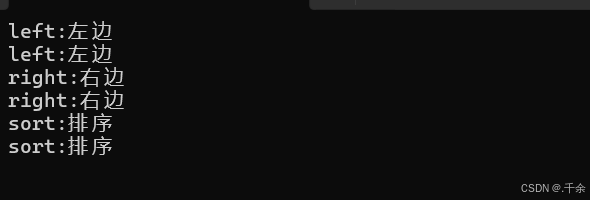
1. 无参默认构造(默认构造)
创建空的map对象,红黑树为空,无任何键值对
cpp
map<string, string> dict1;2. 初始化列表构造(C++11,推荐)
外层 {} 是列表构造,内层 {} 隐式构造 pair<string, string>- 如:{"sort","排序"}==pair<string,string>("sort","排序")
cpp
map<string, string> dict2 = { {"sort", "排序"}, {"left", "左边"}, {"right", "右边"} };3. 迭代器区间构造
用[begin,end)区间元素初始化新map- 把dict2整个内容拷贝一份给dict3
- 所有支持迭代器的容器都能用这种区间构造
cpp
map<string, string> dict3(dict2.begin(), dict2.end());4. 拷贝构造
同类型对象直接拷贝- 调用map的拷贝构造,完整复刻dict3的所有键值对
cpp
map<string, string> dict4(dict3);5. 构造测试打印
cpp
auto it = dict2.begin();
while (it != dict2.end())
{
    cout << *it << endl;   //报错
    it++;       //map迭代器 ++ 是中序遍历,按键从小到大自动排序
}
cout << endl;
报错原因
*it得到的是 pair<string, string> ;- 标准库里没有重载 pair 的 << 运算符,不能直接 cout 打印
🐾 解决办法1 : 先解引用,后用 "." 访问成员
*it:迭代器引用,拿到pair的对象.first:取键key.second:取值value
cpp
auto it = dict2.begin();
while (it != dict2.end())
{
	cout << (*it).first << ":" << (*it).second << endl;
	it++;       //map迭代器 ++ 是中序遍历,按键从小到大自动排序
}
cout<<endl;
🐾 解决办法2:迭代器重载(更简洁)
- 迭代器重载了operator->(),返回pair*,
it->first等价于it.operator->()->first
cpp
auto it = dict2.begin();
while (it != dict2.end())
{
	cout << it->first << ":" << it->second << endl;
	 //cout << it.operator->()->first << ":" << it.operator->()->second << endl;

	it++;       //map迭代器 ++ 是中序遍历,按键从小到大自动排序
}
cout<<endl;
🐾 代码执行
cpp
#define _CRT_SECURE_NO_WARNINGS 1
#include <iostream>
#include <string>
#include <map>
using namespace std;

void test_map1()
{
    // 1. 无参默认构造
    map<string, string> dict1;

    // 2. 初始化列表构造(C++11,推荐)
    map<string, string> dict2 = {{"sort", "排序"}, {"left", "左边"}, {"right", "右边"}};
    // 外层 {} 是列表构造,内层 {} 隐式构造 pair<string, string>

    // 3. 迭代器区间构造
    map<string, string> dict3(dict2.begin(), dict2.end());

    // 4. 拷贝构造
    map<string, string> dict4(dict3);

    //构造测试打印
    auto it = dict2.begin();
    while (it != dict2.end())
    {

        cout << (*it).first << ":" << (*it).second << endl;

        cout << it->first << ":" << it->second << endl;
        //cout << it.operator->()->first << ":" << it.operator->()->second << endl;

        it++;       //map迭代器 ++ 是中序遍历,按键从小到大自动排序
    }
    cout << endl;
}

int main()
{
    test_map1();
    return 0;
}
🐶 🐾 ✨ 🐾 🐶
4. map 的迭代器与遍历
4.1 迭代器性质
- map 的迭代器是双向迭代器,支持
++和--,不支持 +/- 操作 - 迭代器遍历顺序 = 红黑树中序遍历 = Key 升序排列
4.2 遍历方式
- 迭代器循环
- 范围for
🐾 代码执行
cpp
#define _CRT_SECURE_NO_WARNINGS 1
#include <iostream>
#include <string>
#include <map>
using namespace std;

void test_map2()
{
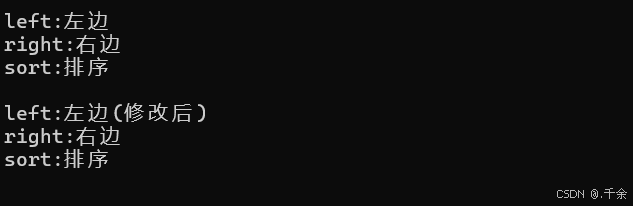
    map<string, string> dict = {{"sort", "排序"}, {"left", "左边"}, {"right", "右边"}};

    // 方式1:迭代器遍历(可修改 Value)
    auto it = dict.begin();
    while (it != dict.end())
    {
        // it->first = "new_left";   // ❌ Key 不可修改(const)

        if (it->first == "left")
            it->second = "左边(修改后)";   // ✅ Value 可修改

        cout << it->first << ":" << it->second << endl;
        ++it;
    }

    // 方式2:范围 for(const 引用避免拷贝,减少拷贝次数优化效率)
    for (const auto& e : dict)
    {
    	// e 是 pair<const string, string> 类型(重点),
    	//这里有双重保护:外面const不能改整个pair,里面first本身也是const
        cout << e.first << ":" << e.second << endl;
    }
}

int main()
{
    test_map2();
    return 0;
}
🐶 🐾 ✨ 🐾 🐶
5. map 的插入操作
5.1 四种插入方式
核心规则
- map key唯一,insert 插入重复key不会覆盖旧值,直接插入失败
- insert 返回一个 pair <迭代器,bool>
bool 为 true:插入成功bool 为 false:key已存在,插入失败
cpp
void test_map3()
{
	//创建空map容器
    map<string, string> dict;

    // 方式1:先构造有名字的pair,再插入(C++98,啰嗦)
    pair<string, string> kv1("sort", "排序");
    dict.insert(kv1);

    // 方式2:插入匿名 pair 对象--->不创建临时变量,直接临时匿名构造pair塞进insert,但还是要写全模板类型
    dict.insert(pair<string, string>("left", "左边"));

    // 方式3:用 make_pair 生成 pair(推荐,自动推导类型)
    dict.insert(make_pair("right", "右边"));

    // 方式4:单元素+批量初始化列表插入(单参数隐式类型转换)
    dict.insert({"insert", "插入"});                     // 单个
    dict.insert({{"map", "映射"}, {"erase", "删除"}});    // 批量:用多参数的隐式类型转换(C++11支持)
}
5.2 insert 返回值
insert 返回 pair<iterator, bool>:
cpp
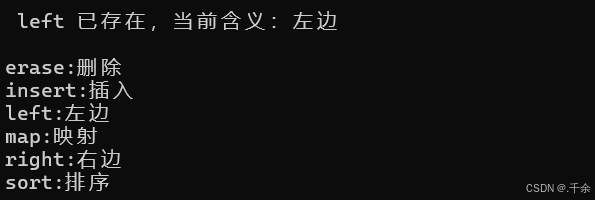
auto ret = dict.insert({"left", "左边(重复插入)"});
if (!ret.second)
{
    cout << "left 已存在,当前含义:" << ret.first->second << endl;
}
// 输出:left 已存在,当前含义:左边
插入重复 Key(返回的pair第二个成员(bool)为false,不修改原数据)
ret.first:迭代器,指向已存在或新插入的节点ret.second:bool- true:之前没有改=该key,插入成功
- false:key重复,插入失败,不覆盖旧值
区别 :insert 重复 Key 不会覆盖;operator[] 重复 Key 会覆盖 Value。
🐾 代码执行
cpp
#define _CRT_SECURE_NO_WARNINGS 1
#include <iostream>
#include <string>
#include <map>
using namespace std;

void test_map3()
{

    map<string, string> dict;

    //方式1:先构造有名字的pair,再插入(C++98的老写法)-> 写法啰嗦,要单独定义变量
    pair<string, string> kv1("sort", "排序");
    dict.insert(kv1);

    // 方式2:插入匿名 pair 对象--->不创建临时变量,直接临时匿名构造pair塞进insert,但还是要写全模板类型
    dict.insert(pair<string, string>("left", "左边"));

    // 方式3:用 make_pair 生成 pair(推荐,无需显式写类型)
    dict.insert(make_pair("right", "右边"));

    // 方法4:单元素+批量初始化列表插入(单参数隐式类型转换)
    dict.insert({ "insert","插入" });                             //单个

    // 批量插入多个键值对:用多参数的隐式类型转换(C++11支持)
    dict.insert({ {"map", "映射"}, {"erase", "删除"} });           //多个


    auto ret = dict.insert({ "left", "左边(重复插入)" });
    if (!ret.second)
    {
        cout << " left 已存在,当前含义:" << ret.first->second << endl;
    }
    cout << endl;

    // 输出结果
    for (const auto& e : dict)
    {
        cout << e.first << ":" << e.second << endl;
    }
}

int main()
{
    test_map3();
    return 0;
}
🐶 🐾 ✨ 🐾 🐶
6. map 的查找与删除
自动排序
find(键):按key查找,返回迭代器找到: 返回对应元素的迭代器没找到:返回end()
6.1 find:按 Key 查找
cpp
void test_map4()
{
    map<string, string> dict = {{"sort", "排序"}, {"left", "左边"}, {"right", "右边"}};

    //1. find 查找单词并且进行删除
    string x;
    cin >> x;
    auto pos = dict.find(x);   // O(log n)
								//函数原型:iterator find (const key_type& k);

    //按key找,返回迭代器
    if (pos != dict.end())
    {
        cout << "找到 Key " << x << ",值为:" << pos->second << endl;
        dict.erase(pos);       // 通过迭代器删除,且此时迭代器pos失效,无法访问
        cout << "删除 Key 'left' 后:" << endl;

		for (const auto& e : dict)
		{
		    cout << e.first << ":" << e.second << endl;
		}
    }
    else
    {
        cout << "没有找到 Key " << x << endl;
    }
    cout << endl;
}
6.2 erase:删除操作
cpp
    // 2. 直接删除指定 Key
    //返回值:删成功返回1,没找到返回0
    //不用自己find,直接传key就能删,写法最简单
    size_t del_cnt = dict.erase("right"); //函数原型:size_type erase(const key_type & k);

    cout << "删除 Key 'right',影响个数:" << del_cnt << endl;
    cout << endl;

    // 3. 删除迭代器区间(删除所有元素)
    dict.erase(dict.begin(), dict.end()); //函数原型:void erase (iterator first, iterator last);
    cout << "删除所有元素后,map 大小:" << dict.size() << endl;//size()变为0
}
🐾 代码执行
cpp
#define _CRT_SECURE_NO_WARNINGS 1
#include <iostream>
#include <string>
#include <map>
using namespace std;

void test_map4()
{
    map<string, string> dict = { {"sort", "排序"}, {"left", "左边"}, {"right", "右边"} };

    // 1. find 查找单词并且进行删除
    string x;
    cin >> x;
    auto pos = dict.find(x); //函数原型:iterator find (const key_type& k);

    //按key找,返回迭代器
    if (pos != dict.end())
    {
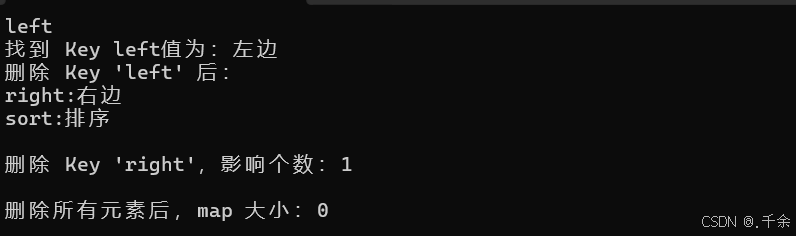
        cout << "找到 Key " << x << "值为:" << pos->second << endl;

        //删除迭代器指向的节点
        dict.erase(pos); //此时迭代器pos失效,无法访问

        cout << "删除 Key 'left' 后:" << endl;
        for (const auto& e : dict)
        {
            cout << e.first << ":" << e.second << endl;
        }
    }
    else
    {
        cout << "没有找到 Key " << x << endl;
    }
    cout << endl;

    // 2. 直接删除指定 Key
    //返回值:删成功返回1,没找到返回0
    //不用自己find,直接传key就能删,写法最简单
    size_t del_cnt = dict.erase("right"); //函数原型:size_type erase(const key_type & k);

    cout << "删除 Key 'right',影响个数:" << del_cnt << endl;
    cout << endl;

    // 3. 删除迭代器区间(删除所有元素)
    dict.erase(dict.begin(), dict.end()); //函数原型:void erase (iterator first, iterator last);
    cout << "删除所有元素后,map 大小:" << dict.size() << endl;//size()变为0
}

int main()
{
    test_map4();
    return 0;
}
🐶 🐾 ✨ 🐾 🐶
7. operator\[\] 底层原理
-
目标:统计每个水果出现的次数
-
传统写法(麻烦):先用find判断,存在就 ++ ,不存在就insert(代冗长,还要手动分支判断)
-
用operator\[\]写法(简洁)---底层逻辑
(1)fruit不存在:- 自动插入:{fruit,int()},int(),默认是0
- 然后返回这个value的引用,++ 变成 1
(2)fruit已存在:- 不插入,直接找到对应位置,返回value引用,直接 ++ 计数
7.1 operator 的函数签名
cpp
mapped_type& operator[] (const key_type& k);7.2 底层行为(三合一)
cpp
// 等价实现
V& operator[](const K& key)
{
    auto it = insert({key, V()}).first;  // 插入或获取已有节点
    return it->second;                    // 返回 Value 的引用
}
7.3 使用场景
- 场景2:
只写 dict["insert"]; - key不存在,自动插入- value调用string(),默认构造-> 空字符串
- 场景3:
插入+修改- left 不存在`:先插入 {"left"," "}
- 返回value引用,再赋值改成"左边"
- left 已存在:直接找到,覆盖修改value
- 场景4:
千万别用 [] 做单纯查找
如果你不确定key是否存在,千万别用 \[\] 查找!- 存在:正常返回值
- 不存在:偷偷给你插入一个默认空值,污染容器数据
🐾 代码执行
cpp
#define _CRT_SECURE_NO_WARNINGS 1
#include <iostream>
#include <string>
#include <map>
using namespace std;

void test_map5()
{
    map<string, int> countMap;  // 统计每种水果出现次数
    string arr[] = { "苹果", "西瓜", "苹果", "西瓜", "苹果", "香蕉" };

		    ////方法一(不使用operator[]):
		    ////先判断该水果是否存在于map中(find()),如果存在则Value++;如果不存在则insert
		    //for (auto e : arr)
		    //{
		    //    auto it = countMap.find(e);
		    //    if (it != countMap.end())//说明存在
		    //    {
		    //        it->second++;
		    //    }
		    //    else//说明不存在
		    //    {
		    //        countMap.insert({e, 1});
		    //    }
		    //}//缺点:代码冗长

    //方法二:(使用operator[],同时进行插入、查找和修改操作)
    for (auto fruit : arr)
    {
        countMap[fruit]++;
        // 若 fruit 不存在:先插入 { fruit, int() },返回插入位置的Value引用( 调用的默认构造int()=0 ),++ 后变为 1;
        // 若 fruit 已存在:则不会执行插入操作,并且查找到fruit存在位置,返回存在位置 Value 引用,++ 后次数增加;
    }

    //测试打印结果
    cout << "水果统计结果:" << endl;
    for (const auto& e : countMap)
    {
        cout << e.first << ":" << e.second << endl;
    }
    cout << endl;

		    /*
		    场景2:只插入数据(Key 不存在时,插入默认 Value)
		    - key不存在,自动插入值
		    - value调用string(), 默认构造->空字符串
		    */
    map<string, string> dict;
    dict["insert"];             // 插入 { "insert", string() }(string 默认空)
    cout << "插入 'insert' 后,值:" << dict["insert"] << endl;

		    /*
		    场景3:插入 + 修改(Key 不存在时插入,存在时修改)
		    - left 不存在:先插入 {"left",""}
		    - 返回value引用,再赋值改成"左边"
		    - left 已存在:直接找到,覆盖修改value
		    */

    dict["left"] = "左边";  // 插入 { "left", string() },同时将返回的结果 "" 修改为 "左边"
    dict["left"] = "左边(修改后)";  // Key已经存在,查找后返回结果"左边",再修改为 "左边(修改后)"
    cout << "修改 'left' 后,值:" << dict["left"] << endl;

		    /*
		    场景4:单纯查找(Key 存在时,返回 Value 引用)
		        如果你不确定key是否存在,千万别用 [] 查找!
		            - 存在:正常返回值
		            - 不存在:偷偷给你插入一个默认空值,污染容器数据
		    */

    cout << "查找 'left',值:" << dict["left"] << endl;

}

int main()
{
    test_map5();
    return 0;
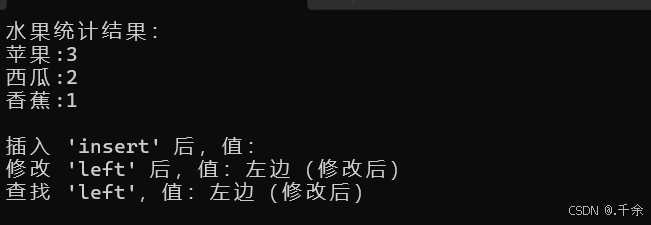
}
7.4 operator 与 insert 对比
| 操作 | insert | operator\[\] |
|---|---|---|
重复 |
Key 不覆盖,返回 false | 覆盖旧 Value |
返回值 |
pair<iterator, bool> | Value 引用 |
插入效率 |
略高(不构造默认值) | 略低(先构造默认值) |
查找场景 |
安全 | 危险(会插入) |
修改场景 |
需先 find | 直接赋值 |
🐶 🐾 ✨ 🐾 🐶
8. multimap:允许重复 key 的 map
multimap:是C++标准模版库中的一种关联容器,他允许一个键对应多个值,且键可以重复
multimap 不支持下标[],直接禁用 [] 重载,因为一个key对应多个值,下标无法确定取哪个
8.1 multimap 与 map 的核心区别
| 特性 | map | multimap |
|---|---|---|
Key 唯一性 |
唯一(重复插入失败) | 不唯一(支持重复 Key) |
operator[] |
支持(插入 / 查找 / 修改) | 不支持(Key 冗余,无法确定修改哪个) |
find(Key) |
返回唯一 Key 的迭代器 | 返回中序遍历的第一个 Key 迭代器 |
count(Key) |
返回 0 或 1 | 返回 Key 的实际出现次数 |
erase(Key) |
删除唯一 Key(返回 0 或 1) | 删除所有相同 Key(返回删除个数) |
🐾 代码执行
cpp
#define _CRT_SECURE_NO_WARNINGS 1
#include <iostream>
#include <string>
#include <map>
using namespace std;

void test_multimap()
{
    multimap<string, string> dict;

    dict.insert({"right", "右边"});
    dict.insert({"left", "左边"});
    dict.insert({"right", "右边xx"});
    dict.insert({"right", "右边"});
    // 连续插入 3 个重复 Key: right,全部成功
    //底层红黑树,遍历会自动把相同key排在一起

    for (const auto& e : dict)
    {
        cout << e.first << ":" << e.second << endl;
    }
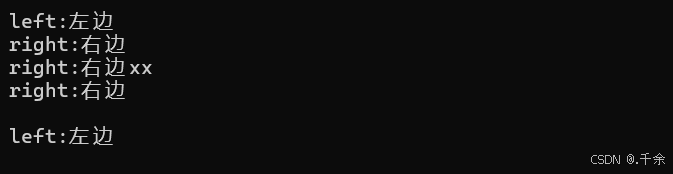
    // 第一轮遍历输出:
    // left:左边
    // right:右边
    // right:右边xx
    // right:右边

    // 删除所有 Key 为 "right" 的节点,返回删除个数
    size_t del_cnt = dict.erase("right");   // 返回 3
    for (const auto& e : dict)
    {
        cout << e.first << ":" << e.second << endl;
    }
    cout << endl;
    //第二轮遍历:left:左边
}


int main()
{
    test_multimap();
    return 0;
}
🐶 🐾 ✨ 🐾 🐶
9. 总结
map 与 multimap 的核心知识点:
| 分类 | 核心内容 |
|---|---|
map 特性 |
Key 唯一、自动排序、红黑树底层 |
pair 结构 |
first(Key) 不可改,second(Value) 可改 |
插入方式 |
make_pair、初始化列表、insert |
查找删除 |
find O(log n)、erase 三种重载 |
operator[] |
插入/查找/修改三合一,底层调用 insert |
multimap |
Key 可重复、无 operator\[\]、erase 删除全部 |
operator 使用建议
| 场景 | 推荐方式 |
|---|---|
统计词频/计数 |
mapkey++ |
插入 + 修改 |
mapkey = value |
仅判断 Key 是否存在 |
find(key) 或 count(key) |
仅插入(不覆盖) |
insert({key, value}) |
🐶 🐾 ✨ 🐾 🐶
本文全部代码
🐾 Test.cpp
cpp
#define _CRT_SECURE_NO_WARNINGS 1
#include <iostream>
#include <string>
#include <map>
using namespace std;
/*
1.map:是一个关联容器,用于存储键值对(Key-value),并按key自动排序(默认升序)
2.map的核心特性:
- 所有key唯一,不能重复
- 插入、删除、查找的时间复杂度为O(log n)
- 基于红黑树实现
- key是const类型,不可直接修改
3.map的关键类型定义
//map 模版定义
template <class Key, //键的类型
class T, //值的类型
class Copmpare = less<Key>, //键的比较方式(默认升序)
class Alloc = allocator<pair<con Key,T>> //空间配置器
>class map;
//核心内部类型
typedef pair<const Key ,T> value_type; //红黑树节点存储的键值对(Key 不可改)
//value_type存的是pair<const Key,T>类型
typedef Key Key_type; //键的类型
typedef T mapped_type; //值的类型
4.键值对:
- Key(键)-> 值(value),即:一一对应,通过key就能找到对应的value
- map<K,V> ,本质:pair<K,V>
pair 就是专门用来装键值对的结构体
(1).first:存key(键)
(2).second:存value(值)
//----------------------------------------set常见的相关接口--------------------------------------------
/*
// empty (1) ⽆参默认构造
explicit map (const key_compare& comp = key_compare(),
const allocator_type& alloc = allocator_type());
// range (2) 迭代器区间构造
template <class InputIterator>
map (InputIterator first, InputIterator last,
const key_compare& comp = key_compare(),
const allocator_type& = allocator_type());
// copy (3) 拷⻉构造
map (const map& x);
// initializer list (5) initializer 列表构造
map (initializer_list<value_type> il,
const key_compare& comp = key_compare(),
const allocator_type& alloc = allocator_type());
// 迭代器是⼀个双向迭代器
iterator -> a bidirectional iterator to const value_type
// 正向迭代器
iterator begin();
iterator end();
// 反向迭代器
reverse_iterator rbegin();
reverse_iterator rend();
*/
///////////////////////////////////////////////////////////////////////////////////////////////////////
//1.map构造与初始化
/*
核心知识点:
- map <K,V>底层是红黑树,键值对存储,本质存的是 pair<K,V>
- map 引用得到 pair 对象,只能用 .first/.second 访问
pair 就是专门用来装键值对的结构体
(1).first:存key(键)
(2).second:存value(值)
- it -> first 本质是重载
*/
void test_map1()
{
// 1. 默认构造:创建空的map对象,红黑树为空,无任何键值对
map<string, string> dict1;
// 2. 初始化列表构造(C++11支持,比较推荐)
map<string, string> dict2 = { {"sort", "排序"}, {"left", "左边"}, {"right", "右边"} };
//最外面一层的"{ }"代表的是列表构造
//内层每一个 { } 会隐式构造 pair<string, string>`,如:{"sort","排序"}==pair<string,string>("sort","排序")
// 3. 迭代器区间构造:用[begin,end)区间元素初始化新map
//- 把dict2整个内容拷贝一份给dict3
//- 所有支持迭代器的容器都能用这种区间构造
map<string, string> dict3(dict2.begin(), dict2.end());
// 4. 拷贝构造:同类型对象直接拷贝
//- 调用map的拷贝构造,完整复刻dict3的所有键值对
map<string, string> dict4(dict3);
//构造测试打印
auto it = dict2.begin();
while (it != dict2.end())
{
//cout << *it << endl; //报错
/*
原因:
- *it 得到的是 pair<string, string> ,
- 标准库里没有重载 pair 的 << 运算符,不能直接 cout 打印
*/
/*
解决办法1:先解引用,后用 "." 访问成员
- *it :迭代器引用,拿到pair的对象
- .first :取键key
- .second :取值value
*/
cout << (*it).first << ":" << (*it).second << endl;
/*
解决办法2:迭代器重载(更简洁)
- 迭代器重载了operator->(),返回pair*,it->first 等价于 it.operator->()->first
*/
cout << it->first << ":" << it->second << endl;
//cout << it.operator->()->first << ":" << it.operator->()->second << endl;
it++; //map迭代器 ++ 是中序遍历,按键从小到大自动排序
}
cout << endl;
}
int main()
{
test_map1();
return 0;
}
/*
运行结果:
left:左边
left:左边
right:右边
right:右边
sort:排序
sort:排序
*/
//////////////////////////////////////////////////////////////////////////////////////////////////////////
//2.迭代器遍历
/*
map的迭代器是双向迭代器,仅支持 ++/--操作,不能用+/-操作
遍历方式:
- 迭代器循环
- 范围for
*/
void test_map2()
{
map<string, string> dict1 = { {"sort", "排序"}, {"left", "左边"}, {"right", "右边"} };
// 方式1:while普通迭代器遍历(支持修改 Value)
auto it = dict1.begin();
while (it != dict1.end())
{
cout << it->first << ":" << it->second << endl;
// 尝试修改 Key(编译报错!Key 是 const 修饰的,不可修改)
//it->first = "new_left"; //error
// 修改 Value(合法)
if (it->first == "left")
{
it->second = "左边(修改后)";
}
++it;
}
cout << endl;
// 方式2:范围 for 遍历(传引用可减少拷贝次数优化效率,const 保护不被修改)
for (const auto& e : dict1)//auto& e 不用拷贝整个pair,直接引用原容器元素,效率更高,加上const表示只读遍历
{
// e 是 pair<const string, string> 类型(重点)
//这里有双重保护:外面const不能改整个pair,里面first本身也是const
cout << e.first << ":" << e.second << endl;
}
cout << endl;
}
int main()
{
test_map2();
return 0;
}
/*
运行结果:
left:左边
right:右边
sort:排序
left:左边(修改后)
right:右边
sort:排序
*/
//////////////////////////////////////////////////////////////////////////////////////////////////////
//3.插入操作(insert)
/*
核心规则:
- map key唯一,insert 插入重复key不会覆盖旧值,直接插入失败
- insert 返回一个 pair <迭代器,bool>
- bool 为 true:插入成功
- bool 为 false:key已存在,插入失败
*/
void test_map3()
{
//创建空map容器
map<string, string> dict;
//方式1:先构造有名字的pair,再插入(C++98的老写法)-> 写法啰嗦,要单独定义变量
pair<string, string> kv1("sort", "排序");
dict.insert(kv1);
// 方式2:插入匿名 pair 对象--->不创建临时变量,直接临时匿名构造pair塞进insert,但还是要写全模板类型
dict.insert(pair<string, string>("left", "左边"));
// 方式3:用 make_pair 生成 pair(推荐,无需显式写类型)
dict.insert(make_pair("right", "右边"));
// 方法4:单元素+批量初始化列表插入(单参数隐式类型转换)
dict.insert({ "insert","插入" }); //单个
// 批量插入多个键值对:用多参数的隐式类型转换(C++11支持)
dict.insert({ {"map", "映射"}, {"erase", "删除"} }); //多个
// 插入重复 Key(返回的pair第二个成员(bool)为false,不修改原数据)
/*
ret.first:迭代器,指向已有key的位置
ret.second:bool
- true:之前没有改=该key,插入成功
- false:key重复,插入失败,不覆盖旧值
区别:
insert 重复key不覆盖
dict["left"]="xxx"重复key直接覆盖
*/
auto ret = dict.insert({ "left", "左边(重复插入)" });
if (!ret.second)
{
cout << " left 已存在,当前含义:" << ret.first->second << endl;
}
cout << endl;
// 输出结果
for (const auto& e : dict)
{
cout << e.first << ":" << e.second << endl;
}
}
int main()
{
test_map3();
return 0;
}
/*
运行结果:
left 已存在,当前含义:左边
erase:删除
insert:插入
left:左边
map:映射
right:右边
sort:排序
*/
////////////////////////////////////////////////////////////////////////////////////////////
//4.查找与删除(find/erase)
/*
自动排序
- find(键):按key查找,返回迭代器
- 找到 -> 返回对应元素的迭代器
- 没找到 ->返回end()
*/
void test_map4()
{
map<string, string> dict = { {"sort", "排序"}, {"left", "左边"}, {"right", "右边"} };
// 1. find 查找单词并且进行删除
string x;
cin >> x;
auto pos = dict.find(x); //函数原型:iterator find (const key_type& k);
//按key找,返回迭代器
if (pos != dict.end())
{
cout << "找到 Key " << x << "值为:" << pos->second << endl;
//删除迭代器指向的节点
dict.erase(pos); //此时迭代器pos失效,无法访问
cout << "删除 Key 'left' 后:" << endl;
for (const auto& e : dict)
{
cout << e.first << ":" << e.second << endl;
}
}
else
{
cout << "没有找到 Key " << x << endl;
}
cout << endl;
// 2. 直接删除指定 Key
//返回值:删成功返回1,没找到返回0
//不用自己find,直接传key就能删,写法最简单
size_t del_cnt = dict.erase("right"); //函数原型:size_type erase(const key_type & k);
cout << "删除 Key 'right',影响个数:" << del_cnt << endl;
cout << endl;
// 3. 删除迭代器区间(删除所有元素)
dict.erase(dict.begin(), dict.end()); //函数原型:void erase (iterator first, iterator last);
cout << "删除所有元素后,map 大小:" << dict.size() << endl;//size()变为0
}
int main()
{
test_map4();
return 0;
}
/*
输入:left
运行结果:
找到 Key left值为:左边
删除 Key 'left' 后:
right:右边
sort:排序
删除 Key 'right',影响个数:1
删除所有元素后,map 大小:0
*/
/////////////////////////////////////////////////////////////////////////////////////////////
//5.核心特性:operator []
/*
1.目标:统计每个水果出现的次数
2.传统写法(麻烦):先用find判断,存在就 ++ ,不存在就insert(代冗长,还要手动分支判断)
3.用operator[]写法(简洁)---底层逻辑
(1)fruit不存在:
- 自动插入:{fruit,int()},int(),默认是0
- 然后返回这个value的引用,++ 变成 1
(2)fruit已存在
- 不插入,直接找到对应位置,返回value引用,直接 ++ 计数
4.场景2:只写 dict["insert"];
- key不存在,自动插入
- value调用string(),默认构造-> 空字符串
5.场景3:插入+修改
- left 不存在:先插入 {"left",""}
- 返回value引用,再赋值改成"左边"
- left 已存在:直接找到,覆盖修改value
6.场景4:千万别用 [] 做单纯查找
如果你不确定key是否存在,千万别用 [] 查找!
- 存在:正常返回值
- 不存在:偷偷给你插入一个默认空值,污染容器数据
*/
void test_map5()
{
map<string, int> countMap; // 统计每种水果出现次数
string arr[] = { "苹果", "西瓜", "苹果", "西瓜", "苹果", "香蕉" };
////方法一(不使用operator[]):
////先判断该水果是否存在于map中(find()),如果存在则Value++;如果不存在则insert
//for (auto e : arr)
//{
// auto it = countMap.find(e);
// if (it != countMap.end())//说明存在
// {
// it->second++;
// }
// else//说明不存在
// {
// countMap.insert({e, 1});
// }
//}//缺点:代码冗长
//方法二:(使用operator[],同时进行插入、查找和修改操作)
for (auto fruit : arr)
{
countMap[fruit]++;
// 若 fruit 不存在:先插入 { fruit, int() },返回插入位置的Value引用( 调用的默认构造int()=0 ),++ 后变为 1;
// 若 fruit 已存在:则不会执行插入操作,并且查找到fruit存在位置,返回存在位置 Value 引用,++ 后次数增加;
}
//测试打印结果
cout << "水果统计结果:" << endl;
for (const auto& e : countMap)
{
cout << e.first << ":" << e.second << endl;
}
cout << endl;
/*
场景2:只插入数据(Key 不存在时,插入默认 Value)
- key不存在,自动插入值
- value调用string(), 默认构造->空字符串
*/
map<string, string> dict;
dict["insert"]; // 插入 { "insert", string() }(string 默认空)
cout << "插入 'insert' 后,值:" << dict["insert"] << endl;
/*
场景3:插入 + 修改(Key 不存在时插入,存在时修改)
- left 不存在:先插入 {"left",""}
- 返回value引用,再赋值改成"左边"
- left 已存在:直接找到,覆盖修改value
*/
dict["left"] = "左边"; // 插入 { "left", string() },同时将返回的结果 "" 修改为 "左边"
dict["left"] = "左边(修改后)"; // Key已经存在,查找后返回结果"左边",再修改为 "左边(修改后)"
cout << "修改 'left' 后,值:" << dict["left"] << endl;
/*
场景4:单纯查找(Key 存在时,返回 Value 引用)
如果你不确定key是否存在,千万别用 [] 查找!
- 存在:正常返回值
- 不存在:偷偷给你插入一个默认空值,污染容器数据
*/
cout << "查找 'left',值:" << dict["left"] << endl;
}
int main()
{
test_map5();
return 0;
}
/*
运行结果:
水果统计结果:
苹果:3
西瓜:2
香蕉:1
插入 'insert' 后,值:
修改 'left' 后,值:左边(修改后)
查找 'left',值:左边(修改后)
*/
//////////////////////////////////////////////////////////////////////////////////////////////////
//6.multimap
/*
1.multimap:是C++标准模版库中的一种关联容器,他允许一个键对应多个值,且键可以重复
2.先记死两个关键点
- multimap 允许 Key 重复
- multimap 没有 operator[] ,不能用 dict["right"]
3.map和multimap的区别
map multimap
Key 唯一性 唯一(重复插入失败) 不唯一(支持重复 Key)
operator[] 支持(插入 / 查找 / 修改) 不支持(Key 冗余,无法确定修改哪个)
find(Key) 返回唯一 Key 的迭代器 返回中序遍历的第一个 Key 迭代器
count(Key) 返回 0 或 1 返回 Key 的实际出现次数
erase(Key) 删除唯一 Key(返回 0 或 1) 删除所有相同 Key(返回删除个数)
*/
void test_multimap()
{
//multimap 不支持下标[],直接禁用 [] 重载,因为一个key对应多个值,下标无法确定取哪个
multimap<string, string> dict;
dict.insert({ "right", "右边" });
dict.insert({ "left", "左边" });
dict.insert({ "right", "右边xx" });
dict.insert({ "right", "右边" });
//连续插入3个重复key:right
//multimap不查重,直接全部插入
//底层红黑树,遍历会自动把相同key排在一起
for (const auto& e : dict)
{
cout << e.first << ":" << e.second << endl;
}
cout << endl;
/*
第一轮遍历:
left:左边
right:右边
right:右边xx
right:右边
*/
dict.erase("right"); //删除所有的right(返回删除个数)
for (const auto& e : dict)
{
cout << e.first << ":" << e.second << endl;
}
cout << endl;
//第二轮遍历:left:左边
}
int main()
{
test_multimap();
return 0;
}
/*
运行结果:
left:左边
right:右边
right:右边xx
right:右边
left:左边
*/🐶 🐾 ✨ 🐾 🐶
- 欢迎留言交流
- 期待你的评论与建议
- 留下你的想法吧

谢谢你看到这里呀
如果喜欢这篇内容,点个关注,下次更新不迷路✨
👍 点赞 ⭐ 收藏 💬 评论