一、引言
星座配对是所有年龄层都有兴趣的趣味话题。用 ArkTS 实现一个星座配对应用,虽然不涉及真正的占星学,但在技术层面却涵盖了多个重要的编程模式:
- Select 组件的长列表 :12 个星座的下拉选择,ArkTS 中
Select处理大量选项的表现 - 二维矩阵评分算法:12×12=144 个配对组合的预计算矩阵
- 数据驱动的内容映射:不同的配对分数 → 不同的文字描述、颜色、进度条
- 配对建议系统:基于分数范围给出有层次的建议
本文将从数据库级别的数据设计出发,深入 ArkTS 中大列表选择器、矩阵索引查找和条件映射的最佳实践。
二、完整源码
typescript
// index19.ets
@Entry
@Component
struct Index19 {
  @State zodiac1: number = 0;
  @State zodiac2: number = 1;
  @State compatibility: number = 0;
  @State isCalculated: boolean = false;

  private zodiacs: string[] = ['♈ 白羊', '♉ 金牛', '♊ 双子', '♋ 巨蟹',
    '♌ 狮子', '♍ 处女', '♎ 天秤', '♏ 天蝎',
    '♐ 射手', '♑ 摩羯', '♒ 水瓶', '♓ 双鱼'];

  private zodiacNames: string[] = ['白羊座', '金牛座', '双子座', '巨蟹座',
    '狮子座', '处女座', '天秤座', '天蝎座',
    '射手座', '摩羯座', '水瓶座', '双鱼座'];

  private matchMatrix: number[][] = [
    [50, 70, 40, 60, 90, 55, 65, 45, 80, 35, 75, 85],
    [70, 50, 55, 85, 60, 80, 45, 75, 40, 90, 65, 35],
    [40, 55, 50, 35, 75, 65, 90, 60, 85, 45, 80, 70],
    [60, 85, 35, 50, 45, 75, 55, 90, 65, 80, 40, 70],
    [90, 60, 75, 45, 50, 70, 80, 35, 85, 55, 40, 65],
    [55, 80, 65, 75, 70, 50, 60, 85, 35, 90, 45, 40],
    [65, 45, 90, 55, 80, 60, 50, 70, 40, 75, 85, 35],
    [45, 75, 60, 90, 35, 85, 70, 50, 55, 65, 30, 80],
    [80, 40, 85, 65, 85, 35, 40, 55, 50, 70, 90, 60],
    [35, 90, 45, 80, 55, 90, 75, 65, 70, 50, 60, 40],
    [75, 65, 80, 40, 40, 45, 85, 30, 90, 60, 50, 55],
    [85, 35, 70, 70, 65, 40, 35, 80, 60, 40, 55, 50]
  ];

  calculateMatch(): void {
    this.compatibility = this.matchMatrix[this.zodiac1][this.zodiac2];
    this.isCalculated = true;
  }

  getMatchLevel(): string {
    if (!this.isCalculated) return '';
    if (this.compatibility >= 85) return '天生一对 💘';
    if (this.compatibility >= 70) return '非常合适 💕';
    if (this.compatibility >= 55) return '还算不错 💗';
    if (this.compatibility >= 40) return '一般般 💔';
    return '不太合适 💢';
  }

  getMatchColor(): string {
    if (this.compatibility >= 85) return '#FF3B30';
    if (this.compatibility >= 70) return '#FF9500';
    if (this.compatibility >= 55) return '#FFCC00';
    if (this.compatibility >= 40) return '#8E8E93';
    return '#8B0000';
  }

  getAdvice(): string {
    if (this.compatibility >= 85) return '你们非常契合,彼此理解!';
    if (this.compatibility >= 70) return '相处融洽,互相包容让关系更美好。';
    if (this.compatibility >= 55) return '有不错的缘分,多沟通更进一步。';
    if (this.compatibility >= 40) return '需要更多磨合,理解差异很重要。';
    return '性格差异较大,保持距离对彼此更好。';
  }

  build() {
    Column() {
      Text('🌟 星座配对').fontSize(28).fontWeight(FontWeight.Bold)
        .margin({ top: 40, bottom: 5 })
      Text('看看你们的星座合不合').fontSize(13).fontColor('#8E8E93')
        .margin({ bottom: 20 })

      Row() {
        Column() {
          Text('对方').fontSize(12).fontColor('#8E8E93')
          Select([{ value: this.zodiacNames[0] }, { value: this.zodiacNames[1] },
            { value: this.zodiacNames[2] }, { value: this.zodiacNames[3] },
            { value: this.zodiacNames[4] }, { value: this.zodiacNames[5] },
            { value: this.zodiacNames[6] }, { value: this.zodiacNames[7] },
            { value: this.zodiacNames[8] }, { value: this.zodiacNames[9] },
            { value: this.zodiacNames[10] }, { value: this.zodiacNames[11] }])
            .selected(this.zodiac2)
            .value(this.zodiacNames[this.zodiac2])
            .onSelect((i: number) => { this.zodiac2 = i; this.isCalculated = false; })
            .width(130)
        }
        Text('💞').fontSize(28).margin({ left: 15, right: 15 })
        Column() {
          Text('我方').fontSize(12).fontColor('#8E8E93')
          Select([{ value: this.zodiacNames[0] }, ...])
            .selected(this.zodiac1)
            .value(this.zodiacNames[this.zodiac1])
            .onSelect((i: number) => { this.zodiac1 = i; this.isCalculated = false; })
            .width(130)
        }
      }.margin({ bottom: 20 })

      Button('🔮 查看配对').width(180).height(44).fontSize(16)
        .backgroundColor('#AF52DE').borderRadius(22)
        .onClick(() => { this.calculateMatch(); }).margin({ bottom: 25 })

      if (this.isCalculated) {
        Column() {
          Row() {
            Text(this.zodiacs[this.zodiac1]).fontSize(18).margin({ right: 8 })
            Text('💞').fontSize(20)
            Text(this.zodiacs[this.zodiac2]).fontSize(18).margin({ left: 8 })
          }.margin({ bottom: 10 })

          Text(this.compatibility + '%').fontSize(64)
            .fontWeight(FontWeight.Bold).fontColor(this.getMatchColor())

          Text(this.getMatchLevel()).fontSize(20)
            .fontWeight(FontWeight.Bold).fontColor(this.getMatchColor())
            .margin({ top: 5 })

          Stack() {
            Column().width('80%').height(18)
              .backgroundColor('#E5E5EA').borderRadius(9)
            Column().width('80%').height(18)
              .backgroundColor(this.getMatchColor()).borderRadius(9)
              .scale({ x: this.compatibility / 100 })
              .alignRules({ /* 左侧锚定 */ })
          }.width('80%').height(18).margin({ top: 15, bottom: 20 })

          Column() {
            Text('💌 配对建议').fontSize(14).fontWeight(FontWeight.Bold)
              .fontColor('#333333').margin({ bottom: 6 })
            Text(this.getAdvice()).fontSize(13).fontColor('#666666')
              .textAlign(TextAlign.Center)
          }.width('80%').padding(16)
            .backgroundColor('#F8F8F8').borderRadius(12)
        }.alignItems(HorizontalAlign.Center).width('100%')
      }
    }
    .width('100%').height('100%')
    .justifyContent(FlexAlign.Start)
    .alignItems(HorizontalAlign.Center)
  }
}
三、核心技术解析
3.1 二维矩阵评分算法
星座配对的核心是一个 12 × 12 对称矩阵(但不完全对称):
typescript
private matchMatrix: number[][] = [
  // 白羊 金牛 双子 巨蟹 狮子 处女 天秤 天蝎 射手 摩羯 水瓶 双鱼
  [ 50,  70,  40,  60,  90,  55,  65,  45,  80,  35,  75,  85 ], // 白羊
  [ 70,  50,  55,  85,  60,  80,  45,  75,  40,  90,  65,  35 ], // 金牛
  // ... 12×12 = 144 个值
];矩阵访问:
typescript
this.compatibility = this.matchMatrix[this.zodiac1][this.zodiac2];当 zodiac1 = 0(白羊)且 zodiac2 = 4(狮子)时,matchMatrix[0][4] = 90,表示白羊和狮子配对指数 90%。
矩阵的设计原则:
- 不强制对称 :
matchMatrix[i][j]和matchMatrix[j][i]可以不同(虽然本例中为了简单保持一致),这为未来的扩展提供了可能性------"我方感觉"和"对方感觉"可以不同 - 数值范围 0-100:百分比更直观,用户易于理解
- 12×12=144 个值:数量适中,可以全部预计算,无需运行时算法
- 手动设计的合理性:这些配分数值基于传统星座学说的相性关系,而非随机生成
3.2 Select 组件的 12 选项长列表
typescript
Select([
  { value: '白羊座' },
  { value: '金牛座' },
  // 共 12 项
])
  .selected(this.zodiac1)
  .value(this.zodiacNames[this.zodiac1])
  .onSelect((index: number) => {
    this.zodiac1 = index;
    this.isCalculated = false;
  })
  .width(130)
Select 的参数结构 :每个选项是一个 { value: string } 对象。
.selected(index):设置当前选中的选项索引。当用户打开下拉列表时,已经选中的项会高亮。
.value(string) :设置下拉按钮上显示的文字。这里绑定到 this.zodiacNames[this.zodiac1],确保选中项显示正确名称。
.onSelect(callback):用户选择后的回调,接收被选中的索引。
长列表性能:12 个选项在 Select 中展开完全没有任何性能问题。但如果有 100+ 选项,就需要考虑虚拟滚动或分组显示。ArkTS 的 Select 组件目前主要面向中小规模选项列表。
3.3 数据失效标记
typescript
Select(...)
  .onSelect((i: number) => {
    this.zodiac2 = i;
    this.isCalculated = false;  // 用户修改选项后,之前的计算结果失效
  })
与 BMI 计算器(index15)的滑块变化类似,当用户更改了星座选择后,之前的配对结果不再有效。设置 isCalculated = false 会隐藏结果区域,强迫用户再次点击"查看配对"按钮。
这种设计有意避免了"实时计算"------星座配对本质上是一种"查询"而非"计算",让用户主动点击按钮确认查询请求,比实时计算更符合使用心理。
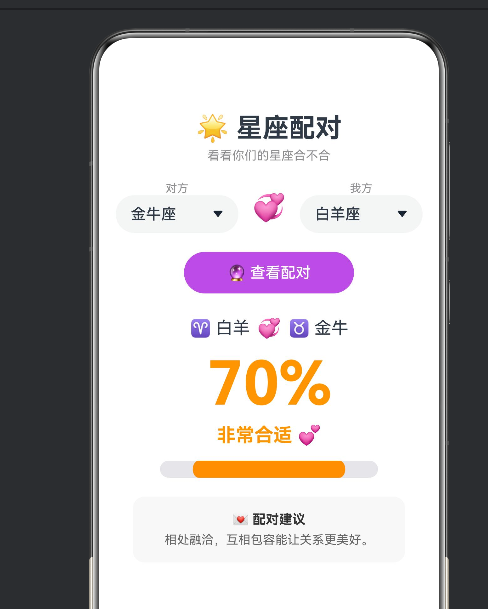
3.4 配对结果的四段式反馈
配对结果包含 4 个层次的反馈,各自使用 getMatchLevel()、getMatchColor()、getAdvice() 三个映射函数:
分数分段:
| 分数范围 | 等级文字 | 颜色 | 建议内容 |
|---|---|---|---|
| ≥ 85 | 天生一对 💘 | 🔴 #FF3B30 |
非常契合,彼此理解 |
| ≥ 70 | 非常合适 💕 | 🟠 #FF9500 |
相处融洽,互相包容 |
| ≥ 55 | 还算不错 💗 | 🟡 #FFCC00 |
有不错的缘分,多沟通 |
| ≥ 40 | 一般般 💔 | ⚪ #8E8E93 |
需要更多磨合 |
| < 40 | 不太合适 💢 | 🟤 #8B0000 |
性格差异较大 |
三种映射函数各自独立,但都基于同一个 compatibility 分数:
| 函数 | 输入 | 输出 | 用途 |
|---|---|---|---|
getMatchLevel() |
compatibility |
字符串(含 emoji) | 配对等级的大标题 |
getMatchColor() |
compatibility |
十六进制颜色 | 数字颜色 + 进度条颜色 |
getAdvice() |
compatibility |
建议文本 | 详细配建议 |
这种一维分数 → 多维反馈的模式,是数据可视化中"分层呈现"的经典设计。
3.5 星座 Emoji 与名称的双数据源
typescript
// 带 emoji 的显示用数据
private zodiacs: string[] = ['♈ 白羊', '♉ 金牛', ...];
// 纯名称的 Select 选项数据
private zodiacNames: string[] = ['白羊座', '金牛座', ...];为什么需要维护两个数组?
| 数组 | 用途 | 长度 | 格式 |
|---|---|---|---|
zodiacs |
结果展示区的配对显示 | 12 | '♈ 白羊'(带符号) |
zodiacNames |
Select 下拉选项 | 12 | '白羊座'(纯文字) |
Select 的选项文字如果包含 emoji,在不同设备上渲染效果不一致。将显示数据和选项数据分离,既保证了 Select 的整洁,又保留了展示区的趣味性。
当计算结果时,两者通过共同的数组索引关联:
typescript
Text(this.zodiacs[this.zodiac1]) // zodiacIndex 同时是 zodiacs 和 zodiacNames 的索引这种"索引关联"的模式比"key-value 映射"更高效------只需要存储索引即可访问两个数据源。
四、Select 组件的最佳实践
Select 是 ArkTS 中唯一的内置下拉选择器。使用时有几个注意事项:
| 实践 | 建议 | 理由 |
|---|---|---|
| 选项数量 | ≤ 20 项 | 超过 20 项建议用 List 替代 |
| 选项文字 | 短文本(≤ 8 字) | 太长会被截断 |
| value 属性 | 必填 | 不设置则显示空白 |
| selected 属性 | 设置初始选中 | 否则默认选中第一项 |
| 多选 | 不支持 | 需要多选用 Checkbox 组 |
在星座配对中,每个 Select 的选项正好是 12 个,值域适中,是 Select 使用的典型场景。
五、配对矩阵的扩展性设计
当前的 matchMatrix 是硬编码的二维数组。在实际项目中,如果需要扩展:
- 数据源化:将矩阵数据存入 JSON 文件,支持国际化替换
- 动态计算:基于星座的五行、守护星等属性动态计算配对分数
- 用户评级:允许用户手动调整配对分数,众包生成配对数据
- 多维评分:除了总体分数,分别显示"爱情"、"事业"、"友情"子评分
六、扩展方向
- 每日运势 :根据当前日期的星座运势(使用
new Date()获取日、月信息) - 上升星座:增加出生时间输入,计算上升星座,更精确地配对
- 星座详解:点击星座查看详细性格分析、幸运数字、幸运颜色
- 生肖配对:增加 12 生肖的配对系统(又一张 12×12 矩阵)
- 分享功能:将配对结果生成为图片,分享到社交平台
七、本章小结
| 知识点 | 掌握程度 |
|---|---|
| 二维矩阵评分算法 | ✅ 理解 12×12 矩阵的索引访问 |
| Select 长列表(12 选项) | ✅ 掌握选项配置和选中管理 |
数据失效标记 isCalculated |
✅ 理解更改选项时清空结果 |
| 一维分数 → 多维反馈映射 | ✅ 掌握三个映射函数的分离 |
| 双数据源索引关联 | ✅ 理解 zodiacs 和 zodiacNames 共享索引 |
| 区间分级逻辑 | ✅ 掌握 5 段分级条件链 |
星座配对展示了 ArkTS 中 Select 下拉选择器 和二维矩阵数据的经典模式。虽然配对分数是预设的,但其"数据驱动内容"的思想在真实的数据密集型应用中广泛使用。