Claude fable 5与GPT5.5模型能力实测
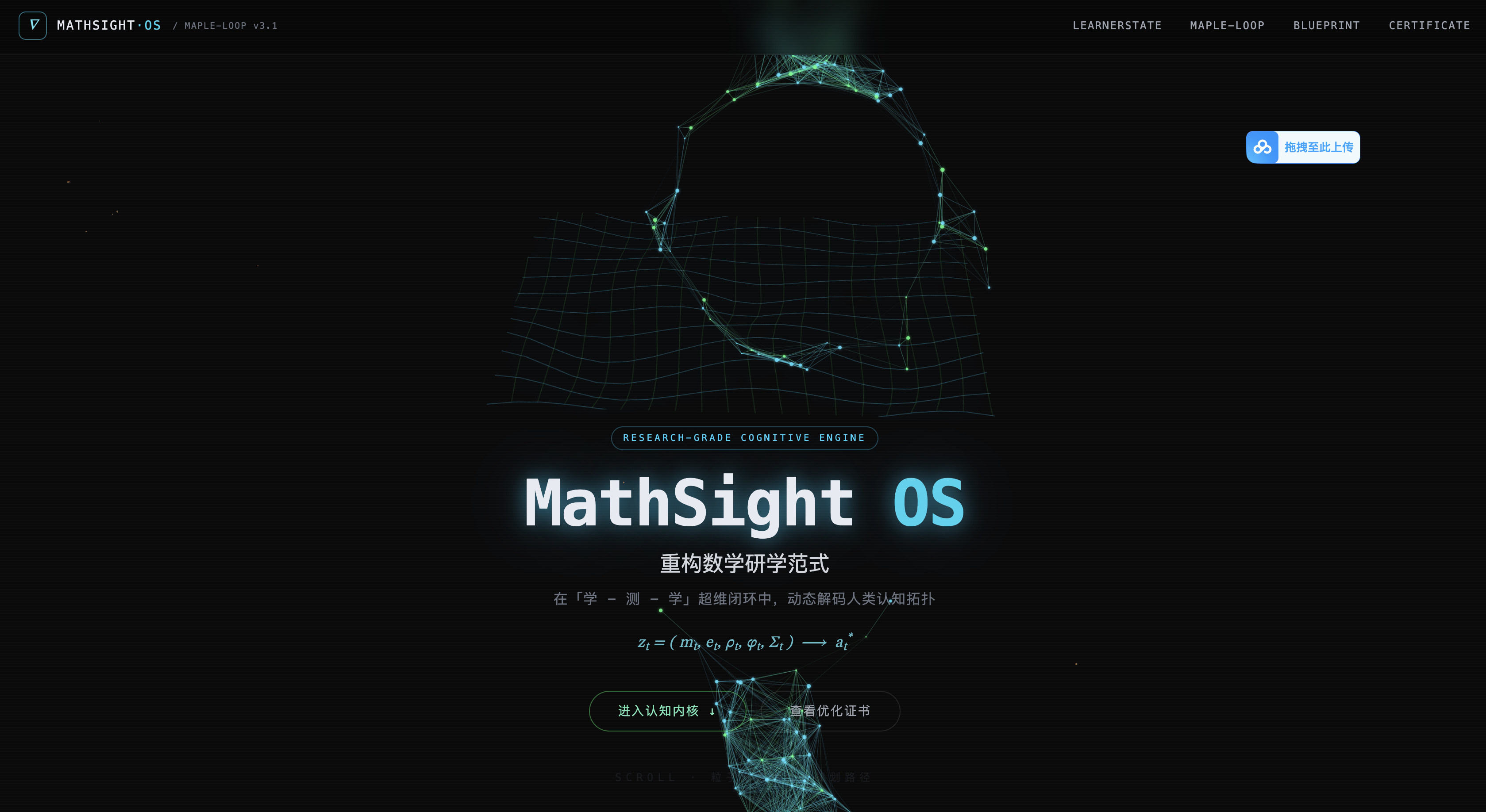
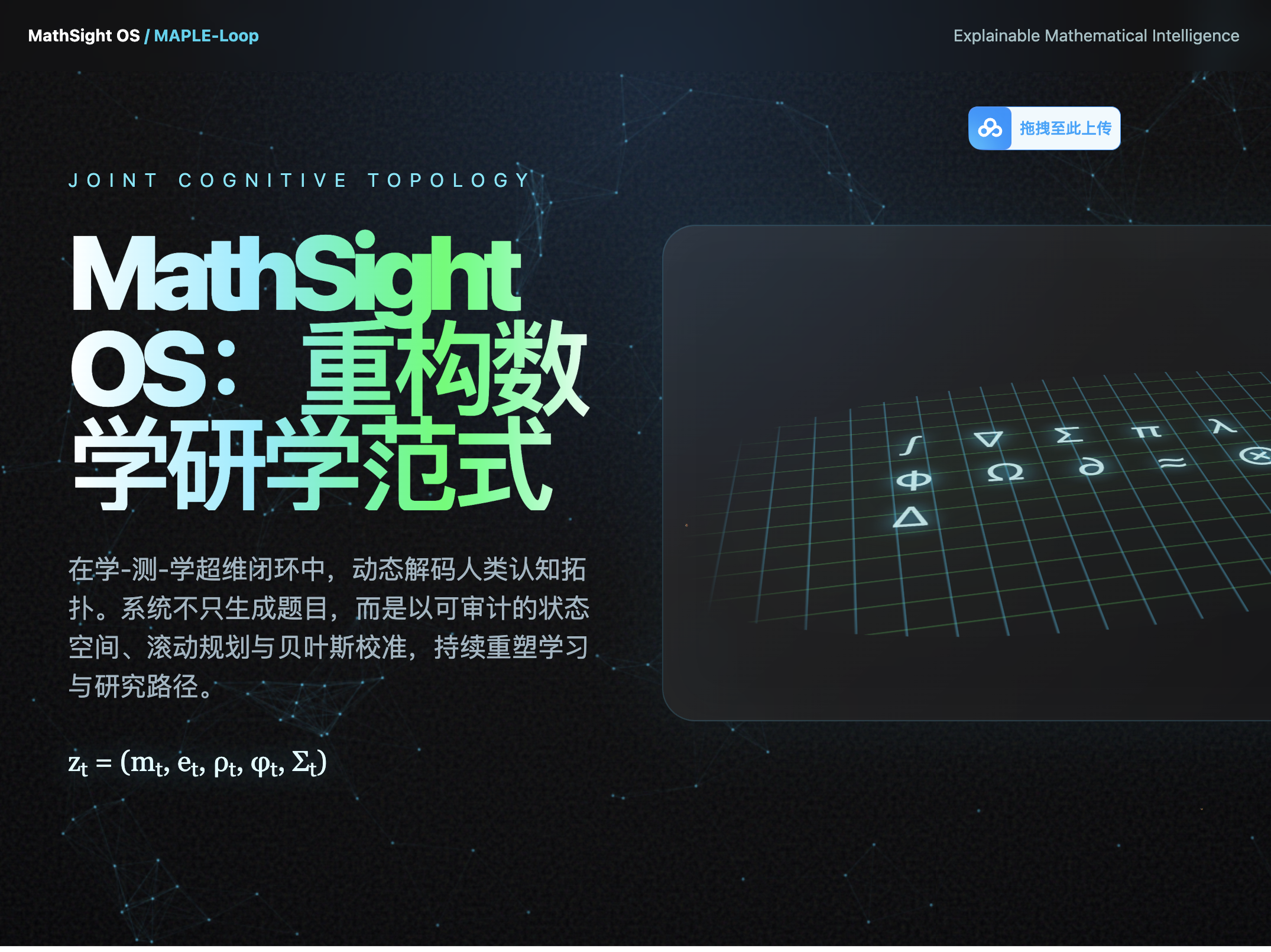
这篇文章记录一次非常直观的前端生成对比:我把同一个高强度创意前端提示词分别交给 GPT 5.5 和 Claude fable 5,让它们都生成一个 MathSight OS 的 One-Page Landing Page。结论先说:这次样本里,Claude fable 5 的完成度明显更高,尤其是流体背景、滚动时的稳定性和整体动效连贯性。
一、这次到底测什么?
这不是简单让模型写一个普通官网,而是故意给了一个"高压 prompt":既要暗黑数学美学,又要流体动态交互,还要能表现学习者状态、MAPLE-Loop 行动流、ItemBlueprint 题目蓝图和优化证书。
我重点观察四件事:
- 流体背景是不是真的"流体",而不是普通粒子乱飞。
- 滚动时是否平滑,粒子、路径、卡片、文字是否能协同变化。
- 数学科研感是否落到页面模块里,不是只堆几个公式符号。
- 代码是否能直接复制运行,是否依赖过重、结构是否清晰。
原始提示词如下:
text
你现在是一位世界顶级的创意前端开发专家与大语言模型代码生成大师。我需要你为我开发一个具有"极强视觉冲击力"、"流体动态交互"以及"深厚数学/科研美感"的产品官方网站(One-Page Landing Page)。

这个产品叫做【MathSight OS】(内部技术代号:MAPLE-Loop,灵感源自智能数学研究辅助与可解释AI决策系统)。

### 1. 技术栈与输出要求
- 请使用 单个完整的文件(HTML + Tailwind CSS + Vanilla JS/GSAP)输出,或者使用 React + Tailwind + Framer Motion(如果你有 Artifacts 渲染环境)。
- 严禁空占位符,所有复杂的数学公式、状态图、动画逻辑和文案都必须完整实现。
- 重点展示【随页面滚动(Scroll-driven)】和【鼠标指针交互(Fluid Dynamic)】的流体网页形态改变能力。

### 2. 核心视觉与交互设计(流体与动态流)
- **画布背景(Fluid Background)**:使用 HTML5 Canvas 渲染一个低饱和度、充满极客感的"数学知识图谱(Knowledge Graph)"或"拓扑粒子流",粒子的流动速度、密度和引力会随着用户的鼠标悬停、拖拽或页面滚动而发生复杂的流体动力学变化(比如滚动时粒子收敛成一条规划路径,静止时扩散为星云)。
- **视差滚动与形态蜕变**:当用户向下滚动时,背景的几何图形(如多胞形、函数曲线、矩阵格点)应当平滑地发生拓扑形变,文字和卡片采用非线性的流体动效(如胶水粘滞感的过渡、气泡弹簧动效)切入。
- **暗黑数学美学**:冷色调暗黑科技风(深邃黑 `#0A0A0C`、数码蓝 `#00D2FF`、矩阵绿 `#00FF66`、极客灰),搭配精美的 LaTeX 渲染风格数学公式(使用纯 CSS/SVG 优雅绘制)。

### 3. 网站结构与核心板块内容(融合《Math Growth OS》交底书精髓)
请将以下核心硬核科技,转化为极具科幻感和动态交互的模块:

* **SECTION 1: Hero 概念震撼区**
    * **文案**:主标题"MathSight OS:重构数学研学范式",副标题"在学-测-学超维闭环中,动态解码人类认知拓扑"。
    * **交互**:中心是一个巨大的、随微动呈现3D旋转感的数学符号网格(或黎曼曲面网格),鼠标悬浮时网格表面产生波纹流体扩散。
* **SECTION 2: 联合认知状态(LearnerState)实时仪表盘**
    * **内容**:展示系统如何实时提取并动态编码 $z_t = (m_t, e_t, \rho_t, \varphi_t, \Sigma_t)$。包括:掌握度概率 $m_t$、误概念分布 $e_t$、动态解题策略混合 $\rho_t$。
    * **交互**:卡片包含动态变化的 SVG 蛛网图/雷达图和高斯分布不确定性曲线。用户在卡片上滑动时,数据流线条和粒子会像水流一样跟随指针流淌,展现策略分布(程序型、表征型、类比迁移型)的丝滑切换。
* **SECTION 3: 粒子路径滚动规划(MAPLE-Loop 行动流)**
    * **内容**:展示系统在"讲解、例题、诊断题、纠错题、迁移题和研究推进"动作间的有限时域滚动规划(基于有约束的回报函数 $a_t^* = \arg\max E[\sum \gamma^h R]$)。
    * **交互**:随着用户向下滚动,一条由流体粒子汇聚成的"动态学习/研究路径轴"会在屏幕中央像藤蔓一样破土生长。当滚过不同的节点(如"异分母分数加法"或"拉格朗日乘子条件核验")时,节点会自动弹出波纹扩散动画,并动态推演其前置知识图谱的门控状态。
* **SECTION 4: 受约束题目生成与贝叶斯校准(ItemBlueprint)**
    * **内容**:展示拒绝黑箱生成、基于结构化蓝图与自动求解、唯一性、歧义、公平性多道门控的硬核机制。
    * **交互**:设计一个"代码/公式解构动态魔方"。当用户鼠标滚过时,一个混乱的题目自然语言文本瞬间被"引力吸附"解构,规整地坍缩并分离成结构化的 `ItemBlueprint` 字段闪烁矩阵。
* **SECTION 5: 决策优化证书(Optimization Certificate)审计**
    * **内容**:每一次系统选题、路径切换,都会生成一份独一无二的数学优化证书。
    * **交互**:页面底部呈现一张极具仪式感的数码防伪证书组件。用户鼠标滑过时,证书表面会有像舞台极光、全息溢彩(Holographic Glare)般的流体光效跟随。

### 4. 极致代码执行
现在,请发挥 Claude /gpt 的全部实力,将数学的理性逻辑与动态网页的感性流体美学融为一体,为我输出这段令人惊叹的前端网页代码。
二、效果如图所示
Claude:
GPT:
三、官网模型能力图和数据
为了让这次测评不只是"我肉眼觉得哪个好",我又补了一组官方资料。下面内容来自 Anthropic 和 OpenAI 官网,检索时间是 2026-07-08。
需要先说明一点:不同厂商的 benchmark 设置、工具权限、运行环境、采样次数和统计口径不一定完全一致,所以这些图和表更适合作为"能力背景参考",不能简单理解成所有场景下的绝对排名。但如果只是分析"为什么这次 Fable 5 在复杂前端动效 prompt 上表现更稳",它们仍然很有参考价值。
1. Anthropic 官方:Claude Fable 5 能力对比图
Anthropic 在 Fable 5 / Mythos 5 发布页中直接给了一个模型能力对比总表,里面把 Claude Fable 5、Claude Mythos Preview、Claude Opus 4.8、GPT 5.5、Gemini 3.1 Pro 放在一起比较。这个表对本文很关键,因为它不是第三方转述,而是 Anthropic 官网发布页里的原始图。
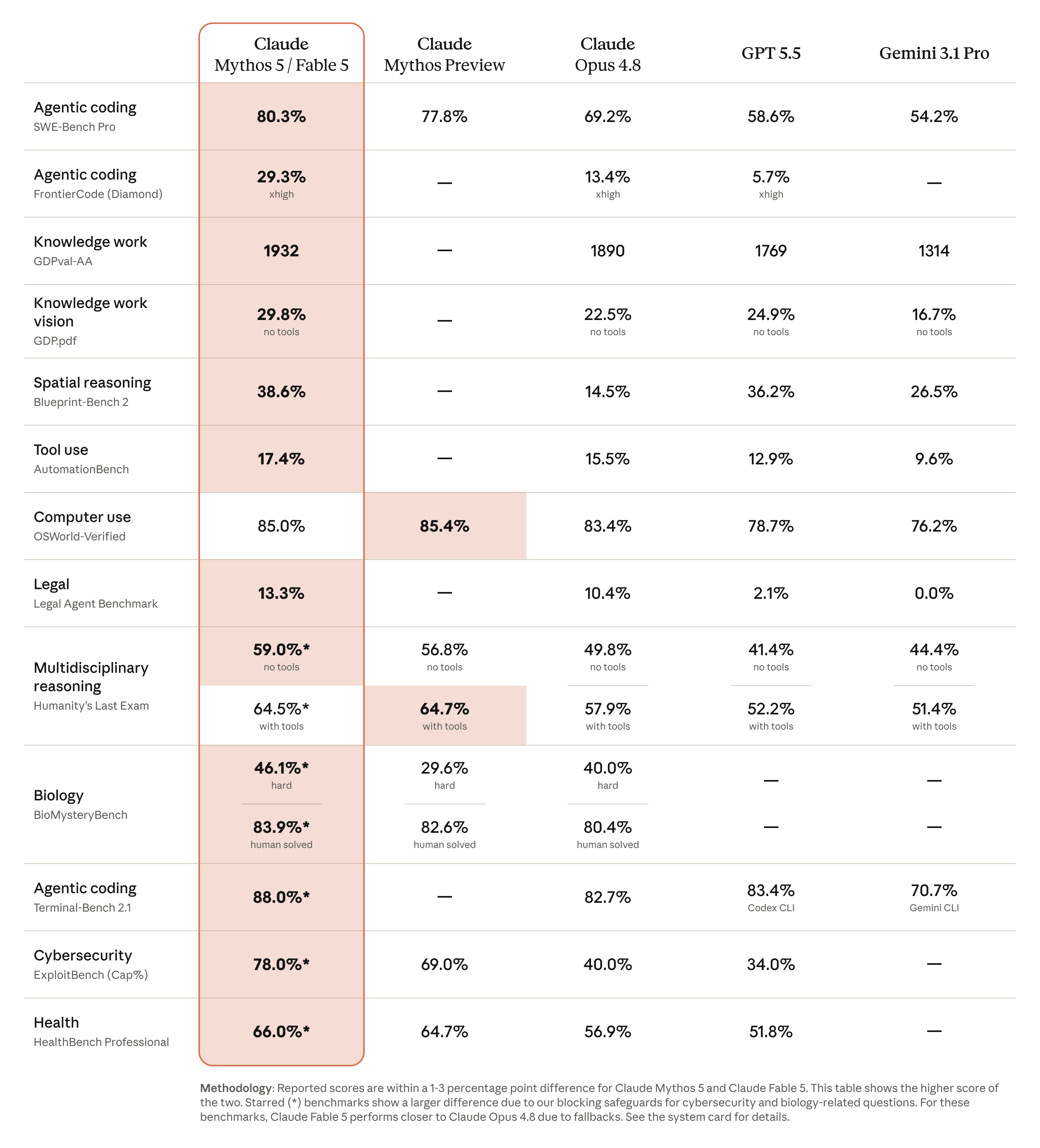
图源:Anthropic:Claude Fable 5 and Claude Mythos 5
从这张图里可以看到,Fable 5 在多个和"复杂工程实现能力"有关的项目上分数很高。例如 Agentic coding 里的 SWE-Bench Pro,Fable 5 标为 80.3%,GPT 5.5 标为 58.6%;FrontierCode 上,Fable 5 标为 29.3%,GPT 5.5 标为 5.7%。这和我这次观察到的现象是能对上的:Fable 5 更像是在完成一个复杂交互系统,而不是只把页面元素堆出来。
2. Anthropic 官方:FrontierCode 成本与准确率图
下面这张图比较的是 FrontierCode 上的 accuracy vs cost。它有一个很直观的点:Fable 5 的曲线随着 effort 提升明显上扬,而 GPT 5.5 在这张图里提升幅度不明显。
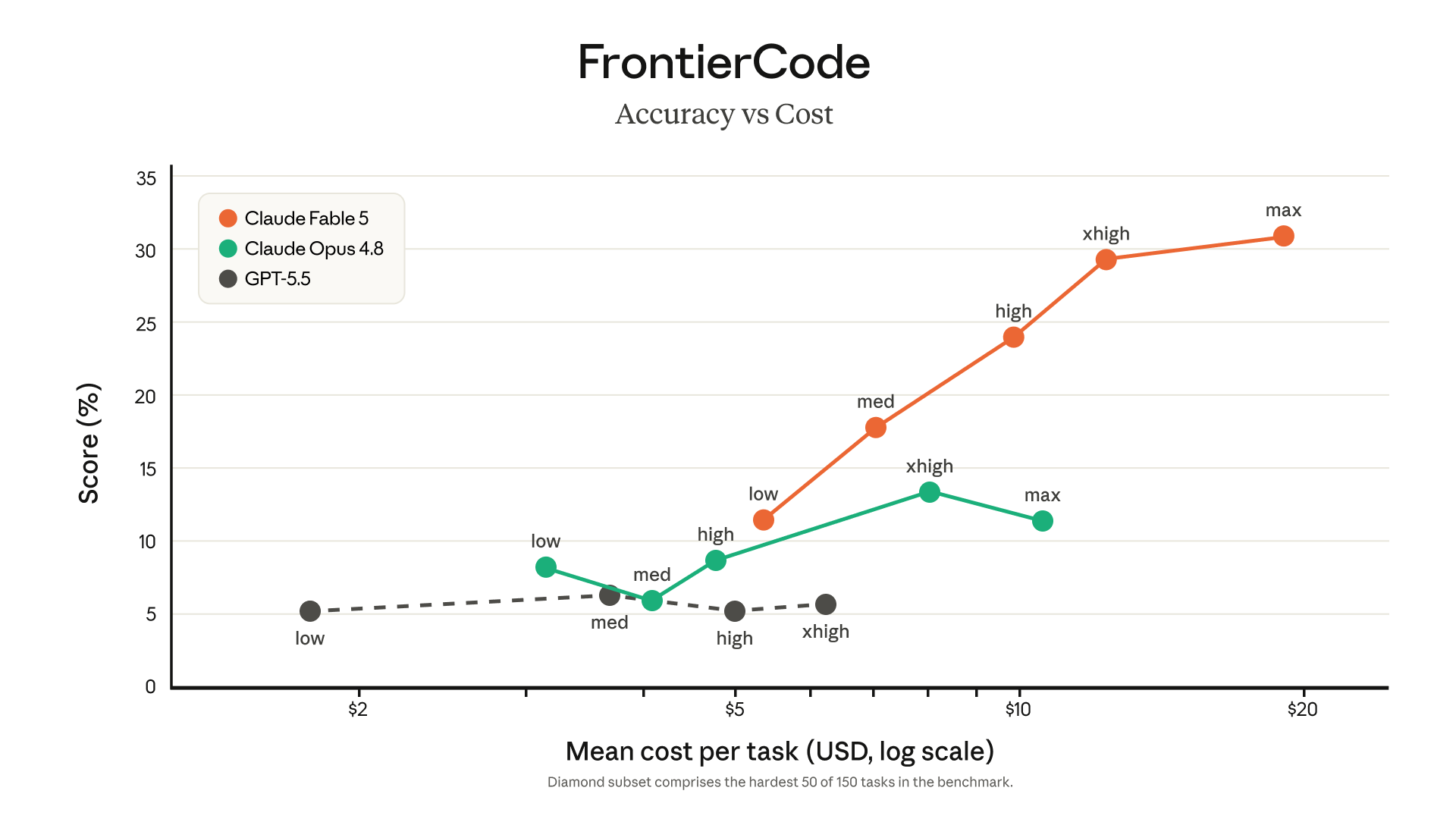
图源:Anthropic:Claude Fable 5 and Claude Mythos 5
这对本文里的前端生成任务也有解释力:复杂流体网页并不是单次静态生成,而是需要模型同时处理视觉方案、布局结构、Canvas 动画、滚动状态、指针交互、性能和代码组织。也就是说,它更接近"长链路工程实现"而不是普通代码补全。
3. Anthropic 官方:Agentic Coding 对比图
Anthropic 还单独给了 Agentic coding 图,其中 SWE-Bench Pro 和 FrontierCode 都是和工程任务强相关的指标。
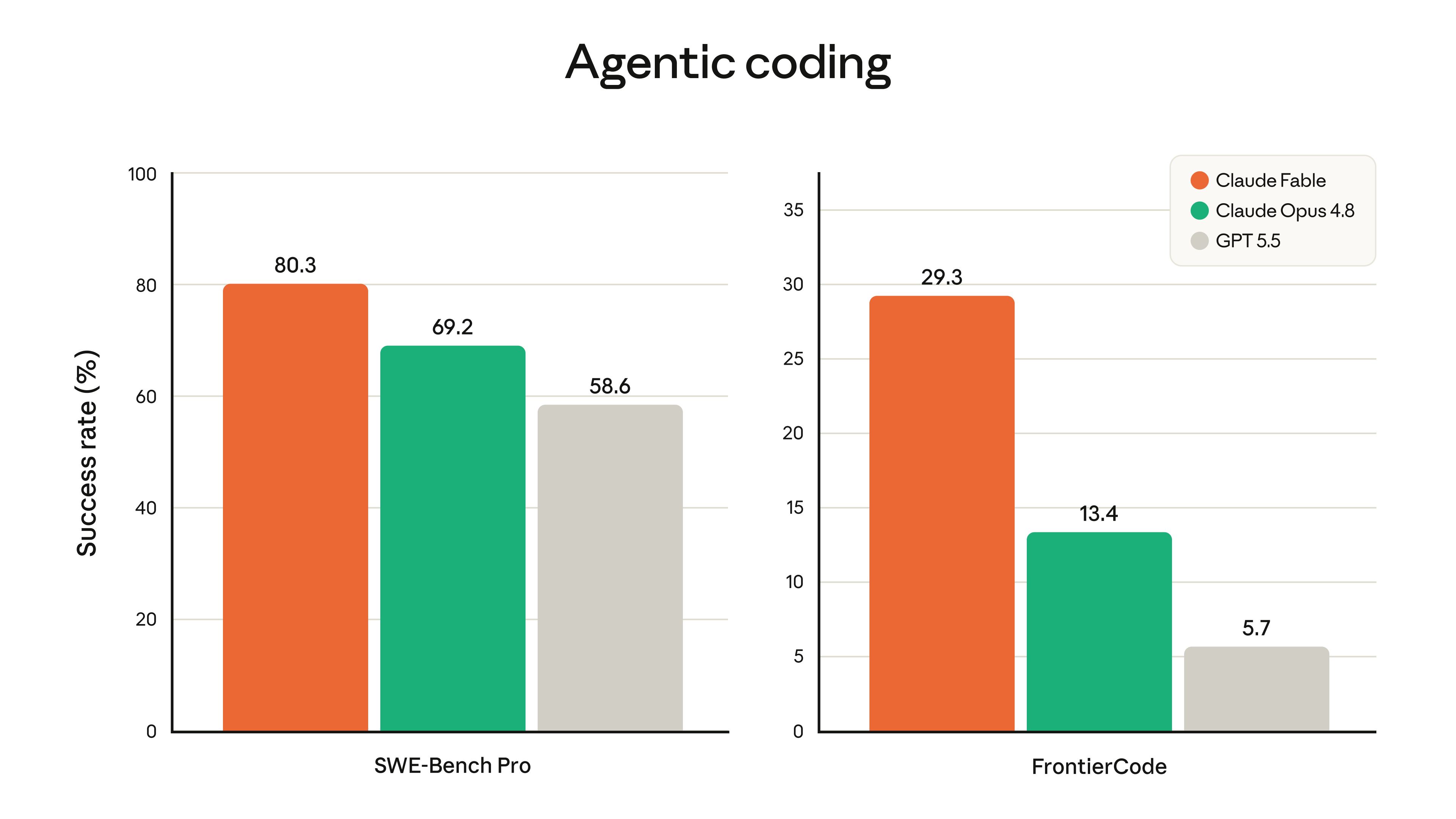
图源:Anthropic:Claude Fable 5 and Claude Mythos 5
如果只看本文这个案例,Fable 5 的优势也集中在"工程整体性"上:它不是只写出一个能打开的页面,而是把粒子场、滚动路径、Hero 网格、仪表盘卡片、题目蓝图、证书光效做成了一套互相呼应的系统。
4. OpenAI 官方:GPT 5.5 评测表摘录
OpenAI 的 GPT 5.5 发布页没有像 Anthropic 那样直接给一张大图,而是用评测表展示能力。为了便于对比,我把和本文有关的几项摘出来:
| Benchmark | GPT 5.5 | GPT 5.4 | Claude Opus 4.7 | Gemini 3.1 Pro |
|---|---|---|---|---|
| Terminal-Bench 2.0 | 82.7% | 75.1% | 69.4% | 68.5% |
| GDPval(wins or ties) | 84.9% | 83.0% | 80.3% | 67.3% |
| OSWorld-Verified | 78.7% | 75.0% | 78.0% | - |
| BrowseComp | 84.4% | 82.7% | 79.3% | 85.9% |
| FrontierMath Tier 1-3 | 51.7% | 47.6% | 43.8% | 36.9% |
| CyberGym | 81.8% | 79.0% | 73.1% | - |
数据源:OpenAI:Introducing GPT-5.5
OpenAI 对 GPT 5.5 的定位也很清楚:它强调复杂现实工作、代码编写与调试、在线研究、数据分析、文档和表格创建,以及跨工具完成任务。也就是说,GPT 5.5 本身并不弱,甚至在很多通用任务上非常强;只是回到这次 prompt,Claude Fable 5 的输出更符合我对"复杂创意前端 + 流体动效 + 数学科研审美"的预期。
补充看 Claude 模型总览页,Anthropic 把 Fable 5 定位为"最高可用能力"的模型,API ID 是 claude-fable-5,上下文窗口是 1M tokens,最大输出是 128k tokens,适合长时间、自主性的复杂任务。这个定位和本文里的实测观感也比较一致:Fable 5 更擅长把一个大 prompt 拆成多层可执行的视觉与交互系统。
来源:Claude Models Overview、GPT-5.5 System Card
四、我的总体结论
这轮对比里,Claude fable 5 的效果明显更好。
它更像是在理解"流体动态交互"这个核心要求:背景不是简单随机粒子,而是做了鼠标旋涡、滚动收敛、知识图谱连线、Hero 网格波纹、卡片数据跟随指针变形、证书全息反光等一整套互相呼应的动态系统。滚动时页面状态也比较稳定,不会让视觉元素突然失控。
GPT 5.5 的版本并不是不能看,首屏标题、玻璃卡片、GSAP reveal、证书眩光这些都有做出来。结合 OpenAI 官方数据看,它在 Terminal-Bench、GDPval、OSWorld 等任务上仍然是非常强的模型。但它在这个具体样本里的最大问题是:流体没有真正做出来。背景粒子更接近"粒子场 + 鼠标排斥 + 简单路径吸附",当页面滚动时,粒子容易出现杂乱、发散、抢视觉焦点的问题,和提示词里想要的"低饱和、科研感、随滚动收敛为规划路径"的效果有明显差距。
五、逐项对比
| 维度 | Claude fable 5 | GPT 5.5 |
|---|---|---|
| 流体背景 | 有鼠标旋涡、滚动收敛、知识图谱连线,整体更像可控的流体系统 | 粒子数量多,但更像随机扰动,滚动时容易乱 |
| 滚动体验 | IntersectionObserver + 路径线条 + 节点激活比较稳定 | GSAP ScrollTrigger 可用,但粒子和页面结构的协同性弱 |
| Hero 数学网格 | SVG 网格按时间、鼠标和滚动实时形变,有"黎曼曲面"味道 | CSS 网格视觉冲击强,但更偏静态装饰 |
| LearnerState 仪表盘 | 雷达图、高斯曲线、策略条都能随指针变化 | 有雷达图和策略条,但联动感弱一些 |
| ItemBlueprint | 自然语言坍缩成结构化字段,交互目标明确 | 也实现了 hover 解构,但视觉上更像普通卡片翻显 |
| 优化证书 | 全息光效跟随鼠标,仪式感更强 | 有 glare 光斑和旋转印章,效果还可以 |
| 代码风格 | 单文件、Vanilla JS,功能拆分清楚 | 单文件,但额外引入 GSAP 和 ScrollTrigger |
六、为什么 fable 5 更接近我的预期?
我觉得关键在于它把提示词里的"流体"和"滚动规划"做成了同一个视觉逻辑。
比如它的 Canvas 粒子不是只在屏幕上随机飘,而是有三个状态:
- 页面静止时,粒子扩散成类似星云和知识图谱的背景。
- 鼠标进入时,粒子围绕指针形成旋涡式扰动。
- 页面滚动时,粒子向中轴路径收敛,暗示 MAPLE-Loop 的行动规划。
这就让"数学知识图谱""滚动规划路径""流体动态"三件事真的合并到了一起。换句话说,页面不是先有内容再贴一层动画,而是动画本身在表达产品机制。
GPT 5.5 的代码里也写了 curveY、scroll、mouse force 等逻辑,但实际表现更偏"粒子受到力场扰动"。当滚动进度变化后,粒子被拉向曲线,同时还叠加鼠标排斥和噪声漂移,很容易让画面显得躁动。视觉上不是"流体收敛",而是"粒子被多股力乱拽"。
七、复现建议
想快速看效果,可以直接把下面两段 HTML 分别保存成 .html 文件,用浏览器打开。
如果不想每次都手动新建文件、保存、刷新,我之前也做过一个快速浏览 HTML 的小工具,已经放在我的博客主页里面。大家可以直接把 HTML 粘进去预览,非常适合测试这种大模型生成的单文件前端页面。
八、Claude fable 5 完整代码
html
<!DOCTYPE html>
<html lang="zh-CN">
<head>
<meta charset="UTF-8">
<meta name="viewport" content="width=device-width, initial-scale=1.0">
<title>MathSight OS --- 重构数学研学范式</title>
<script src="https://cdn.tailwindcss.com"></script>
<style>
:root{ --bg:#0A0A0C; --blue:#00D2FF; --green:#00FF66; --grey:#8B93A7; }
*{ scroll-behavior:smooth; }
html,body{ background:var(--bg); color:#E6EAF2; font-family:'SF Mono','JetBrains Mono',ui-monospace,Menlo,Consolas,monospace; overflow-x:hidden; }
::selection{ background:rgba(0,210,255,.35); }
#fluidCanvas{ position:fixed; inset:0; z-index:0; pointer-events:none; }
.section-wrap{ position:relative; z-index:10; }
.glow-blue{ text-shadow:0 0 24px rgba(0,210,255,.55),0 0 60px rgba(0,210,255,.25); }
.glow-green{ text-shadow:0 0 20px rgba(0,255,102,.5); }
.card{
background:linear-gradient(160deg, rgba(16,18,24,.85), rgba(10,10,12,.75));
border:1px solid rgba(0,210,255,.14);
backdrop-filter:blur(14px);
border-radius:1.25rem;
transition:transform .6s cubic-bezier(.22,1.4,.36,1), border-color .4s, box-shadow .5s;
}
.card:hover{ border-color:rgba(0,210,255,.5); box-shadow:0 0 40px rgba(0,210,255,.12), inset 0 0 30px rgba(0,210,255,.04); transform:translateY(-6px) scale(1.012); }
.reveal{ opacity:0; transform:translateY(70px) scale(.96); filter:blur(8px);
transition:opacity 1s cubic-bezier(.22,1,.36,1), transform 1.1s cubic-bezier(.16,1.3,.3,1), filter 1s; }
.reveal.show{ opacity:1; transform:translateY(0) scale(1); filter:blur(0); }
.reveal.d1{ transition-delay:.12s } .reveal.d2{ transition-delay:.24s } .reveal.d3{ transition-delay:.36s }
.formula{
font-family:'STIX Two Math','Cambria Math','Latin Modern Math',Georgia,serif;
font-style:italic; letter-spacing:.02em;
}
.tag{ font-size:.65rem; letter-spacing:.25em; text-transform:uppercase; color:var(--blue); border:1px solid rgba(0,210,255,.3); padding:.3rem .8rem; border-radius:999px; }
/* Hero grid mesh */
#heroMesh{ filter:drop-shadow(0 0 18px rgba(0,210,255,.25)); }
/* liquid button */
.btn-liquid{ position:relative; overflow:hidden; border:1px solid rgba(0,255,102,.4); transition:all .4s; }
.btn-liquid::before{ content:""; position:absolute; inset:0; background:radial-gradient(circle at var(--mx,50%) var(--my,50%), rgba(0,255,102,.35), transparent 60%); opacity:0; transition:opacity .3s; }
.btn-liquid:hover::before{ opacity:1; }
.btn-liquid:hover{ box-shadow:0 0 30px rgba(0,255,102,.3); transform:translateY(-2px); }
/* holographic certificate */
.cert{ position:relative; overflow:hidden;
background:linear-gradient(135deg,#0d0f14 0%,#101520 50%,#0b0d12 100%);
border:1px solid rgba(0,210,255,.35);
}
.cert::before{ content:""; position:absolute; inset:-40%;
background:conic-gradient(from 0deg at var(--hx,50%) var(--hy,50%),
rgba(0,210,255,.0), rgba(0,210,255,.28), rgba(170,0,255,.22), rgba(0,255,102,.26), rgba(255,200,0,.18), rgba(0,210,255,.0));
opacity:0; transition:opacity .5s; mix-blend-mode:screen; pointer-events:none;
animation:holoSpin 8s linear infinite;
}
.cert:hover::before{ opacity:1; }
@keyframes holoSpin{ to{ transform:rotate(360deg);} }
.cert::after{ content:""; position:absolute; inset:0; pointer-events:none;
background:linear-gradient(115deg, transparent 30%, rgba(255,255,255,.08) 45%, transparent 60%);
transform:translateX(-120%); transition:transform 1.2s ease; }
.cert:hover::after{ transform:translateX(120%); }
/* blueprint collapse */
.bp-raw{ transition:all .8s cubic-bezier(.65,0,.35,1); }
.bp-field{ opacity:0; transform:translateX(-30px) scale(.9); transition:all .7s cubic-bezier(.22,1.4,.36,1); }
.bp-active .bp-raw{ opacity:.15; filter:blur(4px); transform:scale(.92); letter-spacing:-.05em; }
.bp-active .bp-field{ opacity:1; transform:translateX(0) scale(1); }
.bp-field:nth-child(1){transition-delay:.05s}.bp-field:nth-child(2){transition-delay:.15s}.bp-field:nth-child(3){transition-delay:.25s}
.bp-field:nth-child(4){transition-delay:.35s}.bp-field:nth-child(5){transition-delay:.45s}.bp-field:nth-child(6){transition-delay:.55s}
/* path timeline */
.node-dot{ transition:all .6s cubic-bezier(.22,1.6,.36,1); }
.node-active .node-dot{ transform:scale(1.6); background:var(--green); box-shadow:0 0 26px rgba(0,255,102,.8); }
.node-active .node-card{ border-color:rgba(0,255,102,.55); box-shadow:0 0 40px rgba(0,255,102,.12); }
.ripple{ position:absolute; border:1px solid var(--green); border-radius:999px; opacity:0; }
.node-active .ripple{ animation:rip 1.8s ease-out infinite; }
@keyframes rip{ 0%{width:14px;height:14px;opacity:.9} 100%{width:90px;height:90px;opacity:0} }
#pathLine{ stroke-dasharray:2000; stroke-dashoffset:2000; }
/* radar */
.gauss{ transition:d .8s; }
.gate{ transition:all .5s; }
.gate.pass{ background:rgba(0,255,102,.12); border-color:rgba(0,255,102,.6); color:var(--green); }
.blink{ animation:blink 1.2s steps(2) infinite; }
@keyframes blink{ 50%{opacity:.2} }
.scanline{ position:fixed; inset:0; z-index:50; pointer-events:none;
background:repeating-linear-gradient(0deg, rgba(255,255,255,.015) 0 1px, transparent 1px 3px); }
</style>
</head>
<body>
<canvas id="fluidCanvas"></canvas>
<div class="scanline"></div>
<!-- NAV -->
<nav class="fixed top-0 left-0 right-0 z-40 flex items-center justify-between px-8 py-4 backdrop-blur-md bg-black/30 border-b border-white/5">
<div class="flex items-center gap-3">
<div class="w-8 h-8 rounded-lg border border-cyan-400/50 flex items-center justify-center text-cyan-300 formula font-bold">∇</div>
<span class="tracking-widest text-sm">MATHSIGHT<span class="text-cyan-400">·OS</span></span>
<span class="text-[10px] text-gray-500 tracking-widest hidden md:inline">/ MAPLE-LOOP v3.1</span>
</div>
<div class="hidden md:flex gap-8 text-xs text-gray-400 tracking-widest">
<a href="#state" class="hover:text-cyan-300 transition">LEARNERSTATE</a>
<a href="#loop" class="hover:text-cyan-300 transition">MAPLE-LOOP</a>
<a href="#blueprint" class="hover:text-cyan-300 transition">BLUEPRINT</a>
<a href="#cert" class="hover:text-cyan-300 transition">CERTIFICATE</a>
</div>
</nav>
<div class="section-wrap">
<!-- ============ SECTION 1: HERO ============ -->
<section class="min-h-screen flex flex-col items-center justify-center relative px-6 pt-24">
<div id="heroTilt" class="relative" style="perspective:1200px">
<svg id="heroMesh" width="520" height="320" viewBox="0 0 520 320" class="max-w-full" style="transform-style:preserve-3d"></svg>
</div>
<div class="text-center -mt-6 relative z-10">
<div class="tag inline-block mb-6 reveal show">RESEARCH-GRADE COGNITIVE ENGINE</div>
<h1 class="text-4xl md:text-7xl font-bold tracking-tight glow-blue">
MathSight <span class="text-cyan-400">OS</span>
</h1>
<p class="mt-4 text-xl md:text-2xl text-gray-300">重构数学研学范式</p>
<p class="mt-3 text-sm md:text-base text-gray-500 tracking-wider">在「学 - 测 - 学」超维闭环中,动态解码人类认知拓扑</p>
<div class="formula mt-6 text-cyan-300/80 text-lg">
z<sub>t</sub> = ( m<sub>t</sub>, e<sub>t</sub>, ρ<sub>t</sub>, φ<sub>t</sub>, Σ<sub>t</sub> ) ⟶ a<sub>t</sub><sup>*</sup>
</div>
<div class="mt-10 flex gap-4 justify-center">
<a href="#state" class="btn-liquid px-8 py-3 rounded-full text-sm tracking-widest text-emerald-300">进入认知内核 ↓</a>
<a href="#cert" class="px-8 py-3 rounded-full text-sm tracking-widest text-gray-400 border border-white/10 hover:border-cyan-400/40 hover:text-cyan-300 transition">查看优化证书</a>
</div>
</div>
<div class="absolute bottom-8 text-gray-600 text-xs tracking-[.4em] blink">SCROLL · 粒子流将收敛为规划路径</div>
</section>
<!-- ============ SECTION 2: LEARNERSTATE ============ -->
<section id="state" class="max-w-6xl mx-auto px-6 py-32">
<div class="reveal"><span class="tag">SECTION 02 · JOINT COGNITIVE STATE</span></div>
<h2 class="reveal d1 text-3xl md:text-5xl font-bold mt-6">联合认知状态 <span class="text-cyan-400">实时仪表盘</span></h2>
<p class="reveal d2 mt-4 text-gray-400 max-w-3xl leading-relaxed">
系统在每次交互后实时提取并动态编码学习者状态向量
<span class="formula text-cyan-300">z<sub>t</sub> = (m<sub>t</sub>, e<sub>t</sub>, ρ<sub>t</sub>, φ<sub>t</sub>, Σ<sub>t</sub>)</span>:
掌握度概率 m<sub>t</sub>、误概念分布 e<sub>t</sub>、动态解题策略混合 ρ<sub>t</sub>、情感投入 φ<sub>t</sub> 与不确定性协方差 Σ<sub>t</sub>。指针滑过卡片,数据将如水流般跟随流淌。
</p>
<div class="grid md:grid-cols-3 gap-6 mt-14">
<!-- Radar card -->
<div class="card p-6 reveal d1 flow-card" data-flow>
<div class="text-xs tracking-widest text-gray-500 mb-2">m<sub>t</sub> · MASTERY RADAR</div>
<svg id="radar" viewBox="0 0 200 200" class="w-full">
<g stroke="rgba(0,210,255,.15)" fill="none">
<polygon points="100,20 176,65 176,155 100,180 24,155 24,65"/>
<polygon points="100,50 148,78 148,132 100,150 52,132 52,78"/>
<polygon points="100,80 124,93 124,120 100,128 76,120 76,93"/>
</g>
<polygon id="radarPoly" fill="rgba(0,210,255,.18)" stroke="#00D2FF" stroke-width="1.5"
points="100,40 160,70 150,140 100,165 45,140 55,75" style="transition:all .6s cubic-bezier(.22,1.4,.36,1)"/>
<g font-size="9" fill="#8B93A7" text-anchor="middle">
<text x="100" y="12">代数结构</text><text x="190" y="65">函数分析</text><text x="190" y="162">几何拓扑</text>
<text x="100" y="196">数论</text><text x="12" y="162">概率统计</text><text x="12" y="65">最优化</text>
</g>
</svg>
<div class="text-[10px] text-gray-500 mt-2">P(mastery | history) --- 六维知识域后验估计</div>
</div>
<!-- Gaussian card -->
<div class="card p-6 reveal d2 flow-card" data-flow>
<div class="text-xs tracking-widest text-gray-500 mb-2">Σ<sub>t</sub> · 不确定性高斯校准</div>
<svg viewBox="0 0 220 150" class="w-full">
<line x1="10" y1="130" x2="210" y2="130" stroke="rgba(255,255,255,.15)"/>
<path id="gauss1" class="gauss" d="M10,130 C60,130 80,20 110,20 C140,20 160,130 210,130" fill="rgba(0,255,102,.12)" stroke="#00FF66" stroke-width="1.5"/>
<path id="gauss2" class="gauss" d="M10,130 C50,130 60,70 90,70 C120,70 150,130 210,130" fill="none" stroke="rgba(0,210,255,.6)" stroke-dasharray="4 3" stroke-width="1.2"/>
<text x="110" y="145" font-size="9" fill="#8B93A7" text-anchor="middle" class="formula">θ̂ ± σ · 贝叶斯后验收缩</text>
</svg>
<div class="mt-3 flex justify-between text-[10px] text-gray-500">
<span>先验 N(θ₀, σ₀²)</span><span class="text-emerald-400" id="sigmaVal">σ = 0.31 ↓</span>
</div>
<div class="text-[10px] text-gray-500 mt-2">误概念分布 e<sub>t</sub> 熵值实时衰减中...</div>
</div>
<!-- Strategy mixture -->
<div class="card p-6 reveal d3 flow-card" data-flow>
<div class="text-xs tracking-widest text-gray-500 mb-2">ρ<sub>t</sub> · 解题策略动态混合</div>
<div class="space-y-4 mt-4" id="stratBars">
<div><div class="flex justify-between text-[11px] mb-1"><span>程序型 Procedural</span><span class="text-cyan-300 sv">0.46</span></div>
<div class="h-2 rounded-full bg-white/5 overflow-hidden"><div class="sb h-full rounded-full bg-gradient-to-r from-cyan-500 to-cyan-300 transition-all duration-700" style="width:46%"></div></div></div>
<div><div class="flex justify-between text-[11px] mb-1"><span>表征型 Representational</span><span class="text-emerald-300 sv">0.33</span></div>
<div class="h-2 rounded-full bg-white/5 overflow-hidden"><div class="sb h-full rounded-full bg-gradient-to-r from-emerald-500 to-emerald-300 transition-all duration-700" style="width:33%"></div></div></div>
<div><div class="flex justify-between text-[11px] mb-1"><span>类比迁移型 Analogical</span><span class="text-purple-300 sv">0.21</span></div>
<div class="h-2 rounded-full bg-white/5 overflow-hidden"><div class="sb h-full rounded-full bg-gradient-to-r from-purple-500 to-purple-300 transition-all duration-700" style="width:21%"></div></div></div>
</div>
<div class="formula text-center mt-6 text-gray-400 text-sm">ρ<sub>t</sub> = softmax( Wₛ · h<sub>t</sub> ) , Σρᵢ = 1</div>
<div class="text-[10px] text-gray-500 mt-2 text-center">滑动指针 → 观测策略权重丝滑再分配</div>
</div>
</div>
</section>
<!-- ============ SECTION 3: MAPLE-LOOP ============ -->
<section id="loop" class="max-w-5xl mx-auto px-6 py-32 relative">
<div class="reveal text-center"><span class="tag">SECTION 03 · ROLLING HORIZON PLANNING</span></div>
<h2 class="reveal d1 text-3xl md:text-5xl font-bold mt-6 text-center">MAPLE-Loop <span class="text-emerald-400 glow-green">行动流</span></h2>
<p class="reveal d2 mt-4 text-gray-400 text-center max-w-2xl mx-auto">
在讲解 · 例题 · 诊断 · 纠错 · 迁移 · 研究推进之间,执行有限时域滚动规划:
</p>
<div class="reveal d3 formula text-center mt-4 text-lg text-cyan-300">
a<sub>t</sub><sup>*</sup> = arg max<sub>a</sub> 𝔼[ Σ<sub>h=0</sub><sup>H</sup> γ<sup>h</sup> R(z<sub>t+h</sub>, a<sub>t+h</sub>) ] s.t. C(a) ≤ κ
</div>
<div class="relative mt-20">
<svg class="absolute left-1/2 -translate-x-1/2 h-full" width="4" style="overflow:visible">
<line id="pathLine" x1="2" y1="0" x2="2" y2="1400" stroke="url(#pg)" stroke-width="2.5"/>
<defs><linearGradient id="pg" x1="0" y1="0" x2="0" y2="1"><stop offset="0" stop-color="#00D2FF"/><stop offset="1" stop-color="#00FF66"/></linearGradient></defs>
</svg>
<div class="space-y-24 relative" id="pathNodes">
<!-- node template repeated -->
<div class="path-node flex items-center gap-6 flex-col md:flex-row">
<div class="md:w-1/2 md:text-right md:pr-10 order-2 md:order-1">
<div class="node-card card p-5 inline-block text-left">
<div class="text-cyan-300 text-sm font-bold">① 讲解 EXPLAIN</div>
<div class="text-xs text-gray-400 mt-2">异分母分数加法 --- 通分算理动态推演</div>
<div class="formula text-[11px] text-gray-500 mt-1">a/b + c/d = (ad+bc)/bd · 门控前置:因数分解 ✓ 最小公倍数 ✓</div>
</div>
</div>
<div class="relative order-1 md:order-2 flex items-center justify-center w-8">
<span class="ripple"></span><span class="node-dot w-4 h-4 rounded-full bg-cyan-400 shadow-lg block relative z-10"></span>
</div>
<div class="md:w-1/2 order-3"></div>
</div>
<div class="path-node flex items-center gap-6 flex-col md:flex-row">
<div class="md:w-1/2 order-2"></div>
<div class="relative order-1 md:order-2 flex items-center justify-center w-8">
<span class="ripple"></span><span class="node-dot w-4 h-4 rounded-full bg-cyan-400 block relative z-10"></span>
</div>
<div class="md:w-1/2 md:pl-10 order-3">
<div class="node-card card p-5 inline-block">
<div class="text-cyan-300 text-sm font-bold">② 诊断 DIAGNOSE</div>
<div class="text-xs text-gray-400 mt-2">检测误概念 e₃:分母直接相加 · 后验概率 0.72 ⚠</div>
<div class="formula text-[11px] text-gray-500 mt-1">KL( e<sub>t</sub> ∥ e<sub>t-1</sub> ) > τ → 触发纠错分支</div>
</div>
</div>
</div>
<div class="path-node flex items-center gap-6 flex-col md:flex-row">
<div class="md:w-1/2 md:text-right md:pr-10 order-2 md:order-1">
<div class="node-card card p-5 inline-block text-left">
<div class="text-emerald-300 text-sm font-bold">③ 纠错 REMEDIATE</div>
<div class="text-xs text-gray-400 mt-2">对比反例注入 + 表征型策略权重上调 Δρ₂ = +0.14</div>
<div class="formula text-[11px] text-gray-500 mt-1">min<sub>a</sub> H(e<sub>t+1</sub>) --- 误概念熵最速下降方向</div>
</div>
</div>
<div class="relative order-1 md:order-2 flex items-center justify-center w-8">
<span class="ripple"></span><span class="node-dot w-4 h-4 rounded-full bg-cyan-400 block relative z-10"></span>
</div>
<div class="md:w-1/2 order-3"></div>
</div>
<div class="path-node flex items-center gap-6 flex-col md:flex-row">
<div class="md:w-1/2 order-2"></div>
<div class="relative order-1 md:order-2 flex items-center justify-center w-8">
<span class="ripple"></span><span class="node-dot w-4 h-4 rounded-full bg-cyan-400 block relative z-10"></span>
</div>
<div class="md:w-1/2 md:pl-10 order-3">
<div class="node-card card p-5 inline-block">
<div class="text-emerald-300 text-sm font-bold">④ 迁移 TRANSFER</div>
<div class="text-xs text-gray-400 mt-2">跨域投射:分数运算 → 有理函数通分 → 部分分式分解</div>
<div class="formula text-[11px] text-gray-500 mt-1">近迁移距离 d(k<sub>i</sub>, k<sub>j</sub>) = 1.8 · 图谱门控开启</div>
</div>
</div>
</div>
<div class="path-node flex items-center gap-6 flex-col md:flex-row">
<div class="md:w-1/2 md:text-right md:pr-10 order-2 md:order-1">
<div class="node-card card p-5 inline-block text-left">
<div class="text-purple-300 text-sm font-bold">⑤ 研究推进 RESEARCH</div>
<div class="text-xs text-gray-400 mt-2">拉格朗日乘子条件核验 --- KKT 互补松弛自动审计</div>
<div class="formula text-[11px] text-gray-500 mt-1">∇f = Σλᵢ∇gᵢ , λᵢgᵢ(x*) = 0 , λᵢ ≥ 0 ✓</div>
</div>
</div>
<div class="relative order-1 md:order-2 flex items-center justify-center w-8">
<span class="ripple"></span><span class="node-dot w-4 h-4 rounded-full bg-cyan-400 block relative z-10"></span>
</div>
<div class="md:w-1/2 order-3"></div>
</div>
</div>
</div>
</section>
<!-- ============ SECTION 4: ITEMBLUEPRINT ============ -->
<section id="blueprint" class="max-w-6xl mx-auto px-6 py-32">
<div class="reveal"><span class="tag">SECTION 04 · CONSTRAINED GENERATION</span></div>
<h2 class="reveal d1 text-3xl md:text-5xl font-bold mt-6">受约束题目生成 <span class="text-cyan-400">ItemBlueprint</span></h2>
<p class="reveal d2 mt-4 text-gray-400 max-w-3xl">
拒绝黑箱生成。每一道题目在发布前必须通过结构化蓝图 → 自动求解 → 唯一性核验 → 歧义检测 → 公平性审计的多道门控。
<span class="text-cyan-300">将鼠标悬停于下方模块,观察自然语言被引力吸附解构为字段矩阵。</span>
</p>
<div id="bpBox" class="card mt-12 p-8 reveal d2 grid md:grid-cols-2 gap-8 cursor-crosshair">
<div class="bp-raw text-gray-300 leading-loose text-sm">
<div class="text-[10px] tracking-widest text-gray-500 mb-3">RAW NL PROMPT / 混乱自然语言态</div>
「帮我出一道关于二次函数的题,要有实际情境,最好和抛物运动有关,中等偏难,考察顶点式和最值,答案不要太丑,别有歧义,适合初三学生......」
<div class="mt-4 text-[10px] text-gray-600">熵值:HIGH · 结构化程度:0.12 · 可审计性:✗</div>
</div>
<div class="space-y-2 text-xs">
<div class="text-[10px] tracking-widest text-gray-500 mb-1">STRUCTURED ITEMBLUEPRINT / 坍缩后字段矩阵</div>
<div class="bp-field flex justify-between border border-cyan-400/20 rounded-lg px-4 py-2 bg-cyan-400/5"><span class="text-gray-400">skill_node</span><span class="text-cyan-300">quadratic.vertex_form.optimization</span></div>
<div class="bp-field flex justify-between border border-cyan-400/20 rounded-lg px-4 py-2 bg-cyan-400/5"><span class="text-gray-400">context_schema</span><span class="text-cyan-300">projectile_motion(v₀, θ, g=9.8)</span></div>
<div class="bp-field flex justify-between border border-cyan-400/20 rounded-lg px-4 py-2 bg-cyan-400/5"><span class="text-gray-400">difficulty_θ</span><span class="text-emerald-300">IRT b = +0.65 · 校准 CI ±0.08</span></div>
<div class="bp-field flex justify-between border border-cyan-400/20 rounded-lg px-4 py-2 bg-cyan-400/5"><span class="text-gray-400">answer_form</span><span class="text-cyan-300">rational, |num|≤50, den∈{1,2,4}</span></div>
<div class="bp-field flex justify-between border border-cyan-400/20 rounded-lg px-4 py-2 bg-cyan-400/5"><span class="text-gray-400">solver_check</span><span class="text-emerald-300">CAS ✓ unique_solution ✓</span></div>
<div class="bp-field flex justify-between border border-cyan-400/20 rounded-lg px-4 py-2 bg-cyan-400/5"><span class="text-gray-400">fairness_audit</span><span class="text-emerald-300">bias_scan ✓ DIF < 0.05 ✓</span></div>
</div>
</div>
<div class="grid grid-cols-2 md:grid-cols-5 gap-3 mt-8">
<div class="gate reveal border border-white/10 rounded-xl py-3 text-center text-[11px] text-gray-500">① 自动求解</div>
<div class="gate reveal d1 border border-white/10 rounded-xl py-3 text-center text-[11px] text-gray-500">② 唯一性核验</div>
<div class="gate reveal d1 border border-white/10 rounded-xl py-3 text-center text-[11px] text-gray-500">③ 歧义检测</div>
<div class="gate reveal d2 border border-white/10 rounded-xl py-3 text-center text-[11px] text-gray-500">④ 难度校准</div>
<div class="gate reveal d3 border border-white/10 rounded-xl py-3 text-center text-[11px] text-gray-500">⑤ 公平性审计</div>
</div>
</section>
<!-- ============ SECTION 5: CERTIFICATE ============ -->
<section id="cert" class="max-w-4xl mx-auto px-6 py-32">
<div class="reveal text-center"><span class="tag">SECTION 05 · AUDITABLE DECISION</span></div>
<h2 class="reveal d1 text-3xl md:text-5xl font-bold mt-6 text-center">决策优化<span class="text-cyan-400">证书</span></h2>
<p class="reveal d2 mt-4 text-gray-400 text-center max-w-2xl mx-auto">每一次选题与路径切换,系统都会签发一份可验证的数学优化证书。滑动指针,感受全息溢彩。</p>
<div id="certCard" class="cert reveal d2 rounded-2xl p-10 mt-14 relative">
<div class="flex justify-between items-start">
<div>
<div class="text-[10px] tracking-[.4em] text-cyan-400">OPTIMIZATION CERTIFICATE</div>
<div class="text-2xl font-bold mt-2">№ MS-2026-0708-A7F3</div>
</div>
<div class="w-16 h-16 border-2 border-cyan-400/40 rounded-full flex items-center justify-center formula text-cyan-300 text-2xl">∮</div>
</div>
<div class="grid md:grid-cols-2 gap-6 mt-8 text-xs">
<div class="space-y-3">
<div class="flex justify-between border-b border-white/5 pb-2"><span class="text-gray-500">决策动作</span><span class="text-cyan-300">a* = 迁移题 (transfer, d=1.8)</span></div>
<div class="flex justify-between border-b border-white/5 pb-2"><span class="text-gray-500">期望回报</span><span class="text-emerald-300 formula">𝔼[ΣγʰR] = 4.271 ± 0.113</span></div>
<div class="flex justify-between border-b border-white/5 pb-2"><span class="text-gray-500">对偶间隙</span><span class="text-emerald-300 formula">gap = 3.2 × 10⁻⁶ ✓</span></div>
</div>
<div class="space-y-3">
<div class="flex justify-between border-b border-white/5 pb-2"><span class="text-gray-500">约束满足</span><span class="text-emerald-300">C(a) = 0.83κ ≤ κ ✓</span></div>
<div class="flex justify-between border-b border-white/5 pb-2"><span class="text-gray-500">KKT 条件</span><span class="text-emerald-300 formula">λᵢgᵢ = 0 ∀i · 已核验 ✓</span></div>
<div class="flex justify-between border-b border-white/5 pb-2"><span class="text-gray-500">哈希签名</span><span class="text-gray-400">SHA-256: 9f3a...c17e</span></div>
</div>
</div>
<div class="formula text-center mt-8 text-gray-500 text-sm">
「Every decision is a theorem; every path, a proof.」
</div>
</div>
<div class="text-center mt-20 reveal d3">
<a href="#" class="btn-liquid inline-block px-12 py-4 rounded-full tracking-[.3em] text-emerald-300">申请研究级内测 →</a>
<div class="text-[10px] text-gray-600 mt-8 tracking-widest">© 2026 MATHSIGHT OS · MAPLE-LOOP · 认知拓扑,可证可审</div>
</div>
</section>
</div>
<script>
/* ================= FLUID PARTICLE KNOWLEDGE GRAPH ================= */
const cv = document.getElementById('fluidCanvas'), ctx = cv.getContext('2d');
let W, H, DPR = Math.min(devicePixelRatio, 2);
function resize(){ W = innerWidth; H = innerHeight; cv.width = W*DPR; cv.height = H*DPR; cv.style.width=W+'px'; cv.style.height=H+'px'; ctx.setTransform(DPR,0,0,DPR,0,0); }
resize(); addEventListener('resize', resize);
const N = innerWidth < 768 ? 70 : 140;
const P = [];
for(let i=0;i<N;i++) P.push({
x:Math.random()*innerWidth, y:Math.random()*innerHeight,
vx:(Math.random()-.5)*.4, vy:(Math.random()-.5)*.4,
r:Math.random()*1.8+.6, hue:Math.random()<.7?190:140,
ph:Math.random()*Math.PI*2
});
let mouse = {x:-9999, y:-9999}, scrollV = 0, lastY = scrollY, scrollProg = 0;
addEventListener('mousemove', e => { mouse.x = e.clientX; mouse.y = e.clientY; });
addEventListener('mouseleave', () => { mouse.x = -9999; });
addEventListener('scroll', () => {
scrollV = Math.min(Math.abs(scrollY - lastY)*.08, 4); lastY = scrollY;
scrollProg = scrollY / (document.body.scrollHeight - innerHeight);
}, {passive:true});
function tick(t){
ctx.clearRect(0,0,W,H);
scrollV *= .95;
const converge = Math.min(scrollV*.4, 1); // 滚动时粒子向中央路径收敛
for(const p of P){
// ambient nebula drift
p.ph += .008;
p.vx += Math.cos(p.ph + p.y*.002)*.008;
p.vy += Math.sin(p.ph + p.x*.002)*.008;
// mouse fluid attraction/repulsion
const dx = mouse.x-p.x, dy = mouse.y-p.y, d2 = dx*dx+dy*dy;
if(d2 < 32000){
const d = Math.sqrt(d2)+.1, f = (180-d)/180;
if(f>0){ // swirl vortex around cursor
p.vx += (-dy/d)*f*.35 + (dx/d)*f*.06;
p.vy += ( dx/d)*f*.35 + (dy/d)*f*.06;
}
}
// scroll convergence to central vertical stream
if(converge > .02){
const target = W/2 + Math.sin(p.y*.01 + t*.001)*60;
p.vx += (target - p.x)*.0016*converge;
p.vy += 2.2*converge*.15;
}
p.vx *= .96; p.vy *= .96;
p.x += p.vx; p.y += p.vy;
if(p.x<-20)p.x=W+20; if(p.x>W+20)p.x=-20;
if(p.y<-20)p.y=H+20; if(p.y>H+20)p.y=-20;
}
// edges (knowledge graph)
ctx.lineWidth = .6;
for(let i=0;i<N;i++) for(let j=i+1;j<N;j++){
const a=P[i], b=P[j], dx=a.x-b.x, dy=a.y-b.y, d2=dx*dx+dy*dy;
if(d2 < 9500){
const alpha = (1-d2/9500)*.35;
ctx.strokeStyle = `hsla(${(a.hue+b.hue)/2},100%,60%,${alpha})`;
ctx.beginPath(); ctx.moveTo(a.x,a.y); ctx.lineTo(b.x,b.y); ctx.stroke();
}
}
// nodes
for(const p of P){
ctx.beginPath(); ctx.arc(p.x,p.y,p.r,0,7);
ctx.fillStyle = `hsla(${p.hue},100%,65%,.8)`;
ctx.shadowColor = `hsla(${p.hue},100%,60%,.9)`; ctx.shadowBlur = 6;
ctx.fill(); ctx.shadowBlur = 0;
}
requestAnimationFrame(tick);
}
requestAnimationFrame(tick);
/* ================= HERO 3D RIEMANN MESH ================= */
const mesh = document.getElementById('heroMesh');
const rows=12, cols=20, gw=520/(cols-1), gh=320/(rows-1);
let ns = 'http://www.w3.org/2000/svg', lines=[];
for(let r=0;r<rows;r++){ const pl=document.createElementNS(ns,'polyline'); pl.setAttribute('fill','none'); pl.setAttribute('stroke','rgba(0,210,255,.35)'); pl.setAttribute('stroke-width','.8'); mesh.appendChild(pl); lines.push({pl,r,type:'h'});}
for(let c=0;c<cols;c++){ const pl=document.createElementNS(ns,'polyline'); pl.setAttribute('fill','none'); pl.setAttribute('stroke','rgba(0,255,102,.18)'); pl.setAttribute('stroke-width','.6'); mesh.appendChild(pl); lines.push({pl,c,type:'v'});}
let mrx=0, mry=0, wave={x:-999,y:-999,t:0};
document.getElementById('heroTilt').addEventListener('mousemove', e=>{
const b = mesh.getBoundingClientRect();
mrx = (e.clientY-b.top-b.height/2)/b.height; mry = (e.clientX-b.left-b.width/2)/b.width;
wave = {x:(e.clientX-b.left)/b.width*520, y:(e.clientY-b.top)/b.height*320, t:performance.now()};
});
function meshTick(t){
const scr = Math.min(scrollY/600,1); // scroll morph: flatten & twist
mesh.style.transform = `rotateX(${55+mrx*18-scr*30}deg) rotateZ(${mry*14+scr*20}deg) scale(${1-scr*.25})`;
mesh.style.opacity = 1 - scr*.85;
const age = (t-wave.t)/1000;
function z(x,y){
let v = Math.sin(x*.02 + t*.0012)*Math.cos(y*.025 + t*.0009)*16;
v += Math.sin(Math.hypot(x-260,y-160)*.03 - t*.002)*8; // riemann-ish ripple
if(age < 2){ const d = Math.hypot(x-wave.x, y-wave.y);
v += Math.sin(d*.08 - age*14)*22*Math.exp(-age*2.2 - d*.008); }
v *= (1+scr*1.5); // topological deformation on scroll
return v;
}
for(const L of lines){
let pts='';
if(L.type==='h'){ const y=L.r*gh; for(let c=0;c<cols;c++){ const x=c*gw; pts+=`${x},${y+z(x,y)} `; } }
else{ const x=L.c*gw; for(let r=0;r<rows;r++){ const y=r*gh; pts+=`${x+z(x,y)*.4},${y+z(x,y)} `; } }
L.pl.setAttribute('points',pts);
}
requestAnimationFrame(meshTick);
}
requestAnimationFrame(meshTick);
/* ================= SCROLL REVEAL ================= */
const io = new IntersectionObserver(es=>es.forEach(e=>{ if(e.isIntersecting) e.target.classList.add('show'); }),{threshold:.15});
document.querySelectorAll('.reveal').forEach(el=>io.observe(el));
/* gates light up sequentially when visible */
const gio = new IntersectionObserver(es=>es.forEach(e=>{
if(e.isIntersecting){ document.querySelectorAll('.gate').forEach((g,i)=>setTimeout(()=>g.classList.add('pass'), 400+i*350)); gio.disconnect(); }
}),{threshold:.4});
gio.observe(document.querySelector('.gate'));
/* path nodes activate + line draw */
const nodes = document.querySelectorAll('.path-node');
const nio = new IntersectionObserver(es=>es.forEach(e=>e.target.classList.toggle('node-active', e.isIntersecting)),{threshold:.5});
nodes.forEach(n=>nio.observe(n));
const line = document.getElementById('pathLine');
const loopSec = document.getElementById('loop');
addEventListener('scroll', ()=>{
const r = loopSec.getBoundingClientRect();
const prog = Math.min(Math.max((innerHeight*.7 - r.top)/(r.height), 0), 1);
line.style.strokeDashoffset = 2000*(1-prog);
},{passive:true});
/* ================= FLOW CARDS (LearnerState) ================= */
document.querySelectorAll('[data-flow]').forEach(card=>{
card.addEventListener('mousemove', e=>{
const b = card.getBoundingClientRect();
const px = (e.clientX-b.left)/b.width, py = (e.clientY-b.top)/b.height;
card.style.transform = `perspective(800px) rotateY(${(px-.5)*10}deg) rotateX(${(.5-py)*10}deg) translateY(-4px)`;
// radar morph
const poly = card.querySelector('#radarPoly');
if(poly){
const base=[[100,40],[160,70],[150,140],[100,165],[45,140],[55,75]];
poly.setAttribute('points', base.map(([x,y],i)=>{
const dx=(x-100), dy=(y-100), k=1+Math.sin(px*6+i)*.14+Math.cos(py*5+i)*.1;
return `${100+dx*k},${100+dy*k}`;
}).join(' '));
}
// gaussian morph
const g1 = card.querySelector('#gauss1');
if(g1){
const w = 40+px*60, hgt = 130 - (30+py*80);
g1.setAttribute('d',`M10,130 C${110-w},130 ${110-w*.5},${hgt} 110,${hgt} C${110+w*.5},${hgt} ${110+w},130 210,130`);
card.querySelector('#sigmaVal').textContent = `σ = ${(0.15+px*.4).toFixed(2)} ${px<.5?'↓':'↑'}`;
}
// strategy bars fluid reallocation
const bars = card.querySelectorAll('.sb');
if(bars.length){
const raw=[.3+px*.5, .3+py*.5, .3+(1-px)*.4], s=raw[0]+raw[1]+raw[2];
const vals = card.querySelectorAll('.sv');
raw.forEach((v,i)=>{ const p=v/s; bars[i].style.width=(p*100)+'%'; vals[i].textContent=p.toFixed(2); });
}
});
card.addEventListener('mouseleave', ()=>{ card.style.transform=''; });
});
/* ================= BLUEPRINT COLLAPSE ================= */
const bp = document.getElementById('bpBox');
bp.addEventListener('mouseenter', ()=>bp.classList.add('bp-active'));
bp.addEventListener('mouseleave', ()=>bp.classList.remove('bp-active'));
/* ================= HOLOGRAPHIC CERT & LIQUID BUTTONS ================= */
const cert = document.getElementById('certCard');
cert.addEventListener('mousemove', e=>{
const b = cert.getBoundingClientRect();
cert.style.setProperty('--hx', ((e.clientX-b.left)/b.width*100)+'%');
cert.style.setProperty('--hy', ((e.clientY-b.top)/b.height*100)+'%');
cert.style.transform = `perspective(1200px) rotateY(${((e.clientX-b.left)/b.width-.5)*6}deg) rotateX(${(.5-(e.clientY-b.top)/b.height)*6}deg)`;
});
cert.addEventListener('mouseleave', ()=>cert.style.transform='');
document.querySelectorAll('.btn-liquid').forEach(b=>b.addEventListener('mousemove', e=>{
const r=b.getBoundingClientRect();
b.style.setProperty('--mx',((e.clientX-r.left)/r.width*100)+'%');
b.style.setProperty('--my',((e.clientY-r.top)/r.height*100)+'%');
}));
</script>
</body>
</html>九、GPT 5.5 完整代码
html
<!doctype html>
<html lang="zh-CN">
<head>
<meta charset="utf-8" />
<meta name="viewport" content="width=device-width,initial-scale=1" />
<title>MathSight OS|MAPLE-Loop</title>
<script src="https://cdn.tailwindcss.com"></script>
<script src="https://cdnjs.cloudflare.com/ajax/libs/gsap/3.12.5/gsap.min.js"></script>
<script src="https://cdnjs.cloudflare.com/ajax/libs/gsap/3.12.5/ScrollTrigger.min.js"></script>
<style>
:root{--bg:#0A0A0C;--blue:#00D2FF;--green:#00FF66;--gray:#9aa4ad;--glass:rgba(255,255,255,.055)}
*{box-sizing:border-box} html{scroll-behavior:smooth} body{margin:0;background:var(--bg);color:#e8fbff;font-family:Inter,ui-sans-serif,system-ui,"PingFang SC","Microsoft YaHei",sans-serif;overflow-x:hidden}
#field{position:fixed;inset:0;z-index:-3;background:radial-gradient(circle at 50% 10%,#102235 0,#0A0A0C 46%,#030305 100%)}
.noise{position:fixed;inset:0;z-index:-2;pointer-events:none;opacity:.18;background-image:url("data:image/svg+xml,%3Csvg viewBox='0 0 256 256' xmlns='http://www.w3.org/2000/svg'%3E%3Cfilter id='n'%3E%3CfeTurbulence type='fractalNoise' baseFrequency='.8' numOctaves='4' stitchTiles='stitch'/%3E%3C/filter%3E%3Crect width='256' height='256' filter='url(%23n)' opacity='.55'/%3E%3C/svg%3E")}
.scan{position:fixed;inset:0;z-index:-1;pointer-events:none;background:linear-gradient(transparent 96%,rgba(0,210,255,.08) 100%);background-size:100% 7px;mix-blend-mode:screen}
section{min-height:100vh;position:relative;padding:8rem 6vw;display:flex;align-items:center}.glass{background:linear-gradient(135deg,rgba(255,255,255,.08),rgba(255,255,255,.025));border:1px solid rgba(0,210,255,.18);box-shadow:0 0 60px rgba(0,210,255,.08),inset 0 0 40px rgba(255,255,255,.025);backdrop-filter:blur(18px);border-radius:28px}.formula{font-family:Georgia,"Times New Roman",serif;color:#dffcff;text-shadow:0 0 18px rgba(0,210,255,.32)}
.title{font-size:clamp(3rem,8vw,8.5rem);line-height:.92;font-weight:900;letter-spacing:-.08em;background:linear-gradient(90deg,#fff,#83ecff 35%,#00ff66 70%,#fff);-webkit-background-clip:text;color:transparent}.sub{color:#9fb5c2;font-size:clamp(1.05rem,2vw,1.55rem)}
.reveal{opacity:0;transform:translateY(55px) scale(.98);filter:blur(12px)}
.riemann{width:min(72vw,760px);height:420px;margin:auto;perspective:900px;transform-style:preserve-3d}.grid3d{position:absolute;inset:0;border-radius:50%;transform:rotateX(58deg) rotateZ(-20deg);background:repeating-linear-gradient(90deg,transparent 0 28px,rgba(0,210,255,.36) 29px 30px),repeating-linear-gradient(0deg,transparent 0 28px,rgba(0,255,102,.24) 29px 30px);mask:radial-gradient(circle,#000 0 58%,transparent 74%);filter:drop-shadow(0 0 28px rgba(0,210,255,.5));animation:breathe 6s ease-in-out infinite}.grid3d:after{content:"∫ ∇ Σ π λ φ Ω ∂ ≈ ⊗ Δ";position:absolute;inset:28%;display:grid;place-items:center;font-size:42px;letter-spacing:16px;color:rgba(210,255,255,.82);text-shadow:0 0 18px var(--blue);animation:float 4s ease-in-out infinite}.ripple{position:absolute;border:1px solid rgba(0,210,255,.7);border-radius:999px;pointer-events:none;transform:translate(-50%,-50%);animation:ripple 1.2s ease-out forwards}@keyframes breathe{50%{transform:rotateX(64deg) rotateZ(-12deg) scale(1.08);filter:drop-shadow(0 0 44px rgba(0,255,102,.35))}}@keyframes float{50%{transform:translateY(-18px) rotateZ(5deg)}}@keyframes ripple{from{width:0;height:0;opacity:.9}to{width:360px;height:360px;opacity:0}}
.card{transition:transform .18s ease,border-color .25s}.card:hover{border-color:rgba(0,255,102,.55)}.bar span{display:block;height:100%;border-radius:999px;background:linear-gradient(90deg,var(--blue),var(--green));box-shadow:0 0 24px rgba(0,210,255,.45)}
.path-wrap{height:170vh;width:100%;position:relative}.path-line{position:absolute;left:50%;top:5%;width:5px;height:0;background:linear-gradient(var(--blue),var(--green),#fff);border-radius:99px;box-shadow:0 0 28px var(--blue)}.node{position:absolute;left:50%;transform:translateX(-50%) scale(.8);opacity:.35}.node .dot{width:22px;height:22px;border-radius:50%;background:var(--bg);border:3px solid var(--blue);box-shadow:0 0 28px var(--blue)}.node.active{opacity:1;transform:translateX(-50%) scale(1)}.node.active .dot{background:var(--green);border-color:#fff;animation:pulse 1.4s infinite}.tag{position:absolute;top:-26px;white-space:nowrap;padding:12px 18px;border-radius:18px;background:rgba(8,18,24,.82);border:1px solid rgba(0,210,255,.25)}.node:nth-child(even) .tag{right:42px}.node:nth-child(odd) .tag{left:42px}@keyframes pulse{50%{box-shadow:0 0 0 24px rgba(0,210,255,0),0 0 35px var(--green)}}
.cube{min-height:430px;position:relative;overflow:hidden}.chaos{position:absolute;inset:30px;font-family:ui-monospace,monospace;color:#a9bbc5;line-height:1.9;transition:.8s cubic-bezier(.2,1,.2,1)}.fields{display:grid;grid-template-columns:repeat(2,minmax(0,1fr));gap:14px;opacity:0;transform:scale(.82);transition:.8s cubic-bezier(.2,1,.2,1)}.cube:hover .chaos{opacity:0;filter:blur(14px);transform:scale(1.35) rotate(8deg)}.cube:hover .fields{opacity:1;transform:scale(1)}.field{padding:16px;border:1px solid rgba(0,255,102,.25);border-radius:16px;background:rgba(0,255,102,.045);font-family:ui-monospace,monospace}.gate{height:8px;border-radius:99px;background:#152027;overflow:hidden}.gate span{display:block;height:100%;width:0;background:linear-gradient(90deg,var(--blue),var(--green));transition:1s}.cube:hover .gate span{width:100%}
.cert{position:relative;overflow:hidden;transform-style:preserve-3d}.glare{position:absolute;width:380px;height:380px;border-radius:50%;background:radial-gradient(circle,rgba(255,255,255,.35),rgba(0,210,255,.22),rgba(0,255,102,.09),transparent 68%);filter:blur(8px);mix-blend-mode:screen;pointer-events:none;transform:translate(-50%,-50%);opacity:.65}.seal{border:1px solid rgba(0,210,255,.35);background:conic-gradient(from 0deg,rgba(0,210,255,.15),rgba(0,255,102,.18),rgba(255,255,255,.1),rgba(0,210,255,.15));animation:spin 9s linear infinite}@keyframes spin{to{transform:rotate(360deg)}}
</style>
</head>
<body>
<canvas id="field"></canvas><div class="noise"></div><div class="scan"></div>
<nav class="fixed top-0 left-0 right-0 z-50 px-8 py-5 flex justify-between text-sm text-cyan-100/75 backdrop-blur-md"><b class="text-white">MathSight OS <span class="text-cyan-400">/ MAPLE-Loop</span></b><span>Explainable Mathematical Intelligence</span></nav>
<section id="hero" class="grid lg:grid-cols-2 gap-12">
 <div class="reveal"><p class="text-cyan-300 tracking-[.45em] mb-6">JOINT COGNITIVE TOPOLOGY</p><h1 class="title">MathSight OS:重构数学研学范式</h1><p class="sub mt-8 max-w-2xl">在学-测-学超维闭环中,动态解码人类认知拓扑。系统不只生成题目,而是以可审计的状态空间、滚动规划与贝叶斯校准,持续重塑学习与研究路径。</p><div class="formula mt-8 text-2xl">z<sub>t</sub> = (m<sub>t</sub>, e<sub>t</sub>, ρ<sub>t</sub>, φ<sub>t</sub>, Σ<sub>t</sub>)</div></div>
 <div class="riemann glass reveal" id="riemann"><div class="grid3d"></div></div>
</section>
<section id="state" class="block"><div class="max-w-7xl mx-auto"><div class="reveal mb-12"><p class="text-green-300 tracking-[.35em]">SECTION 02 / LEARNERSTATE</p><h2 class="text-5xl md:text-7xl font-black mt-4">联合认知状态实时仪表盘</h2></div><div class="grid lg:grid-cols-3 gap-6">
 <div class="glass card p-7 reveal" id="radarCard"><h3 class="text-2xl font-bold">认知蛛网编码</h3><svg id="radar" viewBox="0 0 320 260" class="w-full mt-6"><g stroke="rgba(0,210,255,.25)" fill="none"><polygon points="160,20 278,88 278,192 160,250 42,192 42,88"/><polygon points="160,65 232,106 232,174 160,210 88,174 88,106"/><line x1="160" y1="20" x2="160" y2="250"/><line x1="42" y1="88" x2="278" y2="192"/><line x1="278" y1="88" x2="42" y2="192"/></g><polygon id="radarPoly" fill="rgba(0,210,255,.22)" stroke="#00FF66" stroke-width="3" points="160,45 245,100 236,180 160,220 70,184 82,95"/><g fill="#fff"><text x="144" y="16">mₜ</text><text x="282" y="92">eₜ</text><text x="282" y="198">ρₜ</text><text x="150" y="258">φₜ</text><text x="12" y="198">Σₜ</text><text x="18" y="92">τ</text></g></svg></div>
 <div class="glass card p-7 reveal"><h3 class="text-2xl font-bold">高斯不确定性曲线</h3><svg id="gauss" viewBox="0 0 360 220" class="w-full mt-8"><path d="M20 180 C80 178,95 160,130 100 C160 45,200 45,230 100 C265 160,285 178,340 180" fill="none" stroke="#00D2FF" stroke-width="4"/><path id="uncertain" d="M20 180 C95 185,100 145,130 100 C160 28,200 28,230 100 C260 145,265 185,340 180 L340 200 L20 200 Z" fill="rgba(0,210,255,.12)"/><line x1="180" y1="30" x2="180" y2="190" stroke="#00FF66" stroke-dasharray="6 8"/><text x="132" y="210" fill="#bfe">Σₜ uncertainty envelope</text></svg><p class="formula text-xl mt-3">p(θ|D<sub>t</sub>) ∝ p(D<sub>t</sub>|θ)p(θ)</p></div>
 <div class="glass card p-7 reveal" id="strategy"><h3 class="text-2xl font-bold">动态解题策略混合 ρₜ</h3><p class="text-slate-400 mt-3">滑动卡片,策略分布像水流一样重分配。</p><div class="mt-8 space-y-6"><div>程序型 <div class="bar h-3 bg-slate-800 rounded-full mt-2"><span id="b1" style="width:64%"></span></div></div><div>表征型 <div class="bar h-3 bg-slate-800 rounded-full mt-2"><span id="b2" style="width:48%"></span></div></div><div>类比迁移型 <div class="bar h-3 bg-slate-800 rounded-full mt-2"><span id="b3" style="width:72%"></span></div></div></div></div>
 </div></div></section>
<section id="loop" class="block"><div class="reveal text-center"><p class="text-cyan-300 tracking-[.35em]">SECTION 03 / MAPLE-LOOP</p><h2 class="text-5xl md:text-7xl font-black mt-4">粒子路径滚动规划</h2><p class="formula text-2xl mt-6">a<sub>t</sub><sup>*</sup> = argmax E[ Σ<sub>h=0</sub><sup>H</sup> γ<sup>h</sup> R(z<sub>t+h</sub>,a<sub>t+h</sub>) ]</p></div><div class="path-wrap"><div class="path-line" id="pathLine"></div><div class="node" style="top:12%"><div class="dot"></div><div class="tag">讲解|异分母分数加法:LCM 门控开启</div></div><div class="node" style="top:30%"><div class="dot"></div><div class="tag">例题|表征转换:数轴 → 符号</div></div><div class="node" style="top:48%"><div class="dot"></div><div class="tag">诊断题|误概念 eₜ 峰值定位</div></div><div class="node" style="top:66%"><div class="dot"></div><div class="tag">纠错题|反事实解释注入</div></div><div class="node" style="top:84%"><div class="dot"></div><div class="tag">研究推进|拉格朗日乘子条件核验</div></div></div></section>
<section id="blueprint"><div class="max-w-7xl mx-auto grid lg:grid-cols-2 gap-8 items-center"><div class="reveal"><p class="text-green-300 tracking-[.35em]">SECTION 04 / ITEMBLUEPRINT</p><h2 class="text-5xl md:text-7xl font-black mt-4">受约束题目生成与贝叶斯校准</h2><p class="sub mt-6">拒绝黑箱生成。自然语言题目被自动求解器、唯一性检测、歧义扫描、公平性校准与难度后验更新共同约束。</p></div><div class="glass cube p-8 reveal"><div class="chaos">某班同学完成一组关于分式方程与最优化条件的综合题......已知约束函数、目标函数、学习者历史错误与语言可读性阈值,请生成一道既能诊断误概念又不引入歧义的迁移题,并保证答案唯一。</div><div class="fields"><div class="field">concept: fraction_addition / KKT</div><div class="field">constraints: unique_solution = true</div><div class="field">solver: symbolic + numeric_verify</div><div class="field">ambiguity_score ≤ 0.07</div><div class="field">fairness_gate: dialect neutral</div><div class="field">posterior_difficulty: Beta(8.2,3.1)</div></div><div class="absolute bottom-8 left-8 right-8 grid grid-cols-5 gap-2"><div class="gate"><span></span></div><div class="gate"><span></span></div><div class="gate"><span></span></div><div class="gate"><span></span></div><div class="gate"><span></span></div></div></div></div></section>
<section id="cert"><div class="max-w-5xl mx-auto w-full"><div class="glass cert p-10 md:p-14 reveal" id="certificate"><div class="glare" id="glare"></div><div class="flex justify-between gap-8"><div><p class="text-cyan-300 tracking-[.35em]">SECTION 05 / OPTIMIZATION CERTIFICATE</p><h2 class="text-5xl md:text-7xl font-black mt-4">决策优化证书</h2></div><div class="seal w-28 h-28 rounded-full grid place-items-center shrink-0"><b>MAPLE</b></div></div><div class="grid md:grid-cols-2 gap-8 mt-10 text-slate-300"><div><p>Certificate ID</p><h3 class="font-mono text-2xl text-white">MSO-7F3A-ΣT-20260708</h3></div><div><p>Audited Action</p><h3 class="font-mono text-2xl text-white">diagnostic → corrective → transfer</h3></div><div><p>Constraint Residual</p><h3 class="formula text-2xl">||g(a,z)||₂ = 0.0031</h3></div><div><p>Expected Return Uplift</p><h3 class="formula text-2xl">ΔE[R] = +18.7%</h3></div></div><p class="mt-10 border-t border-cyan-400/20 pt-8 text-slate-400">每一次选题、路径切换与研究推进都生成可复核的优化证据:状态快照、候选动作集合、约束满足性、贝叶斯置信区间与反事实解释。</p></div></div></section>
<script>
gsap.registerPlugin(ScrollTrigger);
const canvas=document.getElementById('field'),ctx=canvas.getContext('2d');let W,H,scroll=0,mouse={x:0,y:0,down:false};function resize(){W=canvas.width=innerWidth;H=canvas.height=innerHeight}resize();addEventListener('resize',resize);addEventListener('pointermove',e=>{mouse.x=e.clientX;mouse.y=e.clientY});addEventListener('pointerdown',()=>mouse.down=true);addEventListener('pointerup',()=>mouse.down=false);addEventListener('scroll',()=>{scroll=scrollY/(document.body.scrollHeight-innerHeight)});
const N=190,pts=[];for(let i=0;i<N;i++)pts.push({x:Math.random()*W,y:Math.random()*H,vx:0,vy:0,seed:Math.random()*99});function curveY(x,t){return H*(.18+.66*t)+Math.sin(x*.012+t*9)*90*(.2+t)}
function draw(){ctx.clearRect(0,0,W,H);ctx.globalCompositeOperation='lighter';for(const p of pts){let dx=mouse.x-p.x,dy=mouse.y-p.y,d=Math.hypot(dx,dy)+1,force=(mouse.down?4200:1400)/(d*d);p.vx-=dx/d*force;p.vy-=dy/d*force;let targetY=curveY(p.x,scroll),pull=Math.max(0,scroll-.18)*.012;p.vy+=(targetY-p.y)*pull;p.vx+=Math.sin(Date.now()*.0008+p.seed+p.y*.01)*.045;p.vy+=Math.cos(Date.now()*.0007+p.seed+p.x*.01)*.045;p.vx*=.965;p.vy*=.965;p.x+=p.vx;p.y+=p.vy;if(p.x<0)p.x=W;if(p.x>W)p.x=0;if(p.y<0)p.y=H;if(p.y>H)p.y=0;ctx.beginPath();ctx.arc(p.x,p.y,1.2+scroll*1.6,0,Math.PI*2);ctx.fillStyle= scroll>.45?'rgba(0,255,102,.62)':'rgba(0,210,255,.45)';ctx.fill()}for(let i=0;i<N;i++)for(let j=i+1;j<N;j++){let a=pts[i],b=pts[j],d=Math.hypot(a.x-b.x,a.y-b.y);if(d<112){ctx.strokeStyle=`rgba(0,210,255,${(1-d/112)*.14})`;ctx.lineWidth=.7;ctx.beginPath();ctx.moveTo(a.x,a.y);ctx.lineTo(b.x,b.y);ctx.stroke()}}requestAnimationFrame(draw)}draw();
gsap.utils.toArray('.reveal').forEach(el=>gsap.to(el,{opacity:1,y:0,scale:1,filter:'blur(0px)',duration:1.1,ease:'elastic.out(1,.65)',scrollTrigger:{trigger:el,start:'top 82%'}}));
const r=document.getElementById('riemann');r.addEventListener('pointermove',e=>{const b=r.getBoundingClientRect(),x=(e.clientX-b.left)/b.width-.5,y=(e.clientY-b.top)/b.height-.5;gsap.to(r,{rotateY:x*12,rotateX:-y*12,duration:.35});});r.addEventListener('pointerenter',e=>{const b=r.getBoundingClientRect(),s=document.createElement('span');s.className='ripple';s.style.left=(e.clientX-b.left)+'px';s.style.top=(e.clientY-b.top)+'px';r.appendChild(s);setTimeout(()=>s.remove(),1200)});
const strat=document.getElementById('strategy');strat.addEventListener('pointermove',e=>{const b=strat.getBoundingClientRect(),x=(e.clientX-b.left)/b.width;document.getElementById('b1').style.width=(35+55*x)+'%';document.getElementById('b2').style.width=(80-50*x)+'%';document.getElementById('b3').style.width=(45+35*Math.sin(x*Math.PI))+'%';});
gsap.to('#pathLine',{height:'82%',ease:'none',scrollTrigger:{trigger:'#loop',start:'top top',end:'bottom bottom',scrub:1}});gsap.utils.toArray('.node').forEach(n=>ScrollTrigger.create({trigger:n,start:'top 58%',end:'bottom 42%',onEnter:()=>n.classList.add('active'),onEnterBack:()=>n.classList.add('active'),onLeave:()=>n.classList.remove('active'),onLeaveBack:()=>n.classList.remove('active')}));
const cert=document.getElementById('certificate'),glare=document.getElementById('glare');cert.addEventListener('pointermove',e=>{const b=cert.getBoundingClientRect(),x=e.clientX-b.left,y=e.clientY-b.top;glare.style.left=x+'px';glare.style.top=y+'px';gsap.to(cert,{rotateY:(x/b.width-.5)*10,rotateX:-(y/b.height-.5)*8,duration:.25});});cert.addEventListener('pointerleave',()=>gsap.to(cert,{rotateX:0,rotateY:0,duration:.5}));
ScrollTrigger.create({onUpdate:self=>document.documentElement.style.setProperty('--p',self.progress)});
</script>
</body>
</html>
十、最后总结
这次同提示词对比给我的感受是:当需求从"写一个页面"升级到"写一个带复杂动效系统的页面"时,模型是否真的理解交互意图会变得非常明显。
GPT 5.5 的版本视觉冲击不弱,也能跑起来,但更像把关键词都覆盖了一遍。Claude fable 5 则更接近把提示词里的产品机制、数学审美和流体交互揉成一个整体,尤其是滚动过程中的流畅度和背景粒子的可控性,明显更符合我对 MathSight OS 这个概念官网的预期。