一、引言
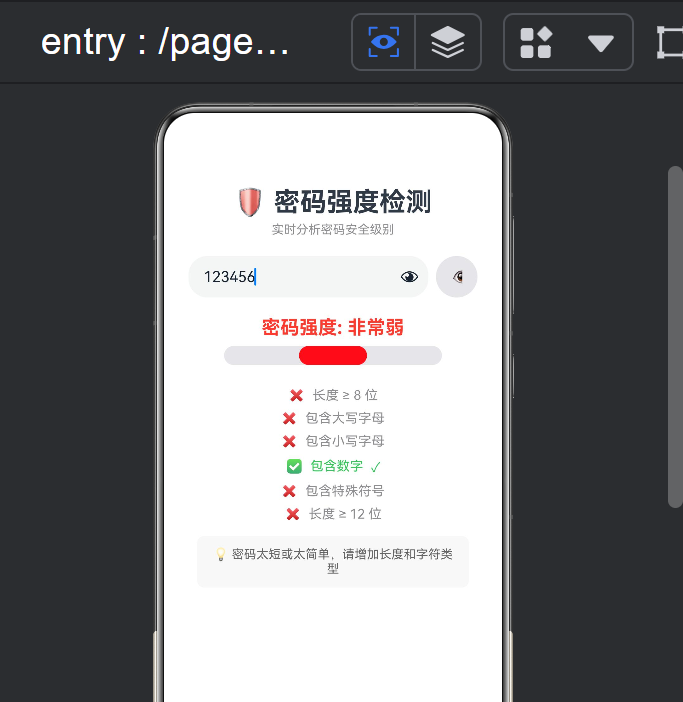
密码强度检测是密码生成器(index12)的姊妹篇------如果说密码生成器是"创造密码",那么密码强度检测就是"验证密码"。两者在功能上互补,在技术上也有不同的侧重:
- 实时分析 :不像密码生成器需要点击按钮,密码强度检测在用户输入的每一秒都在分析------每次
onChange触发时重新计算所有指标 - 正则表达式 :使用
/ [A-Z] /、/ [0-9] /等正则表达式检测字符类型 - 多维度评分:从长度、大小写、数字、符号 4 个维度 6 个条件综合评分
- 可视化反馈:强度条 + 检测项 checklist + 建议文字,三重反馈
- 密码可见切换 :使用
InputType.Password与InputType.Normal切换
本文将从正则表达式的 ArkTS 应用切入,深入实时分析的性能考量和多维度评分的设计思路。
二、完整源码
typescript
// index17.ets
@Entry
@Component
struct Index17 {
  @State password: string = '';
  @State showPassword: boolean = false;

  getLength(): number { return this.password.length; }

  hasUpper(): boolean { return /[A-Z]/.test(this.password); }

  hasLower(): boolean { return /[a-z]/.test(this.password); }

  hasNumber(): boolean { return /[0-9]/.test(this.password); }

  hasSymbol(): boolean {
    return /[^A-Za-z0-9]/.test(this.password);
  }

  getScore(): number {
    let s = 0;
    const len = this.getLength();
    if (len >= 8) s += 1;
    if (len >= 12) s += 1;
    if (len >= 16) s += 1;
    if (this.hasUpper() && this.hasLower()) s += 2;
    if (this.hasNumber()) s += 1;
    if (this.hasSymbol()) s += 2;
    if (len >= 6 && len < 8) s -= 1;
    return Math.max(0, s);
  }

  getStrengthLevel(): number {
    const s = this.getScore();
    if (s <= 2) return 0;
    if (s <= 4) return 1;
    if (s <= 6) return 2;
    return 3;
  }

  getStrengthText(): string {
    const l = this.getStrengthLevel();
    if (l === 0) return '非常弱';
    if (l === 1) return '弱';
    if (l === 2) return '中等';
    if (l === 3) return '强';
    return '';
  }

  getStrengthColor(): string {
    const l = this.getStrengthLevel();
    if (l === 0) return '#FF3B30';
    if (l === 1) return '#FF9500';
    if (l === 2) return '#FFCC00';
    if (l === 3) return '#34C759';
    return '#8E8E93';
  }

  getBarWidth(): string {
    return ((this.getStrengthLevel() + 1) * 25) + '%';
  }

  getSuggestion(): string {
    const l = this.getStrengthLevel();
    if (this.getLength() === 0) return '请开始输入密码...';
    if (l === 0) return '密码太短或太简单,请增加长度和字符类型';
    if (l === 1) return '建议包含大小写字母、数字和特殊符号';
    if (l === 2) return '还可以更强,试试加长到12位以上';
    return '密码强度很好,可以放心使用!';
  }

  @Builder
  checkItem(label: string, ok: boolean) {
    Row({ space: 8 }) {
      Text(ok ? '✅' : '❌').fontSize(14)
      Text(label).fontSize(14).fontColor(ok ? '#34C759' : '#8E8E93')
      if (ok) {
        Text('✓').fontSize(14).fontColor('#34C759')
      }
    }.margin({ top: 4 })
  }

  build() {
    Column() {
      Text('🛡️ 密码强度检测').fontSize(28).fontWeight(FontWeight.Bold)
        .margin({ top: 40, bottom: 5 })
      Text('实时分析密码安全级别').fontSize(13).fontColor('#8E8E93')
        .margin({ bottom: 20 })

      Row() {
        TextInput({ placeholder: '输入密码进行检测', text: this.password })
          .layoutWeight(1).height(44).fontSize(16)
          .type(this.showPassword ? InputType.Normal : InputType.Password)
          .onChange((v: string) => { this.password = v; })

        Button(this.showPassword ? '🙈' : '👁').width(44).height(44)
          .fontSize(18).backgroundColor('#E5E5EA').borderRadius(22)
          .margin({ left: 8 })
          .onClick(() => { this.showPassword = !this.showPassword; })
      }.width('85%').margin({ bottom: 20 })

      if (this.getLength() > 0) {
        Text('密码强度: ' + this.getStrengthText()).fontSize(20)
          .fontWeight(FontWeight.Bold).fontColor(this.getStrengthColor())
          .margin({ bottom: 8 })

        Stack() {
          Column().width('80%').height(20)
            .backgroundColor('#E5E5EA').borderRadius(10)
          Column().width(this.getBarWidth()).height(20)
            .backgroundColor(this.getStrengthColor()).borderRadius(10)
            .alignRules({
              center: { anchor: '__container__', align: VerticalAlign.Center },
              middle: { anchor: '__container__', align: HorizontalAlign.Start }
            })
        }.width('80%').height(20).margin({ bottom: 20 })

        Column({ space: 4 }) {
          this.checkItem('长度 ≥ 8 位', this.getLength() >= 8)
          this.checkItem('包含大写字母', this.hasUpper())
          this.checkItem('包含小写字母', this.hasLower())
          this.checkItem('包含数字', this.hasNumber())
          this.checkItem('包含特殊符号', this.hasSymbol())
          this.checkItem('长度 ≥ 12 位', this.getLength() >= 12)
        }.width('80%').margin({ bottom: 15 })

        Column() {
          Text('💡 ' + this.getSuggestion())
            .fontSize(13).fontColor('#666666').textAlign(TextAlign.Center)
        }.width('80%').padding(12)
          .backgroundColor('#F8F8F8').borderRadius(8)
      } else {
        Text('💡 输入密码后将自动分析强度')
          .fontSize(14).fontColor('#AAAAAA').margin({ top: 40 })
      }
    }
    .width('100%').height('100%')
    .justifyContent(FlexAlign.Start)
    .alignItems(HorizontalAlign.Center)
  }
}
三、核心技术解析
3.1 正则表达式:在 ArkTS 中进行字符类型检测
密码强度检测的基石是正则表达式。ArkTS 支持标准的 JavaScript 正则表达式语法:
typescript
hasUpper(): boolean { return /[A-Z]/.test(this.password); }
hasLower(): boolean { return /[a-z]/.test(this.password); }
hasNumber(): boolean { return /[0-9]/.test(this.password); }
hasSymbol(): boolean { return /[^A-Za-z0-9]/.test(this.password); }每个正则表达式的含义:
| 函数 | 正则 | 匹配对象 | 示例匹配 |
|---|---|---|---|
hasUpper() |
/[A-Z]/ |
任何大写字母 A-Z | "Hello" 中的 H |
hasLower() |
/[a-z]/ |
任何小写字母 a-z | "Hello" 中的 e,l,l,o |
hasNumber() |
/[0-9]/ |
任何数字 0-9 | "Pass123" 中的 1,2,3 |
hasSymbol() |
/[^A-Za-z0-9]/ |
非字母数字的字符 | "Pass!@#" 中的 !,@,# |
特别注意 hasSymbol() 的设计 :它使用了否定字符集 [^...]------匹配"不在 A-Z、a-z、0-9 范围内的任意字符"。这比列出一堆特殊符号([!@#$%^&*()])更具通用性,因为用户可能输入任意符号(如 emoji 😊),而预定义列表会漏掉这些。
RegExp.prototype.test() 方法:
typescript
/[A-Z]/.test('Hello123')  // true (包含大写 H)
/[A-Z]/.test('hello123')  // false (全部小写)
test() 返回布尔值,是正则匹配中最常用的方法之一。其他常用方法:
| 方法 | 返回 | 适用场景 |
|---|---|---|
regex.test(str) |
boolean |
是否存在匹配 |
str.match(regex) |
string[] |
获取匹配结果 |
str.search(regex) |
number |
匹配的位置索引 |
str.replace(regex, '') |
string |
替换匹配内容 |
3.2 实时分析:每次 onChange 触发全量检测
与 index12(密码生成器)需要点击按钮不同,密码强度检测在每次用户输入时自动分析:
typescript
TextInput({ placeholder: '...', text: this.password })
  .onChange((v: string) => {
    this.password = v;  // 每次输入 → 触发 @State 更新 → 所有检测方法重新求值
})数据流:
用户输入 'a' → onChange('a') → this.password = 'a'
                                 → @State 触发 UI 更新
                                 → this.getLength() 执行 → 1
                                 → this.hasUpper() 执行 → /[A-Z]/.test('a') → false
                                 → this.hasLower() 执行 → /[a-z]/.test('a') → true
                                 → this.hasNumber() 执行 → /[0-9]/.test('a') → false
                                 → this.hasSymbol() 执行 → /[^A-Za-z0-9]/.test('a') → false
                                 → this.getScore() 执行 → ...
                                 → UI 全部刷新
性能考量 :每次 onChange 触发完整的 UI 重建,听起来很浪费,但实际上这个开销极低------密码字符串通常很短(<50 字符),5 个正则检测每个都是微秒级的操作。
对比:如果检测逻辑非常复杂(如调用远程 API 检查密码是否在泄露数据库中),就需要"防抖"(debounce)处理。但在纯客户端正则检测的场景下,实时分析没有任何性能问题。
3.3 多维度评分算法
评分算法从 5 个维度 6 个条件综合评估密码强度:
typescript
getScore(): number {
  let s = 0;
  if (this.getLength() >= 8)  s += 1;   // 维度1: 基础长度
  if (this.getLength() >= 12) s += 1;   // 维度1: 进阶长度
  if (this.getLength() >= 16) s += 1;   // 维度1: 高级长度
  if (this.hasUpper() && this.hasLower()) s += 2;  // 维度2: 大小写混合
  if (this.hasNumber())       s += 1;   // 维度3: 包含数字
  if (this.hasSymbol())       s += 1;   // 维度4: 包含符号
  if (len >= 6 && len < 8)    s -= 1;   // 惩罚: 短密码
  return Math.max(0, s);
}评分权重设计:
| 条件 | 得分 | 权重理由 |
|---|---|---|
| 长度 ≥ 8 | +1 | 基础安全门槛(大多数网站要求) |
| 长度 ≥ 12 | +1 | 中等长度(推荐) |
| 长度 ≥ 16 | +1 | 高强度长度 |
| 大小写混合 | +2 | 最高权重------因为同时满足两个字符集 |
| 包含数字 | +1 | 增加字符多样性 |
| 包含符号 | +2 | 最高权重------符号增加搜索空间效果最显著 |
| 长度 6-7 | -1 | 惩罚过短的密码 |
总分范围 :-1 到 8,但通过 Math.max(0, s) 确保最低为 0。
强度等级映射:
| 得分 | 等级 | 等级值 | 含义 |
|---|---|---|---|
| 0-2 | 非常弱 | 0 | 几秒内即可暴力破解 |
| 3-4 | 弱 | 1 | 较弱,容易被破解 |
| 5-6 | 中等 | 2 | 可接受,建议加强 |
| 7-8 | 强 | 3 | 安全强度高 |
3.4 强度条:25% 等分的设计
typescript
getBarWidth(): string {
  return ((this.getStrengthLevel() + 1) * 25) + '%';
}
强度条被分为 4 个等份,每份 25%,对应 4 个等级:
| 等级 | level + 1 |
宽度 | 显示效果 |
|---|---|---|---|
| 非常弱 (0) | 1 | 25% | 红色,只填满 1/4 |
| 弱 (1) | 2 | 50% | 橙色,填满 1/2 |
| 中等 (2) | 3 | 75% | 黄色,填满 3/4 |
| 强 (3) | 4 | 100% | 绿色,全部填满 |
这是一个离散的 4 段式进度条 ,而非连续变化。优点是用户能清晰地感知"我还差一个等级"。如果改为连续变化(score / 8 * 100%),显示的百分比(如 62.5%)对用户不够直观。
3.5 密码可见性切换
typescript
@State showPassword: boolean = false;

TextInput({ placeholder: '输入密码进行检测', text: this.password })
  .type(this.showPassword ? InputType.Normal : InputType.Password)

Button(this.showPassword ? '🙈' : '👁')
  .onClick(() => { this.showPassword = !this.showPassword; })
InputType.Password 会将输入内容替换为圆点(●),防止窥屏。用户点击 👁 按钮切换到 InputType.Normal 显示明文。
InputType 枚举:
| 类型 | 行为 | 场景 |
|---|---|---|
InputType.Normal |
显示明文 | 普通文本输入 |
InputType.Password |
显示为 ● | 密码输入 |
InputType.Number |
数字键盘 + 数字过滤 | 验证码、金额 |
InputType.PhoneNumber |
电话键盘 | 手机号 |
InputType.Email |
邮箱键盘 | 邮箱地址 |
3.6 @Builder checkItem:带状态图标的检测项
typescript
@Builder
checkItem(label: string, ok: boolean) {
  Row({ space: 8 }) {
    Text(ok ? '✅' : '❌').fontSize(14)
    Text(label).fontSize(14).fontColor(ok ? '#34C759' : '#8E8E93')
  }.margin({ top: 4 })
}这是一个纯展示型 的 @Builder------它根据 ok 参数决定:
- 图标:✅ 已满足 / ❌ 未满足
- 文字颜色:绿色(
#34C759)已满足 / 灰色(#8E8E93)未满足
调用处:
typescript
this.checkItem('长度 ≥ 8 位', this.getLength() >= 8)
this.checkItem('包含大写字母', this.hasUpper())
this.checkItem('包含小写字母', this.hasLower())
this.checkItem('包含数字', this.hasNumber())
this.checkItem('包含特殊符号', this.hasSymbol())
this.checkItem('长度 ≥ 12 位', this.getLength() >= 12)
当用户输入 "Hello123" 时:
| 检测项 | 结果 | 图标 | 颜色 |
|---|---|---|---|
| 长度 ≥ 8 | 8 ✅ | ✅ | 绿色 |
| 包含大写字母 | H | ✅ | 绿色 |
| 包含小写字母 | ello | ✅ | 绿色 |
| 包含数字 | 123 | ✅ | 绿色 |
| 包含特殊符号 | 无 | ❌ | 灰色 |
| 长度 ≥ 12 | 8 ❌ | ❌ | 灰色 |
未满足的项标红/灰色,告诉用户"还缺什么才能变强"------这是一种可操作的反馈(actionable feedback),不仅告诉用户"不够强",还告诉"哪里不够强"。
四、index12(密码生成器)vs index17(密码强度检测)对比
两者是密码安全的一体两面:
| 维度 | index12 密码生成器 | index17 密码强度检测 |
|---|---|---|
| 目标 | 创建密码 | 验证密码 |
| 方向 | 输出密码 | 接收输入 |
| 核心组件 | Toggle 开关 |
TextInput 密码输入 |
| 核心算法 | 字符池随机抽取 | 正则多维度检测 |
| 交互模式 | 点击生成 | 实时分析(onChange) |
| 输出 | 密码字符串 | 强度等级 + 建议 |
| 可视反馈 | 强度标签 | 强度条 + 检查清单 |
| 密码可见 | 始终可见 | 可切换隐藏/显示 |
一个完整的密码管理工具链应该是:index12 生成 → index17 验证 → 用户确认。
五、密码安全的实用建议
作为面向用户的应用,密码强度检测器背后有一些密码安全的通识值得了解:
- 长度胜过复杂度 :
aaaaaaaaaaaaaaaa(16位纯字母)比A1!(4位全类型)更难暴力破解------搜索空间是 26^16 ≈ 4 × 10^22 vs 95³ ≈ 8.5 × 10^5 - 不要用个人信息:生日、姓名、电话是最先被尝试的"
- 每个网站用不同密码:密码重用是最大的安全风险之一
- 使用密码管理器:1Password、LastPass、Bitwarden 等工具自动生成和保存密码
- 开启双因素认证(2FA):密码 + 验证码的双重保护
六、扩展方向
- 常见密码黑名单:检查密码是否在"123456"、"password"等常见弱密码列表中
- 键盘序列检测:检测 "qwerty"、"asdfgh" 等相邻键盘序列
- 重复字符惩罚:连续重复字符("aaa")降低评分
- pwned 密码检查:通过 API(如 Have I Been Pwned)查询密码是否在数据泄露中
- 多语言支持:检测中文、日文等非 ASCII 字符
- 渐进式建议:根据密码的具体短板给出定制化改进建议
七、本章小结
| 知识点 | 掌握程度 |
|---|---|
正则表达式 / [A-Z] / 检测字符类型 |
✅ 掌握 4 种字符检测 |
InputType.Password 密码隐藏 |
✅ 掌握密码可见性切换 |
| 多维度评分算法 | ✅ 理解 6 条件加权求和 |
| 4 段式强度条 | ✅ 掌握离散等级映射 |
@Builder checkItem 可操作反馈 |
✅ 理解 actionable feedback |
| 实时分析 vs 点击触发 | ✅ 理解两种交互模式差异 |
密码强度检测器展示了 ArkTS 中正则表达式实时分析 的核心能力,以及多维度评分算法的设计模式。它和密码生成器共同构成了 ArkTS 密码安全工具链的基础。