写在前面
源码 。
截至当前,我们的mvc还不支持接收来自request中的参数,本文来实现这部分内容。最终实现如下效果:
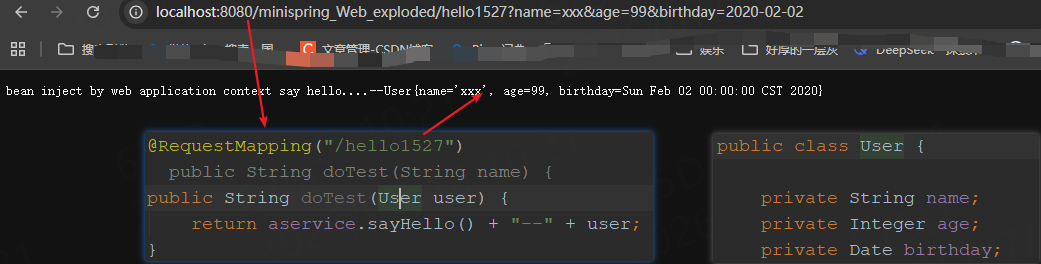
1:正文
来定义类WebDataBinder作为数据绑定的总入口,如下:
java
// com.hc.minispring.web.v5_databind.WebDataBinder
// 1:负责完成值绑定职责的类(大一统的类)
public class WebDataBinder {
    // 要绑定的目标对象
    private Object target;
    private Class<?> clz;

    private String objectName;

    AbstractPropertyAccessor propertyAccessor;

    public WebDataBinder(Object target) {
        this(target,"");
    }
    public WebDataBinder(Object target, String targetName) {
        // ...
    }

    public void bind(HttpServletRequest request) {
        PropertyValues mpvs = assignParameters(request);
//        addBindValues(mpvs, request);
        doBind(mpvs);
    }

    private void doBind(PropertyValues mpvs) {
        applyPropertyValues(mpvs);

    }

    protected void applyPropertyValues(PropertyValues mpvs) {
        getPropertyAccessor().setPropertyValues(mpvs);
    }
    // ...
}这里我们通过bind方法完成绑定,首先解析request中的参数转换到PropertyValues(name,value等)中,然后通过doBind方法完成绑定。现在我们已经有了要绑定的对象,也有了需要绑定的数据,接下来就是怎么绑定的问题了。
首先request中的数据类型到目标对象的数据类型是需要一个转换操作的,为此定义接口:
java
/**
 * string->其他类型 接口
 * 如string->Integer,通过setText方法完成转换,通过getValue方法获取转换结果
 * 这里方法名称起的有些欠考虑,不是特别的见名知意!!!
 */
public interface PropertyEditor {
	// 先调用该方法完成转换,通过该方法完成转换,具体实现类需要在本地定义变量存储转化结果,已被用
	void setAsText(String text);
	// 不依赖输入,直接设置一个合理的数据(比如期望获取方法执行的时间场景???)
	void setValue(Object value);
	// 通过该方法获取转换后的结果,必须在setAsText方法后调用
	Object getValue();
	// 获取原始值
	String getAsText();
}
接着我们就可以定义各种实现类了,为了管理这些实现类,再来定义类PropertyEditorRegistrySupport负责维护并返回这些实现类们:
java
package com.hc.minispring.web.v5_databind.beans;

// ...

public class PropertyEditorRegistrySupport {
	private Map<Class<?>, PropertyEditor> defaultEditors;
	private Map<Class<?>, PropertyEditor> customEditors;

	public PropertyEditorRegistrySupport() {
		registerDefaultEditors();
	}

	protected void registerDefaultEditors() {
		createDefaultEditors();
	}

	public PropertyEditor getDefaultEditor(Class<?> requiredType) {
		return this.defaultEditors.get(requiredType);
	}

	private void createDefaultEditors() {
		this.defaultEditors = new HashMap<>(64);

		// Default instances of collection editors.
		this.defaultEditors.put(int.class, new CustomNumberEditor(Integer.class, false));
		this.defaultEditors.put(Integer.class, new CustomNumberEditor(Integer.class, true));
		this.defaultEditors.put(long.class, new CustomNumberEditor(Long.class, false));
		this.defaultEditors.put(Long.class, new CustomNumberEditor(Long.class, true));
//		this.defaultEditors.put(float.class, new CustomNumberEditor(Float.class, false));
//		this.defaultEditors.put(Float.class, new CustomNumberEditor(Float.class, true));
//		this.defaultEditors.put(double.class, new CustomNumberEditor(Double.class, false));
//		this.defaultEditors.put(Double.class, new CustomNumberEditor(Double.class, true));
//		this.defaultEditors.put(BigDecimal.class, new CustomNumberEditor(BigDecimal.class, true));
//		this.defaultEditors.put(BigInteger.class, new CustomNumberEditor(BigInteger.class, true));

		this.defaultEditors.put(String.class, new StringEditor(String.class, true));

	}
    // ...

}
defaultEditors作为了内置的属性转换实现,customEditors作为用户自定义的属性转换实现(这种预留扩展口子的方式在我们日常工作中也要考虑用起来!!!)。再来定义PropertyEditorRegistrySupport类的子类com.hc.minispring.web.v5_databind.BeanWrapperImpl完成真正的绑定工作:
java
package com.hc.minispring.web.v5_databind;

import java.lang.reflect.Field;
import java.lang.reflect.InvocationTargetException;
import java.lang.reflect.Method;
import com.hc.minispring.web.v5_databind.beans.AbstractPropertyAccessor;
import com.hc.minispring.web.v5_databind.beans.PropertyValue;

public class BeanWrapperImpl extends AbstractPropertyAccessor {
	Object wrappedObject;
	Class<?> clz;

	public BeanWrapperImpl(Object object) {
		super();
		this.wrappedObject = object;
		this.clz = object.getClass();
	}

	@Override
	public void setPropertyValue(PropertyValue pv) {
		BeanPropertyHandler propertyHandler = new BeanPropertyHandler(pv.getName());
		PropertyEditor pe = this.getCustomEditor(propertyHandler.getPropertyClz());
		if (pe == null) {
			pe = this.getDefaultEditor(propertyHandler.getPropertyClz());

		}
		if (pe == null) {
			throw new IllegalArgumentException("can not find property editor for type: " + propertyHandler.getPropertyClz() + " ,please consider register one!");
		}
		if (pe != null) {
			pe.setAsText((String) pv.getValue());
			propertyHandler.setValue(pe.getValue());
		}
		else {
			propertyHandler.setValue(pv.getValue());
		}

	}

	// 负责设置值到目标对象中(反射)
	class BeanPropertyHandler {
		Method writeMethod = null;
		Method readMethod = null;
		Class<?> propertyClz = null;

		public Class<?> getPropertyClz() {
			return propertyClz;
		}

		public BeanPropertyHandler(String propertyName) {
			try {
				Field field = clz.getDeclaredField(propertyName);
				propertyClz = field.getType();
				this.writeMethod = clz.getDeclaredMethod("set"+propertyName.substring(0,1).toUpperCase()+propertyName.substring(1),propertyClz);
				this.readMethod = clz.getDeclaredMethod("get"+propertyName.substring(0,1).toUpperCase()+propertyName.substring(1));
			} catch (NoSuchMethodException e) {
				// ...
			}
		}

		public void setValue(Object value) {
				writeMethod.setAccessible(true);
				try {
					writeMethod.invoke(wrappedObject, value);
				} catch (IllegalAccessException e) {
                    // ...
				}
		}
	}

}
类BeanPropertyHandler负责通过反射设置值到目标对象中,接着就是通过具体数据类型获取对应的属性编辑器转换为目标类型值,最后反射设置,搞定!
还有一个问题,就是如何预留自定义编辑器的口子,为此定义接口:
java
/**
 * 负责注册自定义编辑器
 */
public interface WebBindingInitializer {
    void initBinder(WebDataBinder binder);
}
string转java.util.Date实现类:
java
public class DateInitializer implements WebBindingInitializer {
    public void initBinder(WebDataBinder binder) {
        binder.registerCustomEditor(Date.class, new CustomDateEditor(Date.class, "yyyy-MM-dd", false));
    }
}
CustomDateEditor自定义类:
java
package com.hc.minispring.web.v5_databind;

// ...

public class CustomDateEditor implements PropertyEditor {
    private Class<Date> dateClass;
    private DateTimeFormatter datetimeFormatter;
    private boolean allowEmpty;
    private Date value;

    public CustomDateEditor() throws IllegalArgumentException {
        this(Date.class, "yyyy-MM-dd", true);
    }

    // ...
}
注册到bean中:
xml
<?xml version="1.0" encoding="UTF-8"?>
<beans>
    <bean id="aservice" class="com.hc.minispring.web.v5_databind.test.AServiceImpl"/>

    <bean id="webBindingInitializer" class="com.hc.minispring.web.v5_databind.DateInitializer">    </bean>
</beans>
接着我们还需要完成对应类型初始化器的注册工作,这个工作我们在webdatabinder的工厂类中完成,创建webdatabinder类后完成注册,如下:
java
// com.hc.minispring.web.v5_databind.WebDataBinderFactory
package com.hc.minispring.web.v5_databind;

// ...

public class WebDataBinderFactory {
    //	public WebDataBinder createBinder(HttpServletRequest request, Object target, String objectName) {
    public WebDataBinder createBinder(HttpServletRequest request, Object target, String objectName, WebApplicationContext wac) {
        WebDataBinder wbd= new WebDataBinder(target,objectName);

//		initBinder(wbd, request);
        initBinder(wbd, request, wac);
        return wbd;
    }
    protected void initBinder(WebDataBinder dataBinder, HttpServletRequest request, WebApplicationContext wac){

        try {
//			WebBindingInitializer webBindingInitializer = (WebBindingInitializer) wac.getBean("webBindingInitializer");
//			Map<String, WebBindingInitializer> webBindingInitializerMap = wac.getBeansOfType(WebBindingInitializer.class);
            String[] beanNames = wac.getBeanDefinitionNames();
            String[] parentBeanNames = ((AnnotationConfigWebApplicationContext)wac).getParentApplicationContext().getBeanDefinitionNames();
            String[] mergedBeanNames = new String[beanNames.length + parentBeanNames.length];
            System.arraycopy(beanNames, 0, mergedBeanNames, 0, beanNames.length);
            System.arraycopy(parentBeanNames, 0, mergedBeanNames, beanNames.length, parentBeanNames.length);
            // 注册自定义数据绑定编辑器
            for (String mergedBeanName : mergedBeanNames) {
                if (mergedBeanName.indexOf("webBindingInitializer") >= 0) {
                    ((WebBindingInitializer) wac.getBean("webBindingInitializer")).initBinder(dataBinder);
                }
            }
			/*for (Map.Entry<String, WebBindingInitializer> stringWebBindingInitializerEntry : webBindingInitializerMap.entrySet()) {
				stringWebBindingInitializerEntry.getValue().initBinder(dataBinder);
			}*/
//			webBindingInitializer.initBinder(dataBinder);
        } catch (BeansException e) {
            e.printStackTrace();
        }

    }
}
那么我们应该在哪里切入修改呢?因为是调用目标方法时设置参数,所以自然应该是在负责方法执行的HandlerAdapter中了,这里是基于RequestMapping的实现类RequestMappingHandlerAdapter,修改如下:
java
// com.hc.minispring.web.v4_split_dispatcher.RequestMappingHandlerAdapter
package com.hc.minispring.web.v4_split_dispatcher;

// ...

/**
 * 基于@RequestMapping注解的具具体执行方法实现类
 */
public class RequestMappingHandlerAdapter implements HandlerAdapter {
    WebApplicationContext wac;

    // 负责注册数据绑定,自定义编辑器
    WebBindingInitializer webBindingInitializer;


    public RequestMappingHandlerAdapter(WebApplicationContext wac) {
        this.wac = wac;

        try {
            this.webBindingInitializer = (WebBindingInitializer) this.wac.getBean("webBindingInitializer");

        } catch (BeansException e) {
            e.printStackTrace();
        }
    }

    @Override
    public void handle(HttpServletRequest request, HttpServletResponse response, Object handler)
            throws Exception {
        handleInternal(request, response, (HandlerMethod) handler);
    }

    private void handleInternal(HttpServletRequest request, HttpServletResponse response,
                                HandlerMethod handlerMethod) throws Exception {
/*
			Method method = handler.getMethod();
			Object obj = handler.getBean();
			Object objResult = null;
			try {
				objResult = method.invoke(obj);
			} catch (IllegalAccessException e) {
				e.printStackTrace();
			} catch (IllegalArgumentException e) {
				e.printStackTrace();
			} catch (InvocationTargetException e) {
				e.printStackTrace();
			}

		try {
			response.getWriter().append(objResult.toString());
		} catch (IOException e) {
			e.printStackTrace();
		}*/

        WebDataBinderFactory binderFactory = new WebDataBinderFactory();
        Parameter[] methodParameters = handlerMethod.getMethod().getParameters();
        Object[] methodParamObjs = new Object[methodParameters.length];
        int i = 0;        //对调用方法里的每一个参数,处理绑定
        for (Parameter methodParameter : methodParameters) {
            Object methodParamObj = methodParameter.getType().newInstance();
            //给这个参数创建WebDataBinder
            WebDataBinder wdb = binderFactory.createBinder(request, methodParamObj, methodParameter.getName(), wac);

//            // 注册自定义数据绑定编辑器
//            this.webBindingInitializer.initBinder(wdb);
            wdb.bind(request);
            methodParamObjs[i] = methodParamObj;
            i++;
        }
        Method invocableMethod = handlerMethod.getMethod();
        Object returnObj = invocableMethod.invoke(handlerMethod.getBean(), methodParamObjs);
        response.getWriter().append(returnObj.toString());
    }

}
定义一个controller测试下:
java
public class HelloController {

    @Autowired
    private AService aservice;

    @RequestMapping("/hello1527")
//    public String doTest(String name) {
    public String doTest(User user) {
        return aservice.sayHello() + "--" + user;
    }

}
java
public class User {

    private String name;
    private Integer age;
    private Date birthday;

    // ...
}
启动测试:
