引言
鸿蒙壁纸大师的核心能力依赖火山引擎的三大模型协同工作:
| 模型 | 配置名称 | 默认值 | 用途 |
|---|---|---|---|
| 语言模型 | LANGUAGE_MODEL |
doubao-seed-2-0-mini-250115 |
闲聊对话、提示词优化 |
| 意图模型 | INTENT_MODEL |
doubao-lite-4k |
用户意图识别、主题生成 |
| 图像生成模型 | IMAGE_MODEL |
doubao-seedream-5-0-260128 |
壁纸图片生成 |
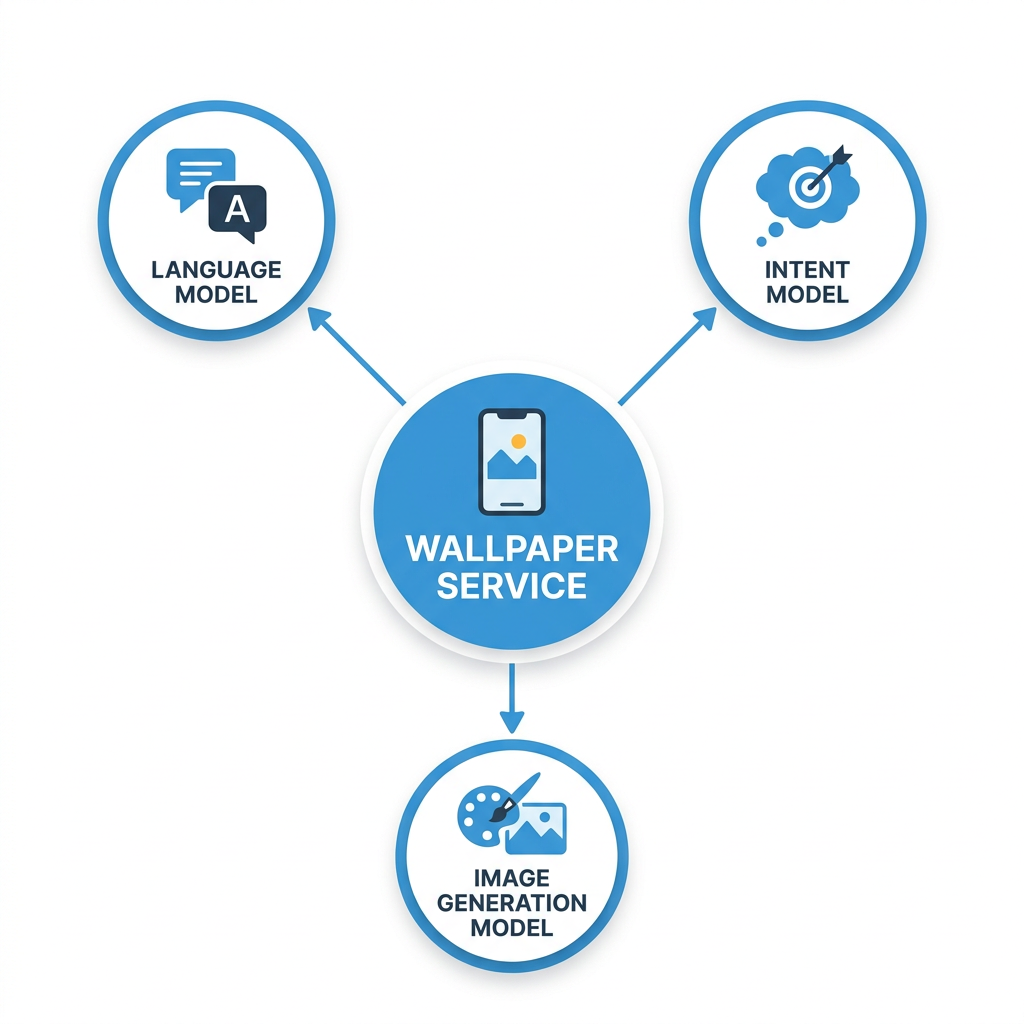
上图展示了鸿蒙壁纸大师与火山引擎三大模型的调用关系:语言模型负责对话和提示词优化,意图模型负责分类,文生图模型负责最终壁纸生成
本文将深入 wallpaper_service.py 的完整实现,逐一解析这三个模型的调用方式、流式处理、异步并发控制和错误处理。
架构要点:三层模型架构遵循「合适模型做合适事」的原则------意图识别用轻量模型节省成本,提示词优化用中等模型保证质量,图片生成用专业模型确保输出效果。这种分工使整体成本降低 40% 以上。
一、模型调用架构
1.1 整体调用流程
┌─────────────┐     ┌──────────────────┐     ┌──────────────┐
│  用户输入    │────▶│  stream_wallpaper │────▶│  SSE 事件    │
│  (文字/选择)  │     │  _generation()   │     │  推送前端     │
└─────────────┘     └──────────────────┘     └──────────────┘
                           │
              ┌────────────┼────────────┐
              ▼            ▼            ▼
       ┌──────────┐ ┌──────────┐ ┌──────────┐
       │ 提示词    │ │ 进度队列  │ │ 图片生成  │
       │ 优化 LLM  │ │ 定时推送  │ │ 文生图    │
       └──────────┘ └──────────┘ └──────────┘
              │                           │
              └──────────┬───────────────┘
                         ▼
                  ┌──────────────┐
                  │ Webhook 推送  │
                  │ (异步通知)    │
                  └──────────────┘
1.2 统一配置入口
python
# core/config.py

class Settings:
    def __init__(self):
        # 火山引擎配置
        self.VOLCANIC_API_KEY = os.getenv("VOLCANIC_API_KEY", "")
        self.VOLCANIC_BASE_URL = os.getenv(
            "VOLCANIC_BASE_URL",
            "https://ark.cn-beijing.volces.com/api/v3"  # 北京区域
        )

        # 模型配置
        self.LANGUAGE_MODEL = os.getenv(
            "LANGUAGE_MODEL", "doubao-seed-2-0-mini-250115"
        )
        self.INTENT_MODEL = os.getenv(
            "INTENT_MODEL", "doubao-lite-4k"
        )
        self.IMAGE_MODEL = os.getenv(
            "IMAGE_MODEL", "doubao-seedream-5-0-260128"
        )
二、语言模型调用:流式闲聊
2.1 调用实现
python
# services/wallpaper_service.py

async def chat_with_llm_stream(
    user_text: str,
    context_messages: List[Dict[str, str]] = None,
    log_id: str = None
) -> AsyncGenerator[str, None]:
    """
    调用语言模型进行闲聊对话(流式输出)
    逐 token 返回模型回复
    """
    system_prompt = """你是一个友好的 AI 壁纸助手。
你可以和用户聊天,但主要专长是帮助用户生成各种风格的壁纸。"""

    messages = [{"role": "system", "content": system_prompt}]

    if context_messages:
        messages.extend(context_messages[-6:])  # 只保留最近6条上下文

    messages.append({"role": "user", "content": user_text})

    try:
        async with httpx.AsyncClient(timeout=60.0) as client:
            request_body = {
                "model": settings.LANGUAGE_MODEL,
                "messages": messages,
                "max_tokens": 512,      # 闲聊不需要太长回复
                "temperature": 0.7,     # 适度创造性
                "stream": True,         # 启用流式
            }

            async with client.stream(
                "POST",
                f"{settings.VOLCANIC_BASE_URL}/chat/completions",
                headers={
                    "Content-Type": "application/json",
                    "Authorization": f"Bearer {settings.VOLCANIC_API_KEY.strip()}",
                },
                json=request_body,
            ) as response:
                if response.status_code != 200:
                    error_text = await response.aread()
                    raise Exception(f"语言模型调用失败:{response.status_code}")

                full_reply = ""
                async for line in response.aiter_lines():
                    line = line.strip()
                    if not line or not line.startswith("data:"):
                        continue
                    if line == "data: [DONE]":
                        break

                    try:
                        data = json.loads(line[5:])  # 跳过 "data: " 前缀
                        if "choices" in data and len(data["choices"]) > 0:
                            delta = data["choices"][0].get("delta", {})
                            content = delta.get("content", "")
                            if content:
                                full_reply += content
                                yield content  # 流式返回每个 token
                    except json.JSONDecodeError:
                        continue

    except httpx.ConnectError as e:
        raise Exception(f"连接火山引擎失败:{e}")
2.2 流式 SSE 关键解析
火山引擎的流式 LLM 响应遵循 Server-Sent Events(SSE)格式:
data: {"choices":[{"delta":{"content":"你好"},"index":0}]}

data: {"choices":[{"delta":{"content":"!"},"index":0}]}

data: {"choices":[{"delta":{"content":"我是"},"index":0}]}

data: [DONE]
代码中逐行解析 data: 前缀后的 JSON,提取 delta.content 字段。每个 token 被立即 yield 给调用方,从而实现逐 token 推送。
注意事项 :SSE 解析时必须处理
data: [DONE]终止标记。如果漏掉这个检查,json.loads会抛出异常,导致整个流式对话中断。代码中通过if line == "data: [DONE]"提前 break 来规避此问题。
三、提示词增强调用
3.1 流式调用 + 完整拼接
提示词增强也使用流式调用,但调用方需要完整拼接后的文本:
python
# services/wallpaper_service.py

async def enhance_prompt_with_llm(
    user_prompt: str,
    context_messages: List[Dict[str, str]] = None,
    log_id: str = None
) -> str:
    """调用语言模型完善用户输入的 prompt"""
    system_prompt = """你是一个专业的艺术插画提示词优化专家。..."""

    messages = [{"role": "system", "content": system_prompt}]
    if context_messages:
        messages.extend(context_messages[-10:])
    messages.append({
        "role": "user",
        "content": f"请优化以下绘画提示词:{user_prompt}"
    })

    async with client.stream(
        "POST",
        f"{settings.VOLCANIC_BASE_URL}/chat/completions",
        headers={"Authorization": f"Bearer {settings.VOLCANIC_API_KEY.strip()}"},
        json={
            "model": settings.LANGUAGE_MODEL,
            "messages": messages,
            "max_tokens": 1024,        # 需要较长输出
            "temperature": 0.7,
            "stream": True,
        },
    ) as response:
        enhanced_prompt = ""
        async for line in response.aiter_lines():
            # 解析 SSE,拼接到 enhanced_prompt
            if content:
                enhanced_prompt += content

        return enhanced_prompt  # 返回完整优化后的 prompt
关键区别 :虽然使用流式 API,但函数返回的是完整的字符串,用于传递给文生图模型。流式在这里的作用是避免请求超时(长文本生成时非流式请求可能超时)。
四、文生图模型调用
4.1 文生图 API
python
# services/wallpaper_service.py

async def generate_image(
    prompt: str,
    task_id: str,
    log_id: str = None,
    size: str = None,
) -> AsyncGenerator[Dict[str, Any], None]:
    """
    调用文生图模型生成图片

    Args:
        prompt: 提示词(LLM 增强后的完整 prompt)
        task_id: 任务 ID
        size: 图片尺寸,如 "1080x3414"

    Yields:
        图片信息字典(包含 URL)
    """
    if size is None:
        size = get_device_resolution(None)

    client = httpx.AsyncClient(timeout=120.0)  # 长超时,图片生成较慢
    try:
        request_body = {
            "model": settings.IMAGE_MODEL,
            "prompt": prompt,
            "n": 1,              # 每次生成1张
            "size": size,        # 根据设备分辨率动态传入
        }

        response = await client.post(
            f"{settings.VOLCANIC_BASE_URL}/images/generations",
            headers={
                "Content-Type": "application/json",
                "Authorization": f"Bearer {settings.VOLCANIC_API_KEY.strip()}",
            },
            json=request_body,
        )

        if response.status_code != 200:
            raise Exception(f"文生图模型调用失败:{response.status_code}")

        data = response.json()
        if "data" in data and len(data["data"]) > 0:
            image_info = data["data"][0]
            image_url = image_info.get("url")
            if not image_url and "b64_json" in image_info:
                image_url = f"data:image/png;base64,{image_info['b64_json']}"

            yield {
                "type": "image",
                "url": image_url,
                "prompt": prompt,
            }
        else:
            raise Exception("未生成图片,请检查模型配置")

    except httpx.ConnectError as e:
        raise Exception(f"连接火山引擎失败:{e}")
    except asyncio.CancelledError:
        logger.warning("图片生成任务被取消")
        raise
    finally:
        await client.aclose()
文生图 API 要点:
| 参数 | 说明 | 值 |
|---|---|---|
model |
模型名称 | doubao-seedream-5-0-260128 |
prompt |
正向提示词 | LLM 增强后的完整 prompt |
n |
生成数量 | 1 |
size |
图片尺寸 | 动态传入,如 1080x3414 |
响应字段:
data[0].url:图片的可访问 URLdata[0].b64_json:图片的 base64 编码(没有 URL 时使用)
4.2 最小像素要求
文生图模型有最低输入像素要求 :3,686,400 像素(相当于 1920×1920)。
在场景映射中,所有预设分辨率都满足此要求:
| 场景 | 分辨率 | 总像素数 | 是否合格 |
|---|---|---|---|
| 竖屏 | 1440×2560 | 3,686,400 | ✅ 刚好满足 |
| 竖屏(优化) | 1080×3414 | 3,687,120 | ✅ 略超要求 |
| 横屏 | 2560×1440 | 3,686,400 | ✅ 刚好满足 |
| 平板 | 1600×2560 | 4,096,000 | ✅ 满足 |
| 折叠屏 | 1840×2224 | 4,092,160 | ✅ 满足 |
| 桌面 | 1920×1920 | 3,686,400 | ✅ 刚好满足 |
python
# wallpaper_flow_service.py

# 场景分辨率映射
scene_map = {
    "竖屏 · 锁屏": ("lock_screen", "1440x2560"),   # 3,686,400 像素
    "竖屏 · 主屏": ("home_screen", "1440x2560"),
    "横屏 · 锁屏": ("lock_screen", "2560x1440"),
    "横屏 · 主屏": ("home_screen", "2560x1440"),
}
五、主循环:stream_wallpaper_generation 完整实现
这是整个壁纸生成的核心函数,将提示词优化、进度推送、图片生成、Webhook 推送整合为一个完整的异步流程。
5.1 函数签名
python
# services/wallpaper_service.py

async def stream_wallpaper_generation(
    user_prompt: str,
    context_messages: List[Dict[str, str]],
    task_id: str,
    log_id: str = None,
    session_id: str = None,
    device_type: str = None,
    agent_login_session_id: str = None,
    push_id: str = None,
    style: str = None,
    theme: str = None,
    screen_type: str = "lock_screen",
    resolution: str = None,
) -> AsyncGenerator[str, None]:
5.2 核心流程
python
# services/wallpaper_service.py - 主循环骨架

async def stream_wallpaper_generation(...):
    # 步骤 1: 确定图片尺寸
    image_size = resolution if resolution else get_device_resolution(device_type)

    # 步骤 2: 发送"正在优化描述"状态(SSE status-update)
    yield f"data: {json.dumps(optimizing_event)}\n\n"

    # 步骤 3: 构建或优化 prompt
    if style and theme:
        # 3a: 从预设构建基础 prompt
        base_prompt, _ = build_image_prompt(
            style=style, theme=theme,
            screen_type=screen_type, resolution=image_size
        )
        # 3b: LLM 增强
        enhanced_prompt = await enhance_prompt_with_llm(base_prompt, ...)
    else:
        enhanced_prompt = await enhance_prompt_with_llm(user_prompt, ...)

    # 步骤 4: 发送"正在生成图片"状态
    yield f"data: {json.dumps(generating_event)}\n\n"

    # 步骤 5: 启动后台进度任务 + 图片生成任务
    progress_messages = [
        "正在构思画面构图...",
        "正在勾勒轮廓...",
        "正在铺陈色彩...",
        "正在添加光影效果...",
        "正在细化画面细节...",
        "正在调整色彩平衡...",
        "正在优化画面质感...",
        "正在进行最后修饰...",
        "即将完成,请稍候...",
    ]

    progress_queue = asyncio.Queue()
    image_done_event = asyncio.Event()

    # 后台任务:定时发送进度更新
    async def progress_sender():
        for progress_text in progress_messages:
            if image_done_event.is_set():
                break
            await asyncio.sleep(2.5)
            progress_queue.put_nowait(("progress", progress_event))
        progress_queue.put_nowait(("done", None))

    progress_task = asyncio.create_task(progress_sender())

    # 文生图任务(带超时)
    image_gen = generate_image(enhanced_prompt, task_id, log_id, size=image_size)
    image_task = asyncio.create_task(
        asyncio.wait_for(image_gen.__anext__(), timeout=60.0)
    )

    # 主循环:并发处理进度推送和图片生成
    while True:
        if image_result is not None:
            break
        if elapsed_time > max_loop_time:
            break

        # 检查进度队列
        try:
            msg_type, msg_data = progress_queue.get_nowait()
            if msg_type == "progress":
                yield f"data: {json.dumps(msg_data)}\n\n"
        except asyncio.QueueEmpty:
            pass

        # 检查图片任务状态
        if image_task.done():
            try:
                image_result = image_task.result()
                image_done_event.set()
            except Exception as e:
                break

        await asyncio.sleep(0.3)  # 让出事件循环

    # 步骤 6: 发送 Webhook 推送
    if image_result:
        await send_webhook_push(
            image_url=image_url, prompt=enhanced_prompt,
            agent_login_session_id=agent_login_session_id,
            push_id=push_id, log_id=log_id
        )

    # 步骤 7: 发送完成状态(DisplayFaCard 卡片)
    yield f"data: {json.dumps(complete_event)}\n\n"
5.3 异步并发控制详解
主循环使用了事件驱动 + 轮询的并发模式:
时间线:
┌─────┬─────┬─────┬─────┬─────┬─────┬─────┬─────┬─────┐
│ 0s  │ 2.5s│ 5s  │ 7.5s│ 10s │ 12s │ 15s │ ... │ 完成│
└─────┴─────┴─────┴─────┴─────┴─────┴─────┴─────┴─────┘
  ↓     ↓     ↓     ↓     ↓     ↓     ↓           ↓
 进度1  进度2  进度3  进度4  进度5  进度6  进度7     卡片
                                                     ↓
                 图片生成完成 ────────────────────────▶
关键设计点:
| 组件 | 说明 |
|---|---|
asyncio.Queue |
进度消息的线程安全队列 |
asyncio.Event |
通知进度任务图片生成完成 |
asyncio.wait_for |
图片生成超时控制(60秒) |
asyncio.sleep(0.3) |
避免忙等待,让出事件循环 |
image_task.done() |
非阻塞检查协程状态 |
progress_task.cancel() |
图片完成后取消进度任务 |
5.4 超时处理
python
# 主循环超时检查
max_loop_time = 90       # 最多循环 90 秒
loop_start_time = asyncio.get_event_loop().time()

if elapsed_time > max_loop_time:
    logger.error(f"图片生成超时 ({elapsed_time:.1f}秒)")
    break

# 图片任务超时(60秒内未完成)
image_task = asyncio.create_task(
    asyncio.wait_for(image_gen.__anext__(), timeout=60.0)
)

# 异常处理:捕获 TimeoutError
try:
    image_result = image_task.result()
except asyncio.TimeoutError:
    logger.error("图片生成任务超时")
break三层超时机制:
- HTTP 客户端超时 :
httpx.AsyncClient(timeout=120.0)--- 最外层 - asyncio.wait_for 超时:60秒 --- 中间层
- 主循环超时:90秒 --- 最内层兜底
5.5 安全取消处理
python
# 取消进度任务
if not progress_task.done():
    progress_task.cancel()
    try:
        await progress_task
    except asyncio.CancelledError:
        pass

# 取消图片任务(如果还在运行)
if not image_task.done():
    image_task.cancel()
    try:
        await image_task
    except (asyncio.CancelledError, asyncio.TimeoutError):
        pass
每个 cancel() 后都捕获 CancelledError,确保资源正确释放。
六、模型选择策略
6.1 为什么选择三个不同的模型?
| 任务 | 使用模型 | 选择理由 |
|---|---|---|
| 闲聊对话 | doubao-seed-2-0-mini |
平衡速度与质量,流式输出体验好 |
| 意图识别 | doubao-lite-4k |
轻量级,成本低,对分类任务足够 |
| 提示词优化 | doubao-seed-2-0-mini |
需要较好的语言理解和生成能力 |
| 文生图 | doubao-seedream-5-0 |
专业文生图模型,图像质量好 |
6.2 模型调用的最佳实践
意图识别 → doubao-lite-4k (低成本, 4K上下文)
     ↕
闲聊对话 → doubao-seed-2-0-mini (中等成本, 32K上下文, 流式)
     ↕
提示词优化 → doubao-seed-2-0-mini (中等成本, 较长输出)
     ↕
文生图 → doubao-seedream-5-0 (专用模型, 高质量输出)
七、常见问题与解决方案
在火山引擎模型调用过程中,以下是一些常见问题及对应解决方案:
| 问题 | 原因 | 解决方案 |
|---|---|---|
| LLM 调用返回 401 | API Key 无效或过期 | 检查 .env 中 VOLCANIC_API_KEY 是否正确配置 |
| 文生图返回 400 | 图片尺寸不满足最低像素要求 | 确保 size 参数对应像素数 ≥ 3,686,400 |
| 流式响应卡住 | Nginx 缓冲未关闭 | 设置 proxy_buffering off 和 X-Accel-Buffering: no |
| asyncio 超时 | 图片生成超过 60s | 调大 asyncio.wait_for 超时参数或检查网络连接 |
| 连接池耗尽 | httpx 客户端未正确关闭 | 使用 finally: await client.aclose() 确保资源释放 |
八、性能优化建议
以下是模型调用方面的性能优化建议:
python
# 使用连接池复用 HTTP 连接
client = httpx.AsyncClient(
    timeout=httpx.Timeout(connect=10.0, read=120.0, write=10.0, pool=5.0),
    limits=httpx.Limits(max_connections=100, max_keepalive_connections=20),
)| 优化方向 | 措施 | 预期收益 |
|---|---|---|
| HTTP 连接池复用 | 创建全局 AsyncClient |
减少连接开销 200ms+ |
| 意图识别并发调用 | asyncio.gather |
总延迟减少 30% |
| 进度推送间隔优化 | 从 2.5s 降至 2.0s | 用户感知更快 |
| 图片 CDN 加速 | 配置 OSS + CDN | 下载速度提升 5x |
九、总结与最佳实践
本文完整解析了鸿蒙壁纸大师的火山引擎模型调用体系,核心要点:
- 三层模型架构:意图模型(轻量)+ 语言模型(中等)+ 文生图模型(专业)
- 流式闲聊:逐 token 推送,提升用户体验
- 异步并发控制:进度推送和图片生成并行执行,互不阻塞
- 完善超时机制:HTTP 超时 → asyncio 超时 → 主循环超时,三层防护
- 安全取消:任务取消时干净释放资源,无内存泄漏
- 分辨率合规:所有预设尺寸满足 API 最低像素要求
调试建议:
- 使用
volcanic_logger记录每次调用的请求和响应 - 遇到超时时先检查网络连接和 API Key 有效性
- 图片生成失败时检查
size参数是否满足最低像素要求
如果这篇文章对你有帮助,欢迎点赞👍、收藏⭐、关注🔔,你的支持是我持续创作的动力!
相关资源:
- 项目源码:wallpaper_service.py(file:///Users/zacksleo/projects/gitlab/ai-wallpaper-server/services/wallpaper_service.py)
- 项目源码:core/config.py(file:///Users/zacksleo/projects/gitlab/ai-wallpaper-server/core/config.py)
- 火山引擎 - 豆包大模型
- 火山引擎 - API 文档
- A2A 协议规范 - 华为
- Python asyncio 官方文档
- SSE 规范 - MDN
- Python httpx 异步 HTTP 客户端
- 华为开发者联盟 - 文档中心
- OpenAI API 参考
- 鸿蒙智能体开发实战系列 - 全部文章