基于FastAPI和PaddleOCR的身份证识别系统。系统提供两个API接口:通过上传图片文件识别和通过图片URL识别身份证信息。核心功能包括利用PaddleOCR进行文字识别,通过正则表达式提取身份证关键字段(姓名、性别、民族、地址等),并封装为JSON返回。项目采用Docker部署,配置了资源限制和模型持久化。开发经验总结指出:优先使用Linux环境、图片质量决定OCR准确率、FastAPI需注意参数校验和文件处理、Docker构建要优化镜像体积。系统适合集成到各类需要身份证识别的应用中。
1.依赖项
requirements.txt
fastapi==0.104.1
uvicorn[standard]==0.24.0.post1
opencv-python==4.6.0.66
paddleocr==2.7.0.0
paddlepaddle==2.6.2
urllib3==2.0.7
numpy==1.26.4
python-multipart==0.0.18- 程序入口 main.py
配置nginx代理需加上proxy_headers=True
import os
import warnings
import asyncio
import requests
from contextlib import asynccontextmanager
from fastapi import FastAPI, UploadFile, File, Form
from paddleocr import PaddleOCR
from idcard_parse import parse_idcard
from fastapi import Request
from uuid import uuid4

warnings.filterwarnings("ignore")

ocr = None

@asynccontextmanager
async def lifespan(app: FastAPI):
    # 服务启动时加载模型
    global ocr
    ocr = PaddleOCR(use_angle_cls=True, lang="ch", use_gpu=False)
    yield
    # 服务关闭时执行清理工作
    ocr = None

app = FastAPI(title="身份证识别后端", lifespan=lifespan)

def sync_ocr(img_path):
    return ocr.ocr(img_path, cls=True)

# 原有接口:上传文件识别
@app.post("/ocr/idcard")
async def id_ocr(file: UploadFile = File(...)):
    img_bytes = await file.read()
    temp_path = "./temp/idcard.jpg"
    os.makedirs("temp", exist_ok=True)
    with open(temp_path, "wb") as f:
        f.write(img_bytes)
    ocr_result = await asyncio.to_thread(sync_ocr, temp_path)
    text_lines = []
    if ocr_result[0]:
        for line in ocr_result[0]:
            txt = line[1][0]
            text_lines.append(txt)
    data = parse_idcard(text_lines)
    os.remove(temp_path)
    return {"code": 200, "msg": "success", "data": data}


@app.post("/ocr/url")
async def ocr_by_url(request: Request):
    body = await request.json()
    file_url = body.get("file_url", "").strip()
    if not file_url:
        return {"code": 400, "msg": "图片地址为空", "data": {}}

    filename = f"{ uuid4()}.jpg"
    temp_path = os.path.join("temp", filename)
    os.makedirs("temp", exist_ok=True)
    try:
        resp = requests.get(file_url, timeout=15, verify=False)
        if resp.status_code != 200:
            return {"code": 400, "msg": "图片地址访问失败", "data": {}}
        with open(temp_path, "wb") as f:
            f.write(resp.content)
        ocr_result = await asyncio.to_thread(sync_ocr, temp_path)
        text_lines = []
        if ocr_result[0]:
            for line in ocr_result[0]:
                txt = line[1][0]
                text_lines.append(txt)
        data = parse_idcard(text_lines)
        return {"code": 200, "msg": "success", "data": data}
    except Exception as e:
        return {"code": 500, "msg": f"处理失败:{str(e)}", "data": {}}
    finally:
        if os.path.exists(temp_path):
            os.remove(temp_path)


# 首页接口
@app.get("/")
async def home():
    data = "server is running!"
    return {"code": 200, "msg": "server is running", "data": data}


if __name__ == '__main__':
    import uvicorn
uvicorn.run("main:app", host="0.0.0.0", port=8000, workers=1,proxy_headers=True)-
辅助工具模块 idcard_parse.py
import re
def parse_idcard(result_list):
raw_lines = result_list
raw_text = "".join([s.replace(" ", "") for s in raw_lines])
print("OCR原始文本:", raw_text)res = { "name": None, "sex": None, "nation": None, "birthday": None, "address": None, "id_num": None, "issue": None, "valid_date": None } # 身份证号 id_pattern = re.compile(r'[1-9]\d{5}(18|19|20)\d{2}(0[1-9]|1[0-2])(0[1-9]|[12]\d|3[01])\d{3}[\dXx]') id_match = id_pattern.search(raw_text) if id_match: res["id_num"] = id_match.group() birth_str = res["id_num"][6:14] res["birthday"] = f"{birth_str[:4]}-{birth_str[4:6]}-{birth_str[6:8]}" sex_num = int(res["id_num"][16]) res["sex"] = "男" if sex_num % 2 == 1 else "女" # 姓名匹配,后续出现"性别"就截断 name_match = re.search(r"姓名(.+?)(?=性别|民族)", raw_text) if name_match: name = name_match.group(1) name = re.sub(r"性别", "", name) res["name"] = name # 民族匹配,遇到出生就截止 nation_match = re.search(r"民族(.+?)(?=出生|住)", raw_text) if nation_match: nation = nation_match.group(1) res["nation"] = nation # 住址 addr_match = re.search(r"住(.*?)公民身份号码", raw_text) if addr_match: addr = addr_match.group(1).strip() res["address"] = addr # 签发机关 issue_match = re.search(r"([\u4e00-\u9fa5]{4,}公安局)", raw_text) if issue_match: res["issue"] = issue_match.group(1) # 有效期 valid_match = re.search(r"(\d{4}\.\d{2}\.\d{2}\-\d{4}\.\d{2}\.\d{2})", raw_text) if valid_match: res["valid_date"] = valid_match.group(1) return res
4.docker配置文件 docker-compose.yml
services:
  idcard-ocr:
    build: .
    container_name: idcard-ocr
    restart: always
    ports:
      - "8000:8000"
    volumes:
      # 模型持久化,避免每次启动重复下载PP‑OCR模型
      - paddle_model:/root/.paddleocr
      - ./temp:/app/temp
    environment:
      - FLAGS_use_onednn=0
      - PADDLE_PIR_DISABLE=1
    # 不要增加scale或者多workers,paddle‑paddle会崩溃
    deploy:
      resources:
        limits:
          cpus: '2'
          memory: 2G

volumes:
  paddle_model:
5.容器构建配置 Dockerfile
FROM python:3.10

RUN apt update && apt install -y \
    libgomp1 \
    libgfortran5 \
    libglib2.0-0 \
    libgl1 \
    && rm -rf /var/lib/apt/lists/*

ENV PIP_INDEX_URL=https://pypi.tuna.tsinghua.edu.cn/simple
ENV PYTHONUNBUFFERED=1
WORKDIR /app

COPY requirements.txt .
RUN pip install --upgrade pip && \
    pip install -r requirements.txt

COPY app/ /app/

CMD ["uvicorn", "main:app", "--host", "0.0.0.0", "--port", "8000", "--workers", "1"]
6.项目结构
.
├── app
│   ├── idcard_parse.py
│   └── main.py
├── docker-compose.yml
├── Dockerfile
└── requirements.txt
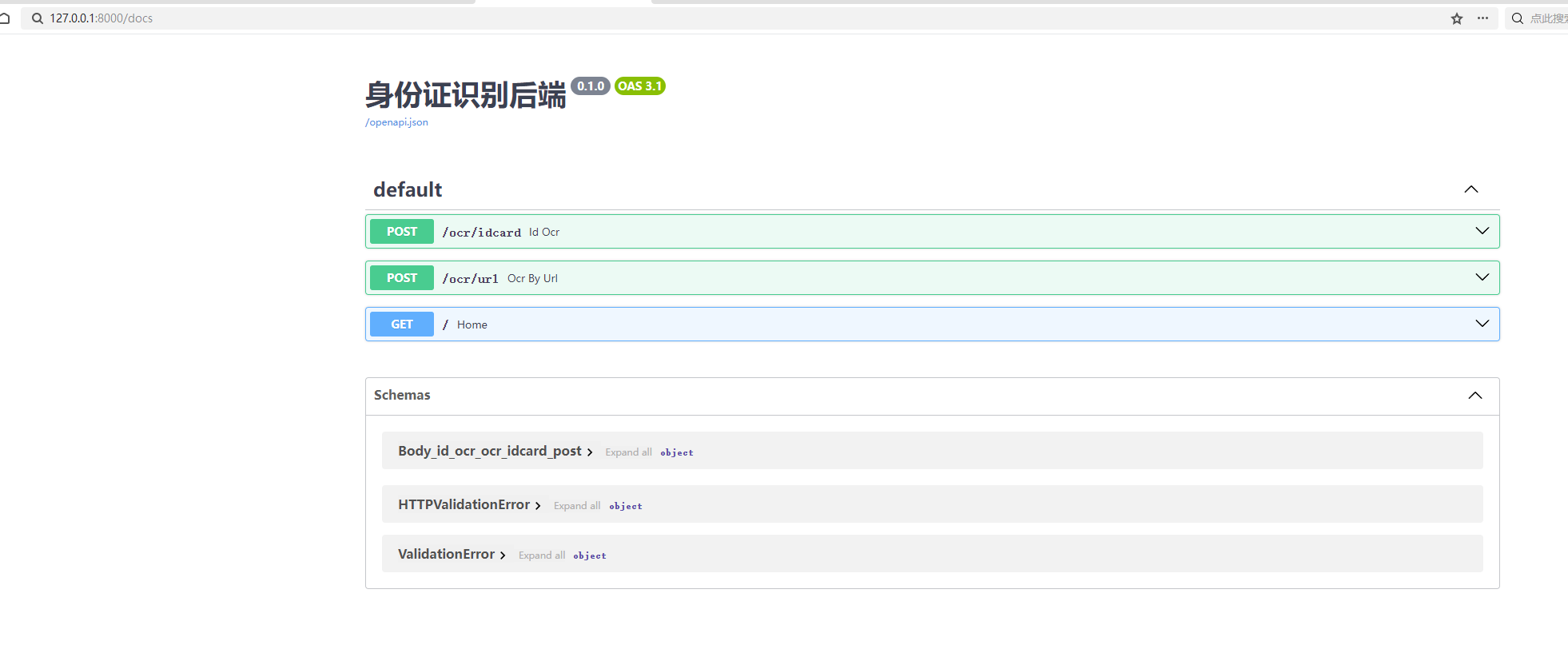
7.API 地址
7、整体经验总结
- Paddle‑Paddle 生态:开发优先 Linux,Windows 开发坑非常多;正式部署全部放到 Linux 服务器;
- OCR 识别优先级:图像预处理(透视矫正)>正则文本处理,图片质量决定识别成功率;
- FastAPI 开发规范:生产环境优先 Pydantic 模型做参数校验;并发场景临时文件必须唯一;
- Docker 构建原则:分层构建 + .dockerignore,减小镜像体积;模型文件用数据卷持久化;
- C# 调用原则:HttpClient 全局单例,区分 Json‑Body 和 Form‑Data 两种请求格式。