一、文档切分和入库
学习目标:将长文档切分成小块,生成向量并存入Qdrant,为RAG问答做准备。
1.为什么需要切分文档?
1.1问题场景
csharp
你的文档:一份5000字的项目README
    ↓
❌ 直接整篇生成向量 → 语义模糊,检索不准
❌ 直接整篇发给大模型 → 超出上下文窗口
1.2 切分的价值
csharp
项目README(5000字)
    ↓ 切分
┌─────────────┐
│ 片段1:项目简介      │ → 向量1
│ 片段2:技术架构      │ → 向量2
│ 片段3:快速开始      │ → 向量3
│ 片段4:API文档       │ → 向量4
│ 片段5:常见问题      │ → 向量5
└─────────────┘
    ↓
用户问:"怎么安装这个项目?"
    ↓
检索到最相关的片段3 → 准确回答 ✅
1.3 切分策略
| 策略 | 说明 | 适用场景 |
|---|---|---|
| 按段落切分 | 以空行分割 | 结构清晰的文档 |
| 按固定长度切分 | 每N个字符/Token切一块 | 通用场景 |
| 按语义切分 | 用模型判断边界 | 复杂文档 |
| 按标题切分 | 根据Markdown标题层级 | 技术文档 |
二、C#实现文档切分
2.1 创建文档切分类
csharp
using System;
using System.Collections.Generic;
using System.Linq;
using System.Text;
using System.Threading.Tasks;

namespace ConsoleApp1.Service
{
    using System.Text.RegularExpressions;

    public class DocumentChunker
    {
        private readonly int _chunkSize;
        private readonly int _overlap;

        /// <summary>
        /// 文档切分器
        /// </summary>
        /// <param name="chunkSize">每块最大字符数</param>
        /// <param name="overlap">重叠字符数(保留上下文)</param>
        public DocumentChunker(int chunkSize = 500, int overlap = 50)
        {
            _chunkSize = chunkSize;
            _overlap = overlap;
        }

        /// <summary>
        /// 按段落切分(优先保持段落完整)
        /// </summary>
        public List<DocumentChunk> ChunkByParagraph(string text, string source = "unknown")
        {
            var chunks = new List<DocumentChunk>();
            var paragraphs = text.Split(new[] { "\r\n\r\n", "\n\n" }, StringSplitOptions.RemoveEmptyEntries);

            foreach (var para in paragraphs)
            {
                // 如果段落本身不长,直接作为一个块
                if (para.Length <= _chunkSize)
                {
                    chunks.Add(new DocumentChunk
                    {
                        Id = chunks.Count,
                        Text = para.Trim(),
                        Source = source,
                        ChunkIndex = chunks.Count
                    });
                }
                else
                {
                    // 长段落进一步按句子切分
                    var subChunks = ChunkByFixedLength(para, source);
                    chunks.AddRange(subChunks);
                }
            }

            return chunks;
        }

        /// <summary>
        /// 按固定长度切分(带重叠)
        /// </summary>
        public List<DocumentChunk> ChunkByFixedLength(string text, string source = "unknown")
        {
            var chunks = new List<DocumentChunk>();
            int start = 0;

            while (start < text.Length)
            {
                int end = Math.Min(start + _chunkSize, text.Length);

                // 尽量在句子边界截断(句号、问号、感叹号)
                if (end < text.Length)
                {
                    int sentenceEnd = FindSentenceBoundary(text, end, 50);
                    if (sentenceEnd > start)
                    {
                        end = sentenceEnd;
                    }
                }

                var chunkText = text.Substring(start, end - start).Trim();
                if (!string.IsNullOrEmpty(chunkText))
                {
                    chunks.Add(new DocumentChunk
                    {
                        Id = chunks.Count,
                        Text = chunkText,
                        Source = source,
                        ChunkIndex = chunks.Count
                    });
                }

                // 移动指针,保留重叠部分
                start = end - _overlap;
                if (start < 0) start = 0;
                if (start >= text.Length) break;
                if (start == end) break; // 防止死循环
            }

            return chunks;
        }

        /// <summary>
        /// 在指定位置附近找句子边界
        /// </summary>
        private int FindSentenceBoundary(string text, int position, int maxLookAhead)
        {
            var sentenceEndChars = new[] { '。', '?', '!', '.', '?', '!', '\n' };
            int searchEnd = Math.Min(position + maxLookAhead, text.Length);

            for (int i = position; i < searchEnd; i++)
            {
                if (sentenceEndChars.Contains(text[i]))
                {
                    return i + 1; // 包含结束符
                }
            }

            // 找不到合适边界,找空格
            for (int i = position; i < searchEnd; i++)
            {
                if (char.IsWhiteSpace(text[i]))
                {
                    return i;
                }
            }

            return position;
        }

        /// <summary>
        /// 按Markdown标题切分
        /// </summary>
        public List<DocumentChunk> ChunkByMarkdownHeaders(string markdown, string source = "unknown")
        {
            var chunks = new List<DocumentChunk>();
            var lines = markdown.Split('\n');
            var currentChunk = new StringBuilder();
            string currentHeader = "根";

            foreach (var line in lines)
            {
                // 检测标题(# 开头)
                if (line.StartsWith("#"))
                {
                    // 保存当前块
                    if (currentChunk.Length > 0)
                    {
                        chunks.Add(new DocumentChunk
                        {
                            Id = chunks.Count,
                            Text = $"{currentHeader}\n{currentChunk.ToString().Trim()}",
                            Source = source,
                            ChunkIndex = chunks.Count
                        });
                        currentChunk.Clear();
                    }
                    currentHeader = line.Trim('#').Trim();
                }
                else
                {
                    currentChunk.AppendLine(line);
                }
            }

            // 保存最后一块
            if (currentChunk.Length > 0)
            {
                chunks.Add(new DocumentChunk
                {
                    Id = chunks.Count,
                    Text = $"{currentHeader}\n{currentChunk.ToString().Trim()}",
                    Source = source,
                    ChunkIndex = chunks.Count
                });
            }

            return chunks;
        }
    }

    /// <summary>
    /// 文档块
    /// </summary>
    public class DocumentChunk
    {
        public int Id { get; set; }
        public string Text { get; set; }
        public string Source { get; set; }
        public int ChunkIndex { get; set; }
        public float[] Vector { get; set; }
    }
}
2.2 准备测试文档
创建一份测试文档 sample_doc.txt:
csharp
# C# 编程指南

## 项目简介
C#(读作 "C Sharp")是微软开发的一种面向对象的编程语言。
它结合了 C++ 的强大功能和 Java 的易用性,是 .NET 平台的主要开发语言。

## 主要特性
1. 面向对象:支持类、继承、多态等面向对象特性。
2. 类型安全:强类型语言,编译时检查类型错误。
3. 垃圾回收:自动管理内存,减少内存泄漏风险。
4. LINQ:语言集成查询,方便数据操作。
5. 异步编程:async/await 关键字简化异步代码编写。

## 快速开始

### 安装 .NET SDK
首先,从微软官网下载并安装 .NET SDK。
安装完成后,打开命令行验证安装:
dotnet --version

### 创建第一个程序
创建一个新的控制台应用:
dotnet new console -n HelloWorld
cd HelloWorld

编辑 Program.cs 文件:
Console.WriteLine("Hello, World!");

运行程序:
dotnet run

## 常用数据类型
C# 中的基本数据类型包括:
- int:32位整数
- double:双精度浮点数
- string:字符串
- bool:布尔值
- DateTime:日期时间

## 集合类型
List<T>:动态数组,最常用的集合类型。
Dictionary<TKey, TValue>:键值对集合。
Array:固定长度的数组。
Queue<T>:先进先出队列。
Stack<T>:后进先出栈。

## 常见问题

### 1. C# 和 Java 有什么区别?
C# 和 Java 都是面向对象的编程语言,但有以下主要区别:
- C# 支持结构体和指针(不安全代码)
- C# 支持运算符重载
- C# 有 LINQ 和 async/await
- Java 运行在 JVM 上,C# 运行在 .NET CLR 上

### 2. 如何学习 C#?
推荐学习路径:
1. 掌握基础语法
2. 学习面向对象编程
3. 熟悉 .NET 类库
4. 实战项目练习
5. 深入研究高级特性
2.3入库脚本
csharp
using System.Text;
using System.Text.Json;

class Program
{
    static async Task Main(string[] args)
    {
        Console.WriteLine("=== 文档切分和入库 ===\n");

        // 1. 配置
        string qdrantUrl = "你的Qdrant集群URL";
        string qdrantApiKey = "你的Qdrant API Key";
        string qwenApiKey = "你的千问API Key";
        string collectionName = "my_knowledge";  //你的qdrant 集合名

        // 2. 初始化服务
        var qdrant = new QdrantService(qdrantUrl, qdrantApiKey);
        var embedding = new QwenEmbeddingClient(qwenApiKey);
        var chunker = new DocumentChunker(chunkSize: 500, overlap: 50);

        // 3. 读取文档
        string docPath = "sample_document.txt";
        if (!File.Exists(docPath))
        {
            Console.WriteLine($"❌ 文档不存在: {docPath}");
            return;
        }

        string content = File.ReadAllText(docPath, Encoding.UTF8);

        // 4. 切分文档(按Markdown标题)
        Console.WriteLine("📄 正在切分文档...");
        var chunks = chunker.ChunkByMarkdownHeaders(content, source: docPath);

        if (chunks.Count == 0)
        {
            Console.WriteLine("⚠️ 切分结果为空,尝试按段落切分");
            chunks = chunker.ChunkByParagraph(content, source: docPath);
        }

        Console.WriteLine($"📊 共切分为 {chunks.Count} 个块\n");

        // 5. 打印切分预览
        Console.WriteLine("=== 切分预览 ===");
        for (int i = 0; i < Math.Min(chunks.Count, 5); i++)
        {
            string preview = chunks[i].Text.Length > 80
                ? chunks[i].Text.Substring(0, 80) + "..."
                : chunks[i].Text;
            Console.WriteLine($"[{i}] {preview}");
        }
        if (chunks.Count > 5)
        {
            Console.WriteLine($"... 还有 {chunks.Count - 5} 个块");
        }
        Console.WriteLine();

        // 6. 创建集合(如果不存在)
        bool exists = await qdrant.CollectionExistsAsync(collectionName);
        if (!exists)
        {
            Console.WriteLine($"📦 创建集合: {collectionName}");
            await qdrant.CreateCollectionAsync(collectionName, vectorSize: 1024);
        }
        else
        {
            Console.WriteLine($"⚠️ 集合 '{collectionName}' 已存在,跳过创建");
        }

        // 7. 生成向量并入库
        Console.WriteLine("\n🔄 正在生成向量并入库...");

        var points = new List<QdrantPoint>();
        int processed = 0;

        foreach (var chunk in chunks)
        {
            try
            {
                // 生成向量
                var vector = await embedding.GenerateEmbeddingAsync(chunk.Text);

                // 构建Payload
                var payload = new Dictionary<string, object>
                {
                    ["text"] = chunk.Text,
                    ["source"] = chunk.Source,
                    ["chunk_index"] = chunk.ChunkIndex
                };

                points.Add(new QdrantPoint
                {
                    Id = chunk.Id,
                    Vector = vector,
                    Payload = payload
                });

                processed++;
                Console.Write($"\r  进度: {processed}/{chunks.Count} ({processed * 100 / chunks.Count}%)");

                // 批量入库(每10条一批)
                if (points.Count >= 10)
                {
                    await qdrant.UpsertPointsAsync(collectionName, points.ToArray());
                    points.Clear();
                    // 避免API限流
                    await Task.Delay(100);
                }
            }
            catch (Exception ex)
            {
                Console.WriteLine($"\n❌ 处理块 {chunk.Id} 失败: {ex.Message}");
            }
        }

        // 保存剩余的点
        if (points.Count > 0)
        {
            await qdrant.UpsertPointsAsync(collectionName, points.ToArray());
        }

        Console.WriteLine($"\n\n✅ 入库完成!共处理 {processed} 个文档块");

        // 8. 验证入库结果
        Console.WriteLine("\n🔍 验证入库结果...");
        var sampleVector = await embedding.GenerateEmbeddingAsync("C# 基础");
        var results = await qdrant.SearchAsync(collectionName, sampleVector, topK: 3);

        Console.WriteLine("\n=== 检索验证 ===");
        Console.WriteLine($"查询: C# 基础");
        foreach (var item in results)
        {
            if (item.Payload.TryGetValue("text", out var text))
            {
                string preview = text.ToString().Length > 100
                    ? text.ToString().Substring(0, 100) + "..."
                    : text.ToString();
                Console.WriteLine($"Score: {item.Score:F4}\n{preview}\n");
            }
        }
    }
}
补充类1 QWenEmbeddingClient.cs:
csharp
using System;
using System.Collections.Generic;
using System.Linq;
using System.Text;
using System.Threading.Tasks;
using ConsoleApp1.Common;
using System.Net.Http;
using System.Text.Json;

namespace ConsoleApp1.Service
{
    public class QwenEmbeddingClient
    {
        private readonly HttpClient _httpClient;
        private const string API_URL = "https://dashscope.aliyuncs.com/compatible-mode/v1/embeddings";

        public QwenEmbeddingClient(string apiKey)
        {
            _httpClient = new HttpClient();
            _httpClient.DefaultRequestHeaders.Add("Authorization", $"Bearer {apiKey}");
        }

        /// <summary>
        /// 生成文本向量(千问API)
        /// </summary>
        public async Task<float[]> GenerateEmbeddingAsync(string text)
        {
            var request = new
            {
                model = "text-embedding-v3",
                input = text
            };

            var json = JsonSerializer.Serialize(request);
            var content = new StringContent(json, Encoding.UTF8, "application/json");

            var response = await _httpClient.PostAsync(API_URL, content);
            var responseJson = await response.Content.ReadAsStringAsync();

            if (!response.IsSuccessStatusCode)
            {
                throw new Exception($"API调用失败:{responseJson}");
            }

            var doc = JsonDocument.Parse(responseJson);
            var embedding = doc.RootElement
                .GetProperty("data")[0]
                .GetProperty("embedding")
                .EnumerateArray()
                .Select(x => (float)x.GetDouble())
                .ToArray();

            return embedding;
        }
    }
}
补充类2 QdrantService.cs:
csharp
using System;
using System.Collections.Generic;
using System.Linq;
using System.Net.Http;
using System.Text;
using System.Text.Json;
using System.Threading.Tasks;

namespace ConsoleApp1.Service
{
    public class QdrantService
    {
        private readonly HttpClient _httpClient;
        private readonly JsonSerializerOptions _jsonOptions;

        /// <summary>
        /// 构造函数(支持本地和云端)
        /// </summary>
        /// <param name="baseUrl">本地: http://localhost:6333  云端: 你的Cluster URL</param>
        /// <param name="apiKey">云端需要,本地可为null</param>
        public QdrantService(string baseUrl, string apiKey = null)
        {
            _httpClient = new HttpClient
            {
                BaseAddress = new Uri(baseUrl)
            };

            // 云端需要 API Key 认证
            if (!string.IsNullOrEmpty(apiKey))
            {
                _httpClient.DefaultRequestHeaders.Add("api-key", apiKey);
            }

            _httpClient.DefaultRequestHeaders.Add("Accept", "application/json");

            _jsonOptions = new JsonSerializerOptions
            {
                PropertyNamingPolicy = JsonNamingPolicy.CamelCase
            };
        }

        /// <summary>
        /// 1. 创建集合
        /// </summary>
        public async Task CreateCollectionAsync(string collectionName, int vectorSize = 1024)
        {
            var request = new
            {
                vectors = new
                {
                    size = vectorSize,
                    distance = "Cosine"
                }
            };

            var json = JsonSerializer.Serialize(request, _jsonOptions);
            var content = new StringContent(json, Encoding.UTF8, "application/json");

            var response = await _httpClient.PutAsync($"collections/{collectionName}", content);

            if (!response.IsSuccessStatusCode)
            {
                var error = await response.Content.ReadAsStringAsync();
                throw new Exception($"创建集合失败: {response.StatusCode}, {error}");
            }

            Console.WriteLine($"✅ 集合 '{collectionName}' 创建成功");
        }

        /// <summary>
        /// 2. 插入向量(批量)
        /// </summary>
        public async Task UpsertPointsAsync(string collectionName, Model.QdrantPoint[] points)
        {
            var request = new { points = points };
            var json = JsonSerializer.Serialize(request, _jsonOptions);
            var content = new StringContent(json, Encoding.UTF8, "application/json");

            var response = await _httpClient.PutAsync($"collections/{collectionName}/points", content);

            if (!response.IsSuccessStatusCode)
            {
                var error = await response.Content.ReadAsStringAsync();
                throw new Exception($"插入向量失败: {response.StatusCode}, {error}");
            }

            Console.WriteLine($"✅ 成功插入 {points.Length} 条向量");
        }

        /// <summary>
        /// 3. 插入向量(单条)
        /// </summary>
        public async Task UpsertPointAsync(string collectionName, int id, float[] vector, Dictionary<string, object> payload)
        {
            var point = new Model.QdrantPoint
            {
                Id = id,
                Vector = vector,
                Payload = payload
            };
            await UpsertPointsAsync(collectionName, new[] { point });
        }

        /// <summary>
        /// 4. 向量搜索
        /// </summary>
        public async Task<List<Model.ScoredPoint>> SearchAsync(string collectionName, float[] queryVector, int topK = 5)
        {
            var request = new
            {
                vector = queryVector,
                limit = topK,
                with_payload = true
            };

            var json = JsonSerializer.Serialize(request, _jsonOptions);
            var content = new StringContent(json, Encoding.UTF8, "application/json");

            var response = await _httpClient.PostAsync($"collections/{collectionName}/points/search", content);

            if (!response.IsSuccessStatusCode)
            {
                var error = await response.Content.ReadAsStringAsync();
                throw new Exception($"搜索失败: {response.StatusCode}, {error}");
            }

            var responseJson = await response.Content.ReadAsStringAsync();
            var result = JsonSerializer.Deserialize<Model.QdrantSearchResult>(responseJson, _jsonOptions);

            return result?.Result ?? new List<Model.ScoredPoint>();
        }

        /// <summary>
        /// 5. 检查集合是否存在
        /// </summary>
        public async Task<bool> CollectionExistsAsync(string collectionName)
        {
            var response = await _httpClient.GetAsync($"collections/{collectionName}");
            return response.IsSuccessStatusCode;
        }

        /// <summary>
        /// 6. 删除集合
        /// </summary>
        public async Task DeleteCollectionAsync(string collectionName)
        {
            var response = await _httpClient.DeleteAsync($"collections/{collectionName}");

            if (!response.IsSuccessStatusCode)
            {
                var error = await response.Content.ReadAsStringAsync();
                throw new Exception($"删除集合失败: {response.StatusCode}, {error}");
            }

            Console.WriteLine($"✅ 集合 '{collectionName}' 已删除");
        }
    }
}
三、运行结果 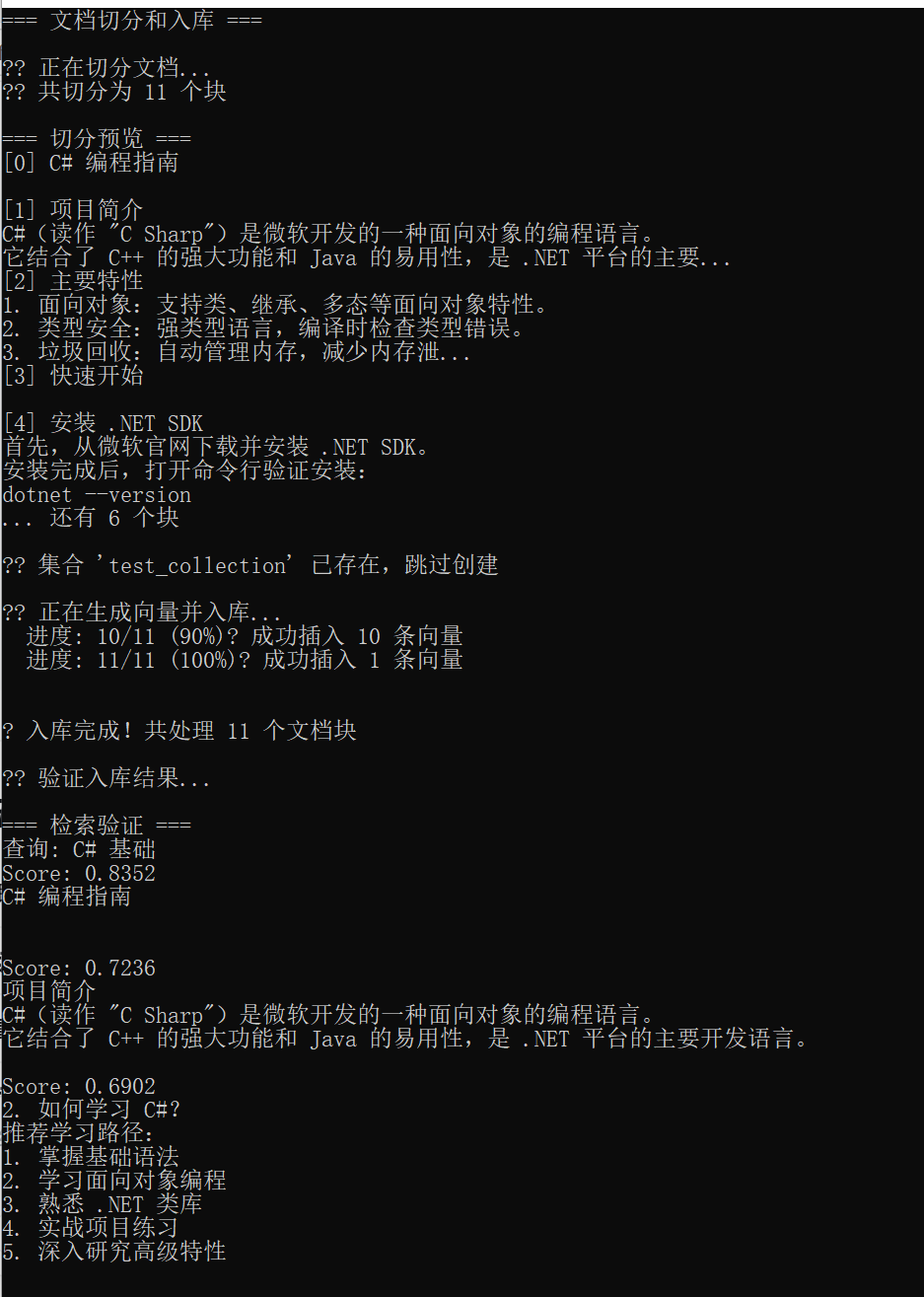
四、核心知识点总结
| 概念 | 说明 |
|---|---|
| 切分大小 | 一般 300-1000 字符,取决于Embedding模型 |
| 重叠 | 保留上下文,防止语义割裂 |
| 切分策略 | 按段落/固定长度/标题/语义 |
| 批量入库 | 减少网络请求,提高效率 |
| 验证 | 用测试查询验证检索效果 |