2026 年上半年,Anthropic 的工程团队悄悄发了两篇文章,解决了一个看似无聊、实则致命的问题:怎么让一个 Agent 连续跑四个小时不崩。答案是------别把 Agent 当聊天机器人用,把它当一个需要状态管理、错误恢复、上下文压缩的运行时系统。
一个语言模型,每次 API 调用都是独立事件。不记得上一轮说了什么,不知道三分钟前调过什么工具,更不会在进程崩溃后从断点恢复。它没有真正的主动性------本质上是被一个 while 循环推着走的。
这个 while 循环,加上它周围的一整套基础设施,就是 Harness。
OpenAI 在 2026 年 2 月正式把它命名为 "Harness Engineering",并定义为独立学科。在那之前,Codex 的团队已经通过 AI 生成了 100 万行生产代码------零手写------靠的不只是模型有多强,很大程度上是 Harness 足够可靠。
公式很简单:Agent = Model + Harness。但做起来不简单。
为什么 Demo 跑通了,生产环境一塌糊涂
先看一个真实数字:一个 10 步的工作流,每步 90% 成功率,整条链路跑通的概率只有 35%。提到 95%,也只有 60%。
Agent 不是那种"要么对要么错"的系统。它在每一步都面临多个决策分支(该调哪个工具、参数填什么、结果可信不可信、要不要重试),每个分支都在累积不确定性。单步的错误率看似可控,乘起来就是灾难。
Demo 看起来好,是因为你盯着它跑。出了问题你手动纠正、重启上下文、换个问法重来。没有人盯着的时候,它需要一个自动化的"你"------一个知道什么时候重试、什么时候放弃、什么时候换方案的运行时系统。
这就是 Harness 要解决的问题。
2026 年的一条核心结论来自 LangChain 自己的实践:同一个模型,Harness 改进后,Terminal Bench 排名从第 30 跳到第 5,分数从 52.8% 提到 66.5% 。Harness 设计的差异可以拉开 40 分的任务完成率差距,模型没变。
架构拆解:一个 Harness 由哪些层组成
2026 年 4 月的 arXiv 论文《Architectural Design Decisions in Harnesses》(2604.18071)对 70 个开源 Agent 系统做了实证分析,结论是 60% 的系统采用 Agent Loop 作为核心执行模式。但 Loop 只是骨架,真正的差异在上面长出的五层结构。
第一层:推理-行动循环(ReAct)
ReAct 循环是 Harness 的心脏。它的结构简单到只有四步循环:
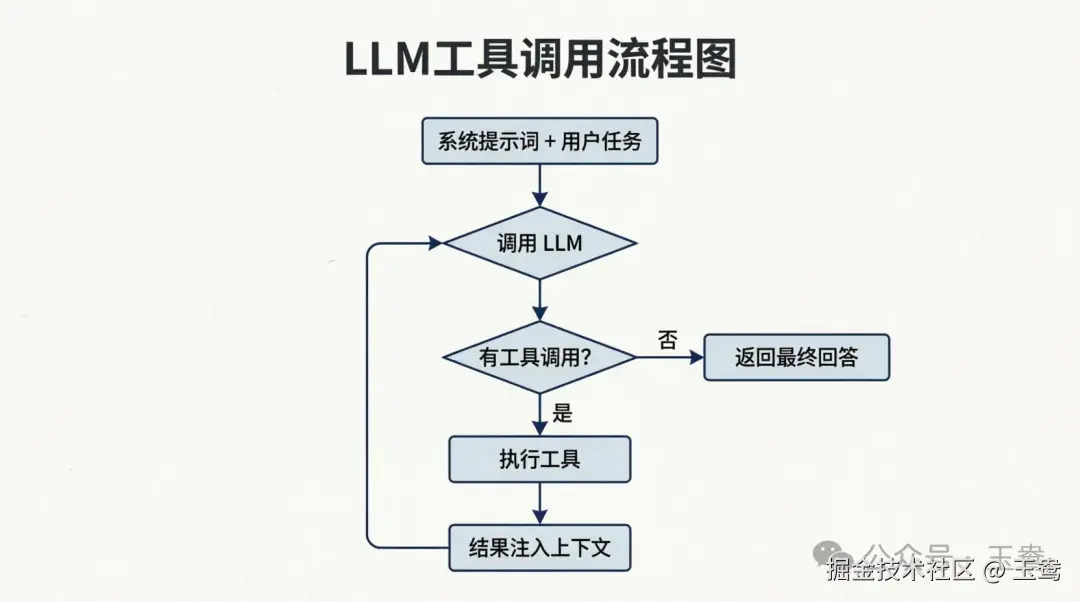
这个循环源自 Yao 等人在 2022 年发表的 ReAct 论文(arXiv:2210.03629)。它的核心洞察是:让模型在推理(Thought)和行动(Action)之间交替,而不是先想完再行动或先行动完再想。每一步的行动结果反馈回上下文,成为下一步推理的输入。
ReAct 解决了纯 CoT(Chain-of-Thought)的两个致命问题:一是推理过程与外部世界隔离,错误假设没有机会被纠正;二是模型倾向于"脑补"事实而非查询验证。这种交替执行方式强制模型用真实数据替代想象。
在 2026 年的生产实践中,ReAct 是大多数 Harness 框架的默认循环模式。LangGraph、OpenAI Agents SDK------底层都是这个四步循环。
第二层:工具调用协议
工具调用有三个关键设计决策,每个都影响 Agent 的可靠性。
工具数量:并非越多越好。 Vercel 在 2026 年做了一个著名的实验:将 Text-to-SQL Agent 从 15-18 个专用工具砍到 2 个(bash + SQL 执行),结果成功率从 80% 跳到 100%,速度快了 3.5 倍,token 消耗减少 37%。
原因很直接:更多工具意味着更多决策分支,模型在每个分支上分配注意力,每一个分支都有不确定性。模型在"选哪个工具"上花的算力,挤占了"怎么解决问题"的算力。
Schema 设计:写给初级开发者的文档。 Anthropic 在 "Building Effective Agents"(2024 年 12 月)中提出了 ACI(Agent-Computer Interface)原则------对待工具描述的态度,应该跟对待用户界面设计一样认真。
具体做法:包含使用示例、标注边界条件、用强制格式避免歧义(比如绝对路径而非相对路径)、清晰区分相似工具("用 search_code 查代码,用 search_docs 查文档,两不混用")。
协议标准化:MCP 的 N+M 收敛 。 在 MCP(Model Context Protocol,Anthropic 2024 年 11 月发布)之前,N 个 Agent 对接 M 个工具是 N×M 的集成问题。MCP 把它降为 N+M------每个 Agent 说 MCP,每个工具暴露 MCP Server,任意组合即插即用。到 2026 年 3 月,MCP SDK 月下载量超过 9,700 万次,10,000+ 公共 MCP Server 在生产中运行(spec.modelcontextprotocol.io 数据)。
A2A(Google 2025 年 4 月发布)补充了 Agent 间的通信协议。两个协议一起,构成了 2026 年 Agent 生态的基础设施层。
第三层:上下文管理
LLM 的上下文窗口在快速增长,2026 年主流模型已经普遍支持 100 万 token 上下文。但更长不等于更好。上下文越长,模型越容易在噪声中迷失,token 成本线性增长,Prefix Caching 命中率下降。
上下文管理的核心策略是分层:
1静态提示词放前面 :系统身份、通用行为规则、核心工具 Schema------这些几乎不变的内容固定在上下文开头。Anthropic 的 Context Engineering 文章(2025 年 9 月)指出,静态内容在前、动态内容在后可以最大化 Prefix Caching 的收益,缓存命中时只支付新增 token 的费用。2会话历史做压缩 :不是保留全部对话,而是每 N 轮做一次摘要压缩。压缩策略的选择直接影响 Agent 的"记忆质量"------太激进丢失关键上下文,太保守等于没压缩。3工具输出做卸载:工具返回的大量数据(如搜索结果、文件内容)不在上下文里逐字保留,而是存入结构化存储(向量数据库、SQLite、文件系统),仅在需要时检索。Claude Code 和 Manus 都采用了这种"上下文与存储分离"的模式。
第四层:状态持久化
Agent 最脆弱的时候发生在崩溃之后,而非运行之中。
Harness 的标准做法是事件溯源(Event Sourcing)------每个事件(用户消息、工具调用、工具结果、压缩事件)以 JSONL 格式追加写入磁盘,一行一条,立即落盘。进程在第 47 行崩溃,第 47 行之前的状态就是安全的。重启后从第 47 行恢复(不是重新开始,是接着跑)。
这个模式在 Anthropic 的 "Effective Harnesses" 文章(2025 年 11 月)中以 Ralph Loop 的名字被形式化。Ralph Loop 的核心是代理边界跨越(Context Boundary Crossing):当上下文窗口接近极限时,Stop Hook 拦截模型退出意图,从文件系统读取当前状态,将原始任务重新注入一个干净的上下文窗口,然后继续执行。
状态存在于磁盘上,上下文窗口只是工作缓存。
Manus 在 6 个月内重写了 Harness 5 次。一个反复出现的主题是 :状态持久化的设计,是 Harness 里容易被低估、也最需要迭代的部分之一。
第五层:错误恢复
Agent 系统的错误不同于传统软件。大多数传统软件的错误是"二元的"------请求成功或失败,返回 200 或 500。Agent 的错误更复杂:200 OK 可以返回一个完全错误的计算结果;模型可以在连续 5 步正确后突然天马行空。
生产环境的错误恢复采用分层策略,从内到外:
1重试(Retry ):指数退避 + 随机抖动。有效减少 60-80% 的重试风暴。适用于网络超时、API 限流等瞬时故障。2降级(Fallback ):识别到当前模型不可用或输出质量过低,切换到备用模型。降级链:主力模型 → 备选模型 → 本地小模型 → 缓存结果。3熔断(Circuit Breaker ):某种工具或服务连续 5 次失败,熔断器打开,暂停调用 30-60 秒,再半开探测。保护上游依赖不被雪崩拖垮。4重规划(Re-plan ):工具返回的结果与当前计划冲突,回到 Planner 生成新计划。不盲目执行错误的路线。5人工升级(Human-in-the-loop):以上所有自动恢复耗尽后,暂停 Agent,通知人类操作员决策。这是最后的安全网。
从零构建:500 行 Python 搭一个生产骨架
目标不是做一个通用框架。是做一个能跑的参考实现------你可以读完直接抄、改、扩展。所有代码用 Python 写,依赖只有标准库 + OpenAI SDK。
完整的 Harness 包含六个模块:
1核心循环 --- Agent 运行的主 while 循环2工具注册表 --- 工具的定义、验证、分发3上下文管理 --- 提示词组装与压缩4状态持久化 --- JSONL 追加写入,崩溃恢复5权限门控 --- 工具调用前后的安全检查6错误恢复 --- 指数退避重试 + 熔断器
模块一:工具注册表
工具要解决三个问题:定义(模型知道有什么工具、怎么调)、验证(Harness 确保参数合法再执行)、分发(把验证后的调用路由到正确的函数)。
python
import json
from typing import Any, Callable
from dataclasses import dataclass, field


@dataclass
class Tool:
    """一个工具的完整定义:模型看到的描述 + 运行时的执行函数"""
    name: str
    description: str
    parameters: dict  # JSON Schema
    fn: Callable
    requires_approval: bool = False  # 危险操作需要人工确认

    def to_openai_schema(self) -> dict:
        return {
            "type": "function",
            "function": {
                "name": self.name,
                "description": self.description,
                "parameters": self.parameters,
            },
        }

    def validate_args(self, args: dict) -> dict:
        """简易 Schema 校验:检查必填字段和类型。生产环境用 jsonschema 库。"""
        required = self.parameters.get("required", [])
        properties = self.parameters.get("properties", {})
        for key in required:
            if key not in args:
                raise ValueError(f"缺少必填参数 '{key}'")
        for key, value in args.items():
            if key in properties:
                expected = properties[key].get("type", "string")
                if expected == "integer" and not isinstance(value, int):
                    raise TypeError(f"'{key}' 应为整数,实际为 {type(value).__name__}")
        return args


class ToolRegistry:
    """工具注册表:注册、查询、执行。工具可以运行时动态添加。"""

    def __init__(self):
        self._tools: dict[str, Tool] = {}

    def register(self, tool: Tool):
        self._tools[tool.name] = tool

    def get_schemas(self) -> list[dict]:
        return [t.to_openai_schema() for t in self._tools.values()]

    def execute(self, name: str, args: dict) -> str:
        tool = self._tools.get(name)
        if tool is None:
            return f"错误:未找到工具 '{name}'"
        try:
            validated = tool.validate_args(args)
            result = tool.fn(**validated)
            return str(result)
        except (ValueError, TypeError) as e:
            return f"参数错误:{e}"
        except Exception as e:
            return f"执行错误:{e}"
模块二:上下文管理器
上下文管理器负责两件事:组装每一轮发给模型的提示词,以及在上下文过长时做压缩。
python
from dataclasses import dataclass, field
from typing import Any


@dataclass
class Message:
    role: str  # system, user, assistant, tool
    content: str
    tool_call_id: str | None = None
    tool_calls: list[dict] | None = None


@dataclass
class ContextManager:
    """管理对话上下文:组装提示词、追踪消息历史、在过长时压缩"""

    system_prompt: str
    messages: list[Message] = field(default_factory=list)
    compact_at: int = 20   # 超过此轮数触发压缩
    keep_recent: int = 6   # 压缩后保留最近 N 轮

    def build_prompt(self, tool_schemas: list[dict]) -> list[dict]:
        """组装发送给 OpenAI 的消息列表"""
        payload: list[dict] = [{"role": "system", "content": self.system_prompt}]
        for msg in self.messages:
            entry: dict = {"role": msg.role, "content": msg.content}
            if msg.tool_call_id:
                entry["tool_call_id"] = msg.tool_call_id
            if msg.tool_calls:
                entry["tool_calls"] = msg.tool_calls
            payload.append(entry)
        return payload

    def add(self, role: str, content: str, **kwargs):
        self.messages.append(Message(role=role, content=content, **kwargs))

    def maybe_compact(self, llm_summarize) -> int:
        """如果消息过多,调用 LLM 做摘要压缩。返回切除的消息数。"""
        if len(self.messages) <= self.compact_at:
            return 0
        old = self.messages[: -self.keep_recent]
        recent = self.messages[-self.keep_recent:]
        summary_text = "\n".join(f"[{m.role}]: {m.content[:200]}" for m in old)
        compact_prompt = (
            "以下是一段 Agent 对话历史。请用最多 3 句话总结已经完成了什么、当前进度。\n\n"
            f"{summary_text}"
        )
        summary = llm_summarize(compact_prompt)
        self.messages = [Message("user", f"[上下文摘要] {summary}"), *recent]
        return len(old)
压缩是这里最容易出问题的地方。太激进的压缩会在模型"快要出结果"时切除关键上下文------比如还差最后一个文件修复任务就完成了,压缩后模型忘了改过哪些文件。实际部署时,建议给压缩加上条件判断:只在模型连续 N 轮重复相同操作(卡住)时才触发,而不是机械地按轮数压缩。
模块三:状态持久化
一行一条 JSON,立即落盘。不做批量写入,不缓存内存。可以在程序运行的任何时刻 kill -9,重启后状态完好。
python
import json
import os
from datetime import datetime


class Journal:
    """JSONL 事件日志:每行一个事件,立即落盘,崩溃后可恢复"""

    def __init__(self, filepath: str):
        self.filepath = filepath
        self._line_count = 0

    def append(self, event_type: str, payload: dict):
        # 防止 payload 中同名键覆盖固定字段(line/timestamp/type)
        safe_payload = {k: v for k, v in payload.items() if k not in ("line", "timestamp", "type")}
        with open(self.filepath, "a", encoding="utf-8") as f:
            line = json.dumps({
                "line": self._line_count,
                "timestamp": datetime.now().isoformat(),
                "type": event_type,
                **safe_payload,
            }, ensure_ascii=False)
            f.write(line + "\n")
            f.flush()
            os.fsync(f.fileno())
        self._line_count += 1

    def replay(self) -> list[dict]:
        """从文件中恢复所有事件"""
        if not os.path.exists(self.filepath):
            return []
        events = []
        with open(self.filepath, "r", encoding="utf-8") as f:
            for line in f:
                line = line.strip()
                if line:
                    events.append(json.loads(line))
        return events

    def restore_messages(self) -> list[dict]:
        """从日志中重建消息历史(仅 user/assistant/tool 类型)"""
        messages: list[dict] = []
        for event in self.replay():
            if event["type"] == "user_message":
                messages.append({"role": "user", "content": event["content"]})
            elif event["type"] == "assistant_message":
                msg: dict = {"role": "assistant", "content": event.get("content", "")}
                if "tool_calls" in event:
                    msg["tool_calls"] = event["tool_calls"]
                messages.append(msg)
            elif event["type"] == "tool_result":
                messages.append({
                    "role": "tool",
                    "tool_call_id": event["tool_call_id"],
                    "content": event["content"],
                })
        return messages
模块四:权限门控
不管 Agent 有多聪明,让它可以任意删除文件、发送 HTTP 请求、执行 Shell 命令,本质上是在给一个概率系统授予 root 权限。权限门控要做的,是在工具执行前拦截、审查、确认。
python
from enum import Enum


class Decision(Enum):
    ALLOW = "allow"
    DENY = "deny"
    ASK = "ask"   # 需要人工确认


class PermissionGate:
    """权限门控:在工具执行前检查是否允许"""

    DENY_LIST = {
        ("bash",): Decision.ASK,        # Shell 命令:必须人工确认
        ("write_file",): Decision.ASK,  # 写文件:必须人工确认
        ("http_request",): Decision.ASK,# 网络请求:必须人工确认
        ("read_file",): Decision.ALLOW, # 读文件:默认允许
        ("search",): Decision.ALLOW,    # 搜索:默认允许
    }

    @classmethod
    def check(cls, tool_name: str, tool_args: dict) -> Decision:
        for (pattern,), decision in cls.DENY_LIST.items():
            if pattern in tool_name:
                # 额外检查:写文件到系统目录外的路径才允许
                if pattern == "write_file":
                    path = tool_args.get("file_path", "")
                    if any(path.startswith(d) for d in ["/etc/", "/sys/", "/proc/"]):
                        return Decision.DENY
                return decision
        return Decision.ALLOW

    @staticmethod
    def request_approval(tool_name: str, tool_args: dict) -> bool:
        """交互式确认(演示用 print;生产环境换成 WebSocket / MCP Elicitation)"""
        summary = json.dumps(tool_args, ensure_ascii=False)[:200]
        print(f"\n⚠️  人工确认:执行 {tool_name}({summary})?")
        resp = input("  [y] 允许  [n] 拒绝  [s] 跳过: ").strip().lower()
        return resp == "y"
模块五:错误恢复
核心是两件东西:指数退避重试,和熔断器保护依赖。
python
import time
import random
from functools import wraps
from typing import Any


def retry_with_backoff(
    max_retries: int = 3,
    base_delay: float = 1.0,
    max_delay: float = 30.0,
    retryable: tuple = (TimeoutError, ConnectionError),
):
    """指数退避重试装饰器,带随机抖动避免重试风暴"""
    def decorator(fn):
        @wraps(fn)
        def wrapper(*args, **kwargs):
            last_error = None
            for attempt in range(max_retries + 1):
                try:
                    return fn(*args, **kwargs)
                except retryable as e:
                    last_error = e
                    if attempt < max_retries:
                        delay = min(base_delay * (2 ** attempt), max_delay)
                        jitter = random.uniform(0, delay * 0.3)
                        time.sleep(delay + jitter)
                    else:
                        raise
                except Exception:
                    raise  # 不可重试的错误直接抛出
            raise last_error
        return wrapper
    return decorator


class CircuitBreaker:
    """熔断器:保护下游依赖不被雪崩拖垮"""

    def __init__(self, failure_threshold: int = 5, recovery_timeout: float = 60.0):
        self.failure_threshold = failure_threshold
        self.recovery_timeout = recovery_timeout
        self.failure_count = 0
        self.last_failure_time = 0.0
        self.state = "closed"  # closed → open → half_open

    def call(self, fn, *args, **kwargs) -> Any:
        if self.state == "open":
            if time.time() - self.last_failure_time > self.recovery_timeout:
                self.state = "half_open"
            else:
                raise RuntimeError("熔断器打开,拒绝调用")
        try:
            result = fn(*args, **kwargs)
            if self.state == "closed":
                self.failure_count = 0   # 成功后重置计数,避免长期累积误熔断
            elif self.state == "half_open":
                self.state = "closed"
                self.failure_count = 0
            return result
        except Exception:
            self.failure_count += 1
            self.last_failure_time = time.time()
            if self.failure_count >= self.failure_threshold:
                self.state = "open"
            raise
完整组装:把所有模块串起来
python
import openai
from openai import OpenAI


class AgentHarness:
    """Agent 运行时引擎。骨架可以在此基础上长成任何专用 Agent。"""

    MAX_ITERATIONS = 25

    def __init__(
        self,
        system_prompt: str,
        tools: ToolRegistry,
        journal: Journal,
        model: str = "gpt-4o",
    ):
        self.ctx = ContextManager(system_prompt=system_prompt)
        self.tools = tools
        self.journal = journal
        self.model = model
        self.client = OpenAI()
        self.breaker = CircuitBreaker()

    def run(self, task: str) -> str:
        # 恢复:如果有之前的日志,从中重建消息历史
        restored = self.journal.restore_messages()
        if restored:
            for msg in restored:
                self.ctx.add(**msg)
            self.journal.append("event", {"event": "resumed_from_journal"})

        self.ctx.add("user", task)
        self.journal.append("user_message", {"content": task})

        for iteration in range(self.MAX_ITERATIONS):
            try:
                response = self._call_model()
            except RuntimeError:
                return "错误:模型调用失败(熔断或重试耗尽),任务中止。"

            choice = response.choices[0]
            msg = choice.message

            # 模型给出最终回答
            if msg.content and not msg.tool_calls:
                self.ctx.add("assistant", msg.content)
                self.journal.append("assistant_message", {"content": msg.content})
                return msg.content

            # 模型请求调用工具:先记录 assistant 消息(含 tool_calls),再执行工具
            self.ctx.add("assistant", msg.content or "", tool_calls=[
                {"id": tc.id, "type": "function",
                 "function": {"name": tc.function.name, "arguments": tc.function.arguments}}
                for tc in (msg.tool_calls or [])
            ])
            self.journal.append("assistant_message", {
                "content": msg.content or "",
                "tool_calls": [
                    {"id": tc.id, "type": "function",
                     "function": {"name": tc.function.name, "arguments": tc.function.arguments}}
                    for tc in (msg.tool_calls or [])
                ],
            })

            for tc in (msg.tool_calls or []):
                decision = PermissionGate.check(tc.function.name, json.loads(tc.function.arguments))
                if decision == Decision.DENY:
                    result = f"权限拒绝:工具 '{tc.function.name}' 被阻止"
                elif decision == Decision.ASK:
                    if not PermissionGate.request_approval(
                        tc.function.name, json.loads(tc.function.arguments)
                    ):
                        result = f"人工拒绝:工具 '{tc.function.name}' 未获批准"
                    else:
                        result = self.tools.execute(tc.function.name, json.loads(tc.function.arguments))
                else:
                    result = self.tools.execute(tc.function.name, json.loads(tc.function.arguments))

                self.ctx.add("tool", result, tool_call_id=tc.id)
                self.journal.append("tool_result", {
                    "tool_name": tc.function.name,
                    "tool_call_id": tc.id,
                    "content": result,
                })

            self.ctx.maybe_compact(self._quick_summarize)

        return "达到最大迭代次数,任务未完成。"

    @retry_with_backoff(max_retries=3, retryable=(TimeoutError, ConnectionError, openai.APITimeoutError, openai.APIConnectionError))
    def _call_model(self):
        return self.breaker.call(
            self.client.chat.completions.create,
            model=self.model,
            messages=self.ctx.build_prompt(self.tools.get_schemas()),
            tools=self.tools.get_schemas(),
            tool_choice="auto",
        )

    @retry_with_backoff(max_retries=2, retryable=(TimeoutError, ConnectionError, openai.APITimeoutError, openai.APIConnectionError))
    def _quick_summarize(self, text: str) -> str:
        """用模型做简要总结------调用轻量模型避免递归开销"""
        resp = self.breaker.call(
            self.client.chat.completions.create,
            model="gpt-4o-mini",
            messages=[{"role": "user", "content": text}],
        )
        return resp.choices[0].message.content or ""
大约 300 行 Python(去掉注释和空行),涵盖了工具注册、上下文管理、状态持久化、权限门控、错误恢复------生产环境需要的每一个基础设施层。
生产经验:几条硬通货
这些不是书本上的建议,而是 2026 年多个团队在生产中踩坑后留下的结论。
1. 工具是 Harness 的核心设计对象之一。 Datadog 的 "State of AI Engineering 2026" 报告显示,生产环境中 69% 的 LLM 输入 token 是系统提示词------也就是工具定义、行为规则、输出格式。工具 Schema 写得不好,模型的推理能力再强也会被绑住手脚。投入在工具设计上的时间,回报往往高于投入在 Prompt 调整上的时间。
2. Planner 和 Generator 建议分为两个角色。 Anthropic 在 2025 年 11 月的 "Effective Harnesses" 中做了一件看起来很反直觉的事:把同级模型的实例分配给 Planner 和 Generator 两个角色,不让同一个实例既做计划又执行。
结果发现,两个独立角色协作,比单一实例做全部事情的输出质量更高。原因简单:自我评估是不可靠的。同一个模型无法客观判断自己刚才产出的质量。就像 GAN 架构里判别器和生成器必须分离一样。
3. 状态持久化从第一天就做 。 Agent 项目常见的错误是在 Demo 阶段跳过持久化、用内存变量和 print 日志凑合。"反正我盯着它跑,崩了重启就行。"但 Demo 离生产只差一次意外崩溃。"先做持久化"这个决策,是最难在初期意识到、但后期最昂贵的技术债。
4. 分层降级,别让一个环节的失败拖垮全局。 重试 → 降级 → 熔断 → 重规划 → 人工升级。不是每层都要实现,但至少要有前两层。Agent 系统运行在概率之上,单点故障不是"会不会发生"的问题,是"多久发生一次"的问题。
常见误区
误区一:"模型能力越强,Harness 越不重要。"
反了。2026 年的趋势恰恰相反:模型能力的提升让 Harness 的重要性上升,不是下降。原因在于边际效应------用 GPT-3.5 时,瓶颈明显在模型本身,Harness 的差异被淹没了。但到了 GPT-5 级别,多个模型的能力趋于收敛,Harness 的差异成为竞争壁垒。LangChain 的排名从 30 跳到 5,靠的不是换了模型,是改了 Harness。
误区二:"Agent 应该完全自主,人不要干预。"
Andrew Ng 的团队在 2026 年给出了一个反直觉的数据:GPT-3.5 + 结构化工作流(Agentic Workflow)在 HumanEval 上达到 95.1% 的准确率,而 GPT-4 零样本(完全自主)只有 67.0%。不是模型不够强------是没有结构化的流程引导,再强的模型也会在歧路中迷失。2026 年市场共识:结构化工作流压倒全自主 Agent。
误区三:"上下文窗口大了,不需要做压缩和管理。"
100 万 token 的上下文不等于模型可以高效利用这 100 万 token。Attention 机制在长上下文中有"迷失在中间"的问题(Lost in the Middle, Liu et al. 2024, arXiv:2307.03172),模型对上下文中部的信息利用率显著低于开头和结尾。
再加上 token 成本和延迟的线性增长,不做管理直接用满上下文是一种浪费。上下文管理不是"因为装不下才做",是"为了效率和精度而做"。
参考来源:
•Yao et al., "ReAct: Synergizing Reasoning and Acting in Language Models", arXiv:2210.03629, ICLR 2023•Anthropic, "Building Effective Agents", 2024 年 12 月•Anthropic, "Effective Harnesses for Long-Running Agents", 2025 年 11 月•Anthropic, "Effective Context Engineering for AI Agents", 2025 年 9 月•OpenAI, "The Next Evolution of the Agents SDK", 2026 年 4 月•Architectural Design Decisions in AI Agent Harnesses, arXiv:2604.18071, 2026 年 4 月•From Agent Loops to Structured Graphs: A Scheduler-Theoretic Framework for LLM Agent Execution, arXiv:2604.11378, 2026 年 4 月•What makes a harness a harness: necessary and sufficient conditions for an agent harness, arXiv:2606.10106, 2026 年 6 月•LangChain, "The Anatomy of an Agent Harness", 2026•Liu et al., "Lost in the Middle: How Language Models Use Long Contexts", arXiv:2307.03172, 2024•Vercel, "We Removed 80% of Our Agent's Tools and Got Better Results", 2026•Datadog, "State of AI Engineering 2026"•MCP Specification, spec.modelcontextprotocol.io•A2A Protocol, github.com/google/A2A•github.com/ai-boost/awesome-harness-engineering