词向量转换与中文文本情感分类:从CountVectorizer到朴素贝叶斯
- 简介
- 一、词向量转换相关概念
-
- [1. 为什么需要词向量转换](#1. 为什么需要词向量转换)
- [2. 词向量转换的分类](#2. 词向量转换的分类)
- [二、CountVectorizer 词频向量化](#二、CountVectorizer 词频向量化)
-
- [1. 导入 CountVectorizer](#1. 导入 CountVectorizer)
-
- [CountVectorizer 核心参数说明](#CountVectorizer 核心参数说明)
- [2. 定义文本数据](#2. 定义文本数据)
- [3. 创建并训练 CountVectorizer](#3. 创建并训练 CountVectorizer)
- [4. 查看稀疏矩阵输出](#4. 查看稀疏矩阵输出)
- [5. 查看特征名称](#5. 查看特征名称)
- [6. 转换为稠密矩阵](#6. 转换为稠密矩阵)
- [7. 结果对照表](#7. 结果对照表)
- 三、案例分析:中文评论情感分类
-
- [1. 数据集概览](#1. 数据集概览)
- [2. 整体功能概述](#2. 整体功能概述)
- [3. 代码分步详解](#3. 代码分步详解)
- 总结
简介
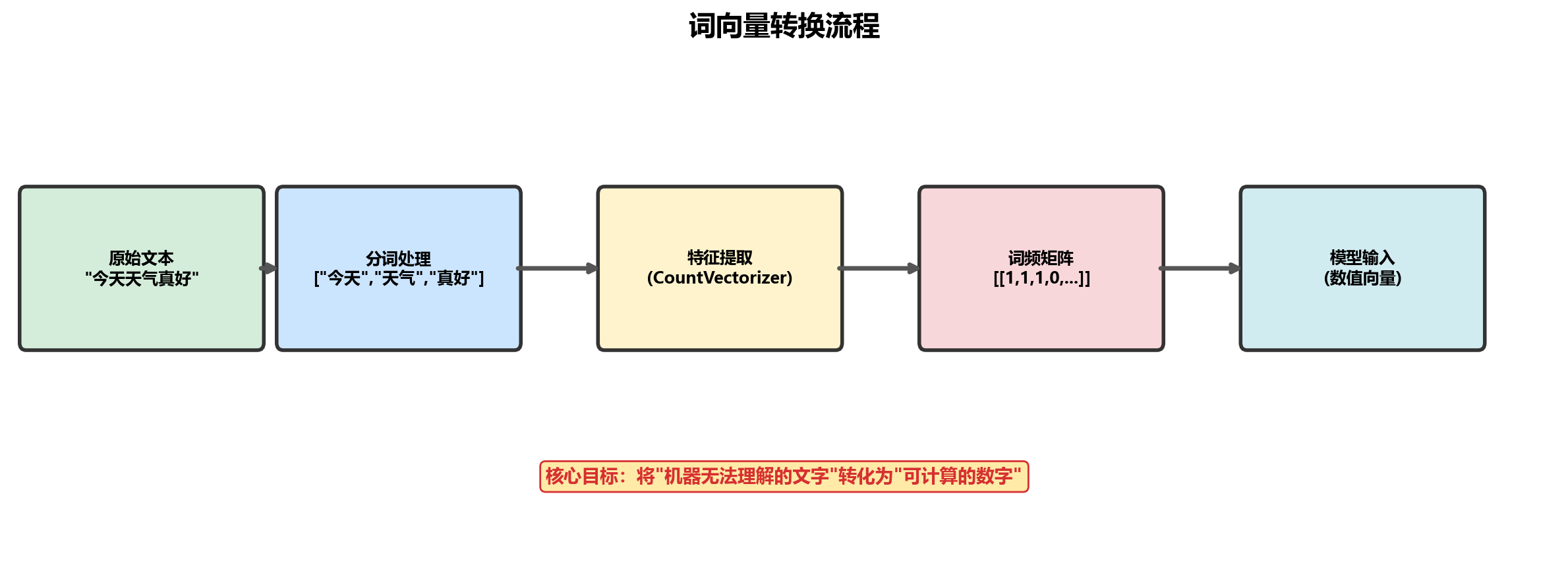
jieba库、朴素贝叶斯算法和TF-IDF值是自然语言处理(NLP)中常用的工具和技术,各自在文本处理的不同阶段发挥作用。在自然语言处理的世界里,如何让计算机"读懂"人类语言一直是核心难题,而词向量转换正是破解这一难题的关键钥匙。本次机器学习专题,我们就来深入探讨这一基础又核心的技术。词向量转换的本质,是将文本中离散的词语转化为连续的数值向量。这一步看似简单,却实现了从"机器无法理解的文字"到"可计算的数字"的跨越,为后续的文本分类、情感分析、机器翻译等任务铺平了道路。
一、词向量转换相关概念
1. 为什么需要词向量转换
人类语言丰富多样,单词具有语义、语法和语境等多重信息。但计算机擅长处理数值数据,原始文本无法直接被计算机理解和分析。词向量转换通过将单词转换为数值向量,把语言信息编码成计算机能处理的形式。这样,计算机可以利用这些向量进行计算,从而挖掘文本中的有用信息,实现对文本的理解和处理。
2. 词向量转换的分类
从特征提取库中导入向量转化模块,将自然语言转换成数据的形式,才能保证模型进行训练。
| 类型 | 说明 |
|---|---|
| 基于统计的方法 | 统计每个单词在文本中出现的次数(如 CountVectorizer、TF-IDF) |
| 基于神经网络模型训练的方法 | 通过深度学习模型训练得到稠密向量(如 Word2Vec、BERT) |
今天主要讲述基于统计的方法进行词向量转换,第二种方法涉及深度学习知识,后续再展开讨论。
二、CountVectorizer 词频向量化
我们以一个小例子来说明词向量转换的代码过程。
1. 导入 CountVectorizer
python
from sklearn.feature_extraction.text import CountVectorizerCountVectorizer 核心参数说明
| 参数 | 说明 |
|---|---|
| input | 输入类型:'content'(直接文本)、'filename'(文件路径) |
| encoding | 文本编码格式,默认 'utf-8' |
| lowercase | 是否将文本转为小写(默认 True) |
| stop_words | 停用词:None、'english'、自定义列表 |
| token_pattern | 分词正则表达式(默认匹配 2 个及以上字符的单词) |
| ngram_range | 提取 n 元词范围,如 (1,2) 表示同时提取 1 元词和 2 元词 |
| max_df | 最大文档频率,过滤高频词(如出现在 80% 以上文档中的词) |
| min_df | 最小文档频率,过滤低频词 |
| max_features | 保留的最大特征数(按词频排序取前 N 个) |
| vocabulary | 自定义词汇表 |
| binary | 是否将词频转为二进制(1 表示出现,0 表示未出现) |
2. 定义文本数据
python
texts = ['apple banana orange', 'apple banana banana', 'orange pear', 'pear']3. 创建并训练 CountVectorizer
python
# max_features=6:只保留频率最高的 6 个特征
# ngram_range=(1,3):提取 1 元词、2 元词和 3 元词
cv = CountVectorizer(max_features=6, ngram_range=(1, 3))
cv_fit = cv.fit_transform(texts)
4. 查看稀疏矩阵输出
python
print(cv_fit)输出是一个稀疏矩阵表示,格式为 (文档索引, 特征索引) 词频:
py
(0, 0)	1
(0, 3)	1
(0, 4)	1
(0, 1)	1
(1, 0)	1
(1, 3)	2
(1, 1)	1
(1, 2)	1
(2, 4)	1
(2, 5)	1
(3, 5)	1
5. 查看特征名称
python
print(cv.get_feature_names_out())输出类似:
['apple' 'apple banana' 'apple banana banana' 'banana' 'orange' 'pear']6. 转换为稠密矩阵
python
print(cv_fit.toarray())输出二维数组,每行代表一个文档,每列代表一个特征:
py
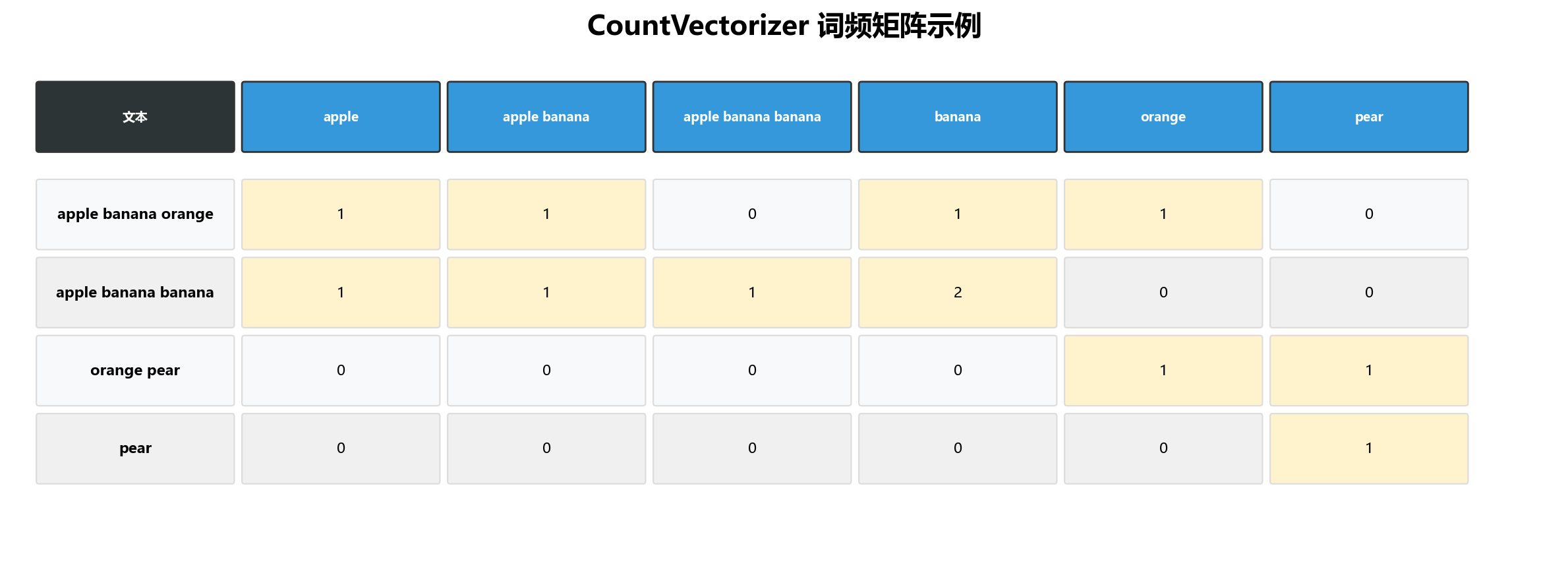
[[1 1 0 1 1 0]
 [1 1 1 2 0 0]
 [0 0 0 0 1 1]
 [0 0 0 0 0 1]]
7. 结果对照表
| 文本内容 | apple | apple banana | apple banana banana | banana | orange | pear |
|---|---|---|---|---|---|---|
| apple banana orange | 1 | 1 | 0 | 1 | 1 | 0 |
| apple banana banana | 1 | 1 | 1 | 2 | 0 | 0 |
| orange pear | 0 | 0 | 0 | 0 | 1 | 1 |
| pear | 0 | 0 | 0 | 0 | 0 | 1 |
三、案例分析:中文评论情感分类
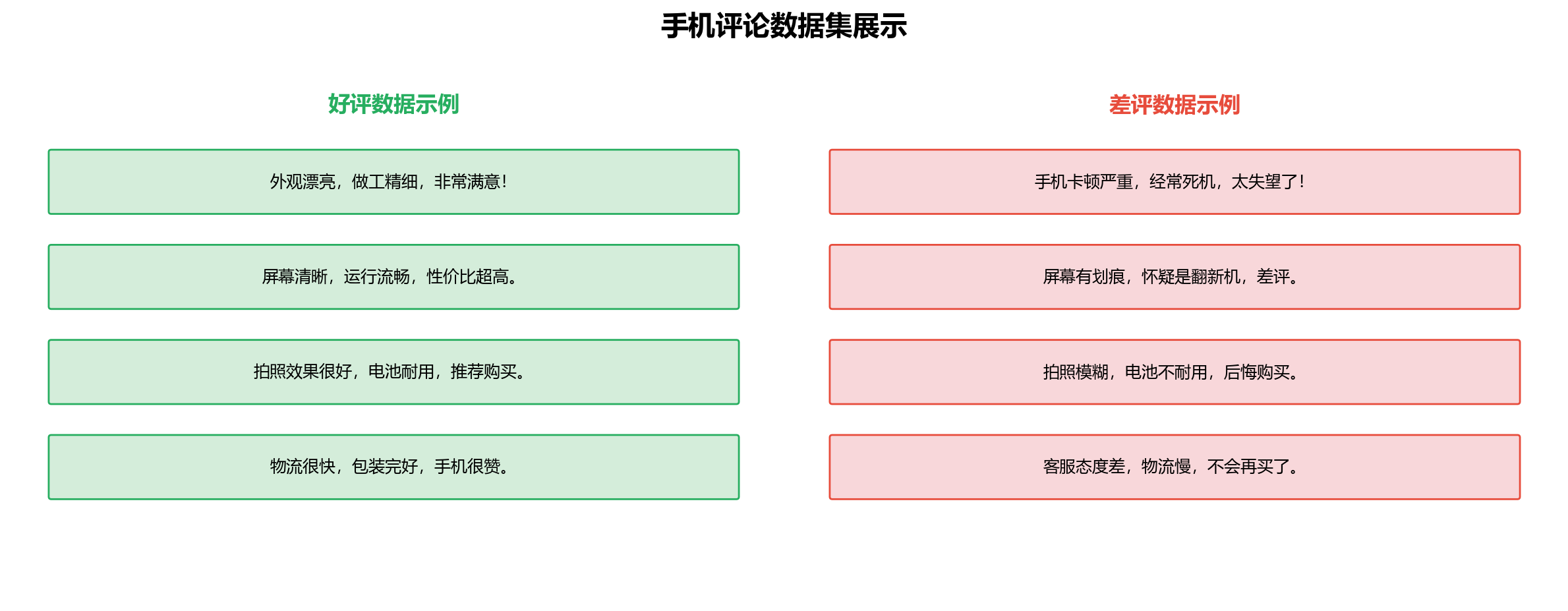
这里有一个从苏宁爬取的手机评论数据集,包含好评和差评两个文件。
1. 数据集概览
2. 整体功能概述
这段代码主要实现了中文文本情感分类的前期数据处理与特征工程流程,包括:
读取好评、差评文本数据
用 jieba 进行中文分词
去除停用词(高频无意义词汇,如"的""了"等)
构建带标签的训练数据集
拆分训练集、测试集
用 CountVectorizer 将分词后的文本转换为词频特征矩阵
使用朴素贝叶斯模型训练并评估
实现用户输入预测
3. 代码分步详解
1)导入所需库
python
from sklearn.feature_extraction.text import CountVectorizer
import pandas as pd
import jieba
from sklearn.model_selection import train_test_split
from sklearn.naive_bayes import MultinomialNB
from sklearn import metrics
2)读取原始数据
python
# 读取好评和差评文本文件
hp_content = pd.read_table("好评.txt", encoding='gbk')
cp_content = pd.read_table("差评.txt", encoding='gbk')
3)中文分词
差评处理:
python
cp_segments = []
contents = cp_content.content.values.tolist()
for content in contents:
    results = jieba.lcut(content)   # 精确模式分词
    if len(results) > 1:
        cp_segments.append(results)

cp_fc_results = pd.DataFrame({'content': cp_segments})
cp_fc_results.to_excel('cp_fc_results.xlsx', index=False)
好评处理(逻辑相同):
python
hp_segments = []
contents = hp_content.content.values.tolist()
for content in contents:
    results = jieba.lcut(content)
    if len(results) > 1:
        hp_segments.append(results)

hp_fc_results = pd.DataFrame({'content': hp_segments})
hp_fc_results.to_excel('hp_fc_results.xlsx', index=False)
4)读取停用词表
python
stopwords = pd.read_csv(
    'StopwordsCN.txt',
    encoding='utf-8',
    engine='python',
    header=None,
    names=['word'],
    sep='\t'
)
5)定义停用词过滤函数
python
def drop_stopwords(contents, stopwords):
    """过滤文本中的停用词"""
    segments_clean = []
    for content in contents:
        line_clean = []
        for word in content:
            if word not in stopwords:
                line_clean.append(word)
        segments_clean.append(line_clean)
    return segments_clean
调用函数:
python
# 处理差评
contents = cp_fc_results.content.values.tolist()
stopwords_list = stopwords.word.values.tolist()
cp_fc_clean = drop_stopwords(contents, stopwords_list)

# 处理好评
contents = hp_fc_results.content.values.tolist()
hp_fc_clean = drop_stopwords(contents, stopwords_list)
6)构建带标签的训练数据集
python
# 差评标签为 1,好评标签为 0
cp_train = pd.DataFrame({'segments_clean': cp_fc_clean, 'label': 1})
hp_train = pd.DataFrame({'segments_clean': hp_fc_clean, 'label': 0})
train_data = pd.concat([cp_train, hp_train])
train_data.to_excel("train_data.xlsx", index=False)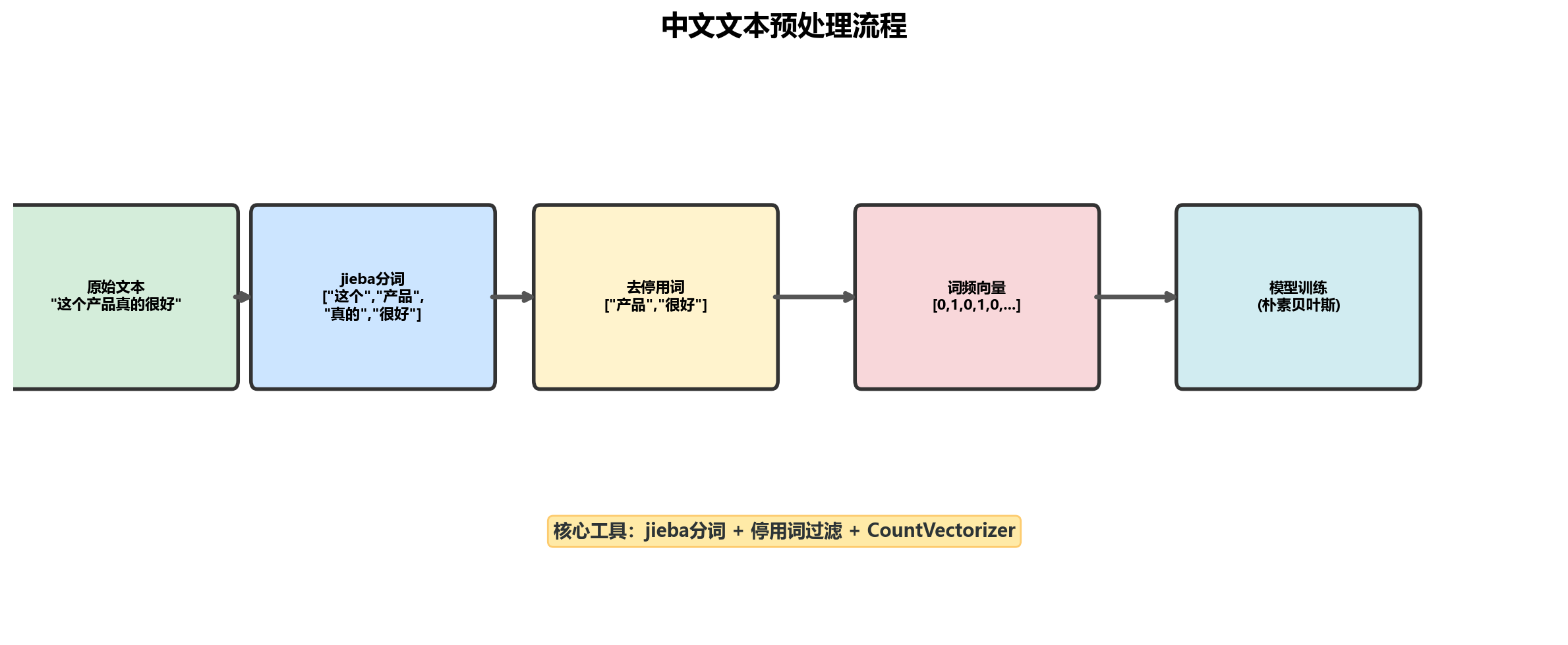
7)拆分训练集和测试集
python
x_train, x_test, y_train, y_test = train_test_split(
    train_data['segments_clean'].values,
    train_data['label'].values,
    random_state=0
)
8)文本转词频特征矩阵
python
# 将分词列表转换为用空格连接的字符串
train_words = []
for line in x_train:
    train_words.append(' '.join(line))

# 创建 CountVectorizer 并转换
vec = CountVectorizer(max_features=4000, ngram_range=(1, 3))
vec.fit(train_words)
x_train_vec = vec.transform(train_words)
9)训练朴素贝叶斯模型
python
# 训练模型
classifier = MultinomialNB(alpha=0.1)
classifier.fit(x_train_vec, y_train)

# 训练集评估
train_pred = classifier.predict(x_train_vec)
print("训练集表现:")
print(metrics.classification_report(y_train, train_pred))

# 测试集评估
test_words = [' '.join(line) for line in x_test]
test_pred = classifier.predict(vec.transform(test_words))
print("测试集表现:")
print(metrics.classification_report(y_test, test_pred))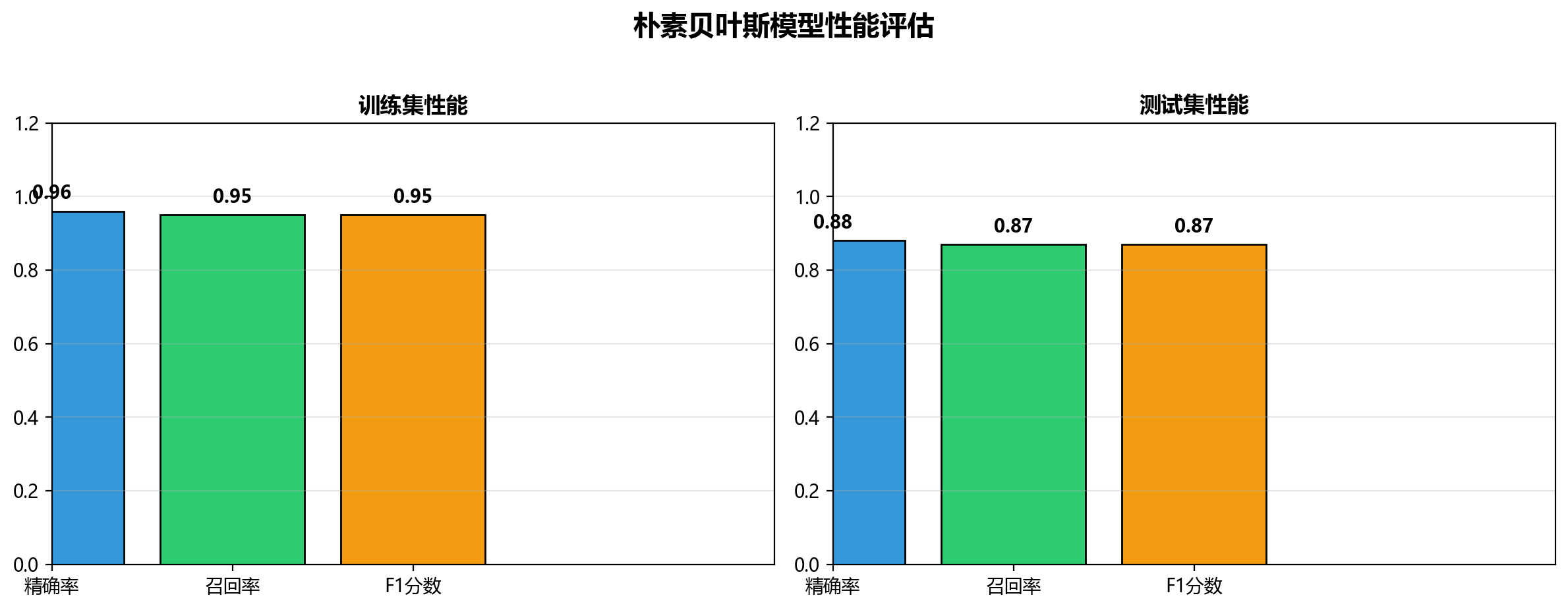
10)实际预测应用
python
# 用户输入预测
def preprocess_single_text(text, stopwords):
    """单条文本预处理:分词 → 去停用词 → 转字符串"""
    segments = jieba.lcut(text)
    clean_segments = [word for word in segments if word not in stopwords]
    return ' '.join(clean_segments)

user_input = input("请输入评价:")
processed = preprocess_single_text(user_input, stopwords_list)
result = classifier.predict(vec.transform([processed]))

print("\n预测结果:", "好评" if result[0] == 0 else "差评")
总结
| 步骤 | 关键操作 | 工具/方法 |
|---|---|---|
| 1 | 读取原始文本 | pd.read_table |
| 2 | 中文分词 | jieba.lcut |
| 3 | 去除停用词 | 自定义过滤函数 |
| 4 | 文本特征提取 | CountVectorizer |
| 5 | 模型训练 | MultinomialNB |
| 6 | 性能评估 | classification_report |
| 7 | 实际预测 | classifier.predict |