在 AI Agent 中,Tool(工具)就是让大模型能够执行具体操作的"函数"。LLM 负责"思考要做什么",Tool 负责"真正去做"。
Tool 和普通函数的区别是它多了一层"给 LLM 使用"的描述信息。
最简单的 Tool
在 LangChain 中,定义一个 Tool 非常简单,只需给函数加上"名称 + 描述 + 参数结构",让 LLM 知道这个函数能干什么、需要什么参数就可以了。
下面我们定义一个查询城市天气的 Tool :
js
import { tool } from "@langchain/core/tools";
import { z } from "zod";

const getWeather = tool(
  async ({ city }) => {
    console.log(`正在查询 ${city} 的天气...`);
    // 模拟调用天气 API
    return `${city}:晴天,26℃`;
  },
  {
    name: "get_weather",
    description: "查询指定城市的天气",
    schema: z.object({
      city: z.string().describe("城市名称"),
    }),
  }
);
可以使用 Langchain 中的 tool 方法定义 Tool 。
一个 Tool 由 4 个部分组成:
- 执行函数
- name
- description
- schema
name 用于定义 Tool 的名字,用于告诉 LLM 这个 Tool 的名字是什么。
js
name: "get_weather";description 用于告诉 LLM 这个 Tool 能干什么
js
description: "查询指定城市的天气";schema 规定 Tool 需要什么参数
js
schema: z.object({
  city: z.string().describe("城市名称"),
});
执行函数则是 Tool 真正执行的代码
js
async ({ city }) => {
  console.log(`正在查询 ${city} 的天气...`);
  // 模拟调用天气 API
  return `${city}:晴天,26℃`;
},
zod 是一个 TypeScript/JavaScript 的数据校验(Schema Validation)库。
zod 用来定义"数据应该长什么样",然后在运行时 检查实际数据是否符合要求。而 TypeScript 是在编译时校验数据是否符合要求,无法校验调用 Tool 时,传入的参数是否符合要求。所以需要用到 zod 。
把 Tool 绑定到大模型
让 LLM 知道,我拥有一个 Tool ,所需参数是 city ,用途是查询城市天气。
创建 LLM 对话实例:
js
import { ChatOpenAI } from "@langchain/openai";

const llm = new ChatOpenAI({
  model: "qwen-plus",

  apiKey: process.env.DASHSCOPE_API_KEY,

  configuration: {
    baseURL: "https://dashscope.aliyuncs.com/compatible-mode/v1",
  },
  temperature: 0,
});
将 Tool 绑定到 LLM :
js
const llmWithTools = llm.bindTools([getWeather]);顺带提一下 :temperature: 0 对工具调用场景是推荐配置。因为工具调用要求模型准确输出 tool_calls 的结构化 JSON,温度越低越稳定,不容易"自由发挥"导致参数格式错误。
调用 LLM
定义用户问题:
js
const userMessage = {
  role: "user",
  content: "北京今天天气怎么样?",
};
将用户问题传入 invoke 方法,让 LLM 回答问题:
js
const response = await llmWithTools.invoke([userMessage]);这时候 LLM 不会查询回答天气,因为它不知道北京天气,但有一个 get_weather Tool,可以调用它。
于是返回类似这样的对象:
js
{
  tool_calls: [
    {
      name: "get_weather",
      args: {
        city: "北京",
      },
    },
  ];
}
这就是 Tool Call 。当返回值中有 tool_calls ,说明 LLM 不自己回答,而是需要调用 Tool Call 获得额外的信息再回答:
js
if (response.tool_calls?.length > 0) {
  // LLM 决定调用工具
} else {
  // LLM 直接回答了
}
执行 Tool
我们拿到 Tool Call:
js
const toolCall = response.tool_calls[0];然后执行 Tool:
js
const toolResult = await getWeather.invoke(toolCall.args);实际上就是:
js
await getWeather.invoke({
  city: "北京",
});
把 Tool 结果再交给 LLM
通过 Tool 获得具体天气信息后,将天气信息传给 LLM ,让 LLM 组织答案回答用户
js
const finalResponse = await llmWithTools.invoke([
  userMessage,
  response,
  {
    role: "tool",
    content: toolResult,
    tool_call_id: toolCall.id,
  },
]);

console.log("最终回答:");
console.log(finalResponse.content);
将 LLM 上次的回复 response 也传入是因为 LLM 是无状态 的,每次调用都要把完整上下文带上。尤其是 response ------它告诉 LLM"你之前说过要调用工具、调用 ID 是什么",这样 LLM 才能把 tool_call_id 和结果对应起来,继续完成对话,而不是从零开始。
完整代码
完整代码如下:
js
import { tool } from "@langchain/core/tools";
import { ChatOpenAI } from "@langchain/openai";
import { z } from "zod";
import "dotenv/config"; // 加载 .env 文件中的环境变量

// 1. 创建 Tool
const getWeather = tool(
  async ({ city }) => {
    console.log(`正在查询 ${city} 的天气...`);

    // 模拟调用天气 API
    return `${city}:晴天,26℃`;
  },
  {
    name: "get_weather",

    description: "查询指定城市的天气",

    schema: z.object({
      city: z.string().describe("城市名称"),
    }),
  }
);

// 2. 创建 qwen-plus
const llm = new ChatOpenAI({
  model: "qwen-plus",

  apiKey: process.env.DASHSCOPE_API_KEY,

  configuration: {
    baseURL: "https://dashscope.aliyuncs.com/compatible-mode/v1",
  },

  temperature: 0,
});

// 3. 把 Tool 绑定给 LLM
const llmWithTools = llm.bindTools([getWeather]);

// 4. 用户问题
const userMessage = {
  role: "user",
  content: "北京今天天气怎么样?",
};

// 5. 第一次调用 LLM
const response = await llmWithTools.invoke([userMessage]);

// 6. 判断 LLM 是否调用 Tool
if (response.tool_calls?.length > 0) {
  const toolCall = response.tool_calls[0];

  console.log("LLM 调用 Tool:");
  console.log(toolCall);

  // 7. 执行 Tool
  const toolResult = await getWeather.invoke(toolCall.args);

  console.log("Tool 返回:");
  console.log(toolResult);

  // 8. 把 Tool 结果交给 LLM
  const finalResponse = await llmWithTools.invoke([
    userMessage,
    response,
    {
      role: "tool",
      content: toolResult,
      tool_call_id: toolCall.id,
    },
  ]);

  // 9. 输出最终答案
  console.log("最终回答:");
  console.log(finalResponse.content);
} else {
  console.log(response.content);
}
运行效果为:
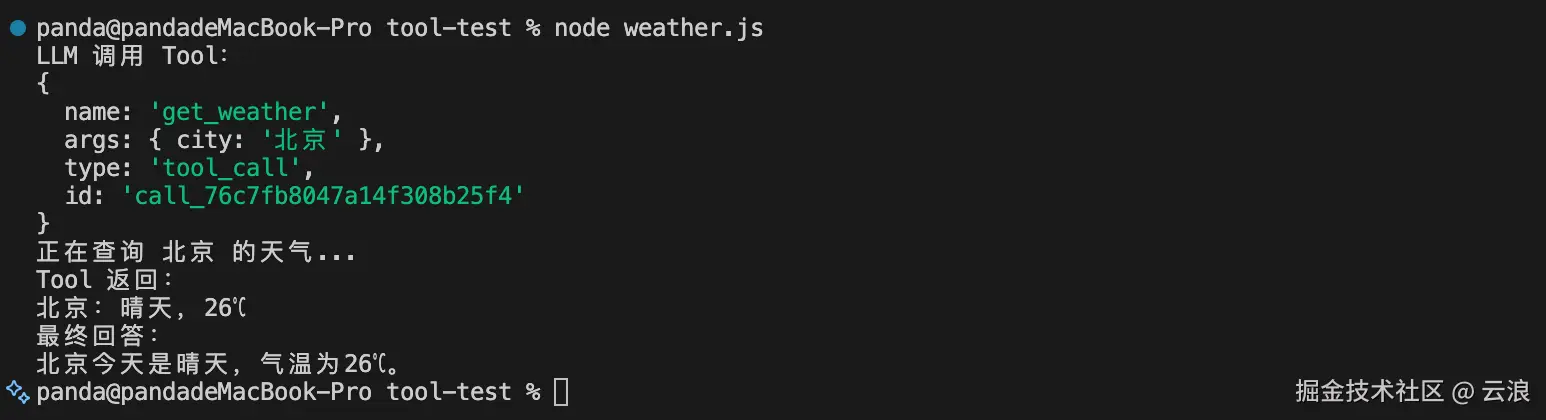
总结
在 AI Agent 中,Tool 本质是函数,和普通函数的区别是 Tool 多了一层给 LLM 使用的描述信息。
可以使用 LangChain 将 Tool 绑定到 LLM ,当用户向 LLM 提问时,LLM 会判断是否需要调用绑定的 Tool 来获取额外信息来回答用户的问题。
当 LLM 判断需要调用 Tool 时,LLM 不会直接回答,而是返回 tool_calls ,然后我们从tool_calls 取出对应的 Tool 来执行 Tool,再把 Tool 结果连同完整上下文(含 tool_call_id)回传给无状态的 LLM,从而生成最终答案。