拍摄前只有文字脚本,很难判断镜头景别、构图和顺序是否连贯。
先把目标收窄到分镜元素、镜头序号、构图位置、焦段信息和撤销快照。把每个分镜作为可选择、可移动和可恢复的画布元素,同时记录镜头参数。 界面只是这些状态在当前设备上的一种表达。
从输入到画面的调用路径是【定义分镜模型 → 建立镜头顺序 → 绘制构图参考 → 保存镜头参数 → 加入回看与撤销】。文章也按这条路径穿插代码,不单独罗列一套说明。
分镜先拥有不变的镜头ID
这个功能的第一个断点不在UI,而在数据归属:删除或调整分镜后使用数组下标做镜头编号,会让引用关系整体错位。模型层先把责任收回来。
ts
export interface CanvasPoint {
  x: number
  y: number
}

export interface CanvasElement {
  id: string
  name: string
  x: number
  y: number
  scale: number
  opacity: number
  selected: boolean
}

interface CanvasSnapshot {
  elements: CanvasElement[]
  selectedId: string
}

export class FeatureController {
  private elements: CanvasElement[] = [
    { id: 'hero', name: '分镜取景器主视觉', x: 120, y: 88, scale: 1, opacity: 1, selected: true },
    { id: 'copy', name: '标题文本', x: 156, y: 246, scale: 1, opacity: 1, selected: false },
    { id: 'light', name: '氛围光层', x: 410, y: 120, scale: 1.2, opacity: 0.42, selected: false }
  ]
  private history: CanvasSnapshot[] = []
  private selectedId: string = 'hero'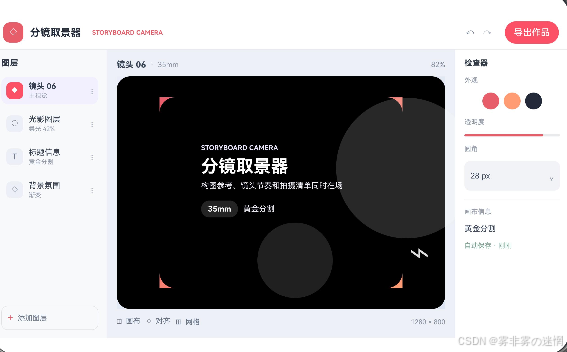
序号变化不影响引用关系
从这里开始,页面上的操作不再只是切换文案。绘制构图参考会实际改写模型。
ts
  getElements(): CanvasElement[] {
    return this.elements
  }

  select(id: string): boolean {
    const exists: boolean = this.elements.some((item: CanvasElement) => item.id === id)
    if (!exists) {
      return false
    }
    this.selectedId = id
    this.elements = this.elements.map((item: CanvasElement) => ({ id: item.id, name: item.name, x: item.x, y: item.y, scale: item.scale, opacity: item.opacity, selected: item.id === id } as CanvasElement))
    return true
  }

  moveSelected(point: CanvasPoint): boolean {
    const index: number = this.elements.findIndex((item: CanvasElement) => item.id === this.selectedId)
    if (index < 0 || point.x < 0 || point.y < 0) {
      return false
    }
    this.pushSnapshot()
    const current: CanvasElement = this.elements[index]
    this.elements[index] = { id: current.id, name: current.name, x: point.x, y: point.y, scale: current.scale, opacity: current.opacity, selected: current.selected }
    return true
  }

  updateScale(delta: number): number {
    const index: number = this.elements.findIndex((item: CanvasElement) => item.id === this.selectedId)
    if (index < 0) {
绘制构图参考完成后,控制器把结果写回分镜元素、镜头序号、构图位置、焦段信息和撤销快照,视图只接收本次动作产生的新状态。
构图框与焦段一起保存
这里不再增加业务字段,只把现有状态安排到合适位置。左侧分镜列表,中间取景画布,右侧显示焦段、构图和拍摄检查。
ts
import { FeatureController } from '../features/FeatureController'

interface LayerItem { icon: string;
    name: string;
    meta: string;
    active: boolean }

@Entry
@Component
struct Index {
  private featureController: FeatureController = new FeatureController()
  private layers: LayerItem[] = [
    { icon: '◆', name: '镜头 06', meta: '主视觉', active: true }, { icon: '○', name: '光影图层', meta: '柔光 42%', active: false },
    { icon: 'T', name: '标题信息', meta: '黄金分割', active: false }, { icon: '◇', name: '背景氛围', meta: '渐变', active: false }
  ]

  build() {
    Column() {
      Row({ space: 12 }) { Stack() { Rect().width(36).height(36).radius(12).fill('#E85D6A');
    Text('◇').fontSize(17).fontColor(Color.White) };
    Text('分镜取景器').fontSize(18).fontWeight(FontWeight.Bold).fontColor('#252D3C');
    Text('STORYBOARD CAMERA').fontSize(11).fontWeight(FontWeight.Bold).fontColor('#E85D6A').margin({ left: 8 });
    Blank();
    Text('↶').fontSize(18).fontColor('#778196');
    Text('↷').fontSize(18).fontColor('#B3BAC7');
    Button('导出作品').backgroundColor('#E85D6A').margin({ left: 10 }) }.width('100%').height(60).padding({ left: 18, right: 18 }).backgroundColor(Color.White).border({ width: { bottom: 1 }, color: '#E7EAF0' })
      Row() {
        Column({ space: 10 }) { Text('图层').fontSize(15).fontWeight(FontWeight.Bold).fontColor('#30394A').width('100%').margin({ bottom: 6 });
    ForEach(this.layers, (item: LayerItem) => { Row({ space: 10 }) { Text(item.icon).fontSize(14).fontColor(item.active ? Color.White : '#6F7B90').width(30).height(30).textAlign(TextAlign.Center).backgroundColor(item.active ? '#E85D6A' : '#EDF0F5').borderRadius(9);
    Column({ space: 2 }) { Text(item.name).fontSize(14).fontWeight(item.active ? FontWeight.Bold : FontWeight.Normal).fontColor('#354052');
    Text(item.meta).fontSize(11).fontColor('#929BAC') }.alignItems(HorizontalAlign.Start).layoutWeight(1);
    Text('⋮').fontSize(16).fontColor('#A4ACB9') }.width('100%').padding(9).backgroundColor(item.active ? '#F2F0FF' : Color.Transparent).borderRadius(12) }, (item: LayerItem) => item.name);
    Blank();
    Row({ space: 8 }) { Text('+').fontSize(18).fontColor('#E85D6A');
    Text('添加图层').fontSize(13).fontColor('#6F7B90') }.width('100%').padding(10).border({ width: 1, color: '#DDE2EA' }).borderRadius(11) }.width(202).height('100%').padding(15).backgroundColor('#F8F9FB')
        Column({ space: 12 }) {
          Row() { Text('镜头 06').fontSize(15).fontWeight(FontWeight.Bold).fontColor('#354052');
    Text('  ·  35mm').fontSize(13).fontColor('#8B95A6');
    Blank();
    Text('82%').fontSize(13).fontColor('#7B8698') }.width('100%')
          Stack() {
            Rect().width('100%').height('100%').radius(24).linearGradient({ angle: 135, colors: [['#E9EDF7', 0.0], ['#DDE5F2', 1.0]] })
            Rect().width('74%').height('82%').radius(28).linearGradient({ angle: 145, colors: [['#E85D6A', 0.0], ['#FF9C73', 1.0]] }).shadow({ radius: 24, color: '#28000000', offsetY: 12 })
            Circle({ width: 250, height: 250 }).fill('#28FFFFFF').position({ x: 390, y: 38 })
            Circle({ width: 134, height: 134 }).fill('#20FFFFFF').position({ x: 250, y: 260 })
            Column({ space: 8 }) { Text('STORYBOARD CAMERA').fontSize(12).fontWeight(FontWeight.Bold).fontColor('#EDE8FF');
    Text('分镜取景器').fontSize(31).fontWeight(FontWeight.Bold).fontColor(Color.White);
    Text('构图参考、镜头节奏和拍摄清单同时在场').fontSize(14).fontColor('#F1EEFA').width(320);
    Row({ space: 9 }) { Text('35mm').fontSize(14).fontWeight(FontWeight.Bold).fontColor(Color.White).padding({ left: 12, right: 12, top: 7, bottom: 7 }).backgroundColor('#24FFFFFF').borderRadius(15);
    Text('黄金分割').fontSize(14).fontColor('#EEEAF8') }.margin({ top: 10 }) }.position({ x: 150, y: 120 }).alignItems(HorizontalAlign.Start)
            Text('⌁').fontSize(62).fontColor('#DFFFFFFF').position({ x: 520, y: 245 })
          }.layoutWeight(1).width('100%')
          Row({ space: 10 }) { Text('◫  画布').fontSize(13).fontColor('#667287');
    Text('⌖  对齐').fontSize(13).fontColor('#667287');
    Text('⊞  网格').fontSize(13).fontColor('#667287');
    Blank();
    Text('1280 × 800').fontSize(12).fontColor('#8C96A7') }.width('100%')
        }.layoutWeight(1).height('100%').padding(18).backgroundColor('#EEF1F6')
        Column({ space: 15 }) { Text('检查器').fontSize(14).fontWeight(FontWeight.Bold).width('100%');
    Text('外观').fontSize(12).fontColor('#929BAC').width('100%');
    Row({ space: 8 }) { Circle({ width: 30, height: 30 }).fill('#E85D6A');
    Circle({ width: 30, height: 30 }).fill('#FF9C73');
    Circle({ width: 30, height: 30 }).fill('#222A3A') };
    Text('透明度').fontSize(12).fontColor('#929BAC').width('100%');
    Progress({ value: 82, total: 100, type: ProgressType.Linear }).width('100%').color('#E85D6A');
    Text('圆角').fontSize(12).fontColor('#929BAC').width('100%');
    Row() { Text('28 px').fontSize(14).fontColor('#3F495B');
    Blank();
    Text('⌄').fontSize(15).fontColor('#8B94A4') }.width('100%').padding(11).backgroundColor('#F1F3F7').borderRadius(10);
删除镜头也能撤销回来
资源生命周期从保存镜头参数开始归属到会话,退出时由同一对象回收。
ts
      return 1
    }
    this.pushSnapshot()
    const current: CanvasElement = this.elements[index]
    const next: number = Math.max(0.4, Math.min(2.4, current.scale + delta))
    this.elements[index] = { id: current.id, name: current.name, x: current.x, y: current.y, scale: next, opacity: current.opacity, selected: current.selected }
    return next
  }

  undo(): boolean {
    const snapshot: CanvasSnapshot | undefined = this.history.pop()
    if (!snapshot) {
      return false
    }
    this.selectedId = snapshot.selectedId
    this.elements = snapshot.elements.map((item: CanvasElement) => ({ id: item.id, name: item.name, x: item.x, y: item.y, scale: item.scale, opacity: item.opacity, selected: item.selected } as CanvasElement))
    return true
  }

  private pushSnapshot(): void {
    this.history.push({
      selectedId: this.selectedId,
      elements: this.elements.map((item: CanvasElement) => ({ id: item.id, name: item.name, x: item.x, y: item.y, scale: item.scale, opacity: item.opacity, selected: item.selected } as CanvasElement))
    })
    if (this.history.length > 30) {
      this.history.shift()
    }
  }
}
离开StoryboardCamera页面时,当前分镜元素、镜头序号、构图位置、焦段信息和撤销快照按会话归属收尾;再次进入后不会叠加旧任务。
StoryboardCamera的数据组织
Index.ets只组合界面,FeatureController.ets处理分镜元素、镜头序号、构图位置、焦段信息和撤销快照。如果后面接入真实设备或网络服务,只需增加适配器并把结果转换成控制器认识的状态。
StoryboardCamera最终把定义分镜模型、绘制构图参考和加入回看与撤销连在同一条状态路径中。