专栏前言
上一篇我们掌握了 PWM 脉冲宽度调制 ,用数字信号实现了模拟输出效果,完成了呼吸灯、蜂鸣器音阶播放。
如果说 PWM 是"数字→模拟"的输出桥梁,那本篇的 ADC(模数转换器) 就是"模拟→数字"的输入桥梁------现实世界的温度、光照、电压、声音都是连续的模拟量,必须通过 ADC 转换成数字信号,MCU 才能识别处理。
这是嵌入式从"纯数字控制"迈向"真实世界感知"的关键一步,也是所有传感器项目的核心基础。
本篇一次性讲透 ESP-IDF 下 ADC 完整开发体系:
核心原理 → ESP32 ADC资源架构 → 电位器调压采集 → 光敏光照检测 → 软件滤波 → OLED实时显示
全程代码可直接编译烧录,零基础也能打通「模拟感知→数字转换→界面展示」的完整链路。
一、ADC 核心基础(新手必懂)
1. 什么是ADC?
ADC(Analog-to-Digital Converter)即模数转换器,作用是将连续变化的模拟电压信号,转换成离散的数字数值,让只能识别0和1的单片机可以读取现实世界的模拟量。
三个核心概念:
- 分辨率 :转换的精度位数,ESP32 为12位,对应数值范围
0 ~ 4095 - 参考电压:ADC转换的基准电压,ESP32 内部基准约1.1V
- 衰减器:扩展测量范围,通过衰减输入信号,实现更高电压的测量
2. ESP32 ADC 硬件资源
ESP32 内置 2 路独立 ADC 控制器,共18个通道:
- ADC1 :8个通道,不受无线模块影响,新手优先使用
- ADC2:10个通道,与WiFi、蓝牙共用硬件,开启无线后无法使用
3. 衰减档位与测量范围
通过配置衰减倍数,可适配不同的输入电压范围,常用档位:
| 衰减档位 | 满量程电压 | 适用场景 |
|---|---|---|
| 0dB | ~1.1V | 高精度小信号测量 |
| 2.5dB | ~1.5V | 小范围电压检测 |
| 6dB | ~2.2V | 中等电压测量 |
| 11dB | ~3.9V | 0~3.3V全量程测量(最常用) |
新手默认选
11dB 衰减,直接覆盖 0~3.3V 常用量程,适配绝大多数传感器。
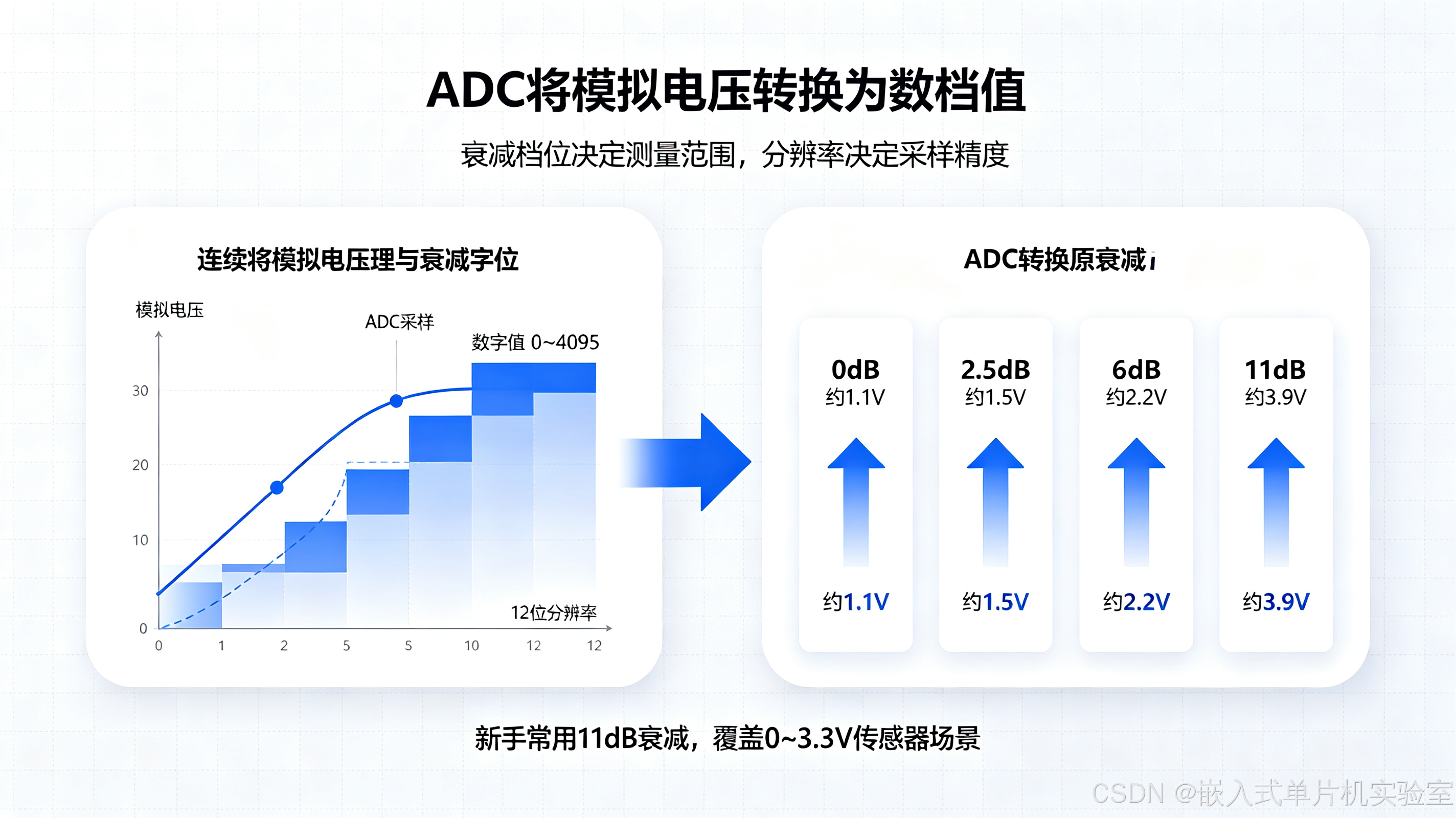
【配图1:ADC转换原理与衰减档位示意图】
配图说明:左侧展示模拟电压到数字值的阶梯状转换对应关系,右侧标注四种衰减档位对应的测量范围,直观呈现分辨率、参考电压、衰减三者的逻辑。
下面是 ADC 核心概念与 ESP32 硬件资源的整体架构图:
#mermaid-svg-4M7XWATOhFThGS4h{font-family:"trebuchet ms",verdana,arial,sans-serif;font-size:16px;fill:#333;}@keyframes edge-animation-frame{from{stroke-dashoffset:0;}}@keyframes dash{to{stroke-dashoffset:0;}}#mermaid-svg-4M7XWATOhFThGS4h .edge-animation-slow{stroke-dasharray:9,5!important;stroke-dashoffset:900;animation:dash 50s linear infinite;stroke-linecap:round;}#mermaid-svg-4M7XWATOhFThGS4h .edge-animation-fast{stroke-dasharray:9,5!important;stroke-dashoffset:900;animation:dash 20s linear infinite;stroke-linecap:round;}#mermaid-svg-4M7XWATOhFThGS4h .error-icon{fill:#552222;}#mermaid-svg-4M7XWATOhFThGS4h .error-text{fill:#552222;stroke:#552222;}#mermaid-svg-4M7XWATOhFThGS4h .edge-thickness-normal{stroke-width:1px;}#mermaid-svg-4M7XWATOhFThGS4h .edge-thickness-thick{stroke-width:3.5px;}#mermaid-svg-4M7XWATOhFThGS4h .edge-pattern-solid{stroke-dasharray:0;}#mermaid-svg-4M7XWATOhFThGS4h .edge-thickness-invisible{stroke-width:0;fill:none;}#mermaid-svg-4M7XWATOhFThGS4h .edge-pattern-dashed{stroke-dasharray:3;}#mermaid-svg-4M7XWATOhFThGS4h .edge-pattern-dotted{stroke-dasharray:2;}#mermaid-svg-4M7XWATOhFThGS4h .marker{fill:#333333;stroke:#333333;}#mermaid-svg-4M7XWATOhFThGS4h .marker.cross{stroke:#333333;}#mermaid-svg-4M7XWATOhFThGS4h svg{font-family:"trebuchet ms",verdana,arial,sans-serif;font-size:16px;}#mermaid-svg-4M7XWATOhFThGS4h p{margin:0;}#mermaid-svg-4M7XWATOhFThGS4h .label{font-family:"trebuchet ms",verdana,arial,sans-serif;color:#333;}#mermaid-svg-4M7XWATOhFThGS4h .cluster-label text{fill:#333;}#mermaid-svg-4M7XWATOhFThGS4h .cluster-label span{color:#333;}#mermaid-svg-4M7XWATOhFThGS4h .cluster-label span p{background-color:transparent;}#mermaid-svg-4M7XWATOhFThGS4h .label text,#mermaid-svg-4M7XWATOhFThGS4h span{fill:#333;color:#333;}#mermaid-svg-4M7XWATOhFThGS4h .node rect,#mermaid-svg-4M7XWATOhFThGS4h .node circle,#mermaid-svg-4M7XWATOhFThGS4h .node ellipse,#mermaid-svg-4M7XWATOhFThGS4h .node polygon,#mermaid-svg-4M7XWATOhFThGS4h .node path{fill:#ECECFF;stroke:#9370DB;stroke-width:1px;}#mermaid-svg-4M7XWATOhFThGS4h .rough-node .label text,#mermaid-svg-4M7XWATOhFThGS4h .node .label text,#mermaid-svg-4M7XWATOhFThGS4h .image-shape .label,#mermaid-svg-4M7XWATOhFThGS4h .icon-shape .label{text-anchor:middle;}#mermaid-svg-4M7XWATOhFThGS4h .node .katex path{fill:#000;stroke:#000;stroke-width:1px;}#mermaid-svg-4M7XWATOhFThGS4h .rough-node .label,#mermaid-svg-4M7XWATOhFThGS4h .node .label,#mermaid-svg-4M7XWATOhFThGS4h .image-shape .label,#mermaid-svg-4M7XWATOhFThGS4h .icon-shape .label{text-align:center;}#mermaid-svg-4M7XWATOhFThGS4h .node.clickable{cursor:pointer;}#mermaid-svg-4M7XWATOhFThGS4h .root .anchor path{fill:#333333!important;stroke-width:0;stroke:#333333;}#mermaid-svg-4M7XWATOhFThGS4h .arrowheadPath{fill:#333333;}#mermaid-svg-4M7XWATOhFThGS4h .edgePath .path{stroke:#333333;stroke-width:2.0px;}#mermaid-svg-4M7XWATOhFThGS4h .flowchart-link{stroke:#333333;fill:none;}#mermaid-svg-4M7XWATOhFThGS4h .edgeLabel{background-color:rgba(232,232,232, 0.8);text-align:center;}#mermaid-svg-4M7XWATOhFThGS4h .edgeLabel p{background-color:rgba(232,232,232, 0.8);}#mermaid-svg-4M7XWATOhFThGS4h .edgeLabel rect{opacity:0.5;background-color:rgba(232,232,232, 0.8);fill:rgba(232,232,232, 0.8);}#mermaid-svg-4M7XWATOhFThGS4h .labelBkg{background-color:rgba(232, 232, 232, 0.5);}#mermaid-svg-4M7XWATOhFThGS4h .cluster rect{fill:#ffffde;stroke:#aaaa33;stroke-width:1px;}#mermaid-svg-4M7XWATOhFThGS4h .cluster text{fill:#333;}#mermaid-svg-4M7XWATOhFThGS4h .cluster span{color:#333;}#mermaid-svg-4M7XWATOhFThGS4h div.mermaidTooltip{position:absolute;text-align:center;max-width:200px;padding:2px;font-family:"trebuchet ms",verdana,arial,sans-serif;font-size:12px;background:hsl(80, 100%, 96.2745098039%);border:1px solid #aaaa33;border-radius:2px;pointer-events:none;z-index:100;}#mermaid-svg-4M7XWATOhFThGS4h .flowchartTitleText{text-anchor:middle;font-size:18px;fill:#333;}#mermaid-svg-4M7XWATOhFThGS4h rect.text{fill:none;stroke-width:0;}#mermaid-svg-4M7XWATOhFThGS4h .icon-shape,#mermaid-svg-4M7XWATOhFThGS4h .image-shape{background-color:rgba(232,232,232, 0.8);text-align:center;}#mermaid-svg-4M7XWATOhFThGS4h .icon-shape p,#mermaid-svg-4M7XWATOhFThGS4h .image-shape p{background-color:rgba(232,232,232, 0.8);padding:2px;}#mermaid-svg-4M7XWATOhFThGS4h .icon-shape .label rect,#mermaid-svg-4M7XWATOhFThGS4h .image-shape .label rect{opacity:0.5;background-color:rgba(232,232,232, 0.8);fill:rgba(232,232,232, 0.8);}#mermaid-svg-4M7XWATOhFThGS4h .label-icon{display:inline-block;height:1em;overflow:visible;vertical-align:-0.125em;}#mermaid-svg-4M7XWATOhFThGS4h .node .label-icon path{fill:currentColor;stroke:revert;stroke-width:revert;}#mermaid-svg-4M7XWATOhFThGS4h :root{--mermaid-font-family:"trebuchet ms",verdana,arial,sans-serif;} ESP32 ADC 硬件资源
现实世界模拟信号
温度 / 光照 / 电压 / 声音
ADC 模数转换器
数字信号
0 ~ 4095
MCU 识别处理
ADC1
8 通道
不受无线影响
ADC2
10 通道
与 WiFi/蓝牙共用
新手优先使用
开启无线后不可用
二、硬件准备与接线说明
1. 物料清单
- ESP32 开发板
- 10K 电位器(可调电阻)
- 光敏电阻模块(或光敏电阻+10K电阻)
- 0.96寸 OLED 屏幕(SSD1306,I2C接口,复用第06篇驱动)
- 杜邦线若干
2. 完整接线表
| 器件 | 引脚 | ESP32 引脚 | 说明 |
|---|---|---|---|
| OLED | VCC | 3.3V | 供电,复用第06篇引脚 |
| OLED | GND | GND | 共地 |
| OLED | SCL | GPIO9 | I2C时钟 |
| OLED | SDA | GPIO8 | I2C数据 |
| 电位器 | 左端 | 3.3V | 电位器两端接电源 |
| 电位器 | 右端 | GND | |
| 电位器 | 中间抽头 | GPIO3 | ADC1_CH3,输出可调电压 |
| 光敏模块 | VCC | 3.3V | 供电 |
| 光敏模块 | GND | GND | 共地 |
| 光敏模块 | AO | GPIO4 | ADC1_CH4,模拟量输出 |
工程提示:两个模拟器件分别占用独立ADC通道,互不干扰;OLED继续复用I2C总线,体现多外设整合的模块化思想。
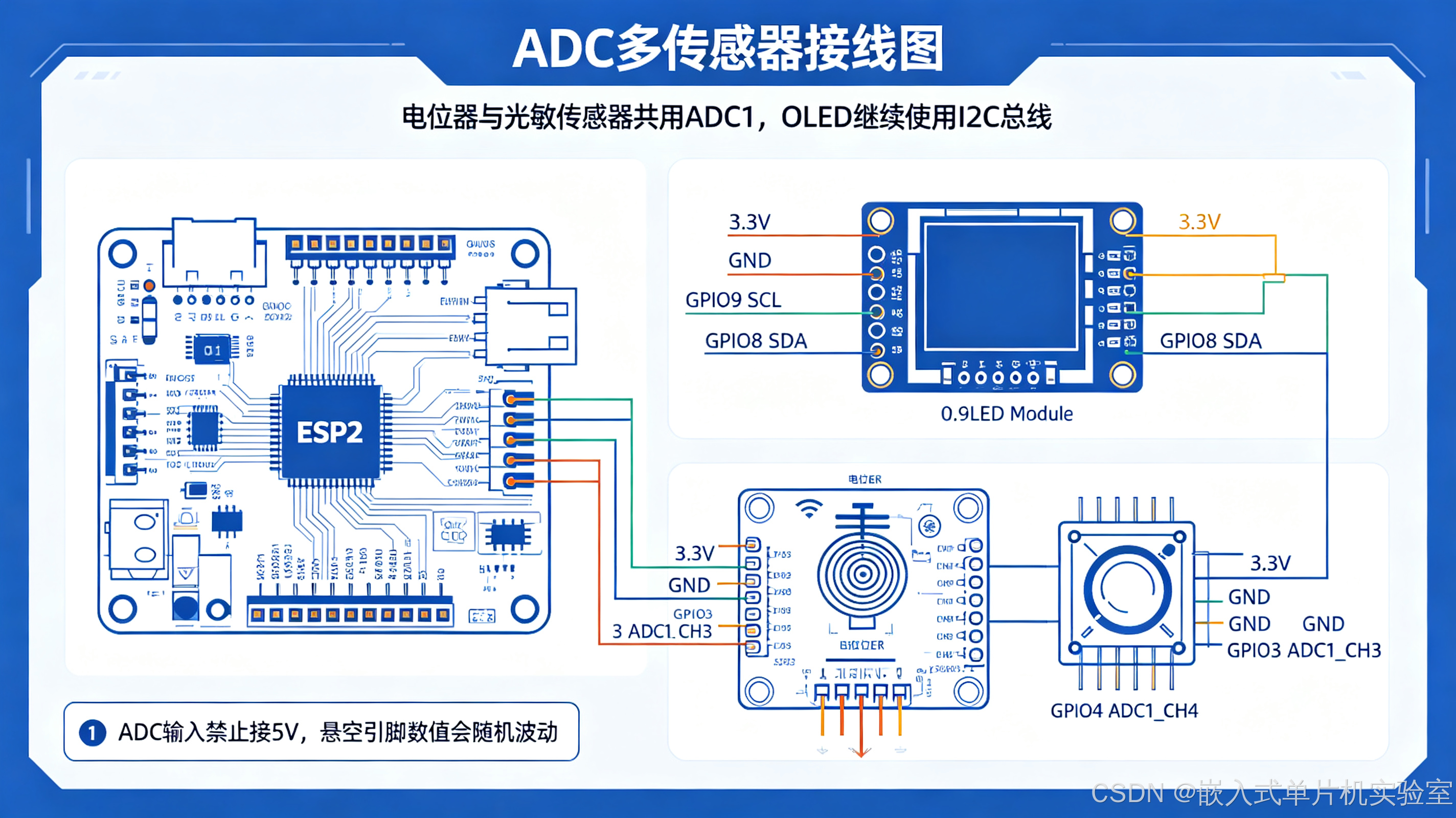
【配图2:电位器+光敏传感器+OLED整体接线示意图】
配图说明:清晰标注三路器件的接线对应关系,重点突出ADC模拟输入引脚、分压电路逻辑,新手可直接对照接线。
三、ESP-IDF ADC 基础配置与单次读取
ESP-IDF v5.x 提供标准化 adc_oneshot 驱动,单次采集模式简单稳定,适合入门。
1. 标准初始化三步法
- 创建ADC单元实例
- 配置通道、衰减、分辨率
- 调用读取函数获取原始值
2. 基础读取代码(串口输出)
c
#include <stdio.h>
#include "freertos/FreeRTOS.h"
#include "freertos/task.h"
#include "driver/adc.h"
#include "esp_log.h"

#define TAG "ADC_DEMO"

// ADC配置
#define ADC_UNIT        ADC_UNIT_1
#define ADC_CH_POT      ADC_CHANNEL_3  // GPIO3 电位器
#define ADC_ATTEN       ADC_ATTEN_DB_11 // 11dB衰减,0~3.3V
#define ADC_WIDTH       ADC_BITWIDTH_12 // 12位分辨率

void app_main(void)
{
    // 1. 初始化ADC单元
    adc_oneshot_unit_handle_t adc_handle;
    adc_oneshot_unit_init_cfg_t unit_cfg = {
        .unit_id = ADC_UNIT,
    };
    adc_oneshot_new_unit(&unit_cfg, &adc_handle);

    // 2. 配置通道
    adc_oneshot_chan_cfg_t chan_cfg = {
        .atten = ADC_ATTEN,
        .bitwidth = ADC_WIDTH,
    };
    adc_oneshot_config_channel(adc_handle, ADC_CH_POT, &chan_cfg);

    int raw_value = 0;
    float voltage = 0.0f;

    while(1)
    {
        // 3. 读取ADC原始值
        adc_oneshot_read(adc_handle, ADC_CH_POT, &raw_value);

        // 换算成实际电压(11dB衰减,满量程3.3V)
        voltage = raw_value * 3.3f / 4095.0f;

        ESP_LOGI(TAG, "原始值: %d  电压: %.2f V", raw_value, voltage);

        vTaskDelay(pdMS_TO_TICKS(500));
    }
}
3. 关键说明
- 原始值范围:0 ~ 4095(12位分辨率)
- 电压换算公式:
实际电压 = 原始值 × 满量程电压 ÷ 2^分辨率 - 旋转电位器,观察串口电压从0V到3.3V连续变化,说明ADC工作正常
下面是 ESP-IDF 标准初始化三步法的流程图:
#mermaid-svg-aSaYo8qU8q0LJT76{font-family:"trebuchet ms",verdana,arial,sans-serif;font-size:16px;fill:#333;}@keyframes edge-animation-frame{from{stroke-dashoffset:0;}}@keyframes dash{to{stroke-dashoffset:0;}}#mermaid-svg-aSaYo8qU8q0LJT76 .edge-animation-slow{stroke-dasharray:9,5!important;stroke-dashoffset:900;animation:dash 50s linear infinite;stroke-linecap:round;}#mermaid-svg-aSaYo8qU8q0LJT76 .edge-animation-fast{stroke-dasharray:9,5!important;stroke-dashoffset:900;animation:dash 20s linear infinite;stroke-linecap:round;}#mermaid-svg-aSaYo8qU8q0LJT76 .error-icon{fill:#552222;}#mermaid-svg-aSaYo8qU8q0LJT76 .error-text{fill:#552222;stroke:#552222;}#mermaid-svg-aSaYo8qU8q0LJT76 .edge-thickness-normal{stroke-width:1px;}#mermaid-svg-aSaYo8qU8q0LJT76 .edge-thickness-thick{stroke-width:3.5px;}#mermaid-svg-aSaYo8qU8q0LJT76 .edge-pattern-solid{stroke-dasharray:0;}#mermaid-svg-aSaYo8qU8q0LJT76 .edge-thickness-invisible{stroke-width:0;fill:none;}#mermaid-svg-aSaYo8qU8q0LJT76 .edge-pattern-dashed{stroke-dasharray:3;}#mermaid-svg-aSaYo8qU8q0LJT76 .edge-pattern-dotted{stroke-dasharray:2;}#mermaid-svg-aSaYo8qU8q0LJT76 .marker{fill:#333333;stroke:#333333;}#mermaid-svg-aSaYo8qU8q0LJT76 .marker.cross{stroke:#333333;}#mermaid-svg-aSaYo8qU8q0LJT76 svg{font-family:"trebuchet ms",verdana,arial,sans-serif;font-size:16px;}#mermaid-svg-aSaYo8qU8q0LJT76 p{margin:0;}#mermaid-svg-aSaYo8qU8q0LJT76 .label{font-family:"trebuchet ms",verdana,arial,sans-serif;color:#333;}#mermaid-svg-aSaYo8qU8q0LJT76 .cluster-label text{fill:#333;}#mermaid-svg-aSaYo8qU8q0LJT76 .cluster-label span{color:#333;}#mermaid-svg-aSaYo8qU8q0LJT76 .cluster-label span p{background-color:transparent;}#mermaid-svg-aSaYo8qU8q0LJT76 .label text,#mermaid-svg-aSaYo8qU8q0LJT76 span{fill:#333;color:#333;}#mermaid-svg-aSaYo8qU8q0LJT76 .node rect,#mermaid-svg-aSaYo8qU8q0LJT76 .node circle,#mermaid-svg-aSaYo8qU8q0LJT76 .node ellipse,#mermaid-svg-aSaYo8qU8q0LJT76 .node polygon,#mermaid-svg-aSaYo8qU8q0LJT76 .node path{fill:#ECECFF;stroke:#9370DB;stroke-width:1px;}#mermaid-svg-aSaYo8qU8q0LJT76 .rough-node .label text,#mermaid-svg-aSaYo8qU8q0LJT76 .node .label text,#mermaid-svg-aSaYo8qU8q0LJT76 .image-shape .label,#mermaid-svg-aSaYo8qU8q0LJT76 .icon-shape .label{text-anchor:middle;}#mermaid-svg-aSaYo8qU8q0LJT76 .node .katex path{fill:#000;stroke:#000;stroke-width:1px;}#mermaid-svg-aSaYo8qU8q0LJT76 .rough-node .label,#mermaid-svg-aSaYo8qU8q0LJT76 .node .label,#mermaid-svg-aSaYo8qU8q0LJT76 .image-shape .label,#mermaid-svg-aSaYo8qU8q0LJT76 .icon-shape .label{text-align:center;}#mermaid-svg-aSaYo8qU8q0LJT76 .node.clickable{cursor:pointer;}#mermaid-svg-aSaYo8qU8q0LJT76 .root .anchor path{fill:#333333!important;stroke-width:0;stroke:#333333;}#mermaid-svg-aSaYo8qU8q0LJT76 .arrowheadPath{fill:#333333;}#mermaid-svg-aSaYo8qU8q0LJT76 .edgePath .path{stroke:#333333;stroke-width:2.0px;}#mermaid-svg-aSaYo8qU8q0LJT76 .flowchart-link{stroke:#333333;fill:none;}#mermaid-svg-aSaYo8qU8q0LJT76 .edgeLabel{background-color:rgba(232,232,232, 0.8);text-align:center;}#mermaid-svg-aSaYo8qU8q0LJT76 .edgeLabel p{background-color:rgba(232,232,232, 0.8);}#mermaid-svg-aSaYo8qU8q0LJT76 .edgeLabel rect{opacity:0.5;background-color:rgba(232,232,232, 0.8);fill:rgba(232,232,232, 0.8);}#mermaid-svg-aSaYo8qU8q0LJT76 .labelBkg{background-color:rgba(232, 232, 232, 0.5);}#mermaid-svg-aSaYo8qU8q0LJT76 .cluster rect{fill:#ffffde;stroke:#aaaa33;stroke-width:1px;}#mermaid-svg-aSaYo8qU8q0LJT76 .cluster text{fill:#333;}#mermaid-svg-aSaYo8qU8q0LJT76 .cluster span{color:#333;}#mermaid-svg-aSaYo8qU8q0LJT76 div.mermaidTooltip{position:absolute;text-align:center;max-width:200px;padding:2px;font-family:"trebuchet ms",verdana,arial,sans-serif;font-size:12px;background:hsl(80, 100%, 96.2745098039%);border:1px solid #aaaa33;border-radius:2px;pointer-events:none;z-index:100;}#mermaid-svg-aSaYo8qU8q0LJT76 .flowchartTitleText{text-anchor:middle;font-size:18px;fill:#333;}#mermaid-svg-aSaYo8qU8q0LJT76 rect.text{fill:none;stroke-width:0;}#mermaid-svg-aSaYo8qU8q0LJT76 .icon-shape,#mermaid-svg-aSaYo8qU8q0LJT76 .image-shape{background-color:rgba(232,232,232, 0.8);text-align:center;}#mermaid-svg-aSaYo8qU8q0LJT76 .icon-shape p,#mermaid-svg-aSaYo8qU8q0LJT76 .image-shape p{background-color:rgba(232,232,232, 0.8);padding:2px;}#mermaid-svg-aSaYo8qU8q0LJT76 .icon-shape .label rect,#mermaid-svg-aSaYo8qU8q0LJT76 .image-shape .label rect{opacity:0.5;background-color:rgba(232,232,232, 0.8);fill:rgba(232,232,232, 0.8);}#mermaid-svg-aSaYo8qU8q0LJT76 .label-icon{display:inline-block;height:1em;overflow:visible;vertical-align:-0.125em;}#mermaid-svg-aSaYo8qU8q0LJT76 .node .label-icon path{fill:currentColor;stroke:revert;stroke-width:revert;}#mermaid-svg-aSaYo8qU8q0LJT76 :root{--mermaid-font-family:"trebuchet ms",verdana,arial,sans-serif;} 1. 创建 ADC 单元实例
adc_oneshot_new_unit
2. 配置通道参数
衰减 / 分辨率
adc_oneshot_config_channel
3. 读取原始值
adc_oneshot_read
换算实际电压
四、实战1:电位器调压 + OLED 实时显示
复用第06篇的 OLED 驱动,将电压数值实时显示到屏幕上,完成"模拟输入→数字转换→界面显示"完整闭环。
完整工程主函数源码
c
#include <stdio.h>
#include "freertos/FreeRTOS.h"
#include "freertos/task.h"
#include "driver/adc.h"
#include "driver/i2c.h"
#include "oled.h"
#include "esp_log.h"

#define TAG "ADC_OLED"

// ADC配置
#define ADC_UNIT        ADC_UNIT_1
#define ADC_CH_POT      ADC_CHANNEL_3
#define ADC_ATTEN       ADC_ATTEN_DB_11
#define ADC_WIDTH       ADC_BITWIDTH_12

// I2C配置(复用OLED引脚)
#define I2C_SDA_PIN     GPIO_NUM_8
#define I2C_SCL_PIN     GPIO_NUM_9
#define I2C_PORT        I2C_NUM_0

static void i2c_master_init(void)
{
    i2c_config_t conf = {
        .mode = I2C_MODE_MASTER,
        .sda_io_num = I2C_SDA_PIN,
        .scl_io_num = I2C_SCL_PIN,
        .sda_pullup_en = GPIO_PULLUP_ENABLE,
        .scl_pullup_en = GPIO_PULLUP_ENABLE,
        .master.clk_speed = 100000,
    };
    i2c_param_config(I2C_PORT, &conf);
    i2c_driver_install(I2C_PORT, conf.mode, 0, 0, 0);
}

void app_main(void)
{
    // 外设初始化
    i2c_master_init();
    oled_init();

    // ADC初始化
    adc_oneshot_unit_handle_t adc_handle;
    adc_oneshot_unit_init_cfg_t unit_cfg = {.unit_id = ADC_UNIT};
    adc_oneshot_new_unit(&unit_cfg, &adc_handle);

    adc_oneshot_chan_cfg_t chan_cfg = {
        .atten = ADC_ATTEN,
        .bitwidth = ADC_WIDTH,
    };
    adc_oneshot_config_channel(adc_handle, ADC_CH_POT, &chan_cfg);

    // 开机标题
    oled_show_string(0, 0, "ADC电压采集");
    oled_show_string(0, 2, "电位器:");
    oled_show_string(80, 2, "V");

    int raw = 0;
    float vol = 0.0f;

    while(1)
    {
        adc_oneshot_read(adc_handle, ADC_CH_POT, &raw);
        vol = raw * 3.3f / 4095.0f;

        // OLED刷新显示
        oled_show_num(48, 2, (uint8_t)vol, 1);
        oled_show_char(56, 2, '.');
        oled_show_num(64, 2, (uint8_t)(vol*100)%100, 2);

        ESP_LOGI(TAG, "电位器电压: %.2f V", vol);

        vTaskDelay(pdMS_TO_TICKS(200));
    }
}
预期效果
旋转电位器,OLED 屏幕上的电压值实时跟随变化,范围 0.00V ~ 3.30V。
下面是实战1「电位器调压 + OLED 实时显示」的完整数据流图:
#mermaid-svg-CtaJb0n27EsQOvxE{font-family:"trebuchet ms",verdana,arial,sans-serif;font-size:16px;fill:#333;}@keyframes edge-animation-frame{from{stroke-dashoffset:0;}}@keyframes dash{to{stroke-dashoffset:0;}}#mermaid-svg-CtaJb0n27EsQOvxE .edge-animation-slow{stroke-dasharray:9,5!important;stroke-dashoffset:900;animation:dash 50s linear infinite;stroke-linecap:round;}#mermaid-svg-CtaJb0n27EsQOvxE .edge-animation-fast{stroke-dasharray:9,5!important;stroke-dashoffset:900;animation:dash 20s linear infinite;stroke-linecap:round;}#mermaid-svg-CtaJb0n27EsQOvxE .error-icon{fill:#552222;}#mermaid-svg-CtaJb0n27EsQOvxE .error-text{fill:#552222;stroke:#552222;}#mermaid-svg-CtaJb0n27EsQOvxE .edge-thickness-normal{stroke-width:1px;}#mermaid-svg-CtaJb0n27EsQOvxE .edge-thickness-thick{stroke-width:3.5px;}#mermaid-svg-CtaJb0n27EsQOvxE .edge-pattern-solid{stroke-dasharray:0;}#mermaid-svg-CtaJb0n27EsQOvxE .edge-thickness-invisible{stroke-width:0;fill:none;}#mermaid-svg-CtaJb0n27EsQOvxE .edge-pattern-dashed{stroke-dasharray:3;}#mermaid-svg-CtaJb0n27EsQOvxE .edge-pattern-dotted{stroke-dasharray:2;}#mermaid-svg-CtaJb0n27EsQOvxE .marker{fill:#333333;stroke:#333333;}#mermaid-svg-CtaJb0n27EsQOvxE .marker.cross{stroke:#333333;}#mermaid-svg-CtaJb0n27EsQOvxE svg{font-family:"trebuchet ms",verdana,arial,sans-serif;font-size:16px;}#mermaid-svg-CtaJb0n27EsQOvxE p{margin:0;}#mermaid-svg-CtaJb0n27EsQOvxE .label{font-family:"trebuchet ms",verdana,arial,sans-serif;color:#333;}#mermaid-svg-CtaJb0n27EsQOvxE .cluster-label text{fill:#333;}#mermaid-svg-CtaJb0n27EsQOvxE .cluster-label span{color:#333;}#mermaid-svg-CtaJb0n27EsQOvxE .cluster-label span p{background-color:transparent;}#mermaid-svg-CtaJb0n27EsQOvxE .label text,#mermaid-svg-CtaJb0n27EsQOvxE span{fill:#333;color:#333;}#mermaid-svg-CtaJb0n27EsQOvxE .node rect,#mermaid-svg-CtaJb0n27EsQOvxE .node circle,#mermaid-svg-CtaJb0n27EsQOvxE .node ellipse,#mermaid-svg-CtaJb0n27EsQOvxE .node polygon,#mermaid-svg-CtaJb0n27EsQOvxE .node path{fill:#ECECFF;stroke:#9370DB;stroke-width:1px;}#mermaid-svg-CtaJb0n27EsQOvxE .rough-node .label text,#mermaid-svg-CtaJb0n27EsQOvxE .node .label text,#mermaid-svg-CtaJb0n27EsQOvxE .image-shape .label,#mermaid-svg-CtaJb0n27EsQOvxE .icon-shape .label{text-anchor:middle;}#mermaid-svg-CtaJb0n27EsQOvxE .node .katex path{fill:#000;stroke:#000;stroke-width:1px;}#mermaid-svg-CtaJb0n27EsQOvxE .rough-node .label,#mermaid-svg-CtaJb0n27EsQOvxE .node .label,#mermaid-svg-CtaJb0n27EsQOvxE .image-shape .label,#mermaid-svg-CtaJb0n27EsQOvxE .icon-shape .label{text-align:center;}#mermaid-svg-CtaJb0n27EsQOvxE .node.clickable{cursor:pointer;}#mermaid-svg-CtaJb0n27EsQOvxE .root .anchor path{fill:#333333!important;stroke-width:0;stroke:#333333;}#mermaid-svg-CtaJb0n27EsQOvxE .arrowheadPath{fill:#333333;}#mermaid-svg-CtaJb0n27EsQOvxE .edgePath .path{stroke:#333333;stroke-width:2.0px;}#mermaid-svg-CtaJb0n27EsQOvxE .flowchart-link{stroke:#333333;fill:none;}#mermaid-svg-CtaJb0n27EsQOvxE .edgeLabel{background-color:rgba(232,232,232, 0.8);text-align:center;}#mermaid-svg-CtaJb0n27EsQOvxE .edgeLabel p{background-color:rgba(232,232,232, 0.8);}#mermaid-svg-CtaJb0n27EsQOvxE .edgeLabel rect{opacity:0.5;background-color:rgba(232,232,232, 0.8);fill:rgba(232,232,232, 0.8);}#mermaid-svg-CtaJb0n27EsQOvxE .labelBkg{background-color:rgba(232, 232, 232, 0.5);}#mermaid-svg-CtaJb0n27EsQOvxE .cluster rect{fill:#ffffde;stroke:#aaaa33;stroke-width:1px;}#mermaid-svg-CtaJb0n27EsQOvxE .cluster text{fill:#333;}#mermaid-svg-CtaJb0n27EsQOvxE .cluster span{color:#333;}#mermaid-svg-CtaJb0n27EsQOvxE div.mermaidTooltip{position:absolute;text-align:center;max-width:200px;padding:2px;font-family:"trebuchet ms",verdana,arial,sans-serif;font-size:12px;background:hsl(80, 100%, 96.2745098039%);border:1px solid #aaaa33;border-radius:2px;pointer-events:none;z-index:100;}#mermaid-svg-CtaJb0n27EsQOvxE .flowchartTitleText{text-anchor:middle;font-size:18px;fill:#333;}#mermaid-svg-CtaJb0n27EsQOvxE rect.text{fill:none;stroke-width:0;}#mermaid-svg-CtaJb0n27EsQOvxE .icon-shape,#mermaid-svg-CtaJb0n27EsQOvxE .image-shape{background-color:rgba(232,232,232, 0.8);text-align:center;}#mermaid-svg-CtaJb0n27EsQOvxE .icon-shape p,#mermaid-svg-CtaJb0n27EsQOvxE .image-shape p{background-color:rgba(232,232,232, 0.8);padding:2px;}#mermaid-svg-CtaJb0n27EsQOvxE .icon-shape .label rect,#mermaid-svg-CtaJb0n27EsQOvxE .image-shape .label rect{opacity:0.5;background-color:rgba(232,232,232, 0.8);fill:rgba(232,232,232, 0.8);}#mermaid-svg-CtaJb0n27EsQOvxE .label-icon{display:inline-block;height:1em;overflow:visible;vertical-align:-0.125em;}#mermaid-svg-CtaJb0n27EsQOvxE .node .label-icon path{fill:currentColor;stroke:revert;stroke-width:revert;}#mermaid-svg-CtaJb0n27EsQOvxE :root{--mermaid-font-family:"trebuchet ms",verdana,arial,sans-serif;} 10K 电位器
中间抽头输出可调电压
GPIO3
ADC1_CH3
ADC 转换
12位 0~4095
电压换算
vol = raw × 3.3 / 4095
OLED 实时显示
0.00V ~ 3.30V
串口日志输出
ESP_LOGI
五、实战2:光敏传感器光照检测 + 软件滤波
1. 光敏传感器原理
光敏电阻的阻值随光照强度变化:光线越强,阻值越小。配合分压电路,光照越强,输出电压越低,通过ADC读取电压即可判断光照强度。
2. 软件均值滤波(解决数据跳变)
原始ADC数据容易受噪声干扰出现跳变,工程中最常用多次采样取平均的简单滤波方法,兼顾效果和易用性。
3. 完整光照检测代码
c
// 新增光敏通道定义
#define ADC_CH_LIGHT    ADC_CHANNEL_4  // GPIO4 光敏

// 多次采样滤波函数
int adc_read_filter(adc_oneshot_unit_handle_t handle, adc_channel_t ch, uint8_t times)
{
    int sum = 0;
    int val = 0;

    for(int i=0; i<times; i++)
    {
        adc_oneshot_read(handle, ch, &val);
        sum += val;
        vTaskDelay(pdMS_TO_TICKS(2));
    }

    return sum / times;
}

void app_main(void)
{
    // 省略初始化部分...
    // 配置光敏通道
    adc_oneshot_config_channel(adc_handle, ADC_CH_LIGHT, &chan_cfg);

    oled_show_string(0, 4, "光照等级:");

    int light_raw = 0;
    uint8_t light_level = 0;

    while(1)
    {
        // 滤波读取光敏值
        light_raw = adc_read_filter(adc_handle, ADC_CH_LIGHT, 10);

        // 划分光照等级(值越小,光照越强)
        if(light_raw < 1000)      light_level = 3; // 强光
        else if(light_raw < 2500) light_level = 2; // 中等
        else                      light_level = 1; // 弱光

        // OLED显示
        oled_show_num(64, 4, light_level, 1);
        if(light_level == 3) oled_show_string(80, 4, "强 ");
        if(light_level == 2) oled_show_string(80, 4, "中 ");
        if(light_level == 1) oled_show_string(80, 4, "弱 ");

        vTaskDelay(pdMS_TO_TICKS(500));
    }
}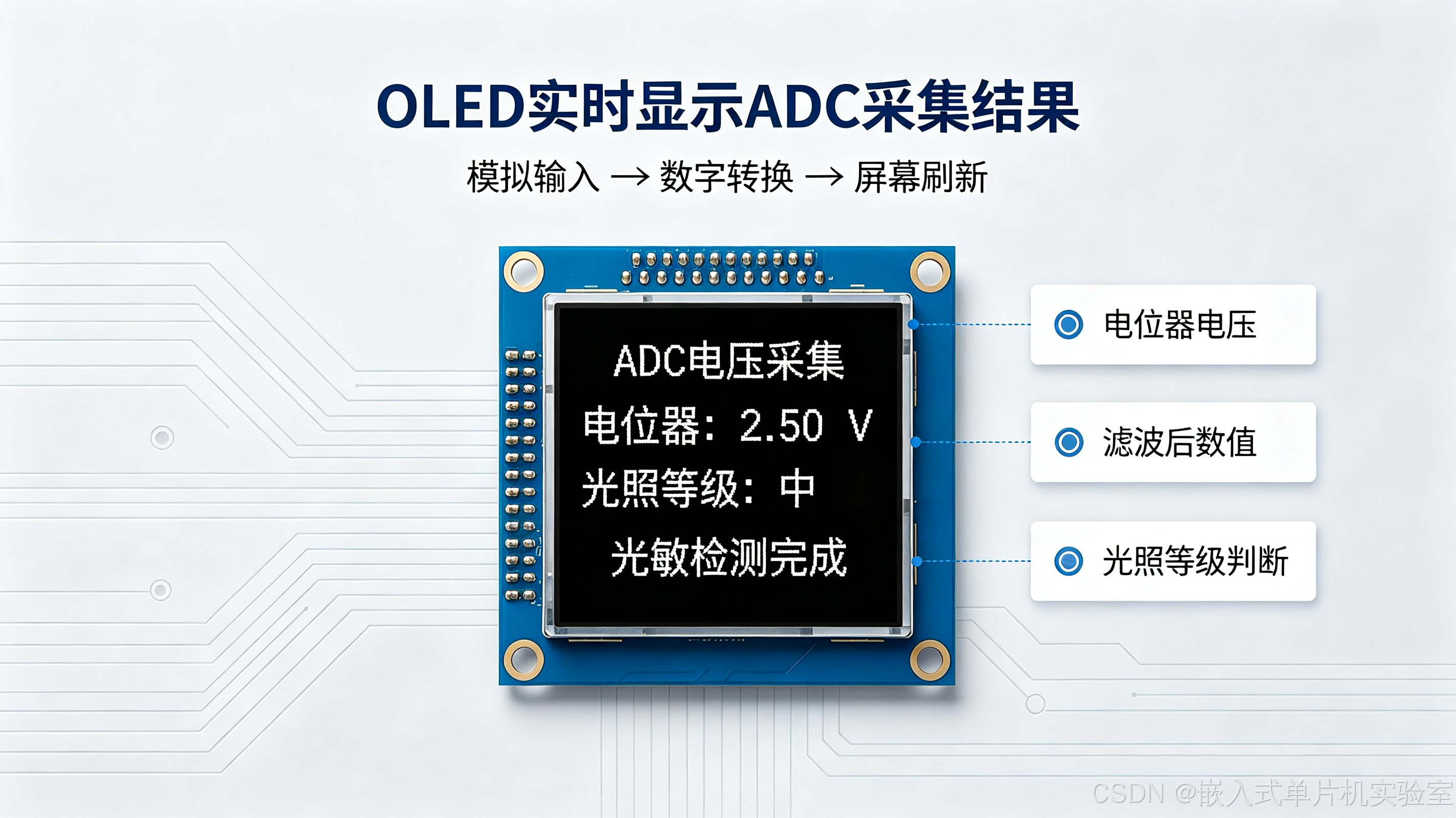
【配图3:OLED显示电压与光照效果示意图】
配图说明:模拟屏幕实际显示效果,上下分两行分别展示电位器电压、光照等级,直观呈现最终运行界面。
下面是实战2「光敏传感器光照检测 + 软件滤波」的完整处理流程图:
#mermaid-svg-YSMgKAEiiyJt51eM{font-family:"trebuchet ms",verdana,arial,sans-serif;font-size:16px;fill:#333;}@keyframes edge-animation-frame{from{stroke-dashoffset:0;}}@keyframes dash{to{stroke-dashoffset:0;}}#mermaid-svg-YSMgKAEiiyJt51eM .edge-animation-slow{stroke-dasharray:9,5!important;stroke-dashoffset:900;animation:dash 50s linear infinite;stroke-linecap:round;}#mermaid-svg-YSMgKAEiiyJt51eM .edge-animation-fast{stroke-dasharray:9,5!important;stroke-dashoffset:900;animation:dash 20s linear infinite;stroke-linecap:round;}#mermaid-svg-YSMgKAEiiyJt51eM .error-icon{fill:#552222;}#mermaid-svg-YSMgKAEiiyJt51eM .error-text{fill:#552222;stroke:#552222;}#mermaid-svg-YSMgKAEiiyJt51eM .edge-thickness-normal{stroke-width:1px;}#mermaid-svg-YSMgKAEiiyJt51eM .edge-thickness-thick{stroke-width:3.5px;}#mermaid-svg-YSMgKAEiiyJt51eM .edge-pattern-solid{stroke-dasharray:0;}#mermaid-svg-YSMgKAEiiyJt51eM .edge-thickness-invisible{stroke-width:0;fill:none;}#mermaid-svg-YSMgKAEiiyJt51eM .edge-pattern-dashed{stroke-dasharray:3;}#mermaid-svg-YSMgKAEiiyJt51eM .edge-pattern-dotted{stroke-dasharray:2;}#mermaid-svg-YSMgKAEiiyJt51eM .marker{fill:#333333;stroke:#333333;}#mermaid-svg-YSMgKAEiiyJt51eM .marker.cross{stroke:#333333;}#mermaid-svg-YSMgKAEiiyJt51eM svg{font-family:"trebuchet ms",verdana,arial,sans-serif;font-size:16px;}#mermaid-svg-YSMgKAEiiyJt51eM p{margin:0;}#mermaid-svg-YSMgKAEiiyJt51eM .label{font-family:"trebuchet ms",verdana,arial,sans-serif;color:#333;}#mermaid-svg-YSMgKAEiiyJt51eM .cluster-label text{fill:#333;}#mermaid-svg-YSMgKAEiiyJt51eM .cluster-label span{color:#333;}#mermaid-svg-YSMgKAEiiyJt51eM .cluster-label span p{background-color:transparent;}#mermaid-svg-YSMgKAEiiyJt51eM .label text,#mermaid-svg-YSMgKAEiiyJt51eM span{fill:#333;color:#333;}#mermaid-svg-YSMgKAEiiyJt51eM .node rect,#mermaid-svg-YSMgKAEiiyJt51eM .node circle,#mermaid-svg-YSMgKAEiiyJt51eM .node ellipse,#mermaid-svg-YSMgKAEiiyJt51eM .node polygon,#mermaid-svg-YSMgKAEiiyJt51eM .node path{fill:#ECECFF;stroke:#9370DB;stroke-width:1px;}#mermaid-svg-YSMgKAEiiyJt51eM .rough-node .label text,#mermaid-svg-YSMgKAEiiyJt51eM .node .label text,#mermaid-svg-YSMgKAEiiyJt51eM .image-shape .label,#mermaid-svg-YSMgKAEiiyJt51eM .icon-shape .label{text-anchor:middle;}#mermaid-svg-YSMgKAEiiyJt51eM .node .katex path{fill:#000;stroke:#000;stroke-width:1px;}#mermaid-svg-YSMgKAEiiyJt51eM .rough-node .label,#mermaid-svg-YSMgKAEiiyJt51eM .node .label,#mermaid-svg-YSMgKAEiiyJt51eM .image-shape .label,#mermaid-svg-YSMgKAEiiyJt51eM .icon-shape .label{text-align:center;}#mermaid-svg-YSMgKAEiiyJt51eM .node.clickable{cursor:pointer;}#mermaid-svg-YSMgKAEiiyJt51eM .root .anchor path{fill:#333333!important;stroke-width:0;stroke:#333333;}#mermaid-svg-YSMgKAEiiyJt51eM .arrowheadPath{fill:#333333;}#mermaid-svg-YSMgKAEiiyJt51eM .edgePath .path{stroke:#333333;stroke-width:2.0px;}#mermaid-svg-YSMgKAEiiyJt51eM .flowchart-link{stroke:#333333;fill:none;}#mermaid-svg-YSMgKAEiiyJt51eM .edgeLabel{background-color:rgba(232,232,232, 0.8);text-align:center;}#mermaid-svg-YSMgKAEiiyJt51eM .edgeLabel p{background-color:rgba(232,232,232, 0.8);}#mermaid-svg-YSMgKAEiiyJt51eM .edgeLabel rect{opacity:0.5;background-color:rgba(232,232,232, 0.8);fill:rgba(232,232,232, 0.8);}#mermaid-svg-YSMgKAEiiyJt51eM .labelBkg{background-color:rgba(232, 232, 232, 0.5);}#mermaid-svg-YSMgKAEiiyJt51eM .cluster rect{fill:#ffffde;stroke:#aaaa33;stroke-width:1px;}#mermaid-svg-YSMgKAEiiyJt51eM .cluster text{fill:#333;}#mermaid-svg-YSMgKAEiiyJt51eM .cluster span{color:#333;}#mermaid-svg-YSMgKAEiiyJt51eM div.mermaidTooltip{position:absolute;text-align:center;max-width:200px;padding:2px;font-family:"trebuchet ms",verdana,arial,sans-serif;font-size:12px;background:hsl(80, 100%, 96.2745098039%);border:1px solid #aaaa33;border-radius:2px;pointer-events:none;z-index:100;}#mermaid-svg-YSMgKAEiiyJt51eM .flowchartTitleText{text-anchor:middle;font-size:18px;fill:#333;}#mermaid-svg-YSMgKAEiiyJt51eM rect.text{fill:none;stroke-width:0;}#mermaid-svg-YSMgKAEiiyJt51eM .icon-shape,#mermaid-svg-YSMgKAEiiyJt51eM .image-shape{background-color:rgba(232,232,232, 0.8);text-align:center;}#mermaid-svg-YSMgKAEiiyJt51eM .icon-shape p,#mermaid-svg-YSMgKAEiiyJt51eM .image-shape p{background-color:rgba(232,232,232, 0.8);padding:2px;}#mermaid-svg-YSMgKAEiiyJt51eM .icon-shape .label rect,#mermaid-svg-YSMgKAEiiyJt51eM .image-shape .label rect{opacity:0.5;background-color:rgba(232,232,232, 0.8);fill:rgba(232,232,232, 0.8);}#mermaid-svg-YSMgKAEiiyJt51eM .label-icon{display:inline-block;height:1em;overflow:visible;vertical-align:-0.125em;}#mermaid-svg-YSMgKAEiiyJt51eM .node .label-icon path{fill:currentColor;stroke:revert;stroke-width:revert;}#mermaid-svg-YSMgKAEiiyJt51eM :root{--mermaid-font-family:"trebuchet ms",verdana,arial,sans-serif;} raw < 1000
1000 ≤ raw < 2500
raw ≥ 2500
光敏电阻
光线越强阻值越小
分压电路
光照越强电压越低
GPIO4
ADC1_CH4
软件均值滤波
10次采样取平均
光照等级判断
等级3 强光
等级2 中等
等级1 弱光
OLED 显示光照等级
六、ADC 进阶优化与工程知识
1. 硬件校准提升精度
ESP32 内部基准电压存在个体差异,可通过 eFuse 校准 或软件曲线拟合校准,大幅提升电压测量精度。ESP-IDF 提供 adc_cali 校准组件,正式项目建议开启。
2. 连续采样与DMA
高频采样(如音频采集)可使用 ADC 连续采样模式 + DMA,硬件自动搬运数据,不占用CPU,适合高速模拟信号采集。
3. 多通道扫描
多个传感器可分时复用同一个ADC单元,轮流切换通道读取,节省硬件资源,是量产项目的常用做法。
七、新手高频踩坑汇总
- ADC 完全没数值/数值固定
- 检查引脚是否对应正确的ADC通道,不是所有GPIO都支持ADC
- ADC2 开启WiFi/蓝牙后无法使用,切换到ADC1
- 输入电压超出量程,严重时直接烧毁芯片
- 数据跳变严重、数值不稳定
- 正常现象,模拟信号易受噪声干扰,增加软件滤波
- 电源纹波大,增加电源滤波电容
- 布线远离强电、高频信号线
- 测量电压不准、偏差大
- 衰减档位配置错误,导致满量程不匹配
- 未开启硬件校准,参考电压偏差
- 输入阻抗过高,降低分压电阻阻值
- 芯片烧坏、引脚损坏
- ⚠️ ADC 引脚最大输入 3.3V,绝对禁止接5V
- 悬空引脚数值随机波动,属于正常现象
下面是新手高频踩坑的排查决策流程图,帮助快速定位问题:
#mermaid-svg-XmRTLFvhB10bZmst{font-family:"trebuchet ms",verdana,arial,sans-serif;font-size:16px;fill:#333;}@keyframes edge-animation-frame{from{stroke-dashoffset:0;}}@keyframes dash{to{stroke-dashoffset:0;}}#mermaid-svg-XmRTLFvhB10bZmst .edge-animation-slow{stroke-dasharray:9,5!important;stroke-dashoffset:900;animation:dash 50s linear infinite;stroke-linecap:round;}#mermaid-svg-XmRTLFvhB10bZmst .edge-animation-fast{stroke-dasharray:9,5!important;stroke-dashoffset:900;animation:dash 20s linear infinite;stroke-linecap:round;}#mermaid-svg-XmRTLFvhB10bZmst .error-icon{fill:#552222;}#mermaid-svg-XmRTLFvhB10bZmst .error-text{fill:#552222;stroke:#552222;}#mermaid-svg-XmRTLFvhB10bZmst .edge-thickness-normal{stroke-width:1px;}#mermaid-svg-XmRTLFvhB10bZmst .edge-thickness-thick{stroke-width:3.5px;}#mermaid-svg-XmRTLFvhB10bZmst .edge-pattern-solid{stroke-dasharray:0;}#mermaid-svg-XmRTLFvhB10bZmst .edge-thickness-invisible{stroke-width:0;fill:none;}#mermaid-svg-XmRTLFvhB10bZmst .edge-pattern-dashed{stroke-dasharray:3;}#mermaid-svg-XmRTLFvhB10bZmst .edge-pattern-dotted{stroke-dasharray:2;}#mermaid-svg-XmRTLFvhB10bZmst .marker{fill:#333333;stroke:#333333;}#mermaid-svg-XmRTLFvhB10bZmst .marker.cross{stroke:#333333;}#mermaid-svg-XmRTLFvhB10bZmst svg{font-family:"trebuchet ms",verdana,arial,sans-serif;font-size:16px;}#mermaid-svg-XmRTLFvhB10bZmst p{margin:0;}#mermaid-svg-XmRTLFvhB10bZmst .label{font-family:"trebuchet ms",verdana,arial,sans-serif;color:#333;}#mermaid-svg-XmRTLFvhB10bZmst .cluster-label text{fill:#333;}#mermaid-svg-XmRTLFvhB10bZmst .cluster-label span{color:#333;}#mermaid-svg-XmRTLFvhB10bZmst .cluster-label span p{background-color:transparent;}#mermaid-svg-XmRTLFvhB10bZmst .label text,#mermaid-svg-XmRTLFvhB10bZmst span{fill:#333;color:#333;}#mermaid-svg-XmRTLFvhB10bZmst .node rect,#mermaid-svg-XmRTLFvhB10bZmst .node circle,#mermaid-svg-XmRTLFvhB10bZmst .node ellipse,#mermaid-svg-XmRTLFvhB10bZmst .node polygon,#mermaid-svg-XmRTLFvhB10bZmst .node path{fill:#ECECFF;stroke:#9370DB;stroke-width:1px;}#mermaid-svg-XmRTLFvhB10bZmst .rough-node .label text,#mermaid-svg-XmRTLFvhB10bZmst .node .label text,#mermaid-svg-XmRTLFvhB10bZmst .image-shape .label,#mermaid-svg-XmRTLFvhB10bZmst .icon-shape .label{text-anchor:middle;}#mermaid-svg-XmRTLFvhB10bZmst .node .katex path{fill:#000;stroke:#000;stroke-width:1px;}#mermaid-svg-XmRTLFvhB10bZmst .rough-node .label,#mermaid-svg-XmRTLFvhB10bZmst .node .label,#mermaid-svg-XmRTLFvhB10bZmst .image-shape .label,#mermaid-svg-XmRTLFvhB10bZmst .icon-shape .label{text-align:center;}#mermaid-svg-XmRTLFvhB10bZmst .node.clickable{cursor:pointer;}#mermaid-svg-XmRTLFvhB10bZmst .root .anchor path{fill:#333333!important;stroke-width:0;stroke:#333333;}#mermaid-svg-XmRTLFvhB10bZmst .arrowheadPath{fill:#333333;}#mermaid-svg-XmRTLFvhB10bZmst .edgePath .path{stroke:#333333;stroke-width:2.0px;}#mermaid-svg-XmRTLFvhB10bZmst .flowchart-link{stroke:#333333;fill:none;}#mermaid-svg-XmRTLFvhB10bZmst .edgeLabel{background-color:rgba(232,232,232, 0.8);text-align:center;}#mermaid-svg-XmRTLFvhB10bZmst .edgeLabel p{background-color:rgba(232,232,232, 0.8);}#mermaid-svg-XmRTLFvhB10bZmst .edgeLabel rect{opacity:0.5;background-color:rgba(232,232,232, 0.8);fill:rgba(232,232,232, 0.8);}#mermaid-svg-XmRTLFvhB10bZmst .labelBkg{background-color:rgba(232, 232, 232, 0.5);}#mermaid-svg-XmRTLFvhB10bZmst .cluster rect{fill:#ffffde;stroke:#aaaa33;stroke-width:1px;}#mermaid-svg-XmRTLFvhB10bZmst .cluster text{fill:#333;}#mermaid-svg-XmRTLFvhB10bZmst .cluster span{color:#333;}#mermaid-svg-XmRTLFvhB10bZmst div.mermaidTooltip{position:absolute;text-align:center;max-width:200px;padding:2px;font-family:"trebuchet ms",verdana,arial,sans-serif;font-size:12px;background:hsl(80, 100%, 96.2745098039%);border:1px solid #aaaa33;border-radius:2px;pointer-events:none;z-index:100;}#mermaid-svg-XmRTLFvhB10bZmst .flowchartTitleText{text-anchor:middle;font-size:18px;fill:#333;}#mermaid-svg-XmRTLFvhB10bZmst rect.text{fill:none;stroke-width:0;}#mermaid-svg-XmRTLFvhB10bZmst .icon-shape,#mermaid-svg-XmRTLFvhB10bZmst .image-shape{background-color:rgba(232,232,232, 0.8);text-align:center;}#mermaid-svg-XmRTLFvhB10bZmst .icon-shape p,#mermaid-svg-XmRTLFvhB10bZmst .image-shape p{background-color:rgba(232,232,232, 0.8);padding:2px;}#mermaid-svg-XmRTLFvhB10bZmst .icon-shape .label rect,#mermaid-svg-XmRTLFvhB10bZmst .image-shape .label rect{opacity:0.5;background-color:rgba(232,232,232, 0.8);fill:rgba(232,232,232, 0.8);}#mermaid-svg-XmRTLFvhB10bZmst .label-icon{display:inline-block;height:1em;overflow:visible;vertical-align:-0.125em;}#mermaid-svg-XmRTLFvhB10bZmst .node .label-icon path{fill:currentColor;stroke:revert;stroke-width:revert;}#mermaid-svg-XmRTLFvhB10bZmst :root{--mermaid-font-family:"trebuchet ms",verdana,arial,sans-serif;} 是
否
是
是
否
否
是
否
是
否
ADC 读数异常
完全没数值
或数值固定?
引脚是否对应
正确 ADC 通道?
更换到支持 ADC 的 GPIO
是否使用 ADC2
且开启 WiFi/蓝牙?
切换到 ADC1
检查输入电压是否超量程
数值跳变严重?
增加软件滤波
多次采样取平均
测量电压偏差大?
检查衰减档位配置
开启硬件校准
检查输入阻抗
降低分压电阻阻值
下一篇预告(10篇)
ESP-IDF保姆级入门10|FreeRTOS任务管理与调度,告别单循环死等,开启多任务并发开发,掌握任务创建、优先级、延时、挂起的核心用法!
关注本专栏,从零系统化吃透ESP32工业级开发,每篇均带完整源码+配图+避坑总结!