参考:openManus的ask_human.py
一、整体思路
-
添加askUser工具来执行【暂停agent执行,等待用户输入】的功能
-
添加SystemPrompt来确定一些必须使用askUser工具的场景
-
yml中添加是否启动人机终端交互开关按钮
-
通过实现ApplicationRunner接口的run方法达到在程序启动时直接进行人机交互目的
-
单元测试无法进行终端交互,默认控制台日志窗口为read_only
-
我们采用run方式运行程序,这样可以实现在终端窗口输入命令的需求
-
启动时直接打开人机交互窗口是为了快速验证功能实现,生产环境不这样做
注: 思路的实现关注我给出的核心代码即可。完整代码只是参考一下核心代码写在哪里。
二、实现askUser工具
1. 工具类实现代码
java
package com.jingdong.ai_super_love_agent.tools;

import org.springframework.ai.tool.annotation.Tool;
import org.springframework.ai.tool.annotation.ToolParam;
import org.springframework.stereotype.Component;
import java.util.Scanner;

/**
 * 用户交互工具类:暂停执行并等待用户输入
 * <p>适用于需要用户决策、确认或提供额外信息的场景,增强人机协作能力。</p>
 */
@Component
public class AskUserTool {

    /**
     * 向用户提问并获取回答
     * @param question 需要用户回答的问题
     * @return 用户的回答文本
     */
    @Tool(description = "【能力】暂停当前流程并向用户请求输入,用于需要人工决策、确认或提供额外信息的场景。【限制】此工具会阻塞当前线程直到用户输入,请确保在交互式环境中使用。【调用提示】问题应清晰明确,引导用户做出有效决策。" +
            "【强制调用场景】当需要用户确认、决策或提供信息时调用。典型场景:1)删除/覆盖文件前确认 2)选择报告类型 3)请求API密钥\n" +
            "    4)澄清模糊需求。问题必须清晰明确,包含可操作的选项。")
    public String askUser(@ToolParam(description = "需要用户回答的问题描述,应清晰明确,引导用户做出有效决策。示例:'请选择下一步操作:A)继续 B)终止 C)保存'") String question) {
        System.out.println("\n[系统需要您的决策] " + question);
        System.out.print(">>> 请输入您的选择: ");

        Scanner scanner = new Scanner(System.in);
        String answer = scanner.nextLine().trim();

        if (answer.isEmpty()) {
            answer = "用户未提供输入,启用默认处理";
        }

        System.out.println("[用户回答] " + answer);
        return answer;
    }
}
2. 加入工具类集中注册中心,使askUser能被注册和发现及使用
核心代码:
java
核心代码:
@Resource
private AskUserTool askUserTool;

ToolCallback[] normalCallbacks = ToolCallbacks.from(
                askUserTool
        );
工具注册类完整实现(参考部分即可):
java
package com.jingdong.ai_super_love_agent.config;

import com.jingdong.ai_super_love_agent.advisor.observation.ObservationToolCallbackWrapper;
import com.jingdong.ai_super_love_agent.tool.email.EmailTool;
import com.jingdong.ai_super_love_agent.tool.sms.SmsTool;
import com.jingdong.ai_super_love_agent.tool.smsverify.SmsVerifyTool;
import com.jingdong.ai_super_love_agent.tools.*;
import jakarta.annotation.Resource;
import lombok.extern.slf4j.Slf4j;

import org.springframework.ai.model.function.FunctionCallback;
import org.springframework.ai.tool.ToolCallback;
import org.springframework.ai.tool.ToolCallbackProvider;
import org.springframework.ai.tool.ToolCallbacks;
import org.springframework.context.annotation.Bean;
import org.springframework.context.annotation.Configuration;

import java.util.Arrays;
import java.util.stream.Stream;

/**
 * 工具注册配置类
 * <p>
 * 统一注册 tools 包下的所有工具类,以 {@link ToolCallback} 数组形式提供给AI模型,
 * 由AI自行决定在对话中调用哪个工具。</p>
 *
 * <p>使用 {@link ToolCallbacks#from(Object...)} 方法扫描工具对象中带 @Tool 注解的方法,
 * 将其包装为可调用的工具实例。</p>
 */
@Slf4j
@Configuration
public class ToolRegistration {

    @Resource
    private FileOperationTool fileOperationTool;

    @Resource
    private WebSearchTool webSearchTool;

    @Resource
    private WebScrapingTool webScrapingTool;

    @Resource
    private TerminalOperationTool terminalOperationTool;

    @Resource
    private ResourceDownloadTool resourceDownloadTool;

    @Resource
    private PDFGenerationTool pdfGenerationTool;

    @Resource
    private EmailTool emailTool;

    @Resource
    private SmsTool smsTool;

    @Resource
    private SmsVerifyTool smsVerifyTool;

    @Resource
    private AskUserTool askUserTool; // 注入askUser

    @Resource
    private TerminateTool terminateTool;

    @Resource
    private ToolObservationProperties observationProperties;

    @Resource
    private ToolCallbackProvider toolCallbackProvider;

    /**
     * 注册所有工具并生成 {@link ToolCallback} 数组
     * <p>
     * 使用 {@link ObservationToolCallbackWrapper} 包装每个工具,
     * 在工具执行时自动记录观测数据(入参、出参、耗时、状态)。</p>
     *
     * @return 所有包装后的工具回调实例数组
     */
    @Bean
    public ToolCallback[] allTools() {
        log.info("Registering all tools as ToolCallback array...");

        // 1. 普通 POJO 工具类,通过 ToolCallbacks.from() 扫描 @Tool 注解方法
        ToolCallback[] normalCallbacks = ToolCallbacks.from(
                fileOperationTool,
                webSearchTool,
                webScrapingTool,
                terminalOperationTool,
                resourceDownloadTool,
                pdfGenerationTool,
                emailTool,
                smsTool,
                smsVerifyTool,
                askUserTool, // 加入askUer
                terminateTool
        );

        // 2. MCP 工具:直接获取已构建好的 ToolCallback 对象
        ToolCallback[] mcpCallbacks = toolCallbackProvider != null
                ? (ToolCallback[]) toolCallbackProvider.getToolCallbacks()
                : new ToolCallback[0];

        log.info("Normal tools: {}, MCP tools: {}", normalCallbacks.length, mcpCallbacks.length);

        // 3. 合并两类工具
        ToolCallback[] rawCallbacks = Stream.concat(
                Arrays.stream(normalCallbacks),
                Arrays.stream(mcpCallbacks)
        ).toArray(ToolCallback[]::new);

        // 4. 统一包装观测逻辑
        return Arrays.stream(rawCallbacks)
                .map(cb -> new ObservationToolCallbackWrapper(
                        cb, observationProperties.getOutputTruncateLength())) // 将stream流中的每个ToolCallBack类型元素映射为ObservationToolCallbackWrapper装饰器装饰的ToolCallBack对象
                // stream.toArray(ToolCallback[]::new) → 返回ToolCallback[],类型安全。lambda等价:stream.toArray(size -> new ToolCallback[size])
                // ToolCallback[]::new是数组构造器的方法引用,等价于size -> new ToolCallback[size],toArray 内部会调用该构造,根据流元素个数创建对应长度的ToolCallback[]数组,把流元素填充进去返回。
                .toArray(ToolCallback[]::new);
    }

    // ===== helper methods =====

    /**
     * 作用: 工具调用执行DefaultToolCallingManager#executeToolCall(Prompt,AssistantMessage,ToolContext)中的prompt.getOptions()获取FunctionCallbacks数组,
     * <p>我们此方法用来为遍历所有注入的工具列表提供 【为chatOptions添加FunctionCallbacks工具列表属性的入口】</p>
     * <p>作用地点:初始化ToolCallAgent添加chatOptions属性时</p>
     * @return FunctionCallback类型的工具列表
     */
    @Bean
    public FunctionCallback[] allFunctionCallbacks(ToolCallback[] allTools) {
        // 遍历allTools所有元素挨个转换类型。不推荐直接强转allTools,可能会出现类型转换异常
        return Arrays.stream(allTools)
          .filter(cb -> cb instanceof FunctionCallback)
          .map(cb -> (FunctionCallback) cb)
          .toArray(FunctionCallback[]::new);
    }

    /**
     * 判断是否为 MCP 工具(用于日志统计)
     */
    private boolean isMcpTool(String name) {
        String lower = name.toLowerCase();
        return lower.contains("amap") || lower.contains("maps_") || lower.contains("mcp");
    }
}
注:我这个工具注册类,同时还实现了装饰器模式实现工具调用观测,以及MCP工具的注册,感兴趣可以看看。
三、prompt引导模型在某些场景调用askUser工具
1. 核心代码:(重点关注决策规则)
java
核心代码:
String SYSTEM_PROMPT = """
                You are YuManus, an all-capable AI assistant, aimed at solving any task presented by the user.
                You have various tools at your disposal that you can call upon to efficiently complete complex requests.

                 **关键决策规则:**
                    当且仅当遇到以下情况时,必须调用`askUser`工具:
                    1. **高风险操作**(可能破坏数据、影响系统)
                       - 示例:删除文件、覆盖数据、执行系统命令
                       - 必须询问:"即将执行[操作],请确认是否继续?"                              \s
                    2. **关键选择**(影响最终结果)
                       - 示例:生成报告类型选择、处理策略选择
                       - 必须询问:"请选择[选项A/B/C],您的偏好是?"
                               \s
                    3. **信息缺失**(无法继续执行)
                       - 示例:需要API密钥、文件路径、配置参数
                       - 必须询问:"请提供[缺失信息]:"
                               \s
                    4. **意图不明**(用户请求模糊)
                       - 示例:"处理一下这个文件"(不清楚如何处理)
                       - 必须询问:"请明确您的具体需求:"
                               \s
                    **调用规范:**
                    - 问题必须清晰明确,包含可操作的选项
                    - 获得用户回答后,立即继续执行后续步骤
                    - 不要猜测用户意图,不确定时务必询问
               \s""";
2. 完整实现代码
java
package com.jingdong.ai_super_love_agent.agent;

import com.jingdong.ai_super_love_agent.advisor.MyLoggerAdvisor;
import com.jingdong.ai_super_love_agent.config.ToolObservationProperties;
import lombok.extern.slf4j.Slf4j;
import org.springframework.ai.chat.client.ChatClient;
import org.springframework.ai.chat.model.ChatModel;
import org.springframework.ai.model.function.FunctionCallback;
import org.springframework.ai.tool.ToolCallback;
import org.springframework.beans.factory.annotation.Qualifier;
import org.springframework.stereotype.Component;

/**
 * AlgoManus Agent
 * <p>实现完整的 ReAct 循环(Think-Act-Observe),自动化处理用户需求</p>
 * <p>支持多轮对话、工具调用、终止控制</p>
 */
@Slf4j
@Component
public class AlgoManus extends ToolCallAgent {

    // 通过Manus构造函数作为入口,初始化Manus智能体需要的初始变量值(初始信息)
    public AlgoManus(@Qualifier("allTools") ToolCallback[] allTools,
                     @Qualifier("allFunctionCallbacks") FunctionCallback[] allFunctionCallbacks,
                     @Qualifier("dashScopeChatModel") ChatModel dashScopeChatModel,
                     ToolObservationProperties toolObservationProperties){
        super(allTools,allFunctionCallbacks);
        this.setName("AlgoManus");
        String SYSTEM_PROMPT = """
                You are YuManus, an all-capable AI assistant, aimed at solving any task presented by the user.
                You have various tools at your disposal that you can call upon to efficiently complete complex requests.

                 **关键决策规则:**
                    当且仅当遇到以下情况时,必须调用`askUser`工具:
                    1. **高风险操作**(可能破坏数据、影响系统)
                       - 示例:删除文件、覆盖数据、执行系统命令
                       - 必须询问:"即将执行[操作],请确认是否继续?"                              \s
                    2. **关键选择**(影响最终结果)
                       - 示例:生成报告类型选择、处理策略选择
                       - 必须询问:"请选择[选项A/B/C],您的偏好是?"
                               \s
                    3. **信息缺失**(无法继续执行)
                       - 示例:需要API密钥、文件路径、配置参数
                       - 必须询问:"请提供[缺失信息]:"
                               \s
                    4. **意图不明**(用户请求模糊)
                       - 示例:"处理一下这个文件"(不清楚如何处理)
                       - 必须询问:"请明确您的具体需求:"
                               \s
                    **调用规范:**
                    - 问题必须清晰明确,包含可操作的选项
                    - 获得用户回答后,立即继续执行后续步骤
                    - 不要猜测用户意图,不确定时务必询问
               \s""";
        this.setSystemPrompt(SYSTEM_PROMPT);
        String NEXT_STEP_PROMPT = """
                Based on user needs, proactively select the most appropriate tool or combination of tools.
                For complex tasks, you can break down the problem and use different tools step by step to solve it.
                After using each tool, clearly explain the execution results and suggest the next steps.
                If you want to stop the interaction at any point, use the `terminate` tool/function call.
                """;
        this.setNextStepPrompt(NEXT_STEP_PROMPT);
        this.setMaxSteps(5);

        // 初始化客户端
        ChatClient chatClient = ChatClient.builder(dashScopeChatModel)
                .defaultAdvisors(new MyLoggerAdvisor(toolObservationProperties))
                .build();
        this.setChatClient(chatClient);
    }
}
四、yml中添加是否启动人机终端交互开关按钮
bash
tool:
  # 是否启用 AlgoManus 交互模式(启动后自动进入命令行交互)
  enable-algo-manus-interaction: true
五、通过实现ApplicationRunner接口的run方法达到在程序启动时直接进行人机交互目的
完整代码:
java
package com.jingdong.ai_super_love_agent.runTest;

import com.jingdong.ai_super_love_agent.agent.AlgoManus;
import jakarta.annotation.Resource;
import lombok.extern.slf4j.Slf4j;
import org.springframework.beans.factory.annotation.Value;
import org.springframework.boot.ApplicationArguments;
import org.springframework.boot.ApplicationRunner;
import org.springframework.stereotype.Component;
import org.springframework.util.StringUtils;

import java.util.Scanner;

/**
 * 用户交互入口类 - 用于在终端与 AlgoManus 进行交互
 *
 * 运行方式:mvn spring-boot:run
 * 或者通过 IDE 运行 AiSuperLoveAgentApplication 后自动触发
 */
@Slf4j
@Component
public class UserAlgoManusInterAction implements ApplicationRunner {

    @Resource
    private AlgoManus algoManus;

    @Value("${tool.enable-algo-manus-interaction}")
    private boolean enableInteraction;

    /**
     * 是否启用交互模式(可在配置文件中控制)
     */
    @Override
    public void run(ApplicationArguments args) throws Exception {
        // 判断是否启动交互模式,false为不启动
        if (!enableInteraction) {
            log.info("AlgoManus 交互模式未启用,可通过添加参数 --enable-manus-interaction=true 启动");
            return;
        }

        // 启动用户与algoManus的内部终端命令交互
        System.out.println("========================================");
        System.out.println("AlgoManus 用户交互模式已启动");
        System.out.println("========================================");
        System.out.println("请输入任务描述(输入 'exit' 退出):");

        while (true) {
            String userPrompt = getUserInput();

            if ("exit".equalsIgnoreCase(userPrompt.trim())) {
                System.out.println("再见!");
                break;
            }

            if (StringUtils.isEmpty(userPrompt)) {
                System.out.println("输入不能为空,请重新输入:");
                continue;
            }

            System.out.println("\n[执行中...]");
            String result = algoManus.run(userPrompt);
            System.out.println("\n[执行结果]:\n" + result);
            System.out.println("\n========================================");
            System.out.println("请输入下一个任务(输入 'exit' 退出):");
        }
    }

    /**
     * 获取用户输入
     */
    private String getUserInput() {
        java.util.Scanner scanner = new Scanner(System.in);
        if (scanner.hasNextLine()) {
            return scanner.nextLine();
        }
        return "";
    }

}
六、启动Application启动类运行程序,测试效果呈现
1. 启动程序
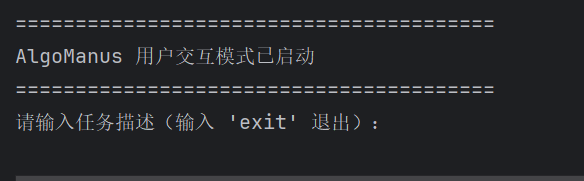
2. 输入"删除目录下文件"的命令

3. 涉及到敏感删除权限,模型再次调用askUser工具询问用户是否继续

4. 确认继续后,Manus直接执行用户"删除文件的要求"
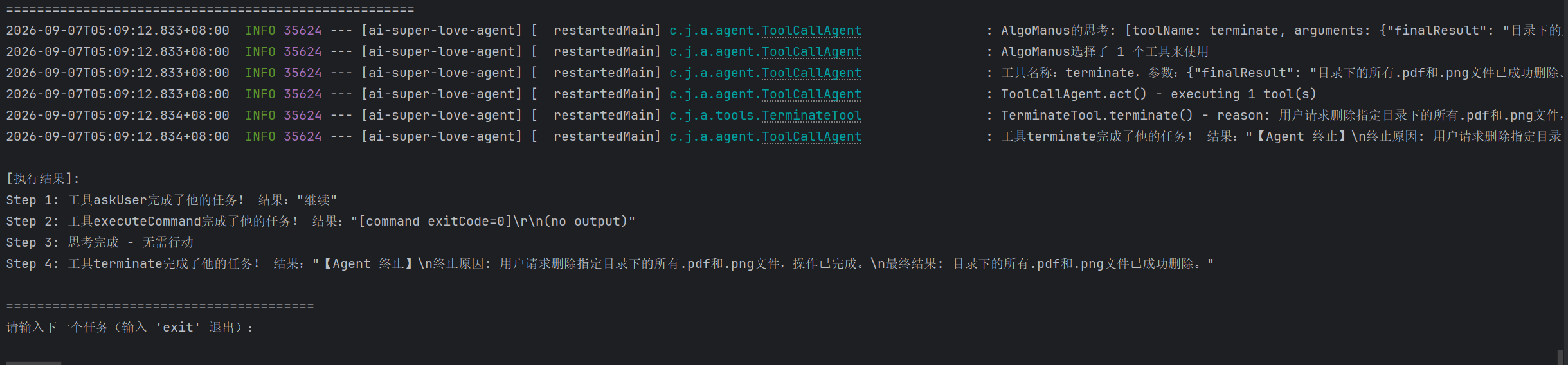
可以看到,Manus执行结果显示执行成功了。中间调用的工具也进行了说明。
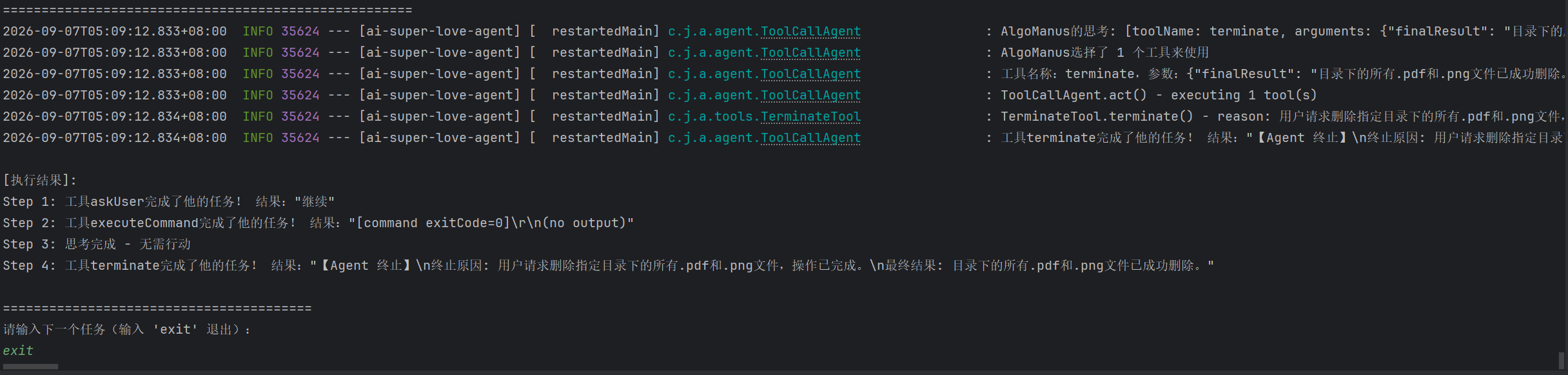
最后我们输入"exit"命令就可以退出交互界面了。当然,若你还有其它操作,可以继续输入需求!
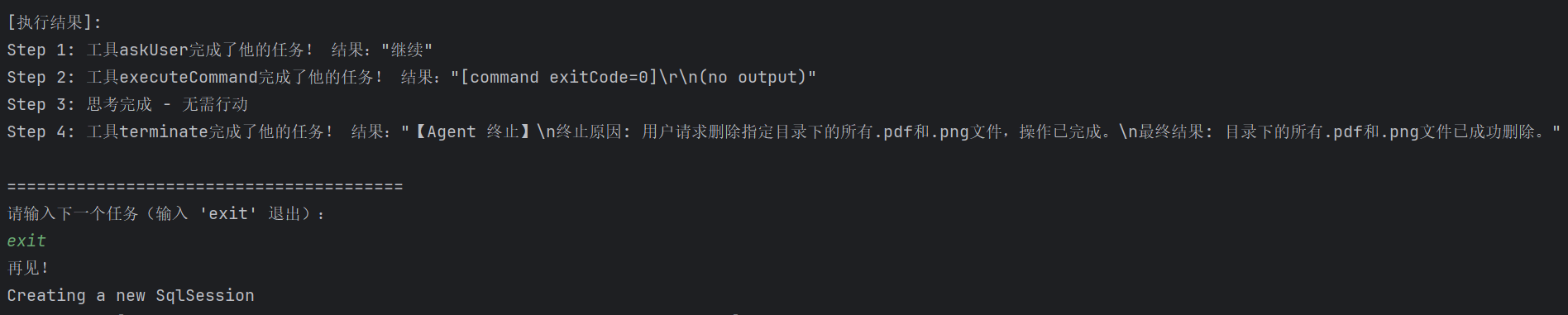
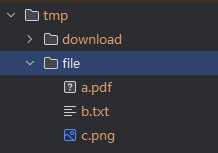
5. 成功删除.pdf和.png文件
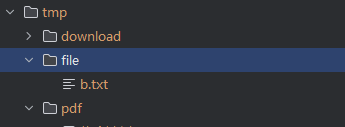
注:你的需求需要使用的工具你应提前准备好,不然manus无法完成你的你的需求,毕竟智能体的能力边界都是工具提供的。
七、补充说明
此次测试我们使用了两个工具【askUser】和 【执行终端命令的工具executeCommand】,我现在补充一下【终端命令工具的实现代码】,供大家参考。
java
package com.jingdong.ai_super_love_agent.tools;

import lombok.extern.slf4j.Slf4j;
import org.springframework.ai.tool.annotation.Tool;
import org.springframework.ai.tool.annotation.ToolParam;
import org.springframework.stereotype.Component;
import org.springframework.util.StringUtils;

import java.io.BufferedReader;
import java.io.IOException;
import java.io.InputStream;
import java.io.InputStreamReader;
import java.nio.charset.Charset;
import java.util.concurrent.CompletableFuture;
import java.util.concurrent.TimeUnit;

/**
 * 终端操作工具 - 作用是在 Windows 系统上执行终端命令并返回执行输出与退出码。
 * <p>
 * 通过 JDK Process API 调用 {@code cmd.exe /c} 执行命令,具备入参校验、超时兜底、
 * 启动失败有限重试、输出流异步读取(避免管道缓冲写满导致进程死锁)等能力。
 * 对齐参考类 {@link WebSearchTool}:工具异常以字符串形式返回,不向上抛出。
 */
@Slf4j
@Component
public class TerminalOperationTool {

    // 命令执行超时时间(秒)
    private static final long TIMEOUT_SECONDS = 30L;

    // 返回给大模型的输出文本截断长度
    private static final int MAX_OUTPUT_LENGTH = 8000;

    // Windows cmd 中文环境默认编码(GBK),避免读取输出出现中文乱码
    private static final Charset OUTPUT_CHARSET = Charset.forName("GBK");

    // 仅针对「进程启动失败」这类无副作用异常的重试上限(不重试命令执行本身)
    private static final int MAX_RETRY = 1;

    // 错误信息统一前缀(对齐 WebSearchTool 风格)
    private static final String ERROR_PREFIX = "Error executing command";

    // 取回异步输出结果时的等待上限(秒)
    private static final long OUTPUT_READ_TIMEOUT_SECONDS = 5L;

    // 日志中记录命令时的截断阈值,避免超长命令刷屏
    private static final int LOG_COMMAND_MAX_LENGTH = 200;

    /**
     * 在 Windows 终端执行指定命令。
     *
     * @param command 待执行的终端命令
     * @return 命令执行输出(含退出码);失败/超时/空入参时返回带原因的字符串,不向上抛异常
     */
    @Tool(description = "在Windows终端执行命令并返回输出结果。适用场景:1)运行Python/Node等脚本 2)查看系统信息(ipconfig,tasklist) 3)执行批处理或CMD命令。当用户要求执行脚本、运行命令、查看系统状态时必须使用此工具。")
    public String executeCommand(
            @ToolParam(description = "要执行的终端命令,例如 'python3 script.py'、'ipconfig'、'dir'") String command) {
        // ① 入参校验:命令为空/纯空白直接返回错误提示,不启动进程,避免浪费资源
        if (!StringUtils.hasText(command)) {
            return ERROR_PREFIX + ": command is null or blank";
        }

        Process process = null;
        try {
            // ② 构建进程:通过 cmd.exe /c 执行命令,并合并 stderr 到 stdout
            ProcessBuilder builder = new ProcessBuilder("cmd.exe", "/c", command)
                    .redirectErrorStream(true);

            // ③ 启动进程,启动失败时做有限重试(无命令副作用),重试后仍失败返回 null
            process = startProcessWithRetry(builder);
            if (process == null) {
                return ERROR_PREFIX + ": failed to start process, command=" + truncateForLog(command);
            }
            log.info("开始执行终端命令: {}", truncateForLog(command));

            // ④ 异步读取标准输出:避免 Windows 管道缓冲写满导致进程阻塞死锁
            final Process runningProcess = process; // 供 lambda 捕获的有效 final 副本
            CompletableFuture<String> outputFuture = CompletableFuture.supplyAsync(
                    () -> readStreamQuietly(runningProcess.getInputStream()));

            // ⑤ 等待命令结束,超时则强杀进程并返回超时提示
            boolean finished = process.waitFor(TIMEOUT_SECONDS, TimeUnit.SECONDS);
            if (!finished) {
                process.destroyForcibly();
                String partialOutput = getOutputQuietly(outputFuture); // 取得命令超时后的future结果
                log.error("命令执行超时({}s), command={}", TIMEOUT_SECONDS, truncateForLog(command));
                return buildTimeoutResult(command, partialOutput);
            }

            // 未超时正常结束
            String output = getOutputQuietly(outputFuture);
            int exitCode = process.exitValue();
            log.info("命令执行结束, exitCode={}, command={}", exitCode, truncateForLog(command));

            // ⑥⑦ 输出判空 + 超长截断 + 拼接退出码后返回
            return buildResult(output, exitCode);
        } catch (InterruptedException e) {
            Thread.currentThread().interrupt();
            log.error("等待命令执行被中断, command={}", truncateForLog(command), e);
            return ERROR_PREFIX + ": interrupted, command=" + truncateForLog(command);
        } catch (Exception e) {
            log.error("命令执行异常, command={}", truncateForLog(command), e);
            return ERROR_PREFIX + ": " + e.getMessage();
        } finally {
            // 兜底:确保异常/中断场景下进程仍存活时被强杀,避免残留进程
            if (process != null && process.isAlive()) {
                process.destroyForcibly();
            }
        }
    }

    // ===== helper methods =====

    /**
     * 启动进程,仅对启动失败(IOException,无命令副作用)做有限重试。
     *
     * @param builder 已配置好的进程构建器
     * @return 启动成功的进程;重试次数用尽后仍失败返回 null
     */
    private Process startProcessWithRetry(ProcessBuilder builder) {
        for (int attempt = 1; attempt <= MAX_RETRY + 1; attempt++) {
            try {
                return builder.start();
            } catch (IOException e) {
                log.warn("启动进程失败(第 {}/{} 次): {}", attempt, MAX_RETRY + 1, e.getMessage());
                if (attempt > MAX_RETRY) {
                    log.error("启动进程重试后仍失败", e);
                    return null;
                }
            }
        }
        return null;
    }

    /**
     * 无异常泄漏地读取输入流全部内容(按 Windows 默认 GBK 解码)。
     *
     * @param inputStream 进程标准输出流(可能为 null)
     * @return 读取出的文本;inputStream 为 null 或读取异常且无内容时返回 null,由上层占位处理
     */
    private String readStreamQuietly(InputStream inputStream) {
        // 判空:部分进程可能没有标准输出流,返回 null 由上层占位处理
        if (inputStream == null) {
            return null;
        }
        StringBuilder sb = new StringBuilder();
        try (BufferedReader reader = new BufferedReader(new InputStreamReader(inputStream, OUTPUT_CHARSET))) {
            String line;
            while ((line = reader.readLine()) != null) {
                sb.append(line).append(System.lineSeparator());
            }
            return sb.toString();
        } catch (Exception e) {
            log.warn("读取命令输出异常", e);
            return sb.length() > 0 ? sb.toString() : null;
        }
    }

    /**
     * 从异步读取任务中取回输出,等待超时/异常统一返回 null。
     */
    private String getOutputQuietly(CompletableFuture<String> outputFuture) {
        try {
            return outputFuture.get(OUTPUT_READ_TIMEOUT_SECONDS, TimeUnit.SECONDS);
        } catch (Exception e) {
            log.warn("获取命令输出异常", e);
            return null;
        }
    }

    /**
     * 组装正常返回结果:输出判空 + 超长截断 + 拼接退出码。
     */
    private String buildResult(String output, int exitCode) {
        // ⑥ 输出判空:null 或空白统一占位,避免返回空内容误导大模型
        String outputText = (output == null || output.isBlank()) ? "(no output)" : output;
        // ⑦ 超长截断
        outputText = truncateOutput(outputText);
        return "[command exitCode=" + exitCode + "]" + System.lineSeparator() + outputText;
    }

    /**
     * 组装超时返回结果:明确的超时提示 + 已捕获的部分输出。
     */
    private String buildTimeoutResult(String command, String partialOutput) {
        String partial = (partialOutput == null || partialOutput.isBlank())
                ? "(no output before timeout)"
                : truncateOutput(partialOutput);
        return ERROR_PREFIX + ": command timed out after " + TIMEOUT_SECONDS
                + " seconds, command=" + truncateForLog(command) + System.lineSeparator() + partial;
    }

    /**
     * 输出文本截断,超出上限追加截断标记。
     */
    private String truncateOutput(String output) {
        if (output.length() <= MAX_OUTPUT_LENGTH) {
            return output;
        }
        return output.substring(0, MAX_OUTPUT_LENGTH) + "...(truncated)";
    }

    /**
     * 日志中记录命令时做截断,避免超长命令刷屏。
     */
    private String truncateForLog(String command) {
        if (command.length() <= LOG_COMMAND_MAX_LENGTH) {
            return command;
        }
        return command.substring(0, LOG_COMMAND_MAX_LENGTH) + "...";
    }
}
至此,人机交互分享结束!由于本次我是学习为主,所以偷懒在启动时测试终端交互。生产环境可以自己实现接口进行人机交互。