目录
[一、为什么需要 epoll](#一、为什么需要 epoll)
[二、epoll 的核心思想](#二、epoll 的核心思想)
[三、epoll 的核心接口](#三、epoll 的核心接口)
[3.1 epoll_create](#3.1 epoll_create)
[3.2 epoll_create1](#3.2 epoll_create1)
[3.3 epoll_ctl](#3.3 epoll_ctl)
[3.4 epoll_wait](#3.4 epoll_wait)
[四、epoll 的工作原理](#四、epoll 的工作原理)
[4.1 创建 epoll 模型](#4.1 创建 epoll 模型)
[4.2 epoll_ctl:注册 fd](#4.2 epoll_ctl:注册 fd)
[4.3 为什么需要红黑树](#4.3 为什么需要红黑树)
[4.4 epitem 为什么既和红黑树有关,又和就绪队列有关](#4.4 epitem 为什么既和红黑树有关,又和就绪队列有关)
[4.5 fd 什么时候进入就绪队列](#4.5 fd 什么时候进入就绪队列)
[4.6 为什么 epoll_wait 不需要遍历所有 fd](#4.6 为什么 epoll_wait 不需要遍历所有 fd)
[五、epoll 的工作模式](#五、epoll 的工作模式)
[5.1 LT:水平触发](#5.1 LT:水平触发)
[5.2 ET:边缘触发](#5.2 ET:边缘触发)
[5.3 为什么 ET 通常需要配合非阻塞 IO](#5.3 为什么 ET 通常需要配合非阻塞 IO)
[5.4 LT 和 ET 应该如何选择](#5.4 LT 和 ET 应该如何选择)
[六、基于 epoll 的 Reactor 服务器](#六、基于 epoll 的 Reactor 服务器)
[Epoller.hpp :epoll 模型](#Epoller.hpp :epoll 模型)
[Channel.hpp:普通 Socket 套接字](#Channel.hpp:普通 Socket 套接字)
[Reactor.hpp:Reactor 反应堆设计思想](#Reactor.hpp:Reactor 反应堆设计思想)
[Protocol.hpp:数据格式 ------ 自定义协议 + 序列化 + 反序列化](#Protocol.hpp:数据格式 —— 自定义协议 + 序列化 + 反序列化)
[NetCal.hpp:业务模块 ------ 计算器](#NetCal.hpp:业务模块 —— 计算器)
[7.1 内核数据结构](#7.1 内核数据结构)
[struct epitem](#struct epitem)
[struct eventpoll](#struct eventpoll)
[7.2 epoll 的惊群问题](#7.2 epoll 的惊群问题)
一、为什么需要 epoll
在 深入理解 Linux IO 模型(二):多路复用 ------ select 文章中,我们可以知道 select 监视的文件描述符数量受到 FD_SETSIZE 限制 。同时,用户空间需要维护用于记录被监视文件描述符的数据结构。每次调用 select 前, 需要遍历该数据结构重新设置文件描述符集合;进入内核后,内核还需要遍历文件描述符集合,检查哪些文件描述符对应的事件是否就绪;select 返回后,用户空间仍然需要再次遍历文件描述符集合,判断哪些文件描述符是否就绪。
在 深入理解 Linux IO 模型(三):多路复用 ------ poll 文章中,我们可以知道 poll 解决了 select 对文件描述符数量的限制 ,但其核心问题并没有改变:用户层仍然需要维护 struct pollfd 数组来记录需要监视的文件描述符,并且每次调用 poll 时,内核仍然需要遍历所有被监视的文件描述符。
因此,当服务器监视的文件描述符数量不断增加,而真正发生事件的文件描述符数量却比较少时,select和 poll 仍然需要付出大量的遍历成本。
例如:一个服务器同时维护 10000 TCP 连接,但某一时刻只有 10 个连接真正有数据到达:
select 和 poll 就需要遍历 10000 个 fd,找到真正就绪的 10 个 fd
epoll 出现的原因:如果这种遍历操作频繁发生,那么大量的 CPU 时间就会消耗在检查那些实际上并没有发生时间的文件描述上。
于是,Linux 提供了 epoll。
二、epoll 的核心思想
epoll 不再要求每次调用 epoll_wait 等待接口时,都将完整的文件描述符集合交给内核进行遍历,而是通过 epoll_ctl 向内核注册需要被监视的文件描述符,由内核来维护这些文件描述符以及对应的事件。当文件描述符对应的事件发生时,通过回调机制将其加入内核维护的就绪队列中,epoll_wait 只需要获取就绪队列中的文件描述符。
因此,可以简单理解为:
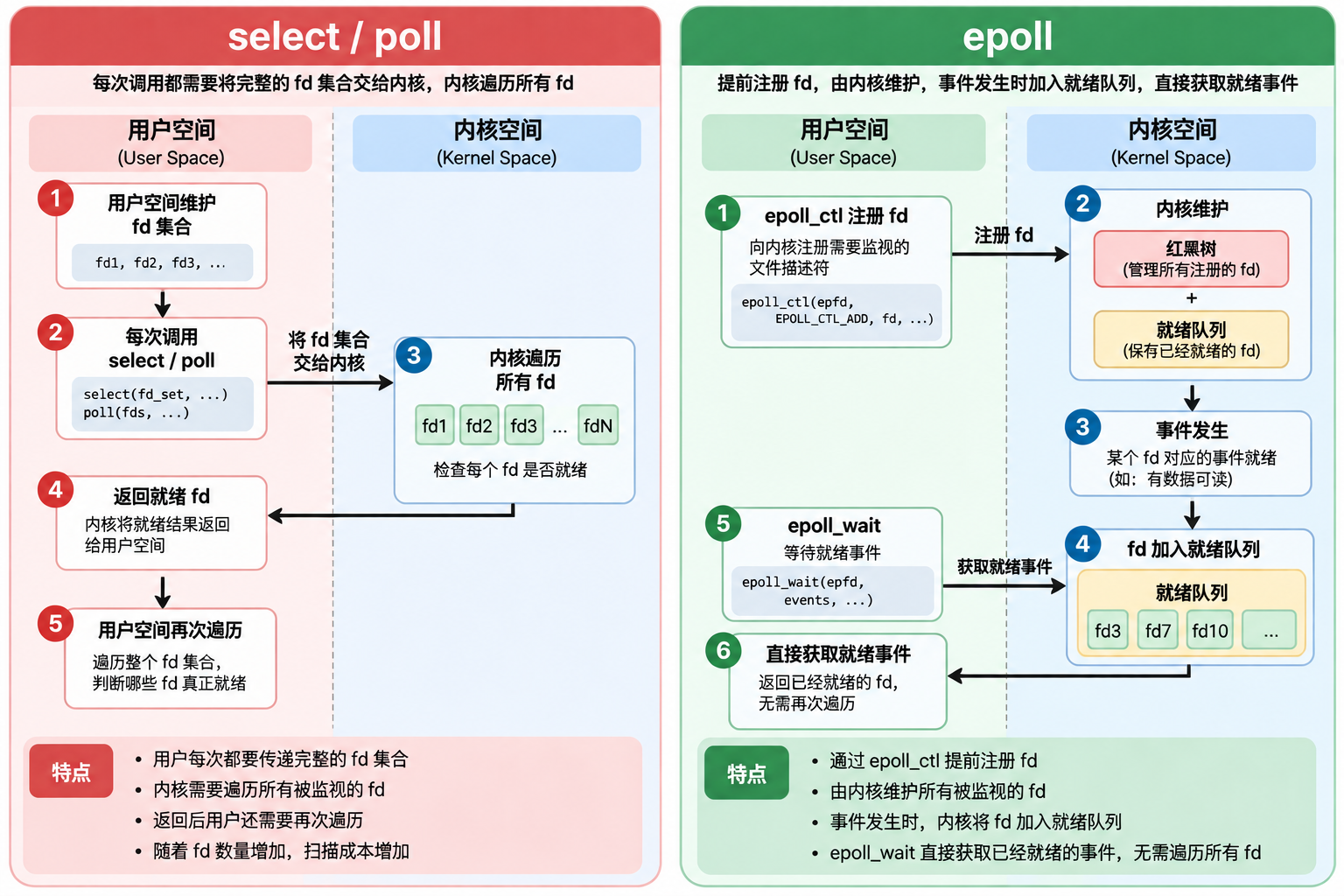
| 模型 | fd 数量限制 | 内核是否遍历全部 fd | 用户是否遍历全部 fd |
|---|---|---|---|
| select | 有 | 是 | 是 |
| poll | 无 | 是 | 是 |
| epoll | 无 | 否 | 否 |
注:epoll 的核心思想并不是"遍历得更快",而是尽可能避免无意义的遍历。
三、epoll 的核心接口
使用 epoll 接口所需要的头文件:#include <sys/epoll.h>
3.1 epoll_create
cpp
int epoll_create(int size);功能:创建一个 epoll 模型
参数:
早期 Linux 内核中, size 参数用于提示内核:这个 epoll 模型预计需要监视多少个文件描述符
但是在较新的 Linux 内核中,size 参数已经失去实际意义,仅仅为了保持历史接口兼容性而保留。不过 size 仍然要求 大于 0,否则 epoll_create 会调用失败并返回 -1,同时设置 errno 为 EINVAL
示例:
cpp
int epfd = epoll_create(1024);

if (epfd == -1)
{
    perror("epoll_create");
    exit(1);
}
返回值:
创建成功:返回值 >= 0 的 epoll 文件描述符
创建失败:返回值 == -1,并设置 errno
3.2 epoll_create1
cpp
int epoll_create1(int flags);epoll_create1 是 Linux 后来提供的创建 epoll 模型的接口,相比 epoll_create,它不再需要传入已经失去实际意义的 size 参数,而是通过 flags 参数指定创建 epoll 文件描述符时的属性。
参数:
目前主要支持 EPOLL_CLOEXEC
cpp
int epfd = epoll_create1(EPOLL_CLOEXEC);表示:当进程调用 exec 系列函数执行新的程序时,自动关闭 epoll 文件描述符
如果不需要设置特殊属性,可以传入:
cpp
int epfd = epoll_create1(0);3.3 epoll_ctl
cpp
int epoll_ctl(int epfd, int op, int fd, struct epoll_event *event);功能:对指定 epoll 模型进行增加文件描述符,修改文件描述符对应的关心事件,删除文件描述符
参数:
int epfd:指定的 epoll 模型(epoll_create 返回的 epoll 文件描述符)
int op:对指定的 epoll 模型进行 op 操作
|---------------|---------|
| op | 功能 |
| EPOLL_CTL_ADD | 新增文件描述符 |
| EPOLL_CTL_MOD | 修改文件描述符 |
| EPOLL_CTL_DEL | 删除文件描述符 |
int fd:文件描述符,对指定的 fd 在 epoll 模型中进行 op 操作
struct epoll_event *event:只做输入型参数
cpp
struct epoll_event {
               uint32_t     events;      /* Epoll events */
               epoll_data_t data;        /* User data variable */
           };
typedef union epoll_data {
               void        *ptr;
               int          fd;
               uint32_t     u32;
               uint64_t     u64;
           } epoll_data_t;
uint32_t events:对应文件描述符所关心的事件
| 主要事件 | 含义 | 服务器中的典型场景 |
| EPOLLIN | 读事件就绪 | socket 有数据可读、监听 socket 有新连接 |
| EPOLLOUT | 写事件就绪 | socket 写缓冲区有空间,可以发送数据 |
| EPOLLHUP | 挂起 | 对端关闭连接 |
| EPOLLERR | 发生错误 | fd 发生错误 |
EPOLLET |
边缘触发模式 | 非阻塞 + ET 提高效率(LT 和 ET 章节详细说明) |
|---|
epoll_data_t data:用户层定义的数据,通常使用 int fd
返回值:
设置成功:返回 0
设置失败:返回 -1,并设置 errno
3.4 epoll_wait
cpp
int epoll_wait(int epfd, struct epoll_event *events,
                      int maxevents, int timeout);
功能:在指定的 epoll 模型中,从就绪队列中获取已经就绪的文件描述符
参数:
int epfd:指定的 epoll 模型
struct epoll_event *events:struct epoll_event 类型的数组起始地址
int maxevents:数组的大小
timeout:epoll 等待文件描述符就绪的最大时间,单位是毫秒
特殊情况
timeout = 0 :epoll 不进行等待,立即检查所有被监视的文件描述符:
如果存在就绪事件,则将对应的事件设置到 struct epoll_event 的 events 中
如果没有任何事件就绪,则返回 0
因此,可以理解为:非阻塞轮询一次文件描述符
timeout = -1:epoll 会一直阻塞,直到有文件描述符对应的事件就绪
因此,可以理解为:无限等待文件描述符事件就绪
返回值:
返回值:
-1:epoll 内部异常
0:没有文件描述符就绪
n > 0:有 n 个文件描述符就绪
注:epoll 模型 本身支持多线程并发操作。多个线程可以同时调用 epoll_ctl 对同一个 epoll 实例进行注册、修改和删除,也可以同时调用 epoll_wait 等待事件。内核会对相关数据结构进行同步,保证并发访问的安全性。
四、epoll 的工作原理
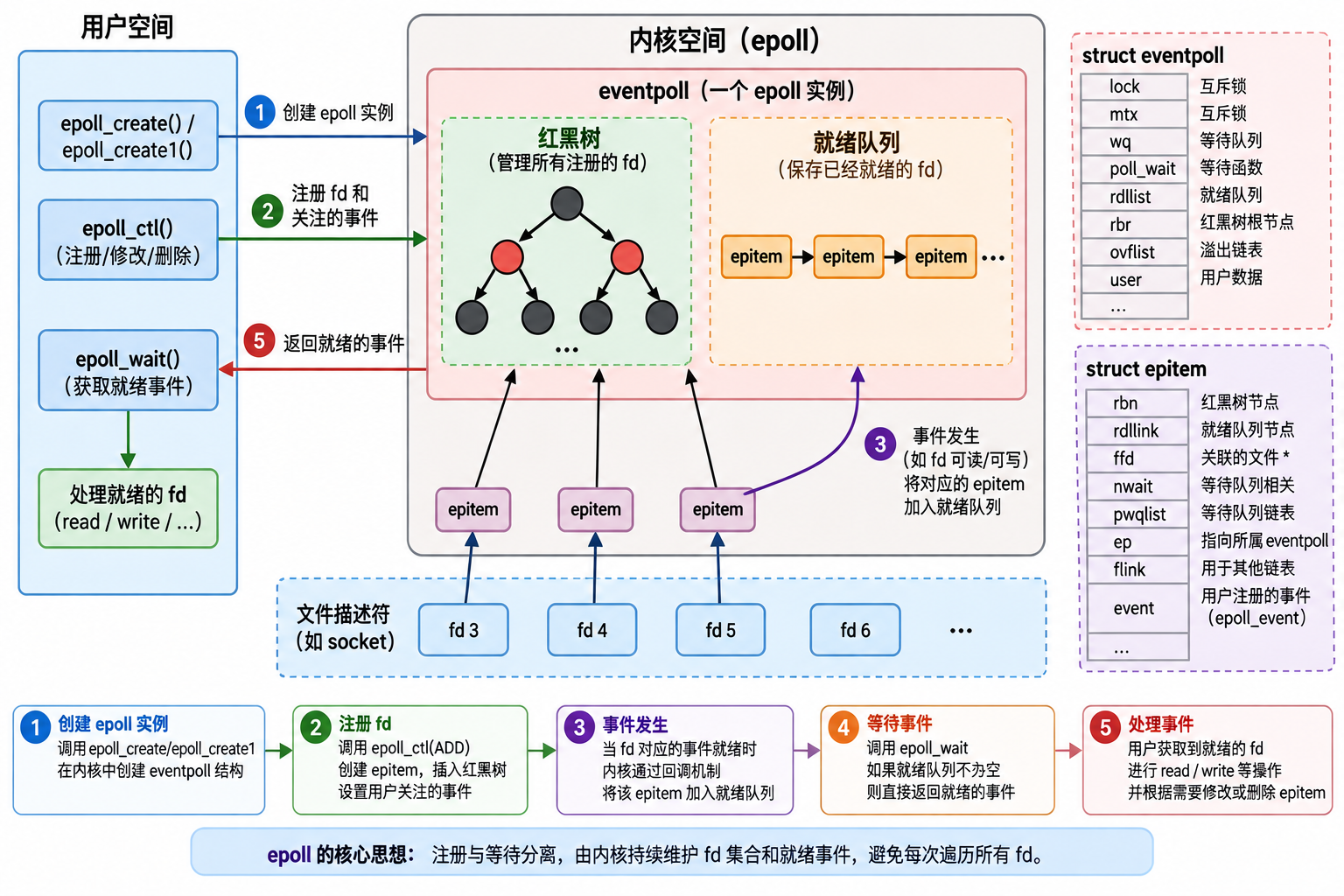
在前面的内容中,我们已经知道,epoll 与 select、poll 最大的区别在于:
epoll 将"注册需要监视的 fd"和"等待 fd 就绪"这两个操作进行了分离。
调用 epoll_ctl 后,fd 不需要像 select/poll 那样在每次等待时重新交给内核。
那么问题来了:
fd 注册到 epoll 之后,内核究竟保存了什么?当 fd 真正就绪时,内核又是如何知道哪个 fd 就绪,并最终让 epoll_wait 返回的?
这就是 epoll 的核心工作原理。
4.1 创建 epoll 模型
首先,用户程序调用:
cpp
int epfd = epoll_create1(0);内核会创建一个 eventpoll 对象,用来表示一个 epoll 模型。
可以把它简单理解成:
用户空间
    |
    | epoll_create1()
    ↓
内核空间
    |
    ↓
eventpoll
eventpoll 可以看成是 epoll 在内核中的"管理中心"。
它并不是简单保存一个 fd 数组,而是维护了多种数据结构,其中最重要的是:
eventpoll
├── 红黑树
│   └── 管理所有已经注册的 fd
│
└── 就绪队列
└── 管理已经发生事件的 fd所以可以先记住:红黑树负责"谁被监视",就绪队列负责"谁已经就绪"。
这是理解 epoll 的第一关键点。
4.2 epoll_ctl:注册 fd
假设服务器监听:
cpp
fd = 3现在我们希望 epoll 监视它的读事件:
cpp
struct epoll_event ev;
ev.events = EPOLLIN;
ev.data.fd = 3;

epoll_ctl(epfd, EPOLL_CTL_ADD, 3, &ev);
调用 epoll_ctl 后,内核需要保存:
cpp
fd = 3
关注 EPOLLIN
用户数据 = 3
为了保存这些信息,内核会创建一个与该 fd 对应的 epitem。
可以简化理解为:
cpp
fd 3
 ↓
epitem
├── fd / file
├── event.events = EPOLLIN
├── event.data.fd = 3
├── rbn
└── rdllink
这里的 epitem 可以理解为:epoll 内部用于描述"一个被监视 fd"的对象。
4.3 为什么需要红黑树
当我们不断向 epoll 中添加 fd:
cpp
fd 3
fd 4
fd 5
fd 6
...
epoll 需要快速完成:
cpp
这个 fd 是否已经注册?
这个 fd 对应哪个 epitem?
修改哪个 epitem?
删除哪个 epitem?
因此 Linux 内核使用红黑树来管理注册的 epitem。
注:红黑树增删查改时间复杂度 O(N * log N)
例如:
                 epitem(fd=5)
                /            \
       epitem(fd=3)       epitem(fd=8)
          /                   \
   epitem(fd=2)          epitem(fd=10)
这里需要特别注意:
红黑树中存储的不是简单的 fd,而是 epitem。
epitem 中包含了 fd、用户注册的事件以及其他内核管理信息。
因此可以理解成:
             eventpoll
                 |
                 ↓
             红黑树
                 |
       ┌─────────┼─────────┐
       ↓         ↓         ↓
    epitem     epitem     epitem
      ↓           ↓          ↓
     fd=3        fd=5       fd=8
4.4 epitem 为什么既和红黑树有关,又和就绪队列有关
这其实是你这张图里最值得详细讲的一部分。
epitem 内部并不是只有一个"节点"。
简化来看:
cpp
struct epitem
{
    struct rb_node rbn;
    struct list_head rdllink;

    struct file *ffd;
    struct epoll_event event;
};
其中:
cpp
rbn
 ↓
用于把 epitem 组织到红黑树

rdllink
 ↓
用于把 epitem 组织到就绪链表
所以:
                   epitem
                  /      \
                 /        \
              rbn        rdllink
               ↓            ↓
            红黑树        就绪队列
不是把 epitem 从红黑树里面拿出来,再放到就绪队列。
而是:同一个 epitem 对象,同时具备参与红黑树和就绪链表的两个连接成员。
因此,一个 epitem 可以:
cpp
一直存在于红黑树同时在需要的时候:
cpp
被加入就绪队列4.5 fd 什么时候进入就绪队列
这是整个 epoll 工作原理最核心的一步。
假设:
cpp
fd = 5
关注:

EPOLLIN
此时:
cpp
socket 接收缓冲区为空所以 fd 目前没有读事件。
此时:
cpp
红黑树:

        epitem(fd=5)
             ↑
          已注册

就绪队列:

        空
然后客户端发送数据。
例如:
cpp
客户端
   |
   | 发送 "hello"
   ↓
服务器 socket
   |
   ↓
接收缓冲区出现数据
此时 fd = 5 变成可读。
底层网络子系统在唤醒等待者的过程中,会触发与 epoll 相关的回调机制。
可以简化理解为:
cpp
socket 变得可读
        ↓
epoll 感知到事件
        ↓
找到 fd 对应的 epitem
        ↓
将 epitem 加入 ready list
于是:
红黑树:

        epitem(fd=5)
              ↑
           仍然存在


就绪队列:

        epitem(fd=5)
              ↓
ready list这就是图中的:"事件发生 → 将对应的 epitem 加入就绪队列"
4.6 为什么 epoll_wait 不需要遍历所有 fd
现在就体现出 epoll 的优势了。
假设服务器有:
cpp
10000 个连接红黑树中:
cpp
fd 1
fd 2
fd 3
...
fd 10000
但是现在只有:
cpp
fd 123
fd 456
fd 789
真正就绪。
那么就绪队列中可能只有:
cpp
ready list:

epitem(fd=123)
      ↓
epitem(fd=456)
      ↓
epitem(fd=789)
此时用户调用:
cpp
epoll_wait(epfd, events, MAX_EVENTS, -1);内核主要处理的是:
cpp
ready list
    ↓
fd=123
fd=456
fd=789
而不是:
cpp
fd 1
fd 2
fd 3
...
fd 10000因此:当监视的 fd 数量非常大,而真正就绪的 fd 数量比较少时,epoll 可以避免每次等待都遍历整个监视集合。
这就是 epoll 相比 select/poll 的核心优势之一。
五、epoll 的工作模式
前面我们已经介绍了 epoll 的基本工作原理:
当文件描述符对应的事件就绪时,epoll 会将该文件描述符放入就绪队列中,随后 epoll_wait 从就绪队列中获取这些已经就绪的文件描述符,并返回给用户。
那么问题来了:如果一个文件描述符已经就绪,但是我们没有一次性处理完这个事件,下一次调用 epoll_wait 时,epoll 还会不会继续通知我们,会不会继续将它放到就绪队列中。
这就涉及到 epoll 的工作模式。
epoll 主要支持两种工作模式:
- LT(Level Trigger,水平触发)
- ET(Edge Trigger,边缘触发)
5.1 LT:水平触发
LT(Level Trigger,水平触发)是 epoll 默认的工作模式。select 和 poll 的默认工作模式就是 LT。
LT:只要文件描述符对应的事件处于就绪状态,epoll 就会持续通知该文件描述符。
以读事件为例:
假设客户端向服务器发送:hello world
数据到达服务器后,会被放入对应 socket 的接收缓冲区中,此时 socket 处于可读状态。
当调用 epoll_wait 时,它会返回这个文件描述符,假设服务器本次 recv 只读取了 hello,那么接收缓冲区中依旧存在数据(world),这个 socket 仍然处于可读状态。
当再次调用 epoll_wait 时,它依旧会返回这个文件描述符。
因此,LT 的特点就是:只要文件描述符对应的事件没有处理完毕,epoll_wait 会一直返回该文件描述符,直到该文件描述符对应的事件处理完毕。
5.2 ET:边缘触发
ET(Edge Trigger,边缘触发):ET 只在文件描述符状态发生变化时通知一次,而不是因为文件描述符一直处于就绪状态而反复通知。
以读事件为例:
假设客户端向服务器发送:hello world
数据到达服务器后,会被放入对应 socket 的接收缓冲区中,此时 socket 处于可读状态。
当调用 epoll_wait 时,它会返回这个文件描述符,假设服务器本次 recv 只读取了 hello,那么接收缓冲区中依旧存在数据(world),此时 socket 依旧处于可读状态
当再次调用 epoll_wait 时,它不在返回这个文件描述符。
当客户端下一次向服务器发送:ni hao
数据到达服务器被放入对应 socket 的接收缓冲区中,此时 socket 的状态发送变化。
当调用 epoll_wait 时,它会再次返回这个文件描述符,假设服务器再次 recv 6 个字节的数据,将要得到 " world"
因此,ET 的特点就是:ET 只在文件描述符对应的状态发生变化时通知一次,如果以后没有状态不再变化,即使文件描述符事件就绪,也不会再次通知。
5.3 为什么 ET 通常需要配合非阻塞 IO
理解 ET 的工作模式之后,就会产生一个非常重要的问题:
既然 ET 不会反复通知,那么收到一次事件之后,如果没有把数据处理完怎么办?
答案就是:在 ET 模式下,我们需要一次性尽可能处理完当前已经就绪的数据。
此时就需要采取非阻塞 IO 的方式进行非阻塞轮询读取:
非阻塞 IO 相关使用请看:深入理解 Linux IO 模型(一):阻塞 IO、非阻塞 IO 与信号驱动
5.4 LT 和 ET 应该如何选择
LT 与 ET 只是两种工作模式,不存在一方取代另一方
LT 的特点:
- 只要事件就绪,就会一直通知
- 逻辑简单,编程实现简单
- 不需要一次性处理完所有数据
ET 的特点:
- 只有状态发生变化才会通知
- 逻辑相对复杂,编程相对复杂
- 需要一次性处理完所有数据(非阻塞 IO)
对于 LT 模式,如果也采用 非阻塞 IO 轮询处理,也是可以达到 ET 效果的。所以对于 LT 和 ET 的选择,最终还是需要服务器的具体设计来决定。
六、基于 epoll 的 Reactor 服务器
Epoller.hpp :epoll 模型
cpp
#pragma once
#include <iostream>
#include <sys/epoll.h>

#include "Log.hpp"
#include "Error.hpp"

using namespace LogModule;

class Epoller
{
    const static int epoll_size = 128;
public:
    Epoller()
    {
        _epfd = epoll_create(epoll_size);
        if(_epfd < 0)
        {
            LOG(LogLevel::FATAL) << "epoll create error";
            exit(EPOLL_CREATE_ERR);
        }
        LOG(LogLevel::INFO) << "epoll create success: " << _epfd;
    }

    int Wait(struct epoll_event events[], int maxsize, int timeout)
    {
        int n = epoll_wait(_epfd, events, maxsize, timeout);
        if(n < 0)
        {
            LOG(LogLevel::WARNING) << "epoll wait error";
        }
        return n;
    }

    void Add(int sockfd, uint32_t events)
    {
        struct epoll_event ev;
        ev.events = events;
        ev.data.fd = sockfd;
        int n = epoll_ctl(_epfd, EPOLL_CTL_ADD, sockfd, &ev);
        if(n < 0)
        {
            LOG(LogLevel::WARNING) << "epoll add error";
            return;
        }
        LOG(LogLevel::INFO) << "epoll add sockfd: " << sockfd;
    }

    void Mod(int sockfd, uint32_t events)
    {
        struct epoll_event ev;
        ev.events = events;
        ev.data.fd = sockfd;
        int n = epoll_ctl(_epfd, EPOLL_CTL_MOD, sockfd, &ev);
        if(n < 0)
        {
            LOG(LogLevel::WARNING) << "epoll mod error";
            return;
        }
        LOG(LogLevel::INFO) << "epoll mod sockfd: " << sockfd;
    }

    void Del(int sockfd)
    {
        int n = epoll_ctl(_epfd, EPOLL_CTL_DEL, sockfd, nullptr);
        if(n < 0)
        {
            LOG(LogLevel::WARNING) << "epoll del error";
            return;
        }
        LOG(LogLevel::INFO) << "epoll del sockfd: " << sockfd;
    }

    ~Epoller()
    {

    }
private:
    int _epfd;
};
Listener.hpp:连接管理
cpp
#pragma once
#include <iostream>
#include <sys/epoll.h>

#include "Socket.hpp"
#include "IntAddr.hpp"
#include "Channel.hpp"


class Listener : public Connection
{
    const static in_port_t default_port = 8080;
    const static int default_backlog = 10;

public:
    Listener(in_port_t port = default_port, int backlog = default_backlog)
        : _listen(std::make_unique<TcpSocket>()), _port(port), _backlog(backlog)
    {
        _listen->BuildTcpListenSocket(_port, _backlog);
        SetEvents(EPOLLET | EPOLLIN);
        // 设置非阻塞 IO
        SetNoBlock(_listen->Fd());
    }

    int GetSockFd() override
    {
        return _listen->Fd();
    }
    // 连接管理器
    void Recver() override
    {
        // 处理新连接
        while (true)
        {
            IntAddr client;
            int sockfd = _listen->Accpet(&client);
            LOG(LogLevel::DEBUG) << "accept sockfd: " << sockfd;

            if (sockfd == ACCEPT_CONTINUE)
            {
                continue;
            }
            else if(sockfd == ACCEPT_DOWN)
            {
                break;
            }
            else if(sockfd == ACCEPT_ERROR)
            {
                break;
            }
            else // 获取文件描述符成功
            {
                std::shared_ptr<Connection> con = std::make_shared<Channel>(sockfd, client);
                con->SetEvents(EPOLLET | EPOLLIN);
                SetNoBlock(con->GetSockFd());
                con->SetHandler(_handler);
                GetOwner()->AddConnection(con);
            }
        }
    }

    void Sender() override
    {
    }

    void Excepter() override
    {
    }

    ~Listener()
    {
    }

private:
    std::unique_ptr<Socket> _listen;
    in_port_t _port;
    int _backlog;
};
Channel.hpp:普通 Socket 套接字
cpp
#pragma once
#include <iostream>

#include "IntAddr.hpp"
#include "Connection.hpp"

class Channel : public Connection
{
public:
    Channel(int sockfd, const IntAddr &client)
    :_sockfd(sockfd)
    ,_client(client)
    {

    }

    int GetSockFd() override
    {
        return _sockfd;
    }
    // IO 处理器
    void Recver() override
    {
        // 读事件就绪
#define BUFFER_SIZE 128
        char buffer[BUFFER_SIZE];
        while(true)
        {
            // sockfd 已经是非阻塞,非阻塞读取
            int n = recv(_sockfd, buffer, sizeof(buffer) - 1, 0);
            if(n > 0)
            {
                buffer[n] = 0;
                _inbuffer += buffer;
            }
            else if(n == 0) // 对方把连接关闭
            {
                Excepter();
                return;
            }
            else
            {
                if(errno == EAGAIN || errno == EWOULDBLOCK)
                {
                    // 本轮数据已经读取完毕
                    break;
                }
                else if(errno == EINTR)
                {
                    // 读取数据时被信号中断
                    continue;
                }
                else
                {
                    // 读取错误
                    Excepter();
                    return;
                }
            }
        }
        LOG(LogLevel::DEBUG) << "inbuffer: " << _inbuffer;
        // 本轮数据读取完毕
        if(!_inbuffer.empty())
        {
            // 处理数据
            _outbuffer += _handler(_inbuffer);
        }

        if(!_outbuffer.empty())
        {
            // 默认直接发送
            Sender();
        }
    }

    void Sender() override
    {
        while(true)
        {
            // 非阻塞写入
            int n = send(_sockfd, _outbuffer.c_str(), _outbuffer.size(), 0);
            if(n > 0)
            {
                _outbuffer.erase(0, n);
                if(_outbuffer.empty())
                    break;
            }
            else if(n == 0)
            {
                break;
            }
            else
            {
                if(errno == EAGAIN || errno == EWOULDBLOCK)
                {
                    // 发送缓冲区写满
                    break;
                }
                else if(errno == EINTR)
                {
                    continue;
                }
                else
                {
                    Excepter();
                    return;
                }
            }
        }

        // 数据可能发送完毕  数据可能没有发送完毕
        if(_outbuffer.empty())
        {
            // 只关心读事件
            GetOwner()->EnableReadWrite(_sockfd, 1, 0);
        }
        else
        {
            // 关心读写事件
            GetOwner()->EnableReadWrite(_sockfd, 1, 1);
        }
    }

    void Excepter() override
    {
        //  关闭连接
        GetOwner()->DelConnection(_sockfd);
    }

    ~Channel()
    {

    }
private:
    int _sockfd;
    IntAddr _client;
    std::string _inbuffer;
    std::string _outbuffer;

};
Connection.hpp:抽象连接
cpp
#pragma once
#include <iostream>
#include <unistd.h>
#include <fcntl.h>
#include <functional>

using handler_t = std::function<std::string(std::string &)>;

class Reactor;

void SetNoBlock(int fd)
{
    int fl = fcntl(fd, F_GETFL);
    if(fl < 0)
    {
        LOG(LogLevel::WARNING) << "fcntl get error";
        return;
    }
    fcntl(fd, F_SETFL, fl | O_NONBLOCK);
}

class Connection
{
public:
    Connection()
    :_events(0)
    ,_owner(nullptr)
    {

    }

    virtual int GetSockFd() = 0;
    virtual void Recver() = 0;
    virtual void Sender() = 0;
    virtual void Excepter() = 0;

    uint32_t GetEvents()
    {
        return _events;
    }

    void SetHandler(handler_t handler)
    {
        _handler = handler;
    }

    void SetEvents(uint32_t events)
    {
        _events = events;
    }

    void SetOwner(Reactor* owner)
    {
        _owner = owner;
    }

    Reactor* GetOwner()
    {
        return _owner;
    }

    virtual ~Connection()
    {

    }
private:

    // 关心的事件
    uint32_t _events;

    // 回指指针
    Reactor* _owner;
public:
    // 处理任务
    handler_t _handler;
};
Reactor.hpp:Reactor 反应堆设计思想
cpp
#pragma once

#include <iostream>
#include <memory>
#include <unordered_map>
#include <cstring>

#include "Epoller.hpp"
#include "Connection.hpp"

class Reactor
{
    const static int events_size = 32;
private:
    bool IsConnectionExist(int fd)
    {
        // 存在返回 true
        return _connections.count(fd);
    }

public:
    Reactor()
    :_epoller(std::make_unique<Epoller>())
    ,_isrunning(false)
    {

    }

    void OneLoop()
    {
        memset(_events, 0, sizeof(_events));
        int n = _epoller->Wait(_events, events_size, _timeout);
        for(int i = 0; i < n; ++i)
        {
            int sockfd = _events[i].data.fd;
            int events = _events[i].events;
            // 将异常交给读取和写入处理
            if((events & EPOLLHUP) || (events & EPOLLERR))
            {
                events = (EPOLLIN | EPOLLERR);
            }

            if(events & EPOLLIN)
            {
                if(IsConnectionExist(sockfd))
                    _connections[sockfd]->Recver();
            }
            if(events & EPOLLOUT)
            {
                if(IsConnectionExist(sockfd))
                    _connections[sockfd]->Sender();
            }
        }
    }

    void Loop()
    {
        _isrunning = true;
        while(_isrunning)
        {
            OneLoop();
        }
        _isrunning = false;
    }

    void Stop()
    {
        _isrunning = false;
    }

    // 添加连接
    void AddConnection(std::shared_ptr<Connection> con)
    {
        int sockfd = con->GetSockFd();
        if(IsConnectionExist(sockfd))
            return;
        // 添加到 epoll 模型
        uint32_t events = con->GetEvents();
        _epoller->Add(sockfd, events);

        // 设置回指指针
        con->SetOwner(this);

        // 添加到 Reactor
        _connections[sockfd] = con;
    }

    void EnableReadWrite(int sockfd, bool read, bool write)
    {
        if(!IsConnectionExist(sockfd))
            return;
        uint32_t events = (EPOLLET | (read ? EPOLLIN : 0) | (write ? EPOLLOUT : 0));
        _epoller->Mod(sockfd, events);
        _connections[sockfd]->SetEvents(events);

    }

    void DelConnection(int sockfd)
    {
        _epoller->Del(sockfd);
        _connections.erase(sockfd);
        close(sockfd);
        LOG(LogLevel::DEBUG) << "close sockfd: " << sockfd;
    }

    ~Reactor()
    {

    }
private:
    std::unique_ptr<Epoller> _epoller;
    std::unordered_map<int, std::shared_ptr<Connection>> _connections;
    bool _isrunning;
    struct epoll_event _events[events_size];
    int _timeout = -1;
};
Protocol.hpp:数据格式 ------ 自定义协议 + 序列化 + 反序列化
cpp
#pragma once

#include <iostream>
#include <string>
#include <jsoncpp/json/json.h>
#include <memory>
#include <functional>
#include "Socket.hpp"

class Request
{
public:
    Request()
    {
    }
    Request(int x, int y, int oper)
        : _x(x), _y(y), _oper(oper)
    {
    }
    // 序列化
    std::string Serialize()
    {
        Json::Value root;
        root["x"] = _x;
        root["y"] = _y;
        root["oper"] = _oper;
        Json::StyledWriter write;
        return write.write(root);
    }

    // 反序列化
    bool Deserialize(std::string &json_str)
    {
        Json::Value root;
        Json::Reader reader;
        bool ok = reader.parse(json_str, root);
        if (ok)
        {
            _x = root["x"].asInt();
            _y = root["y"].asInt();
            _oper = root["oper"].asInt();
        }
        return ok;
    }

    int X() const
    {
        return _x;
    }
    int Y() const
    {
        return _y;
    }
    char Oper() const
    {
        return _oper;
    }
    ~Request()
    {
    }

private:
    int _x;
    int _y;
    char _oper;
};

class Response
{
public:
    Response()
        : _result(0), _code(0)
    {
    }
    Response(int result, int code)
        : _result(result), _code(code)
    {
    }
    std::string Serialize()
    {
        Json::Value root;
        root["result"] = _result;
        root["code"] = _code;
        Json::StyledWriter write;
        return write.write(root);
    }
    bool DeSerialize(const std::string &json_str)
    {
        Json::Value root;
        Json::Reader reader;
        bool ok = reader.parse(json_str, root);
        if (ok)
        {
            _result = root["result"].asInt();
            _code = root["code"].asInt();
        }
        return ok;
    }

    void SetResp(int result, int code)
    {
        _result = result;
        _code = code;
    }
    void Show()
    {
        std::cout << "计算结果为: " << "result: " << _result << " code: " << _code << std::endl;
    }
    ~Response()
    {
    }

private:
    int _result;
    int _code;
};

const static std::string sep = "\r\n";
using task_t = std::function<Response(const Request &)>;

class Protocol
{
public:
    Protocol(task_t task)
        : _task(task)
    {
    }
    Protocol()
    {
    }
    std::string AddHeader(const std::string &json_str)
    {
        return std::to_string(json_str.size()) + sep + json_str + sep;
    }
    bool DeHeader(std::string &message, std::string *json_str)
    {
        size_t pos = message.find(sep);
        if (pos == std::string::npos) // 没有找到
            return false;
        // 提取长度
        int json_str_len = std::stoi(message.substr(0, pos));
        int len = json_str_len + 2 * sep.size() + pos;
        if (message.size() < len)
            return false;
        // 一定存在一个完整的报文
        *json_str = message.substr(pos + sep.size(), json_str_len);
        message.erase(0, len);
        return true;
    }
    std::string HandleRequest(std::string &inbuffer)
    {
        std::string outbuffer;
        std::string package;
        while (DeHeader(inbuffer, &package))
        {
            // 1. 有了完整的 package, 反序列化
            Request req;
            bool ok = req.Deserialize(package);
            if (!ok)
                continue;
            // 2. 处理请求
            Response resp = _task(req);
            // 3. 序列化
            std::string resp_json_str = resp.Serialize();
            // 4. 添加报头
            std::string resp_str = AddHeader(resp_json_str);
            outbuffer += resp_str;
        }
        LOG(LogLevel::DEBUG) << "outbuffer: " << outbuffer;
        return outbuffer;
    }

    ~Protocol()
    {
    }

private:
    task_t _task;
};
NetCal.hpp:业务模块 ------ 计算器
cpp
#pragma once

#include "Protocol.hpp"

class NetCal
{
public:
    Response Calculate(const Request& req)
    {
        Response resp;
        switch (req.Oper())
        {
        case '+':
            resp.SetResp(req.X() + req.Y(), 0);
            break;
        case '-':
            resp.SetResp(req.X() - req.Y(), 0);
            break;
        case '*':
            resp.SetResp(req.X() * req.Y(), 0);
            break;
        case '/':
            if(req.Y() == 0)
                resp.SetResp(0, 1);
            else
                resp.SetResp(req.X() / req.Y(), 0);
            break;
        case '%':
            if(req.Y() == 0)
                resp.SetResp(0, 2);
            else
                resp.SetResp(req.X() % req.Y(), 0);
            break;
        default:
            resp.SetResp(0, 3);
            break;
        }
        return resp;
    }
private:
};Main.cc:搭起模块之间的桥梁
cpp
#include <iostream>
#include <memory>

#include "Error.hpp"
#include "Reactor.hpp"
#include "Listener.hpp"
#include "Protocol.hpp"
#include "NetCal.hpp"

void Usage(char *message)
{
    std::cout << "Usage: " << message << " port" << std::endl;
    exit(USAGE_ERR);
}

int main(int argc, char* argv[])
{
    if(argc != 2)
    {
        Usage(argv[0]);
    }
    in_port_t port = std::stoi(argv[1]);

    std::unique_ptr<NetCal> netcal = std::make_unique<NetCal>();

    std::unique_ptr<Protocol> protocol = std::make_unique<Protocol>([&netcal](const Request& req)->Response
    {
        return netcal->Calculate(req);
    });

    std::shared_ptr<Connection> listener = std::make_shared<Listener>(port);
    listener->SetHandler([&protocol](std::string &inbuffer)
    {
        return protocol->HandleRequest(inbuffer);
    });

    std::unique_ptr<Reactor> R = std::make_unique<Reactor>();

    R->AddConnection(listener);
    R->Loop();

    return 0;
}
七、补充
7.1 内核数据结构
struct epitem
cpp
// epitem 是 epoll 模型中每一个被监听 fd 的管理对象
struct epitem {
	struct rb_node rbn; // 连接红黑树的结构

	struct list_head rdllink; // 连接就绪队列的结构

	struct epoll_filefd ffd; // 被监听的 fd

	/* Number of active wait queue attached to poll operations */
	int nwait;

	/* List containing poll wait queues */
	struct list_head pwqlist;

	// 回指指针:指向 epoll 模型管理者的指针
	struct eventpoll *ep;

	/* The structure that describe the interested events and the source fd */
	struct epoll_event event; // 用户关心的事件

	/*
	 * Used to keep track of the usage count of the structure. This avoids
	 * that the structure will desappear from underneath our processing.
	 */
	atomic_t usecnt;

	/* List header used to link this item to the "struct file" items list */
	struct list_head fllink;

	/* List header used to link the item to the transfer list */
	struct list_head txlink;

	unsigned int revents; // 实际发生的事件
};
struct eventpoll
cpp
// eventpoll 是整个 epoll 模型的管理者
struct eventpoll {
	// 锁:保护这个 eventpoll 只能被一个执行流访问 -> 线程安全
	rwlock_t lock;

	/*
	 * This semaphore is used to ensure that files are not removed
	 * while epoll is using them. This is read-held during the event
	 * collection loop and it is write-held during the file cleanup
	 * path, the epoll file exit code and the ctl operations.
	 */
	struct rw_semaphore sem;

	// epoll_wait 的等待队列
	wait_queue_head_t wq;

	/* Wait queue used by file->poll() */
	wait_queue_head_t poll_wait;

	// 就绪队列
	struct list_head rdllist;

	// 红黑树的根节点
	struct rb_root rbr;
};
eventpoll 内部通过 rbr 维护一棵红黑树,用于管理所有注册的 epitem;通过 rdllist 维护一个就绪队列,用于保存当前已经产生就绪事件的 epitem。epitem 内部的 rbn 和 rdllink 分别作为连接这两个数据结构的节点。