Python 实现与 Ollama 运行的模型对话
摘要: 本文介绍如何通过 Python 调用 Ollama 中运行的千问(qwen2:7b)小模型进行对话。首先回顾 Ollama 的安装与模型拉取,接着演示使用
ollama run启动模型,最后通过 Python 的requests库调用本地 API 接口,实现与大模型的交互问答。
上一篇介绍了安装 Ollama,以及如何拉取一个模型,现在使用 Ollama 运行一个小模型,使用 Python 调用这个小模型进行对话。
小模型以千问为例。我的显卡只有 8G,就拉取一个小的 qwen2:7b 模型。
之前的文章介绍过 Ollama 的安装了(Ollama 安装),这里就不再赘述。
拉取千问模型
查看 Ollama 版本
powershell
ollama --version拉取模型:
powershell
ollama pull qwen2:7b拉取过程中会显示进度条,等进度条走完(第一次下载 4GB 左右)。
运行千问:
powershell
ollama run qwen2:7b运行成功后即可开始对话。
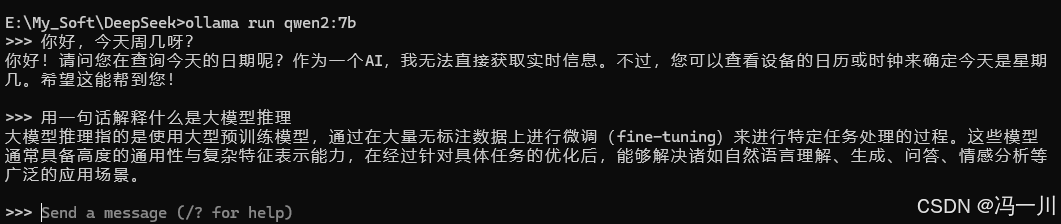
退出按 Ctrl+D,或者输入 /bye。
先确认 Ollama 的 API 服务正在运行。
Ollama 安装后默认会常驻后台,打开浏览器访问:
powershell
http://localhost:11434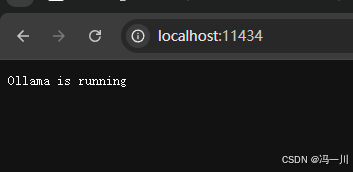
Python调用模型
创建一个 Python 脚本
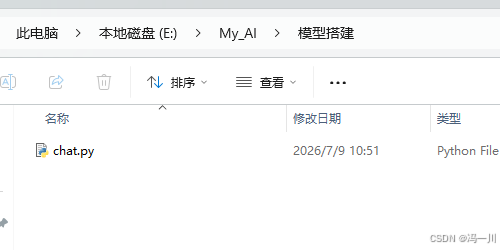
编写内容:
python
import requests
import json

def ask_model(prompt, model="qwen2:7b"):
    url = "http://localhost:11434/api/generate"

    payload = {
        "model": model,
        "prompt": prompt,
        "stream": False  # 一次性返回完整结果
    }

    response = requests.post(url, json=payload)
    data = response.json()
    return data["response"]

# 测试
if __name__ == "__main__":
    question = "用一句话解释什么是大模型推理"
    answer = ask_model(question)
    print(f"Q: {question}")
    print(f"A: {answer}")
下面是 Python 调用 Ollama 模型的完整流程:
"千问模型" "Ollama 服务" "Python 脚本" "用户" "千问模型" "Ollama 服务" "Python 脚本" "用户" #mermaid-svg-a4qVLCC8o0oZjpYB{font-family:"trebuchet ms",verdana,arial,sans-serif;font-size:16px;fill:#333;}@keyframes edge-animation-frame{from{stroke-dashoffset:0;}}@keyframes dash{to{stroke-dashoffset:0;}}#mermaid-svg-a4qVLCC8o0oZjpYB .edge-animation-slow{stroke-dasharray:9,5!important;stroke-dashoffset:900;animation:dash 50s linear infinite;stroke-linecap:round;}#mermaid-svg-a4qVLCC8o0oZjpYB .edge-animation-fast{stroke-dasharray:9,5!important;stroke-dashoffset:900;animation:dash 20s linear infinite;stroke-linecap:round;}#mermaid-svg-a4qVLCC8o0oZjpYB .error-icon{fill:#552222;}#mermaid-svg-a4qVLCC8o0oZjpYB .error-text{fill:#552222;stroke:#552222;}#mermaid-svg-a4qVLCC8o0oZjpYB .edge-thickness-normal{stroke-width:1px;}#mermaid-svg-a4qVLCC8o0oZjpYB .edge-thickness-thick{stroke-width:3.5px;}#mermaid-svg-a4qVLCC8o0oZjpYB .edge-pattern-solid{stroke-dasharray:0;}#mermaid-svg-a4qVLCC8o0oZjpYB .edge-thickness-invisible{stroke-width:0;fill:none;}#mermaid-svg-a4qVLCC8o0oZjpYB .edge-pattern-dashed{stroke-dasharray:3;}#mermaid-svg-a4qVLCC8o0oZjpYB .edge-pattern-dotted{stroke-dasharray:2;}#mermaid-svg-a4qVLCC8o0oZjpYB .marker{fill:#333333;stroke:#333333;}#mermaid-svg-a4qVLCC8o0oZjpYB .marker.cross{stroke:#333333;}#mermaid-svg-a4qVLCC8o0oZjpYB svg{font-family:"trebuchet ms",verdana,arial,sans-serif;font-size:16px;}#mermaid-svg-a4qVLCC8o0oZjpYB p{margin:0;}#mermaid-svg-a4qVLCC8o0oZjpYB .actor{stroke:hsl(259.6261682243, 59.7765363128%, 87.9019607843%);fill:#ECECFF;}#mermaid-svg-a4qVLCC8o0oZjpYB text.actor>tspan{fill:black;stroke:none;}#mermaid-svg-a4qVLCC8o0oZjpYB .actor-line{stroke:hsl(259.6261682243, 59.7765363128%, 87.9019607843%);}#mermaid-svg-a4qVLCC8o0oZjpYB .innerArc{stroke-width:1.5;stroke-dasharray:none;}#mermaid-svg-a4qVLCC8o0oZjpYB .messageLine0{stroke-width:1.5;stroke-dasharray:none;stroke:#333;}#mermaid-svg-a4qVLCC8o0oZjpYB .messageLine1{stroke-width:1.5;stroke-dasharray:2,2;stroke:#333;}#mermaid-svg-a4qVLCC8o0oZjpYB #arrowhead path{fill:#333;stroke:#333;}#mermaid-svg-a4qVLCC8o0oZjpYB .sequenceNumber{fill:white;}#mermaid-svg-a4qVLCC8o0oZjpYB #sequencenumber{fill:#333;}#mermaid-svg-a4qVLCC8o0oZjpYB #crosshead path{fill:#333;stroke:#333;}#mermaid-svg-a4qVLCC8o0oZjpYB .messageText{fill:#333;stroke:none;}#mermaid-svg-a4qVLCC8o0oZjpYB .labelBox{stroke:hsl(259.6261682243, 59.7765363128%, 87.9019607843%);fill:#ECECFF;}#mermaid-svg-a4qVLCC8o0oZjpYB .labelText,#mermaid-svg-a4qVLCC8o0oZjpYB .labelText>tspan{fill:black;stroke:none;}#mermaid-svg-a4qVLCC8o0oZjpYB .loopText,#mermaid-svg-a4qVLCC8o0oZjpYB .loopText>tspan{fill:black;stroke:none;}#mermaid-svg-a4qVLCC8o0oZjpYB .loopLine{stroke-width:2px;stroke-dasharray:2,2;stroke:hsl(259.6261682243, 59.7765363128%, 87.9019607843%);fill:hsl(259.6261682243, 59.7765363128%, 87.9019607843%);}#mermaid-svg-a4qVLCC8o0oZjpYB .note{stroke:#aaaa33;fill:#fff5ad;}#mermaid-svg-a4qVLCC8o0oZjpYB .noteText,#mermaid-svg-a4qVLCC8o0oZjpYB .noteText>tspan{fill:black;stroke:none;}#mermaid-svg-a4qVLCC8o0oZjpYB .activation0{fill:#f4f4f4;stroke:#666;}#mermaid-svg-a4qVLCC8o0oZjpYB .activation1{fill:#f4f4f4;stroke:#666;}#mermaid-svg-a4qVLCC8o0oZjpYB .activation2{fill:#f4f4f4;stroke:#666;}#mermaid-svg-a4qVLCC8o0oZjpYB .actorPopupMenu{position:absolute;}#mermaid-svg-a4qVLCC8o0oZjpYB .actorPopupMenuPanel{position:absolute;fill:#ECECFF;box-shadow:0px 8px 16px 0px rgba(0,0,0,0.2);filter:drop-shadow(3px 5px 2px rgb(0 0 0 / 0.4));}#mermaid-svg-a4qVLCC8o0oZjpYB .actor-man line{stroke:hsl(259.6261682243, 59.7765363128%, 87.9019607843%);fill:#ECECFF;}#mermaid-svg-a4qVLCC8o0oZjpYB .actor-man circle,#mermaid-svg-a4qVLCC8o0oZjpYB line{stroke:hsl(259.6261682243, 59.7765363128%, 87.9019607843%);fill:#ECECFF;stroke-width:2px;}#mermaid-svg-a4qVLCC8o0oZjpYB :root{--mermaid-font-family:"trebuchet ms",verdana,arial,sans-serif;} 运行 python chat.py POST /api/generate 加载 qwen2:7b 模型 返回生成结果 返回 JSON 响应 打印问答结果
运行 Python 脚本
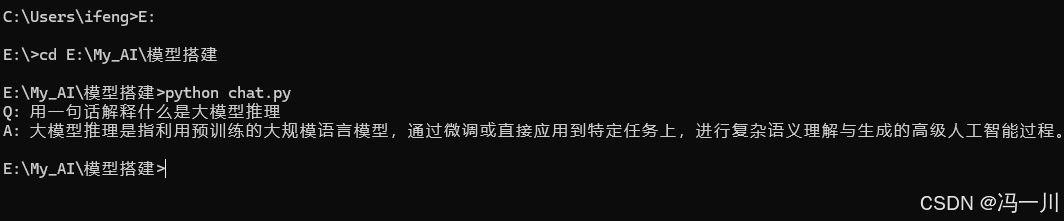
然后我们运行这个脚本:
python
python chat.py结果如下:
本文原创作者:冯一川(CSDN:ifeng12358),未经作者授权同意,请勿转载。