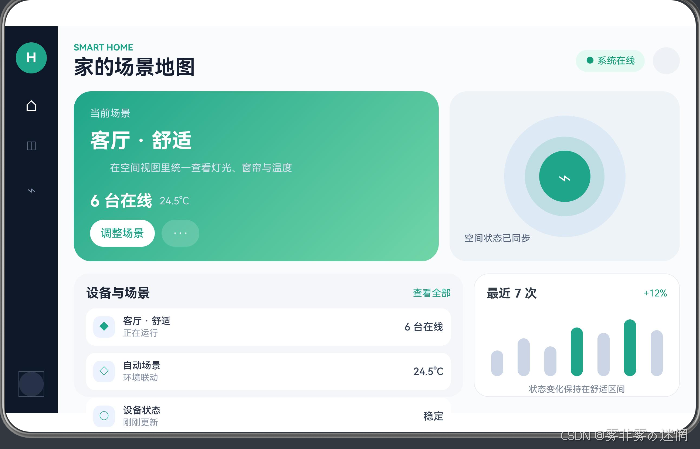
智能家居设备按品牌排列并不好用,用户更关心客厅现在是什么状态,以及一个场景会改变哪些设备。
这个项目不以拼出一个静态页面为终点,而是让房间状态、场景强度、焦点区域、设备在线状态和联动结果形成可以独立验证的业务链路。把设备按空间和场景组织,让亮度、温度、窗帘和在线状态在同一张地图中可读。
这次按【建立空间模型 → 聚合设备状态 → 定义场景命令 → 处理部分成功 → 绘制状态趋势】逐层推进,先让关键动作跑通,再安排侧栏选择空间,主视觉展示当前场景,下方列出设备和最近状态变化。
设备列表先改造成空间模型
场景命令执行一半失败时,界面不能直接显示"全部完成"。因此先把房间状态、场景强度、焦点区域、设备在线状态和联动结果写成独立模型,页面只订阅结果。
ts
export interface VisualState {
  intensity: number
  focusX: number
  focusY: number
  active: boolean
  mode: string
}

export class FeatureController {
  private state: VisualState = { intensity: 0.68, focusX: 0.5, focusY: 0.42, active: true, mode: '家的场景地图' }

  moveFocus(x: number, y: number): VisualState {
场景命令拆成多台设备动作
定义场景命令从一个明确命令开始。命令带上目标和输入,控制器完成判断后再提交修改。
ts
    this.state.focusX = Math.max(0, Math.min(1, x))
    this.state.focusY = Math.max(0, Math.min(1, y))
    return this.getState()
  }

  updateIntensity(value: number): number {
    const intensity: number = Math.max(0, Math.min(1, value))
    this.state.intensity = intensity
    return intensity
定义场景命令完成后,控制器把结果写回房间状态、场景强度、焦点区域、设备在线状态和联动结果,视图只接收本次动作产生的新状态。
部分成功不能显示全部完成
侧栏选择空间,主视觉展示当前场景,下方列出设备和最近状态变化。这套排列首先服务平板与家庭中控屏的观看距离与操作范围。
ts
import { FeatureController } from '../features/FeatureController'

interface SceneItem { icon: string;
    name: string;
    value: string;
    note: string }

@Entry
@Component
struct Index {
  private featureController: FeatureController = new FeatureController()
  private scenes: SceneItem[] = [
    { icon: '◆', name: '客厅 · 舒适', value: '6 台在线', note: '正在运行' },
    { icon: '◇', name: '自动场景', value: '24.5°C', note: '环境联动' },
    { icon: '○', name: '设备状态', value: '稳定', note: '刚刚更新' }
  ]
  private bars: number[] = [38, 56, 44, 72, 64, 84, 68]

  build() {
    Row() {
      Column({ space: 22 }) {
        Stack() { Circle({ width: 46, height: 46 }).fill('#1FA58A');
    Text('H').fontSize(20).fontWeight(FontWeight.Bold).fontColor(Color.White) }
        Text('⌂').fontSize(23).fontColor(Color.White)
        Text('◫').fontSize(21).fontColor('#8290AA')
        Text('⌁').fontSize(22).fontColor('#8290AA')
        Blank()
        Circle({ width: 38, height: 38 }).fill('#273147').border({ width: 1, color: '#44516B' })
      }.width(78).height('100%').padding({ top: 24, bottom: 24 }).backgroundColor('#111827')

      Column({ space: 18 }) {
        Row() {
          Column({ space: 4 }) { Text('SMART HOME').fontSize(13).fontWeight(FontWeight.Bold).fontColor('#1FA58A');
    Text('家的场景地图').fontSize(30).fontWeight(FontWeight.Bold).fontColor('#172033') }.alignItems(HorizontalAlign.Start)
          Blank()
          Text('● 系统在线').fontSize(14).fontColor('#169B78').padding({ left: 14, right: 14, top: 8, bottom: 8 }).backgroundColor('#E7F8F2').borderRadius(18)
          Circle({ width: 40, height: 40 }).fill('#EEF1F6').margin({ left: 12 })
        }.width('100%')

        Row({ space: 16 }) {
          Column({ space: 14 }) {
            Text('当前场景').fontSize(15).fontColor('#DCE7F5').width('100%')
            Text('客厅 · 舒适').fontSize(30).fontWeight(FontWeight.Bold).fontColor(Color.White).width('100%')
            Text('在空间视图里统一查看灯光、窗帘与温度').fontSize(15).fontColor('#D8E1F0').width('88%')
            Row({ space: 10 }) { Text('6 台在线').fontSize(24).fontWeight(FontWeight.Bold).fontColor(Color.White);
    Text('24.5°C').fontSize(15).fontColor('#DCE7F5') }.width('100%').margin({ top: 12 })
            Row({ space: 10 }) { Button('调整场景').backgroundColor(Color.White).fontColor('#1FA58A');
    Button('···').backgroundColor('#28FFFFFF').fontColor(Color.White) }.width('100%')
          }.layoutWeight(1).height(252).padding(24).borderRadius(26).linearGradient({ angle: 135, colors: [['#1FA58A', 0.0], ['#71D6A8', 1.0]] })
          Stack() {
            Rect().width('100%').height('100%').radius(26).fill('#EEF3F8')
            Circle({ width: 180, height: 180 }).fill('#DDE9F4')
            Circle({ width: 118, height: 118 }).fill('#1FA58A').opacity(0.16)
            Circle({ width: 76, height: 76 }).fill('#1FA58A')
            Text('⌁').fontSize(32).fontColor(Color.White)
            Text('空间状态已同步').fontSize(14).fontColor('#536178').position({ x: 22, y: 210 })
          }.width('38%').height(252)
        }.width('100%')

        Row({ space: 16 }) {
          Column({ space: 11 }) {
            Row() { Text('设备与场景').fontSize(19).fontWeight(FontWeight.Bold).fontColor('#20293A');
    Blank();
    Text('查看全部').fontSize(14).fontColor('#1FA58A') }.width('100%')
            ForEach(this.scenes, (item: SceneItem) => {
              Row({ space: 12 }) { Text(item.icon).fontSize(18).fontColor('#1FA58A').width(32).height(32).textAlign(TextAlign.Center).backgroundColor('#EEF2FF').borderRadius(10);
    Column({ space: 2 }) { Text(item.name).fontSize(14).fontWeight(FontWeight.Medium).fontColor('#273044');
    Text(item.note).fontSize(13).fontColor('#8A94A7') }.alignItems(HorizontalAlign.Start).layoutWeight(1);
    Text(item.value).fontSize(15).fontWeight(FontWeight.Medium).fontColor('#344056') }.width('100%').padding(11).backgroundColor(Color.White).borderRadius(14)
中控首屏突出当前房间
处理部分成功结束后仍可能收到旧事件,下面的代码先判断阶段,再决定保留或回退。
ts
  }

  toggle(): boolean {
    this.state.active = !this.state.active
    return this.state.active
  }

  getState(): VisualState {
    return { intensity: this.state.intensity, focusX: this.state.focusX, focusY: this.state.focusY, active: this.state.active, mode: this.state.mode }
  }
}
离开HomeSceneMap页面时,当前房间状态、场景强度、焦点区域、设备在线状态和联动结果按会话归属收尾;再次进入后不会叠加旧任务。
HomeSceneMap的联动状态
下面是HomeSceneMap当前使用的目录。pages负责侧栏选择空间,主视觉展示当前场景,下方列出设备和最近状态变化,features保存本文展示的业务链路。
text
HomeSceneMap/
├─ entry/src/main/ets/
│  ├─ pages/Index.ets                 # 首屏与响应式布局
│  ├─ features/FeatureController.ets # 模型、动作和边界
│  ├─ entryability/EntryAbility.ets   # 页面入口与生命周期
│  └─ adapters/                       # 真机能力或数据源接口
├─ entry/src/main/resources/          # 颜色、文字和媒体资源
└─ build-profile.json5                # 工程构建配置
Index.ets只组合界面,FeatureController.ets处理房间状态、场景强度、焦点区域、设备在线状态和联动结果。如果后面接入真实设备或网络服务,只需增加适配器并把结果转换成控制器认识的状态。
HomeSceneMap最终把建立空间模型、定义场景命令和绘制状态趋势连在同一条状态路径中。