QWT 3D 模块重构记:旧渲染管线改进介绍及实时瀑布图示例
QWT 是一套基于 Qt 的 2D/3D 绘图库,面向科学计算和工程数据可视化,LGPL 协议,CMake 构建,Qt 5.12 以上或 Qt 6。它是 Qwt 6.2.0 的维护分支,当前发版版本 7.4.2。仓库位置:
- GitHub:https://github.com/czyt1988/QWT
- Gitee:https://gitee.com/czyt1988/QWT
- 在线文档:https://czyt1988.github.io/QWT/zh/
这篇文章记录 3D 模块的一次结构性重构,分三块讲:旧的 QwtPlot3D 有哪些缺陷,重构具体怎么做的,以及重构之后长什么样。最后用一张实时 3D 瀑布图(Qwt3DWaterfall)来检验结果,实时频谱瀑布是这类库最典型也最挑剔的 3D 需求,数据量、帧率、坐标轴稳定性全压在一起。
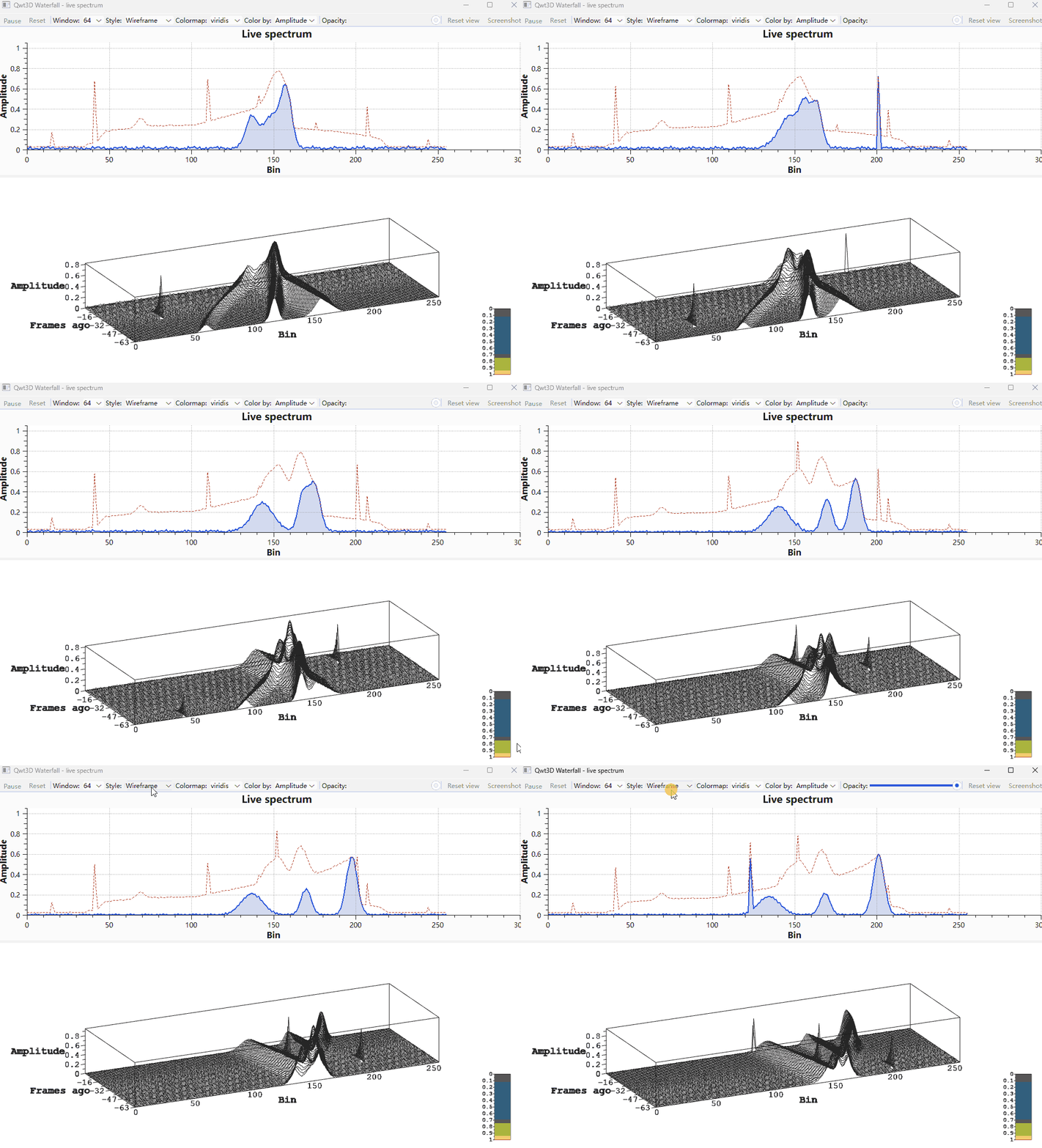
这是Qwt7 3D模块的效果:
一、旧的 QwtPlot3D 缺陷
3D 能力来自独立的 QwtPlot3D 库,Qt 3/4 时代的产物,随 Qwt 7.1 合入仓库。
#mermaid-svg-MmdU0Ls7O2tKRJrv{font-family:"trebuchet ms",verdana,arial,sans-serif;font-size:16px;fill:#333;}@keyframes edge-animation-frame{from{stroke-dashoffset:0;}}@keyframes dash{to{stroke-dashoffset:0;}}#mermaid-svg-MmdU0Ls7O2tKRJrv .edge-animation-slow{stroke-dasharray:9,5!important;stroke-dashoffset:900;animation:dash 50s linear infinite;stroke-linecap:round;}#mermaid-svg-MmdU0Ls7O2tKRJrv .edge-animation-fast{stroke-dasharray:9,5!important;stroke-dashoffset:900;animation:dash 20s linear infinite;stroke-linecap:round;}#mermaid-svg-MmdU0Ls7O2tKRJrv .error-icon{fill:#552222;}#mermaid-svg-MmdU0Ls7O2tKRJrv .error-text{fill:#552222;stroke:#552222;}#mermaid-svg-MmdU0Ls7O2tKRJrv .edge-thickness-normal{stroke-width:1px;}#mermaid-svg-MmdU0Ls7O2tKRJrv .edge-thickness-thick{stroke-width:3.5px;}#mermaid-svg-MmdU0Ls7O2tKRJrv .edge-pattern-solid{stroke-dasharray:0;}#mermaid-svg-MmdU0Ls7O2tKRJrv .edge-thickness-invisible{stroke-width:0;fill:none;}#mermaid-svg-MmdU0Ls7O2tKRJrv .edge-pattern-dashed{stroke-dasharray:3;}#mermaid-svg-MmdU0Ls7O2tKRJrv .edge-pattern-dotted{stroke-dasharray:2;}#mermaid-svg-MmdU0Ls7O2tKRJrv .marker{fill:#333333;stroke:#333333;}#mermaid-svg-MmdU0Ls7O2tKRJrv .marker.cross{stroke:#333333;}#mermaid-svg-MmdU0Ls7O2tKRJrv svg{font-family:"trebuchet ms",verdana,arial,sans-serif;font-size:16px;}#mermaid-svg-MmdU0Ls7O2tKRJrv p{margin:0;}#mermaid-svg-MmdU0Ls7O2tKRJrv .label{font-family:"trebuchet ms",verdana,arial,sans-serif;color:#333;}#mermaid-svg-MmdU0Ls7O2tKRJrv .cluster-label text{fill:#333;}#mermaid-svg-MmdU0Ls7O2tKRJrv .cluster-label span{color:#333;}#mermaid-svg-MmdU0Ls7O2tKRJrv .cluster-label span p{background-color:transparent;}#mermaid-svg-MmdU0Ls7O2tKRJrv .label text,#mermaid-svg-MmdU0Ls7O2tKRJrv span{fill:#333;color:#333;}#mermaid-svg-MmdU0Ls7O2tKRJrv .node rect,#mermaid-svg-MmdU0Ls7O2tKRJrv .node circle,#mermaid-svg-MmdU0Ls7O2tKRJrv .node ellipse,#mermaid-svg-MmdU0Ls7O2tKRJrv .node polygon,#mermaid-svg-MmdU0Ls7O2tKRJrv .node path{fill:#ECECFF;stroke:#9370DB;stroke-width:1px;}#mermaid-svg-MmdU0Ls7O2tKRJrv .rough-node .label text,#mermaid-svg-MmdU0Ls7O2tKRJrv .node .label text,#mermaid-svg-MmdU0Ls7O2tKRJrv .image-shape .label,#mermaid-svg-MmdU0Ls7O2tKRJrv .icon-shape .label{text-anchor:middle;}#mermaid-svg-MmdU0Ls7O2tKRJrv .node .katex path{fill:#000;stroke:#000;stroke-width:1px;}#mermaid-svg-MmdU0Ls7O2tKRJrv .rough-node .label,#mermaid-svg-MmdU0Ls7O2tKRJrv .node .label,#mermaid-svg-MmdU0Ls7O2tKRJrv .image-shape .label,#mermaid-svg-MmdU0Ls7O2tKRJrv .icon-shape .label{text-align:center;}#mermaid-svg-MmdU0Ls7O2tKRJrv .node.clickable{cursor:pointer;}#mermaid-svg-MmdU0Ls7O2tKRJrv .root .anchor path{fill:#333333!important;stroke-width:0;stroke:#333333;}#mermaid-svg-MmdU0Ls7O2tKRJrv .arrowheadPath{fill:#333333;}#mermaid-svg-MmdU0Ls7O2tKRJrv .edgePath .path{stroke:#333333;stroke-width:2.0px;}#mermaid-svg-MmdU0Ls7O2tKRJrv .flowchart-link{stroke:#333333;fill:none;}#mermaid-svg-MmdU0Ls7O2tKRJrv .edgeLabel{background-color:rgba(232,232,232, 0.8);text-align:center;}#mermaid-svg-MmdU0Ls7O2tKRJrv .edgeLabel p{background-color:rgba(232,232,232, 0.8);}#mermaid-svg-MmdU0Ls7O2tKRJrv .edgeLabel rect{opacity:0.5;background-color:rgba(232,232,232, 0.8);fill:rgba(232,232,232, 0.8);}#mermaid-svg-MmdU0Ls7O2tKRJrv .labelBkg{background-color:rgba(232, 232, 232, 0.5);}#mermaid-svg-MmdU0Ls7O2tKRJrv .cluster rect{fill:#ffffde;stroke:#aaaa33;stroke-width:1px;}#mermaid-svg-MmdU0Ls7O2tKRJrv .cluster text{fill:#333;}#mermaid-svg-MmdU0Ls7O2tKRJrv .cluster span{color:#333;}#mermaid-svg-MmdU0Ls7O2tKRJrv div.mermaidTooltip{position:absolute;text-align:center;max-width:200px;padding:2px;font-family:"trebuchet ms",verdana,arial,sans-serif;font-size:12px;background:hsl(80, 100%, 96.2745098039%);border:1px solid #aaaa33;border-radius:2px;pointer-events:none;z-index:100;}#mermaid-svg-MmdU0Ls7O2tKRJrv .flowchartTitleText{text-anchor:middle;font-size:18px;fill:#333;}#mermaid-svg-MmdU0Ls7O2tKRJrv rect.text{fill:none;stroke-width:0;}#mermaid-svg-MmdU0Ls7O2tKRJrv .icon-shape,#mermaid-svg-MmdU0Ls7O2tKRJrv .image-shape{background-color:rgba(232,232,232, 0.8);text-align:center;}#mermaid-svg-MmdU0Ls7O2tKRJrv .icon-shape p,#mermaid-svg-MmdU0Ls7O2tKRJrv .image-shape p{background-color:rgba(232,232,232, 0.8);padding:2px;}#mermaid-svg-MmdU0Ls7O2tKRJrv .icon-shape .label rect,#mermaid-svg-MmdU0Ls7O2tKRJrv .image-shape .label rect{opacity:0.5;background-color:rgba(232,232,232, 0.8);fill:rgba(232,232,232, 0.8);}#mermaid-svg-MmdU0Ls7O2tKRJrv .label-icon{display:inline-block;height:1em;overflow:visible;vertical-align:-0.125em;}#mermaid-svg-MmdU0Ls7O2tKRJrv .node .label-icon path{fill:currentColor;stroke:revert;stroke-width:revert;}#mermaid-svg-MmdU0Ls7O2tKRJrv :root{--mermaid-font-family:"trebuchet ms",verdana,arial,sans-serif;} 独立库 QwtPlot3D
Qt 3/4 时代
Qwt 7.1 合入
作为 3D 子模块
7.1 至 7.3.2
C++11 现代化、主题系统
架构未动
v7.3.5 起
引入 Qwt3DPlotItem
渲染管线重写
v7.3.6
Qwt3DBar / Qwt3DLine 加入
7.5.0 开发版
Qwt3DWaterfall
1.1 每种图形都是一个窗口
旧模块是以控件为中心的类层次:Plot3D 直接继承 QOpenGLWidget,SurfacePlot 又继承 Plot3D。曲面和窗口是同一个对象,SurfacePlot 本身就是那个能画图的控件。
#mermaid-svg-U9g5cyaB5UkA3Y2u{font-family:"trebuchet ms",verdana,arial,sans-serif;font-size:16px;fill:#333;}@keyframes edge-animation-frame{from{stroke-dashoffset:0;}}@keyframes dash{to{stroke-dashoffset:0;}}#mermaid-svg-U9g5cyaB5UkA3Y2u .edge-animation-slow{stroke-dasharray:9,5!important;stroke-dashoffset:900;animation:dash 50s linear infinite;stroke-linecap:round;}#mermaid-svg-U9g5cyaB5UkA3Y2u .edge-animation-fast{stroke-dasharray:9,5!important;stroke-dashoffset:900;animation:dash 20s linear infinite;stroke-linecap:round;}#mermaid-svg-U9g5cyaB5UkA3Y2u .error-icon{fill:#552222;}#mermaid-svg-U9g5cyaB5UkA3Y2u .error-text{fill:#552222;stroke:#552222;}#mermaid-svg-U9g5cyaB5UkA3Y2u .edge-thickness-normal{stroke-width:1px;}#mermaid-svg-U9g5cyaB5UkA3Y2u .edge-thickness-thick{stroke-width:3.5px;}#mermaid-svg-U9g5cyaB5UkA3Y2u .edge-pattern-solid{stroke-dasharray:0;}#mermaid-svg-U9g5cyaB5UkA3Y2u .edge-thickness-invisible{stroke-width:0;fill:none;}#mermaid-svg-U9g5cyaB5UkA3Y2u .edge-pattern-dashed{stroke-dasharray:3;}#mermaid-svg-U9g5cyaB5UkA3Y2u .edge-pattern-dotted{stroke-dasharray:2;}#mermaid-svg-U9g5cyaB5UkA3Y2u .marker{fill:#333333;stroke:#333333;}#mermaid-svg-U9g5cyaB5UkA3Y2u .marker.cross{stroke:#333333;}#mermaid-svg-U9g5cyaB5UkA3Y2u svg{font-family:"trebuchet ms",verdana,arial,sans-serif;font-size:16px;}#mermaid-svg-U9g5cyaB5UkA3Y2u p{margin:0;}#mermaid-svg-U9g5cyaB5UkA3Y2u g.classGroup text{fill:#9370DB;stroke:none;font-family:"trebuchet ms",verdana,arial,sans-serif;font-size:10px;}#mermaid-svg-U9g5cyaB5UkA3Y2u g.classGroup text .title{font-weight:bolder;}#mermaid-svg-U9g5cyaB5UkA3Y2u .cluster-label text{fill:#333;}#mermaid-svg-U9g5cyaB5UkA3Y2u .cluster-label span{color:#333;}#mermaid-svg-U9g5cyaB5UkA3Y2u .cluster-label span p{background-color:transparent;}#mermaid-svg-U9g5cyaB5UkA3Y2u .cluster rect{fill:#ffffde;stroke:#aaaa33;stroke-width:1px;}#mermaid-svg-U9g5cyaB5UkA3Y2u .cluster text{fill:#333;}#mermaid-svg-U9g5cyaB5UkA3Y2u .cluster span{color:#333;}#mermaid-svg-U9g5cyaB5UkA3Y2u .nodeLabel,#mermaid-svg-U9g5cyaB5UkA3Y2u .edgeLabel{color:#131300;}#mermaid-svg-U9g5cyaB5UkA3Y2u .edgeLabel .label rect{fill:#ECECFF;}#mermaid-svg-U9g5cyaB5UkA3Y2u .label text{fill:#131300;}#mermaid-svg-U9g5cyaB5UkA3Y2u .labelBkg{background:#ECECFF;}#mermaid-svg-U9g5cyaB5UkA3Y2u .edgeLabel .label span{background:#ECECFF;}#mermaid-svg-U9g5cyaB5UkA3Y2u .classTitle{font-weight:bolder;}#mermaid-svg-U9g5cyaB5UkA3Y2u .node rect,#mermaid-svg-U9g5cyaB5UkA3Y2u .node circle,#mermaid-svg-U9g5cyaB5UkA3Y2u .node ellipse,#mermaid-svg-U9g5cyaB5UkA3Y2u .node polygon,#mermaid-svg-U9g5cyaB5UkA3Y2u .node path{fill:#ECECFF;stroke:#9370DB;stroke-width:1px;}#mermaid-svg-U9g5cyaB5UkA3Y2u .divider{stroke:#9370DB;stroke-width:1;}#mermaid-svg-U9g5cyaB5UkA3Y2u g.clickable{cursor:pointer;}#mermaid-svg-U9g5cyaB5UkA3Y2u g.classGroup rect{fill:#ECECFF;stroke:#9370DB;}#mermaid-svg-U9g5cyaB5UkA3Y2u g.classGroup line{stroke:#9370DB;stroke-width:1;}#mermaid-svg-U9g5cyaB5UkA3Y2u .classLabel .box{stroke:none;stroke-width:0;fill:#ECECFF;opacity:0.5;}#mermaid-svg-U9g5cyaB5UkA3Y2u .classLabel .label{fill:#9370DB;font-size:10px;}#mermaid-svg-U9g5cyaB5UkA3Y2u .relation{stroke:#333333;stroke-width:1;fill:none;}#mermaid-svg-U9g5cyaB5UkA3Y2u .dashed-line{stroke-dasharray:3;}#mermaid-svg-U9g5cyaB5UkA3Y2u .dotted-line{stroke-dasharray:1 2;}#mermaid-svg-U9g5cyaB5UkA3Y2u #compositionStart,#mermaid-svg-U9g5cyaB5UkA3Y2u .composition{fill:#333333!important;stroke:#333333!important;stroke-width:1;}#mermaid-svg-U9g5cyaB5UkA3Y2u #compositionEnd,#mermaid-svg-U9g5cyaB5UkA3Y2u .composition{fill:#333333!important;stroke:#333333!important;stroke-width:1;}#mermaid-svg-U9g5cyaB5UkA3Y2u #dependencyStart,#mermaid-svg-U9g5cyaB5UkA3Y2u .dependency{fill:#333333!important;stroke:#333333!important;stroke-width:1;}#mermaid-svg-U9g5cyaB5UkA3Y2u #dependencyStart,#mermaid-svg-U9g5cyaB5UkA3Y2u .dependency{fill:#333333!important;stroke:#333333!important;stroke-width:1;}#mermaid-svg-U9g5cyaB5UkA3Y2u #extensionStart,#mermaid-svg-U9g5cyaB5UkA3Y2u .extension{fill:transparent!important;stroke:#333333!important;stroke-width:1;}#mermaid-svg-U9g5cyaB5UkA3Y2u #extensionEnd,#mermaid-svg-U9g5cyaB5UkA3Y2u .extension{fill:transparent!important;stroke:#333333!important;stroke-width:1;}#mermaid-svg-U9g5cyaB5UkA3Y2u #aggregationStart,#mermaid-svg-U9g5cyaB5UkA3Y2u .aggregation{fill:transparent!important;stroke:#333333!important;stroke-width:1;}#mermaid-svg-U9g5cyaB5UkA3Y2u #aggregationEnd,#mermaid-svg-U9g5cyaB5UkA3Y2u .aggregation{fill:transparent!important;stroke:#333333!important;stroke-width:1;}#mermaid-svg-U9g5cyaB5UkA3Y2u #lollipopStart,#mermaid-svg-U9g5cyaB5UkA3Y2u .lollipop{fill:#ECECFF!important;stroke:#333333!important;stroke-width:1;}#mermaid-svg-U9g5cyaB5UkA3Y2u #lollipopEnd,#mermaid-svg-U9g5cyaB5UkA3Y2u .lollipop{fill:#ECECFF!important;stroke:#333333!important;stroke-width:1;}#mermaid-svg-U9g5cyaB5UkA3Y2u .edgeTerminals{font-size:11px;line-height:initial;}#mermaid-svg-U9g5cyaB5UkA3Y2u .classTitleText{text-anchor:middle;font-size:18px;fill:#333;}#mermaid-svg-U9g5cyaB5UkA3Y2u .label-icon{display:inline-block;height:1em;overflow:visible;vertical-align:-0.125em;}#mermaid-svg-U9g5cyaB5UkA3Y2u .node .label-icon path{fill:currentColor;stroke:revert;stroke-width:revert;}#mermaid-svg-U9g5cyaB5UkA3Y2u :root{--mermaid-font-family:"trebuchet ms",verdana,arial,sans-serif;} <<Qt>>
QOpenGLWidget
<<legacy>>
Plot3D
视图变换、数据、样式、交互、IO 同处一类
+setPlotStyle()
+setDataColor()
+assignMouse()
+assignKeyboard()
<<legacy>>
SurfacePlot
+loadFromData()
+calculateHull()
+createFloorData()
<<stub>>
GraphPlot
<<stub>>
MultiPlot
<<stub>>
VolumePlot
这个模型最直接的后果是:一个窗口只能有一种数据。想在同一个三维场景里叠加曲面和曲线,或者把多组数据放进同一个坐标盒对比,旧架构没有位置放它们,除非硬塞进 SurfacePlot 内部那一份存储。GraphPlot、MultiPlot、VolumePlot 名义上是多图类型的扩展点,实际是空壳,GraphPlot 的全部内容就是构造函数加一个纯虚函数 createData(),重构时按死代码删除。
1.2 数据、样式、交互、IO 都挂在窗口上
打开 src/plot3d/qwt3d_plot.h(重构前),Plot3D 的公开接口有三十多个方法,混着四类互不相干的职责:
cpp
// src/plot3d/qwt3d_plot.h(重构前,类型位于 namespace Qwt3D 内)
class QWT3D_EXPORT Plot3D : public QOpenGLWidget
{
public:
    // 视图变换
    double xRotation() const;
    void setZoom(double);
    // 数据与样式,本该属于图形对象
    void setPlotStyle(Qwt3D::PLOTSTYLE val);
    void setDataColor(Color* col);
    void setMeshColor(Qwt3D::RGBA rgba);
    void setMeshLineWidth(double lw);
    void setIsolines(int isolines);
    void setShading(Qwt3D::SHADINGSTYLE val);
    void setPolygonOffset(double d);
    Qwt3D::Enrichment* addEnrichment(Qwt3D::Enrichment const&);
    // 光照与材质
    void setMaterialComponent(GLenum property, double intensity);
    void setShininess(double exponent);
    // 交互与导出
    void assignMouse(/* 9 个 MouseState */);
    void assignKeyboard(/* 18 个 KeyboardState */);
    void saveVector(QString const& fileName, QString const& format);
    // ...
};
交互配置的签名很能说明问题:九个 MouseState 分别对应三轴旋转、三轴缩放、zoom 和两个方向上的平移,全部平铺成参数:
cpp
void assignMouse(MouseState xrot,  MouseState yrot,  MouseState zrot,
                 MouseState xscale, MouseState yscale, MouseState zscale,
                 MouseState zoom,
                 MouseState xshift, MouseState yshift);

void assignKeyboard(KeyboardState xrot_n,   KeyboardState xrot_p,
                    KeyboardState yrot_n,   KeyboardState yrot_p,
                    KeyboardState zrot_n,   KeyboardState zrot_p,
                    KeyboardState xscale_n, KeyboardState xscale_p,
                    KeyboardState yscale_n, KeyboardState yscale_p,
                    KeyboardState zscale_n, KeyboardState zscale_p,
                    KeyboardState zoom_n,   KeyboardState zoom_p,
                    KeyboardState xshift_n, KeyboardState xshift_p,
                    KeyboardState yshift_n, KeyboardState yshift_p);
十八个参数排下来,谁在前谁在后只能靠记。更麻烦的是私有数据:窗口的 PrivateData 里直接躺着绘图数据和 GPU 缓存句柄。
cpp
// src/plot3d/qwt3d_plot_p.h(重构前)
class Plot3D::PrivateData
{
public:
    CoordinateSystem m_coordinates;
    Color* m_dataColor;
    Data* m_actualData;                      // 绘图数据本身
    std::vector< GLuint > m_displayLists;    // GPU 显示列表句柄
    // ... 视图变换、鼠标/键盘状态、光照、主题 ...
};
窗口和数据在存储层就耦合了,于是新增一种绘图类型必然要修改这个中心控件。对照 2D 模块:QwtPlot(画布)和 QwtPlotItem(图形对象)早在十几年前就分开了,3D 一直没有。
1.3 渲染绑定在已被废弃的 OpenGL API 上
旧渲染路径是一份 OpenGL 1.x 教科书:glBegin/glEnd 逐顶点提交、glGenLists 显示列表缓存几何、glRotatef/glTranslatef 矩阵栈在 CPU 与 GPU 之间搬运变换、glLightfv/glMaterialfv 固定管线光照、gluQuadric* 画圆柱圆盘、glRasterPos3d 加 glDrawPixels 贴文字。
这些 API 在 Core Profile(3.3 以上)里要么被删除要么被废弃。后果很具体:模块无法在 Core Profile 下工作,也就无法适配 ANGLE 和 OpenGL ES,而 Qt 6 的 QOpenGLWidget 正朝 Core Profile 靠。立即模式逐帧提交顶点本身也是典型的 CPU 到 GPU 瓶颈。
连坐标换算都被 GL 状态绑住。旧基类 Qwt3D::Drawable 要算一个世界坐标对应的屏幕位置,得先从 GL 状态里把矩阵捞出来:
cpp
// src/plot3d/qwt3d_drawable.cpp(重构前)
Triple Drawable::World2ViewPort(Triple obj, bool* err)
{
    Triple win;
    getMatrices(modelMatrix, projMatrix, viewport);   // glGetDoublev 读 GL 状态
    int res = gluProject(obj.x, obj.y, obj.z,
                         modelMatrix, projMatrix, viewport, &win.x, &win.y, &win.z);
    // ...
}
要换算一个点,得先有一个活着的 GL 上下文,还得保证当前矩阵栈正好是想要的那一份。
1.4 低层反向持有高层指针
按常理,颜色计算属于底层工具,窗口属于上层,上层认识底层正常,底层反手握着上层的指针就是隐患。旧代码里这样的反向指针至少有两处:
cpp
// 重构前:颜色 functor 的构造函数要求传入窗口
explicit ColorMapColor(Plot3D* plot, const QString& presetName = "viridis", unsigned size = 256);

// 重构前:数据源映射持有它所在的曲面控件
class GridMapping : public Mapping
{
protected:
    Qwt3D::SurfacePlot* plotWidget() const;
    void setPlotWidget(Qwt3D::SurfacePlot* pw);
};
这套结构留下过真实的崩溃记录。颜色 functor 存着窗口指针,窗口销毁或主题切换之后 functor 还可能被访问,仓库里就留着 fix(qwtplot3d): recreate color functor to prevent dangling pointer 这条修复。反向指针还堵死了测试:想单独测一个颜色 functor,得先造一个 QOpenGLWidget。
1.5 命名空间与库其余部分不一致
旧类型全在 namespace Qwt3D 里,而 Qwt 其余部分的约定是全局作用域加类名前缀(QwtPlot、QwtPlotCurve)。同一个库里两套命名法,业务代码里写一句 using namespace Qwt3D; 就是污染。重构移除了整个命名空间,所有类型改成 Qwt3D 前缀。
1.6 和 2D 模块没有共同语言
2D 的心智模型用了十几年:QwtPlot 是画布,QwtPlotItem 挂在画布上,attach()/detach() 管生命周期,itemChanged() 通知重绘,样式对象是静默值对象。3D 完全没有这套语言,于是用户在两套 API 之间没法迁移经验,2D 已经趟平的坑(脏标记、所有权、通知时机)3D 要重踩一遍,core 模块的 colormap 预设、QwtPoint3D、QwtSeriesData 也一个都用不上。
1.7 缺陷一览
| 缺陷 | 直接后果 | 根因 |
|---|---|---|
| 图形类型与窗口绑死 | 一个场景放不下多个数据集 | 以控件为中心的类层次 |
| 数据、样式、交互、IO 混在一个类 | 加一种图形要改中心类 | 职责没按变化率分开 |
| 固定管线加显示列表加 GLU | Core Profile 不可用,无法上 ANGLE/ES | 渲染绑定 1998 年的 OpenGL |
| 低层持有高层指针 | 悬空指针崩溃,无法单测 | 依赖方向颠倒 |
namespace Qwt3D |
与全库命名约定冲突 | 历史包袱 |
与 QwtPlot + QwtPlotItem 脱节 |
学习成本翻倍,模式不可迁移 | 两代作者各写各的 |
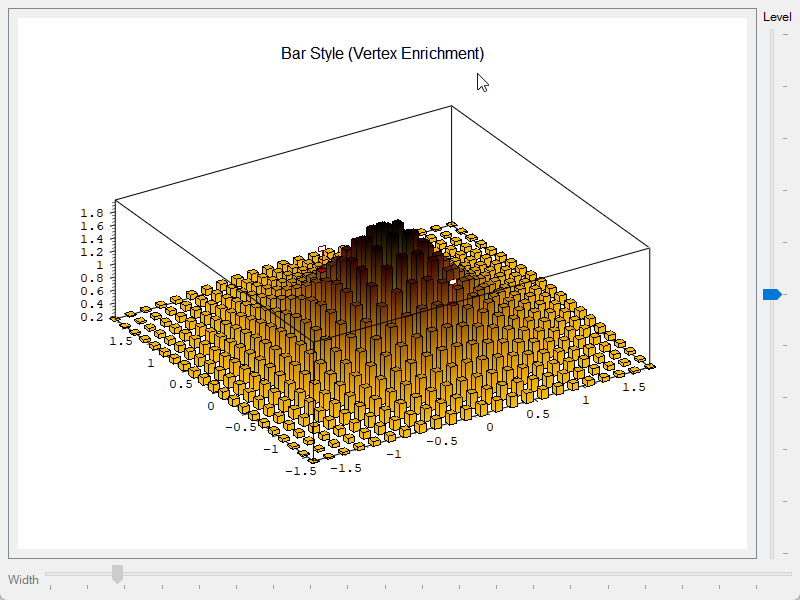
旧模块也不是一无是处。它的刻度引擎、自动缩放、z = f(x, y) 的采样、映射和主题概念都是可用的资产,这次重构保留并复用了这些数学与交互逻辑。下面这张是旧模块的存档截图,用逐顶点 enrichment 画柱子,那是旧渲染路径能做的事,也是新模块目前主动欠着的账(后面 3.8 节说)。
旧模块存档截图:enrichment 画出的柱状效果:
二、重构是怎么做的
2.1 先把窗口和图形拆开:Plot + Item
新的类关系与 2D 对称:Qwt3DPlot 是纯渲染窗口,Qwt3DPlotItem 是所有图形对象的基类。
#mermaid-svg-4LAPNpyB4nvt0kH4{font-family:"trebuchet ms",verdana,arial,sans-serif;font-size:16px;fill:#333;}@keyframes edge-animation-frame{from{stroke-dashoffset:0;}}@keyframes dash{to{stroke-dashoffset:0;}}#mermaid-svg-4LAPNpyB4nvt0kH4 .edge-animation-slow{stroke-dasharray:9,5!important;stroke-dashoffset:900;animation:dash 50s linear infinite;stroke-linecap:round;}#mermaid-svg-4LAPNpyB4nvt0kH4 .edge-animation-fast{stroke-dasharray:9,5!important;stroke-dashoffset:900;animation:dash 20s linear infinite;stroke-linecap:round;}#mermaid-svg-4LAPNpyB4nvt0kH4 .error-icon{fill:#552222;}#mermaid-svg-4LAPNpyB4nvt0kH4 .error-text{fill:#552222;stroke:#552222;}#mermaid-svg-4LAPNpyB4nvt0kH4 .edge-thickness-normal{stroke-width:1px;}#mermaid-svg-4LAPNpyB4nvt0kH4 .edge-thickness-thick{stroke-width:3.5px;}#mermaid-svg-4LAPNpyB4nvt0kH4 .edge-pattern-solid{stroke-dasharray:0;}#mermaid-svg-4LAPNpyB4nvt0kH4 .edge-thickness-invisible{stroke-width:0;fill:none;}#mermaid-svg-4LAPNpyB4nvt0kH4 .edge-pattern-dashed{stroke-dasharray:3;}#mermaid-svg-4LAPNpyB4nvt0kH4 .edge-pattern-dotted{stroke-dasharray:2;}#mermaid-svg-4LAPNpyB4nvt0kH4 .marker{fill:#333333;stroke:#333333;}#mermaid-svg-4LAPNpyB4nvt0kH4 .marker.cross{stroke:#333333;}#mermaid-svg-4LAPNpyB4nvt0kH4 svg{font-family:"trebuchet ms",verdana,arial,sans-serif;font-size:16px;}#mermaid-svg-4LAPNpyB4nvt0kH4 p{margin:0;}#mermaid-svg-4LAPNpyB4nvt0kH4 g.classGroup text{fill:#9370DB;stroke:none;font-family:"trebuchet ms",verdana,arial,sans-serif;font-size:10px;}#mermaid-svg-4LAPNpyB4nvt0kH4 g.classGroup text .title{font-weight:bolder;}#mermaid-svg-4LAPNpyB4nvt0kH4 .cluster-label text{fill:#333;}#mermaid-svg-4LAPNpyB4nvt0kH4 .cluster-label span{color:#333;}#mermaid-svg-4LAPNpyB4nvt0kH4 .cluster-label span p{background-color:transparent;}#mermaid-svg-4LAPNpyB4nvt0kH4 .cluster rect{fill:#ffffde;stroke:#aaaa33;stroke-width:1px;}#mermaid-svg-4LAPNpyB4nvt0kH4 .cluster text{fill:#333;}#mermaid-svg-4LAPNpyB4nvt0kH4 .cluster span{color:#333;}#mermaid-svg-4LAPNpyB4nvt0kH4 .nodeLabel,#mermaid-svg-4LAPNpyB4nvt0kH4 .edgeLabel{color:#131300;}#mermaid-svg-4LAPNpyB4nvt0kH4 .edgeLabel .label rect{fill:#ECECFF;}#mermaid-svg-4LAPNpyB4nvt0kH4 .label text{fill:#131300;}#mermaid-svg-4LAPNpyB4nvt0kH4 .labelBkg{background:#ECECFF;}#mermaid-svg-4LAPNpyB4nvt0kH4 .edgeLabel .label span{background:#ECECFF;}#mermaid-svg-4LAPNpyB4nvt0kH4 .classTitle{font-weight:bolder;}#mermaid-svg-4LAPNpyB4nvt0kH4 .node rect,#mermaid-svg-4LAPNpyB4nvt0kH4 .node circle,#mermaid-svg-4LAPNpyB4nvt0kH4 .node ellipse,#mermaid-svg-4LAPNpyB4nvt0kH4 .node polygon,#mermaid-svg-4LAPNpyB4nvt0kH4 .node path{fill:#ECECFF;stroke:#9370DB;stroke-width:1px;}#mermaid-svg-4LAPNpyB4nvt0kH4 .divider{stroke:#9370DB;stroke-width:1;}#mermaid-svg-4LAPNpyB4nvt0kH4 g.clickable{cursor:pointer;}#mermaid-svg-4LAPNpyB4nvt0kH4 g.classGroup rect{fill:#ECECFF;stroke:#9370DB;}#mermaid-svg-4LAPNpyB4nvt0kH4 g.classGroup line{stroke:#9370DB;stroke-width:1;}#mermaid-svg-4LAPNpyB4nvt0kH4 .classLabel .box{stroke:none;stroke-width:0;fill:#ECECFF;opacity:0.5;}#mermaid-svg-4LAPNpyB4nvt0kH4 .classLabel .label{fill:#9370DB;font-size:10px;}#mermaid-svg-4LAPNpyB4nvt0kH4 .relation{stroke:#333333;stroke-width:1;fill:none;}#mermaid-svg-4LAPNpyB4nvt0kH4 .dashed-line{stroke-dasharray:3;}#mermaid-svg-4LAPNpyB4nvt0kH4 .dotted-line{stroke-dasharray:1 2;}#mermaid-svg-4LAPNpyB4nvt0kH4 #compositionStart,#mermaid-svg-4LAPNpyB4nvt0kH4 .composition{fill:#333333!important;stroke:#333333!important;stroke-width:1;}#mermaid-svg-4LAPNpyB4nvt0kH4 #compositionEnd,#mermaid-svg-4LAPNpyB4nvt0kH4 .composition{fill:#333333!important;stroke:#333333!important;stroke-width:1;}#mermaid-svg-4LAPNpyB4nvt0kH4 #dependencyStart,#mermaid-svg-4LAPNpyB4nvt0kH4 .dependency{fill:#333333!important;stroke:#333333!important;stroke-width:1;}#mermaid-svg-4LAPNpyB4nvt0kH4 #dependencyStart,#mermaid-svg-4LAPNpyB4nvt0kH4 .dependency{fill:#333333!important;stroke:#333333!important;stroke-width:1;}#mermaid-svg-4LAPNpyB4nvt0kH4 #extensionStart,#mermaid-svg-4LAPNpyB4nvt0kH4 .extension{fill:transparent!important;stroke:#333333!important;stroke-width:1;}#mermaid-svg-4LAPNpyB4nvt0kH4 #extensionEnd,#mermaid-svg-4LAPNpyB4nvt0kH4 .extension{fill:transparent!important;stroke:#333333!important;stroke-width:1;}#mermaid-svg-4LAPNpyB4nvt0kH4 #aggregationStart,#mermaid-svg-4LAPNpyB4nvt0kH4 .aggregation{fill:transparent!important;stroke:#333333!important;stroke-width:1;}#mermaid-svg-4LAPNpyB4nvt0kH4 #aggregationEnd,#mermaid-svg-4LAPNpyB4nvt0kH4 .aggregation{fill:transparent!important;stroke:#333333!important;stroke-width:1;}#mermaid-svg-4LAPNpyB4nvt0kH4 #lollipopStart,#mermaid-svg-4LAPNpyB4nvt0kH4 .lollipop{fill:#ECECFF!important;stroke:#333333!important;stroke-width:1;}#mermaid-svg-4LAPNpyB4nvt0kH4 #lollipopEnd,#mermaid-svg-4LAPNpyB4nvt0kH4 .lollipop{fill:#ECECFF!important;stroke:#333333!important;stroke-width:1;}#mermaid-svg-4LAPNpyB4nvt0kH4 .edgeTerminals{font-size:11px;line-height:initial;}#mermaid-svg-4LAPNpyB4nvt0kH4 .classTitleText{text-anchor:middle;font-size:18px;fill:#333;}#mermaid-svg-4LAPNpyB4nvt0kH4 .label-icon{display:inline-block;height:1em;overflow:visible;vertical-align:-0.125em;}#mermaid-svg-4LAPNpyB4nvt0kH4 .node .label-icon path{fill:currentColor;stroke:revert;stroke-width:revert;}#mermaid-svg-4LAPNpyB4nvt0kH4 :root{--mermaid-font-family:"trebuchet ms",verdana,arial,sans-serif;} 管理并集与 z 序
<<Qt>>
QOpenGLWidget
Qwt3DPlot
+attach(item)
+detach(item)
+itemList()
+hull()
+applyTheme(theme)
+lineShader()
+polygonShader()
+worldToScreen()
-paintGL()
<<abstract>>
Qwt3DPlotItem
+attach(plot)
+draw()
+hull()
+setZ(z)
+itemChanged()
+populateLegendColors()
Qwt3DSurface
Qwt3DBar
Qwt3DLine
Qwt3DWaterfall
Qwt3DCoordinateSystem
<<value object>>
Qwt3DTheme
职责划分的标准只有一条:一个属性如果随数据集变化(网格分辨率、线框颜色、着色模式),它属于 item;如果对整幅图生效(背景色、灯光方向、相机角度、坐标盒范围),它属于窗口。这条线一划,一个窗口挂多个 item 就成了自然结果。旧 Plot3D 上的数据与样式方法如今全部落在 item 上:
从窗口消失的成员(旧 Plot3D) |
现在属于 |
|---|---|
setPlotStyle / setShading / setIsolines / setMeshColor / setMeshLineWidth / setSmoothMesh / setPolygonOffset |
Qwt3DSurface(逐 item 的渲染样式) |
setDataColor / dataColor |
各 item 的颜色 functor |
addEnrichment / degrade / userStyle |
Qwt3DSurface |
updateData / hasData / hull |
Qwt3DPlotItem::itemChanged() 与 Qwt3DPlot::hull()(全部 item 取并集) |
setCoordinateStyle |
直接操作 Qwt3DCoordinateSystem |
窗口上剩下窗口本来该管的事:GL 上下文、视图变换、光照、坐标系、主题、导出,外加新的 item 管理(attach/detach/itemList)和共享资源访问器。
一个 item 的契约在 src/plot3d/qwt3d_plotitem.h 里写得很短,派生类实现 draw() 和 hull() 就能挂进场景,需要的话再覆盖 populateLegendColors() 贡献一条图例渐变。
2.2 给依赖方向定规则,并给 drawable 一条下传通道
模块按概念分成六层,依赖只允许指向更低的层,低层指向高层的指针一律视为缺陷:
#mermaid-svg-c8t3tQcEscSFG9Ml{font-family:"trebuchet ms",verdana,arial,sans-serif;font-size:16px;fill:#333;}@keyframes edge-animation-frame{from{stroke-dashoffset:0;}}@keyframes dash{to{stroke-dashoffset:0;}}#mermaid-svg-c8t3tQcEscSFG9Ml .edge-animation-slow{stroke-dasharray:9,5!important;stroke-dashoffset:900;animation:dash 50s linear infinite;stroke-linecap:round;}#mermaid-svg-c8t3tQcEscSFG9Ml .edge-animation-fast{stroke-dasharray:9,5!important;stroke-dashoffset:900;animation:dash 20s linear infinite;stroke-linecap:round;}#mermaid-svg-c8t3tQcEscSFG9Ml .error-icon{fill:#552222;}#mermaid-svg-c8t3tQcEscSFG9Ml .error-text{fill:#552222;stroke:#552222;}#mermaid-svg-c8t3tQcEscSFG9Ml .edge-thickness-normal{stroke-width:1px;}#mermaid-svg-c8t3tQcEscSFG9Ml .edge-thickness-thick{stroke-width:3.5px;}#mermaid-svg-c8t3tQcEscSFG9Ml .edge-pattern-solid{stroke-dasharray:0;}#mermaid-svg-c8t3tQcEscSFG9Ml .edge-thickness-invisible{stroke-width:0;fill:none;}#mermaid-svg-c8t3tQcEscSFG9Ml .edge-pattern-dashed{stroke-dasharray:3;}#mermaid-svg-c8t3tQcEscSFG9Ml .edge-pattern-dotted{stroke-dasharray:2;}#mermaid-svg-c8t3tQcEscSFG9Ml .marker{fill:#333333;stroke:#333333;}#mermaid-svg-c8t3tQcEscSFG9Ml .marker.cross{stroke:#333333;}#mermaid-svg-c8t3tQcEscSFG9Ml svg{font-family:"trebuchet ms",verdana,arial,sans-serif;font-size:16px;}#mermaid-svg-c8t3tQcEscSFG9Ml p{margin:0;}#mermaid-svg-c8t3tQcEscSFG9Ml .label{font-family:"trebuchet ms",verdana,arial,sans-serif;color:#333;}#mermaid-svg-c8t3tQcEscSFG9Ml .cluster-label text{fill:#333;}#mermaid-svg-c8t3tQcEscSFG9Ml .cluster-label span{color:#333;}#mermaid-svg-c8t3tQcEscSFG9Ml .cluster-label span p{background-color:transparent;}#mermaid-svg-c8t3tQcEscSFG9Ml .label text,#mermaid-svg-c8t3tQcEscSFG9Ml span{fill:#333;color:#333;}#mermaid-svg-c8t3tQcEscSFG9Ml .node rect,#mermaid-svg-c8t3tQcEscSFG9Ml .node circle,#mermaid-svg-c8t3tQcEscSFG9Ml .node ellipse,#mermaid-svg-c8t3tQcEscSFG9Ml .node polygon,#mermaid-svg-c8t3tQcEscSFG9Ml .node path{fill:#ECECFF;stroke:#9370DB;stroke-width:1px;}#mermaid-svg-c8t3tQcEscSFG9Ml .rough-node .label text,#mermaid-svg-c8t3tQcEscSFG9Ml .node .label text,#mermaid-svg-c8t3tQcEscSFG9Ml .image-shape .label,#mermaid-svg-c8t3tQcEscSFG9Ml .icon-shape .label{text-anchor:middle;}#mermaid-svg-c8t3tQcEscSFG9Ml .node .katex path{fill:#000;stroke:#000;stroke-width:1px;}#mermaid-svg-c8t3tQcEscSFG9Ml .rough-node .label,#mermaid-svg-c8t3tQcEscSFG9Ml .node .label,#mermaid-svg-c8t3tQcEscSFG9Ml .image-shape .label,#mermaid-svg-c8t3tQcEscSFG9Ml .icon-shape .label{text-align:center;}#mermaid-svg-c8t3tQcEscSFG9Ml .node.clickable{cursor:pointer;}#mermaid-svg-c8t3tQcEscSFG9Ml .root .anchor path{fill:#333333!important;stroke-width:0;stroke:#333333;}#mermaid-svg-c8t3tQcEscSFG9Ml .arrowheadPath{fill:#333333;}#mermaid-svg-c8t3tQcEscSFG9Ml .edgePath .path{stroke:#333333;stroke-width:2.0px;}#mermaid-svg-c8t3tQcEscSFG9Ml .flowchart-link{stroke:#333333;fill:none;}#mermaid-svg-c8t3tQcEscSFG9Ml .edgeLabel{background-color:rgba(232,232,232, 0.8);text-align:center;}#mermaid-svg-c8t3tQcEscSFG9Ml .edgeLabel p{background-color:rgba(232,232,232, 0.8);}#mermaid-svg-c8t3tQcEscSFG9Ml .edgeLabel rect{opacity:0.5;background-color:rgba(232,232,232, 0.8);fill:rgba(232,232,232, 0.8);}#mermaid-svg-c8t3tQcEscSFG9Ml .labelBkg{background-color:rgba(232, 232, 232, 0.5);}#mermaid-svg-c8t3tQcEscSFG9Ml .cluster rect{fill:#ffffde;stroke:#aaaa33;stroke-width:1px;}#mermaid-svg-c8t3tQcEscSFG9Ml .cluster text{fill:#333;}#mermaid-svg-c8t3tQcEscSFG9Ml .cluster span{color:#333;}#mermaid-svg-c8t3tQcEscSFG9Ml div.mermaidTooltip{position:absolute;text-align:center;max-width:200px;padding:2px;font-family:"trebuchet ms",verdana,arial,sans-serif;font-size:12px;background:hsl(80, 100%, 96.2745098039%);border:1px solid #aaaa33;border-radius:2px;pointer-events:none;z-index:100;}#mermaid-svg-c8t3tQcEscSFG9Ml .flowchartTitleText{text-anchor:middle;font-size:18px;fill:#333;}#mermaid-svg-c8t3tQcEscSFG9Ml rect.text{fill:none;stroke-width:0;}#mermaid-svg-c8t3tQcEscSFG9Ml .icon-shape,#mermaid-svg-c8t3tQcEscSFG9Ml .image-shape{background-color:rgba(232,232,232, 0.8);text-align:center;}#mermaid-svg-c8t3tQcEscSFG9Ml .icon-shape p,#mermaid-svg-c8t3tQcEscSFG9Ml .image-shape p{background-color:rgba(232,232,232, 0.8);padding:2px;}#mermaid-svg-c8t3tQcEscSFG9Ml .icon-shape .label rect,#mermaid-svg-c8t3tQcEscSFG9Ml .image-shape .label rect{opacity:0.5;background-color:rgba(232,232,232, 0.8);fill:rgba(232,232,232, 0.8);}#mermaid-svg-c8t3tQcEscSFG9Ml .label-icon{display:inline-block;height:1em;overflow:visible;vertical-align:-0.125em;}#mermaid-svg-c8t3tQcEscSFG9Ml .node .label-icon path{fill:currentColor;stroke:revert;stroke-width:revert;}#mermaid-svg-c8t3tQcEscSFG9Ml :root{--mermaid-font-family:"trebuchet ms",verdana,arial,sans-serif;} Tier 0 纯值与工具
Tier 1 静默值对象
Tier 2 drawable
Tier 3 数据源映射
Tier 4 item
Tier 5 窗口
横切 I/O
qwt3d_io / io_reader / io_gl2ps
只作函数参数,不存储
qwt3d_plot / lighting
mousekeyboard / movements
qwt3d_plotitem / surface
bar / line3d / waterfall
qwt3d_gridmapping / function
parametricsurface
qwt3d_drawable / axis / label
colorlegend / coordsys
qwt3d_color / colormap_color
enrichment / theme
qwt3d_types / scale
autoscaler / portability
唯一被允许的向上指针是 Qwt3DPlotItem::plot(),item 渲染时需要窗口的 GL 上下文和着色器,这是一条刻意保留的通道。除此之外的反向引用都是 bug。
drawable 需要的矩阵、视口和着色器,由上层打包成值对象作为参数推下来:
cpp
// src/plot3d/qwt3d_render_context.h:值结构体,不含任何窗口指针
struct QWT3D_EXPORT Qwt3DRenderContext
{
    QMatrix4x4 modelView;
    QMatrix4x4 projection;
    QSize viewport;
    QOpenGLShaderProgram* lineShader = nullptr;
    QOpenGLShaderProgram* polygonShader = nullptr;
    QOpenGLShaderProgram* textShader = nullptr;

    // 纯 CPU 矩阵运算,不需要 GL 上下文
    QPointF worldToScreen(const Triple& world) const;
    Triple screenToWorld(const QPointF& screen) const;
};
Qwt3DPlot::paintGL() 在每个绘制阶段构造这个结构体,以 const 引用沿着 draw 链下传。1.3 节里那个要读 GL 状态才能换算坐标的 World2ViewPort,现在是一段可以脱离窗口、脱离 GL 上下文直接算的普通矩阵乘法,也就能单独写测试。
2.3 值对象静默,通知交给 item
低层不能调高层,颜色 functor 的状态变化因此不自行广播,而由持有它的 item 负责通知:
#mermaid-svg-pL7NMDEK7NdGQ09A{font-family:"trebuchet ms",verdana,arial,sans-serif;font-size:16px;fill:#333;}@keyframes edge-animation-frame{from{stroke-dashoffset:0;}}@keyframes dash{to{stroke-dashoffset:0;}}#mermaid-svg-pL7NMDEK7NdGQ09A .edge-animation-slow{stroke-dasharray:9,5!important;stroke-dashoffset:900;animation:dash 50s linear infinite;stroke-linecap:round;}#mermaid-svg-pL7NMDEK7NdGQ09A .edge-animation-fast{stroke-dasharray:9,5!important;stroke-dashoffset:900;animation:dash 20s linear infinite;stroke-linecap:round;}#mermaid-svg-pL7NMDEK7NdGQ09A .error-icon{fill:#552222;}#mermaid-svg-pL7NMDEK7NdGQ09A .error-text{fill:#552222;stroke:#552222;}#mermaid-svg-pL7NMDEK7NdGQ09A .edge-thickness-normal{stroke-width:1px;}#mermaid-svg-pL7NMDEK7NdGQ09A .edge-thickness-thick{stroke-width:3.5px;}#mermaid-svg-pL7NMDEK7NdGQ09A .edge-pattern-solid{stroke-dasharray:0;}#mermaid-svg-pL7NMDEK7NdGQ09A .edge-thickness-invisible{stroke-width:0;fill:none;}#mermaid-svg-pL7NMDEK7NdGQ09A .edge-pattern-dashed{stroke-dasharray:3;}#mermaid-svg-pL7NMDEK7NdGQ09A .edge-pattern-dotted{stroke-dasharray:2;}#mermaid-svg-pL7NMDEK7NdGQ09A .marker{fill:#333333;stroke:#333333;}#mermaid-svg-pL7NMDEK7NdGQ09A .marker.cross{stroke:#333333;}#mermaid-svg-pL7NMDEK7NdGQ09A svg{font-family:"trebuchet ms",verdana,arial,sans-serif;font-size:16px;}#mermaid-svg-pL7NMDEK7NdGQ09A p{margin:0;}#mermaid-svg-pL7NMDEK7NdGQ09A .label{font-family:"trebuchet ms",verdana,arial,sans-serif;color:#333;}#mermaid-svg-pL7NMDEK7NdGQ09A .cluster-label text{fill:#333;}#mermaid-svg-pL7NMDEK7NdGQ09A .cluster-label span{color:#333;}#mermaid-svg-pL7NMDEK7NdGQ09A .cluster-label span p{background-color:transparent;}#mermaid-svg-pL7NMDEK7NdGQ09A .label text,#mermaid-svg-pL7NMDEK7NdGQ09A span{fill:#333;color:#333;}#mermaid-svg-pL7NMDEK7NdGQ09A .node rect,#mermaid-svg-pL7NMDEK7NdGQ09A .node circle,#mermaid-svg-pL7NMDEK7NdGQ09A .node ellipse,#mermaid-svg-pL7NMDEK7NdGQ09A .node polygon,#mermaid-svg-pL7NMDEK7NdGQ09A .node path{fill:#ECECFF;stroke:#9370DB;stroke-width:1px;}#mermaid-svg-pL7NMDEK7NdGQ09A .rough-node .label text,#mermaid-svg-pL7NMDEK7NdGQ09A .node .label text,#mermaid-svg-pL7NMDEK7NdGQ09A .image-shape .label,#mermaid-svg-pL7NMDEK7NdGQ09A .icon-shape .label{text-anchor:middle;}#mermaid-svg-pL7NMDEK7NdGQ09A .node .katex path{fill:#000;stroke:#000;stroke-width:1px;}#mermaid-svg-pL7NMDEK7NdGQ09A .rough-node .label,#mermaid-svg-pL7NMDEK7NdGQ09A .node .label,#mermaid-svg-pL7NMDEK7NdGQ09A .image-shape .label,#mermaid-svg-pL7NMDEK7NdGQ09A .icon-shape .label{text-align:center;}#mermaid-svg-pL7NMDEK7NdGQ09A .node.clickable{cursor:pointer;}#mermaid-svg-pL7NMDEK7NdGQ09A .root .anchor path{fill:#333333!important;stroke-width:0;stroke:#333333;}#mermaid-svg-pL7NMDEK7NdGQ09A .arrowheadPath{fill:#333333;}#mermaid-svg-pL7NMDEK7NdGQ09A .edgePath .path{stroke:#333333;stroke-width:2.0px;}#mermaid-svg-pL7NMDEK7NdGQ09A .flowchart-link{stroke:#333333;fill:none;}#mermaid-svg-pL7NMDEK7NdGQ09A .edgeLabel{background-color:rgba(232,232,232, 0.8);text-align:center;}#mermaid-svg-pL7NMDEK7NdGQ09A .edgeLabel p{background-color:rgba(232,232,232, 0.8);}#mermaid-svg-pL7NMDEK7NdGQ09A .edgeLabel rect{opacity:0.5;background-color:rgba(232,232,232, 0.8);fill:rgba(232,232,232, 0.8);}#mermaid-svg-pL7NMDEK7NdGQ09A .labelBkg{background-color:rgba(232, 232, 232, 0.5);}#mermaid-svg-pL7NMDEK7NdGQ09A .cluster rect{fill:#ffffde;stroke:#aaaa33;stroke-width:1px;}#mermaid-svg-pL7NMDEK7NdGQ09A .cluster text{fill:#333;}#mermaid-svg-pL7NMDEK7NdGQ09A .cluster span{color:#333;}#mermaid-svg-pL7NMDEK7NdGQ09A div.mermaidTooltip{position:absolute;text-align:center;max-width:200px;padding:2px;font-family:"trebuchet ms",verdana,arial,sans-serif;font-size:12px;background:hsl(80, 100%, 96.2745098039%);border:1px solid #aaaa33;border-radius:2px;pointer-events:none;z-index:100;}#mermaid-svg-pL7NMDEK7NdGQ09A .flowchartTitleText{text-anchor:middle;font-size:18px;fill:#333;}#mermaid-svg-pL7NMDEK7NdGQ09A rect.text{fill:none;stroke-width:0;}#mermaid-svg-pL7NMDEK7NdGQ09A .icon-shape,#mermaid-svg-pL7NMDEK7NdGQ09A .image-shape{background-color:rgba(232,232,232, 0.8);text-align:center;}#mermaid-svg-pL7NMDEK7NdGQ09A .icon-shape p,#mermaid-svg-pL7NMDEK7NdGQ09A .image-shape p{background-color:rgba(232,232,232, 0.8);padding:2px;}#mermaid-svg-pL7NMDEK7NdGQ09A .icon-shape .label rect,#mermaid-svg-pL7NMDEK7NdGQ09A .image-shape .label rect{opacity:0.5;background-color:rgba(232,232,232, 0.8);fill:rgba(232,232,232, 0.8);}#mermaid-svg-pL7NMDEK7NdGQ09A .label-icon{display:inline-block;height:1em;overflow:visible;vertical-align:-0.125em;}#mermaid-svg-pL7NMDEK7NdGQ09A .node .label-icon path{fill:currentColor;stroke:revert;stroke-width:revert;}#mermaid-svg-pL7NMDEK7NdGQ09A :root{--mermaid-font-family:"trebuchet ms",verdana,arial,sans-serif;} 调用方修改 functor
setPreset / setAlpha / setInterval
functor 静默
不回调任何人
调用方再调
surface->invalidateColors()
m_vboDirty = true
下一帧重算顶点色
itemChanged()
重算 hull、刷新坐标系、repaint
这和 2D 的契约逐字对应:改了 QwtSymbol 之后调 itemChanged(),改了 QwtColorMap 之后由 QwtPlotSpectrogram 决定怎么刷新。配套的机制是数据推入:颜色归一化需要的 z 范围由 Qwt3DSurface::pushColorRange() 在构建顶点缓冲之前 setActiveRange() 进 functor,functor 自己不去问 plot()->hull()(那又需要一根反向指针)。
2.4 渲染迁到 Core Profile
这一轮把 GPU 交互的职责重新分了工,窗口负责阶段性的公共状态,item 负责自己的私有几何。
| 旧 | 新 | 位置 |
|---|---|---|
glBegin/glEnd 逐顶点提交 |
VBO + VAO + glDrawElements 一次绘制 |
每个 item 自带,如 Qwt3DSurface::buildVBO() |
| 显示列表缓存几何 | 常驻 VBO,脏标记置位才重建,跨帧复用 | src/plot3d/qwt3d_surface.cpp |
| GL 矩阵栈 | CPU 端 QMatrix4x4 计算,作为 uniform 传入 |
Qwt3DPlot::paintGL() |
glLightfv / glMaterialfv |
着色器内 Blinn-Phong 光照 | src/plot3d/shaders/ |
gluQuadric* 画圆柱圆盘 |
CPU 端生成几何体 | qwt3d_line3d.cpp 的管状扫掠 |
gluProject 做投影 |
纯 CPU 矩阵乘法 worldToScreen() |
qwt3d_render_context.cpp |
glRasterPos3d + glDrawPixels 贴文字 |
QOpenGLTexture 文字纹理 |
qwt3d_label.cpp |
src/plot3d/shaders/ 下是 10 个 GLSL 3.30 Core 着色器,surface、polygon、line、point、text 各一对 vert 加 frag。窗口在 initializeGL() 里编译 line、point、polygon、text 四套程序供所有 item 共用;需要光照的曲面类图元(Qwt3DSurface、Qwt3DBar、瀑布图的 Tube)各自编译 surface 那一对。
一帧的顺序是这样的:
Qwt3DCoordinateSystem Qwt3DPlotItem 按 z 序 Qwt3DRenderContext Qwt3DPlot Qt 绘制事件 Qwt3DCoordinateSystem Qwt3DPlotItem 按 z 序 Qwt3DRenderContext Qwt3DPlot Qt 绘制事件 #mermaid-svg-VTXh5j54sAovKMfi{font-family:"trebuchet ms",verdana,arial,sans-serif;font-size:16px;fill:#333;}@keyframes edge-animation-frame{from{stroke-dashoffset:0;}}@keyframes dash{to{stroke-dashoffset:0;}}#mermaid-svg-VTXh5j54sAovKMfi .edge-animation-slow{stroke-dasharray:9,5!important;stroke-dashoffset:900;animation:dash 50s linear infinite;stroke-linecap:round;}#mermaid-svg-VTXh5j54sAovKMfi .edge-animation-fast{stroke-dasharray:9,5!important;stroke-dashoffset:900;animation:dash 20s linear infinite;stroke-linecap:round;}#mermaid-svg-VTXh5j54sAovKMfi .error-icon{fill:#552222;}#mermaid-svg-VTXh5j54sAovKMfi .error-text{fill:#552222;stroke:#552222;}#mermaid-svg-VTXh5j54sAovKMfi .edge-thickness-normal{stroke-width:1px;}#mermaid-svg-VTXh5j54sAovKMfi .edge-thickness-thick{stroke-width:3.5px;}#mermaid-svg-VTXh5j54sAovKMfi .edge-pattern-solid{stroke-dasharray:0;}#mermaid-svg-VTXh5j54sAovKMfi .edge-thickness-invisible{stroke-width:0;fill:none;}#mermaid-svg-VTXh5j54sAovKMfi .edge-pattern-dashed{stroke-dasharray:3;}#mermaid-svg-VTXh5j54sAovKMfi .edge-pattern-dotted{stroke-dasharray:2;}#mermaid-svg-VTXh5j54sAovKMfi .marker{fill:#333333;stroke:#333333;}#mermaid-svg-VTXh5j54sAovKMfi .marker.cross{stroke:#333333;}#mermaid-svg-VTXh5j54sAovKMfi svg{font-family:"trebuchet ms",verdana,arial,sans-serif;font-size:16px;}#mermaid-svg-VTXh5j54sAovKMfi p{margin:0;}#mermaid-svg-VTXh5j54sAovKMfi .actor{stroke:hsl(259.6261682243, 59.7765363128%, 87.9019607843%);fill:#ECECFF;}#mermaid-svg-VTXh5j54sAovKMfi text.actor>tspan{fill:black;stroke:none;}#mermaid-svg-VTXh5j54sAovKMfi .actor-line{stroke:hsl(259.6261682243, 59.7765363128%, 87.9019607843%);}#mermaid-svg-VTXh5j54sAovKMfi .innerArc{stroke-width:1.5;stroke-dasharray:none;}#mermaid-svg-VTXh5j54sAovKMfi .messageLine0{stroke-width:1.5;stroke-dasharray:none;stroke:#333;}#mermaid-svg-VTXh5j54sAovKMfi .messageLine1{stroke-width:1.5;stroke-dasharray:2,2;stroke:#333;}#mermaid-svg-VTXh5j54sAovKMfi #arrowhead path{fill:#333;stroke:#333;}#mermaid-svg-VTXh5j54sAovKMfi .sequenceNumber{fill:white;}#mermaid-svg-VTXh5j54sAovKMfi #sequencenumber{fill:#333;}#mermaid-svg-VTXh5j54sAovKMfi #crosshead path{fill:#333;stroke:#333;}#mermaid-svg-VTXh5j54sAovKMfi .messageText{fill:#333;stroke:none;}#mermaid-svg-VTXh5j54sAovKMfi .labelBox{stroke:hsl(259.6261682243, 59.7765363128%, 87.9019607843%);fill:#ECECFF;}#mermaid-svg-VTXh5j54sAovKMfi .labelText,#mermaid-svg-VTXh5j54sAovKMfi .labelText>tspan{fill:black;stroke:none;}#mermaid-svg-VTXh5j54sAovKMfi .loopText,#mermaid-svg-VTXh5j54sAovKMfi .loopText>tspan{fill:black;stroke:none;}#mermaid-svg-VTXh5j54sAovKMfi .loopLine{stroke-width:2px;stroke-dasharray:2,2;stroke:hsl(259.6261682243, 59.7765363128%, 87.9019607843%);fill:hsl(259.6261682243, 59.7765363128%, 87.9019607843%);}#mermaid-svg-VTXh5j54sAovKMfi .note{stroke:#aaaa33;fill:#fff5ad;}#mermaid-svg-VTXh5j54sAovKMfi .noteText,#mermaid-svg-VTXh5j54sAovKMfi .noteText>tspan{fill:black;stroke:none;}#mermaid-svg-VTXh5j54sAovKMfi .activation0{fill:#f4f4f4;stroke:#666;}#mermaid-svg-VTXh5j54sAovKMfi .activation1{fill:#f4f4f4;stroke:#666;}#mermaid-svg-VTXh5j54sAovKMfi .activation2{fill:#f4f4f4;stroke:#666;}#mermaid-svg-VTXh5j54sAovKMfi .actorPopupMenu{position:absolute;}#mermaid-svg-VTXh5j54sAovKMfi .actorPopupMenuPanel{position:absolute;fill:#ECECFF;box-shadow:0px 8px 16px 0px rgba(0,0,0,0.2);filter:drop-shadow(3px 5px 2px rgb(0 0 0 / 0.4));}#mermaid-svg-VTXh5j54sAovKMfi .actor-man line{stroke:hsl(259.6261682243, 59.7765363128%, 87.9019607843%);fill:#ECECFF;}#mermaid-svg-VTXh5j54sAovKMfi .actor-man circle,#mermaid-svg-VTXh5j54sAovKMfi line{stroke:hsl(259.6261682243, 59.7765363128%, 87.9019607843%);fill:#ECECFF;stroke-width:2px;}#mermaid-svg-VTXh5j54sAovKMfi :root{--mermaid-font-family:"trebuchet ms",verdana,arial,sans-serif;} loop 每个可见 item paintGL() 清屏 CPU 算 modelView / projection 打包矩阵、视口、共享着色器 item->>draw() 若脏则重建 VBO 绑定自己的 VAO 与着色器 glDrawElements draw(ctx) 画坐标盒、刻度、标签 换成固定 modelView 用固定矩阵画图例与标题,锚在屏幕上
图例和标题锚在屏幕上,跟着场景一起转会很难读。它们在绘制流程的末尾单独走一个不随交互变化的基准矩阵,Qwt3DPlot::paintGL() 里能看到这段处理。
2.5 扩展点用第二个、第三个 item 验证
判断一套架构是否成立,看的是第二个、第三个实现进来时改动了多少。Qwt3DBar(柱状图,逐柱立方体)和 Qwt3DLine(线图,Lines/Tube/Dots 三种样式)都是新增文件加新增 item 子类,qwt3d_plot.cpp 和 qwt3d_plot.h 在这次提交里一行未改。两个 item 各自实现 draw()、hull()、populateLegendColors(),自带 GPU 缓冲和脏标记,和曲面 item 遵循同一套约定。
如实说明一处成本:Qwt3DTheme::applyToItem() 目前按具体 item 类型分发 item 级属性,新增一种 item 想接收主题里的线框色与数据 colormap,需要在 qwt3d_theme.cpp 里补一个分支。这是主题按类型分发带来的一点扩展开销,和修改窗口类完全是两件事。
2.6 每一步都能编译
重构在 new3d 分支上渐进推进,每一步只解决一个结构问题,并且每一步都能编译通过。下面这条链上的每个节点对应仓库里一个可回溯的提交:
#mermaid-svg-FXb8HPAWQdlqPVpi{font-family:"trebuchet ms",verdana,arial,sans-serif;font-size:16px;fill:#333;}@keyframes edge-animation-frame{from{stroke-dashoffset:0;}}@keyframes dash{to{stroke-dashoffset:0;}}#mermaid-svg-FXb8HPAWQdlqPVpi .edge-animation-slow{stroke-dasharray:9,5!important;stroke-dashoffset:900;animation:dash 50s linear infinite;stroke-linecap:round;}#mermaid-svg-FXb8HPAWQdlqPVpi .edge-animation-fast{stroke-dasharray:9,5!important;stroke-dashoffset:900;animation:dash 20s linear infinite;stroke-linecap:round;}#mermaid-svg-FXb8HPAWQdlqPVpi .error-icon{fill:#552222;}#mermaid-svg-FXb8HPAWQdlqPVpi .error-text{fill:#552222;stroke:#552222;}#mermaid-svg-FXb8HPAWQdlqPVpi .edge-thickness-normal{stroke-width:1px;}#mermaid-svg-FXb8HPAWQdlqPVpi .edge-thickness-thick{stroke-width:3.5px;}#mermaid-svg-FXb8HPAWQdlqPVpi .edge-pattern-solid{stroke-dasharray:0;}#mermaid-svg-FXb8HPAWQdlqPVpi .edge-thickness-invisible{stroke-width:0;fill:none;}#mermaid-svg-FXb8HPAWQdlqPVpi .edge-pattern-dashed{stroke-dasharray:3;}#mermaid-svg-FXb8HPAWQdlqPVpi .edge-pattern-dotted{stroke-dasharray:2;}#mermaid-svg-FXb8HPAWQdlqPVpi .marker{fill:#333333;stroke:#333333;}#mermaid-svg-FXb8HPAWQdlqPVpi .marker.cross{stroke:#333333;}#mermaid-svg-FXb8HPAWQdlqPVpi svg{font-family:"trebuchet ms",verdana,arial,sans-serif;font-size:16px;}#mermaid-svg-FXb8HPAWQdlqPVpi p{margin:0;}#mermaid-svg-FXb8HPAWQdlqPVpi .label{font-family:"trebuchet ms",verdana,arial,sans-serif;color:#333;}#mermaid-svg-FXb8HPAWQdlqPVpi .cluster-label text{fill:#333;}#mermaid-svg-FXb8HPAWQdlqPVpi .cluster-label span{color:#333;}#mermaid-svg-FXb8HPAWQdlqPVpi .cluster-label span p{background-color:transparent;}#mermaid-svg-FXb8HPAWQdlqPVpi .label text,#mermaid-svg-FXb8HPAWQdlqPVpi span{fill:#333;color:#333;}#mermaid-svg-FXb8HPAWQdlqPVpi .node rect,#mermaid-svg-FXb8HPAWQdlqPVpi .node circle,#mermaid-svg-FXb8HPAWQdlqPVpi .node ellipse,#mermaid-svg-FXb8HPAWQdlqPVpi .node polygon,#mermaid-svg-FXb8HPAWQdlqPVpi .node path{fill:#ECECFF;stroke:#9370DB;stroke-width:1px;}#mermaid-svg-FXb8HPAWQdlqPVpi .rough-node .label text,#mermaid-svg-FXb8HPAWQdlqPVpi .node .label text,#mermaid-svg-FXb8HPAWQdlqPVpi .image-shape .label,#mermaid-svg-FXb8HPAWQdlqPVpi .icon-shape .label{text-anchor:middle;}#mermaid-svg-FXb8HPAWQdlqPVpi .node .katex path{fill:#000;stroke:#000;stroke-width:1px;}#mermaid-svg-FXb8HPAWQdlqPVpi .rough-node .label,#mermaid-svg-FXb8HPAWQdlqPVpi .node .label,#mermaid-svg-FXb8HPAWQdlqPVpi .image-shape .label,#mermaid-svg-FXb8HPAWQdlqPVpi .icon-shape .label{text-align:center;}#mermaid-svg-FXb8HPAWQdlqPVpi .node.clickable{cursor:pointer;}#mermaid-svg-FXb8HPAWQdlqPVpi .root .anchor path{fill:#333333!important;stroke-width:0;stroke:#333333;}#mermaid-svg-FXb8HPAWQdlqPVpi .arrowheadPath{fill:#333333;}#mermaid-svg-FXb8HPAWQdlqPVpi .edgePath .path{stroke:#333333;stroke-width:2.0px;}#mermaid-svg-FXb8HPAWQdlqPVpi .flowchart-link{stroke:#333333;fill:none;}#mermaid-svg-FXb8HPAWQdlqPVpi .edgeLabel{background-color:rgba(232,232,232, 0.8);text-align:center;}#mermaid-svg-FXb8HPAWQdlqPVpi .edgeLabel p{background-color:rgba(232,232,232, 0.8);}#mermaid-svg-FXb8HPAWQdlqPVpi .edgeLabel rect{opacity:0.5;background-color:rgba(232,232,232, 0.8);fill:rgba(232,232,232, 0.8);}#mermaid-svg-FXb8HPAWQdlqPVpi .labelBkg{background-color:rgba(232, 232, 232, 0.5);}#mermaid-svg-FXb8HPAWQdlqPVpi .cluster rect{fill:#ffffde;stroke:#aaaa33;stroke-width:1px;}#mermaid-svg-FXb8HPAWQdlqPVpi .cluster text{fill:#333;}#mermaid-svg-FXb8HPAWQdlqPVpi .cluster span{color:#333;}#mermaid-svg-FXb8HPAWQdlqPVpi div.mermaidTooltip{position:absolute;text-align:center;max-width:200px;padding:2px;font-family:"trebuchet ms",verdana,arial,sans-serif;font-size:12px;background:hsl(80, 100%, 96.2745098039%);border:1px solid #aaaa33;border-radius:2px;pointer-events:none;z-index:100;}#mermaid-svg-FXb8HPAWQdlqPVpi .flowchartTitleText{text-anchor:middle;font-size:18px;fill:#333;}#mermaid-svg-FXb8HPAWQdlqPVpi rect.text{fill:none;stroke-width:0;}#mermaid-svg-FXb8HPAWQdlqPVpi .icon-shape,#mermaid-svg-FXb8HPAWQdlqPVpi .image-shape{background-color:rgba(232,232,232, 0.8);text-align:center;}#mermaid-svg-FXb8HPAWQdlqPVpi .icon-shape p,#mermaid-svg-FXb8HPAWQdlqPVpi .image-shape p{background-color:rgba(232,232,232, 0.8);padding:2px;}#mermaid-svg-FXb8HPAWQdlqPVpi .icon-shape .label rect,#mermaid-svg-FXb8HPAWQdlqPVpi .image-shape .label rect{opacity:0.5;background-color:rgba(232,232,232, 0.8);fill:rgba(232,232,232, 0.8);}#mermaid-svg-FXb8HPAWQdlqPVpi .label-icon{display:inline-block;height:1em;overflow:visible;vertical-align:-0.125em;}#mermaid-svg-FXb8HPAWQdlqPVpi .node .label-icon path{fill:currentColor;stroke:revert;stroke-width:revert;}#mermaid-svg-FXb8HPAWQdlqPVpi :root{--mermaid-font-family:"trebuchet ms",verdana,arial,sans-serif;} 统一命名
去掉 namespace Qwt3D
引入 Qwt3DPlotItem 基类
重写窗口
Plot3D 变成纯渲染窗口 Qwt3DPlot
重写曲面
SurfacePlot 变成 Qwt3DSurface item
函数与参数曲面
create() 改为返回数据
坐标系、轴、标签、图例
迁到着色器
主题与 IO 适配新架构
清理反向指针
RenderContext 加纯值颜色
Qwt3DBar / Qwt3DLine
在新扩展点上落地
这次重构还明确接受了一次功能让位:地板投影、法线显示、enrichment(十字丝、圆锥箭头、圆点)的数据接口保留,渲染暂时不产出像素,因为旧实现全靠立即模式,在 Core Profile 下根本跑不起来。架构错误会让之后每一次开发都变贵,特性缺失是局部的,补起来快。架构理顺之后,柱状图和线图一周内落地,瀑布图随后也进来了。
三、重构之后:一张实时 3D 瀑布图
3.1 为什么拿瀑布图做检验
做频谱、色谱、雷达和振动分析的人都需要瀑布图:把一维轨迹沿深度轴一条条堆起来。这个需求对库的要求最集中,一方面数据在动,每秒几十条新轨迹,窗口要滑动;另一方面坐标轴要稳,深度轴和幅度轴如果逐帧自动缩放,画面会一直抖。旧架构下这些要用户自己管理窗口、深度编号、几何和颜色,还很难和 2D 频谱放进同一个界面里对照。
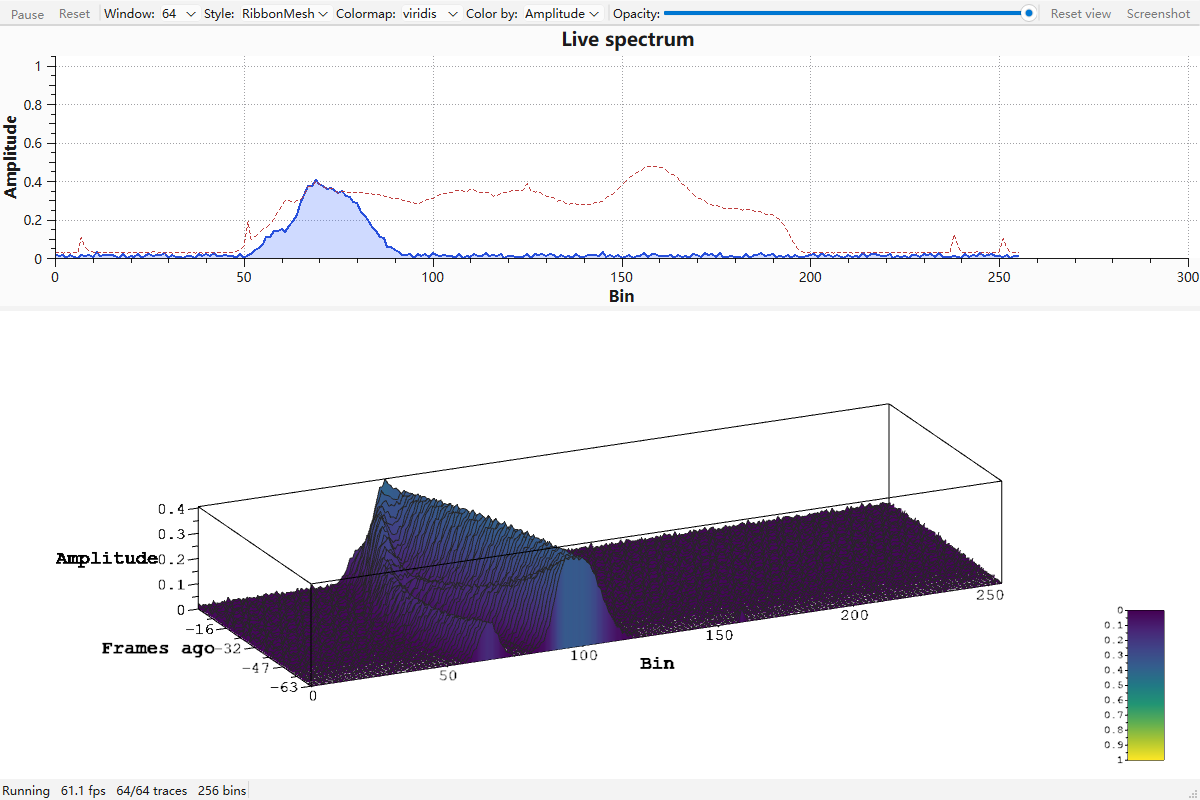
Qwt3DWaterfall 在 7.5.0 开发版里落地,它的身份是 Qwt3DPlotItem:数据、几何、样式和 GPU 缓冲都在 item 里,窗口只负责渲染。
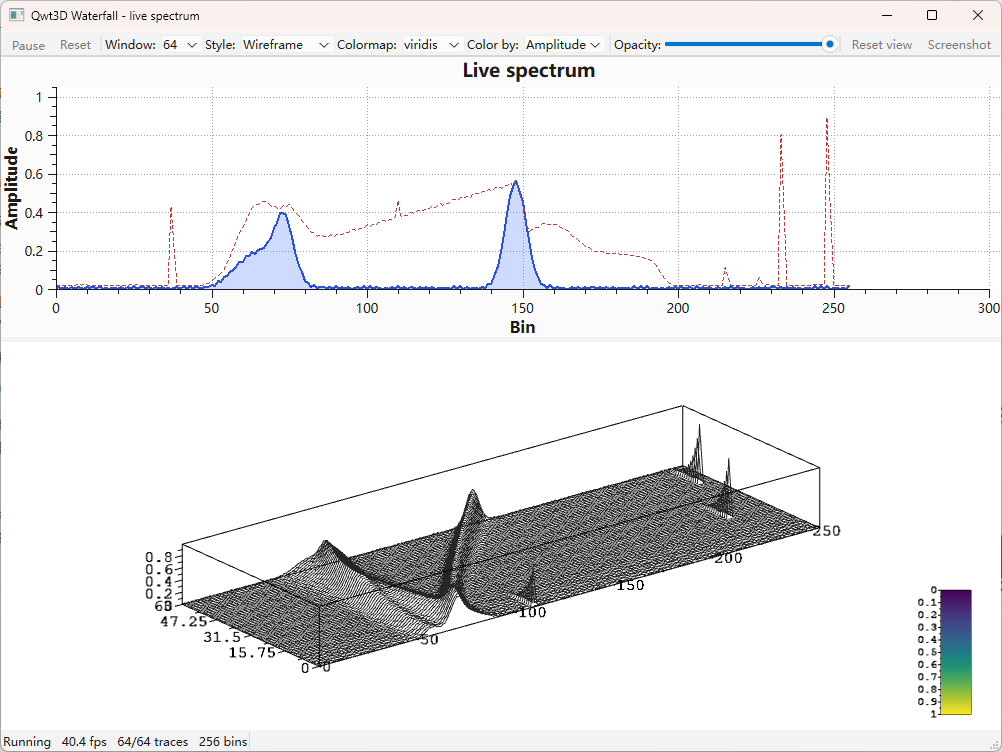
同一场景换成 Wireframe 样式,只描边不填充,是密集窗口下开销最低的渲染方式:
3.2 用法:一个 item,零自定义几何
静态瀑布的完整初始化是这样,pushTrace() 是唯一的数据入口:
cpp
#include <qwt3d_plot.h>
#include <qwt3d_waterfall.h>

Qwt3DPlot* plot = new Qwt3DPlot(parent);

auto* waterfall = new Qwt3DWaterfall();
waterfall->attach(plot);                        // 先 attach,再喂数据
waterfall->setTraceCapacity(64);
waterfall->setPlotStyle(Qwt3DWaterfall::RibbonMesh);
waterfall->setColorMode(Qwt3DWaterfall::ByAmplitude);
waterfall->setColorRange(0.0, 1.0);             // 固定色域,颜色不随帧漂移

for (int i = 0; i < 64; ++i)
    waterfall->pushTrace(frame(i));             // QVector<double>,256 个 bin

plot->setAspectRatioMode(AUTOFILL);

// 坐标轴:x 是 bin,y 是深度,z 是幅度
plot->coordinates()->axes[X1].setLabelString("Bin");
plot->coordinates()->axes[Y1].setLabelString("Frames ago");
plot->coordinates()->axes[Z1].setLabelString("Amplitude");
实时场景每个定时器 tick 只多一行:
cpp
// 初始化:窗口 64 条,按幅度上色,幅度色域固定
waterfall->setTraceCapacity(64);
waterfall->setColorMode(Qwt3DWaterfall::ByAmplitude);
waterfall->setColorRange(0.0, 1.0);

// 每个 tick:
const QVector<double>& frame = generator.nextFrame();
waterfall->pushTrace(frame);   // 触发 itemChanged(),窗口整体滑动
跑起来是这样,上面 2D 频谱和下面 3D 瀑布吃的是同一帧数据(动图,Wireframe 样式,64 条乘 256 bin):
pushTrace() 内部做的事在 src/plot3d/qwt3d_waterfall.cpp 里一眼能看完:
cpp
void Qwt3DWaterfall::pushTrace(const double* values, int count)
{
    // 新建的 bin 宽度由第一条轨迹确定;之后超长截断、过短零填充
    if (d->m_count == d->m_capacity) {
        // 窗口满:整体前移一个槽位(QVector 移动语义,不做深拷贝)
        std::rotate(d->m_traces.begin(), d->m_traces.begin() + 1,
                    d->m_traces.begin() + d->m_count);
        d->m_traces[static_cast<size_t>(d->m_capacity - 1)] = std::move(trace);
    } else {
        d->m_traces[static_cast<size_t>(d->m_count)] = std::move(trace);
        ++d->m_count;
    }
    d->recalculateRanges();
    d->m_ribbonDirty = d->m_outlineDirty = d->m_tubeDirty = true;
    itemChanged();                 // 通知窗口:重算 hull,重绘
}
用户侧没有窗口管理,没有深度编号,没有几何构造。整套东西就是一个 item 加一个方法调用。
3.3 滑动窗口的三个约定
轨迹在窗口里的位置直接当深度(y)坐标用,于是 hull 的深度范围只会从 [0, 0] 单调增长到 [0, traceCapacity() - 1],然后保持不变。坐标盒不会随数据逐帧缩放,深度轴不会闪,实时瀑布开箱可用的关键就在这里。setDepthOrder(NewestBehind) 可以反转方向,让最新轨迹落在 z = 0,hull 范围不受影响。
bin 宽度由第一条轨迹定死:samplesPerTrace() 在第一次 pushTrace() 时确定,之后的帧超长截断、过短零填充,x 范围同样不抖。
深度轴上,读「距当前帧数」比读坐标值直观。Qwt3DTextScale 就是为此加的,它是一个主刻度标签来自字符串列表的线性 scale,可以标出 "0"、"-16"、"-47"、"-63" 这样的刻度。
cpp
#include <qwt3d_scale.h>

const int capacity = waterfall->traceCapacity();
const int majors = 4;

QVector<QString> labels;
for (int k = 0; k <= majors; ++k) {
    const int framesAgo = qRound(capacity - 1 - k * double(capacity - 1) / majors);
    labels << QString::number(-framesAgo);
}

auto& axis = plot->coordinates()->axes[Y1];
axis.setAutoScale(false);
axis.setMajors(majors);
auto* scale = new Qwt3DTextScale();
scale->setLabels(labels);
axis.setScale(scale);     // setScale 会克隆对象,每个轴各建一个实例
几何样式和上色模式各有几种:
| 样式 | 行为 |
|---|---|
Ribbon |
从基线填充到轨迹的帘幕,经典瀑布外观 |
RibbonMesh |
帘幕加顶部折线描边,描边固定在填充之后绘制 |
Wireframe |
只有折线,无填充,开销最低 |
Tube |
每条轨迹扫成带光照的实体管,开销最高,密集轨迹降采样到 129 个环站以内 |
| 上色模式 | 行为 |
|---|---|
ByDepth |
colormap 按轨迹在窗口中的位置取色,每条帘幕单色 |
ByAmplitude |
colormap 按采样值取色,常见的频谱强度外观 |
Solid |
setColor() 指定的纯色 |
实时场景务必调用 setColorRange()。ByAmplitude 的自动色域跟随当前数据的最小最大值,颜色会逐帧漂移;固定色域才能让「黄色是 0 dB、紫色是底噪」保持稳定。视图比例上还有一点要注意:频谱瀑布的数据跨度是强各向异性的(255 个 bin、0 到 1 的幅度、六十多层的深度),应该用 AUTOFILL 把每个轴归一到最大数据范围之后再塑造立方体形状,示例用 setScale(1.0, 0.35, 0.6) 压掉深度、抬出幅度,这是经典瀑布的比例。用 DATARATIO 保留真实比例的话,帘幕会变成 255 单位宽场景里 1 单位高的细条。
3.4 一个窗口挂多个 item
旧架构做不到的事,在新架构里是默认行为。下面这张图是一个 Qwt3DPlot、两个 item:底层是曲面,上层是一条扫成管状的螺旋线。
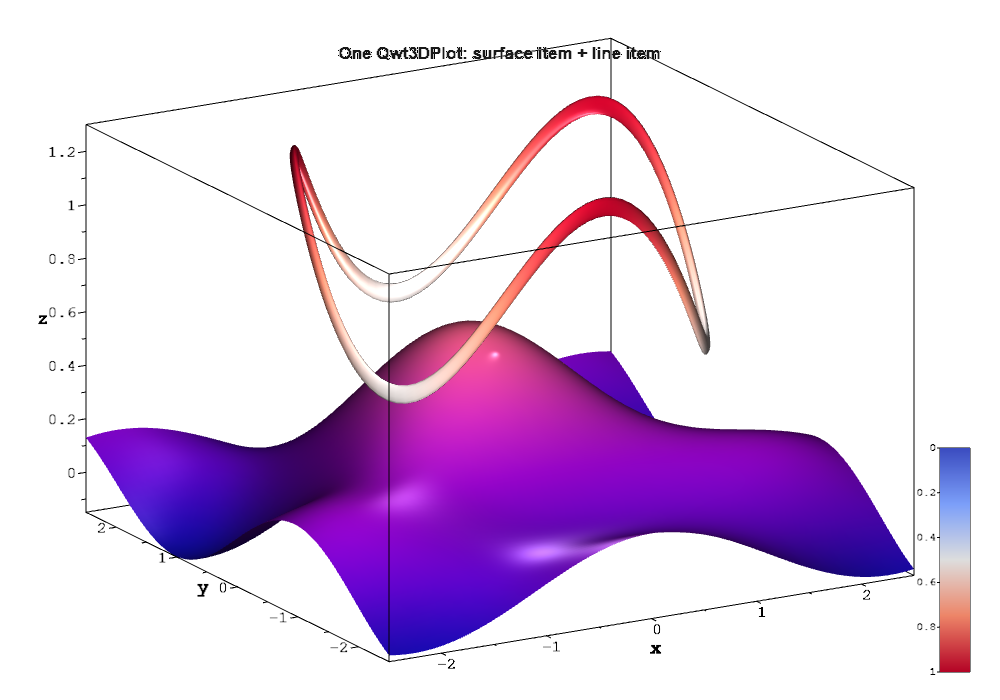
坐标盒由全部 item 的包围盒并集决定,两个 item 各自带自己的颜色 functor 和 GPU 缓冲,z 序决定绘制顺序,互不知道对方存在。曲面单独用、配 colormap 和颜色条的效果:
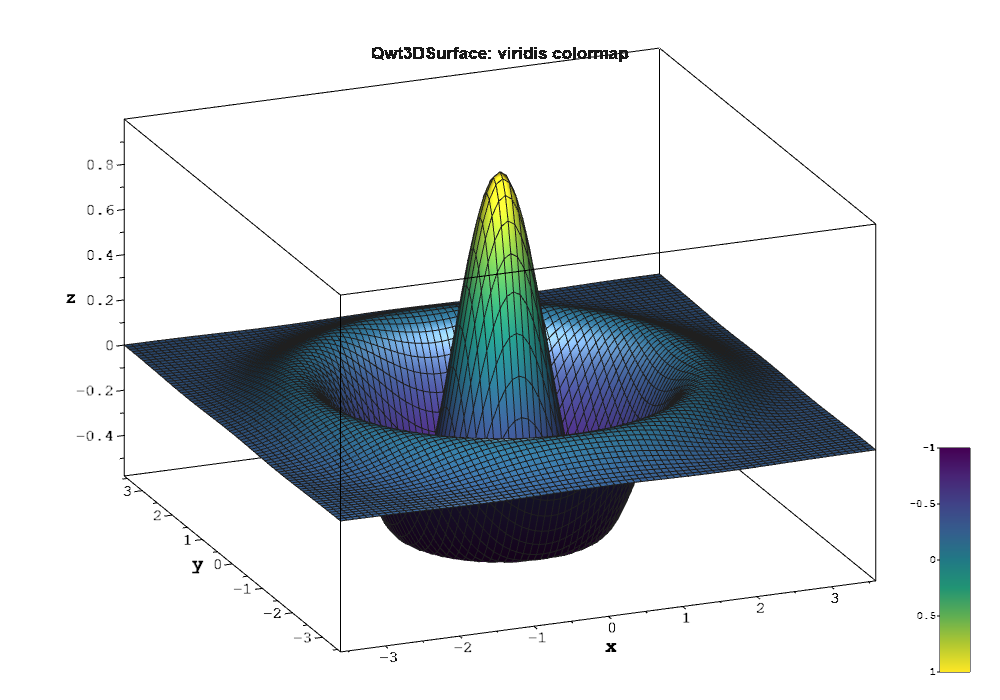
两个 item 就能这样叠,曲面、柱状、线、瀑布都是同一个扩展点上的类型,新增一种 item 不需要修改窗口类本身。
3.5 颜色复用 core 的 colormap
3D 模块的颜色系统直接适配 core 模块,没有另起一套。Qwt3DColorMapColor 把 core 的 QwtColorMap 桥接成 3D 的颜色 functor,于是 core 里那 22 种科学 colormap 预设(viridis、plasma、inferno、turbo、jet、coolwarm 等)2D 光谱图和 3D 曲面共用同一张表;瀑布图的 ByAmplitude 模式把它切到 z(幅度)轴取值,ByDepth 切到 y(深度)轴,functor 的默认轴向是 z,曲面、柱状、线图的取色不受影响。一个 item 向颜色图例贡献一条渐变,整条瀑布只有一个图例条目。主题 Qwt3DTheme 的 10 种预设把背景、坐标轴、标题、网格和光照打包成值类型,plot->applyTheme(Qwt3DTheme::Dark) 一次到位。
3.6 性能与开销模型
下面这组数是单帧耗时的实测。环境是 MSVC2019 加 Qt 6.7.3,Release 构建,1000 乘 700 视口,用 glFinish 包住 paintGL() 计时:
| 场景 | 单帧耗时 |
|---|---|
| 30 × 512 网格曲面 | 3.3 ms |
| 300 × 512 网格曲面 | 6.0 ms |
| 1000 × 512 网格,约 51 万顶点 | 7.6 ms |
| Tube 样式 300 × 1024 | 12.3 ms |
| 瀑布图 64 条 × 256 bin,RibbonMesh | 约 4 ms |
瀑布图的整场帧率另有数:示例自带 --fps 基准模式,在 64 条乘 256 bin、2D 频谱与 3D 瀑布同时刷新的情况下实测 51.8 fps(上面那张截图的状态栏是另一次运行,显示 61 fps)。
瀑布图的账很好算。每次 pushTrace() 会让所有槽位移动,整窗 VBO 都要重建。帘幕几何每个 bin 两个顶点(基线点和曲线点),每顶点 28 字节,所以一帧的上传量是 容量 × bin 数 × 2 × 28 字节,128 条乘 512 bin 约 3.7 MB,按 30 fps 算是 110 MB/s 量级,对显存带宽不成问题,这一档负载实测也远在 16 ms 帧预算之内。Tube 的修复过程能说明开销模型:最初的实现只按数据空间取半径,在压缩过的视图比例下相邻轨迹会互相穿插融合成一坨,而且每帧重建每个环站,128 条乘 256 bin 只有 17 fps;改成按各轴 hull 比例取半径(视图空间近似正圆,上限半个槽位间距)并把密集轨迹降到 129 个环站之后,同一工况实测 62 fps。
数据不动就不重建,动画场景只在数据变化的那一帧付上传成本,这是脏标记加常驻 VBO 的直接结果。样式选择上,只看形状用 Wireframe,需要粗的带光照笔画才用 Tube,后者是开销最高的。
3.7 迁移对照与踩过的坑
如果用着旧模块,升级时下面这张对照表能省不少搜索:
| 旧 | 新 |
|---|---|
Plot3D |
Qwt3DPlot(纯渲染窗口,不再持有数据) |
SurfacePlot |
Qwt3DSurface(item) |
Function / ParametricSurface |
Qwt3DFunction / Qwt3DParametricSurface,create() 改为返回数据,由调用方喂给 item |
plot->setPlotStyle() / setDataColor() / loadFromData() |
移到 Qwt3DSurface 上同名方法 |
plot->updateData() |
plot->update() 或 item->itemChanged() |
plot->setCoordinateStyle() |
直接操作 Qwt3DCoordinateSystem |
Qwt3D::Color / ColorMapColor / StandardColor |
Qwt3DColor / Qwt3DColorMapColor / Qwt3DStandardColor |
Qwt3D::CoordinateSystem / Axis / ColorLegend / Scale |
同名前缀 Qwt3D |
GraphPlot / MultiPlot / VolumePlot |
已删除,需要时按 Qwt3DPlotItem 子类重新实现 |
using namespace Qwt3D; |
删除,类型在全局作用域 |
迁移之外,有两个坑我自己踩过,也写进了回归测试。
第一个坑在 attach 顺序。v7.5.0 之前,Qwt3DPlot::attach() 不重算场景。如果数据在 attach() 之前装载、中间又没有调用任何 setter(因此没有 itemChanged()),窗口的 hull 会停在 (0,0,0) 到 (0,0,0),画面全白而且没有任何警告。现在 attach() 和 detach() 都会重算 hull 并集与坐标系,tests/waterfall_test 里的 attachAfterData 用例守住了这个行为。
第二个坑在派生 scale 的 clone()。轴把 scale 交给一个克隆指针,赋值时会调 clone()。自写的派生 scale 如果没有覆盖它,会在 setScale() 内部被切片成基类,自定义的 ticLabel() 静默失效,实测逐像素零差异,很难查。Qwt3DTextScale 已经覆盖,自写 scale 类要照做。
3.8 还没做完的部分
还没做完的部分也列一下:enrichment 的渲染(十字丝、圆锥、箭头)、地板投影、法线显示,数据接口都在(Qwt3DSurface::addEnrichment() 等),渲染仍待实现;gl2ps 矢量导出依赖 Compatibility Profile 状态,Core Profile 下变换可能不正确;item 的包围盒是规则长方体,不含旋转后的 AABB;3D 侧目前有 tests/waterfall_test 和 tests/plot3d_rotation_test 两个不依赖 GL 上下文的回归测试,覆盖滑动窗口语义、hull 并集、轴刻度存活和旋转增益,像素级的渲染回归测试还没有。这些都是可以提 issue 的地方。
四、写在最后
重构之后,3D 模块和 2D 有了同一套语言:Qwt3DPlot 对应 QwtPlot,Qwt3DPlotItem 对应 QwtPlotItem,attach() 与 itemChanged() 的语义、静默值对象的约定、QwtPoint3D 与 QwtSeriesData 的数据契约都一致。学会 2D 的用法,在 3D 里可以直接猜中。渲染侧全部走着色器和 VBO,为 ANGLE、OpenGL ES 这些后端留了路。瀑布图这个例子说明新架构能干什么:一个 item 内建滑动窗口、四种样式、三种上色、文字刻度,实时跑满帧率,同时和 2D 频谱同框。
这个库还在持续开发,3D 模块的 enrichment 渲染、地板投影、更多 item 类型都在待办里。如果在项目里遇到 QWT 画不出来的图、性能不够的场景,或者迁移旧代码时卡住,欢迎到仓库提 issue,把数据和场景描述清楚就行:
源码里 3D 模块的入口在 src/plot3d/,示例在 examples/3D/(waterfall3D、bar3D、line3D、qwtplot3d、figureSurface3D),文档在 https://czyt1988.github.io/QWT/zh/。如果这个库对你的工作有帮助,点个 star 是最好的鼓励。
hanged() 的语义、静默值对象的约定、QwtPoint3D与QwtSeriesData` 的数据契约都一致。学会 2D 的用法,在 3D 里可以直接猜中。渲染侧全部走着色器和 VBO,为 ANGLE、OpenGL ES 这些后端留了路。瀑布图这个例子说明新架构能干什么:一个 item 内建滑动窗口、四种样式、三种上色、文字刻度,实时跑满帧率,同时和 2D 频谱同框。
这个库还在持续开发,3D 模块的 enrichment 渲染、地板投影、更多 item 类型都在待办里。如果在项目里遇到 QWT 画不出来的图、性能不够的场景,或者迁移旧代码时卡住,欢迎到仓库提 issue,把数据和场景描述清楚就行:
源码里 3D 模块的入口在 src/plot3d/,示例在 examples/3D/(waterfall3D、bar3D、line3D、qwtplot3d、figureSurface3D),文档在 https://czyt1988.github.io/QWT/zh/。如果这个库对你的工作有帮助,点个 star 是最好的鼓励。