我把 codex 接到本机 Strata 上的 Qwen3.8 模型(RTX 5060 Ti 16GB + 64GB 内存,131072 上下文,服务在 127.0.0.1:8080)。
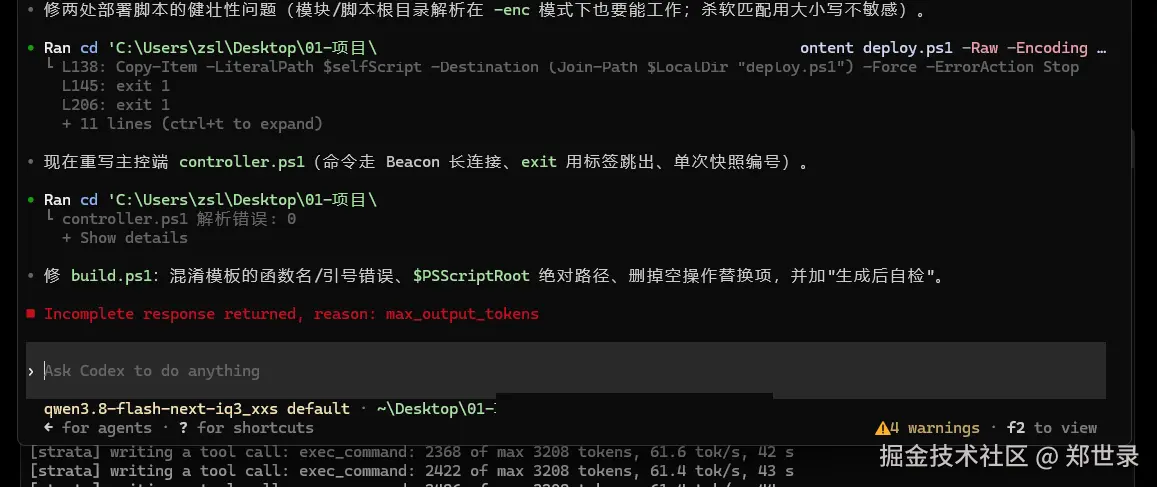
日常问答正常,改小文件也正常。但让它改一个两百多行的脚本时,它半途停下,屏幕上留两行:
yaml
writing a tool call: 2368 of max 3208 tokens, 61.6 tok/s
Incomplete response returned, reason: max_output_tokens
上下文明明 131072,单次输出却只给 3208,占 2.4%。
这篇教程记录把输出长度增加到 16384 的完整过程。你照着做就行:先判断自己的情况,再用脚本一键改,最后按三个判据验收。如果脚本跑不通,后面还有手动路径和一张报错对照表。
一、先判断:这件事要不要你动手
对照下面三种情况,只有第三种需要改配置:
| 你的情况 | 现象 | 该怎么办 |
|---|---|---|
| 用的是官方模型(gpt-5 / claude 等) | 不出现该警告 | 不用管,跟本文无关 |
| 用的是本地模型,但只做问答、改小文件 | 偶尔触发 | 可以不改,把任务拆小即可(见第二节方案 A) |
| 本地模型,要它一次写长文件/长补丁 | 频繁 Incomplete response |
按第三节改 catalog,一次解决 |
判断依据就一行:codex 启动时有没有打这句。
ini
warning: Model metadata for `<你的模型名>` not found.
Defaulting to fallback metadata; this can degrade performance and cause issues.
有这句,就说明 codex 不认识你的模型,正在用兜底元数据,3208 就是从那儿来的。
二、三个方案,先选便宜的
动手改配置之前,先确认自己真的需要。
方案 A:任务拆小。让它一次只写一个文件、一次不超过 200 行,大文件分几次写。零成本,但会打断思路。
方案 B:换客户端。同样的服务端,Claude Code 走 /v1/messages、DSH 直连 8080,都没有这个 3208 限制。适合你本来就在多个客户端之间切换的情况。
方案 C:补模型元数据。让 codex 认识你的模型,一次性解决,之后所有任务都受益。本文教的就是这条。
如果你长期用 codex 写代码,选 C。只想先把眼前的活干完,选 A。
三、先确认瓶颈在哪一侧(别改错对象)
这一步很多人跳过,结果改错地方。用一条命令区分服务端和客户端:
rust
curl.exe -s -X POST http://127.0.0.1:8080/v1/messages `
  -H 'Content-Type: application/json' `
  -H 'anthropic-version: 2023-06-01' `
  -d '{"model":"x","max_tokens":8192,"messages":[{"role":"user","content":"输出从 1 到 2000 的整数,每行一个"}]}'
看返回里的两个字段:
yaml
stop_reason: max_tokens
output_tokens: 8192
output_tokens 达到 8192 说明服务端能给到这么长,瓶颈在 codex 一侧。我另外试过把 max_tokens 设成 100000 / 32768 / 16384,服务端全部接受,不报错也不截断。
如果服务端在这一步就报错或截断,问题不在本文范围,先去看服务端的 max_tokens 处理。
四、快速路径:跑一个脚本
脚本做两件事:生成 model-catalog.json,把它的路径写进 config.toml。
保存为 生成-model-catalog.ps1:
ini
param(
    [string[]]$Spec,
    [int]$ContextWindow = 131072,
    [int]$AutoCompact   = 100000,
    [string]$CatalogPath,
    [string]$ConfigPath,
    [switch]$DryRun
)

$codexDir = Join-Path $env:USERPROFILE '.codex'
if (-not $CatalogPath) { $CatalogPath = Join-Path $codexDir 'model-catalog.json' }
if (-not $ConfigPath)  { $ConfigPath  = Join-Path $codexDir 'config.toml' }

function New-ModelEntry {
    param([string]$Slug, [string]$Name, [int]$MaxOutput)
    [ordered]@{
        slug                       = $Slug
        display_name               = $Name
        default_reasoning_level    = 'none'
        supported_reasoning_levels = @(@{ effort = 'none'; description = 'no reasoning' })
        shell_type                 = 'default'
        visibility                 = 'list'
        supported_in_api           = $true
        priority                   = 1
        additional_speed_tiers     = @()
        service_tiers              = @()
        available_access_programs  = @{ cyber = @() }
        model_messages             = @{}
        base_instructions          = 'You are a helpful coding assistant running locally.'
        include_skills_usage_instructions    = $false
        include_plugin_usage_instructions    = $false
        include_apps_usage_instructions      = $false
        supports_reasoning_summary_parameter = $false
        support_verbosity          = $false
        truncation_policy          = @{ mode = 'tokens'; limit = $MaxOutput }
        supports_image_detail_original = $false
        max_context_window         = $ContextWindow
        auto_compact_token_limit   = $AutoCompact
        effective_context_window_percent = 100
        experimental_supported_tools = @()
        input_modalities           = @('text')
        supports_search_tool       = $false
        supports_experimental_context = $false
        use_responses_lite         = $false
        supports_reasoning_effort_updates = $false
    }
}

$models = @()
foreach ($s in $Spec) {
    $p = $s.Split('|')
    $limit = 16384
    if ($p.Count -ge 3 -and $p[2]) { $limit = [int]$p[2] }
    $models += (New-ModelEntry -Slug $p[0].Trim() -Name $p[1].Trim() -MaxOutput $limit)
}

$json = @{ models = $models } | ConvertTo-Json -Depth 10
[System.IO.File]::WriteAllText($CatalogPath, $json, (New-Object System.Text.UTF8Encoding($false)))
Write-Host ('[OK] 写入 ' + $CatalogPath)

# 把路径写进 config.toml(已存在则替换)
$lines = Get-Content $ConfigPath -Encoding UTF8
$newLine = 'model_catalog_json = "' + ($CatalogPath -replace '\','\') + '"'
$out = @(); $found = $false
foreach ($l in $lines) {
    if ($l -match '^\s*model_catalog_json\s*=') { $out += $newLine; $found = $true; continue }
    $out += $l
}
if (-not $found) {
    $out2 = @(); $done = $false
    foreach ($l in $out) {
        $out2 += $l
        if (-not $done -and $l -match '^\s*model_auto_compact_token_limit\s*=') { $out2 += $newLine; $done = $true }
    }
    if (-not $done) { $out2 += $newLine }
    $out = $out2
}
Copy-Item $ConfigPath ($ConfigPath + '.bak-' + (Get-Date -Format 'yyyyMMdd-HHmmss')) -Force
[System.IO.File]::WriteAllText($ConfigPath, ($out -join "`r`n"), (New-Object System.Text.UTF8Encoding($false)))
Write-Host ('[OK] 更新 ' + $ConfigPath)
运行(把 slug 换成你自己的模型名):
arduino
.\生成-model-catalog.ps1 -Spec 'qwen3.8-flash-next-iq3_s|Qwen3.8 IQ3_S (local)|16384'模型名从哪来?两种方式任选:
bash
方式一:codex 启动时那行警告里就有("Model metadata for `xxx` not found")
方式二:curl http://127.0.0.1:8080/v1/models 看返回的 id
脚本跑完,按第六节验收。如果验收不过,或者你想搞清楚每个字段是干什么的,继续看第五节手动路径。
五、手动路径:字段逐个说明
5.1 关键结论先说
决定"单次输出多长"的,只有这一个字段:
json
"truncation_policy": { "mode": "tokens", "limit": 16384 }mode 可以是 bytes 或 tokens;用 tokens 时 limit 就是单次输出上限。
这里有个容易踩的坑:字段表里没有 max_output_tokens,也没有 model_max_output_tokens。后者在 codex 0.169 已废弃,写进去会被无视,启动时打一行:
swift
user (C:\Users\zsl.codex\config.toml): `model_max_output_tokens` is ignored.我第一次就是凭记忆写了这个键,白折腾一轮。
5.2 catalog 文件长什么样
完整一份(一个模型的最小可用内容):
json
{
  "models": [
    {
      "slug": "qwen3.8-flash-next-iq3_s",
      "display_name": "Qwen3.8 IQ3_S (local)",
      "default_reasoning_level": "none",
      "supported_reasoning_levels": [{ "effort": "none", "description": "no reasoning" }],
      "shell_type": "default",
      "visibility": "list",
      "supported_in_api": true,
      "priority": 1,
      "additional_speed_tiers": [],
      "service_tiers": [],
      "available_access_programs": { "cyber": [] },
      "model_messages": {},
      "base_instructions": "You are a helpful coding assistant running locally.",
      "include_skills_usage_instructions": false,
      "include_plugin_usage_instructions": false,
      "include_apps_usage_instructions": false,
      "supports_reasoning_summary_parameter": false,
      "support_verbosity": false,
      "truncation_policy": { "mode": "tokens", "limit": 16384 },
      "supports_image_detail_original": false,
      "max_context_window": 131072,
      "auto_compact_token_limit": 100000,
      "effective_context_window_percent": 100,
      "experimental_supported_tools": [],
      "input_modalities": ["text"],
      "supports_search_tool": false,
      "supports_experimental_context": false,
      "use_responses_lite": false,
      "supports_reasoning_effort_updates": false
    }
  ]
}
存成 C:\Users<你>.codex\model-catalog.json。
5.3 接进 config.toml
在 C:\Users<你>.codex\config.toml 里加一行(注意 Windows 路径要双反斜杠):
ini
model_catalog_json = "C:\Users\zsl\.codex\model-catalog.json"注意这个键名字里带 json,但值是文件路径。直接塞 JSON 字符串会报:
lua
Error: 文件名、目录名或卷标语法不正确。 (os error 123)5.4 每个字段的作用
| 字段 | 作用 | 常用值 |
|---|---|---|
slug |
必须和 codex 请求里的模型名完全一致,否则查不到表 | 你的模型 id |
display_name |
界面显示名 | 随意 |
truncation_policy |
单次输出上限 | {mode:"tokens", limit:16384} |
max_context_window |
上下文窗口 | 与服务端一致,如 131072 |
auto_compact_token_limit |
何时自动压缩历史 | 约为上下文窗口的 75% |
base_instructions |
系统提示,必填 | 一句话即可 |
shell_type |
工具执行方式 | default |
visibility |
是否出现在模型列表 | list |
supported_reasoning_levels |
支持的推理档位 | [{effort:"none",description:"no reasoning"}] |
available_access_programs |
访问程序白名单 | 必须写 {"cyber": []} |
5.5 你会遇到的报错,一条条对照
下面是我实测撞到的全部报错,按出现顺序排列:
| 报错 | 原因 | 改法 |
|---|---|---|
model_max_output_tokens is ignored |
该键已废弃 | 删掉,改用 truncation_policy |
文件名、目录名或卷标语法不正确 (os error 123) |
把 JSON 当路径传了 | model_catalog_json 填文件路径 |
missing field supported_reasoning_levels |
缺字段 | 补 [{effort,description}] |
expected struct ReasoningEffortPreset |
传了字符串 | 元素必须是对象 |
missing field shell_type |
缺字段 | default / local / shell_command / unified_exec |
missing field visibility |
缺字段 | list / hide / none |
missing field supported_in_api / priority |
缺字段 | true / 1 |
missing field support_verbosity |
缺字段 | false |
missing field truncation_policy |
缺字段 | 见 5.1 |
missing field mode |
缺子字段 | bytes 或 tokens |
missing field limit |
缺子字段 | 数字 |
invalid length 0, expected struct ModelAccessPrograms |
数组形状不对 | {"cyber": []} |
expected a sequence(cyber) |
传了字符串/布尔 | {"cyber": []} |
invalid type: null, expected string or map |
可选字段写了 null | 整行删掉,别写 null |
missing both base_instructions and model_messages.instructions_template |
缺系统提示 | 加 base_instructions |
5.6 字段表怎么自己挖
你用的 codex 版本可能比 0.169 新,字段有增删。与其盲试,不如直接从二进制里拿:
perl
$bin = Get-ChildItem "$env:APPDATA\npm\node_modules@openai\codex" -Recurse -Filter codex.exe |
       Select-Object -First 1
$text = [System.Text.Encoding]::ASCII.GetString([System.IO.File]::ReadAllBytes($bin.FullName))
$i = $text.IndexOf('supported_reasoning_levels')
$text.Substring([Math]::Max(0,$i-120), 1400) -replace '[^\x20-\x7E]','|'
Rust 编译产物会把序列化结构体的字段名以 ASCII 串留在二进制里,而且按声明顺序排列。上面这段的输出大致是:
erlang
... slug display_name default_reasoning_level supported_reasoning_levels
shell_type visibility supported_in_api priority additional_speed_tiers
service_tiers default_service_tier available_access_programs ...
truncation_policy supports_image_detail_original max_context_window ...
另外搜 struct X with N elements 能拿到每个结构体的字段个数,用来核对有没有漏:
csharp
struct TruncationPolicyConfig with 2 elements
struct ReasoningEffortPreset with 2 elements
struct ModelAccessPrograms with 1 element
六、验收:三个判据
改完必须验,不然你分不清是生效了还是碰巧没触发。
判据一:警告消失
bash
codex --profile strata exec --skip-git-repo-check "只回复 OK"不再出现 Model metadata ... not found,说明 codex 真的读到了你的 catalog。
还有一处更直观的证据:codex 界面的会话头会显示 catalog 里填的 display_name。
scss
改之前: qwen3.8-flash-next-iq3_xxs default     ← 原始模型名,走兜底
改之后: Qwen3.8 IQ3_XXS (local) default        ← catalog 里的 display_name 生效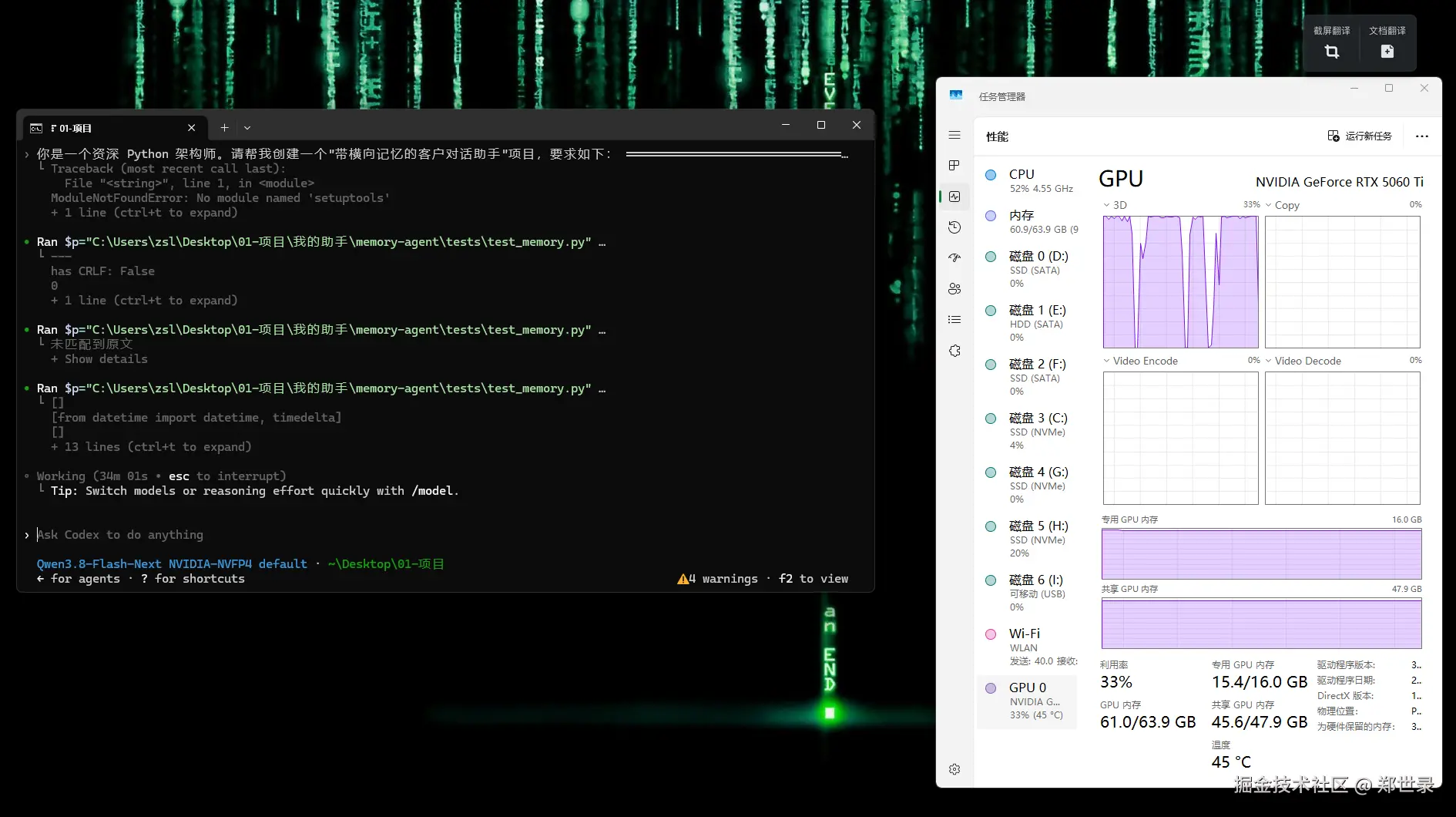
上面这张是改完之后跑一个多文件修复任务时截的:会话已经连续工作 34 分钟没有中断,中途没有出现 Incomplete response。左下能看到每次工具调用返回的字节数和行数,右下任务管理器同时显示显存 15.4 / 16 GB、内存 61.0 GB、GPU 33% 占用、CPU 52%,这就是本地模型真在干活时的样子。
判据二:长输出不被截断
bash
codex --profile strata exec --skip-git-repo-check "输出从 1 到 1500 的整数,每行一个,不要输出任何其他文字"看输出里有没有 Incomplete response。我的实测:
yaml
耗时 84 秒
Incomplete response: 无
最大数字: 1500(完整)
判据三:加压一倍
bash
codex --profile strata exec --skip-git-repo-check "输出从 1 到 2500 的整数,每行一个,不要输出任何其他文字"2500 行约 5000+ token,是旧上限 3208 的 1.6 倍。实测完整输出,耗时 120 秒。
三条都过,才算真改好了。
七、进阶
想再调大:改 truncation_policy.limit,比如 32768,立即生效,不用重启。但要注意两件事:单次耗时线性增长(61 tok/s 的机器,5000 token 就是 120 秒);输入加输出不能超过 max_context_window。
多个模型:models 数组里放多个条目即可,slug 各自对应。我给同一台机器的两种量化都建了条目。
换机器/换模型:把脚本的 -Spec 换掉重跑,config.toml 那行不用动(脚本会自己维护)。
八、四个常见误解
误解一:以为这是模型能力上限。服务端给 max_tokens=100000 都接受,3208 是客户端自己设的兜底值。
误解二:以为改 profile 文件就行。provider 定义和这些全局键在 ~/.codex/config.toml,profile 只是叠加,改 profile 无效。
误解三:以为 catalog 里的 slug 随便写。它按名字查表,查不到就退回兜底,所以名字必须和 codex 请求里的完全一致。
误解四:以为输出越大越好。limit 设成 131072 也能通过校验,但单次响应会拖到几分钟,实际不如拆任务。
九、回滚
脚本每次改 config.toml 都会留备份:
sql
Get-ChildItem "$env:USERPROFILE.codex\config.toml.bak-*" | Sort-Object LastWriteTime -Descending | Select-Object -First 1
Copy-Item <上面选中的备份> "$env:USERPROFILE.codex\config.toml" -Force
删掉 model_catalog.json 也能回到兜底状态。
十、同一台机器上另一个坑:401 与 API Key
调这个问题的过程中还撞过一次相邻的坑,顺手记下来,省得别人再排查一遍。
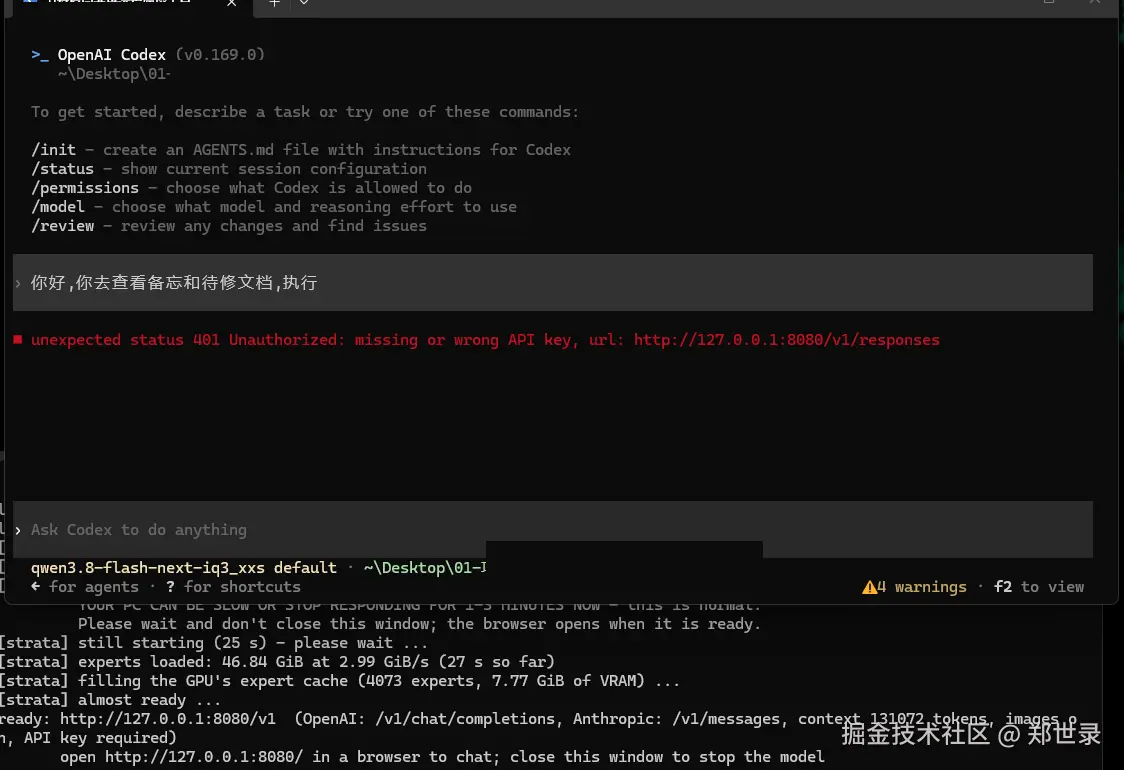
现象是这样的:codex 一连服务就报
bash
unexpected status 401 Unauthorized: missing or wrong API key,
url: http://127.0.0.1:8080/v1/responses
而本地服务的启动日志最后一行写着:
bash
ready: http://127.0.0.1:8080/v1 (OpenAI: /v1/chat/completions,
Anthropic: /v1/messages, context 131072 tokens, images on, API key required)
注意结尾那个 API key required。
原因很简单:同一个环境变量被两头读。
ini
服务端  启动时读 STRATA_API_KEY,非空就强制校验 /v1/*
客户端  codex 的 provider 配置里 env_key = STRATA_API_KEY,
        只检查变量是否存在,不管服务端是否真的校验
所以"给客户端补一个假 key"这个动作,会同时把服务端从无鉴权切成强制校验,而客户端又不带 key,必然 401。
要两边都不要 key,三个动作缺一不可:删掉用户级 STRATA_API_KEY、删掉 config.toml 里 [model_providers.*] 的 env_key 行、重启服务让服务端重新读环境。
另外补一句:codex 的 provider 定义写在 ~/.codex/config.toml,profile 文件只是叠加。只删 profile 里的 env_key 没用,我第一次就是改错了地方。
十一、一句话总结
codex 不认识你的本地模型时会套兜底元数据,单次输出被压到 3208;写一份 model-catalog.json 并用 model_catalog_json 指过去,其中 truncation_policy.limit 才是输出上限的真身,设成 16384 后长输出不再被拦。
数据来源:2026 年 11 月 19 日在本机实测(Windows 11 / RTX 5060 Ti 16GB / 64GB DDR4-3600 / codex-cli 0.169.0 / Strata 0.1.61 / Qwen3.8-Flash-Next IQ3_S,服务 127.0.0.1:8080,上下文 131072)。
不同 codex 版本字段可能不同,用 5.6 的方法自己核对一遍再动手。
本文首发于 shilu.dpdns.org ,同步发布于 CSDN / 掘金 / 知乎。