Mybatis
- 0、环境准备
-
- [0.1 准备数据库表emp;](#0.1 准备数据库表emp;)
- [0.2 准备SpringBoot工程](#0.2 准备SpringBoot工程)
- [0.3 配置文件中引入数据库连接信息](#0.3 配置文件中引入数据库连接信息)
- [0.4 创建对应的实体类](#0.4 创建对应的实体类)
- [0.5 准备Mapper接口](#0.5 准备Mapper接口)
- 1、MyBatis基础操作
-
- [1.1 删除](#1.1 删除)
- [1.2 新增(主键返回)](#1.2 新增(主键返回))
- [1.3 更新](#1.3 更新)
- [1.4 查询(解决字段名与类属性名不一致返回null问题)](#1.4 查询(解决字段名与类属性名不一致返回null问题))
- 2、动态SQL
-
- [2.1 XML映射文件](#2.1 XML映射文件)
- [2.2 动态SQL标签](#2.2 动态SQL标签)
- 3、总结
0、环境准备
开始前需要做五个准备工作:
1.准备数据库表emp;
2.创建一个新的是SpringBoot工程,引入对应的起步依赖(Mybatis、MySQL、Lombok);
3.application.properties引入数据库连接信息(可改用yaml文件);
4.创建数据库表对应的实体类
5.准备Mapper接口
0.1 准备数据库表emp;
运行下面的SQL语句准备数据库数据:
sql
-- 该案例来自黑马程序员
-- 部门管理
create table dept(
    id int unsigned primary key auto_increment comment '主键ID',
    name varchar(10) not null unique comment '部门名称',
    create_time datetime not null comment '创建时间',
    update_time datetime not null comment '修改时间'
) comment '部门表';

insert into dept (id, name, create_time, update_time) values
    (1,'学工部',now(),now()),
    (2,'教研部',now(),now()),
    (3,'咨询部',now(),now()),
    (4,'就业部',now(),now()),
    (5,'人事部',now(),now());

-- 员工管理
create table emp (
    id int unsigned primary key auto_increment comment 'ID',
    username varchar(20) not null unique comment '用户名',
    password varchar(32) default '123456' comment '密码',
    name varchar(10) not null comment '姓名',
    gender tinyint unsigned not null comment '性别, 说明: 1 男, 2 女',
    image varchar(300) comment '图像',
    job tinyint unsigned comment '职位, 说明: 1 班主任,2 讲师, 3 学工主管, 4 教研主管, 5 咨询师',
    entrydate date comment '入职时间',
    dept_id int unsigned comment '部门ID',
    create_time datetime not null comment '创建时间',
    update_time datetime not null comment '修改时间'
) comment '员工表';

INSERT INTO emp
(id, username, password, name, gender, image, job, entrydate,dept_id, create_time, update_time) VALUES
    (1,'jinyong','123456','金庸',1,'1.jpg',4,'2000-01-01',2,now(),now()),
    (2,'zhangwuji','123456','张无忌',1,'2.jpg',2,'2015-01-01',2,now(),now()),
    (3,'yangxiao','123456','杨逍',1,'3.jpg',2,'2008-05-01',2,now(),now()),
    (4,'weiyixiao','123456','韦一笑',1,'4.jpg',2,'2007-01-01',2,now(),now()),
    (5,'changyuchun','123456','常遇春',1,'5.jpg',2,'2012-12-05',2,now(),now()),
    (6,'xiaozhao','123456','小昭',2,'6.jpg',3,'2013-09-05',1,now(),now()),
    (7,'jixiaofu','123456','纪晓芙',2,'7.jpg',1,'2005-08-01',1,now(),now()),
    (8,'zhouzhiruo','123456','周芷若',2,'8.jpg',1,'2014-11-09',1,now(),now()),
    (9,'dingminjun','123456','丁敏君',2,'9.jpg',1,'2011-03-11',1,now(),now()),
    (10,'zhaomin','123456','赵敏',2,'10.jpg',1,'2013-09-05',1,now(),now()),
    (11,'luzhangke','123456','鹿杖客',1,'11.jpg',5,'2007-02-01',3,now(),now()),
    (12,'hebiweng','123456','鹤笔翁',1,'12.jpg',5,'2008-08-18',3,now(),now()),
    (13,'fangdongbai','123456','方东白',1,'13.jpg',5,'2012-11-01',3,now(),now()),
    (14,'zhangsanfeng','123456','张三丰',1,'14.jpg',2,'2002-08-01',2,now(),now()),
    (15,'yulianzhou','123456','俞莲舟',1,'15.jpg',2,'2011-05-01',2,now(),now()),
    (16,'songyuanqiao','123456','宋远桥',1,'16.jpg',2,'2010-01-01',2,now(),now()),
    (17,'chenyouliang','123456','陈友谅',1,'17.jpg',NULL,'2015-03-21',NULL,now(),now());
0.2 准备SpringBoot工程
创建一个新的空工程。

创建一个SpringBoot项目模块。推荐将Server URL栏的https://start.spring.io替换成https://start.aliyun.com/

指定Mybatis、MySQL、Lombok所需依赖,并创建项目。

项目创建完成。

0.3 配置文件中引入数据库连接信息
在application.properties配置文件中配置MySQL数据库连接信息。
java
# 驱动类名称
spring.datasource.driver-class-name=com.mysql.cj.jdbc.Driver
# 数据库连接的url
spring.datasource.url=jdbc:mysql://localhost:3306/mybatis
# 连接数据库的用户名
spring.datasource.username=root
# 连接数据库的密码
spring.datasource.password=1234
这些信息可以从IDEA的可视化界面中查到。
下图中Database这一栏可以选择连接哪个数据库。

为了更方便后续调试,也可以配置MyBatis的日志输出配置。
java
# MyBatis日志配置
mybatis.configuration.log-impl=org.apache.ibatis.logging.stdout.StdOutImpl
0.4 创建对应的实体类
创建实体类时需要注意成员变量与表的字段一一对应。
使用Lombok提供的注解生成构造方法以及get/set等方法。
java
@Data
@NoArgsConstructor
@AllArgsConstructor
public class Emp {
    private Integer id;
    private String username;
    private String password;
    private String name;
    private Short gender;
    private String image;
    private Short job;
    private LocalDate entrydate;
    private Integer deptId;
    private LocalDateTime createTime;
    private LocalDateTime updateTime;
}
0.5 准备Mapper接口
Mapper接口需要加上@Mapper注解。程序在运行时,会自动创建代理对象,并交给IOC容器管理。
java
@Mapper
public interface EmpMapper {

}
1、MyBatis基础操作
在Java服务端操作MySQL数据库需要用到MyBatis技术。相关代码通常放在DAO层,在使用MyBatis时习惯叫做Mapper层。对每一个MySQL的数据库表都要有一个相关的Mapper接口,里面定义操作该表对应的接口方法。在方法上通过注解的形式编写相应的SQL语句。
常用的注解有:
- @Select: 查
- @Delete: 删
- @Update: 改
- @Insert: 增
在使用这些注解编写SQL语句时,需要使用接口方法传来的参数,这时需要用到占位符。
占位符有:
#{ } :执行SQL时,会将 #{ } 替换为 ?,生成预编译SQL,会自动设置参数值,能够避免SQL注入风险;推荐使用。
$ { } :拼接SQL。直接将参数拼接在SQL语句中,存在SQL注入问题。
如果有多个参数,需要保证占位符中的变量名与接口方法形参名相同。推荐保持一致。
1.1 删除
根据ID删除数据。
定义一个接口deleteById(Integer id),接口中需要传入员工ID,使用Integer类型进行接收。
在接口方法上使用@Delete注解编写SQL语句,员工ID数据使用占位符替代。
java
/**
 * 根据ID删除数据
 * @param id
 */
@Delete("delete from emp where id = #{id}")
void deleteById(Integer id);
在测试类中编写测试方法,调用deleteById()方法。
java
@SpringBootTest
class SpringbootMybatisApplicationTests {
    @Autowired
    private EmpMapper empMapper;

    @Test
    public void testDelete(){
    	// 删除ID为17的员工数据
        empMapper.deleteById(17);
    }
}
运行之后刷新emp表发现ID为17的员工被删除了。
MySQL中的delete、insert、update语句都有返回值,只要把接口的返回参数从void改成int即可,返回参数是SQL语句操作的数据条数。
1.2 新增(主键返回)
新增员工数据。
定义一个新增数据接口insert(Emp emp),接口中传入一个实体类对象,对象中包含要插入的字段数据。
在接口方法上使用@Insert注解编写SQL语句。接口传入的是一个实体类对象,因此在SQL语句占位符中需要填入对象的属性名,也就是类的成员变量名。
java
/**
 * 新增员工数据
 * @param emp
 */
@Insert("insert into emp (username, name, gender, image, job, entrydate, dept_id, create_time, update_time) " +
		"values (#{username}, #{name}, #{gender}, #{image}, #{job}, #{entrydate}, #{deptId}, #{createTime}, #{updateTime})")
void insert(Emp emp);
在测试类中编写测试方法,调用insert()方法。
java
@Test
public void testInsert() {
	// 准备一个emp对象
    Emp emp = new Emp();
    emp.setUsername("xiaowang");
    emp.setName("小王");
    emp.setGender((short)1);
    emp.setImage("1.jpg");
    emp.setJob((short)1);
    emp.setEntrydate(LocalDate.of(2020, 12,2));
    emp.setDeptId(1);
    emp.setCreateTime(LocalDateTime.now());
    emp.setUpdateTime(LocalDateTime.now());
    // 使用empMapper调用insert()方法
    empMapper.insert(emp);
    // 查看主键ID
    System.out.println(emp.getId()); // 控制台输出:null
}
运行之后刷新emp表,发现插入了一条数据。
主键返回:
在某些业务场景下,需要获取刚插入的数据的主键ID。如果仅仅使用上面编写的代码是获取不到的。这时只需要在接口方法上再加上一个@Options注解,设置useGeneratedKeys = true,表明需要返回主键,设置keyProperty = "id",表明将主键值绑定在成员变量 "id" 上。
java
/**
 * 新增员工数据
 * @param emp
 */
@Options(keyProperty = "id", useGeneratedKeys = true)  // 获取返回的主键
@Insert("insert into emp (username, name, gender, image, job, entrydate, dept_id, create_time, update_time) " +
"values (#{username}, #{name}, #{gender}, #{image}, #{job}, #{entrydate}, #{deptId}, #{createTime}, #{updateTime})")
void insert(Emp emp);
1.3 更新
更新员工信息。
定义一个根据ID更新的接口方法updateById(Emp emp),在方法中传入一个Emp对象,对象中包含修改后的数据。
在接口方法上使用@Update注解编写SQL语句。接口传入的是一个实体类对象,因此在SQL语句占位符中需要填入对象的属性名,也就是类的成员变量名。
java
/**
 * 更新员工信息
 * @param emp
 */
@Update("update emp set username = #{username}, name = #{name}, gender = #{gender}, image = #{image}, job = #{job}, " +
        "entrydate = #{entrydate}, dept_id = #{deptId}, update_time = #{updateTime} where id = #{id}")
void updateById(Emp emp);
在测试类中编写测试方法,调用updateById()方法。
java
@Test
public void testUpdate() {
    // 准备一个emp对象
    Emp emp = new Emp();
    emp.setId(21);
    emp.setUsername("xiaowang");
    emp.setName("小王");
    emp.setGender((short)1);
    emp.setImage("21.jpg");
    emp.setJob((short)1);
    emp.setEntrydate(LocalDate.of(2022, 12,2));
    emp.setDeptId(2);
    emp.setUpdateTime(LocalDateTime.now());
    // 使用empMapper调用updateById()方法
    empMapper.updateById(emp);
}
运行之后刷新emp表,发现ID为21的员工数据被修改了。
1.4 查询(解决字段名与类属性名不一致返回null问题)
查询操作是使用最多的操作,有根据单个字段的简单查询和复杂条件的复杂查询。
首先尝试实现根据ID字段的简单查询。
定义一个getById(Integet id)方法,接口中传入要查询的员工ID,返回一个Emp员工对象。
在接口方法上使用@Select注解编写SQL语句,形参变量名与占位符中变量名相同。
MyBatis会将查询到的数据自动封装到Emp对象的属性中。
java
/**
 * 根据ID查询员工信息
 * @param id
 * @return
 */
@Select("select id, username, password, name, gender, image, job, entrydate, dept_id, create_time, update_time from emp where id = #{id}")
Emp getById(Integer id);
在测试类中编写测试方法,调用getById()方法。
java
@Test
public void testGetById() {
	// 查询ID为1的员工信息
    Emp emp = empMapper.getById(1);
    System.out.println(emp);
}
// 输出结果:
// Emp(id=1, username=jinyong, password=123456, name=金庸, gender=1, image=1.jpg, job=4, entrydate=2000-01-01, deptId=null, createTime=null, updateTime=null)
需要注意:表的字段名与类的成员变量名不同,查询到的结果为null。
可以发现输出结果中,deptId,createTime,updateTime这三个属性的值为null。这是因为表中的字段名与类的成员变量名不同造成的。MySQL中表的字段名习惯使用下划线 _ 分隔,Java中成员变量习惯使用驼峰命名法。解决方法有三种。
- 第一种 :
在配置文件中开启MyBatis的驼峰命名自动映射开关。(推荐使用)
java
# 开启MyBatis的驼峰命名自动映射开关
mybatis.configuration.map-underscore-to-camel-case=true- 第二种 :
给查询字段起别名,别名与类的成员变量名一致。
java
/**
 * 根据ID查询员工信息
 * @param id
 * @return
 */
@Select("select id, username, password, name, gender, image, job, entrydate, " +
        "dept_id deptId, create_time createTime, update_time updateTime from emp where id = #{id}")
Emp getById(Integer id);- 第三种 :
使用@Results注解和@Result注解。
java
/**
 * 根据ID查询员工信息
 * @param id
 * @return
 */
@Results({
        @Result(column = "dept_id", property = "deptId"),
        @Result(column = "create_time", property = "createTime"),
        @Result(column = "update_time", property = "updateTime")
})
@Select("select id, username, password, name, gender, image, job, entrydate, dept_id, create_time, update_time from emp where id = #{id}")
Emp getById(Integer id);
现在尝试复杂条件查询。
查询满足指定的姓氏、性别、入职时间范围内的员工。
定义一个list接口,编写SQL语句。在某些Spring版本中,当接口参数有多个时,接口参数前需要加@Param注解绑定参数,不然会报错。
从下面的SQL语句中可以看到,name字段使用了like模糊查询,匹配的字符串使用了concat()函数,这是MySQL提供的字符串拼接函数。
java
@Select("select * from emp where name like concat('%',#{name},'%') and gender = #{gender} and " +
        "entrydate between #{begin} and #{end} order by update_time desc")
List<Emp> list(@Param("name")String name, @Param("gender")Short gender,
               @Param("begin")LocalDate begin, @Param("end")LocalDate end);
在测试类中编写测试方法,调用list()方法进行测试。
java
@Test
public void testList() {
    List<Emp> emps = empMapper.list("张", (short) 1, LocalDate.of(2010, 1, 1), LocalDate.of(2020, 1, 1));
    System.out.println(emps);
}
2、动态SQL
2.1 XML映射文件
XML映射文件规范:
- XML映射文件的名称与Mapper接口名称一致,并且将XML映射文件和Mapper接口放置在相同包下(同包同名);
- XML映射文件的namespace属性为Mapper接口全限定名一致;
- XML映射文件中sql语句的id与Mapper接口中的方法名一致,并保持返回类型一致。
创建和使用XML映射文件的步骤:
- 在resources文件夹下创建与Mapper接口所在包相同的包。注意创建多级包时,文件夹路径使用下划线分隔。
- 创建与Mapper接口同名的.xml文件。
- 在XML映射文件中引入MyBatis约束。不需要记忆,用到的时候到MyBatis官方文档中查找。约束如下:
java
<?xml version="1.0" encoding="UTF-8" ?>
<!DOCTYPE mapper
        PUBLIC "-//mybatis.org//DTD Mapper 3.0//EN"
"http://mybatis.org/dtd/mybatis-3-mapper.dtd">- 在Mapper接口文件中定义一个接口。例如将1.4节中的list()接口方法通过XML映射形式实现:
java
List<Emp> list(String name, Short gender, LocalDate begin, LocalDate end);- 在XML映射文件中实现该接口的SQL语句。
注意XML映射文件的namespace属性为Mapper接口全限定名一致;全限定名可以通过选中Mapper接口名点击右键,在点击Copy Reference获取。
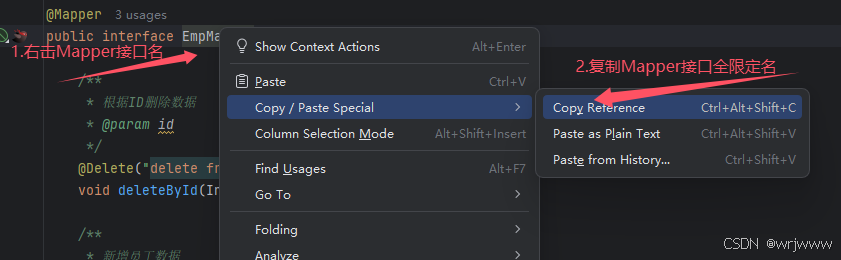
同时,XML映射文件中sql语句的id与Mapper接口中的方法名一致,并保持返回类型一致。
下面这段代码中有一点需要注意。动态SQL中比较大小需要使用<!CDATA\[ \>= ]>替换。
java
<mapper namespace="com.wrj.mapper.EmpMapper">
    <select id="list" resultType="com.wrj.pojo.Emp">
        select * from emp
        <where>
            <if test="name != null and name != ''">name like concat('%', #{name}, '%') and</if>
            <if test="gender != null">gender = #{gender} and</if>
            <if test="begin != null">entrydate <![CDATA[ >= ]]>  #{begin} and</if>
            <if test="end != null">entrydate <![CDATA[ <= ]]>  #{end}</if>
        </where>
        order by update_time desc
    </select>
</mapper>
2.2 动态SQL标签
if标签 :用于判断条件是否成立。使用 test 属性进行条件判断,如果条件为 true ,则拼接 SQL。
范例:
java
<if test="name != null and name != ''">name like concat('%', #{name}, '%') and</if>where标签 :如果where标签对中的条件都不成立,则不生成 where 关键字。如果 where 标签对中有多于的 and 或 or ,则删去多于的 and 和 or 。
范例:
java
<where>
    <if test="name != null and name != ''">name like concat('%', #{name}, '%') and</if>
    <if test="gender != null">gender = #{gender} and</if>
    <if test="begin != null">entrydate <![CDATA[ >= ]]>  #{begin} and</if>
    <if test="end != null">entrydate <![CDATA[ <= ]]>  #{end}</if>
</where>
set标签 :在更新数据(update语句中)时,set 标签对可以动态删除包裹的 if 标签对中多于的逗号。
范例:
java
<set>
	<if test="username != null">username = #{username},</if>
	<if test="name != null">name = #{name},</if>
	<if test="gender != null">gender = #{gender},</if>
	<if test="updateTime != null">update_time = #{updateTime}</if>
</set>
foreach标签 :遍历。批量操作时使用。
foreach常用属性:collection:遍历的集合;item:遍历出来的元素;separator:分隔符;open:遍历开始前拼接的SQL片段;close:遍历结束后拼接的SQL片段。
范例:根据id遍历删除批量数据
java
<delete id="deleteByIds">
	delete from emp where id in
	<foreach collection="ids" item="id" separator="," open="(" close=")">
		#{id}
	</foreach>
</delete>
sql标签与include标签 :sql标签抽取代码,include标签调用抽取的代码。sql与include成对使用。
范例:
java
# <sql></sql>标签对抽取代码,方便复用
<sql id="commonSelect">
	select id, username,name,gender from emp
</sql>

<select id="list" resultType="com.wurongjiang.pojo.Emp">
	# <include></include>标签引用<sql></sql>标签抽取的代码。
	<include refid="commonSelect"/>
	<where>
		<if test="name != null"> name like concat('%',#{name},'%') </if>
		<if test="gender != null"> and gender = #{gender} </if>
	</where>
</select>
3、总结
- 在新建SpringBoot项目时,将Server URL栏的https://start.spring.io替换成https://start.aliyun.com/
- 在配置文件配置MyBatis时,可以添加日志配置和自动驼峰命名转换配置。
sql
# MyBatis日志配置
mybatis.configuration.log-impl=org.apache.ibatis.logging.stdout.StdOutImpl
# 开启自动驼峰命名转换
mybatis.configuration.map-underscore-to-camel-case=true- MyBatis常用的编写SQL语句的四个注解@Select、@Delete、@Update、@Insert。
- SQL语句中的占位符,#{...} :执行SQL时,会将 #{ } 替换为 ?,生成预编译SQL,会自动设置参数值,能够避免SQL注入风险;${...}:拼接SQL。直接将参数拼接在SQL语句中,存在SQL注入问题。。
- @Delete、@Update、@Insert定义的接口都具有返回值。需要返回值时将返回类型修改成int,返回值为该条SQL语句操作的数据条数。
- 主键返回需要在接口方法上再加上一个@Options注解,设置useGeneratedKeys属性和keyProperty属性。动态SQL需要在insert标签对中设置useGeneratedKeys属性和keyProperty属性。
- MySQL提供的concat()函数能够拼接字符串。在模糊匹配时,推荐使用。
java
@Select("select * from emp where name like concat('%',#{name},'%') and gender = #{gender} and " +
        "entrydate between #{begin} and #{end} order by update_time desc")
List<Emp> list(@Param("name")String name, @Param("gender")Short gender,
@Param("begin")LocalDate begin, @Param("end")LocalDate end);- 动态SQL中比较大小需要使用<!CDATA\[ \>= ]>替换。