info.plist
Appearance
Light 关闭黑暗模式

Bundle display name
设置app名称,默认为工程名
Location When In Use Usage Description
定位权限一共有3个key
1.Privacy - Location When In Use Usage Description
2.Privacy - Location Always and When In Use Usage Description
3.Privacy - Location Always Usage Description
推荐使用1,好上架,以下教程使用Location When In Use Usage Description

swift
import CoreLocation

// 定位
let locationManager = CLLocationManager()
locationManager.requestWhenInUseAuthorization()

//定位权限判断
switch CLLocationManager.authorizationStatus() {
case .denied :
    //未授权
case .notDetermined :
    //不确定
case .authorizedAlways :
    //一直允许
case .authorizedWhenInUse :
    //使用期间允许
case .restricted :
    //受限的
}

// 跳转到app权限设置页面
func openSettings() {
    guard let settingsURL = URL(string: UIApplication.openSettingsURLString) else {
        return
    }

    if UIApplication.shared.canOpenURL(settingsURL) {
        UIApplication.shared.open(settingsURL, options: [:], completionHandler: nil)
    }
}
长按显示的复制、剪切的提示从英文改为中文


Archive报错
Invalid large app icon. The large app icon in the asset catalog in "App-lOS.app" can't be transparent or contain an alpha channel.
打开app图标-> 文件 -> 导出-> 取消勾选Alpha通道
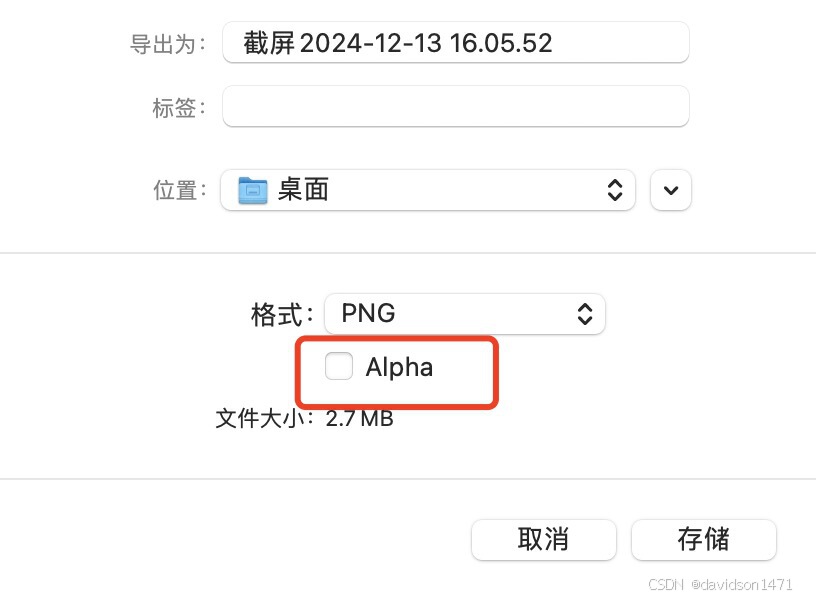
注:App图标为1024 * 1024 的正方形,不能有圆角;有圆角启动时会有黑色阴影