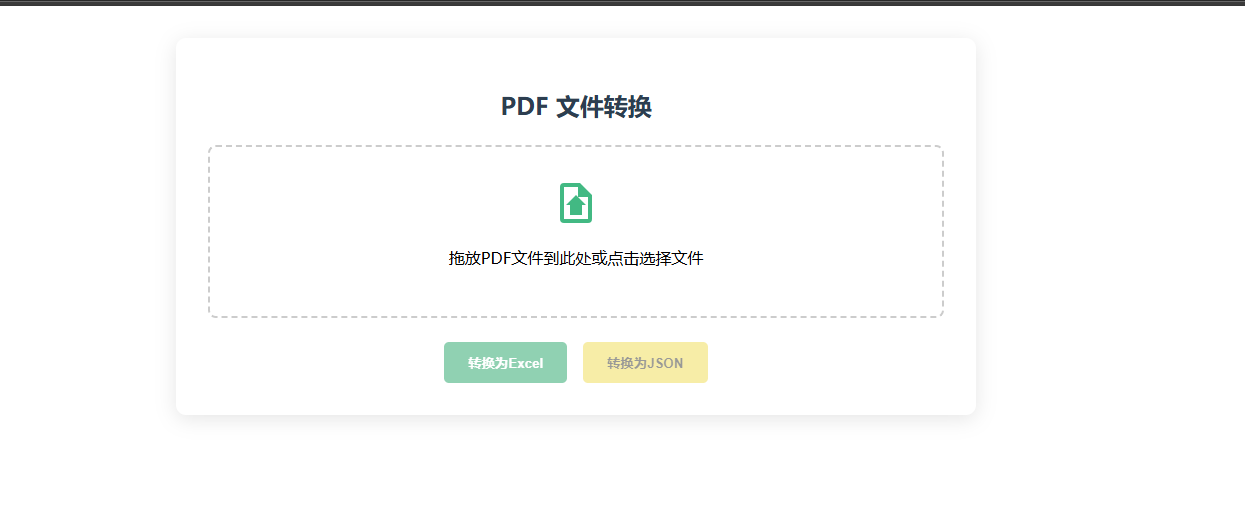
 在线演示地址:Vite + Vue
 http://www.xpclm.online/pdf-h5 源码gitee前后端地址:
javapdfexcel: javaPDF转excelhttps://gitee.com/gaiya001/javapdfexcel.git
盖亚/vuepdfhttps://gitee.com/gaiya001/vuepdf.git
后续会推出 前端版本跟nestjs版本
识别复杂表格不是很准确,建议获取json格式坐标,可以配合我得另一篇使用传参替换表格内容展示更佳前端界面在线excel编辑器 。node编写post接口获取文件流,使用传参替换表格内容展示、前后端一把梭。-CSDN博客
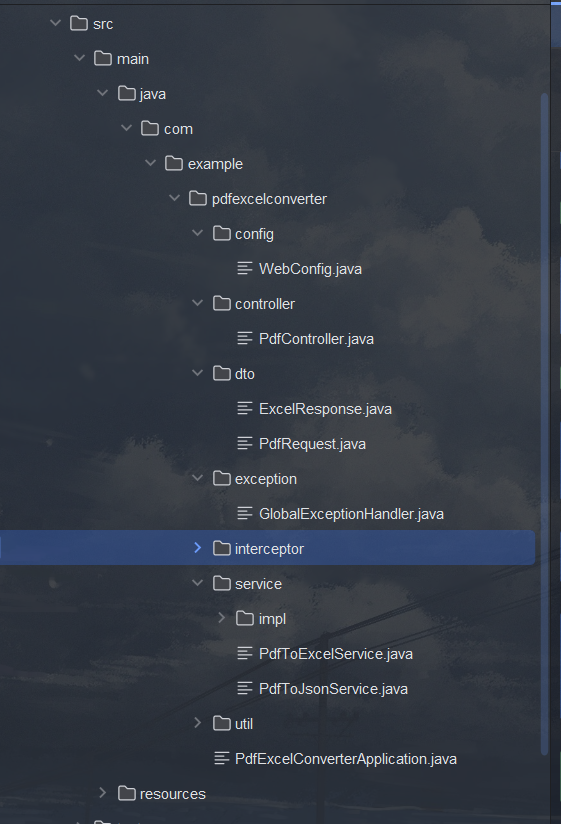
目录结构预览:
基于Spring Boot和Tabula的PDF表格数据提取系统
项目概述
本项目使用Spring Boot框架结合Tabula库,实现从PDF文件中提取表格数据并转换为Excel和JSON格式的功能。
核心技术栈
Spring Boot - 提供快速应用开发框架
Tabula - 专业的PDF表格数据提取库
Apache POI - 用于Excel文件操作
Jackson - 处理JSON数据转换
核心代码实现
1. 主应用入口
PdfExcelConverterApplication.java
java
package com.example.pdfexcelconverter;

import org.springframework.boot.SpringApplication;
import org.springframework.boot.autoconfigure.SpringBootApplication;

@SpringBootApplication
public class PdfExcelConverterApplication {
    public static void main(String[] args) {
        SpringApplication.run(PdfExcelConverterApplication.class, args);
    }
}
2. PDF解析服务
PdfExtractorService.java
java
package com.example.pdfexcelconverter.service;

import technology.tabula.*;
import technology.tabula.extractors.SpreadsheetExtractionAlgorithm;
import java.util.List;

public class PdfExtractorService {

    public List<Table> extractTablesFromPdf(String filePath) throws Exception {
        ObjectExtractor oe = new ObjectExtractor(new PageIterator(filePath));
        SpreadsheetExtractionAlgorithm sea = new SpreadsheetExtractionAlgorithm();
        return sea.extract(oe.next());
    }
}
3. Excel导出服务
ExcelExportService.java
java
package com.example.pdfexcelconverter.service;

import org.apache.poi.ss.usermodel.*;
import org.apache.poi.xssf.usermodel.XSSFWorkbook;
import technology.tabula.Table;
import java.io.FileOutputStream;

public class ExcelExportService {

    public void exportToExcel(List<Table> tables, String outputPath) throws Exception {
        Workbook workbook = new XSSFWorkbook();

        for(int i=0; i<tables.size(); i++) {
            Sheet sheet = workbook.createSheet("Sheet"+(i+1));
            Table table = tables.get(i);

            // 填充Excel表格数据...
        }

        try(FileOutputStream out = new FileOutputStream(outputPath)) {
            workbook.write(out);
        }
    }
}
4. JSON转换服务
sonConverterService.java
java
package com.example.pdfexcelconverter.service;

import com.fasterxml.jackson.databind.ObjectMapper;
import technology.tabula.Table;
import java.util.List;
import java.util.ArrayList;
import java.util.Map;
import java.util.HashMap;

public class JsonConverterService {

    public String convertToJson(List<Table> tables) throws Exception {
        List<Map<String, Object>> result = new ArrayList<>();

        for(Table table : tables) {
            Map<String, Object> tableData = new HashMap<>();
            // 转换表格数据为JSON结构...
            result.add(tableData);
        }

        return new ObjectMapper().writeValueAsString(result);
    }
}
基于Vue.js框架的PDF转Excel/JSON应用核心代码
1. 文件上传组件
FileUploader.vue
javascript
<template>
  <div class="upload-container">
    <div class="upload-card">
      <h2>PDF 文件转换</h2>
      <div class="upload-area" @dragover.prevent @drop="handleDrop">
        <input
          type="file"
          ref="fileInput"
          @change="handleFileChange"
          accept=".pdf"
          class="file-input"
        />
        <div class="upload-icon">
          <svg viewBox="0 0 24 24" width="48" height="48">
            <path fill="currentColor" d="M14,2H6A2,2 0 0,0 4,4V20A2,2 0 0,0 6,22H18A2,2 0 0,0 20,20V8L14,2M18,20H6V4H13V9H18V20M15,13V18H9V13H7L12,8L17,13H15Z" />
          </svg>
        </div>
        <p>拖放PDF文件到此处或点击选择文件</p>
      </div>

      <div class="button-group">
        <button
          @click="uploadFile('excel')"
          :disabled="!file"
          class="btn btn-excel"
        >
          转换为Excel
        </button>
        <button
          @click="uploadFile('json')"
          :disabled="!file"
          class="btn btn-json"
        >
          转换为JSON
        </button>
      </div>

      <div v-if="loading" class="loading-overlay">
        <div class="spinner"></div>
        <p>文件处理中...</p>
        <div class="progress-bar">
          <div class="progress" :style="{width: progress + '%'}"></div>
        </div>
      </div>
    </div>

    <div v-if="jsonResult" class="result-container">
      <h3>JSON 结果</h3>
      <vue-json-pretty
        :data="jsonResult"
        :deep="3"
        :showLength="true"
        :showLine="true"
        :showDoubleQuotes="true"
        :collapsedOnClickBrackets="true"
        class="json-viewer"
      />
    </div>

    <div v-if="downloadUrl" class="download-section">
      <a :href="downloadUrl" download class="download-btn">
        下载Excel文件
      </a>
    </div>
  </div>
</template>

<script setup>
import { ref } from 'vue';
import axios from 'axios';
import VueJsonPretty from 'vue-json-pretty';
import 'vue-json-pretty/lib/styles.css';

const file = ref(null);
const jsonResult = ref(null);
const downloadUrl = ref(null);
const loading = ref(false);
const fileInput = ref(null);

const handleFileChange = (e) => {
  file.value = e.target.files[0];
};

const handleDrop = (e) => {
  e.preventDefault();
  const droppedFile = e.dataTransfer.files[0];
  if (droppedFile && droppedFile.type === 'application/pdf') {
    file.value = droppedFile;
  }
};

const uploadFile = async (type) => {
  if (!file.value) return;

  loading.value = true;
  jsonResult.value = null;
  downloadUrl.value = null;

  const formData = new FormData();
  formData.append('file', file.value);

  try {
    const endpoint = type === 'excel'
      ? '/api/pdf/excel'
      : '/api/pdf/json';

    const response = await axios.post(endpoint, formData, {
      responseType: type === 'excel' ? 'arraybuffer' : 'json', // 修改为arraybuffer
      headers: {
        'Content-Type': 'multipart/form-data'
      }
    });

    if (type === 'excel') {
      const blob = new Blob([response.data], {type: 'application/vnd.openxmlformats-officedocument.spreadsheetml.sheet'});
      downloadUrl.value = URL.createObjectURL(blob);
    } else {
      jsonResult.value = response.data;
    }
  } catch (error) {
    console.error('上传失败:', error);
    alert('文件处理失败,请重试');
  } finally {
    loading.value = false;
  }
};
</script>

<style scoped>
.upload-container {
  max-width: 800px;
  margin: 0 auto;
  padding: 2rem;
}

.upload-card {
  background: white;
  border-radius: 10px;
  box-shadow: 0 4px 20px rgba(0, 0, 0, 0.1);
  padding: 2rem;
  position: relative;
  overflow: hidden;
}

h2 {
  text-align: center;
  color: #2c3e50;
  margin-bottom: 1.5rem;
}

.upload-area {
  border: 2px dashed #ccc;
  border-radius: 8px;
  padding: 2rem;
  text-align: center;
  cursor: pointer;
  transition: all 0.3s;
  margin-bottom: 1.5rem;
}

.upload-area:hover {
  border-color: #42b983;
}

.upload-icon {
  color: #42b983;
  margin-bottom: 1rem;
}

.file-input {
  display: none;
}

.button-group {
  display: flex;
  gap: 1rem;
  justify-content: center;
}

.btn {
  padding: 0.75rem 1.5rem;
  border: none;
  border-radius: 5px;
  font-weight: bold;
  cursor: pointer;
  transition: all 0.3s;
}

.btn:hover {
  transform: translateY(-2px);
}

.btn:disabled {
  opacity: 0.5;
  cursor: not-allowed;
  transform: none;
}

.btn-excel {
  background-color: #21a366;
  color: white;
}

.btn-json {
  background-color: #f0db4f;
  color: #323330;
}

.loading-overlay {
  position: absolute;
  top: 0;
  left: 0;
  right: 0;
  bottom: 0;
  background: rgba(255, 255, 255, 0.8);
  display: flex;
  flex-direction: column;
  justify-content: center;
  align-items: center;
  z-index: 10;
}

.spinner {
  border: 4px solid rgba(0, 0, 0, 0.1);
  border-radius: 50%;
  border-top: 4px solid #42b983;
  width: 40px;
  height: 40px;
  animation: spin 1s linear infinite;
  margin-bottom: 1rem;
}

@keyframes spin {
  0% { transform: rotate(0deg); }
  100% { transform: rotate(360deg); }
}

.result-container {
  margin-top: 2rem;
  background: #f8f9fa;
  border-radius: 8px;
  padding: 1.5rem;
  text-align: left; /* 容器也左对齐 */
}

.json-viewer {
  background: white;
  padding: 1rem;
  border-radius: 5px;
  max-height: 400px;
  overflow-y: auto;
  text-align: left;
}

.download-section {
  text-align: center;
  margin-top: 2rem;
}

.download-btn {
  display: inline-block;
  padding: 0.75rem 1.5rem;
  background-color: #42b983;
  color: white;
  text-decoration: none;
  border-radius: 5px;
  font-weight: bold;
  transition: all 0.3s;
}

.download-btn:hover {
  background-color: #369b6d;
  transform: translateY(-2px);
}
</style>