文章目录
-
- [Gitlab CICD部署应用](#Gitlab CICD部署应用)
Gitlab CICD部署应用
部署设计
对于前后端服务都基于 Kubernetes 进行部署,有关 Kubernetes 安装可以参考: 附042.Kubernetes_v1.33.0生成环境高可用部署方案 。
后端 java 项目部署三套环境,即一套 CI 持续集成环境,一套测试环境,一套生产环境。
同时将每套环境部署在不同的 namespace 下,总体规划如下:
| 环境 | namespace |
|---|---|
| CI环境 | gitlabci |
| 测试环境 | gitlabtest |
| 生产环境 | gitlabprod |
集成Kubernetes
当前 Gitlab 的 runner 是基于 helm 部署 gitla 的同时配套部署的,即 runner 是运行在 Kubernetes 中的一个 Pod,runner 类型是 Kubernetes ,如下所示:
shell
root@master01:~# kubectl -n gitlab exec -ti mygitlab-gitlab-runner-798986f578-h2thf -- bash
camygitlab-gitlab-runner-798986f578-h2thf:/$ cat /home/gitlab-runner/.gitlab-runner/config.toml
#......
[[runners]]
#......
  executor = "kubernetes"
因此该 runner 后续需要直接在 Kubernetes 中部署业务,需要安装 kubectl 命令,以及配置 kubeconfig 上下文。
从而需要提前将 kubeconfig 内容以变量形式引入到 runner Pod 中。
shell
root@master01:~# echo $(cat ~/.kube/config | base64) | tr -d " "
YXBpVmVyc2lvbjogdjEKY2x1c3RlcnM6Ci0gY2x1c3RlcjoKICA......
添加变量 KUBE_CONFIG 。
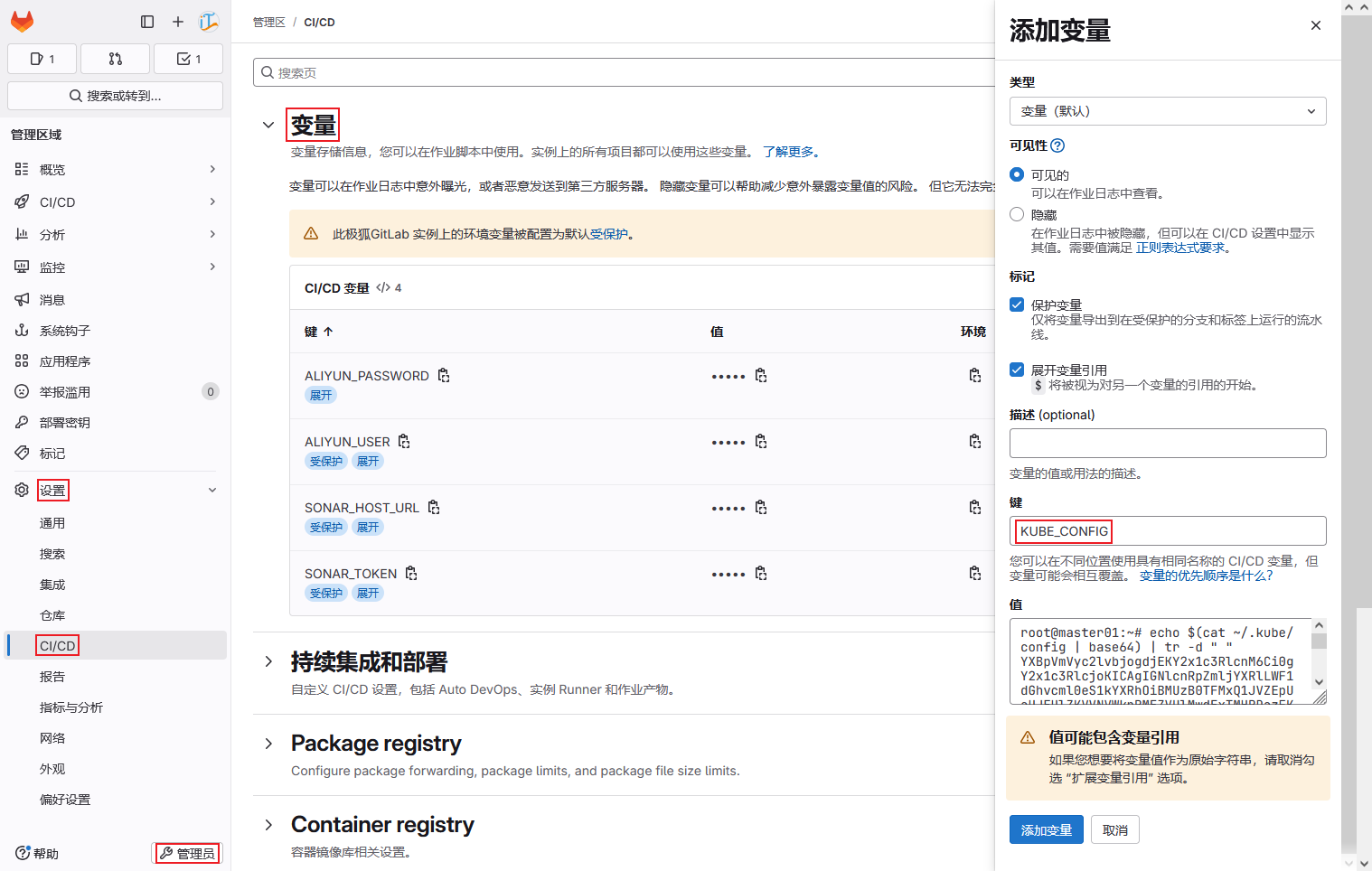
提示:由于后续流水线中作业有 main 和 tag 两种触发方式,因此建议将变量取消受保护。
后端Java项目部署
通过如下 yaml 进行部署。
创建gitlab部署项目
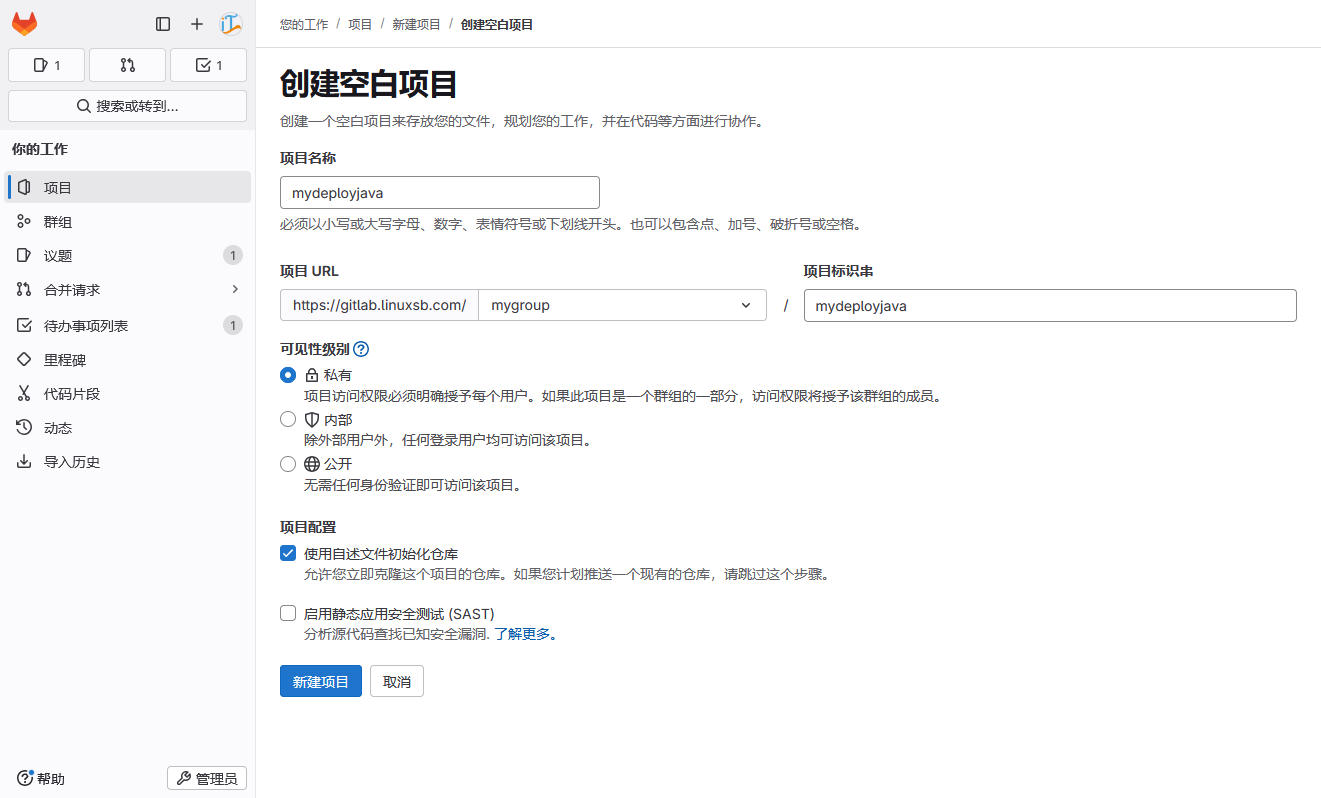
创建部署专用于部署后端 java 应用的 gitlab 项目。
创建部署文件
创建如下 ci 环境部署文件。
bash
[root@gitclient ~]# git clone git@gitlab.linuxsb.com:mygroup/mydeployjava.git
[root@gitclient ~]# cd mydeployjava/
[root@gitclient mydeployjava]# vim deployci.yaml
---
apiVersion: v1
kind: Namespace
metadata:
  name: gitlabci

---
apiVersion: apps/v1
kind: Deployment
metadata:
  name: deploy-apiserver-ci
  namespace: gitlabci
spec:
  replicas: 2
  revisionHistoryLimit: 5
  selector:
    matchLabels:
      app: apiserver-ci
  strategy:
    type: RollingUpdate
    rollingUpdate:
      maxUnavailable: 25%
      maxSurge: 25%
  template:
    metadata:
      labels:
        app: apiserver-ci
    spec:
      containers:
        - name: apiserver-ci
          env:
            - name: TZ
              value: Asia/Shanghai
          image: __POD_CONTAINERS_IMAGE__
          imagePullPolicy: IfNotPresent
          ports:
          - containerPort: 8080
            protocol: TCP
          readinessProbe:
            httpGet:
              path: /demo/hello
              port: 8080
              scheme: HTTP
            initialDelaySeconds: 30
            periodSeconds: 10
          livenessProbe:
            httpGet:
              path: /demo/hello
              port: 8080
              scheme: HTTP
            initialDelaySeconds: 30
            periodSeconds: 10

---
apiVersion: v1
kind: Service
metadata:
  name: service-apiserver-ci
  namespace: gitlabci
spec:
  ports:
  - nodePort: 32101
    port: 8080
    protocol: TCP
    targetPort: 8080
  selector:
    app: apiserver-ci
  sessionAffinity: ClientIP
type: NodePort- test部署文件
shell
[root@gitclient mydeployjava]# vim deploytest.yaml
---
apiVersion: v1
kind: Namespace
metadata:
  name: gitlabtest

---
apiVersion: apps/v1
kind: Deployment
metadata:
  name: deploy-apiserver-test
  namespace: gitlabtest
spec:
  replicas: 2
  revisionHistoryLimit: 5
  selector:
    matchLabels:
      app: apiserver-test
  strategy:
    type: RollingUpdate
    rollingUpdate:
      maxUnavailable: 25%
      maxSurge: 25%
  template:
    metadata:
      labels:
        app: apiserver-test
    spec:
      containers:
        - name: apiserver-test
          env:
            - name: TZ
              value: Asia/Shanghai
          image: __POD_CONTAINERS_IMAGE__
          imagePullPolicy: IfNotPresent
          ports:
          - containerPort: 8080
            protocol: TCP
          readinessProbe:
            httpGet:
              path: /demo/hello
              port: 8080
              scheme: HTTP
            initialDelaySeconds: 30
            periodSeconds: 10
          livenessProbe:
            httpGet:
              path: /demo/hello
              port: 8080
              scheme: HTTP
            initialDelaySeconds: 30
            periodSeconds: 10

---
apiVersion: v1
kind: Service
metadata:
  name: service-apiserver-test
  namespace: gitlabtest
spec:
  ports:
  - nodePort: 32102
    port: 8080
    protocol: TCP
    targetPort: 8080
  selector:
    app: apiserver-test
  sessionAffinity: ClientIP
type: NodePort- prod部署文件
shell
[root@gitclient mydeployjava]# vim deployprod.yaml
---
apiVersion: v1
kind: Namespace
metadata:
  name: gitlabprod

---
apiVersion: apps/v1
kind: Deployment
metadata:
  name: deploy-apiserver-prod
  namespace: gitlabprod
spec:
  replicas: 2
  revisionHistoryLimit: 5
  selector:
    matchLabels:
      app: apiserver-prod
  strategy:
    type: RollingUpdate
    rollingUpdate:
      maxUnavailable: 25%
      maxSurge: 25%
  template:
    metadata:
      labels:
        app: apiserver-prod
    spec:
      containers:
        - name: apiserver-prod
          env:
            - name: TZ
              value: Asia/Shanghai
          image: __POD_CONTAINERS_IMAGE__
          imagePullPolicy: IfNotPresent
          ports:
          - containerPort: 8080
            protocol: TCP
          readinessProbe:
            httpGet:
              path: /demo/hello
              port: 8080
              scheme: HTTP
            initialDelaySeconds: 30
            periodSeconds: 10
          livenessProbe:
            httpGet:
              path: /demo/hello
              port: 8080
              scheme: HTTP
            initialDelaySeconds: 30
            periodSeconds: 10

---
apiVersion: v1
kind: Service
metadata:
  name: service-apiserver-prod
  namespace: gitlabprod
spec:
  ports:
  - nodePort: 32103
    port: 8080
    protocol: TCP
    targetPort: 8080
  selector:
    app: apiserver-prod
  sessionAffinity: ClientIP
  type: NodePort
创建流水线
创建如下流水线,基于实践003-Gitlab CICD部署应用 中编译和构建的镜像进行部署。
shell
[root@gitclient mydeployjava]# vim .gitlab-ci.yml
stages:
  - deploy
  - check

variables:
  KUBECONFIG: "/.kube/config"

deployciapp:
  stage: deploy
  image: uhub.service.ucloud.cn/imxhy/kubectl:1.33.0
  script:
    - mkdir -p /.kube
    - echo $KUBE_CONFIG | base64 -d > $KUBECONFIG
    - kubectl version
    - mkdir -p /.kube
    - IMAGE_TAG=$(echo "${CI_COMMIT_TIMESTAMP}" | sed 's/T/_/g; s/-//g; s/://g' | cut -c1-15)
    - IMAGE_TAG_TO_INSTALL=${CI_COMMIT_TAG:-$IMAGE_TAG}
    - sed -i "s#__POD_CONTAINERS_IMAGE__#registry.cn-hangzhou.aliyuncs.com/xhyimages/apiservice:${IMAGE_TAG_TO_INSTALL}#g" deployci.yaml
    - kubectl apply -f deployci.yaml || exit 1
  only:
    - main
  tags:
    - study-runner

deploytestapp:
  stage: deploy
  image: uhub.service.ucloud.cn/imxhy/kubectl:1.33.0
  when: manual
  script:
    - mkdir -p /.kube
    - echo $KUBE_CONFIG | base64 -d > $KUBECONFIG
    - IMAGE_TAG=$(echo "${CI_COMMIT_TIMESTAMP}" | sed 's/T/_/g; s/-//g; s/://g' | cut -c1-15)
    - IMAGE_TAG_TO_INSTALL=${CI_COMMIT_TAG:-$IMAGE_TAG}
    - sed -i "s#__POD_CONTAINERS_IMAGE__#registry.cn-hangzhou.aliyuncs.com/xhyimages/apiservice:${IMAGE_TAG_TO_INSTALL}#g" deploytest.yaml
    - kubectl apply -f deploytest.yaml || exit 1
  only:
    - main
    - tags
  tags:
    - study-runner

deployprodapp:
  stage: deploy
  image: uhub.service.ucloud.cn/imxhy/kubectl:1.33.0
  script:
    - mkdir -p /.kube
    - echo $KUBE_CONFIG | base64 -d > $KUBECONFIG
    - IMAGE_TAG=$(echo "${CI_COMMIT_TIMESTAMP}" | sed 's/T/_/g; s/-//g; s/://g' | cut -c1-15)
    - IMAGE_TAG_TO_INSTALL=${CI_COMMIT_TAG:-$IMAGE_TAG}
    - sed -i "s#__POD_CONTAINERS_IMAGE__#registry.cn-hangzhou.aliyuncs.com/xhyimages/apiservice:${IMAGE_TAG_TO_INSTALL}#g" deployprod.yaml
    - kubectl apply -f deployprod.yaml || exit 1
  only:
    - tags
  tags:
    - study-runner

check_ci_pod_status:
  stage: check
  image: uhub.service.ucloud.cn/imxhy/kubectl:1.33.0
  script:
    - mkdir -p /.kube
    - echo $KUBE_CONFIG | base64 -d > $KUBECONFIG
    - timeout 120 bash -c "until kubectl get pods -n gitlabci -l app=apiserver-ci --field-selector=status.phase=Running --no-headers | grep '1/1'; do sleep 3; done"
  only:
    - main
  needs:
    - deployciapp
  tags:
    - study-runner

check_test_pod_status:
  stage: check
  image: uhub.service.ucloud.cn/imxhy/kubectl:1.33.0
  script:
    - mkdir -p /.kube
    - echo $KUBE_CONFIG | base64 -d > $KUBECONFIG
    - timeout 120 bash -c "until kubectl get pods -n gitlabtest -l app=apiserver-test --field-selector=status.phase=Running --no-headers | grep '1/1'; do sleep 3; done"
  only:
    - main
    - tags
  needs:
    - deploytestapp
  tags:
    - study-runner

check_prod_pod_status:
  stage: check
  image: uhub.service.ucloud.cn/imxhy/kubectl:1.33.0
  script:
    - mkdir -p /.kube
    - echo $KUBE_CONFIG | base64 -d > $KUBECONFIG
    - timeout 120 bash -c "until kubectl get pods -n gitlabprod -l app=apiserver-prod --field-selector=status.phase=Running --no-headers | grep '1/1'; do sleep 3; done"
  only:
    - tags
  needs:
    - deployprodapp
  tags:
    - study-runner
提交流水线
shell
[root@gitclient mydeployjava]# git add .
[root@gitclient mydeployjava]# git commit -m  "Deploy java gitlab cici first"
[root@gitclient mydeployjava]# git push origin main
查看流水线。
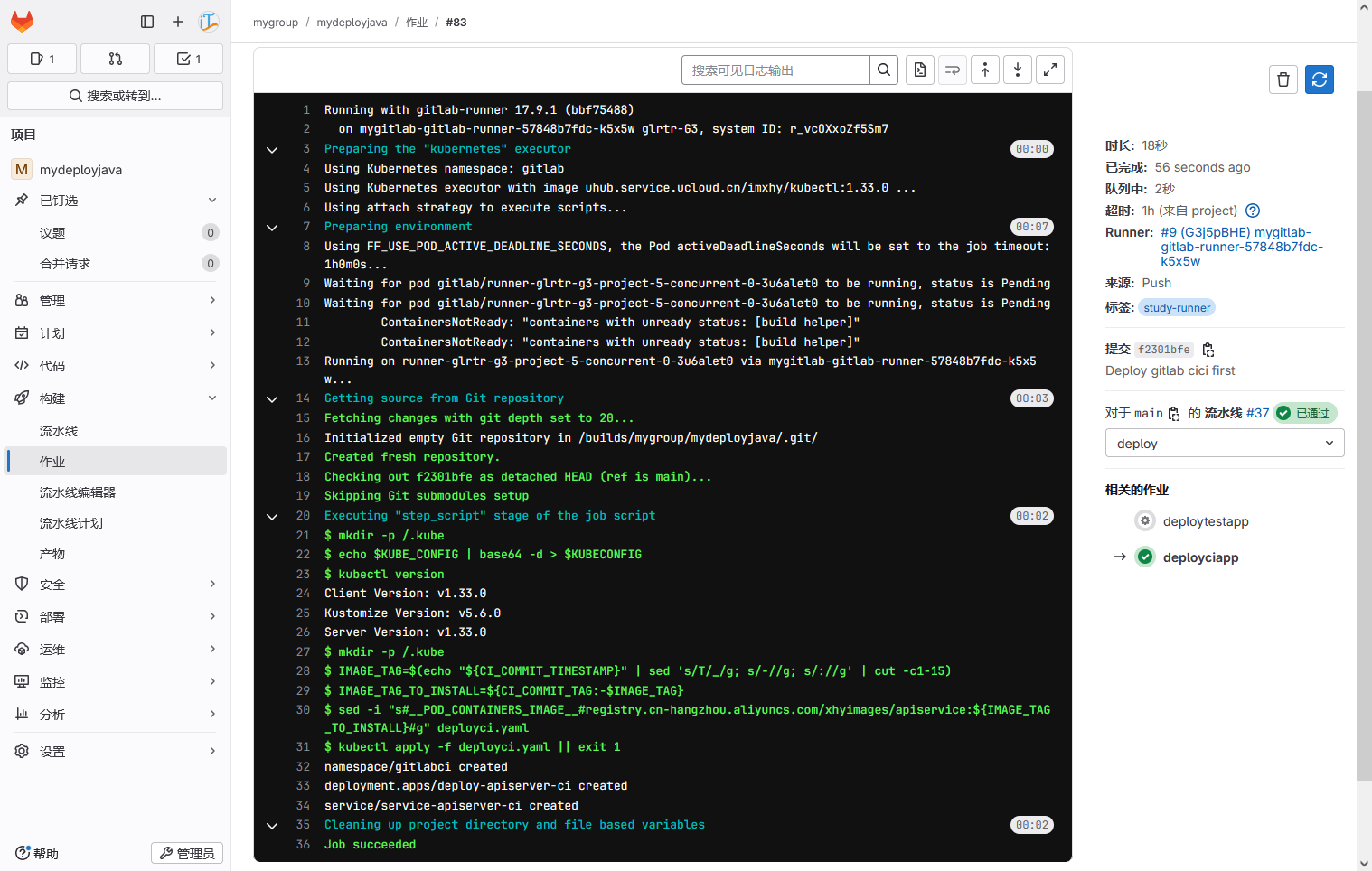
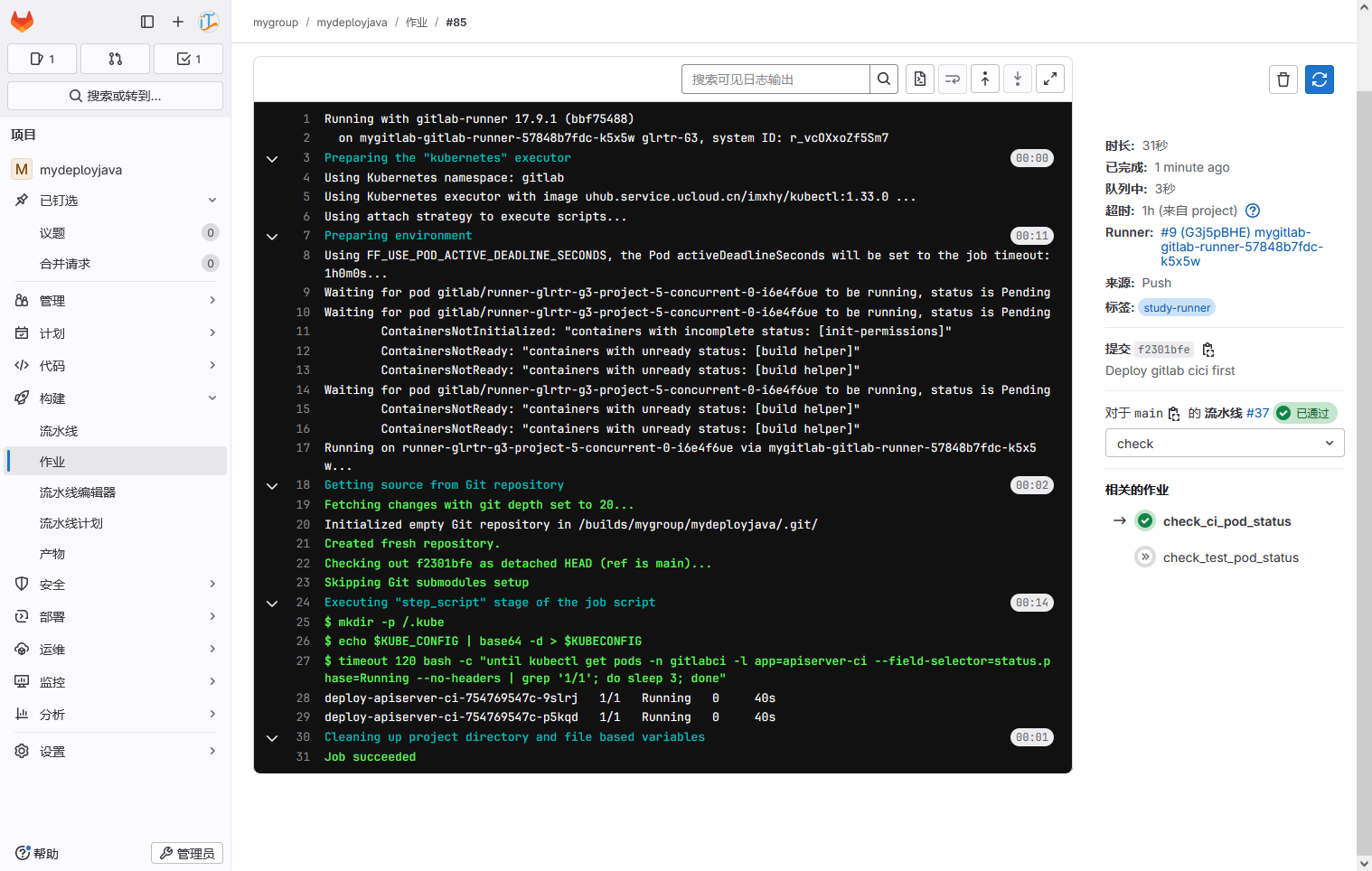
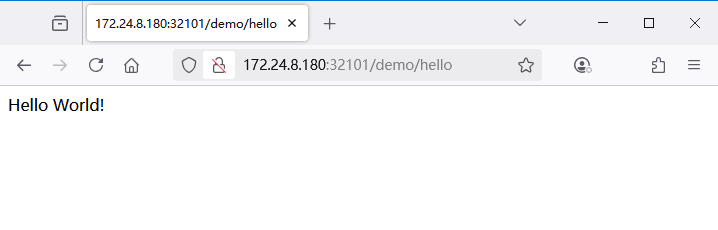
查看部署在 Kubernetes 后的应用,浏览器直接访问: http://172.24.8.180:32101/demo/hello 。
前端Web项目部署
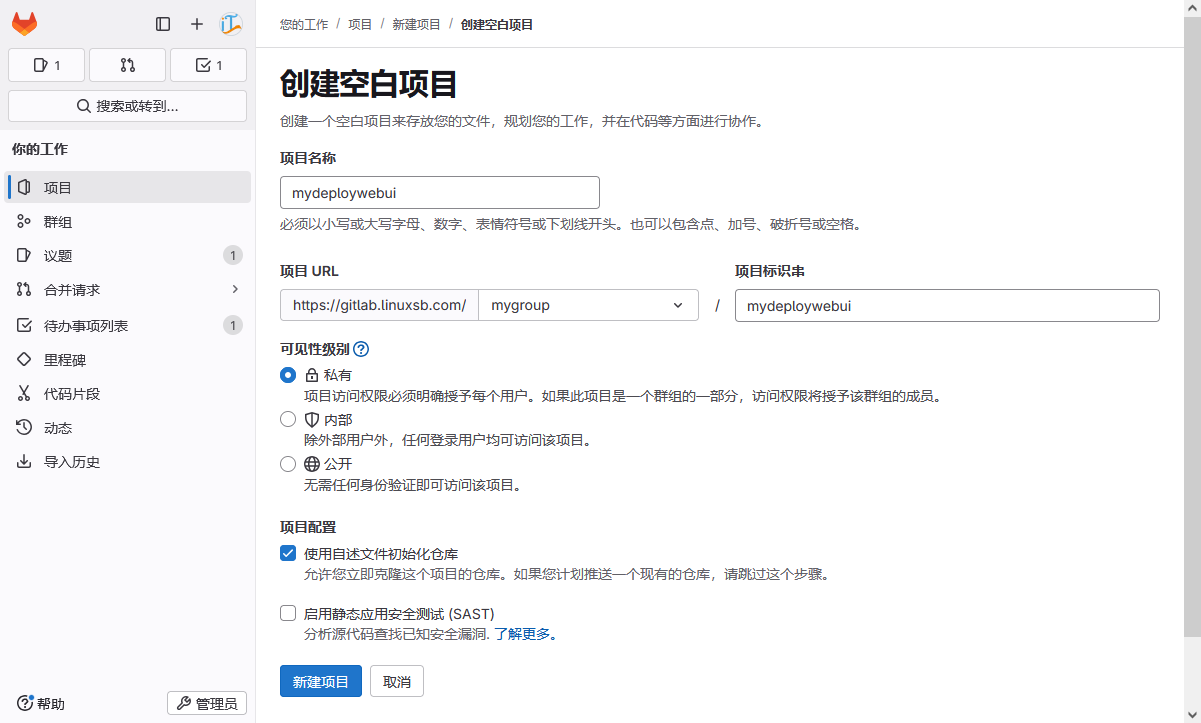
创建gitlab部署项目
创建部署专用于部署后端 webui 应用的 gitlab 项目。
创建部署文件
bash
[root@gitclient ~]# git clone git@gitlab.linuxsb.com:mygroup/mydeploywebui.git
[root@gitclient ~]# cd mydeploywebui/
[root@gitclient mydeploywebui]# vim deployci.yaml
---
apiVersion: v1
kind: Namespace
metadata:
  name: gitlabci

---
apiVersion: apps/v1
kind: Deployment
metadata:
  name: deploy-webui-ci
  namespace: gitlabci
spec:
  replicas: 2
  revisionHistoryLimit: 5
  selector:
    matchLabels:
      app: webui-ci
  strategy:
    type: RollingUpdate
    rollingUpdate:
      maxUnavailable: 25%
      maxSurge: 25%
  template:
    metadata:
      labels:
        app: webui-ci
    spec:
      containers:
        - name: webui-ci
          env:
            - name: TZ
              value: Asia/Shanghai
          image: __POD_CONTAINERS_IMAGE__
          imagePullPolicy: IfNotPresent
          ports:
          - containerPort: 8080
            protocol: TCP
          readinessProbe:
            httpGet:
              path: /
              port: 8080
              scheme: HTTP
            initialDelaySeconds: 30
            periodSeconds: 10
          livenessProbe:
            httpGet:
              path: /
              port: 8080
              scheme: HTTP
            initialDelaySeconds: 30
            periodSeconds: 10

---
apiVersion: v1
kind: Service
metadata:
  name: service-webui-ci
  namespace: gitlabci
spec:
  ports:
  - nodePort: 32111
    port: 8080
    protocol: TCP
    targetPort: 8080
  selector:
    app: webui-ci
  sessionAffinity: ClientIP
type: NodePort- test部署文件
shell
[root@gitclient mydeployjava]# vim deploytest.yaml
---
apiVersion: v1
kind: Namespace
metadata:
  name: gitlabtest

---
apiVersion: apps/v1
kind: Deployment
metadata:
  name: deploy-webui-test
  namespace: gitlabtest
spec:
  replicas: 2
  revisionHistoryLimit: 5
  selector:
    matchLabels:
      app: webui-test
  strategy:
    type: RollingUpdate
    rollingUpdate:
      maxUnavailable: 25%
      maxSurge: 25%
  template:
    metadata:
      labels:
        app: webui-test
    spec:
      containers:
        - name: webui-test
          env:
            - name: TZ
              value: Asia/Shanghai
          image: __POD_CONTAINERS_IMAGE__
          imagePullPolicy: IfNotPresent
          ports:
          - containerPort: 8080
            protocol: TCP
          readinessProbe:
            httpGet:
              path: /
              port: 8080
              scheme: HTTP
            initialDelaySeconds: 30
            periodSeconds: 10
          livenessProbe:
            httpGet:
              path: /
              port: 8080
              scheme: HTTP
            initialDelaySeconds: 30
            periodSeconds: 10

---
apiVersion: v1
kind: Service
metadata:
  name: service-webui-test
  namespace: gitlabtest
spec:
  ports:
  - nodePort: 32112
    port: 8080
    protocol: TCP
    targetPort: 8080
  selector:
    app: webui-test
  sessionAffinity: ClientIP
type: NodePort- prod部署文件
shell
[root@gitclient mydeployjava]# vim deployprod.yaml
---
apiVersion: v1
kind: Namespace
metadata:
  name: gitlabprod

---
apiVersion: apps/v1
kind: Deployment
metadata:
  name: deploy-webui-prod
  namespace: gitlabprod
spec:
  replicas: 2
  revisionHistoryLimit: 5
  selector:
    matchLabels:
      app: webui-prod
  strategy:
    type: RollingUpdate
    rollingUpdate:
      maxUnavailable: 25%
      maxSurge: 25%
  template:
    metadata:
      labels:
        app: webui-prod
    spec:
      containers:
        - name: webui-prod
          env:
            - name: TZ
              value: Asia/Shanghai
          image: __POD_CONTAINERS_IMAGE__
          imagePullPolicy: IfNotPresent
          ports:
          - containerPort: 8080
            protocol: TCP
          readinessProbe:
            httpGet:
              path: /
              port: 8080
              scheme: HTTP
            initialDelaySeconds: 30
            periodSeconds: 10
          livenessProbe:
            httpGet:
              path: /
              port: 8080
              scheme: HTTP
            initialDelaySeconds: 30
            periodSeconds: 10

---
apiVersion: v1
kind: Service
metadata:
  name: service-webui-prod
  namespace: gitlabprod
spec:
  ports:
  - nodePort: 32113
    port: 8080
    protocol: TCP
    targetPort: 8080
  selector:
    app: webui-prod
  sessionAffinity: ClientIP
  type: NodePort
创建流水线
创建如下流水线。
shell
[root@gitclient mydeploywebui]# vim .gitlab-ci.yml
stages:
  - deploy
  - check

variables:
  KUBECONFIG: "/.kube/config"

deployciapp:
  stage: deploy
  image: uhub.service.ucloud.cn/imxhy/kubectl:1.33.0
  script:
    - mkdir -p /.kube
    - echo $KUBE_CONFIG | base64 -d > $KUBECONFIG
    - kubectl version
    - mkdir -p /.kube
    - IMAGE_TAG=$(echo "${CI_COMMIT_TIMESTAMP}" | sed 's/T/_/g; s/-//g; s/://g' | cut -c1-15)
    - IMAGE_TAG_TO_INSTALL=${CI_COMMIT_TAG:-$IMAGE_TAG}
    - sed -i "s#__POD_CONTAINERS_IMAGE__#registry.cn-hangzhou.aliyuncs.com/xhyimages/webui:${IMAGE_TAG_TO_INSTALL}#g" deployci.yaml
    - kubectl apply -f deployci.yaml || exit 1
  only:
    - main
  tags:
    - study-runner

deploytestapp:
  stage: deploy
  image: uhub.service.ucloud.cn/imxhy/kubectl:1.33.0
  when: manual
  script:
    - mkdir -p /.kube
    - echo $KUBE_CONFIG | base64 -d > $KUBECONFIG
    - IMAGE_TAG=$(echo "${CI_COMMIT_TIMESTAMP}" | sed 's/T/_/g; s/-//g; s/://g' | cut -c1-15)
    - IMAGE_TAG_TO_INSTALL=${CI_COMMIT_TAG:-$IMAGE_TAG}
    - sed -i "s#__POD_CONTAINERS_IMAGE__#registry.cn-hangzhou.aliyuncs.com/xhyimages/webui:${IMAGE_TAG_TO_INSTALL}#g" deploytest.yaml
    - kubectl apply -f deploytest.yaml || exit 1
  only:
    - main
    - tags
  tags:
    - study-runner

deployprodapp:
  stage: deploy
  image: uhub.service.ucloud.cn/imxhy/kubectl:1.33.0
  script:
    - mkdir -p /.kube
    - echo $KUBE_CONFIG | base64 -d > $KUBECONFIG
    - IMAGE_TAG=$(echo "${CI_COMMIT_TIMESTAMP}" | sed 's/T/_/g; s/-//g; s/://g' | cut -c1-15)
    - IMAGE_TAG_TO_INSTALL=${CI_COMMIT_TAG:-$IMAGE_TAG}
    - sed -i "s#__POD_CONTAINERS_IMAGE__#registry.cn-hangzhou.aliyuncs.com/xhyimages/webui:${IMAGE_TAG_TO_INSTALL}#g" deployprod.yaml
    - kubectl apply -f deployprod.yaml || exit 1
  only:
    - tags
  tags:
    - study-runner

check_ci_pod_status:
  stage: check
  image: uhub.service.ucloud.cn/imxhy/kubectl:1.33.0
  script:
    - mkdir -p /.kube
    - echo $KUBE_CONFIG | base64 -d > $KUBECONFIG
    - timeout 120 bash -c "until kubectl get pods -n gitlabci -l app=webui-ci --field-selector=status.phase=Running --no-headers | grep '1/1'; do sleep 3; done"
  only:
    - main
  needs:
    - deployciapp
  tags:
    - study-runner

check_test_pod_status:
  stage: check
  image: uhub.service.ucloud.cn/imxhy/kubectl:1.33.0
  script:
    - mkdir -p /.kube
    - echo $KUBE_CONFIG | base64 -d > $KUBECONFIG
    - timeout 120 bash -c "until kubectl get pods -n gitlabtest -l app=webui-test --field-selector=status.phase=Running --no-headers | grep '1/1'; do sleep 3; done"
  only:
    - main
    - tags
  needs:
    - deploytestapp
  tags:
    - study-runner

check_prod_pod_status:
  stage: check
  image: uhub.service.ucloud.cn/imxhy/kubectl:1.33.0
  script:
    - mkdir -p /.kube
    - echo $KUBE_CONFIG | base64 -d > $KUBECONFIG
    - timeout 120 bash -c "until kubectl get pods -n gitlabprod -l app=webui-prod --field-selector=status.phase=Running --no-headers | grep '1/1'; do sleep 3; done"
  only:
    - tags
  needs:
    - deployprodapp
  tags:
    - study-runner
提交流水线
shell
[root@gitclient mydeploywebui]# git add .
[root@gitclient mydeploywebui]# git commit -m  "Deploy webui gitlab cici first"
[root@gitclient mydeploywebui]# git push origin main
查看流水线。
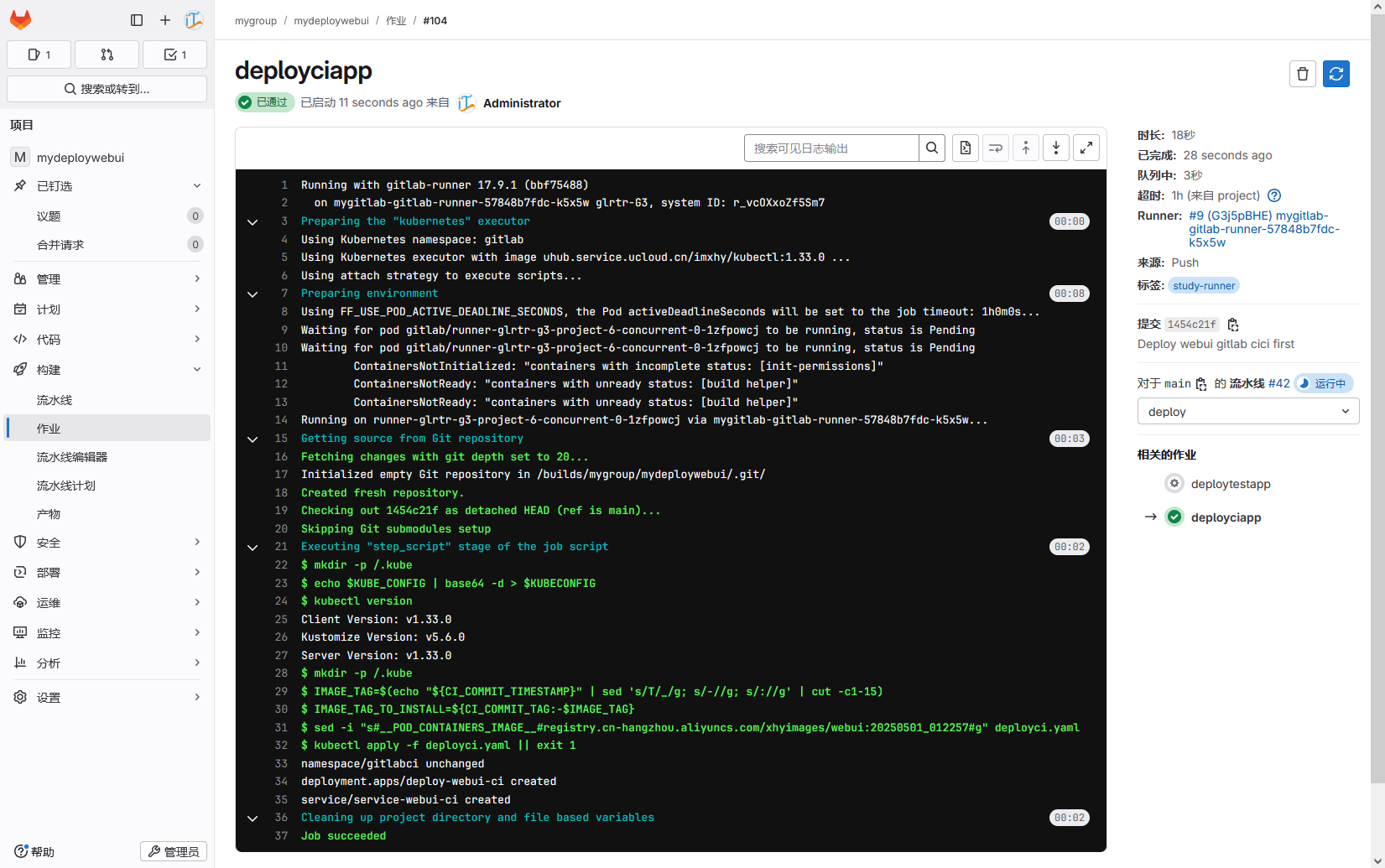
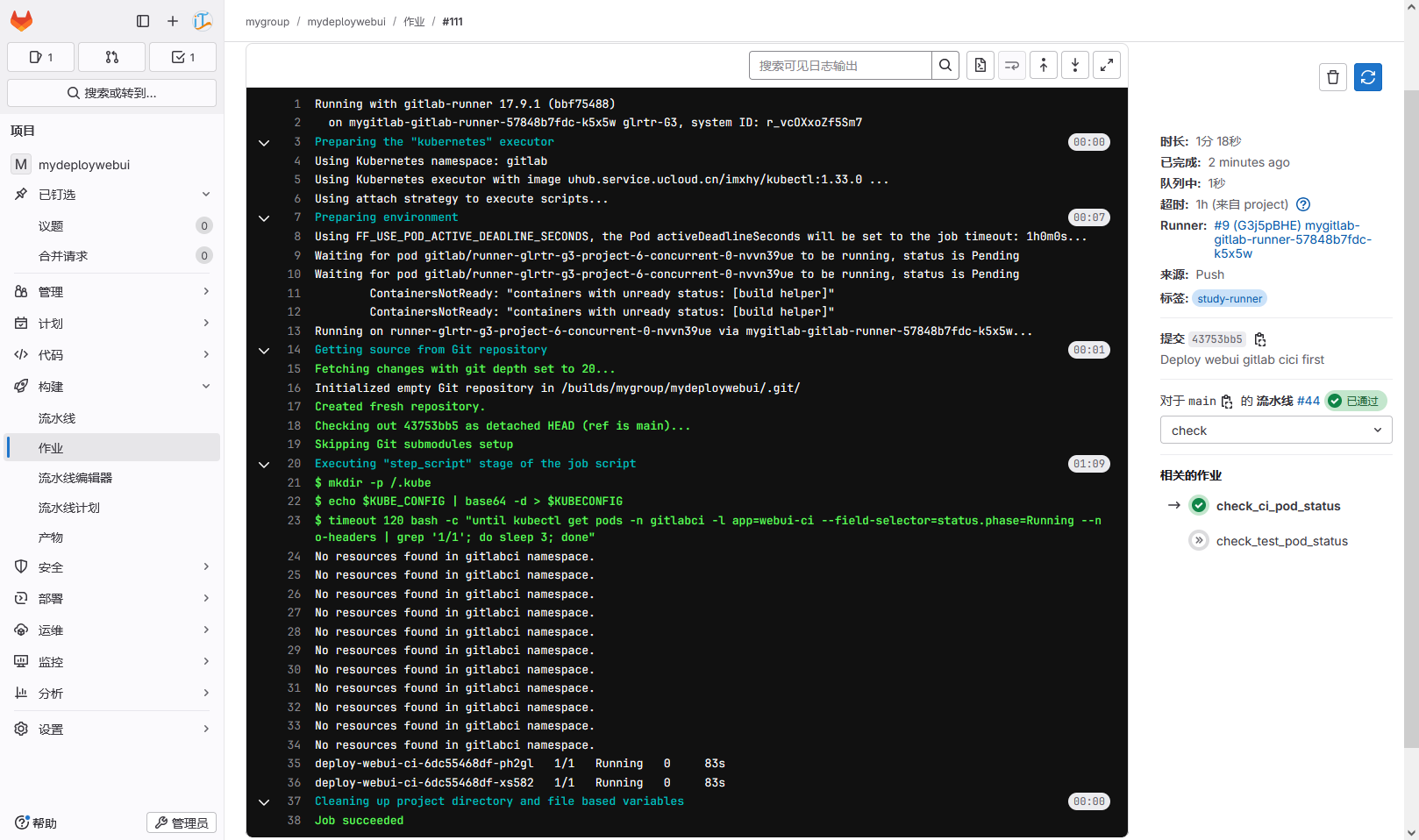
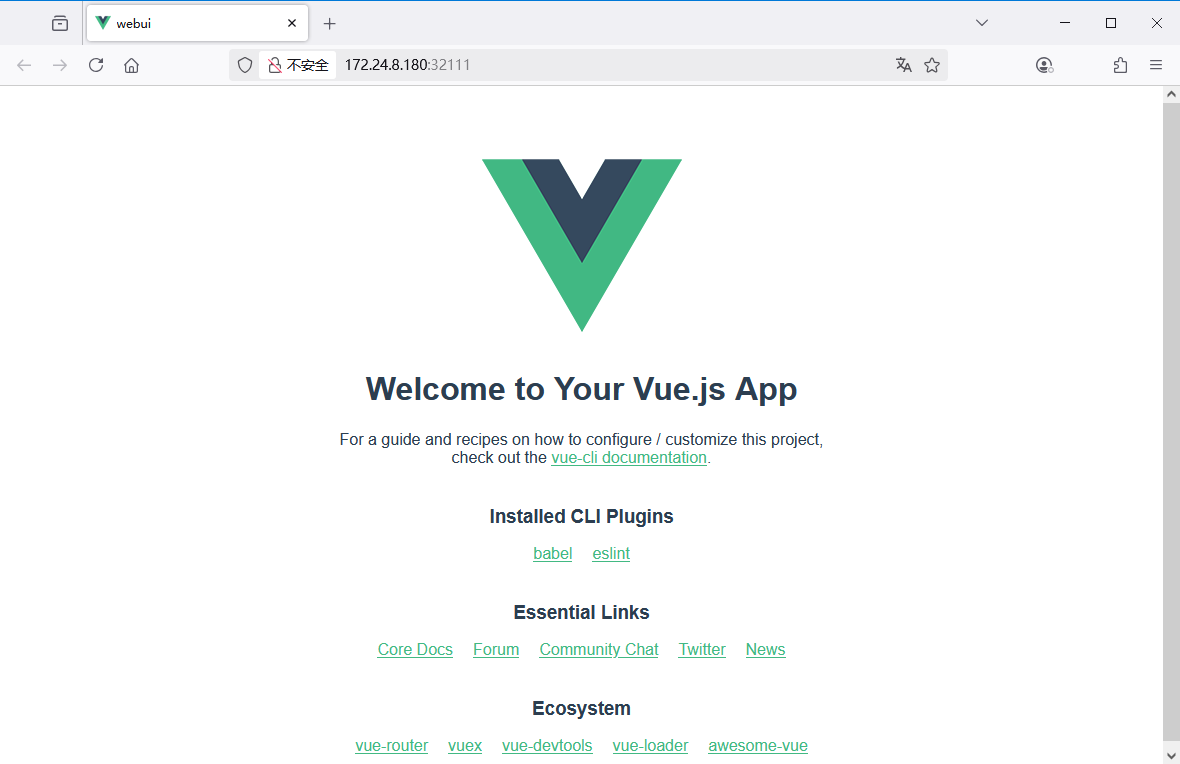
查看部署在 Kubernetes 后的应用,浏览器直接访问: http://172.24.8.180:32111 。