一.代码开发
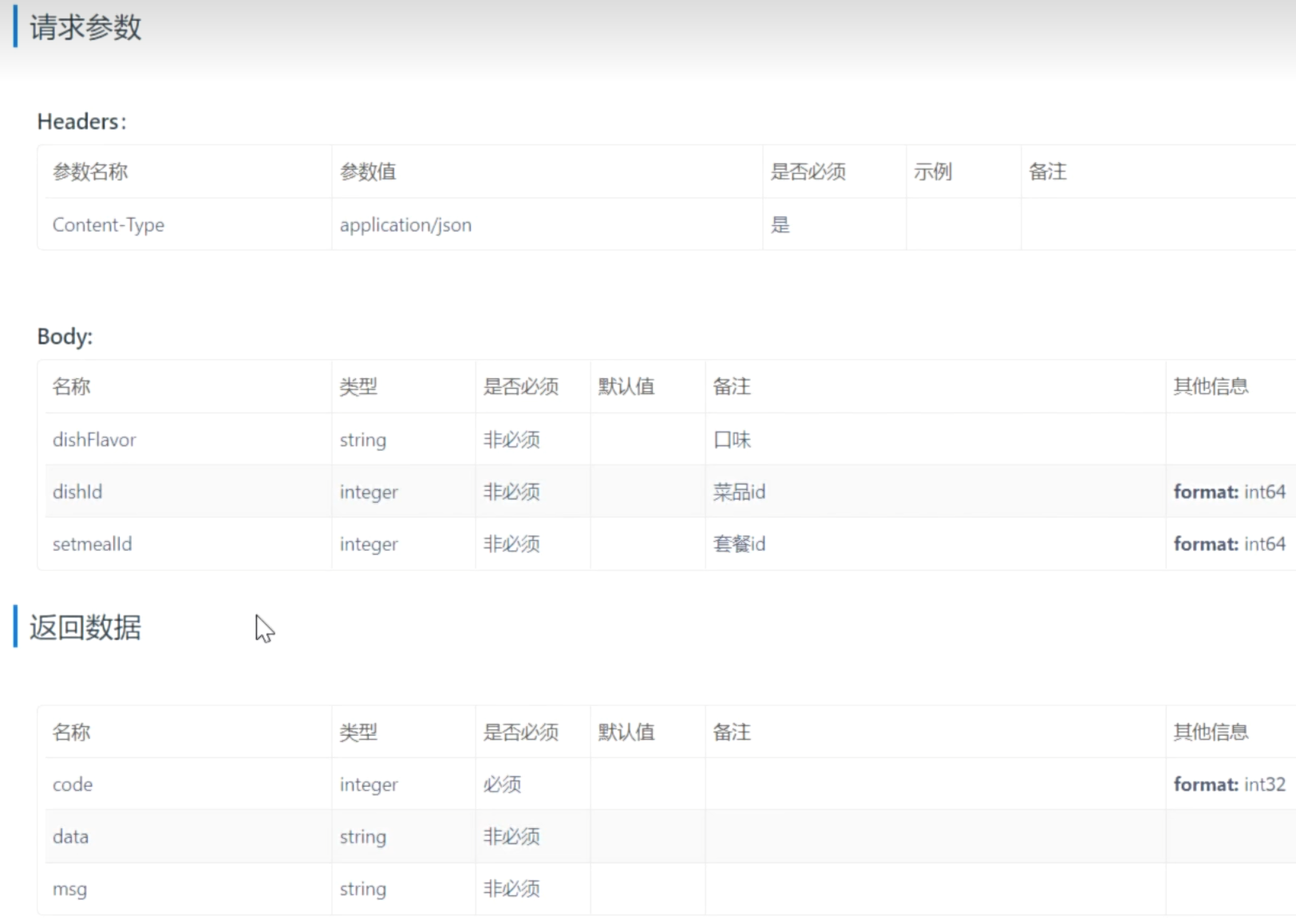
购物车属于用户端功能,因此要在user下创建controller代码。
Controller层
java
package com.sky.controller.user;

import com.sky.dto.ShoppingCartDTO;
import com.sky.entity.ShoppingCart;
import com.sky.result.Result;
import com.sky.service.ShoppingCartService;
import io.swagger.annotations.Api;
import io.swagger.annotations.ApiOperation;
import lombok.extern.slf4j.Slf4j;
import org.springframework.beans.factory.annotation.Autowired;
import org.springframework.web.bind.annotation.PostMapping;
import org.springframework.web.bind.annotation.RequestBody;
import org.springframework.web.bind.annotation.RequestMapping;
import org.springframework.web.bind.annotation.RestController;

@RestController
@RequestMapping("/user/shoppingCart")
@Slf4j
@Api(tags = "购物车相关接口")
public class ShoppingCartController {
    @Autowired
    private ShoppingCartService shoppingCartService;


    /**
     * 添加购物车
     * @param shoppingCartDTO
     * @return
     */
    @ApiOperation("添加购物车")
    @PostMapping("/add")
    public Result add(@RequestBody ShoppingCartDTO shoppingCartDTO) {
        log.info("向购物车中添加菜品或套餐:{}",shoppingCartDTO);
        shoppingCartService.add(shoppingCartDTO);
        return Result.success();
    }
}
前端传递过来的参数是JSON类型的,要使用注解@RequestBody。 ShoppingCartDTO中包含3个属性:setmealId,dishId,dishFlavor。
Service层
接口
java
package com.sky.service;

import com.sky.dto.ShoppingCartDTO;
import org.springframework.stereotype.Service;

@Service
public interface ShoppingCartService {

    /**
     * 添加购物车
     * @param shoppingCartDTO
     */
    void add(ShoppingCartDTO shoppingCartDTO);
}
实现类
java
package com.sky.service.impl;

import com.sky.context.BaseContext;
import com.sky.dto.ShoppingCartDTO;
import com.sky.entity.Dish;
import com.sky.entity.Setmeal;
import com.sky.entity.ShoppingCart;
import com.sky.mapper.DishMapper;
import com.sky.mapper.SetmealMapper;
import com.sky.mapper.ShoppingCartMapper;
import com.sky.service.ShoppingCartService;
import org.springframework.beans.BeanUtils;
import org.springframework.beans.factory.annotation.Autowired;
import org.springframework.stereotype.Service;

import java.time.LocalDateTime;
import java.util.List;

@Service
public class ShoppingCartServiceImpl implements ShoppingCartService {
    @Autowired
    private ShoppingCartMapper shoppingCartMapper;

    @Autowired
    private DishMapper dishMapper;

    @Autowired
    private SetmealMapper setmealMapper;

    /**
     * 添加购物车
     * @param shoppingCartDTO
     */
    @Override
    public void add(ShoppingCartDTO shoppingCartDTO) {
        // 首先判断这次添加购物车的操作加入的菜品或套餐是否已经存在,如果存在就把份数+1,如果不存在就新增
        ShoppingCart shoppingCart = new ShoppingCart();
        BeanUtils.copyProperties(shoppingCartDTO,shoppingCart);
        Long userId = BaseContext.getCurrentId();
        shoppingCart.setUserId(userId);

        // 1.首先查询该菜品或套餐在数据库中是否存在
        List<ShoppingCart> list = shoppingCartMapper.list(shoppingCart);    // 每次添加的要么是菜品,要么是套餐。且如果重复添加只会增加份数而不会新增一条数据,因此每次查询要么为空,要么查询出1条数据

        if (list != null && list.size() > 0) {      // 已存在,数量+1
            ShoppingCart cart = list.get(0);    // 将已存在的购物车对象取出
            cart.setNumber(cart.getNumber() + 1);   // 并将其菜品/套餐数量+1
            shoppingCartMapper.updateNumberById(cart);      // 通过id更新
        } else {
            // 2.不存在,先判断是套餐还是菜品,因为套餐和菜品在购物车中所需要的属性是不一样的
            Long dishId = shoppingCartDTO.getDishId();
            if (dishId != null) {
                // 3.如果是菜品,那么从菜品数据库中查找并将对应属性赋值给购物车对象
                Dish dish = dishMapper.getById(dishId);
                shoppingCart.setName(dish.getName());
                shoppingCart.setImage(dish.getImage());
                shoppingCart.setAmount(dish.getPrice());
            } else {
                // 4.如果是套餐,那么从套餐数据库中查找并将对应属性赋值给购物车对象
                Long setmealId = shoppingCartDTO.getSetmealId();
                Setmeal setmeal = setmealMapper.getById(setmealId);
                shoppingCart.setName(setmeal.getName());
                shoppingCart.setImage(setmeal.getImage());
                shoppingCart.setAmount(setmeal.getPrice());
            }
            // 5.将新增的菜品/套餐加入数据库中
            shoppingCart.setNumber(1);
            shoppingCart.setCreateTime(LocalDateTime.now());
            shoppingCartMapper.insert(shoppingCart);
        }
    }
}
首先判断这次添加购物车的操作加入的菜品或套餐是否已经存在,如果存在就把份数+1,如果不存在就新增。首先我们创建一个购物车对象shoppingCart,然后将shoppingCartDTO的属性赋值给shoppingCart。接着我们通过前端请求的JWT令牌来获得登录用户的用户id作为shoppingCart对象的userId字段。接着我们进行以下操作:
1.首先查询该菜品或套餐在数据库中是否存在。请注意:每次添加的要么是菜品,要么是套餐。且如果重复添加只会增加份数而不会新增一条数据,因此每次查询要么为空,要么查询出1条数据
如果存在,那么将其数量+1即可,即进行数据库的查询和修改操作。
2.如果不存在,先判断是套餐还是菜品,因为套餐和菜品在购物车中所需要的属性是不一样的。如何判断?通过shoppingCartDTO中的dishId和setmealId判断,哪个不为空就是哪个。
3.如果是菜品,那么从菜品数据库中查找并将对应属性赋值给购物车对象。
4.如果是套餐,那么从套餐数据库中查找并将对应属性赋值给购物车对象。
5.将新增的菜品/套餐加入数据库中。
Mapper层
java
package com.sky.mapper;

import com.sky.entity.ShoppingCart;
import org.apache.ibatis.annotations.Insert;
import org.apache.ibatis.annotations.Mapper;
import org.apache.ibatis.annotations.Update;

import java.util.List;

@Mapper
public interface ShoppingCartMapper {
    /**
     * 查询菜品/套餐是否存在
     * @param shoppingCart
     * @return
     */
    List<ShoppingCart> list(ShoppingCart shoppingCart);

    /**
     * 更新购物车中套餐/菜品份数
     * @param shoppingCart
     */
    @Update("update shopping_cart set number = #{number} where id = #{id}")
    void updateNumberById(ShoppingCart shoppingCart);

    /**
     * 向购物车中加入菜品/套餐
     * @param shoppingCart
     */
    @Insert("insert into shopping_cart(name, image, user_id, dish_id, setmeal_id, dish_flavor, number, amount, create_time) " +
            "VALUES (#{name}, #{image}, #{userId}, #{dishId}, #{setmealId}, #{dishFlavor}, #{number}, #{amount},#{createTime})")
    void insert(ShoppingCart shoppingCart);
}
首先查询是否存在,不存在就执行insert操作,存在就执行update操作。
XML映射文件
XML
<?xml version="1.0" encoding="UTF-8" ?>
<!DOCTYPE mapper PUBLIC "-//mybatis.org//DTD Mapper 3.0//EN"
        "http://mybatis.org/dtd/mybatis-3-mapper.dtd" >
<mapper namespace="com.sky.mapper.ShoppingCartMapper">
    <select id = "list" resultType="com.sky.entity.ShoppingCart">
        select * from shopping_cart
        <where>
            <if test="userId != null">
                and user_id = #{userId}
            </if>
            <if test="dishId != null">
                and dish_id = #{dishId}
            </if>
            <if test="setmealId != null">
                and setmeal_id = #{setmealId}
            </if>
            <if test="dishFlavor != null">
                and dish_flavor = #{dishFlavor}
            </if>
        </where>
    </select>
</mapper>