注意:本文是基于《go-zero(十八)结合Elasticsearch实现高效数据检索》这篇文章进行的,部分代码都是在这篇文章中实现,请先阅读这篇文章。
1. Prometheus和Grafana简介
1.1 为什么需要监控?
在微服务架构中,监控系统的运行状态至关重要。没有有效的监控,当系统出现问题时,我们可能无法及时发现并定位问题根源。对于搜索服务这类关键组件,监控尤为重要,因为它们通常是用户体验的重要环节。
1.2 Prometheus简介
Prometheus是一个开源的系统监控和告警工具包,最初由SoundCloud开发。它具有以下特点:
- 多维度数据模型:所有数据都以时间序列形式存储,具有相同指标名称和不同标签的时间序列代表不同的维度
- 强大的查询语言PromQL:可以对收集的时间序列数据进行切片和切块
- 无依赖存储:使用本地时间序列数据库,不依赖外部存储
- 基于HTTP的pull模式:通过HTTP协议从目标系统拉取指标数据
- 支持多种图形和仪表盘:可以与Grafana等工具集成,实现数据可视化
1.3 Grafana简介
Grafana是一个跨平台的开源分析和监控解决方案,提供以下功能:
- 丰富的可视化选项:支持多种图表类型,如折线图、柱状图、热图等
- 多数据源支持:可以连接Prometheus、Elasticsearch、MySQL等多种数据源
- 可交互的仪表盘:用户可以创建自定义的交互式仪表盘
- 告警功能:支持基于指标设置告警规则和通知渠道
- 用户权限控制:提供细粒度的用户权限管理
1.4 go-zero中的监控架构
go-zero框架内置了对指标监控的支持,主要通过以下组件实现:
- Prometheus集成:简化了指标的收集和暴露
- 指标中间件:自动收集HTTP请求、RPC调用等基础指标
- 自定义指标支持:允许开发者定义和收集业务特定指标
2. 环境部署
2.1 创建prometheus.yml
Prometheus通过配置文件定义监控目标和规则。我们需要创建一个配置文件来指定要抓取的go-zero应用指标。
环境依然使用docker部署,先创建 Prometheus 配置文件 prometheus.yml:
yaml
global:
  scrape_interval: 15s  # 每15秒抓取一次指标
  evaluation_interval: 15s # 每15秒评估一次告警规则

scrape_configs:
  - job_name: 'search-api'
    static_configs:
      - targets: ['host.docker.internal:9081']
prometheus.yml的位置自行修改,或者在docker-compose.yml所在目录下创建/deploy/prometheus/server/prometheus.yml
每15秒抓取一次指标
2.2 创建docker-compose.yml
创建 docker-compose.yml 文件,添加 Prometheus 和 Grafana:
yaml
version: '3'
services:

  #prometheus监控 --- Prometheus for monitoring
  prometheus:
    image: bitnami/prometheus:latest
    container_name: prometheus
    environment:
      TZ: Asia/Shanghai  # 简化环境变量格式
    volumes:
      - ./deploy/prometheus/server/prometheus.yml:/etc/prometheus/prometheus.yml
      - ./data/prometheus/data:/prometheus
    command:
      - '--config.file=/etc/prometheus/prometheus.yml'
      - '--storage.tsdb.path=/prometheus'
    restart: always
    user: root  # 非必要场景建议避免使用root用户
    ports:
      - 9090:9090
    networks:
      - go_zero_net

  #查看prometheus监控数据 - Grafana to view Prometheus monitoring data

  grafana:
    image: grafana/grafana:latest
    container_name: grafana
    ports:
      - "3000:3000"
    volumes:
      - grafana-storage:/var/lib/grafana
      - ./grafana/provisioning:/etc/grafana/provisioning
    environment:
      - GF_SECURITY_ADMIN_USER=admin
      - GF_SECURITY_ADMIN_PASSWORD=admin
      - GF_USERS_ALLOW_SIGN_UP=false
    depends_on:
      - prometheus
    restart: always
    extra_hosts:
      - "host.docker.internal:host-gateway"
    networks:
      - go_zero_net

networks:
  go_zero_net:
    driver: bridge
启动服务:
bash
docker-compose up -d2.3 测试环境以及配置Grafana数据源
然后分别测试各服务是否正常:
浏览器打开 http://localhost:9090/query ,测试prometheus是否正常
浏览器打开 http://localhost:3000/ ,测试grafana是否正常,默认账号和密码是admin
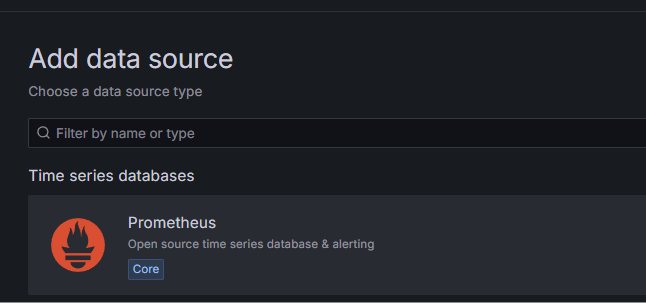
接下来我们配置下数据源 ,点击Data sources ,接着点击Add new data source

选择 prometheus
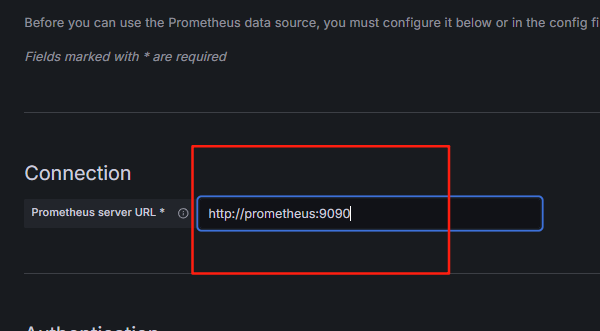
配置prometheus服务地址,如果是使用docker部署的,一般使用容器名作为主机名,使用http://prometheus:9090
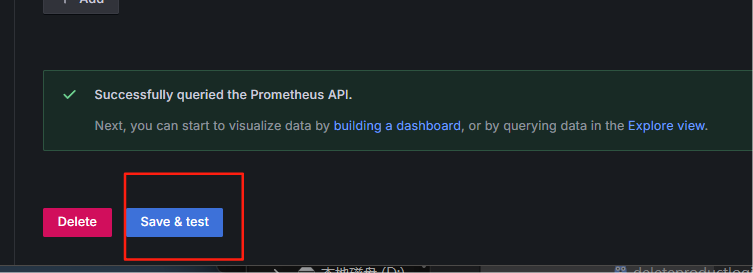
接着点击 Save & test ,如果出现Successfully 说明配置成功
3. 实现Prometheus指标监控
我们可以通过包装Elasticsearch客户端的HTTP Transport来自动收集所有ES请求的指标,而不是在每个业务逻辑中手动添加指标埋点
3.1 指标设计原则
在实现具体代码前,我们需要理解几个指标设计的核心原则:
- 明确的目标:每个指标应该有明确的监控目的
- 分层设计:系统级、应用级、业务级分层收集
- 适当粒度:既不过细导致数据过多,也不过粗导致缺乏洞察力
- 合理命名:命名规范清晰,包含服务/模块前缀
- 标签合理:使用标签增加维度,但避免标签值基数过高
针对Elasticsearch搜索服务,我们主要关注:
- 系统层:ES服务的可用性、集群状态
- 应用层:请求延迟、错误率、QPS
- 业务层:搜索命中率、索引操作成功率
3.2 metric指标定义
首先,创建 internal/pkg/metrics 目录,用于定义指标:
go
package metrics

import (
	"github.com/prometheus/client_golang/prometheus"
	"github.com/zeromicro/go-zero/core/proc"
)

// ES客户端请求指标
var (
	// ES请求耗时直方图
	ESClientReqDur = prometheus.NewHistogramVec(
		prometheus.HistogramOpts{
			Name:    "es_client_req_duration_ms",
			Help:    "Elasticsearch client requests duration in milliseconds",
			Buckets: []float64{5, 10, 25, 50, 100, 250, 500, 1000, 2500, 5000}, // 分桶
		},
		[]string{"index"}, // 索引名称标签
	)

	// ES请求错误计数器
	ESClientReqErrTotal = prometheus.NewCounterVec(
		prometheus.CounterOpts{
			Name: "es_client_req_err_total",
			Help: "Elasticsearch client request error count",
		},
		[]string{"index", "error"}, // 索引名称和错误标签
	)

	// ES请求计数器
	ESClientReqTotal = prometheus.NewCounterVec(
		prometheus.CounterOpts{
			Name: "es_client_req_total",
			Help: "Elasticsearch client request total count",
		},
		[]string{"index", "method"}, // 索引名称和HTTP方法标签
	)

	// 搜索请求计数器
	SearchRequests = prometheus.NewCounterVec(
		prometheus.CounterOpts{
			Name: "search_requests_total",
			Help: "Total number of search requests",
		},
		[]string{"status"}, // 标签:成功/失败
	)

	// 索引操作计数器
	IndexOperations = prometheus.NewCounterVec(
		prometheus.CounterOpts{
			Name: "index_operations_total",
			Help: "Total number of index operations",
		},
		[]string{"operation", "status"}, // 标签:操作类型(add/delete),状态(success/error)
	)
)

// RegisterMetrics 注册所有指标
func RegisterMetrics() {
	prometheus.MustRegister(
		ESClientReqDur,
		ESClientReqErrTotal,
		ESClientReqTotal,
		SearchRequests,
		IndexOperations,
	)

	// 在程序结束时确保指标被正确释放
	proc.AddShutdownListener(func() {
		prometheus.Unregister(ESClientReqDur)
		prometheus.Unregister(ESClientReqErrTotal)
		prometheus.Unregister(ESClientReqTotal)
		prometheus.Unregister(SearchRequests)
		prometheus.Unregister(IndexOperations)
	})
}
3.3 自定义Transport
现在,创建一个支持指标监控的 Elasticsearch 客户端包装器。创建 internal/pkg/es/metric_transport.go 文件:
go
package es

import (
	"go-zero-demo/ES/internal/pkg/metrics"
	"net/http"
	"strconv"
	"strings"
	"time"
)

// MetricTransport 是一个包装http.RoundTripper的结构体,用于收集ES请求指标
type MetricTransport struct {
	transport http.RoundTripper
}

// NewMetricTransport 创建一个新的MetricTransport
func NewMetricTransport(transport http.RoundTripper) *MetricTransport {
	if transport == nil {
		transport = http.DefaultTransport
	}
	return &MetricTransport{transport: transport}
}

// RoundTrip 实现http.RoundTripper接口,添加指标收集
func (t *MetricTransport) RoundTrip(req *http.Request) (resp *http.Response, err error) {
	var (
		startTime = time.Now()
		// 尝试从请求URL中提取索引名称
		indexName = extractIndexName(req.URL.Path)
		method    = req.Method
	)

	// 增加请求计数

	metrics.ESClientReqTotal.WithLabelValues(indexName, method).Inc()

	// 执行原始请求
	resp, err = t.transport.RoundTrip(req)

	// 记录请求耗时
	metrics.ESClientReqDur.WithLabelValues(indexName).Observe(float64(time.Since(startTime).Milliseconds()))

	// 记录错误
	metrics.ESClientReqErrTotal.WithLabelValues(indexName, strconv.FormatBool(err != nil)).Inc()

	return resp, err
}

// extractIndexName 从请求路径中提取Elasticsearch索引名称

func extractIndexName(path string) string {
	// 移除前导斜杠
	if path[0] == '/' {
		path = path[1:]
	}

	// 提取第一个路径段作为索引名
	parts := strings.SplitN(path, "/", 2)
	if len(parts) == 0 {
		return "unknown"
	}

	// 检查是否是特殊API路径
	if parts[0] == "_cat" || parts[0] == "_cluster" || parts[0] == "_nodes" ||
	   parts[0] == "_search" || parts[0] == "_bulk" || parts[0] == "_msearch" {
		return parts[0]
	}

	// 移除可能出现在索引名称中的查询字符串
	index := strings.Split(parts[0], "?")[0]
	if index == "" {
		return "unknown"
	}

	return index
}
修改 internal/pkg/es/es.go 中的 NewElasticsearchClient 方法,使用我们的指标收集包装器:
go
func NewElasticsearchClient(addresses []string, username, password string) (*ElasticsearchClient, error) {
	// 创建基础 Transport
	baseTransport := &http.Transport{
		MaxIdleConnsPerHost:   10,
		ResponseHeaderTimeout: 5 * time.Second,
		DialContext:           (&net.Dialer{Timeout: 5 * time.Second}).DialContext,
		TLSClientConfig: &tls.Config{
			MinVersion: tls.VersionTLS12,
		},
	}

	// 使用指标包装器包装基础 Transport
	metricTransport := NewMetricTransport(baseTransport)

	cfg := elasticsearch.Config{
		Addresses: addresses,
		Username:  username,
		Password:  password,
		Transport: metricTransport, // 使用包装后的 Transport
	}

	client, err := elasticsearch.NewClient(cfg)
	if err != nil {
		return nil, err
	}

	// 测试连接
	res, err := client.Info()
	if err != nil {
		return nil, err
	}
	defer res.Body.Close()

	if res.IsError() {
		return nil, errors.New("Elasticsearch connection failed")
	}

	return &ElasticsearchClient{
		client: client,
	}, nil
}
3.4 注册指标
修改 search.go 文件,注册指标:
go
func main() {
	flag.Parse()

	var c config.Config
	conf.MustLoad(*configFile, &c)

	// 启用 Prometheus 指标
	prometheus.StartAgent(c.Prometheus)
	metrics.RegisterMetrics()


	//其他代码不变
	server := rest.MustNewServer(c.RestConf)
	defer server.Stop()
	ctx := svc.NewServiceContext(c)

		// 初始化 Elasticsearch 索引
	if err := svc.InitElasticsearch(ctx.EsClient); err != nil {
		panic(fmt.Sprintf("初始化 Elasticsearch 失败: %v", err))
	}


	handler.RegisterHandlers(server, ctx)

	fmt.Printf("Starting server at %s:%d...\n", c.Host, c.Port)
	server.Start()
}
3.5 修改配置文件
在 etc/search-api.yaml 中添加 Prometheus 配置:
yaml
Name: search-api
Host: 0.0.0.0
Port: 8888

Elasticsearch:
  Addresses:
    - http://localhost:9200
  Username: ""
  Password: ""

# 添加 Prometheus 指标配置
Prometheus:
  Host: 0.0.0.0
  Port: 9091
  Path: /metrics
3.6 完善业务层指标收集
尽管我们已经通过Transport层获取了Elasticsearch操作的底层指标,但在业务层面添加更多语义化的指标仍然很有价值。修改 internal/logic/searchproductslogic.go 文件:
go
func (l *SearchProductsLogic) SearchProducts(req *types.SearchRequest) (resp *types.SearchResponse, err error) {
	// 记录业务层面的搜索请求
	defer func() {
		if err != nil {
			metrics.SearchRequests.WithLabelValues("error").Inc()
		} else {
			metrics.SearchRequests.WithLabelValues("success").Inc()
		}
	}()

	// 现有逻辑保持不变
	// ...
}
修改 internal/logic/indexproductlogic.go 文件:
go
func (l *IndexProductLogic) IndexProduct(req *types.IndexProductRequest) (resp *types.IndexProductResponse, err error) {
	// 记录业务层面的索引操作
	defer func() {
		if err != nil {
			metrics.IndexOperations.WithLabelValues("add", "error").Inc()
		} else {
			metrics.IndexOperations.WithLabelValues("add", "success").Inc()
		}
	}()

	// 现有逻辑保持不变
	// ...
}
修改 internal/logic/deleteproductlogic.go 文件:
go
func (l *DeleteProductLogic) DeleteProduct(productId string) (resp *types.IndexProductResponse, err error) {
	// 记录业务层面的删除操作
	defer func() {
		if err != nil {
			metrics.IndexOperations.WithLabelValues("delete", "error").Inc()
		} else {
			metrics.IndexOperations.WithLabelValues("delete", "success").Inc()
		}
	}()

	// 现有逻辑保持不变
	// ...
}
4. 运行测试
bash
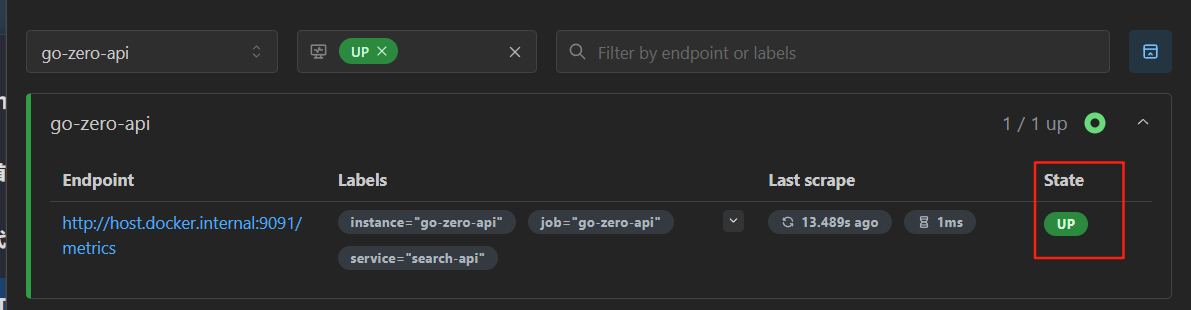
go run search.go项目运行后,浏览器打开http://localhost:9090 ,然后点击Status ->Target health,看下服务状态是否正常,如果是UP说明项目的Prometheus已经正常启动.
接着可以把每个API测试一遍,这里我就不演示了
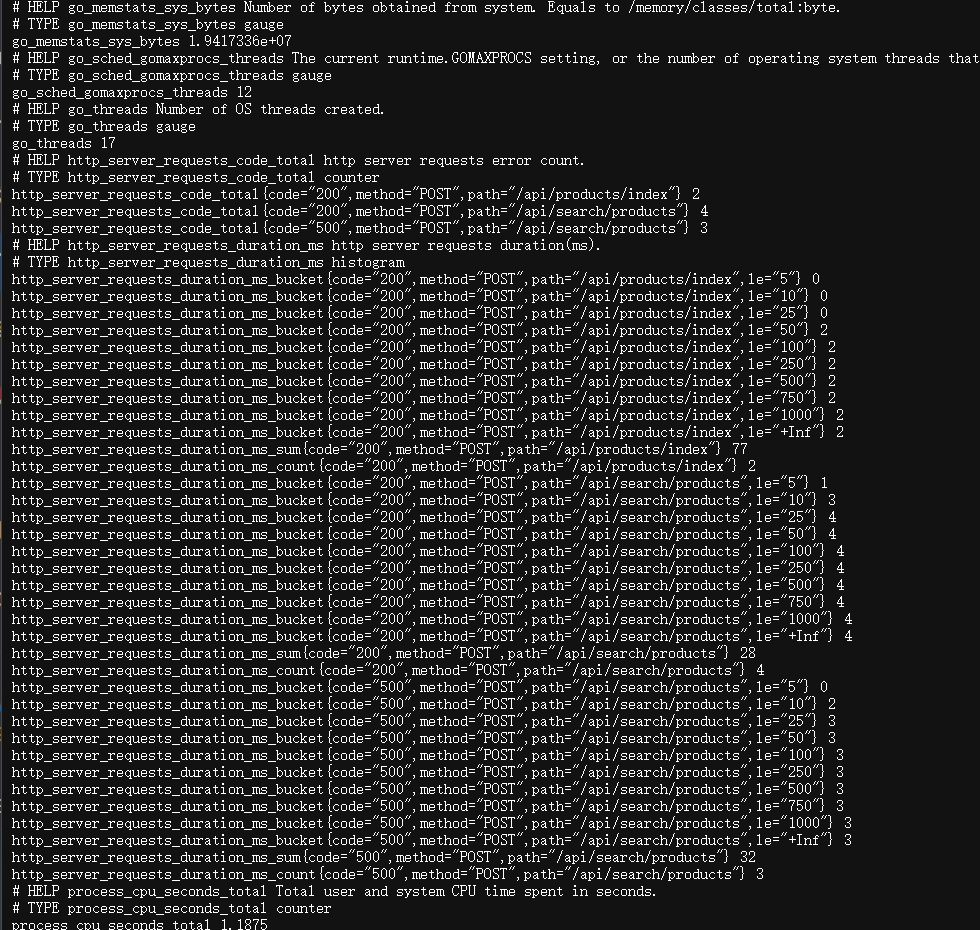
api测试完成后,浏览器访问http://127.0.0.1:9091/metrics ,看下指标是否被监控,如果有以下类似的数据,说明指标已经被监控。
5. 创建 Grafana 仪表盘
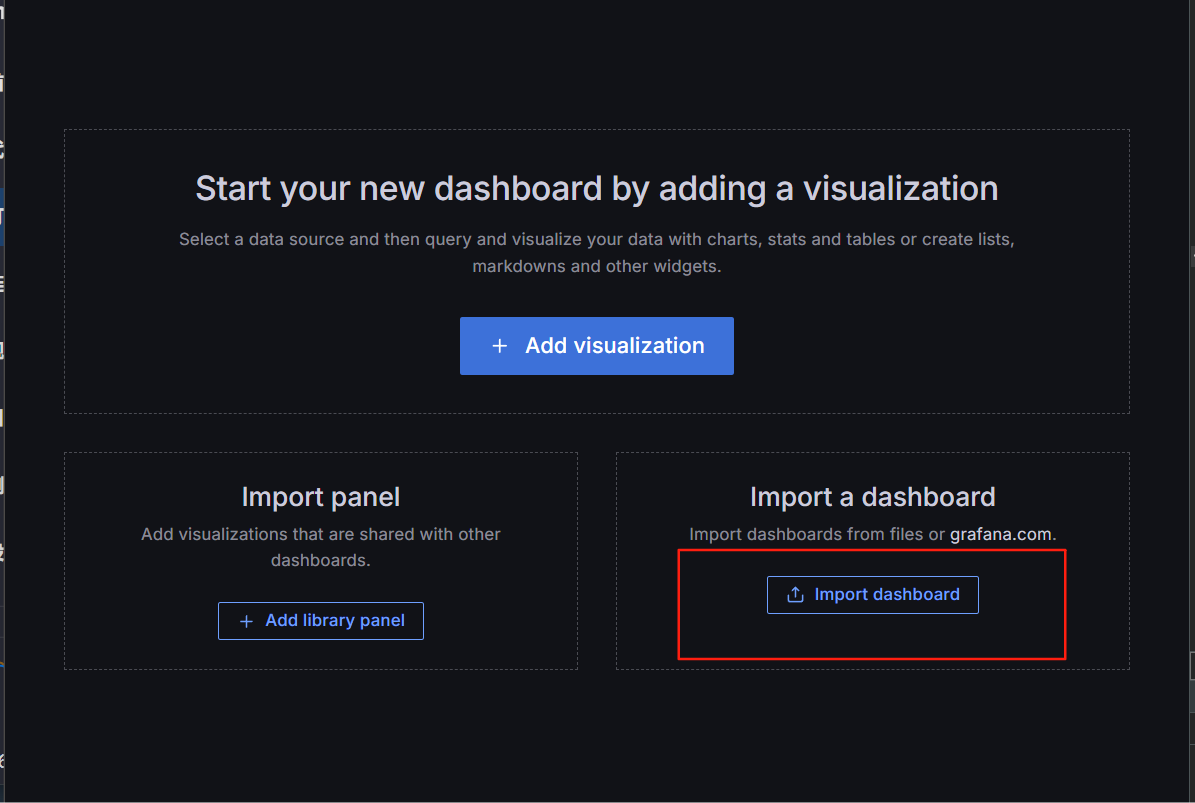
为了让指标看上去更直观,我们需要使用Grafana 让数据可视化,浏览器打开http://localhost:3000, 点击Dashboards ,接着点击Create dashboard ,然后点击 Import dashboard
接着在这里粘贴下面的json,点击Load,即可
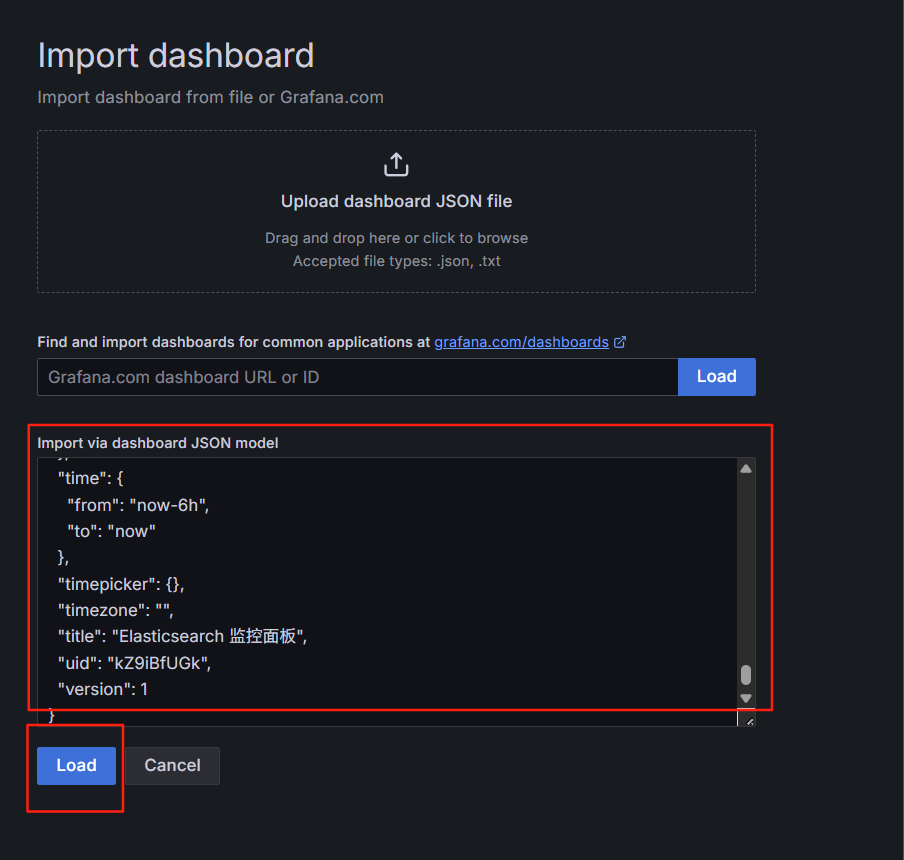
以下是 Grafana 仪表盘的 JSON 定义示例,可以导入到 Grafana 中:
json
{
  "annotations": {
    "list": [
      {
        "builtIn": 1,
        "datasource": "-- Grafana --",
        "enable": true,
        "hide": true,
        "iconColor": "rgba(0, 211, 255, 1)",
        "name": "Annotations & Alerts",
        "type": "dashboard"
      }
    ]
  },
  "editable": true,
  "gnetId": null,
  "graphTooltip": 0,
  "id": 1,
  "links": [],
  "panels": [
    {
      "aliasColors": {},
      "bars": false,
      "dashLength": 10,
      "dashes": false,
      "datasource": "Prometheus",
      "fieldConfig": {
        "defaults": {
          "custom": {}
        },
        "overrides": []
      },
      "fill": 1,
      "fillGradient": 0,
      "gridPos": {
        "h": 8,
        "w": 12,
        "x": 0,
        "y": 0
      },
      "hiddenSeries": false,
      "id": 2,
      "legend": {
        "avg": false,
        "current": false,
        "max": false,
        "min": false,
        "show": true,
        "total": false,
        "values": false
      },
      "lines": true,
      "linewidth": 1,
      "nullPointMode": "null",
      "options": {
        "alertThreshold": true
      },
      "percentage": false,
      "pluginVersion": "7.2.0",
      "pointradius": 2,
      "points": false,
      "renderer": "flot",
      "seriesOverrides": [],
      "spaceLength": 10,
      "stack": false,
      "steppedLine": false,
      "targets": [
        {
          "expr": "es_client_req_duration_ms_sum / es_client_req_duration_ms_count",
          "interval": "",
          "legendFormat": "{{index}}",
          "refId": "A"
        }
      ],
      "thresholds": [],
      "timeFrom": null,
      "timeRegions": [],
      "timeShift": null,
      "title": "Elasticsearch 平均请求耗时 (ms)",
      "tooltip": {
        "shared": true,
        "sort": 0,
        "value_type": "individual"
      },
      "type": "graph",
      "xaxis": {
        "buckets": null,
        "mode": "time",
        "name": null,
        "show": true,
        "values": []
      },
      "yaxes": [
        {
          "format": "ms",
          "label": null,
          "logBase": 1,
          "max": null,
          "min": null,
          "show": true
        },
        {
          "format": "short",
          "label": null,
          "logBase": 1,
          "max": null,
          "min": null,
          "show": true
        }
      ],
      "yaxis": {
        "align": false,
        "alignLevel": null
      }
    },
    {
      "aliasColors": {},
      "bars": false,
      "dashLength": 10,
      "dashes": false,
      "datasource": "Prometheus",
      "fieldConfig": {
        "defaults": {
          "custom": {}
        },
        "overrides": []
      },
      "fill": 1,
      "fillGradient": 0,
      "gridPos": {
        "h": 8,
        "w": 12,
        "x": 12,
        "y": 0
      },
      "hiddenSeries": false,
      "id": 4,
      "legend": {
        "avg": false,
        "current": false,
        "max": false,
        "min": false,
        "show": true,
        "total": false,
        "values": false
      },
      "lines": true,
      "linewidth": 1,
      "nullPointMode": "null",
      "options": {
        "alertThreshold": true
      },
      "percentage": false,
      "pluginVersion": "7.2.0",
      "pointradius": 2,
      "points": false,
      "renderer": "flot",
      "seriesOverrides": [],
      "spaceLength": 10,
      "stack": false,
      "steppedLine": false,
      "targets": [
        {
          "expr": "rate(es_client_req_total[1m])",
          "interval": "",
          "legendFormat": "{{index}} - {{method}}",
          "refId": "A"
        }
      ],
      "thresholds": [],
      "timeFrom": null,
      "timeRegions": [],
      "timeShift": null,
      "title": "Elasticsearch 请求速率 (每分钟)",
      "tooltip": {
        "shared": true,
        "sort": 0,
        "value_type": "individual"
      },
      "type": "graph",
      "xaxis": {
        "buckets": null,
        "mode": "time",
        "name": null,
        "show": true,
        "values": []
      },
      "yaxes": [
        {
          "format": "short",
          "label": null,
          "logBase": 1,
          "max": null,
          "min": null,
          "show": true
        },
        {
          "format": "short",
          "label": null,
          "logBase": 1,
          "max": null,
          "min": null,
          "show": true
        }
      ],
      "yaxis": {
        "align": false,
        "alignLevel": null
      }
    },
    {
      "aliasColors": {},
      "bars": false,
      "dashLength": 10,
      "dashes": false,
      "datasource": "Prometheus",
      "fieldConfig": {
        "defaults": {
          "custom": {}
        },
        "overrides": []
      },
      "fill": 1,
      "fillGradient": 0,
      "gridPos": {
        "h": 8,
        "w": 12,
        "x": 0,
        "y": 8
      },
      "hiddenSeries": false,
      "id": 6,
      "legend": {
        "avg": false,
        "current": false,
        "max": false,
        "min": false,
        "show": true,
        "total": false,
        "values": false
      },
      "lines": true,
      "linewidth": 1,
      "nullPointMode": "null",
      "options": {
        "alertThreshold": true
      },
      "percentage": false,
      "pluginVersion": "7.2.0",
      "pointradius": 2,
      "points": false,
      "renderer": "flot",
      "seriesOverrides": [],
      "spaceLength": 10,
      "stack": false,
      "steppedLine": false,
      "targets": [
        {
          "expr": "rate(es_client_req_err_total{error=\"true\"}[1m])",
          "interval": "",
          "legendFormat": "{{index}}",
          "refId": "A"
        }
      ],
      "thresholds": [],
      "timeFrom": null,
      "timeRegions": [],
      "timeShift": null,
      "title": "Elasticsearch 错误速率 (每分钟)",
      "tooltip": {
        "shared": true,
        "sort": 0,
        "value_type": "individual"
      },
      "type": "graph",
      "xaxis": {
        "buckets": null,
        "mode": "time",
        "name": null,
        "show": true,
        "values": []
      },
      "yaxes": [
        {
          "format": "short",
          "label": null,
          "logBase": 1,
          "max": null,
          "min": null,
          "show": true
        },
        {
          "format": "short",
          "label": null,
          "logBase": 1,
          "max": null,
          "min": null,
          "show": true
        }
      ],
      "yaxis": {
        "align": false,
        "alignLevel": null
      }
    },
    {
      "aliasColors": {},
      "bars": false,
      "dashLength": 10,
      "dashes": false,
      "datasource": "Prometheus",
      "fieldConfig": {
        "defaults": {
          "custom": {}
        },
        "overrides": []
      },
      "fill": 1,
      "fillGradient": 0,
      "gridPos": {
        "h": 8,
        "w": 12,
        "x": 12,
        "y": 8
      },
      "hiddenSeries": false,
      "id": 8,
      "legend": {
        "avg": false,
        "current": false,
        "max": false,
        "min": false,
        "show": true,
        "total": false,
        "values": false
      },
      "lines": true,
      "linewidth": 1,
      "nullPointMode": "null",
      "options": {
        "alertThreshold": true
      },
      "percentage": false,
      "pluginVersion": "7.2.0",
      "pointradius": 2,
      "points": false,
      "renderer": "flot",
      "seriesOverrides": [],
      "spaceLength": 10,
      "stack": false,
      "steppedLine": false,
      "targets": [
        {
          "expr": "rate(search_requests_total[1m])",
          "interval": "",
          "legendFormat": "{{status}}",
          "refId": "A"
        }
      ],
      "thresholds": [],
      "timeFrom": null,
      "timeRegions": [],
      "timeShift": null,
      "title": "搜索请求速率 (每分钟)",
      "tooltip": {
        "shared": true,
        "sort": 0,
        "value_type": "individual"
      },
      "type": "graph",
      "xaxis": {
        "buckets": null,
        "mode": "time",
        "name": null,
        "show": true,
        "values": []
      },
      "yaxes": [
        {
          "format": "short",
          "label": null,
          "logBase": 1,
          "max": null,
          "min": null,
          "show": true
        },
        {
          "format": "short",
          "label": null,
          "logBase": 1,
          "max": null,
          "min": null,
          "show": true
        }
      ],
      "yaxis": {
        "align": false,
        "alignLevel": null
      }
    },
    {
      "aliasColors": {},
      "bars": false,
      "dashLength": 10,
      "dashes": false,
      "datasource": "Prometheus",
      "fieldConfig": {
        "defaults": {
          "custom": {}
        },
        "overrides": []
      },
      "fill": 1,
      "fillGradient": 0,
      "gridPos": {
        "h": 8,
        "w": 12,
        "x": 0,
        "y": 16
      },
      "hiddenSeries": false,
      "id": 10,
      "legend": {
        "avg": false,
        "current": false,
        "max": false,
        "min": false,
        "show": true,
        "total": false,
        "values": false
      },
      "lines": true,
      "linewidth": 1,
      "nullPointMode": "null",
      "options": {
        "alertThreshold": true
      },
      "percentage": false,
      "pluginVersion": "7.2.0",
      "pointradius": 2,
      "points": false,
      "renderer": "flot",
      "seriesOverrides": [],
      "spaceLength": 10,
      "stack": false,
      "steppedLine": false,
      "targets": [
        {
          "expr": "rate(index_operations_total[1m])",
          "interval": "",
          "legendFormat": "{{operation}} - {{status}}",
          "refId": "A"
        }
      ],
      "thresholds": [],
      "timeFrom": null,
      "timeRegions": [],
      "timeShift": null,
      "title": "索引操作速率 (每分钟)",
      "tooltip": {
        "shared": true,
        "sort": 0,
        "value_type": "individual"
      },
      "type": "graph",
      "xaxis": {
        "buckets": null,
        "mode": "time",
        "name": null,
        "show": true,
        "values": []
      },
      "yaxes": [
        {
          "format": "short",
          "label": null,
          "logBase": 1,
          "max": null,
          "min": null,
          "show": true
        },
        {
          "format": "short",
          "label": null,
          "logBase": 1,
          "max": null,
          "min": null,
          "show": true
        }
      ],
      "yaxis": {
        "align": false,
        "alignLevel": null
      }
    },
    {
      "aliasColors": {},
      "bars": false,
      "dashLength": 10,
      "dashes": false,
      "datasource": "Prometheus",
      "description": "",
      "fieldConfig": {
        "defaults": {
          "custom": {}
        },
        "overrides": []
      },
      "fill": 1,
      "fillGradient": 0,
      "gridPos": {
        "h": 8,
        "w": 12,
        "x": 12,
        "y": 16
      },
      "hiddenSeries": false,
      "id": 12,
      "legend": {
        "avg": false,
        "current": false,
        "max": false,
        "min": false,
        "show": true,
        "total": false,
        "values": false
      },
      "lines": true,
      "linewidth": 1,
      "nullPointMode": "null",
      "options": {
        "alertThreshold": true
      },
      "percentage": false,
      "pluginVersion": "7.2.0",
      "pointradius": 2,
      "points": false,
      "renderer": "flot",
      "seriesOverrides": [],
      "spaceLength": 10,
      "stack": false,
      "steppedLine": false,
      "targets": [
        {
          "expr": "histogram_quantile(0.95, sum(rate(es_client_req_duration_ms_bucket[5m])) by (le, index))",
          "interval": "",
          "legendFormat": "p95 - {{index}}",
          "refId": "A"
        },
        {
          "expr": "histogram_quantile(0.99, sum(rate(es_client_req_duration_ms_bucket[5m])) by (le, index))",
          "interval": "",
          "legendFormat": "p99 - {{index}}",
          "refId": "B"
        }
      ],
      "thresholds": [],
      "timeFrom": null,
      "timeRegions": [],
      "timeShift": null,
      "title": "Elasticsearch 请求耗时分位数 (ms)",
      "tooltip": {
        "shared": true,
        "sort": 0,
        "value_type": "individual"
      },
      "type": "graph",
      "xaxis": {
        "buckets": null,
        "mode": "time",
        "name": null,
        "show": true,
        "values": []
      },
      "yaxes": [
        {
          "format": "ms",
          "label": null,
          "logBase": 1,
          "max": null,
          "min": null,
          "show": true
        },
        {
          "format": "short",
          "label": null,
          "logBase": 1,
          "max": null,
          "min": null,
          "show": true
        }
      ],
      "yaxis": {
        "align": false,
        "alignLevel": null
      }
    }
  ],
  "refresh": "10s",
  "schemaVersion": 26,
  "style": "dark",
  "tags": [],
  "templating": {
    "list": []
  },
  "time": {
    "from": "now-6h",
    "to": "now"
  },
  "timepicker": {},
  "timezone": "",
  "title": "Elasticsearch 监控面板",
  "uid": "kZ9iBfUGk",
  "version": 1
}
导入Json后,会生成如下的界面:

如果数据都是显示No data , 点击每一个选项卡,然后点击 Edit
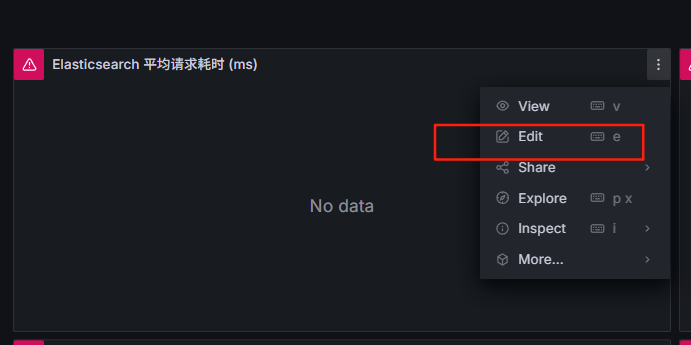
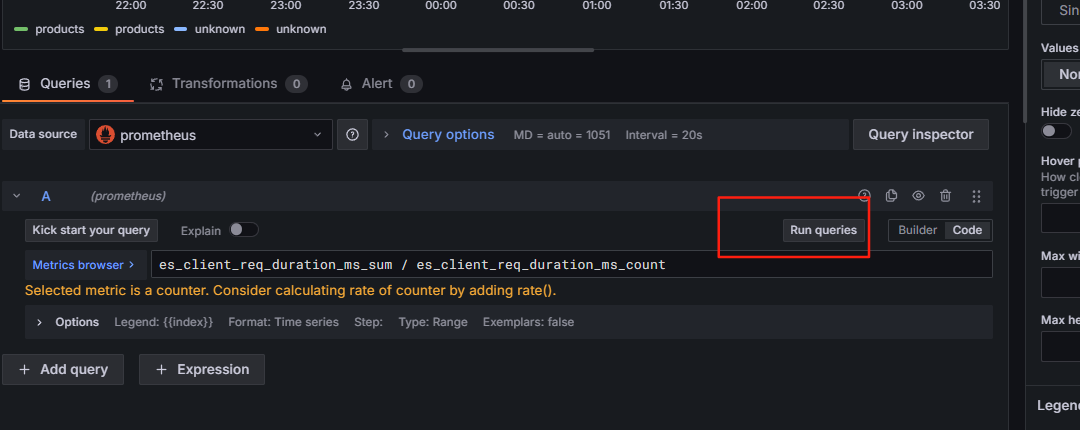
接着手动点击Run queries ,就会出现数据, 然后点击Save dashboard 保存即可。