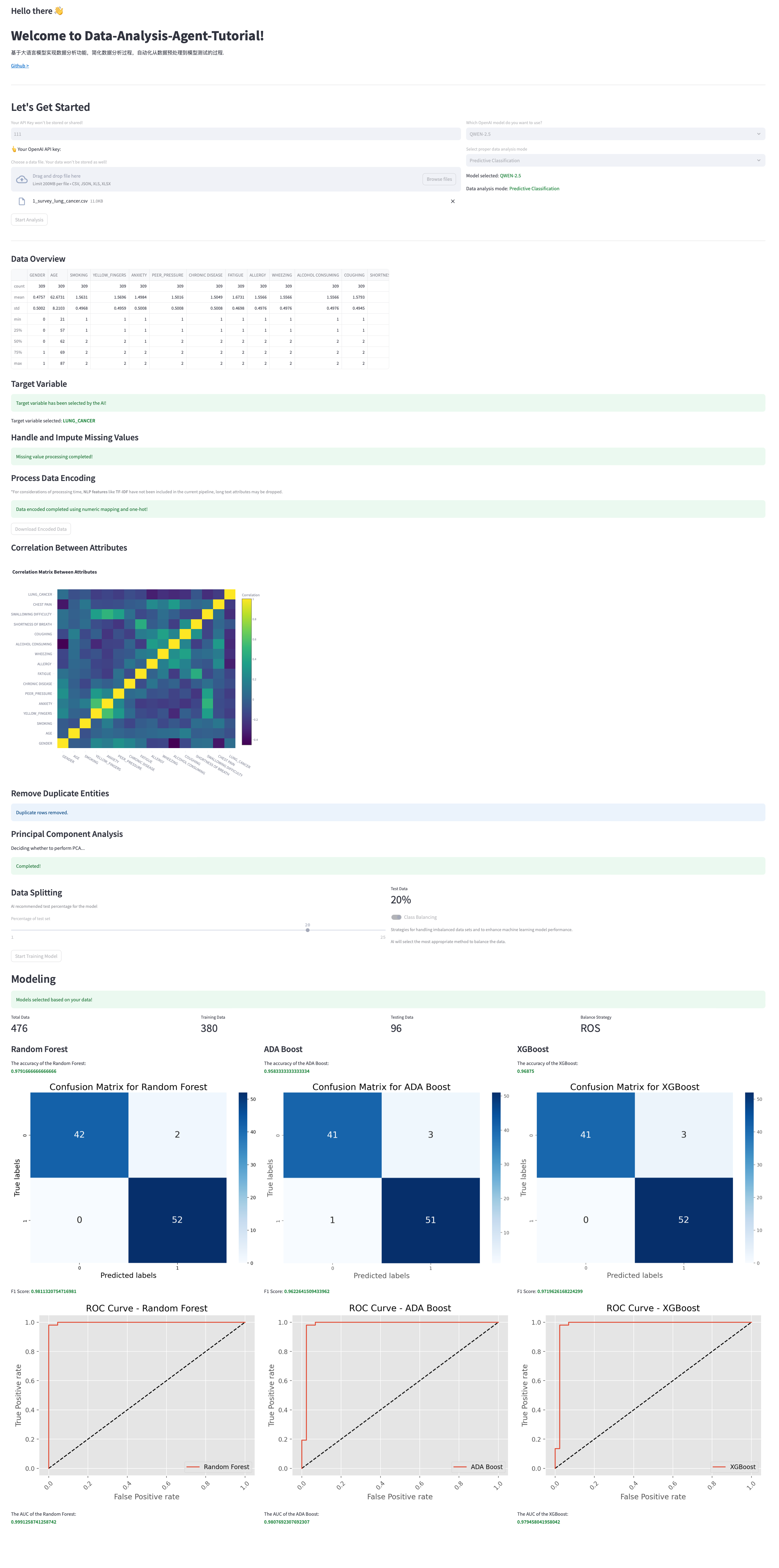
数据分析agent构建
代码资料来源于 Streamline-Analyst,旨在通过该仓库上的代码了解如何使用大语言模型构建数据分析工具;
个人仓库:Data-Analysis-Agent-Tutorial
不同的在于 Data-Analysis-Agent-Tutorial 是在 Streamline-Analyst 基础上进行学习参考的,将其调用的api接口从GPT改成了国内常见的QWEN。
觉得有用的话欢迎各位点一个Star呀,后续还将继续更新其余类型的模型预测。
准备工作
大语言模型API,以QWEN为例,在阿里云百炼大模型平台注册API账号,新人注册免费用百万Token够用。获取之后将API Key添加到自己的环境变量中,保证下面的代码中能够正确获取自己的API。
(注:代码中没有通过这行代码获取API Key,函数中传入的变量暂时都是None,但不妨碍模型的正常调用,langchain中的ChatTongyi模型在传入的api参数不能用的时候会自动搜索环境变量)
python
import os
os.environ["DASHSCOPE_API_KEY"]
运行方式
sh
streamlit run app.py二分类预测模型
以肺癌调查数据为例,通过多种属性数据判断是否有肺癌。详细数据见 sample_data/1_survey_lung_cancer.csv
程序的主入口在 app.py 中
python
# 下面这部分是界面的初始设置,包括标题、界面介绍的,可以对应调试看看不同

st.set_page_config(page_title="Data Analysis Agent", page_icon=":rocket:", layout="wide")

# TITLE SECTION
with st.container():
    st.subheader("Hello there 👋")
    st.title("Welcome to Data-Analysis-Agent-Tutorial!")
    if 'initialized' not in st.session_state:
        st.session_state.initialized = True
    if st.session_state.initialized:
        st.session_state.welcome_message = welcome_message()
        st.write(stream_data(st.session_state.welcome_message))
        time.sleep(0.5)
        st.write("[Github > ](https://github.com/WuChaseSea/Data-Analysis-Agent-Tutorial)")
        st.session_state.initialized = False
    else:
        st.write(st.session_state.welcome_message)
        st.write("[Github > ](https://github.com/WuChaseSea/Data-Analysis-Agent-Tutorial)")
在设置界面之后,构建相关按钮、交互界面的形式输入一些参数,包括api、文档、大语言模型、预测模型等
python
st.divider()
st.header("Let's Get Started")
left_column, right_column = st.columns([6, 4])
with left_column:
    API_KEY = st.text_input(
        "Your API Key won't be stored or shared!",
        placeholder="Enter your API key here...",
    )
    st.write("👆Your OpenAI API key:")
    uploaded_file = st.file_uploader("Choose a data file. Your data won't be stored as well!", accept_multiple_files=False, type=['csv', 'json', 'xls', 'xlsx'])
    if uploaded_file:
        if uploaded_file.getvalue():
            uploaded_file.seek(0)
            st.session_state.DF_uploaded = read_file_from_streamlit(uploaded_file)
            st.session_state.is_file_empty = False
        else:
            st.session_state.is_file_empty = True
with right_column:
    SELECTED_MODEL = st.selectbox(
    'Which OpenAI model do you want to use?',
    ('QWEN-2.5', 'QWEN-3'))

    MODE = st.selectbox(
    'Select proper data analysis mode',
    ('Predictive Classification', 'Clustering Model', 'Regression Model', 'Data Visualization'))

    st.write(f'Model selected: :green[{SELECTED_MODEL}]')
    st.write(f'Data analysis mode: :green[{MODE}]')

# Proceed Button
is_proceed_enabled = uploaded_file is not None and API_KEY != "" or uploaded_file is not None and MODE == "Data Visualization"

# Initialize the 'button_clicked' state
if 'button_clicked' not in st.session_state:
    st.session_state.button_clicked = False
if st.button('Start Analysis', disabled=(not is_proceed_enabled) or st.session_state.button_clicked, type="primary"):
    st.session_state.button_clicked = True
if "is_file_empty" in st.session_state and st.session_state.is_file_empty:
    st.caption('Your data file is empty!')
在所有参数输入之后,可以通过上一步选择的预测模型对文档进行分析预测等,比如对肺癌数据选择的是 Predictive Classification
python
GPT_MODEL = 3 if SELECTED_MODEL == 'QWEN-3' else 2
with st.container():
    if "DF_uploaded" not in st.session_state:
        st.error("File is empty!")
    else:
        if MODE == 'Predictive Classification':
            prediction_model_pipeline(st.session_state.DF_uploaded, API_KEY, GPT_MODEL)
因此预测分类模型的重点部分在models/prediction_model.py prediction_model_pipeline()函数里
包括以下步骤:
- 决定目标属性:让大语言模型根据表格的属性字段自行决定哪一个属性是需要预测的,比如这里的就是 LUNG_CANCER;
- 处理和计算缺失值:让大语言模型根据表格的属性字段决定对字段的缺失值应该怎么处理,比如用平均值、中值等;
- 数据编码:让大语言模型根据表格的属性字段决定对字段是否需要进行one-hot编码、文本类型丢弃等;
- 相关性计算:计算不同字段之间的相关性,这部分不用调用api;
- PCA:根据阈值决定是否需要使用PCA降维;
- 数据划分:让大语言模型根据数据量决定测试集的比例;
- 数据平衡:让大语言模型根据不同类型的数据量决定是否需要进行不平衡数据采样方法,包括RandomOverSampler、SMOTE、ADASYN等;
- 模型训练:让大语言模型根据表格内容决定前3种可能使用的分类模型,包括LogisticRegression、SVC、GaussianNB、RandomForestClassifier、AdaBoostClassifier、XGBClassifier、GradientBoostingClassifier等;
- 结果展示:对选择的3种分类模型结果进行展示;
目前跑通的效果图: