目录
一、项目演示
基于Android 开发完成的购物商城App--前后端分离项目
二、项目简介
使用软件
Android Studio、MySQL、Navicat、IDEA
使用语言
JAVA、VUE2
数据库
MySQL
注释量
中文注释量90%以上
项目页面
请自行观看视频演示
关键技术点
采用前后端分离技术完成该购物商城系统
前端:Android、web管理员(Vue)...
后端:SpringBoot+MyBatisX...
三、设计详情(部分)
Android前端--登录注册
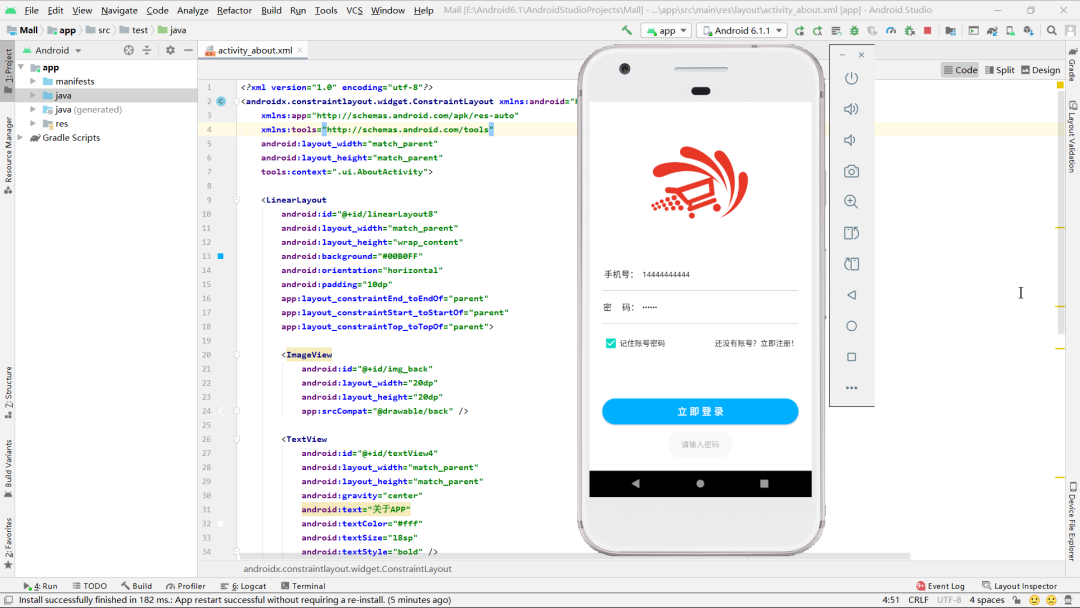
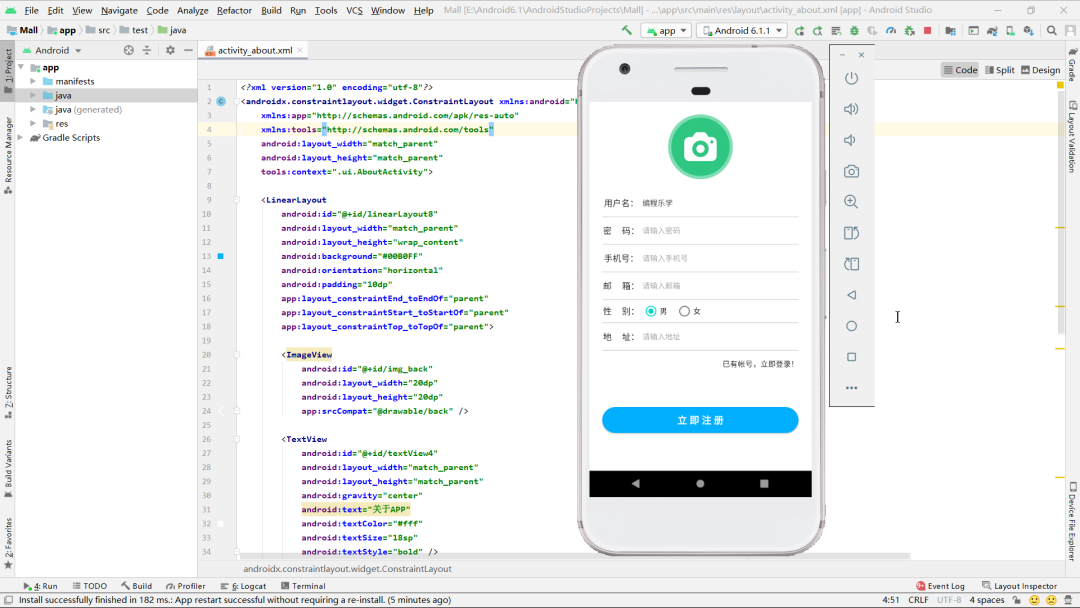
- 注册功能实现
-
提供用户信息填写界面(用户名、密码、手机号、邮箱、地址、性别)
-
支持头像上传功能(从相册选择图片并裁剪为圆形)
-
表单验证确保所有必填字段不为空
-
图片上传成功后调用用户注册接口
-
注册成功后自动关闭注册页面
- 登录功能实现
-
提供手机号和密码输入框
-
实现"记住密码"功能(使用SharedPreferences存储)
-
登录时验证手机号和密码是否匹配
-
登录成功后跳转到主界面(MainActivity)
-
提供注册页面跳转链接
- 数据存储
-
使用SharedPreferences存储登录凭证
-
登录成功后存储用户手机号到"User"共享首选项
-
"记住密码"功能可选择性保存手机号和密码
- 网络请求
-
使用Retrofit进行网络请求
-
图片上传和用户注册分开处理
-
对网络请求结果进行成功/失败处理
-
提供友好的错误提示
XML
<?xml version="1.0" encoding="utf-8"?>
<androidx.constraintlayout.widget.ConstraintLayout xmlns:android="http://schemas.android.com/apk/res/android"
    xmlns:app="http://schemas.android.com/apk/res-auto"
    xmlns:tools="http://schemas.android.com/tools"
    android:layout_width="match_parent"
    android:layout_height="match_parent"
    android:background="#fff"
    tools:context=".ui.LoginActivity">

    <ImageView
        android:id="@+id/imageView2"
        android:layout_width="200dp"
        android:layout_height="200dp"
        android:layout_marginTop="50dp"
        app:layout_constraintEnd_toEndOf="parent"
        app:layout_constraintStart_toStartOf="parent"
        app:layout_constraintTop_toTopOf="parent"
        app:srcCompat="@drawable/logo" />

    <LinearLayout
        android:id="@+id/linearLayout"
        android:layout_width="0dp"
        android:layout_height="wrap_content"
        android:layout_marginStart="24dp"
        android:layout_marginTop="50dp"
        android:layout_marginEnd="24dp"
        android:orientation="vertical"
        app:layout_constraintEnd_toEndOf="parent"
        app:layout_constraintStart_toStartOf="parent"
        app:layout_constraintTop_toBottomOf="@+id/imageView2">

        <LinearLayout
            android:layout_width="match_parent"
            android:layout_height="wrap_content"
            android:gravity="center|left"
            android:orientation="horizontal">

            <TextView
                android:id="@+id/textView2"
                android:layout_width="70dp"
                android:layout_height="wrap_content"
                android:gravity="center"
                android:text="手机号:"
                android:textColor="#000"
                android:textSize="16sp"
                android:textStyle="normal" />

            <EditText
                android:id="@+id/et_phone"
                android:layout_width="match_parent"
                android:layout_height="40dp"
                android:layout_marginLeft="4dp"
                android:background="#fff"
                android:ems="10"
                android:hint="请输入用户手机号"
                android:inputType="textPersonName"
                android:textSize="14sp" />
        </LinearLayout>

        <View
            android:id="@+id/view"
            android:layout_width="match_parent"
            android:layout_height="1dp"
            android:layout_marginTop="10dp"
            android:layout_marginBottom="10dp"
            android:background="#ccc" />

        <LinearLayout
            android:layout_width="match_parent"
            android:layout_height="wrap_content"
            android:gravity="center|left"
            android:orientation="horizontal">

            <TextView
                android:id="@+id/textView3"
                android:layout_width="70dp"
                android:layout_height="wrap_content"
                android:gravity="center"
                android:text="密     码:"
                android:textColor="#000"
                android:textSize="16sp"
                android:textStyle="normal" />

            <EditText
                android:id="@+id/et_password"
                android:layout_width="wrap_content"
                android:layout_height="40dp"
                android:layout_marginLeft="4dp"
                android:layout_weight="1"
                android:background="#fff"
                android:ems="10"
                android:hint="请输入用户密码"
                android:inputType="textPassword"
                android:textSize="14sp" />
        </LinearLayout>

        <View
            android:id="@+id/view2"
            android:layout_width="match_parent"
            android:layout_height="1dp"
            android:layout_marginTop="10dp"
            android:layout_marginBottom="10dp"
            android:background="#ccc" />

        <LinearLayout
            android:layout_width="match_parent"
            android:layout_height="wrap_content"
            android:layout_marginTop="10dp"
            android:orientation="horizontal">

            <CheckBox
                android:id="@+id/cb_rember"
                android:layout_width="wrap_content"
                android:layout_height="wrap_content"
                android:text="记住账号密码" />

            <TextView
                android:id="@+id/tv_register"
                android:layout_width="wrap_content"
                android:layout_height="wrap_content"
                android:layout_weight="1"
                android:gravity="center|right"
                android:text="还没有账号?立即注册!"
                android:textColor="#000" />
        </LinearLayout>

    </LinearLayout>

    <Button
        android:id="@+id/btn_login"
        android:layout_width="0dp"
        android:layout_height="wrap_content"
        android:background="@drawable/button"
        android:text="立 即 登 录"
        android:textColor="#fff"
        android:textSize="18sp"
        android:textStyle="bold"
        app:layout_constraintBottom_toBottomOf="parent"
        app:layout_constraintEnd_toEndOf="@+id/linearLayout"
        app:layout_constraintStart_toStartOf="@+id/linearLayout"
        app:layout_constraintTop_toBottomOf="@+id/linearLayout" />
</androidx.constraintlayout.widget.ConstraintLayout>
Android前端--商品详情页
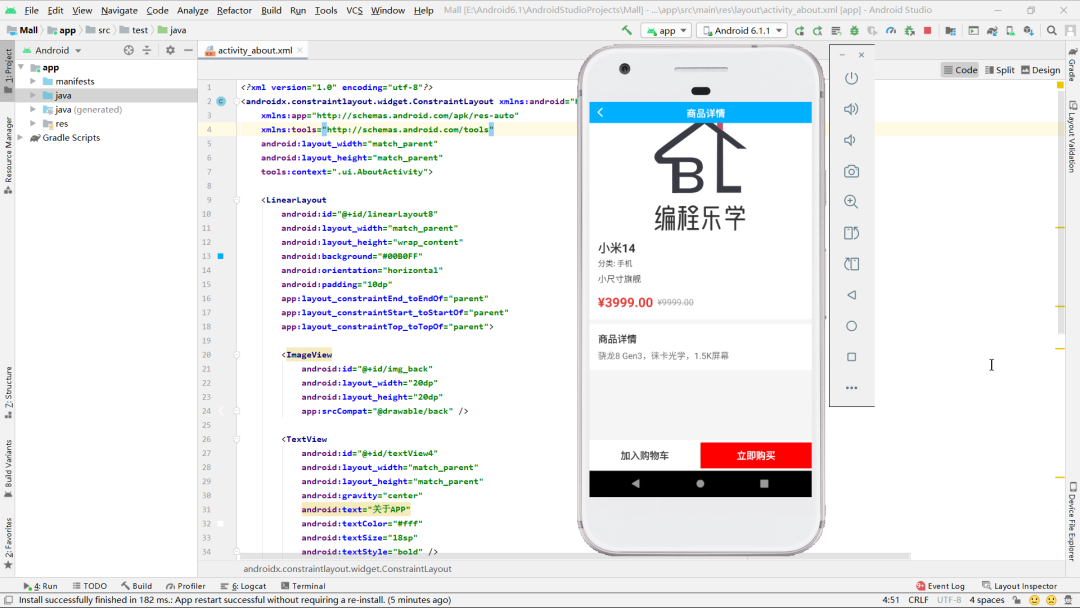
- 商品详情展示
-
显示商品图片(使用Glide加载并设置占位图)
-
展示商品名称、分类、描述、价格等信息
-
原价显示删除线效果
-
显示商品详细描述(若无则显示"暂无详细描述")
- 用户交互功能
-
返回按钮实现页面关闭
-
"加入购物车"按钮功能
-
"立即购买"按钮跳转支付页面
-
未登录用户提示登录
- 购物车功能
-
通过SharedPreferences获取当前用户信息
-
根据手机号查询用户ID
-
调用购物车接口添加商品
-
处理商品已存在购物车的情况
-
提供友好的操作反馈提示
- 网络请求处理
-
使用Retrofit进行商品详情查询
-
异步获取用户信息
-
购物车添加商品请求
-
统一的错误处理机制
-
加载状态提示
java
package com.example.mall.ui;

import android.content.Context;
import android.content.Intent;
import android.content.SharedPreferences;
import android.graphics.Paint;
import android.os.Bundle;
import android.widget.Button;
import android.widget.ImageView;
import android.widget.TextView;
import android.widget.Toast;

import androidx.appcompat.app.AppCompatActivity;

import com.bumptech.glide.Glide;
import com.example.mall.Interface.cart.CartApiService;
import com.example.mall.Interface.cart.CartData;
import com.example.mall.Interface.user.UserApiService;
import com.example.mall.Interface.user.UserData;
import com.example.mall.Interface.user.UserResponse;
import com.example.mall.Interface.product.ProductApiService;
import com.example.mall.Interface.product.ProductData;
import com.example.mall.Interface.product.ProductResponse;
import com.example.mall.R;
import com.example.mall.utils.ApiClient;
import com.example.mall.utils.ApiServiceManager;

import java.util.Map;

import retrofit2.Call;
import retrofit2.Callback;
import retrofit2.Response;

public class ProductDetailActivity extends AppCompatActivity {

    // 界面控件声明
    private ImageView productImage;
    private TextView productName;
    private TextView productCategory;
    private TextView productDescription;
    private TextView productPrice;
    private TextView productOriginalPrice;
    private TextView productDetail;
    private Button btnAddToCart;
    private Button btnBuyNow;
    private ImageView imgBack;

    @Override
    protected void onCreate(Bundle savedInstanceState) {
        super.onCreate(savedInstanceState);
        setContentView(R.layout.activity_product_detail);
        initView(); // 初始化界面控件
        loadProductDetail(); // 加载商品详情
        back(); // 返回按钮点击事件
    }

    // 返回按钮点击事件处理
    private void back() {
        imgBack.setOnClickListener(v -> finish());
    }

    // 初始化界面控件
    private void initView() {
        productImage = findViewById(R.id.product_image);
        productName = findViewById(R.id.product_name);
        productCategory = findViewById(R.id.product_category);
        productDescription = findViewById(R.id.product_description);
        productPrice = findViewById(R.id.product_price);
        productOriginalPrice = findViewById(R.id.product_original_price);
        productDetail = findViewById(R.id.product_detail);
        btnAddToCart = findViewById(R.id.btn_add_to_cart);
        btnBuyNow = findViewById(R.id.btn_buy_now);
        imgBack = findViewById(R.id.img_back);
    }

    // 加载商品详情数据
    private void loadProductDetail() {
        int productId = getIntent().getIntExtra("productId", -1);
        if (productId == -1) {
            showError("商品信息错误");
            return;
        }

        ProductApiService service = ApiServiceManager.getProductService();
        Call<ProductResponse> call = service.getProductDetailById(productId);

        call.enqueue(new Callback<ProductResponse>() {
            @Override
            public void onResponse(Call<ProductResponse> call, Response<ProductResponse> response) {
                if (response.isSuccessful() && response.body() != null) {
                    ProductResponse productResponse = response.body();
                    if (productResponse.getCode() == 200 && productResponse.getData() != null && !productResponse.getData().isEmpty()) {
                        displayProductDetail(productResponse.getData().get(0));
                    } else {
                        showError(productResponse != null ? productResponse.getMsg() : "商品信息获取失败");
                    }
                } else {
                    showError("请求失败,状态码: " + response.code());
                }
            }

            @Override
            public void onFailure(Call<ProductResponse> call, Throwable t) {
                showError("网络错误: " + t.getMessage());
            }
        });
    }

    // 显示商品详情信息
    private void displayProductDetail(ProductData product) {
        Glide.with(this)
                .load(ApiClient.BASE_URL + product.getImage())
                .placeholder(R.mipmap.ic_launcher)
                .into(productImage);

        productName.setText(product.getName());
        productCategory.setText("分类: " + product.getCategory());
        productDescription.setText(product.getDescription());
        productPrice.setText("¥" + product.getPrice());
        productOriginalPrice.setPaintFlags(productOriginalPrice.getPaintFlags() | Paint.STRIKE_THRU_TEXT_FLAG);
        productDetail.setText(product.getDetail() != null ? product.getDetail() : "暂无详细描述");

        btnAddToCart.setOnClickListener(v -> addToCart(product));
        btnBuyNow.setOnClickListener(v -> buyNow(product));
    }

    // 添加到购物车功能
    private void addToCart(ProductData product) {
        // 直接从SharedPreferences获取手机号
        SharedPreferences sharedPreferences = getSharedPreferences("User", Context.MODE_PRIVATE);
        String phone = sharedPreferences.getString("phone", "");

        if (phone.isEmpty()) {
            Toast.makeText(this, "请先登录", Toast.LENGTH_SHORT).show();
            return;
        }

        // 显示加载提示
        Toast.makeText(this, "正在添加到购物车...", Toast.LENGTH_SHORT).show();

        // 根据手机号获取用户信息
        getUserByPhone(phone, new UserCallback() {
            @Override
            public void onSuccess(UserData user) {
                if (user != null && user.getId() != null) {
                    addToCartWithUserId(product, user.getId());
                } else {
                    Toast.makeText(ProductDetailActivity.this, "获取用户信息失败", Toast.LENGTH_SHORT).show();
                }
            }

            @Override
            public void onFailure(String errorMsg) {
                Toast.makeText(ProductDetailActivity.this, errorMsg, Toast.LENGTH_SHORT).show();
            }
        });
    }

    // 根据手机号获取用户信息
    private void getUserByPhone(String phone, UserCallback callback) {
        UserApiService userService = ApiServiceManager.getUserService();
        Call<UserResponse> call = userService.getUserByPhone(phone);

        call.enqueue(new Callback<UserResponse>() {
            @Override
            public void onResponse(Call<UserResponse> call, Response<UserResponse> response) {
                if (response.isSuccessful() && response.body() != null) {
                    UserResponse userResponse = response.body();
                    if (userResponse.getCode() == 200 && userResponse.getData() != null) {
                        callback.onSuccess(userResponse.getData());
                    } else {
                        callback.onFailure(userResponse != null ? userResponse.getMsg() : "获取用户信息失败");
                    }
                } else {
                    callback.onFailure("请求失败,状态码: " + response.code());
                }
            }

            @Override
            public void onFailure(Call<UserResponse> call, Throwable t) {
                callback.onFailure("网络错误: " + t.getMessage());
            }
        });
    }

    // 使用用户ID添加到购物车
    private void addToCartWithUserId(ProductData product, Integer userId) {
        CartData cartData = new CartData();
        cartData.setUserId(userId);
        cartData.setProductId(product.getId());
        cartData.setQuantity(1); // 默认数量为1

        CartApiService cartService = ApiServiceManager.getCartService();
        Call<Map<String, Object>> call = cartService.addCart(cartData);

        call.enqueue(new Callback<Map<String, Object>>() {
            @Override
            public void onResponse(Call<Map<String, Object>> call, Response<Map<String, Object>> response) {
                if (response.isSuccessful() && response.body() != null) {
                    Map<String, Object> result = response.body();
                    try {
                        Number codeNumber = (Number) result.get("code");
                        int code = codeNumber != null ? codeNumber.intValue() : -1;
                        String message = result.containsKey("msg") ? String.valueOf(result.get("msg")) : "";

                        if (code == 200) {
                            // 成功添加到购物车
                            Toast.makeText(ProductDetailActivity.this,
                                    "已添加 " + product.getName() + " 到购物车", Toast.LENGTH_SHORT).show();
                        } else if (message.contains("Duplicate entry")) {
                            // 商品已存在购物车中,静默处理或显示友好提示
                            // 选项1:静默处理,不显示任何提示
                            // 选项2:显示友好提示(根据您的需求选择)
                            Toast.makeText(ProductDetailActivity.this,
                                    product.getName() + " 已在购物车中", Toast.LENGTH_SHORT).show();
                        } else {
                            // 其他错误情况
                            Toast.makeText(ProductDetailActivity.this,
                                    message.isEmpty() ? "操作失败" : message, Toast.LENGTH_SHORT).show();
                        }
                    } catch (Exception e) {
                        Toast.makeText(ProductDetailActivity.this,
                                "处理响应数据出错", Toast.LENGTH_SHORT).show();
                        e.printStackTrace();
                    }
                } else {
                    Toast.makeText(ProductDetailActivity.this,
                            "请求失败,状态码: " + response.code(), Toast.LENGTH_SHORT).show();
                }
            }

            @Override
            public void onFailure(Call<Map<String, Object>> call, Throwable t) {
                Toast.makeText(ProductDetailActivity.this,
                        "网络错误: " + t.getMessage(), Toast.LENGTH_SHORT).show();
            }
        });
    }

    private void buyNow(ProductData product) {
        // 直接从SharedPreferences获取手机号
        SharedPreferences sharedPreferences = getSharedPreferences("User", Context.MODE_PRIVATE);
        String phone = sharedPreferences.getString("phone", "");

        if (phone.isEmpty()) {
            Toast.makeText(this, "请先登录", Toast.LENGTH_SHORT).show();
            return;
        }

        // 跳转到支付页面
        Intent intent = new Intent(this, PaymentActivity.class);
        intent.putExtra("product", product);
        startActivity(intent);
    }

    // 显示错误信息并关闭页面
    private void showError(String message) {
        Toast.makeText(this, message, Toast.LENGTH_SHORT).show();
        finish();
    }

    // 用户回调接口
    private interface UserCallback {
        void onSuccess(UserData user);

        void onFailure(String errorMsg);
    }
}
Android前端--订单详情
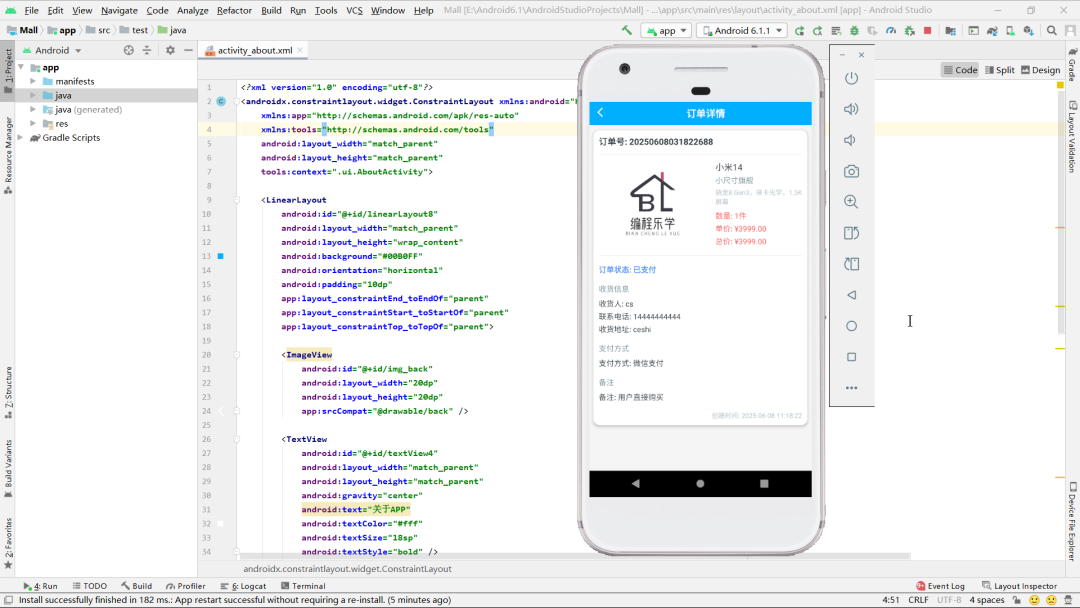
- 订单信息展示
-
显示订单号、商品名称、描述和详情
-
展示商品数量、单价和总金额
-
加载并显示商品图片(使用Glide)
-
显示订单创建时间和完成时间(如有)
- 物流与支付信息
-
展示收货人姓名、联系电话和详细地址
-
显示支付方式
-
显示用户备注信息(若无则显示"无")
- 订单状态处理
-
显示当前订单状态
-
对"已完成"状态特殊标记(红色文字)
-
动态处理完成时间显示(有则显示,无则隐藏)
- 交互功能
-
提供返回按钮(点击关闭当前页面)
-
处理空订单数据情况(直接关闭页面)
Android前端--我的页面
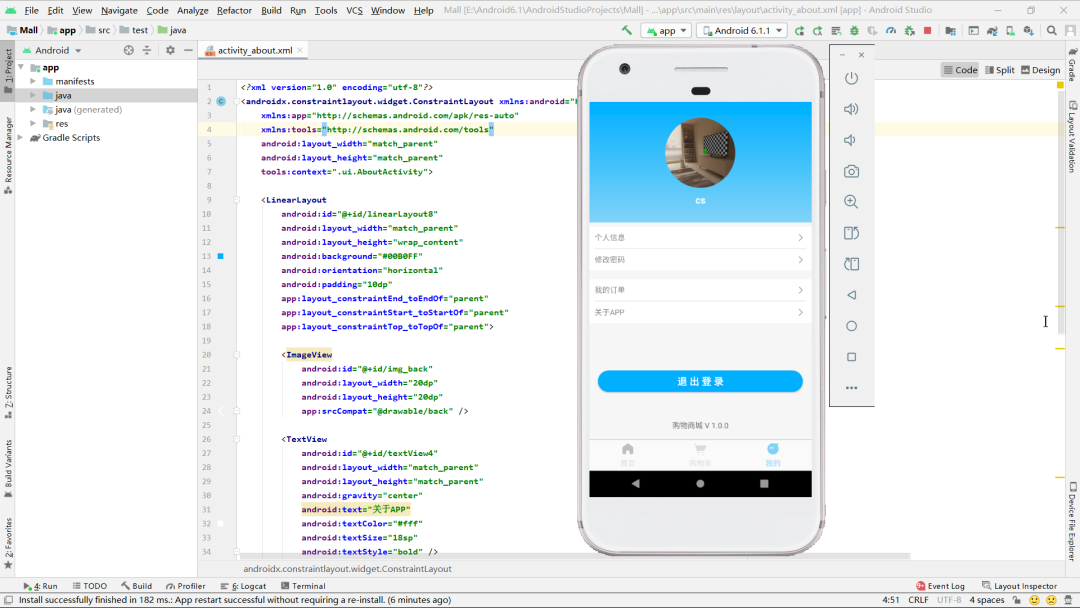
- 用户信息展示
-
显示用户头像(使用Glide加载并裁剪为圆形)
-
展示用户名
-
从SharedPreferences获取当前登录用户手机号
-
通过手机号查询并显示完整用户信息
- 功能导航
-
个人信息管理(跳转InformationActivity)
-
修改密码(跳转ModifyPasswordActivity)
-
我的订单(跳转OrderActivity)
-
关于我们(跳转AboutActivity)
-
使用Map结构管理布局与Activity映射关系
- 用户退出功能
-
提供退出登录按钮
-
点击后跳转回登录页面(LoginActivity)
- 数据加载与处理
-
使用Retrofit异步获取用户数据
-
处理网络请求成功/失败情况
-
显示友好的错误提示
-
检查Fragment是否已附加到Activity
XML
<?xml version="1.0" encoding="utf-8"?>
<androidx.constraintlayout.widget.ConstraintLayout xmlns:android="http://schemas.android.com/apk/res/android"
    xmlns:app="http://schemas.android.com/apk/res-auto"
    xmlns:tools="http://schemas.android.com/tools"
    android:layout_width="match_parent"
    android:layout_height="match_parent"
    android:background="#F6F6F6"
    tools:context=".ui.fragment.MineFragment">

    <LinearLayout
        android:id="@+id/linearLayout6"
        android:layout_width="0dp"
        android:layout_height="wrap_content"
        android:background="@drawable/gradient_bg"
        android:gravity="center"
        android:orientation="vertical"
        android:padding="30dp"
        app:layout_constraintEnd_toEndOf="parent"
        app:layout_constraintStart_toStartOf="parent"
        app:layout_constraintTop_toTopOf="parent">

        <ImageView
            android:id="@+id/ivAvatar"
            android:layout_width="130dp"
            android:layout_height="130dp"
            android:src="@drawable/avatar" />

        <TextView
            android:id="@+id/tv_name"
            android:layout_width="match_parent"
            android:layout_height="wrap_content"
            android:layout_marginTop="10dp"
            android:gravity="center"
            android:textColor="#fff"
            android:textSize="18sp"
            android:textStyle="bold" />
    </LinearLayout>

    <LinearLayout
        android:id="@+id/linearLayout7"
        android:layout_width="0dp"
        android:layout_height="wrap_content"
        android:layout_marginTop="8dp"
        android:background="#fff"
        android:orientation="vertical"
        android:padding="10dp"
        app:layout_constraintEnd_toEndOf="parent"
        app:layout_constraintStart_toStartOf="parent"
        app:layout_constraintTop_toBottomOf="@+id/linearLayout6">

        <LinearLayout
            android:id="@+id/ll_information"
            android:layout_width="match_parent"
            android:layout_height="match_parent"
            android:orientation="horizontal">

            <TextView
                android:id="@+id/textView61"
                android:layout_width="wrap_content"
                android:layout_height="wrap_content"
                android:layout_weight="1"
                android:text="个人信息" />

            <ImageView
                android:id="@+id/imageView41"
                android:layout_width="20dp"
                android:layout_height="20dp"
                android:src="@drawable/right" />
        </LinearLayout>

        <View
            android:id="@+id/view4"
            android:layout_width="match_parent"
            android:layout_height="1dp"
            android:layout_marginTop="10dp"
            android:layout_marginBottom="10dp"
            android:background="#DDDDDD" />

        <LinearLayout
            android:id="@+id/ll_modify_password"
            android:layout_width="match_parent"
            android:layout_height="match_parent"
            android:orientation="horizontal">

            <TextView
                android:id="@+id/textView612"
                android:layout_width="wrap_content"
                android:layout_height="wrap_content"
                android:layout_weight="1"
                android:text="修改密码" />

            <ImageView
                android:id="@+id/imageView24"
                android:layout_width="20dp"
                android:layout_height="20dp"
                android:src="@drawable/right" />
        </LinearLayout>

    </LinearLayout>

    <TextView
        android:id="@+id/textView8"
        android:layout_width="wrap_content"
        android:layout_height="wrap_content"
        android:layout_marginBottom="16dp"
        android:text="购物商城 V 1.0.0"
        android:textColor="#616161"
        android:textSize="14sp"
        app:layout_constraintBottom_toBottomOf="parent"
        app:layout_constraintEnd_toEndOf="parent"
        app:layout_constraintStart_toStartOf="@+id/linearLayout7" />

    <LinearLayout
        android:id="@+id/linearLayou6t7"
        android:layout_width="0dp"
        android:layout_height="wrap_content"
        android:layout_marginTop="16dp"
        android:background="#fff"
        android:orientation="vertical"
        android:padding="10dp"
        app:layout_constraintEnd_toEndOf="parent"
        app:layout_constraintStart_toStartOf="parent"
        app:layout_constraintTop_toBottomOf="@+id/linearLayout7">

        <LinearLayout
            android:id="@+id/ll_MyOrder"
            android:layout_width="match_parent"
            android:layout_height="match_parent"
            android:orientation="horizontal">

            <TextView
                android:id="@+id/textView63"
                android:layout_width="wrap_content"
                android:layout_height="wrap_content"
                android:layout_weight="1"
                android:text="我的订单" />

            <ImageView
                android:id="@+id/imageView44"
                android:layout_width="20dp"
                android:layout_height="20dp"
                android:src="@drawable/right" />
        </LinearLayout>

        <View
            android:id="@+id/view13"
            android:layout_width="match_parent"
            android:layout_height="1dp"
            android:layout_marginTop="10dp"
            android:layout_marginBottom="10dp"
            android:background="#DDDDDD" />

        <LinearLayout
            android:id="@+id/ll_about"
            android:layout_width="match_parent"
            android:layout_height="match_parent"
            android:orientation="horizontal">

            <TextView
                android:id="@+id/textView6"
                android:layout_width="wrap_content"
                android:layout_height="wrap_content"
                android:layout_weight="1"
                android:text="关于APP" />

            <ImageView
                android:id="@+id/imageView4"
                android:layout_width="20dp"
                android:layout_height="20dp"
                android:src="@drawable/right" />
        </LinearLayout>

    </LinearLayout>

    <Button
        android:id="@+id/btn_quit"
        android:layout_width="0dp"
        android:layout_height="40dp"
        android:layout_marginStart="16dp"
        android:layout_marginEnd="16dp"
        android:background="@drawable/button"
        android:text="退 出 登 录"
        android:textColor="#fff"
        android:textSize="18sp"
        android:textStyle="bold"
        app:layout_constraintBottom_toBottomOf="parent"
        app:layout_constraintEnd_toEndOf="parent"
        app:layout_constraintStart_toStartOf="parent"
        app:layout_constraintTop_toBottomOf="@+id/linearLayou6t7" />
</androidx.constraintlayout.widget.ConstraintLayout>
WEB后端--首页
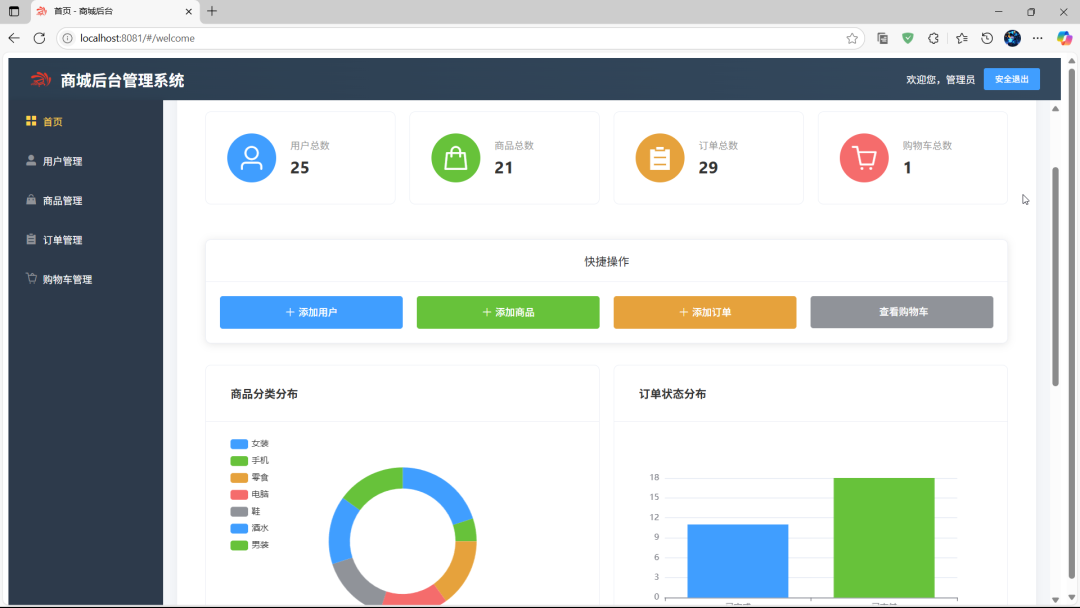
- 整体布局
采用Element UI组件构建的响应式后台管理系统首页,包含统计卡片、快捷操作按钮和图表展示区域。
- 核心功能
-
顶部展示欢迎信息和操作指引
-
4个统计卡片展示用户、商品、订单和购物车总数
-
快捷操作按钮可快速跳转到添加用户、商品、订单和查看购物车页面
-
3个数据图表展示商品分类分布、订单状态分布和用户订单数量排名
- 数据获取
-
通过API接口获取统计数据
-
使用分页和非分页接口获取完整数据用于图表展示
-
统计数据包括用户总数、商品总数、订单总数和购物车总数
- 图表展示
-
使用ECharts库实现数据可视化
-
包含饼图展示商品分类分布
-
柱状图展示订单状态分布
-
柱状图展示用户订单数量排名(前10)
html
<template>
  <div class="dashboard">
    <h2>欢迎使用商城后台管理系统</h2>
    <p>请从左侧菜单选择您要操作的功能</p>

    <el-row :gutter="20" class="statistics">
      <el-col :span="6">
        <el-card shadow="hover" class="stat-card">
          <div class="stat-content">
            <i class="el-icon-user stat-icon user-icon"></i>
            <div class="stat-info">
              <div class="stat-title">用户总数</div>
              <div class="stat-value">{{ userCount }}</div>
            </div>
          </div>
        </el-card>
      </el-col>
      <el-col :span="6">
        <el-card shadow="hover" class="stat-card">
          <div class="stat-content">
            <i class="el-icon-goods stat-icon product-icon"></i>
            <div class="stat-info">
              <div class="stat-title">商品总数</div>
              <div class="stat-value">{{ productCount }}</div>
            </div>
          </div>
        </el-card>
      </el-col>
      <el-col :span="6">
        <el-card shadow="hover" class="stat-card">
          <div class="stat-content">
            <i class="el-icon-s-order stat-icon order-icon"></i>
            <div class="stat-info">
              <div class="stat-title">订单总数</div>
              <div class="stat-value">{{ orderCount }}</div>
            </div>
          </div>
        </el-card>
      </el-col>
      <el-col :span="6">
        <el-card shadow="hover" class="stat-card">
          <div class="stat-content">
            <i class="el-icon-shopping-cart-2 stat-icon cart-icon"></i>
            <div class="stat-info">
              <div class="stat-title">购物车总数</div>
              <div class="stat-value">{{ cartCount }}</div>
            </div>
          </div>
        </el-card>
      </el-col>
    </el-row>

    <el-card class="quick-actions">
      <div slot="header" class="clearfix">
        <span>快捷操作</span>
      </div>
      <el-row :gutter="20">
        <el-col :span="6">
          <el-button type="primary" icon="el-icon-plus" @click="goToUserAdd">添加用户</el-button>
        </el-col>
        <el-col :span="6">
          <el-button type="success" icon="el-icon-plus" @click="goToProductAdd">添加商品</el-button>
        </el-col>
        <el-col :span="6">
          <el-button type="warning" icon="el-icon-plus" @click="goToOrderAdd">添加订单</el-button>
        </el-col>
        <el-col :span="6">
          <el-button type="info" icon="el-icon-shopping-cart" @click="goToCart">查看购物车</el-button>
        </el-col>
      </el-row>
    </el-card>

    <!-- 基于现有API的图表展示 -->
    <el-row :gutter="20" class="chart-row">
      <el-col :span="12">
        <el-card shadow="hover" class="chart-card">
          <div slot="header" class="chart-header">
            <span>商品分类分布</span>
          </div>
          <div id="productCategoryChart" style="width: 100%; height: 300px;"></div>
        </el-card>
      </el-col>
      <el-col :span="12">
        <el-card shadow="hover" class="chart-card">
          <div slot="header" class="chart-header">
            <span>订单状态分布</span>
          </div>
          <div id="orderStatusChart" style="width: 100%; height: 300px;"></div>
        </el-card>
      </el-col>
    </el-row>

    <el-row :gutter="20" class="chart-row">
      <el-col :span="24">
        <el-card shadow="hover" class="chart-card">
          <div slot="header" class="chart-header">
            <span>用户订单数量(前10)</span>
          </div>
          <div id="userOrderChart" style="width: 100%; height: 350px;"></div>
        </el-card>
      </el-col>
    </el-row>
  </div>
</template>

    goToUserAdd() {
      this.$router.push('/user')
    },
    goToProductAdd() {
      this.$router.push('/product')
    },
    goToOrderAdd() {
      this.$router.push('/orders')
    },
    goToCart() {
      this.$router.push('/cart')
    }
  }
}
</script>

<style scoped>
.dashboard {
  background: white;
  padding: 40px;
  border-radius: 12px;
  box-shadow: 0 2px 12px rgba(0, 0, 0, 0.05);
  text-align: center;
  min-height: calc(100vh - 160px);
}

.dashboard h2 {
  font-size: 24px;
  color: #333;
  margin-bottom: 12px;
}

.dashboard p {
  font-size: 16px;
  color: #666;
  margin-bottom: 30px;
}

.statistics {
  margin-bottom: 30px;
}

.stat-card {
  border-radius: 8px;
  cursor: pointer;
  transition: all 0.3s;
}

.stat-card:hover {
  transform: translateY(-5px);
  box-shadow: 0 10px 20px rgba(0, 0, 0, 0.1);
}

.stat-content {
  display: flex;
  align-items: center;
  padding: 10px;
}

.stat-icon {
  font-size: 40px;
  margin-right: 20px;
  padding: 15px;
  border-radius: 50%;
  color: white;
}

.user-icon {
  background-color: #409EFF;
}

.product-icon {
  background-color: #67C23A;
}

.order-icon {
  background-color: #E6A23C;
}

.cart-icon {
  background-color: #F56C6C;
}

.stat-info {
  text-align: left;
}

.stat-title {
  font-size: 14px;
  color: #999;
  margin-bottom: 5px;
}

.stat-value {
  font-size: 24px;
  font-weight: bold;
  color: #333;
}

.quick-actions {
  margin-top: 30px;
  border-radius: 8px;
}

.quick-actions .el-button {
  width: 100%;
  padding: 15px 0;
}

/* 调整列间距 */
.statistics .el-col {
  margin-bottom: 20px;
}

/* 图表样式 */
.chart-row {
  margin-top: 30px;
}

.chart-card {
  border-radius: 8px;
  margin-bottom: 20px;
}

.chart-header {
  font-weight: bold;
  font-size: 16px;
  color: #333;
  text-align: left;
  padding: 10px 15px;
}

#userOrderChart,
#productCategoryChart,
#orderStatusChart {
  transition: all 0.5s;
}
</style>
WEB后端--商品管理
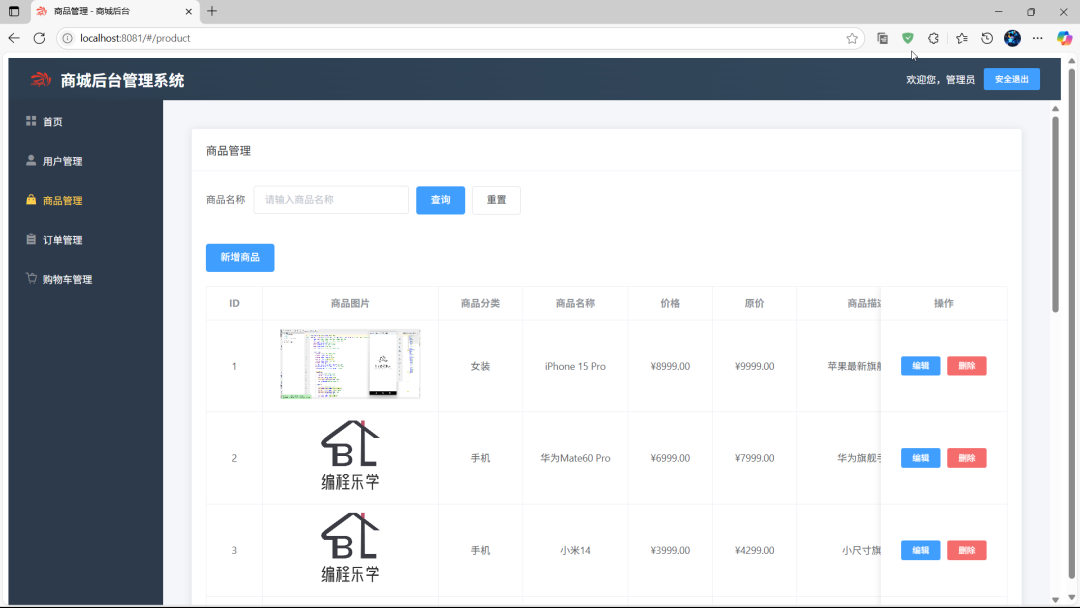
- 功能概述
这是一个基于Element UI的商品管理系统,包含商品列表展示、搜索、新增、编辑、删除等功能
- 主要功能点
-
商品列表分页展示
-
按商品名称搜索功能
-
新增商品功能
-
编辑商品信息功能
-
删除商品功能
-
商品图片上传功能
- 技术特点
-
使用Element UI组件构建界面
-
前后端分离架构
-
表单验证功能
-
图片上传预览功能
-
响应式布局设计
- 数据结构
-
商品包含ID、名称、分类、价格、原价、描述、详情、图片和状态等字段
-
支持多种商品分类
-
商品状态分为上架和下架两种
WEB后端--订单管理
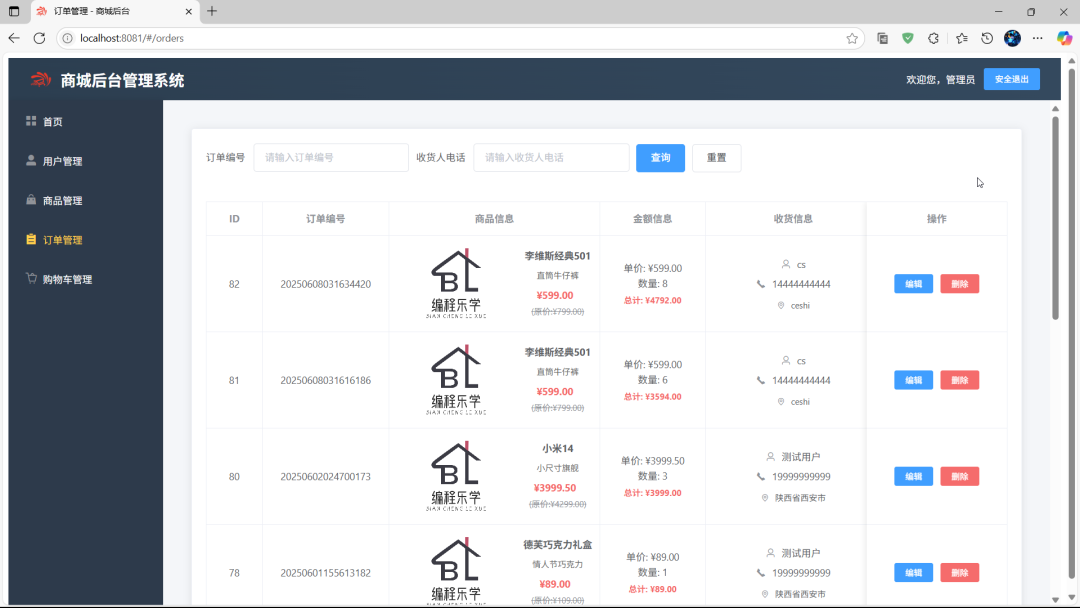
- 功能概述
基于Element UI的订单管理系统,包含订单列表展示、搜索、编辑、删除等功能,支持订单状态管理和详细信息查看
- 主要功能点
-
订单列表分页展示
-
按订单编号和收货人电话搜索功能
-
订单详情查看功能
-
订单状态编辑功能
-
订单删除功能
-
多维度排序功能
- 技术特点
-
使用Element UI组件构建界面
-
前后端分离架构
-
表单验证功能
-
复杂数据结构处理
-
时间格式转换处理
-
响应式布局设计
- 数据结构
-
订单包含ID、订单编号、商品信息、金额信息、收货信息、状态、时间信息等
-
商品信息内嵌在订单中
-
支持多种支付方式
-
订单状态分为已支付和已完成两种
- 交互设计
-
表格展示订单信息,包含商品图片预览
-
对话框形式处理订单编辑
-
操作确认提示
-
加载状态指示
-
状态变更联动效果
四、项目源码
👇👇👇👇👇快捷方式👇👇👇👇👇