前言
人机交互 Human in the loop HITL,简称HITL
涉及人工智能工作流程中的人工监督,使代理能够在关键点暂停、寻求反馈并相应地调整其行为。
这在可能出现错误、敏感作或不确定结果的情况下特别有用。 例如,代理在执行金融交易、完成报告或与敏感数据交互之前可能需要人工批准
核心概念
- 断点
- 检查点
- 状态编辑
示例1 断点的示例
python
import os
import random
import subprocess
import sys
from typing import TypedDict

from dotenv import load_dotenv
from langchain_core.runnables.graph import MermaidDrawMethod
from langchain_openai import ChatOpenAI
from langgraph.checkpoint.memory import MemorySaver
from langgraph.graph import StateGraph, START, END

load_dotenv()
model = ChatOpenAI(model="qwen-max",
                   base_url=os.getenv("BASE_URL"),
                   api_key=os.getenv("OPENAI_API_KEY"),
                   streaming=True)


def display_graph(graph, output_folder="output", ):
    # Code to visualise the graph, we will use this in all lessons
    mermaid_png = graph.get_graph(xray=1).draw_mermaid_png(
        draw_method=MermaidDrawMethod.API
    )

    # Create output folder if it doesn't exist
    output_folder = "."
    os.makedirs(output_folder, exist_ok=True)

    filename = os.path.join(output_folder, f"graph_{random.randint(1, 100000)}.png")
    with open(filename, 'wb') as f:
        f.write(mermaid_png)

    if sys.platform.startswith('darwin'):
        subprocess.call(('open', filename))
    elif sys.platform.startswith('linux'):
        subprocess.call(('xdg-open', filename))
    elif sys.platform.startswith('win'):
        os.startfile(filename)


#
class State(TypedDict):
    input: str


def step_1(state: State):
    print('--- Step 1 ---')
    return state


def step_2(state: State):
    print('--- Step 2 ---')
    return state


builder = StateGraph(State)
builder.add_node('step_1', step_1)
builder.add_node('step_2', step_2)

builder.add_edge(START, 'step_1')
builder.add_edge('step_1', 'step_2')
builder.add_edge('step_2', END)

# Set up memory and breakpoints
memory = MemorySaver()
graph = builder.compile(checkpointer=memory, interrupt_before=['step_2'])
display_graph(graph)

# 执行
config = {'configurable': {'thread_id': 'thread-1'}}
initial_input = {'input': 'Hello, LangGraph!'}
thread = {'configurable': {'thread_id': '1'}}
for event in graph.stream(initial_input, thread, stream_mode='values'):
    print(event)

#     接收用户输入并继续
user_approval = input('Do you approve to continue to Step 2? (yes/no): ')
if user_approval.lower() == 'yes':
    for event in graph.stream(None, thread, stream_mode='values'):
        print(event)
    else:
        print('Execution halted by user.')
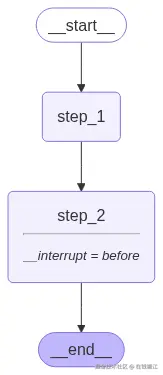
输出图为
输入yes的
css
{'input': 'Hello, LangGraph!'}
--- Step 1 ---
{'input': 'Hello, LangGraph!'}
Do you approve to continue to Step 2? (yes/no): yes
{'input': 'Hello, LangGraph!'}
--- Step 2 ---
{'input': 'Hello, LangGraph!'}
Execution halted by user.
输入no的
css
{'input': 'Hello, LangGraph!'}
--- Step 1 ---
{'input': 'Hello, LangGraph!'}
Do you approve to continue to Step 2? (yes/no): no
可以看到输入yes的继续执行第二步了。
示例 2:内容审核的实际示例
python
import os
import random
import subprocess
import sys
from typing import TypedDict

from dotenv import load_dotenv
from langchain_core.runnables.graph import MermaidDrawMethod
from langchain_openai import ChatOpenAI
from langgraph.checkpoint.memory import MemorySaver
from langgraph.graph import StateGraph, START, END

load_dotenv()
llm = ChatOpenAI(model="qwen-max",
                 base_url=os.getenv("BASE_URL"),
                 api_key=os.getenv("OPENAI_API_KEY"),
                 streaming=True)


def display_graph(graph, output_folder="output", ):
    # Code to visualise the graph, we will use this in all lessons
    mermaid_png = graph.get_graph(xray=1).draw_mermaid_png(
        draw_method=MermaidDrawMethod.API
    )

    # Create output folder if it doesn't exist
    output_folder = "."
    os.makedirs(output_folder, exist_ok=True)

    filename = os.path.join(output_folder, f"graph_{random.randint(1, 100000)}.png")
    with open(filename, 'wb') as f:
        f.write(mermaid_png)

    if sys.platform.startswith('darwin'):
        subprocess.call(('open', filename))
    elif sys.platform.startswith('linux'):
        subprocess.call(('xdg-open', filename))
    elif sys.platform.startswith('win'):
        os.startfile(filename)


class State(TypedDict):
    input: str
    draft_content: str


def create_draft(state: State):
    print("--- 生成草稿 ---")
    prompt = f"写一个主题是{state['input']}的博客"
    response = llm.invoke([{"role": "user", "content": prompt}])
    state["draft_content"] = response.content
    print(f"草稿内容:{response.content}")
    return state


def review_draft(state: State):
    print("--- 审核草稿 ---")
    return state


def publish_content(state: State):
    print("--- 发布内容 ---")
    return state


builder = StateGraph(State)
builder.add_node("create_draft", create_draft)
builder.add_node("review_draft", review_draft)
builder.add_node("publish_content", publish_content)

builder.add_edge(START, "create_draft")
builder.add_edge("create_draft", "review_draft")
builder.add_edge("review_draft", "publish_content")
builder.add_edge("publish_content", END)

memory = MemorySaver()
graph = builder.compile(checkpointer=memory, interrupt_before=["publish_content"])
display_graph(graph)

config = {"configurable": {"thread_id": "thread-1"}}
initial_input = {"input": "AI在现代创作中的重要性"}
thread = {"configurable": {"thread_id": "1"}}
for event in graph.stream(initial_input, thread, stream_mode="values"):
    print(event)
user_approval = input("需要发布草稿吗? (yes/no/mod): ")
if user_approval.lower() == "yes":
    # 继续调用
    for event in graph.stream(None, thread, stream_mode="values"):
        print(event)
elif user_approval.lower() == "mod":
    updated_draft = input("请修改草稿内容:\n")
    #memory.update({"draft_content": updated_draft})  # Update memory with new content
    print("修改完毕")
    for event in graph.stream(None, thread, stream_mode="values"):
        print(event)
else:
    print("用户终止")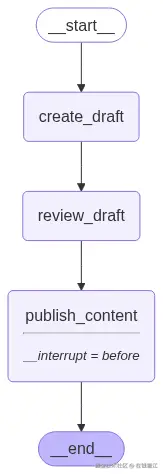
输出结果
bash
{'input': 'AI在现代创作中的重要性'}
--- 生成草稿 ---
草稿内容:# AI在现代创作中的重要性 随着科技的不断进步,人工智能(AI)...'}
--- 审核草稿 ---
{'input': 'AI在现代创作中的重要性', 'draft_content': '# AI在现代创作中的重要性 ...'}
需要发布草稿吗? (yes/no/mod): yes
{'input': 'AI在现代创作中的重要性', 'draft_content': '# AI在现代创作中的重要性 ...'}
--- 发布内容 ---
{'input': 'AI在现代创作中的重要性', 'draft_content': '# AI在现代创作中的重要性 ...'}
ReAct 代理示例与金融股票购买用例
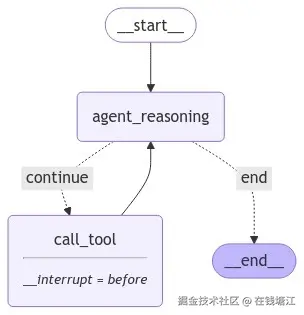
使用人机交互 (HITL) 架构实现 ReAct 代理,以实现股票购买决策工作流程。代理将使用 Finnhub API 查询实时股票价格,推理是否购买股票,并在继续之前暂停以请求人工批准。
python
import os
import random
import subprocess
import sys
from typing import TypedDict

from dotenv import load_dotenv
from langchain_core.runnables.graph import MermaidDrawMethod
from langchain_openai import ChatOpenAI
from langgraph.checkpoint.memory import MemorySaver
from langgraph.graph import StateGraph, START, END, MessagesState
from langchain_core.tools import tool
from langgraph.prebuilt import ToolNode

load_dotenv()
llm = ChatOpenAI(model="qwen-max",
                 base_url=os.getenv("BASE_URL"),
                 api_key=os.getenv("OPENAI_API_KEY"),
                 streaming=True)


def display_graph(graph, output_folder="output", ):
    # Code to visualise the graph, we will use this in all lessons
    mermaid_png = graph.get_graph(xray=1).draw_mermaid_png(
        draw_method=MermaidDrawMethod.API
    )

    # Create output folder if it doesn't exist
    output_folder = "."
    os.makedirs(output_folder, exist_ok=True)

    filename = os.path.join(output_folder, f"graph_{random.randint(1, 100000)}.png")
    with open(filename, 'wb') as f:
        f.write(mermaid_png)

    if sys.platform.startswith('darwin'):
        subprocess.call(('open', filename))
    elif sys.platform.startswith('linux'):
        subprocess.call(('xdg-open', filename))
    elif sys.platform.startswith('win'):
        os.startfile(filename)


@tool
def get_stock_price(symbol: str):
    """Retrieve the latest stock price for the given symbol."""
    # quote = finnhub_client.quote(symbol)
    price = random.randint(500, 800)
    return f"The current price for {symbol} is ${price}."


tools = [get_stock_price]
tool_node = ToolNode(tools)
model = llm.bind_tools(tools)


def agent_reasoning(state):
    messages = state["messages"]
    response = model.invoke(messages)
    return {"messages": [response]}


def should_continue(state):
    messages = state["messages"]
    last_message = messages[-1]
    # 没有工具调用就结束
    if not last_message.tool_calls:
        return "end"
    return "continue"


workflow = StateGraph(MessagesState)
workflow.add_node("agent_reasoning", agent_reasoning)
workflow.add_node("call_tool", tool_node)
workflow.add_edge(START, "agent_reasoning")
workflow.add_conditional_edges(
    "agent_reasoning", should_continue,
    {
        "continue": "call_tool",
        "end": END
    }
)
# Normal edge: after invoking the tool, return to agent reasoning
workflow.add_edge("call_tool", "agent_reasoning")

memory = MemorySaver()
app = workflow.compile(checkpointer=memory, interrupt_before=["call_tool"])
display_graph(app)

initial_input = {"messages": [{"role": "user", "content": "今天应该买AAPL的股票吗?"}]}
thread = {"configurable": {"thread_id": "1"}}

# Run the agent reasoning step first
for event in app.stream(initial_input, thread, stream_mode="values"):
    print(event)

user_approval = input("是否查询AAPL的股价? (yes/no): ")
if user_approval.lower() == "yes":
    # Continue with tool invocation to get stock price
    for event in app.stream(None, thread, stream_mode="values"):
        print(event)
else:
    print("用户终止")
输出结果
bash
{'messages': [HumanMessage(content='今天应该买AAPL的股票吗?', additional_kwargs={}, response_metadata={}, id='1506d0d0-ee04-4245-8c83-09f3e7814918')]}
{'messages': [HumanMessage(content='今天应该买AAPL的股票吗?', additional_kwargs={}, response_metadata={}, id='1506d0d0-ee04-4245-8c83-09f3e7814918'), AIMessage(content='决定是否购买AAPL(苹果公司)的股票取决于多种因素,:\n\n此外,获取最新的股票价格信息也可能有助于您的决策过程。我可以通过调用`get_stock_price`函数来帮助您获取AAPL的最新股票价格。让我们来查一下。', additional_kwargs={'tool_calls': [{'index': 0, 'id': 'call_5b9dcc6901f8422faceb06', 'function': {'arguments': '{"symbol": "AAPL"}', 'name': 'get_stock_price'}, 'type': 'function'}]}, response_metadata={'finish_reason': 'tool_calls', 'model_name': 'qwen-max'}, id='run--f732f6e9-4c5d-4426-86c4-81b1bb8d03ca-0', tool_calls=[{'name': 'get_stock_price', 'args': {'symbol': 'AAPL'}, 'id': 'call_5b9dcc6901f8422faceb06', 'type': 'tool_call'}])]}
是否查询AAPL的股价? (yes/no): yes
{'messages': [HumanMessage(content='今天应该买AAPL的股票吗?', additional_kwargs={}, response_metadata={}, id='1506d0d0-ee04-4245-8c83-09f3e7814918'), AIMessage(content='决定是否购买AAPL(苹果公司)的股票取决于多种因素,:\n\n此外,获取最新的股票价格信息也可能有助于您的决策过程。我可以通过调用`get_stock_price`函数来帮助您获取AAPL的最新股票价格。让我们来查一下。', additional_kwargs={'tool_calls': [{'index': 0, 'id': 'call_5b9dcc6901f8422faceb06', 'function': {'arguments': '{"symbol": "AAPL"}', 'name': 'get_stock_price'}, 'type': 'function'}]}, response_metadata={'finish_reason': 'tool_calls', 'model_name': 'qwen-max'}, id='run--f732f6e9-4c5d-4426-86c4-81b1bb8d03ca-0', tool_calls=[{'name': 'get_stock_price', 'args': {'symbol': 'AAPL'}, 'id': 'call_5b9dcc6901f8422faceb06', 'type': 'tool_call'}])]}
{'messages': [HumanMessage(content='今天应该买AAPL的股票吗?', additional_kwargs={}, response_metadata={}, id='1506d0d0-ee04-4245-8c83-09f3e7814918'), AIMessage(content='决定是否购买AAPL(苹果公司)的股票取决于多种因素,:\n\n此外,获取最新的股票价格信息也可能有助于您的决策过程。我可以通过调用`get_stock_price`函数来帮助您获取AAPL的最新股票价格。让我们来查一下。', additional_kwargs={'tool_calls': [{'index': 0, 'id': 'call_5b9dcc6901f8422faceb06', 'function': {'arguments': '{"symbol": "AAPL"}', 'name': 'get_stock_price'}, 'type': 'function'}]}, response_metadata={'finish_reason': 'tool_calls', 'model_name': 'qwen-max'}, id='run--f732f6e9-4c5d-4426-86c4-81b1bb8d03ca-0', tool_calls=[{'name': 'get_stock_price', 'args': {'symbol': 'AAPL'}, 'id': 'call_5b9dcc6901f8422faceb06', 'type': 'tool_call'}]), ToolMessage(content='The current price for AAPL is $517.', name='get_stock_price', id='51f1adeb-c67a-4a75-95eb-c53ff3ce6776', tool_call_id='call_5b9dcc6901f8422faceb06')]}
{'messages': [HumanMessage(content='今天应该买AAPL的股票吗?', additional_kwargs={}, response_metadata={}, id='1506d0d0-ee04-4245-8c83-09f3e7814918'), AIMessage(content='决定是否购买AAPL(苹果公司)的股票取决于多种因素,:\n\n此外,获取最新的股票价格信息也可能有助于您的决策过程。我可以通过调用`get_stock_price`函数来帮助您获取AAPL的最新股票价格。让我们来查一下。', additional_kwargs={'tool_calls': [{'index': 0, 'id': 'call_5b9dcc6901f8422faceb06', 'function': {'arguments': '{"symbol": "AAPL"}', 'name': 'get_stock_price'}, 'type': 'function'}]}, response_metadata={'finish_reason': 'tool_calls', 'model_name': 'qwen-max'}, id='run--f732f6e9-4c5d-4426-86c4-81b1bb8d03ca-0', tool_calls=[{'name': 'get_stock_price', 'args': {'symbol': 'AAPL'}, 'id': 'call_5b9dcc6901f8422faceb06', 'type': 'tool_call'}]), ToolMessage(content='The current price for AAPL is $517.', name='get_stock_price', id='51f1adeb-c67a-4a75-95eb-c53ff3ce6776', tool_call_id='call_5b9dcc6901f8422faceb06'), AIMessage(content='苹果公司(AAPL)的最新股票价格是 $517。\n\n请记住,这只代表了 AAPL 股票的当前市场价格,并不单独构成买卖建议。您应该结合自己的研究和其他信息来源来决定是否购买。如果您需要进一步的帮助来进行分析或有其他问题,请随时告诉我。', additional_kwargs={}, response_metadata={'finish_reason': 'stop', 'model_name': 'qwen-max'}, id='run--14905aec-befd-4689-a6ba-b7864d64fed7-0')]}
在执行过程中编辑图形状态
在继续之前修改图形状态
python
from typing_extensions import TypedDict
from langgraph.graph import StateGraph, START, END
from langgraph.checkpoint.memory import MemorySaver


# Define the state structure
class State(TypedDict):
    input: str
    modified_input: str


def step_1(state: State):
    print(f"Original input: {state['input']}")
    return state


def modify_state(state: State):
    # Allow the user to modify the state
    return state


def step_3(state: State):
    print(f"Modified input: {state['modified_input']}")
    return state


builder = StateGraph(State)
builder.add_node("step_1", step_1)
builder.add_node("modify_state", modify_state)
builder.add_node("step_3", step_3)

# Define the flow
builder.add_edge(START, "step_1")
builder.add_edge("step_1", "modify_state")
builder.add_edge("modify_state", "step_3")
builder.add_edge("step_3", END)

# Set up memory and breakpoints
memory = MemorySaver()
graph = builder.compile(checkpointer=memory, interrupt_before=["modify_state"])
initial_input = {"input": "Initial Input"}
config = {"configurable": {"thread_id": "thread-1"}}

for event in graph.stream(initial_input, config):
    print(event)

modified_value = input("Enter the modified input: ")
graph.update_state(config, {"modified_input": modified_value})

# Continue the graph execution
for event in graph.stream(None, config):
    print(event)
结果为
python
Original input: Initial Input
{'step_1': {'input': 'Initial Input'}}
{'__interrupt__': ()}
Enter the modified input: 12322
{'modify_state': {'input': 'Initial Input', 'modified_input': '12322'}}
Modified input: 12322
{'step_3': {'input': 'Initial Input', 'modified_input': '12322'}}
断点的示例
同意金融交易
python
from typing_extensions import TypedDict
from langgraph.graph import StateGraph, START, END
from langgraph.checkpoint.memory import MemorySaver


class State(TypedDict):
    amount: float


builder = StateGraph(State)


def define__transaction(state: State):
    print("Defining transaction...")
    return state


def verify_transaction(state: State):
    print(f"Verifying transaction amount: {state['amount']}")
    return state


builder.add_node("define_transaction", define__transaction)
builder.add_node("verify_transaction", verify_transaction)
builder.add_edge(START, "define_transaction")
builder.add_edge("define_transaction", "verify_transaction")
builder.add_edge("verify_transaction", END)

graph = builder.compile(
    interrupt_before=["verify_transaction"],
    checkpointer=MemorySaver())

initial_input = {"amount": 1000.0}
config = {"configurable": {"thread_id": "thread-1"}}
for event in graph.stream(initial_input, config):
    print(event)
approval = input("Approve this transaction? (yes/no): ")
if approval.lower() == "yes":
    for event in graph.stream(None, config):
        print(event)
else:
    print("Transaction cancelled.")
输出结果
bash
"""
Defining transaction...
{'define_transaction': {'amount': 1000.0}}
{'__interrupt__': ()}
Approve this transaction? (yes/no): yes
Verifying transaction amount: 1000.0
{'verify_transaction': {'amount': 1000.0}}
"""
删除数据确认
python
import os
from typing_extensions import TypedDict
from langgraph.graph import StateGraph, START, END
from langgraph.checkpoint.memory import MemorySaver


class State(TypedDict):
    data: str


def delete_data(state: State):
    print(f"Data to be deleted: {state['data']}")
    return state


builder = StateGraph(State)
builder.add_node("delete_data", delete_data)
builder.add_edge(START, "delete_data")
builder.add_edge("delete_data", END)

graph = builder.compile(interrupt_before=["delete_data"], checkpointer=MemorySaver())

initial_input = {"data": "Sensitive Information"}
config = {"configurable": {"thread_id": "thread-1"}}

for event in graph.stream(initial_input, config):
    print(event)

approval = input("Approve data deletion? (yes/no): ")
if approval.lower() == "yes":
    for event in graph.stream(None, config):
        print(event)
else:
    print("Data deletion cancelled.")
输出结果
bash
"""
{'__interrupt__': ()}
Approve data deletion? (yes/no): yes
Data to be deleted: Sensitive Information
{'delete_data': {'data': 'Sensitive Information'}}

"""
允许tool call
python
import os
from typing_extensions import TypedDict
from langgraph.graph import StateGraph, START, END
from langgraph.checkpoint.memory import MemorySaver
from langchain_core.tools import tool


class State(TypedDict):
    query: str


@tool
def perform_query(query: str):
    """:param query: The SQL query to be executed."""
    print(f"Performing query: {query}")
    return {"query": {query}}


def review_query(state: State):
    print(f"Reviewing query: {state['query']}")
    return state


builder = StateGraph(State)
builder.add_node("perform_query", perform_query)
builder.add_node("review_query", review_query)

builder.add_edge(START, "review_query")
builder.add_edge("review_query", "perform_query")
builder.add_edge("perform_query", END)

graph = builder.compile(interrupt_before=["perform_query"],
                        checkpointer=MemorySaver())

initial_input = {"query": "SELECT * FROM users"}
config = {"configurable": {"thread_id": "thread-1"}}

for event in graph.stream(initial_input, config):
    print(event)

approval = input("Approve query execution? (yes/no): ")
if approval.lower() == "yes":
    for event in graph.stream(None, config):
        print(event)
else:
    print("Query execution cancelled.")
输出结果
bash
{'__interrupt__': ()}
Approve data deletion? (yes/no): yes
Data to be deleted: Sensitive Information
{'delete_data': {'data': 'Sensitive Information'}}
动态断点
动态断点允许代理根据运行时数据或外部触发器有条件地暂停,从而增加了灵活性。动态断点不是预先定义图形的暂停位置,而是引入了根据特定条件触发暂停的功能。
基于数据阈值的条件暂停
python
from langgraph.types import interrupt
import os
from typing_extensions import TypedDict
from langgraph.graph import StateGraph, START, END


class State(TypedDict):
    input: str


def step_with_dynamic_interrupt(state: State):
    input_length = len(state["input"])
    if input_length > 10:
        interrupt(f"Input length {input_length} exceeds threshold of 10.")
    return state


builder = StateGraph(State)
builder.add_node("step_with_dynamic_interrupt", step_with_dynamic_interrupt)
builder.add_edge(START, "step_with_dynamic_interrupt")
builder.add_edge("step_with_dynamic_interrupt", END)

graph = builder.compile()

initial_input = {"input": "This is a long input"}
for event in graph.stream(initial_input):
    print(event)
运行结果
- 当输入长度超过 10 个字符时,工作流会自动暂停
bash
{'__interrupt__': (Interrupt(value='Input length 20 exceeds threshold of 10.', id='cf3c8cd72f33e6120e00b8c619f411ce'),)}等待用户输入
一些流程中,AI 代理需要人工反馈才能继续。例如客户服务、医疗保健或业务审批流程。
- 等待用户输入是指人工智能代理在其工作流程中暂停,要求人工澄清或附加信息,然后仅在收到信息后恢复的交互
- 在 LangGraph 中,等待用户输入是使用断点实现的。在断点处,图形暂停执行并等待用户反馈,然后将反馈注入回图形的状态。工作流使用提供的输入从该点恢复。
python
from typing_extensions import TypedDict
from langgraph.graph import StateGraph, START, END
from langgraph.checkpoint.memory import MemorySaver


class State(TypedDict):
    input: str
    user_feedback: str


def step_1(state: State):
    print(f"Step 1: {state['input']}")
    return state


def human_feedback(state: State):
    print("--- Waiting for human feedback ---")
    feedback = input("Please provide your feedback: ")
    state['user_feedback'] = feedback
    return state


def step_3(state: State):
    print(f"Step 3: User feedback received: {state['user_feedback']}")
    return state


builder = StateGraph(State)
builder.add_node("step_1", step_1)
builder.add_node("human_feedback", human_feedback)
builder.add_node("step_3", step_3)

builder.add_edge(START, "step_1")
builder.add_edge("step_1", "human_feedback")
builder.add_edge("human_feedback", "step_3")
builder.add_edge("step_3", END)

# Set up memory and breakpoints
memory = MemorySaver()
graph = builder.compile(checkpointer=memory,
                        interrupt_before=["human_feedback"])

initial_input = {"input": "Proceed with workflow?"}
thread = {"configurable": {"thread_id": "1"}}

for event in graph.stream(initial_input, thread, stream_mode="values"):
    print(event)

user_feedback = input("User feedback: ")
graph.update_state(thread, {"user_feedback": user_feedback},
                   as_node='human_feedback')

for event in graph.stream(None, thread, stream_mode="values"):
    print(event)
运行结果
css
{'input': 'Proceed with workflow?'}
Step 1: Proceed with workflow?
{'input': 'Proceed with workflow?'}
User feedback: 1234
{'input': 'Proceed with workflow?', 'user_feedback': '1234'}
Step 3: User feedback received: 1234
{'input': 'Proceed with workflow?', 'user_feedback': '1234'}
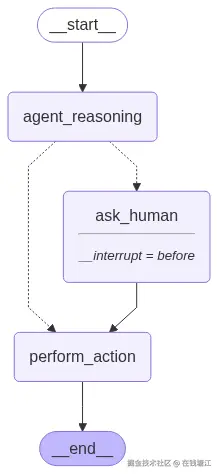
复杂例子
python
from typing_extensions import TypedDict
from langgraph.graph import StateGraph, START, END
from langgraph.checkpoint.memory import MemorySaver
from langchain_core.tools import tool
import os
import random
import subprocess
import sys
from typing import TypedDict

from dotenv import load_dotenv
from langchain_core.runnables.graph import MermaidDrawMethod
from langchain_openai import ChatOpenAI
from langgraph.checkpoint.memory import MemorySaver
from langgraph.graph import StateGraph, START, END, MessagesState
from langchain_core.tools import tool
from langgraph.prebuilt import ToolNode


def display_graph(graph, output_folder="output", ):
    # Code to visualise the graph, we will use this in all lessons
    mermaid_png = graph.get_graph(xray=1).draw_mermaid_png(
        draw_method=MermaidDrawMethod.API
    )

    # Create output folder if it doesn't exist
    output_folder = "."
    os.makedirs(output_folder, exist_ok=True)

    filename = os.path.join(output_folder, f"graph_{random.randint(1, 100000)}.png")
    with open(filename, 'wb') as f:
        f.write(mermaid_png)

    if sys.platform.startswith('darwin'):
        subprocess.call(('open', filename))
    elif sys.platform.startswith('linux'):
        subprocess.call(('xdg-open', filename))
    elif sys.platform.startswith('win'):
        os.startfile(filename)


class State(TypedDict):
    input: str
    user_feedback: str


def agent_reasoning(state: State):
    print(f"Agent is reasoning: {state['input']}")
    # Agent decides whether to ask human based on input length
    if len(state["input"]) > 10:
        print("Agent needs clarification.")
        return state
    else:
        state["user_feedback"] = "No clarification needed"
        return state


def ask_human(state: State):
    print("--- Asking for human feedback ---")
    feedback = input("Please provide feedback on the input: ")
    state['user_feedback'] = feedback
    return state


# Define a tool action after human feedback
@tool
def perform_action(user_feedback: str):
    """
    Perform an action based on the provided user feedback.
    """
    print(f"Action taken based on feedback: {user_feedback}")
    return {"user_feedback": f"Feedback processed: {user_feedback}"}


builder = StateGraph(State)
builder.add_node("agent_reasoning", agent_reasoning)
builder.add_node("ask_human", ask_human)
builder.add_node("perform_action", perform_action)

builder.add_edge(START, "agent_reasoning")
builder.add_conditional_edges(
    "agent_reasoning",
    lambda state: "ask_human" if len(state["input"]) > 10 else "perform_action",
    {
        "ask_human": "ask_human",
        "perform_action": "perform_action"
    }
)
builder.add_edge("ask_human", "perform_action")
builder.add_edge("perform_action", END)

memory = MemorySaver()
graph = builder.compile(checkpointer=memory, interrupt_before=["ask_human"])
display_graph(graph)

# Run the graph
initial_input = {"input": "Proceed with reasoning?"}
thread = {"configurable": {"thread_id": "1"}}

# Stream the graph until the first interruption
for event in graph.stream(initial_input, thread, stream_mode="values"):
    print(event)

# Get user input and update the state
user_feedback = input("User feedback: ")
graph.update_state(thread, {"user_feedback": user_feedback},
                   as_node="ask_human")

# Resume execution after feedback
for event in graph.stream(None, thread, stream_mode="values"):
    print(event)
运行结果
css
{'input': 'Proceed with reasoning?'}
Agent is reasoning: Proceed with reasoning?
Agent needs clarification.
{'input': 'Proceed with reasoning?'}
User feedback: 12324
{'input': 'Proceed with reasoning?', 'user_feedback': '12324'}
Action taken based on feedback: 12324
{'input': 'Proceed with reasoning?', 'user_feedback': 'Feedback processed: 12324'}
查看并更新历史状态
- get_state_history 获取某会话的历史状态
- stream 方法支持从历史的某一个状态继续会话
- update_state 支持修改历史状态记录
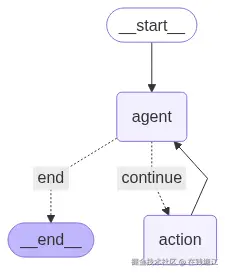
python
from langchain_openai import ChatOpenAI
from langchain_core.tools import tool
from langgraph.graph import MessagesState, START, END, StateGraph
from langgraph.checkpoint.memory import MemorySaver
from langgraph.prebuilt import ToolNode
from dotenv import load_dotenv
import os
from langchain_core.runnables.graph import MermaidDrawMethod
from langchain_core.messages import HumanMessage
import random
import subprocess
import sys


def display_graph(graph, output_folder="output", ):
    # Code to visualise the graph, we will use this in all lessons
    mermaid_png = graph.get_graph(xray=1).draw_mermaid_png(
        draw_method=MermaidDrawMethod.API
    )

    # Create output folder if it doesn't exist
    output_folder = "."
    os.makedirs(output_folder, exist_ok=True)

    filename = os.path.join(output_folder, f"graph_{random.randint(1, 100000)}.png")
    with open(filename, 'wb') as f:
        f.write(mermaid_png)

    if sys.platform.startswith('darwin'):
        subprocess.call(('open', filename))
    elif sys.platform.startswith('linux'):
        subprocess.call(('xdg-open', filename))
    elif sys.platform.startswith('win'):
        os.startfile(filename)


load_dotenv()
model = ChatOpenAI(model="qwen-max",
                   base_url=os.getenv("BASE_URL"),
                   api_key=os.getenv("OPENAI_API_KEY"),
                   streaming=True)


# Define tools
@tool
def play_song_on_spotify(song: str):
    """Play a song on Spotify."""
    return f"Successfully played {song} on Spotify!"


@tool
def play_song_on_apple(song: str):
    """Play a song on Apple Music."""
    return f"Successfully played {song} on Apple Music!"


# List of tools
tools = [play_song_on_apple, play_song_on_spotify]
tool_node = ToolNode(tools)

# Set up model
model = model.bind_tools(tools)


# Define model-calling function
def call_model(state):
    response = model.invoke(state["messages"])
    return {"messages": [response]}


# Define continuation logic
def should_continue(state):
    last_message = state["messages"][-1]
    if last_message.tool_calls:
        return "continue"
    return "end"


# Build the graph
workflow = StateGraph(MessagesState)
workflow.add_node("agent", call_model)
workflow.add_node("action", tool_node)

# Define graph flow
workflow.add_edge(START, "agent")
workflow.add_conditional_edges(
    "agent",
    should_continue,
    {
        "continue": "action",
        "end": END
    }
)

workflow.add_edge("action", "agent")
# Set up memory for checkpointing
memory = MemorySaver()
app = workflow.compile(checkpointer=memory)
# display_graph(app)

config = {"configurable": {"thread_id": "1"}}
input_message = HumanMessage(content="你可以播放Taylor Swift的最流行的歌曲吗?")
for event in app.stream({"messages": [input_message]}, config, stream_mode="values"):
    print(event["messages"][-1].pretty_print())

# View state history
print("--- 状态历史记录 ---" + "\n\n\n")
all_states = []
state_history = app.get_state_history(config)
for state in state_history:
    all_states.append(state)
    print(state)

# 从某次状态下重复
replay_state = all_states[2]  # Replay right before tool execution
print("重复state" + " " + str(replay_state) + "\n\n\n")
print("--- Replayed State ---" + "\n\n\n")
for event in app.stream(None, replay_state.config):
    for v in event.values():
        print(v)
        print("\n\n\n")
print("--- Branching off Past States---")
# Get the last message with the tool call
last_message = replay_state.values["messages"][-1]

# Update the tool call from Apple Music to Spotify
# 修改消息
if last_message.tool_calls[0]["name"] == "play_song_on_spotify":
    last_message.tool_calls[0]["name"] = "play_song_on_apple"
else:
    last_message.tool_calls[0]["name"] = "play_song_on_spotify"

# Update the state and resume execution
branch_config = app.update_state(replay_state.config, {"messages": [last_message]})
for event in app.stream(None, branch_config):
    print(event)
运行结果
lua
================================ Human Message =================================

你可以播放Taylor Swift的最流行的歌曲吗?
None
================================== Ai Message ==================================
Tool Calls:
  play_song_on_spotify (call_1a95d1cd1be04fea9431c0)
 Call ID: call_1a95d1cd1be04fea9431c0
  Args:
    song: Taylor Swift - Shake It Off
None
================================= Tool Message =================================
Name: play_song_on_spotify

Successfully played Taylor Swift - Shake It Off on Spotify!
None
================================== Ai Message ==================================

成功在Spotify上播放了Taylor Swift的歌曲"Shake It Off"! 如果您想听其他歌曲,随时告诉我。
None
--- 状态历史记录 ---


StateSnapshot(values={'messages': [HumanMessage(content='你可以播放Taylor Swift的最流行的歌曲吗?', additional_kwargs={}, response_metadata={}, id='ae716e3a-c657-473d-83d5-8c17cbdc85d1'), AIMessage(content='', additional_kwargs={'tool_calls': [{'index': 0, 'id': 'call_1a95d1cd1be04fea9431c0', 'function': {'arguments': '{"song": "Taylor Swift - Shake It Off"}', 'name': 'play_song_on_spotify'}, 'type': 'function'}]}, response_metadata={'finish_reason': 'tool_calls', 'model_name': 'qwen-max'}, id='run--51e4d937-1b0d-4fcc-803e-c4b5a25e50c7-0', tool_calls=[{'name': 'play_song_on_spotify', 'args': {'song': 'Taylor Swift - Shake It Off'}, 'id': 'call_1a95d1cd1be04fea9431c0', 'type': 'tool_call'}]), ToolMessage(content='Successfully played Taylor Swift - Shake It Off on Spotify!', name='play_song_on_spotify', id='5eba048c-7a79-43e8-ae7d-99deddb2e4a6', tool_call_id='call_1a95d1cd1be04fea9431c0'), AIMessage(content='成功在Spotify上播放了Taylor Swift的歌曲"Shake It Off"! 如果您想听其他歌曲,随时告诉我。', additional_kwargs={}, response_metadata={'finish_reason': 'stop', 'model_name': 'qwen-max'}, id='run--7493b409-7ad8-461f-aaab-e37e68263d39-0')]}, next=(), config={'configurable': {'thread_id': '1', 'checkpoint_ns': '', 'checkpoint_id': '1f0768f8-9957-66ce-8003-0ebfe9a4a043'}}, metadata={'source': 'loop', 'step': 3, 'parents': {}}, created_at='2025-08-11T08:45:30.916014+00:00', parent_config={'configurable': {'thread_id': '1', 'checkpoint_ns': '', 'checkpoint_id': '1f0768f8-8761-6788-8002-fa90d17def27'}}, tasks=(), interrupts=())
StateSnapshot(values={'messages': [HumanMessage(content='你可以播放Taylor Swift的最流行的歌曲吗?', additional_kwargs={}, response_metadata={}, id='ae716e3a-c657-473d-83d5-8c17cbdc85d1'), AIMessage(content='', additional_kwargs={'tool_calls': [{'index': 0, 'id': 'call_1a95d1cd1be04fea9431c0', 'function': {'arguments': '{"song": "Taylor Swift - Shake It Off"}', 'name': 'play_song_on_spotify'}, 'type': 'function'}]}, response_metadata={'finish_reason': 'tool_calls', 'model_name': 'qwen-max'}, id='run--51e4d937-1b0d-4fcc-803e-c4b5a25e50c7-0', tool_calls=[{'name': 'play_song_on_spotify', 'args': {'song': 'Taylor Swift - Shake It Off'}, 'id': 'call_1a95d1cd1be04fea9431c0', 'type': 'tool_call'}]), ToolMessage(content='Successfully played Taylor Swift - Shake It Off on Spotify!', name='play_song_on_spotify', id='5eba048c-7a79-43e8-ae7d-99deddb2e4a6', tool_call_id='call_1a95d1cd1be04fea9431c0')]}, next=('agent',), config={'configurable': {'thread_id': '1', 'checkpoint_ns': '', 'checkpoint_id': '1f0768f8-8761-6788-8002-fa90d17def27'}}, metadata={'source': 'loop', 'step': 2, 'parents': {}}, created_at='2025-08-11T08:45:29.032692+00:00', parent_config={'configurable': {'thread_id': '1', 'checkpoint_ns': '', 'checkpoint_id': '1f0768f8-875c-67e9-8001-66cc0f5b12be'}}, tasks=(PregelTask(id='4684d9cb-6fba-093d-ce28-bc57d15a99f8', name='agent', path=('__pregel_pull', 'agent'), error=None, interrupts=(), state=None, result={'messages': [AIMessage(content='成功在Spotify上播放了Taylor Swift的歌曲"Shake It Off"! 如果您想听其他歌曲,随时告诉我。', additional_kwargs={}, response_metadata={'finish_reason': 'stop', 'model_name': 'qwen-max'}, id='run--7493b409-7ad8-461f-aaab-e37e68263d39-0')]}),), interrupts=())
StateSnapshot(values={'messages': [HumanMessage(content='你可以播放Taylor Swift的最流行的歌曲吗?', additional_kwargs={}, response_metadata={}, id='ae716e3a-c657-473d-83d5-8c17cbdc85d1'), AIMessage(content='', additional_kwargs={'tool_calls': [{'index': 0, 'id': 'call_1a95d1cd1be04fea9431c0', 'function': {'arguments': '{"song": "Taylor Swift - Shake It Off"}', 'name': 'play_song_on_spotify'}, 'type': 'function'}]}, response_metadata={'finish_reason': 'tool_calls', 'model_name': 'qwen-max'}, id='run--51e4d937-1b0d-4fcc-803e-c4b5a25e50c7-0', tool_calls=[{'name': 'play_song_on_spotify', 'args': {'song': 'Taylor Swift - Shake It Off'}, 'id': 'call_1a95d1cd1be04fea9431c0', 'type': 'tool_call'}])]}, next=('action',), config={'configurable': {'thread_id': '1', 'checkpoint_ns': '', 'checkpoint_id': '1f0768f8-875c-67e9-8001-66cc0f5b12be'}}, metadata={'source': 'loop', 'step': 1, 'parents': {}}, created_at='2025-08-11T08:45:29.030653+00:00', parent_config={'configurable': {'thread_id': '1', 'checkpoint_ns': '', 'checkpoint_id': '1f0768f8-786f-6c85-8000-d58fce7ad3a7'}}, tasks=(PregelTask(id='a5624aa2-7d3d-fb1d-adb4-ad33f403169f', name='action', path=('__pregel_pull', 'action'), error=None, interrupts=(), state=None, result={'messages': [ToolMessage(content='Successfully played Taylor Swift - Shake It Off on Spotify!', name='play_song_on_spotify', id='5eba048c-7a79-43e8-ae7d-99deddb2e4a6', tool_call_id='call_1a95d1cd1be04fea9431c0')]}),), interrupts=())
StateSnapshot(values={'messages': [HumanMessage(content='你可以播放Taylor Swift的最流行的歌曲吗?', additional_kwargs={}, response_metadata={}, id='ae716e3a-c657-473d-83d5-8c17cbdc85d1')]}, next=('agent',), config={'configurable': {'thread_id': '1', 'checkpoint_ns': '', 'checkpoint_id': '1f0768f8-786f-6c85-8000-d58fce7ad3a7'}}, metadata={'source': 'loop', 'step': 0, 'parents': {}}, created_at='2025-08-11T08:45:27.465690+00:00', parent_config={'configurable': {'thread_id': '1', 'checkpoint_ns': '', 'checkpoint_id': '1f0768f8-786d-658d-bfff-47e0e417bba6'}}, tasks=(PregelTask(id='0ab5a7f4-7f15-f001-64dd-d2291b5d9c0a', name='agent', path=('__pregel_pull', 'agent'), error=None, interrupts=(), state=None, result={'messages': [AIMessage(content='', additional_kwargs={'tool_calls': [{'index': 0, 'id': 'call_1a95d1cd1be04fea9431c0', 'function': {'arguments': '{"song": "Taylor Swift - Shake It Off"}', 'name': 'play_song_on_spotify'}, 'type': 'function'}]}, response_metadata={'finish_reason': 'tool_calls', 'model_name': 'qwen-max'}, id='run--51e4d937-1b0d-4fcc-803e-c4b5a25e50c7-0', tool_calls=[{'name': 'play_song_on_spotify', 'args': {'song': 'Taylor Swift - Shake It Off'}, 'id': 'call_1a95d1cd1be04fea9431c0', 'type': 'tool_call'}])]}),), interrupts=())
StateSnapshot(values={'messages': []}, next=('__start__',), config={'configurable': {'thread_id': '1', 'checkpoint_ns': '', 'checkpoint_id': '1f0768f8-786d-658d-bfff-47e0e417bba6'}}, metadata={'source': 'input', 'step': -1, 'parents': {}}, created_at='2025-08-11T08:45:27.464692+00:00', parent_config=None, tasks=(PregelTask(id='8c92498d-a5e1-bdcf-cde3-b5abcd2cfd5c', name='__start__', path=('__pregel_pull', '__start__'), error=None, interrupts=(), state=None, result={'messages': [HumanMessage(content='你可以播放Taylor Swift的最流行的歌曲吗?', additional_kwargs={}, response_metadata={}, id='ae716e3a-c657-473d-83d5-8c17cbdc85d1')]}),), interrupts=())
重复state StateSnapshot(values={'messages': [HumanMessage(content='你可以播放Taylor Swift的最流行的歌曲吗?', additional_kwargs={}, response_metadata={}, id='ae716e3a-c657-473d-83d5-8c17cbdc85d1'), AIMessage(content='', additional_kwargs={'tool_calls': [{'index': 0, 'id': 'call_1a95d1cd1be04fea9431c0', 'function': {'arguments': '{"song": "Taylor Swift - Shake It Off"}', 'name': 'play_song_on_spotify'}, 'type': 'function'}]}, response_metadata={'finish_reason': 'tool_calls', 'model_name': 'qwen-max'}, id='run--51e4d937-1b0d-4fcc-803e-c4b5a25e50c7-0', tool_calls=[{'name': 'play_song_on_spotify', 'args': {'song': 'Taylor Swift - Shake It Off'}, 'id': 'call_1a95d1cd1be04fea9431c0', 'type': 'tool_call'}])]}, next=('action',), config={'configurable': {'thread_id': '1', 'checkpoint_ns': '', 'checkpoint_id': '1f0768f8-875c-67e9-8001-66cc0f5b12be'}}, metadata={'source': 'loop', 'step': 1, 'parents': {}}, created_at='2025-08-11T08:45:29.030653+00:00', parent_config={'configurable': {'thread_id': '1', 'checkpoint_ns': '', 'checkpoint_id': '1f0768f8-786f-6c85-8000-d58fce7ad3a7'}}, tasks=(PregelTask(id='a5624aa2-7d3d-fb1d-adb4-ad33f403169f', name='action', path=('__pregel_pull', 'action'), error=None, interrupts=(), state=None, result={'messages': [ToolMessage(content='Successfully played Taylor Swift - Shake It Off on Spotify!', name='play_song_on_spotify', id='5eba048c-7a79-43e8-ae7d-99deddb2e4a6', tool_call_id='call_1a95d1cd1be04fea9431c0')]}),), interrupts=())


--- Replayed State ---


{'messages': [ToolMessage(content='Successfully played Taylor Swift - Shake It Off on Spotify!', name='play_song_on_spotify', id='b9f06d4d-fe20-477a-8c4c-7b6bf20e4ae5', tool_call_id='call_1a95d1cd1be04fea9431c0')]}


{'messages': [AIMessage(content='成功在Spotify上播放了Taylor Swift的歌曲"Shake It Off"!如果你想要听其他的歌曲,随时告诉我。', additional_kwargs={}, response_metadata={'finish_reason': 'stop', 'model_name': 'qwen-max'}, id='run--327816ee-b742-4c65-9931-da751f137001-0')]}


--- Branching off Past States---
{'action': {'messages': [ToolMessage(content='Successfully played Taylor Swift - Shake It Off on Apple Music!', name='play_song_on_apple', id='cc5ee933-d8ee-44b7-9004-869ea8d70b68', tool_call_id='call_1a95d1cd1be04fea9431c0')]}}
{'agent': {'messages': [AIMessage(content='成功在Apple Music上播放了Taylor Swift的歌曲"Shake It Off"! 如果您想听其他的歌曲或者需要任何帮助,随时告诉我哦。', additional_kwargs={}, response_metadata={'finish_reason': 'stop', 'model_name': 'qwen-max'}, id='run--efc74dc2-4dfe-4ff8-b3ea-485c320e93c5-0')]}}