一. 引文:
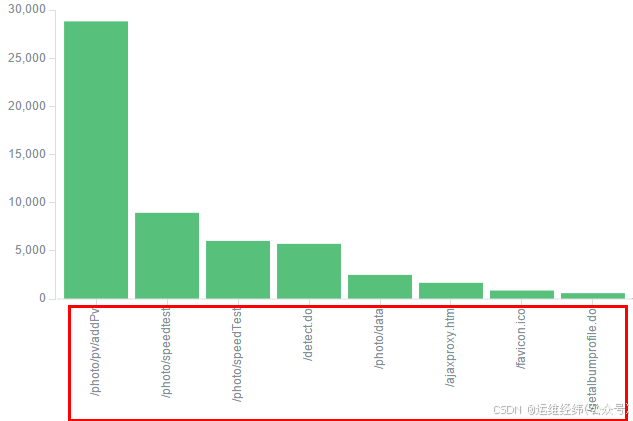
部署了ELK 用来分析nginx的log,新增需求: 统计相关url(字段名url_path)访问次数最高的五个,通过Visualize创建走势图,发现自动对其进行了分词输出(如:/photo/pv/addPv被拆分成了photo,pv,addPV)。通过查询相关资料,明白了在创建索引,插入数据时,有一个template和mappings机制。
二. 概念:
template: 索引可使用预定义的模板进行创建,这个模板称作Index templates(索引模板)。模板设置包括settings和mappings,通过模式匹配的方式使得多个索引重用一个模板(如xxx* ,即:对xxx开头的index都匹配)。
mappings: 类似于静态语言中的数据类型:声明一个变量为int类型的变量, 以后这个变量都只能存储int类型的数据。同样的, 一个number类型的mapping字段只能存储number类型的数据。同语言的数据类型相比,mapping还有一些其他的含义,mapping不仅告诉ES一个field中是什么类型的值, 它还告诉ES如何索引数据以及数据是否能被搜索到。一个mapping由一个或多个analyzer组成, 一个analyzer又由一个或多个filter组成的。当ES索引文档的时候,它把字段中的内容传递给相应的analyzer,analyzer再传递给各自的filters。一个filter就是一个转换数据的方法, 输入一个字符串,这个方法返回另一个字符串(如一个将字符串转为小写的方法)。一个analyzer由一组顺序排列的filter组成,执行分析的过程就是按顺序一个filter一个filter依次调用, ES存储和索引最后得到的结果。总结来说, mapping的作用就是执行一系列的指令将输入的数据转成可搜索的索引项。
三. 核心:
elasticsearch默认是字符串的类型的字段都会分词(也会带来性能及空间占用问题)的(也就是引文中url_path问题所在)。故,这种情况下,解决办法就是修改mapping的string类型改为不分词("index": "not_analyzed")
需要注意的一个问题就是如果index中已经有大量数据的情况下,修改了analyzer,还需要清理已存在的数据,重新灌/cha入才能生效(因为就算put了新的mapping,以前的数据也更正不过来,后进去的数据会跟随旧数据的存储类型) 。。。
四. 基础操作:
可通过以下请求查看template及mapping:
# curl -XGET "http://10.4.30.41:9200/_template/?pretty" #结果太长,略 也可查看某一个template的:
#curl -XGET "http://10.4.30.41:9200/_template/logstash?pretty"


{
  "logstash" : {
    "order" : 0,
    "template" : "logstash-*",
    "settings" : {
      "index" : {
        "refresh_interval" : "5s"
      }
    },
    "mappings" : {
      "_default_" : {
        "dynamic_templates" : [ {
          "message_field" : {
            "mapping" : {
              "fielddata" : {
                "format" : "disabled"
              },
              "index" : "analyzed",
              "omit_norms" : true,
              "type" : "string"
            },
            "match_mapping_type" : "string",
            "match" : "message"
          }
        }, {
          "string_fields" : {
            "mapping" : {
              "fielddata" : {
                "format" : "disabled"
              },
              "index" : "analyzed",
              "omit_norms" : true,
              "type" : "string",
              "fields" : {
                "raw" : {
                  "ignore_above" : 256,
                  "index" : "not_analyzed",
                  "type" : "string"
                }
              }
            },
            "match_mapping_type" : "string",
            "match" : "*"
          }
        } ],
        "_all" : {
          "omit_norms" : true,
          "enabled" : true
        },
        "properties" : {
          "@timestamp" : {
            "type" : "date"
          },
          "geoip" : {
            "dynamic" : true,
            "properties" : {
              "ip" : {
                "type" : "ip"
              },
              "latitude" : {
                "type" : "float"
              },
              "location" : {
                "type" : "geo_point"
              },
              "longitude" : {
                "type" : "float"
              }
            }
          },
          "@version" : {
            "index" : "not_analyzed",
            "type" : "string"
          }
        }
      }
    },
    "aliases" : { }
  }
}
可查看一个index的mapping:
#curl -XGET "http://10.4.30.41:9200/photo-xxx/_mapping/?pretty"


{
  "photo-xxx" : {
    "mappings" : {
      "photo-xxx" : {
        "properties" : {
          "@timestamp" : {
            "type" : "date",
            "format" : "strict_date_optional_time||epoch_millis"
          },
          "@version" : {
            "type" : "string"
          },
          "body_bytes_sent" : {
            "type" : "string"
          },
          "bytes_sent" : {
            "type" : "string"
          },
          "host" : {
            "type" : "string"
          },
          "http_x_forwarded_for" : {
            "type" : "string"
          },
          "message" : {
            "type" : "string"
          },
          "method" : {
            "type" : "string"
          },
          "path" : {
            "type" : "string"
          },
          "remote_addr" : {
            "type" : "string"
          },
          "request" : {
            "type" : "string"
          },
          "request_time" : {
            "type" : "string"
          },
          "servers" : {
            "type" : "string"
          },
          "status" : {
            "type" : "string"
          },
          "tags" : {
            "type" : "string"
          },
          "time_local" : {
            "type" : "string"
          },
          "type" : {
            "type" : "string"
          },
          "upstream_addr" : {
            "type" : "string"
          },
          "upstream_response_time" : {
            "type" : "string"
          },
          "upstream_status" : {
            "type" : "string"
          },
          "uri" : {
            "type" : "string"
          },
          "url_args" : {
            "type" : "string"
          },
          "url_path" : {
            "type" : "string"
          },
          "verb" : {
            "type" : "string"
          }
        }
      }
    }
  }
}
解决分词问题:
新建一个template,如匹配"*xxx_*"的string都不分词,操作如下:
# curl -XPUT 'http://10.4.30.41:9200/_template/xxx?pretty' -d '{"template":"*xxx_*","mappings":{"_default_":{"dynamic_templates":[{"template_1":{"mapping":{"index": "not_analyzed","type": "string"},"match_mapping_type": "string","match": "*"}}],_all:{"enabled": false}}}}'
{
  "acknowledged" : true
}

#注:其中match是匹配((unmatch非匹配))项(如本例中nginx的message,uri等)
至于数据这块,并未正式上线, 故可直接删除数据,生成新的即可(有空调研下相关导数据方法)。
再次查看mapping:
#curl -XGET "http://10.4.30.41:9200/photo-xxx/_mapping/?pretty"


{
  "photo-xxx" : {
    "mappings" : {
      "_default_" : {
        "_all" : {
          "enabled" : false
        },
        "dynamic_templates" : [ {
          "template_1" : {
            "mapping" : {
              "index" : "not_analyzed",
              "type" : "string"
            },
            "match" : "*",
            "match_mapping_type" : "string"
          }
        } ]
      },
      "photo-xxx" : {
        "_all" : {
          "enabled" : false
        },
        "dynamic_templates" : [ {
          "template_1" : {
            "mapping" : {
              "index" : "not_analyzed",
              "type" : "string"
            },
            "match" : "*",
            "match_mapping_type" : "string"
          }
        } ],
        "properties" : {
          "@timestamp" : {
            "type" : "date",
            "format" : "strict_date_optional_time||epoch_millis"
          },
          "@version" : {
            "type" : "string",
            "index" : "not_analyzed"
          },
          "body_bytes_sent" : {
            "type" : "string",
            "index" : "not_analyzed"
          },
          "bytes_sent" : {
            "type" : "string",
            "index" : "not_analyzed"
          },
          "host" : {
            "type" : "string",
            "index" : "not_analyzed"
          },
          "http_x_forwarded_for" : {
            "type" : "string",
            "index" : "not_analyzed"
          },
          "message" : {
            "type" : "string",
            "index" : "not_analyzed"
          },
          "method" : {
            "type" : "string",
            "index" : "not_analyzed"
          },
          "path" : {
            "type" : "string",
            "index" : "not_analyzed"
          },
          "remote_addr" : {
            "type" : "string",
            "index" : "not_analyzed"
          },
          "request" : {
            "type" : "string",
            "index" : "not_analyzed"
          },
          "request_time" : {
            "type" : "string",
            "index" : "not_analyzed"
          },
          "servers" : {
            "type" : "string",
            "index" : "not_analyzed"
          },
          "status" : {
            "type" : "string",
            "index" : "not_analyzed"
          },
          "tags" : {
            "type" : "string",
            "index" : "not_analyzed"
          },
          "time_local" : {
            "type" : "string",
            "index" : "not_analyzed"
          },
          "type" : {
            "type" : "string",
            "index" : "not_analyzed"
          },
          "upstream_addr" : {
            "type" : "string",
            "index" : "not_analyzed"
          },
          "upstream_response_time" : {
            "type" : "string",
            "index" : "not_analyzed"
          },
          "upstream_status" : {
            "type" : "string",
            "index" : "not_analyzed"
          },
          "uri" : {
            "type" : "string",
            "index" : "not_analyzed"
          },
          "url_args" : {
            "type" : "string",
            "index" : "not_analyzed"
          },
          "url_path" : {
            "type" : "string",
            "index" : "not_analyzed"
          },
          "verb" : {
            "type" : "string",
            "index" : "not_analyzed"
          }
        }
      }
    }
  }
}
入新数据后, 问题解决。。
如需要针对某些字段进行聚合统计/计算, 就需要设置字段类型为整数(integer)或浮点数(float)等。如在已创建kibana index的基础上修改字段类型, 需要删除kibana index,然后重新创建, 否则在kibana中不会生效(报错:No Compatible Fields: The "logstash-*" index pattern does not contain any of the following field types: number)。