"快闪反应"是那种一秒就能上手、但能玩很久的小游戏------系统会随机闪出颜色或数字,而玩家要在最短时间内做出正确反应,比如按下对应按键或点击正确的区域。听起来简单,但当提示越来越快时,手速和反应力就成了胜负关键。
传统开发这样的游戏,需要实现 随机提示逻辑 、玩家输入检测 、反应时间统计 、分数计算 等功能。虽然不算特别复杂,但这些逻辑拼起来还是要花不少时间。而现在,用 Trae IDE ,一句话就能搞定全部基础框架。
💡 我想要的玩法
我的需求只有几个关键点:
- 随机提示:屏幕随机出现颜色块或数字,比如红、蓝、绿,或者 1-9。
- 玩家反应:玩家必须迅速按下对应按键,或者点击对应区域。
- 计时与得分:反应越快,得分越高,慢了或者按错直接扣分甚至结束游戏。
- UI 简单清晰:屏幕中央显示提示,底部有分数和剩余时间条,越快越刺激。
于是我在 Trae 里直接敲下一句:
"生成快闪反应游戏,系统随机提示颜色或数字,玩家快速反应。"
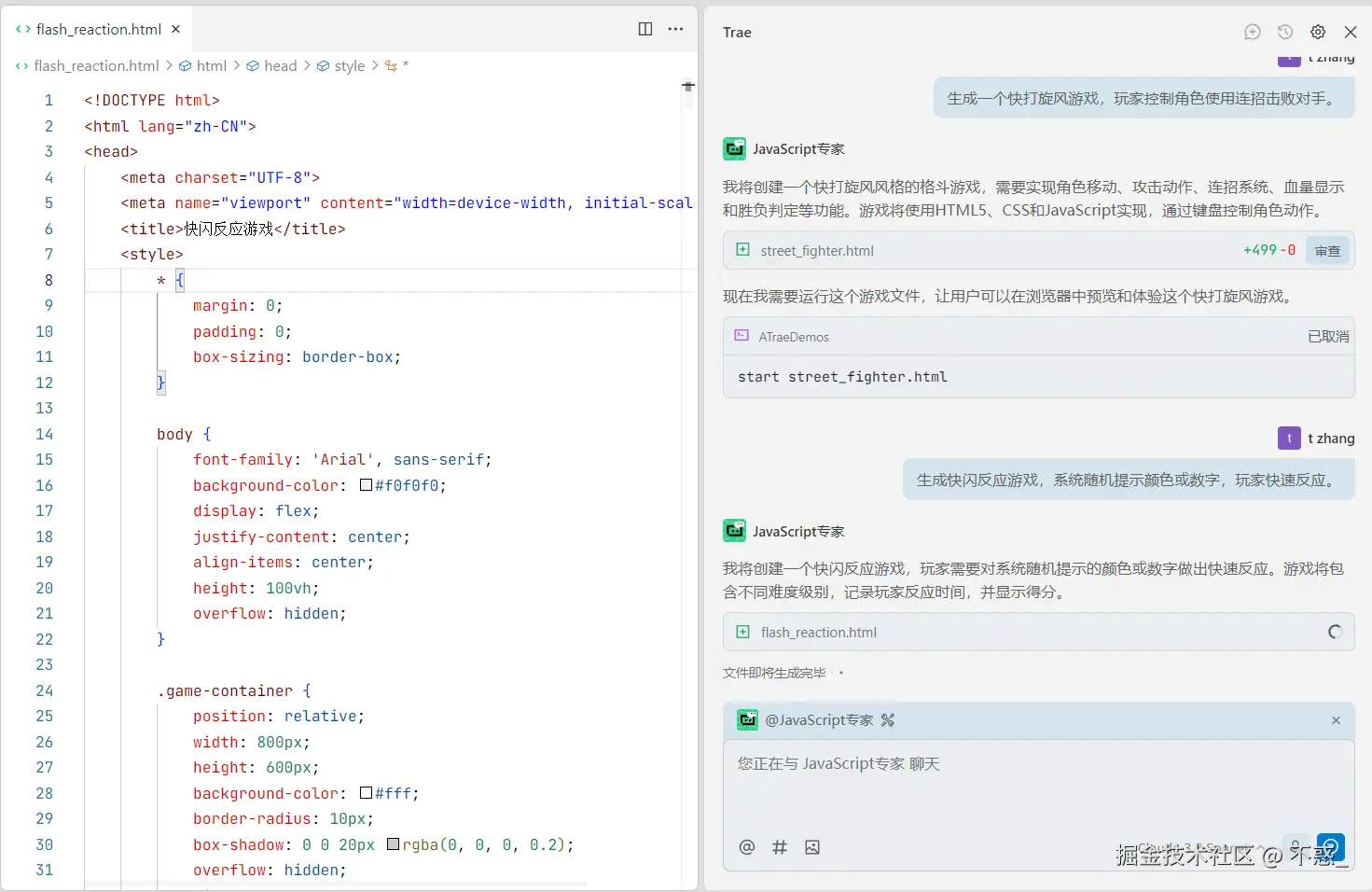
✨ Trae 怎么生成游戏
不到 5 秒钟,Trae 就吐出了一款能直接玩的快闪反应:
✅ 随机提示系统 :颜色块、数字都会随机闪现,毫无规律,让玩家保持高度集中。 ✅ 输入检测逻辑 :键盘输入和点击操作都能识别,判定超快,没有任何延迟。 ✅ 计分 & 反馈机制 :正确反应加分,按错或超时扣分,分数实时更新。 ✅ UI & 动画:提示颜色块会闪烁,正确时有 ✅ 动画,错误时有 ❌ 提示,视觉上很直观。
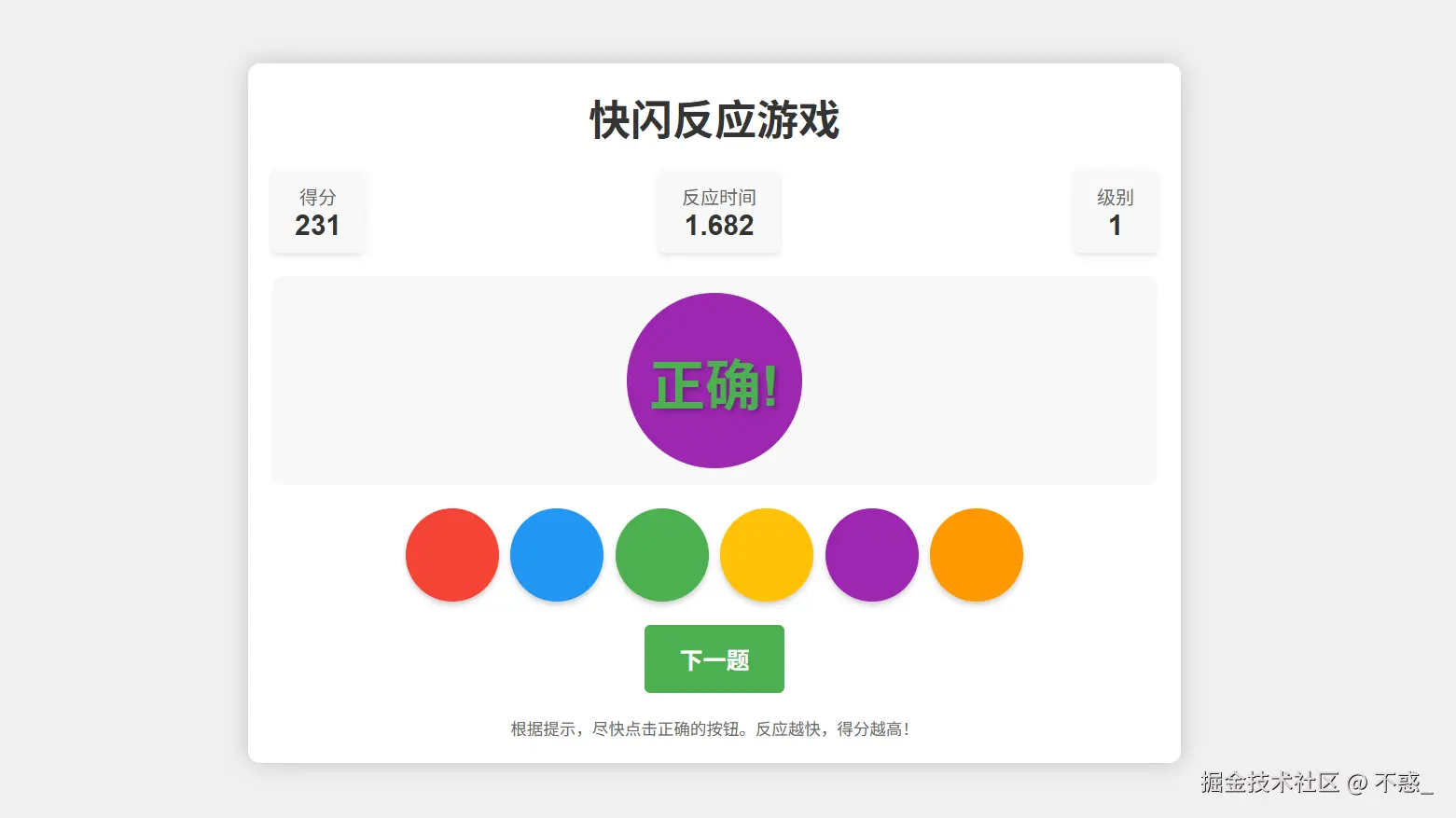
🧩 玩起来是什么感觉?
刚试玩时,我低估了它的难度:
- 一开始提示节奏慢,我轻松拿高分;
- 后面提示越来越快,手指都乱了,按错一个就直接扣分,瞬间紧张起来;
- 当屏幕上闪出颜色的那一刻,大脑和手指几乎要同步反应,非常上头。
那种"越玩越想挑战极限"的感觉,完全被 Trae 生成的逻辑拿捏住了。
🛠 想拓展玩法?一句话
Trae 最大的乐趣是,可以随时追加功能,比如:
- "加个排行榜" → 每次游戏结束后显示最高分记录。
- "加入双人对战模式" → 两个人抢答,谁快谁赢。
- "加惩罚机制" → 反应慢 3 次就 Game Over。
- "让颜色提示改成随机单词" → 还能顺便练英语。
只要一句自然语言描述,Trae 就能自动补全逻辑并无缝接入现有游戏。
🎮 写小游戏的新方式
以前写这种小游戏:
- 要写 随机数逻辑;
- 要调 键盘/鼠标事件监听;
- 要加 计时器、计分系统;
- 还要不断调 UI、调动画。
虽然不是大工程,但就是麻烦。
而现在,用 Trae: 👉 说一句话 → 游戏就能直接跑; 👉 想改玩法 → 继续说,功能就补上了。
从写代码变成了 **"给游戏发指令"**,真的很像玩积木。
✅ 结语
如果你也想做一款"考验手速和反应"的小游戏,只要打开 Trae,输入:
"生成快闪反应游戏,系统随机提示颜色或数字,玩家快速反应。"
几秒后,你就能玩上一个完整的反应挑战游戏:有随机提示、有分数统计、有反馈动画,还能随时扩展更多创意玩法。
这就是 Trae 的魅力------写游戏不再是繁琐的代码活,而是一个"说了就能玩"的创意过程。
html
<!DOCTYPE html>
<html lang="zh-CN">
<head>
<meta charset="UTF-8">
<meta name="viewport" content="width=device-width, initial-scale=1.0">
<title>快闪反应游戏</title>
<style>
* {
margin: 0;
padding: 0;
box-sizing: border-box;
}
body {
font-family: 'Arial', sans-serif;
background-color: #f0f0f0;
display: flex;
justify-content: center;
align-items: center;
height: 100vh;
overflow: hidden;
}
.game-container {
position: relative;
width: 800px;
height: 600px;
background-color: #fff;
border-radius: 10px;
box-shadow: 0 0 20px rgba(0, 0, 0, 0.2);
overflow: hidden;
display: flex;
flex-direction: column;
align-items: center;
padding: 20px;
}
.game-title {
font-size: 36px;
font-weight: bold;
color: #333;
margin-bottom: 20px;
text-align: center;
}
.game-info {
display: flex;
justify-content: space-between;
width: 100%;
margin-bottom: 20px;
}
.score-container, .time-container, .level-container {
background-color: #f8f8f8;
padding: 10px 20px;
border-radius: 5px;
box-shadow: 0 2px 5px rgba(0, 0, 0, 0.1);
text-align: center;
}
.score-label, .time-label, .level-label {
font-size: 16px;
color: #666;
}
.score-value, .time-value, .level-value {
font-size: 24px;
font-weight: bold;
color: #333;
}
.game-area {
width: 100%;
height: 300px;
background-color: #f8f8f8;
border-radius: 10px;
display: flex;
justify-content: center;
align-items: center;
margin-bottom: 20px;
position: relative;
}
.stimulus {
font-size: 72px;
font-weight: bold;
transition: all 0.3s;
}
.color-stimulus {
width: 150px;
height: 150px;
border-radius: 50%;
}
.number-stimulus {
font-size: 120px;
}
.buttons-container {
display: flex;
flex-wrap: wrap;
justify-content: center;
gap: 10px;
width: 100%;
}
.response-button {
padding: 15px 25px;
font-size: 18px;
font-weight: bold;
border: none;
border-radius: 5px;
cursor: pointer;
transition: all 0.2s;
box-shadow: 0 3px 5px rgba(0, 0, 0, 0.2);
}
.response-button:hover {
transform: translateY(-3px);
box-shadow: 0 5px 10px rgba(0, 0, 0, 0.3);
}
.response-button:active {
transform: translateY(1px);
box-shadow: 0 2px 3px rgba(0, 0, 0, 0.2);
}
.color-button {
width: 80px;
height: 80px;
border-radius: 50%;
}
.number-button {
width: 80px;
height: 80px;
display: flex;
justify-content: center;
align-items: center;
background-color: #f0f0f0;
color: #333;
}
.start-button, .next-button {
padding: 15px 30px;
font-size: 20px;
font-weight: bold;
background-color: #4CAF50;
color: white;
border: none;
border-radius: 5px;
cursor: pointer;
transition: all 0.3s;
margin-top: 20px;
}
.start-button:hover, .next-button:hover {
background-color: #45a049;
transform: scale(1.05);
}
.feedback {
position: absolute;
top: 50%;
left: 50%;
transform: translate(-50%, -50%);
font-size: 48px;
font-weight: bold;
text-shadow: 2px 2px 4px rgba(0, 0, 0, 0.3);
display: none;
}
.correct {
color: #4CAF50;
}
.wrong {
color: #f44336;
}
.game-over {
position: absolute;
top: 0;
left: 0;
width: 100%;
height: 100%;
background-color: rgba(0, 0, 0, 0.8);
display: flex;
flex-direction: column;
justify-content: center;
align-items: center;
z-index: 10;
display: none;
}
.game-over-title {
font-size: 48px;
font-weight: bold;
color: white;
margin-bottom: 20px;
}
.final-score {
font-size: 36px;
color: white;
margin-bottom: 30px;
}
.restart-button {
padding: 15px 30px;
font-size: 20px;
font-weight: bold;
background-color: #f44336;
color: white;
border: none;
border-radius: 5px;
cursor: pointer;
transition: all 0.3s;
}
.restart-button:hover {
background-color: #d32f2f;
transform: scale(1.05);
}
.instructions {
margin-top: 20px;
text-align: center;
color: #666;
font-size: 14px;
}
.start-screen {
position: absolute;
top: 0;
left: 0;
width: 100%;
height: 100%;
background-color: rgba(255, 255, 255, 0.9);
display: flex;
flex-direction: column;
justify-content: center;
align-items: center;
z-index: 20;
}
.start-screen-title {
font-size: 48px;
font-weight: bold;
color: #333;
margin-bottom: 20px;
text-align: center;
}
.start-screen-subtitle {
font-size: 24px;
color: #666;
margin-bottom: 30px;
text-align: center;
max-width: 80%;
line-height: 1.4;
}
.difficulty-buttons {
display: flex;
gap: 15px;
margin-bottom: 30px;
}
.difficulty-button {
padding: 10px 20px;
font-size: 18px;
font-weight: bold;
border: none;
border-radius: 5px;
cursor: pointer;
transition: all 0.2s;
}
.easy {
background-color: #4CAF50;
color: white;
}
.medium {
background-color: #FFC107;
color: white;
}
.hard {
background-color: #f44336;
color: white;
}
.difficulty-button:hover {
transform: translateY(-3px);
box-shadow: 0 5px 10px rgba(0, 0, 0, 0.2);
}
.difficulty-button.selected {
transform: scale(1.1);
box-shadow: 0 0 10px rgba(0, 0, 0, 0.3);
}
.mode-buttons {
display: flex;
gap: 15px;
margin-bottom: 30px;
}
.mode-button {
padding: 10px 20px;
font-size: 18px;
font-weight: bold;
border: none;
border-radius: 5px;
cursor: pointer;
transition: all 0.2s;
background-color: #2196F3;
color: white;
}
.mode-button:hover {
transform: translateY(-3px);
box-shadow: 0 5px 10px rgba(0, 0, 0, 0.2);
}
.mode-button.selected {
transform: scale(1.1);
box-shadow: 0 0 10px rgba(0, 0, 0, 0.3);
}
@keyframes countdown {
0% {
transform: scale(1);
opacity: 1;
}
100% {
transform: scale(3);
opacity: 0;
}
}
.countdown {
position: absolute;
top: 50%;
left: 50%;
transform: translate(-50%, -50%);
font-size: 72px;
font-weight: bold;
color: #333;
z-index: 30;
animation: countdown 1s ease-out forwards;
}
.hidden {
display: none;
}
</style>
</head>
<body>
<div class="game-container">
<div class="game-title">快闪反应游戏</div>
<div class="game-info">
<div class="score-container">
<div class="score-label">得分</div>
<div class="score-value" id="score">0</div>
</div>
<div class="time-container">
<div class="time-label">反应时间</div>
<div class="time-value" id="reaction-time">0.000</div>
</div>
<div class="level-container">
<div class="level-label">级别</div>
<div class="level-value" id="level">1</div>
</div>
</div>
<div class="game-area" id="game-area">
<div class="stimulus" id="stimulus"></div>
<div class="feedback correct" id="correct-feedback">正确!</div>
<div class="feedback wrong" id="wrong-feedback">错误!</div>
</div>
<div class="buttons-container" id="buttons-container"></div>
<button class="next-button" id="next-button">下一题</button>
<div class="instructions">
根据提示,尽快点击正确的按钮。反应越快,得分越高!
</div>
<div class="game-over" id="game-over">
<div class="game-over-title">游戏结束</div>
<div class="final-score" id="final-score">最终得分: 0</div>
<button class="restart-button" id="restart-button">再玩一次</button>
</div>
<div class="start-screen" id="start-screen">
<div class="start-screen-title">快闪反应游戏</div>
<div class="start-screen-subtitle">测试你的反应速度和注意力!系统会随机显示颜色或数字,你需要尽快做出正确反应。</div>
<div class="mode-buttons">
<button class="mode-button selected" id="color-mode">颜色模式</button>
<button class="mode-button" id="number-mode">数字模式</button>
<button class="mode-button" id="mixed-mode">混合模式</button>
</div>
<div class="difficulty-buttons">
<button class="difficulty-button easy selected" id="easy-mode">简单</button>
<button class="difficulty-button medium" id="medium-mode">中等</button>
<button class="difficulty-button hard" id="hard-mode">困难</button>
</div>
<button class="start-button" id="start-button">开始游戏</button>
</div>
</div>
<script>
// 游戏元素
const gameArea = document.getElementById('game-area');
const stimulus = document.getElementById('stimulus');
const buttonsContainer = document.getElementById('buttons-container');
const scoreValue = document.getElementById('score');
const reactionTimeValue = document.getElementById('reaction-time');
const levelValue = document.getElementById('level');
const correctFeedback = document.getElementById('correct-feedback');
const wrongFeedback = document.getElementById('wrong-feedback');
const nextButton = document.getElementById('next-button');
const gameOver = document.getElementById('game-over');
const finalScore = document.getElementById('final-score');
const restartButton = document.getElementById('restart-button');
const startScreen = document.getElementById('start-screen');
const startButton = document.getElementById('start-button');
// 模式选择按钮
const colorModeButton = document.getElementById('color-mode');
const numberModeButton = document.getElementById('number-mode');
const mixedModeButton = document.getElementById('mixed-mode');
// 难度选择按钮
const easyModeButton = document.getElementById('easy-mode');
const mediumModeButton = document.getElementById('medium-mode');
const hardModeButton = document.getElementById('hard-mode');
// 游戏配置
const colors = [
{ name: '红色', value: '#f44336' },
{ name: '蓝色', value: '#2196F3' },
{ name: '绿色', value: '#4CAF50' },
{ name: '黄色', value: '#FFC107' },
{ name: '紫色', value: '#9C27B0' },
{ name: '橙色', value: '#FF9800' }
];
const numbers = [1, 2, 3, 4, 5, 6, 7, 8, 9];
// 游戏状态
let gameMode = 'color'; // 'color', 'number', 'mixed'
let difficulty = 'easy'; // 'easy', 'medium', 'hard'
let score = 0;
let level = 1;
let rounds = 0;
let maxRounds = 10;
let currentStimulus = null;
let startTime = 0;
let timeLimit = 0;
let timeLimitInterval = null;
// 初始化游戏
function initGame() {
// 隐藏开始屏幕
startScreen.style.display = 'none';
// 重置游戏状态
score = 0;
level = 1;
rounds = 0;
// 更新显示
scoreValue.textContent = score;
levelValue.textContent = level;
reactionTimeValue.textContent = '0.000';
// 设置难度
setDifficulty();
// 隐藏下一题按钮
nextButton.style.display = 'none';
// 开始倒计时
startCountdown();
}
// 开始倒计时
function startCountdown() {
let count = 3;
function showCount() {
if (count > 0) {
const countElement = document.createElement('div');
countElement.className = 'countdown';
countElement.textContent = count;
gameArea.appendChild(countElement);
setTimeout(() => {
gameArea.removeChild(countElement);
count--;
showCount();
}, 1000);
} else {
startRound();
}
}
showCount();
}
// 设置难度
function setDifficulty() {
switch (difficulty) {
case 'easy':
timeLimit = 3000; // 3秒
break;
case 'medium':
timeLimit = 2000; // 2秒
break;
case 'hard':
timeLimit = 1000; // 1秒
break;
}
}
// 开始新回合
function startRound() {
// 清空按钮容器
buttonsContainer.innerHTML = '';
// 隐藏反馈
correctFeedback.style.display = 'none';
wrongFeedback.style.display = 'none';
// 隐藏下一题按钮
nextButton.style.display = 'none';
// 根据游戏模式生成刺激物
if (gameMode === 'color') {
generateColorStimulus();
} else if (gameMode === 'number') {
generateNumberStimulus();
} else {
// 混合模式随机选择
if (Math.random() < 0.5) {
generateColorStimulus();
} else {
generateNumberStimulus();
}
}
// 记录开始时间
startTime = Date.now();
// 设置时间限制
if (timeLimitInterval) {
clearTimeout(timeLimitInterval);
}
timeLimitInterval = setTimeout(() => {
handleTimeout();
}, timeLimit);
}
// 生成颜色刺激物
function generateColorStimulus() {
// 随机选择一个颜色作为刺激物
const randomIndex = Math.floor(Math.random() * colors.length);
currentStimulus = colors[randomIndex];
// 显示颜色刺激物
stimulus.className = 'stimulus color-stimulus';
stimulus.style.backgroundColor = currentStimulus.value;
stimulus.textContent = '';
// 生成颜色按钮
generateColorButtons();
}
// 生成数字刺激物
function generateNumberStimulus() {
// 随机选择一个数字作为刺激物
const randomIndex = Math.floor(Math.random() * numbers.length);
currentStimulus = numbers[randomIndex];
// 显示数字刺激物
stimulus.className = 'stimulus number-stimulus';
stimulus.style.backgroundColor = 'transparent';
stimulus.textContent = currentStimulus;
// 生成数字按钮
generateNumberButtons();
}
// 生成颜色按钮
function generateColorButtons() {
// 创建所有颜色按钮
colors.forEach(color => {
const button = document.createElement('button');
button.className = 'response-button color-button';
button.style.backgroundColor = color.value;
button.dataset.value = color.name;
button.addEventListener('click', () => {
handleResponse(color.name);
});
buttonsContainer.appendChild(button);
});
}
// 生成数字按钮
function generateNumberButtons() {
// 创建所有数字按钮
numbers.forEach(number => {
const button = document.createElement('button');
button.className = 'response-button number-button';
button.textContent = number;
button.dataset.value = number;
button.addEventListener('click', () => {
handleResponse(number);
});
buttonsContainer.appendChild(button);
});
}
// 处理玩家响应
function handleResponse(response) {
// 清除时间限制
if (timeLimitInterval) {
clearTimeout(timeLimitInterval);
}
// 计算反应时间
const endTime = Date.now();
const reactionTime = (endTime - startTime) / 1000;
// 更新反应时间显示
reactionTimeValue.textContent = reactionTime.toFixed(3);
// 检查响应是否正确
let isCorrect = false;
if (typeof currentStimulus === 'object') { // 颜色模式
isCorrect = response === currentStimulus.name;
} else { // 数字模式
isCorrect = parseInt(response) === currentStimulus;
}
if (isCorrect) {
// 计算得分(反应越快得分越高)
const timeScore = Math.max(0, Math.floor((timeLimit / 1000 - reactionTime) * 100));
const roundScore = 100 + timeScore;
score += roundScore;
// 显示正确反馈
correctFeedback.style.display = 'block';
// 更新得分显示
scoreValue.textContent = score;
} else {
// 显示错误反馈
wrongFeedback.style.display = 'block';
}
// 更新回合数
rounds++;
// 检查是否需要升级
if (rounds % 3 === 0 && level < 5) {
level++;
levelValue.textContent = level;
timeLimit = Math.max(500, timeLimit - 200); // 每升一级减少200毫秒,最低500毫秒
}
// 显示下一题按钮
nextButton.style.display = 'block';
// 检查游戏是否结束
if (rounds >= maxRounds) {
setTimeout(() => {
endGame();
}, 1000);
}
}
// 处理超时
function handleTimeout() {
// 显示错误反馈
wrongFeedback.style.display = 'block';
// 更新回合数
rounds++;
// 显示下一题按钮
nextButton.style.display = 'block';
// 检查游戏是否结束
if (rounds >= maxRounds) {
setTimeout(() => {
endGame();
}, 1000);
}
}
// 结束游戏
function endGame() {
// 显示游戏结束界面
gameOver.style.display = 'flex';
// 更新最终得分
finalScore.textContent = `最终得分: ${score}`;
}
// 事件监听
nextButton.addEventListener('click', () => {
startRound();
});
restartButton.addEventListener('click', () => {
gameOver.style.display = 'none';
startScreen.style.display = 'flex';
});
startButton.addEventListener('click', () => {
initGame();
});
// 模式选择
colorModeButton.addEventListener('click', () => {
gameMode = 'color';
updateModeSelection();
});
numberModeButton.addEventListener('click', () => {
gameMode = 'number';
updateModeSelection();
});
mixedModeButton.addEventListener('click', () => {
gameMode = 'mixed';
updateModeSelection();
});
// 难度选择
easyModeButton.addEventListener('click', () => {
difficulty = 'easy';
updateDifficultySelection();
});
mediumModeButton.addEventListener('click', () => {
difficulty = 'medium';
updateDifficultySelection();
});
hardModeButton.addEventListener('click', () => {
difficulty = 'hard';
updateDifficultySelection();
});
// 更新模式选择UI
function updateModeSelection() {
colorModeButton.classList.remove('selected');
numberModeButton.classList.remove('selected');
mixedModeButton.classList.remove('selected');
if (gameMode === 'color') {
colorModeButton.classList.add('selected');
} else if (gameMode === 'number') {
numberModeButton.classList.add('selected');
} else {
mixedModeButton.classList.add('selected');
}
}
// 更新难度选择UI
function updateDifficultySelection() {
easyModeButton.classList.remove('selected');
mediumModeButton.classList.remove('selected');
hardModeButton.classList.remove('selected');
if (difficulty === 'easy') {
easyModeButton.classList.add('selected');
} else if (difficulty === 'medium') {
mediumModeButton.classList.add('selected');
} else {
hardModeButton.classList.add('selected');
}
}
</script>
</body>
</html>