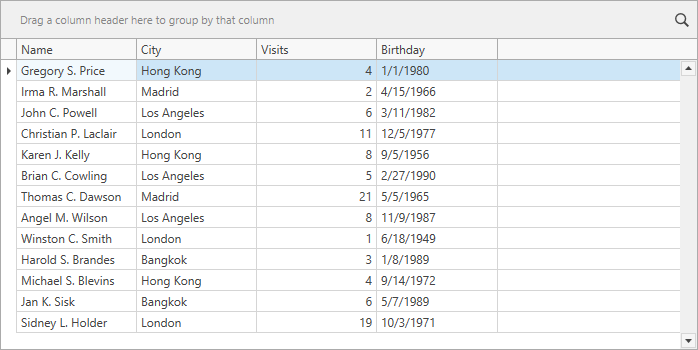
DevExpress WPF拥有120+个控件和库,将帮助您交付满足甚至超出企业需求的高性能业务应用程序。通过DevExpress WPF能创建有着强大互动功能的XAML基础应用程序,这些应用程序专注于当代客户的需求和构建未来新一代支持触摸的解决方案。 无论是Office办公软件的衍伸产品,还是以数据为中心的商业智能产品,都能通过DevExpress WPF控件来实现。
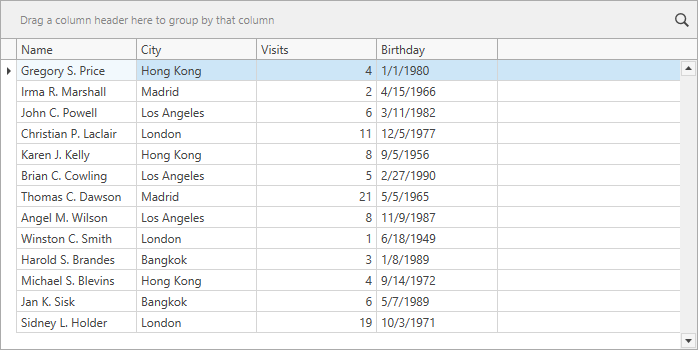
本文主要演示如何将DevExpress WPF GridControl绑定到本地集合,欢迎下载最新版组件体验!
新增一个数据模型
用Customer类的集合创建一个数据模型:
DataModel.cs
cs
using System;
using System.Collections.ObjectModel;

namespace BindToLocalCollection {
public class Customer {
public string Name { get; set; }
public string City { get; set; }
public int Visits { get; set; }
public DateTime? Birthday { get; set; }
}
public class CustomerDataModel {
public ObservableCollection<Customer> GetCustomers() {
ObservableCollection<Customer> people = new ObservableCollection<Customer>();
people.Add(new Customer() { Name = "Gregory S. Price", City = "Hong Kong", Visits = 4, Birthday = new DateTime(1980, 1, 1) });
people.Add(new Customer() { Name = "Irma R. Marshall", City = "Madrid", Visits = 2, Birthday = new DateTime(1966, 4, 15) });
people.Add(new Customer() { Name = "John C. Powell", City = "Los Angeles", Visits = 6, Birthday = new DateTime(1982, 3, 11) });
people.Add(new Customer() { Name = "Christian P. Laclair", City = "London", Visits = 11, Birthday = new DateTime(1977, 12, 5) });
people.Add(new Customer() { Name = "Karen J. Kelly", City = "Hong Kong", Visits = 8, Birthday = new DateTime(1956, 9, 5) });
people.Add(new Customer() { Name = "Brian C. Cowling", City = "Los Angeles", Visits = 5, Birthday = new DateTime(1990, 2, 27) });
people.Add(new Customer() { Name = "Thomas C. Dawson", City = "Madrid", Visits = 21, Birthday = new DateTime(1965, 5, 5) });
people.Add(new Customer() { Name = "Angel M. Wilson", City = "Los Angeles", Visits = 8, Birthday = new DateTime(1987, 11, 9) });
people.Add(new Customer() { Name = "Winston C. Smith", City = "London", Visits = 1, Birthday = new DateTime(1949, 6, 18) });
people.Add(new Customer() { Name = "Harold S. Brandes", City = "Bangkok", Visits = 3, Birthday = new DateTime(1989, 1, 8) });
people.Add(new Customer() { Name = "Michael S. Blevins", City = "Hong Kong", Visits = 4, Birthday = new DateTime(1972, 9, 14) });
people.Add(new Customer() { Name = "Jan K. Sisk", City = "Bangkok", Visits = 6, Birthday = new DateTime(1989, 5, 7) });
people.Add(new Customer() { Name = "Sidney L. Holder", City = "London", Visits = 19, Birthday = new DateTime(1971, 10, 3) });
return people;
}
}
}
DataModel.vb
vbnet
Imports System
Imports System.Collections.ObjectModel

Namespace BindToLocalCollection
Public Class Customer
Public Property Name As String
Public Property City As String
Public Property Visits As Integer
Public Property Birthday As DateTime?
End Class

Public Class CustomerDataModel
Public Function GetCustomers() As ObservableCollection(Of Customer)
Dim people As ObservableCollection(Of Customer) = New ObservableCollection(Of Customer)()
people.Add(New Customer() With { .Name = "Gregory S. Price", .City = "Hong Kong", .Visits = 4, .Birthday = New DateTime(1980, 1, 1) })
people.Add(New Customer() With { .Name = "Irma R. Marshall", .City = "Madrid", .Visits = 2, .Birthday = New DateTime(1966, 4, 15) })
people.Add(New Customer() With { .Name = "John C. Powell", .City = "Los Angeles", .Visits = 6, .Birthday = New DateTime(1982, 3, 11) })
people.Add(New Customer() With { .Name = "Christian P. Laclair", .City = "London", .Visits = 11, .Birthday = New DateTime(1977, 12, 5) })
people.Add(New Customer() With { .Name = "Karen J. Kelly", .City = "Hong Kong", .Visits = 8, .Birthday = New DateTime(1956, 9, 5) })
people.Add(New Customer() With { .Name = "Brian C. Cowling", .City = "Los Angeles", .Visits = 5, .Birthday = New DateTime(1990, 2, 27) })
people.Add(New Customer() With { .Name = "Thomas C. Dawson", .City = "Madrid", .Visits = 21, .Birthday = New DateTime(1965, 5, 5) })
people.Add(New Customer() With { .Name = "Angel M. Wilson", .City = "Los Angeles", .Visits = 8, .Birthday = New DateTime(1987, 11, 9) })
people.Add(New Customer() With { .Name = "Winston C. Smith", .City = "London", .Visits = 1, .Birthday = New DateTime(1949, 6, 18) })
people.Add(New Customer() With { .Name = "Harold S. Brandes", .City = "Bangkok", .Visits = 3, .Birthday = New DateTime(1989, 1, 8) })
people.Add(New Customer() With { .Name = "Michael S. Blevins", .City = "Hong Kong", .Visits = 4, .Birthday = New DateTime(1972, 9, 14) })
people.Add(New Customer() With { .Name = "Jan K. Sisk", .City = "Bangkok", .Visits = 6, .Birthday = New DateTime(1989, 5, 7) })
people.Add(New Customer() With { .Name = "Sidney L. Holder", .City = "London", .Visits = 19, .Birthday = New DateTime(1971, 10, 3) })
Return people
End Function
End Class
End Namespace
新增一个视图模型
创建一个从CustomerDataModel接收数据的视图模型类:
ViewModel.cs
cs
using DevExpress.Mvvm;
using System.Collections.ObjectModel;

namespace BindToLocalCollection {
public class ViewModel : ViewModelBase {
public ViewModel() {
Source = CustomerDataModel.GetCustomers();
}
public ObservableCollection<Customer> Source { get; }
}
}
ViewModel.vb
vbnet
Imports DevExpress.Mvvm
Imports System.Collections.ObjectModel

Namespace BindToLocalCollection
Public Class ViewModel
Inherits ViewModelBase

Public Sub New()
Source = CustomerDataModel.GetCustomers()
End Sub

Public ReadOnly Property Source As ObservableCollection(Of Customer)
End Class
End Namespace
将GridControl绑定到数据
-
构建解决方案,使ViewModel类在窗口的Quick Actions中可见。
-
打开窗口的Quick Actions并指定窗口的数据上下文:
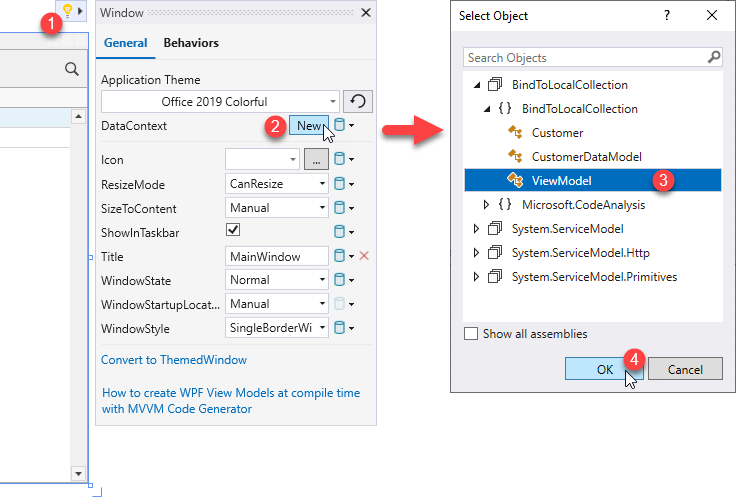
您也可以在代码中定义窗口的数据上下文:
XAML
XML
<Window
xmlns="http://schemas.microsoft.com/winfx/2006/xaml/presentation"
xmlns:x="http://schemas.microsoft.com/winfx/2006/xaml"
xmlns:d="http://schemas.microsoft.com/expression/blend/2008"
xmlns:mc="http://schemas.openxmlformats.org/markup-compatibility/2006"
xmlns:local="clr-namespace:BindToLocalCollection"
xmlns:dxg="http://schemas.devexpress.com/winfx/2008/xaml/grid"
x:Class="BindToLocalCollection.MainWindow"
mc:Ignorable="d"
Title="MainWindow" Height="450" Width="800">
<Window.DataContext>
<local:ViewModel/>
</Window.DataContext>
<Grid>
<dxg:GridControl AutoGenerateColumns="AddNew"
EnableSmartColumnsGeneration="True">
<dxg:GridControl.View>
<dxg:TableView/>
</dxg:GridControl.View>
</dxg:GridControl>
</Grid>
</Window>- 打开GridControl的Quick Actions并指定ItemsSource:
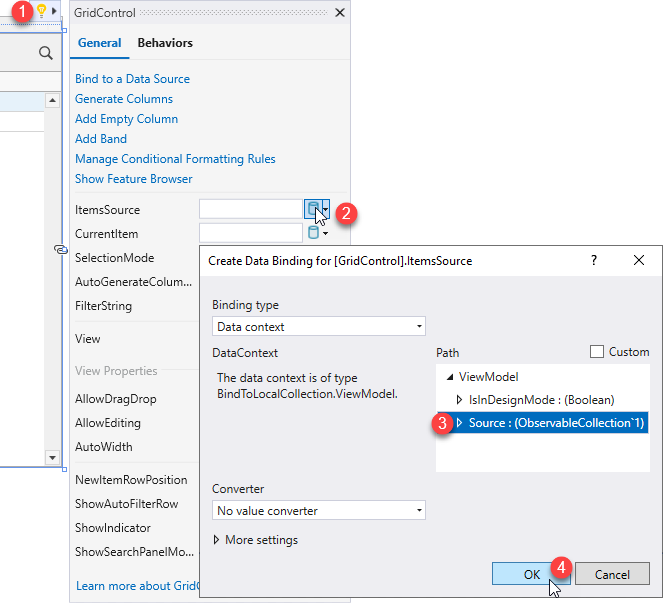
要在代码中将GridControl绑定到数据,请指定DataControlBase.ItemsSource属性:
XAML
XML
<Window
xmlns="http://schemas.microsoft.com/winfx/2006/xaml/presentation"
xmlns:x="http://schemas.microsoft.com/winfx/2006/xaml"
xmlns:d="http://schemas.microsoft.com/expression/blend/2008"
xmlns:mc="http://schemas.openxmlformats.org/markup-compatibility/2006"
xmlns:local="clr-namespace:BindToLocalCollection"
xmlns:dxg="http://schemas.devexpress.com/winfx/2008/xaml/grid"
x:Class="BindToLocalCollection.MainWindow"
mc:Ignorable="d"
Title="MainWindow" Height="450" Width="800">
<Window.DataContext>
<local:ViewModel/>
</Window.DataContext>
<Grid>
<dxg:GridControl AutoGenerateColumns="AddNew"
EnableSmartColumnsGeneration="True"
ItemsSource="{Binding Source}">
<dxg:GridControl.View>
<dxg:TableView/>
</dxg:GridControl.View>
</dxg:GridControl>
</Grid>
</Window>- 运行项目,GridControl为绑定数据源中的所有字段生成列。