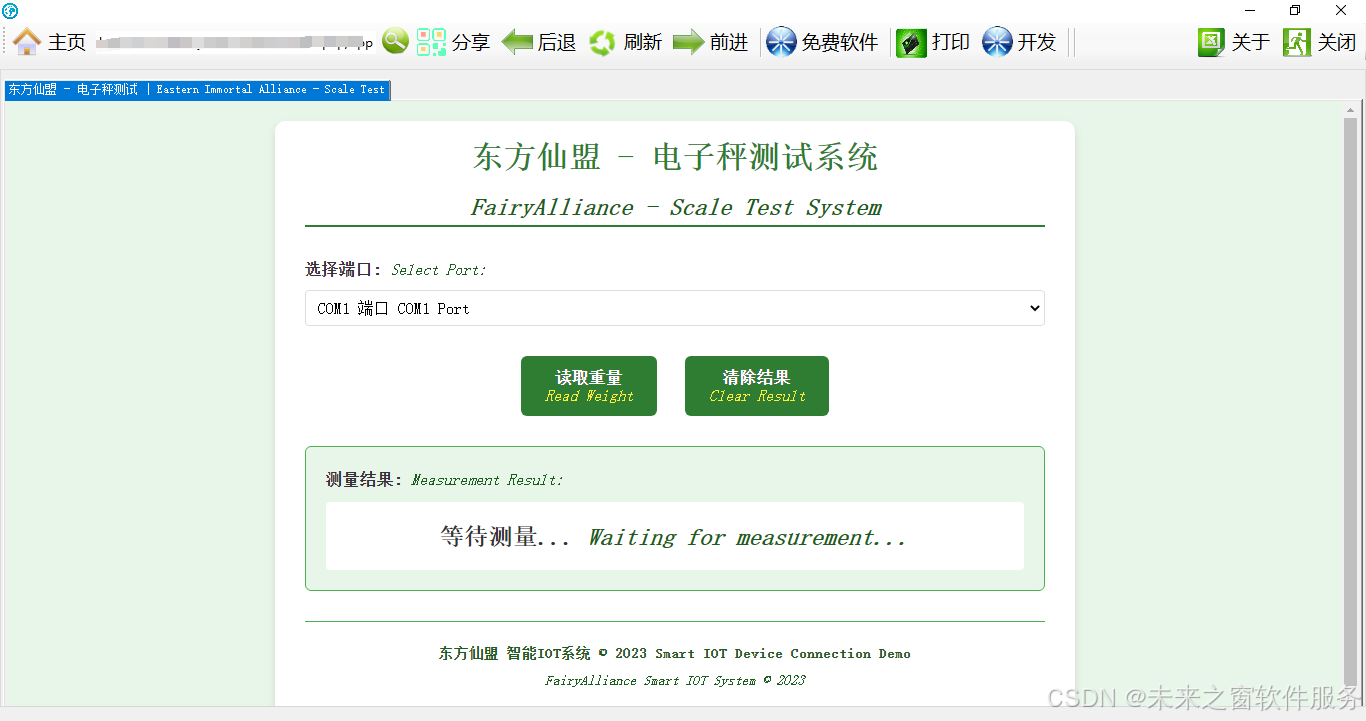
一、东方仙盟智能浏览器:跨平台,畅连百种硬件,速启现场编译
东方仙盟 VOS 智能浏览器在网页调用硬件 SDK 领域堪称卓越典范。它全面兼容多平台,无论是电脑、手机还是各类移动终端,都能完美适配,无缝对接。令人瞩目的是,该浏览器支持上百种硬件设备,从常见的打印机、摄像头,到专业的工业传感器、医疗检测设备等,覆盖面极为广泛。不仅如此,它还具备动态接入硬件 SDK 的强大功能,可随时响应新硬件接入需求,保障系统灵活性与扩展性。
值得一提的是,东方仙盟 VOS 智能浏览器自带编译器,支持现场编译。这意味着开发者在调用硬件 SDK 过程中,若需对代码进行优化或根据硬件特性进行定制开发,无需额外配置复杂环境,直接在浏览器内即可快速完成编译工作,极大提升开发效率,为硬件与网页的深度融合提供了坚实技术保障。
二、打开测试电子秤测试网页
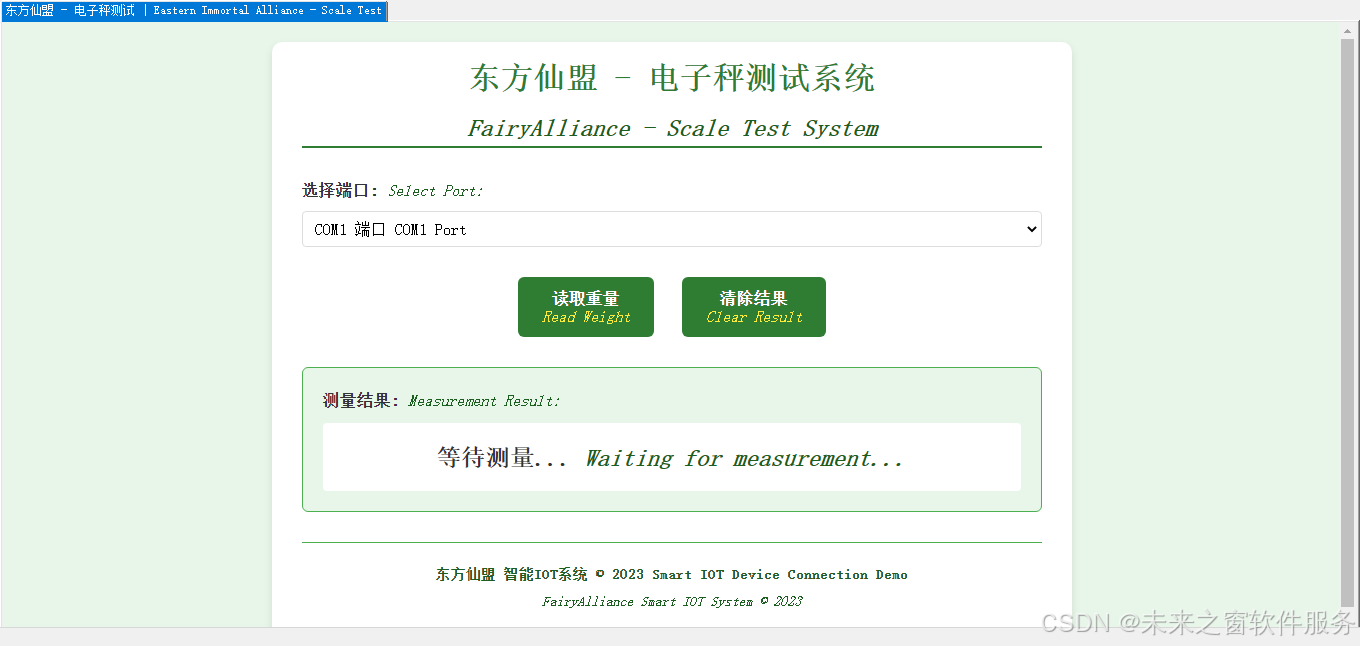
三、读取电子秤重量
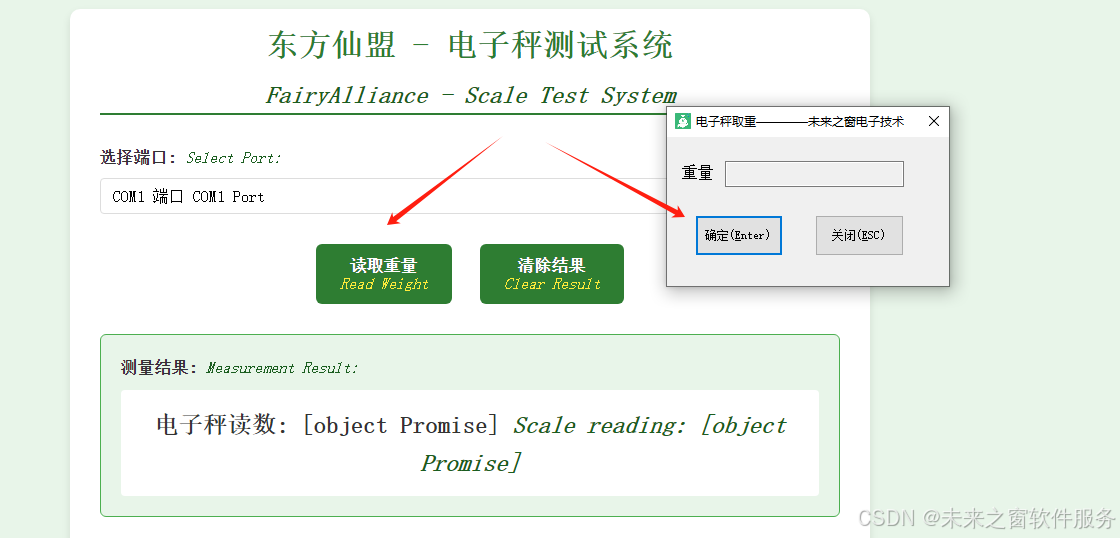
在数字化与智能化深度融合的当下,未来之窗浏览器宛如东方仙盟中拥有神奇法术的智者,以独特的能力为多个行业带来革新,尤其是在网页读取电子秤及控制智能硬件领域,为毕业初学者开辟了一片充满机遇的天地。
四、代码
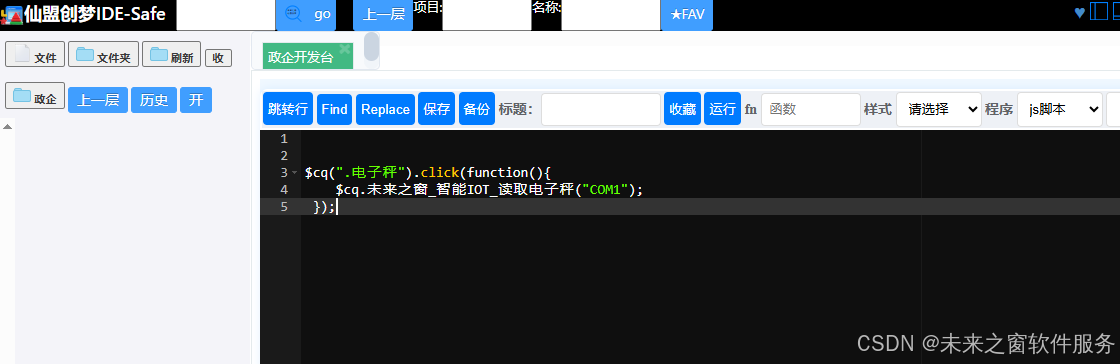
$cq(".电子秤").click(function(){
    $cq.未来之窗_智能IOT_读取电子秤("COM1");
 });

<!DOCTYPE html>
<html lang="zh-CN">
<head>
    <meta charset="UTF-8">
    <meta name="viewport" content="width=device-width, initial-scale=1.0">
    <title>东方仙盟 - 电子秤测试 | Eastern Immortal Alliance - Scale Test</title>
    <style>
        :root {
            --primary-color: #2e7d32;
            --secondary-color: #4caf50;
            --light-color: #e8f5e9;
            --dark-color: #1b5e20;
            --text-color: #333333;
            --white-color: #ffffff;
        }

        * {
            margin: 0;
            padding: 0;
            box-sizing: border-box;
            font-family: "SimSun", "Arial", sans-serif;
        }

        body {
            background-color: var(--light-color);
            color: var(--text-color);
            line-height: 1.6;
            padding: 20px;
        }

        .container {
            max-width: 800px;
            margin: 0 auto;
            background-color: var(--white-color);
            padding: 30px;
            border-radius: 10px;
            box-shadow: 0 4px 8px rgba(0,0,0,0.1);
			padding-top: 10px;
        }

        header {
            text-align: center;
            margin-bottom: 30px;
            padding-bottom: 20px;
            border-bottom: 2px solid var(--primary-color);
			padding-bottom: 0px;
        }

        h1 {
            color: var(--primary-color);
            margin-bottom: 10px;
        }

        .dual-lang作废 {
            display: flex;
            flex-direction: column;
        }

        .zh {
            font-weight: bold;
            margin-bottom: 5px;
        }

        .en {
            color: var(--dark-color);
            font-style: italic;
        }

        .port-selection {
            margin-bottom: 25px;
        }

        label {
            display: block;
            margin-bottom: 8px;
        }

        label .en {
            font-weight: normal;
        }

        select, input[type="text"] {
            width: 100%;
            padding: 10px;
            border: 1px solid var(--secondary-color);
            border-radius: 4px;
            font-size: 16px;
        }

        .button-group {
            margin: 30px 0;
            text-align: center;
        }

        .action-btn {
            background-color: var(--primary-color);
            color: var(--white-color);
            border: none;
            padding: 12px 24px;
            font-size: 16px;
            border-radius: 6px;
            cursor: pointer;
            transition: all 0.3s;
            margin: 0 10px;
        }

        .action-btn:hover {
            background-color: var(--dark-color);
            transform: translateY(-2px);
            box-shadow: 0 4px 8px rgba(0,0,0,0.1);
        }

        .result-area {
            margin-top: 30px;
            padding: 20px;
            background-color: var(--light-color);
            border-radius: 6px;
            border: 1px solid var(--secondary-color);
        }

        .result-title {
            margin-bottom: 10px;
        }

        #weightResult {
            font-size: 24px;
            text-align: center;
            padding: 15px;
            background-color: var(--white-color);
            border-radius: 4px;
            min-height: 60px;
            font-weight: bold;
        }

        footer {
            text-align: center;
            margin-top: 30px;
            padding-top: 20px;
            border-top: 1px solid var(--secondary-color);
            color: var(--dark-color);
            font-size: 14px;
        }

        @media (max-width: 600px) {
            .container {
                padding: 15px;
            }

            .action-btn {
                display: block;
                width: 100%;
                margin: 10px 0;
            }
        }
    </style>
</head>
<body>
    <div class="container">
        <header>
            <div class="dual-lang">
                <h1 class="zh">东方仙盟 - 电子秤测试系统</h1>
                <h2 class="en">FairyAlliance - Scale Test System</h2>
            </div>

        </header>

        <div class="port-selection">
            <label class="dual-lang">
                <span class="zh">选择端口:</span>
                <span class="en">Select Port:</span>
            </label>
            <select id="portSelect">
                <option value="COM1">
                    <span class="zh">COM1 端口</span>
                    <span class="en">COM1 Port</span>
                </option>
                <option value="COM2">
                    <span class="zh">COM2 端口</span>
                    <span class="en">COM2 Port</span>
                </option>
                <option value="COM3">
                    <span class="zh">COM3 端口</span>
                    <span class="en">COM3 Port</span>
                </option>
                <option value="COM4">
                    <span class="zh">COM4 端口</span>
                    <span class="en">COM4 Port</span>
                </option>
                <option value="COM5">
                    <span class="zh">COM5 端口</span>
                    <span class="en">COM5 Port</span>
                </option>
            </select>
        </div>

        <div class="button-group ">
            <button id="readButton" class="action-btn  ">
                <span class="zh">读取重量</span>
				<br>
                <span class="en" style="color: #FFEB3B;">Read Weight</span>
            </button>
            <button id="clearButton" class="action-btn  ">
                <span class="zh">清除结果</span>
				<br>
                <span class="en" style="color: #FFEB3B;">Clear Result</span>
            </button>
        </div>

        <div class="result-area">
            <div class="result-title dual-lang">
                <span class="zh">测量结果:</span>
                <span class="en">Measurement Result:</span>
            </div>
            <div id="weightResult">
                <div class="dual-lang">
                    <span class="zh">等待测量...</span>
                    <span class="en">Waiting for measurement...</span>
                </div>
            </div>
        </div>

        <footer class="dual-lang">
            <p class="zh">东方仙盟 智能IOT系统 © 2023  Smart IOT Device Connection Demo</p>
            <p class="en">FairyAlliance Smart IOT System © 2023</p>
        </footer>
    </div>

    <script>
        // 电子秤读取函数
        function 东方仙盟_智能IOT_读取电子秤(端口){
            try{
                // 这里调用电子秤API
                // 实际环境中应使用真实的CyberWin_JsStandardPlug.cwpd_communicationelectronicscale_getweight
                // 此处为模拟数据
                var d;

                // 模拟API调用,实际使用时请注释掉以下代码并启用真实API调用
                console.log("模拟调用电子秤API,端口:" + 端口);
                d = (Math.random() * 10 + 0.5).toFixed(2) + " kg"; // 生成0.5-10.5kg的随机数

                // 真实API调用(实际使用时启用)
				try{
                    d = $cq.未来之窗_智能IOT_读取电子秤(端口);
				}catch(e2){
                   alert(e2 + "\n" + e2);

                 }

                // 显示结果(同时显示中英文提示)
                document.getElementById('weightResult').innerHTML = `
                    <div class="dual-lang">
                        <span class="zh">电子秤读数: ${d}</span>
                        <span class="en">Scale reading: ${d}</span>
                    </div>
                `;

                // 提示信息(同时显示中英文)
               // alert(`电子秤读数: ${d}\nScale reading: ${d}`);

                return d;
            }catch(e){
                alert(e + "\n" + e);
                return null;
            }
        }

        // 绑定读取按钮事件
        document.getElementById('readButton').addEventListener('click', function() {
            const port = document.getElementById('portSelect').value;
            东方仙盟_智能IOT_读取电子秤(port);
        });

        // 绑定清除按钮事件
        document.getElementById('clearButton').addEventListener('click', function() {
            document.getElementById('weightResult').innerHTML = `
                <div class="dual-lang">
                    <span class="zh">等待测量...</span>
                    <span class="en">Waiting for measurement...</span>
                </div>
            `;
        });
    </script>
</body>
</html>
五、多行业应用场景
- 生鲜售卖行业:在生鲜市场,精准称重至关重要。未来之窗浏览器通过网页读取电子秤数据,可实时获取生鲜重量,自动计算价格并显示在交易界面。这不仅提高称重效率,还减少人工计算失误。例如,对于价格随季节波动的水果,浏览器能依据预设价格策略,结合重量快速算出总价,为顾客提供清晰透明消费体验。
- 粮食售卖行业:粮食交易量大,称重准确性影响成本与收益。未来之窗浏览器连接电子秤,实现大规模粮食称重自动化。它可记录每笔交易重量数据,生成详细销售报表,助商家分析销售趋势,合理规划库存。
- 化工原料行业:化工原料交易需严格把控重量,因些许误差可能致严重后果。未来之窗浏览器与高精度电子秤配合,确保化工原料称重精准。同时,可设置重量阈值,超限时自动报警,保障操作安全规范。
- 药品生产行业:药品生产对成分重量配比要求极高。未来之窗浏览器读取电子秤数据,精确控制药品原料添加量,保证药品质量稳定性与一致性。通过与生产管理系统集成,记录每批药品称重数据,实现质量追溯。
- 珠宝加工行业:珠宝价值高,重量是定价关键因素。未来之窗浏览器连接高精度电子秤,为珠宝精准称重,辅助商家准确评估价值。还可结合图像识别技术,记录珠宝外观特征,建立详细产品档案。
- 快递物流行业:快递需按重量计费。未来之窗浏览器读取电子秤数据,自动计算快递重量及费用,提高包裹处理效率。结合物流管理系统,实时更新包裹重量信息,方便客户查询与物流调度。
- 贵金属回收行业:贵金属价格高昂,回收时精准称重是定价基础。未来之窗浏览器连接专业电子秤,快速准确获取贵金属重量,依据实时金价算出回收价格,保障交易公平公正。
六、设计细节与技术实现
- 硬件连接:如同东方仙盟派遣使者与外界沟通,未来之窗浏览器借助特定通信协议(如 USB、蓝牙或 Wi-Fi)与电子秤建立连接。对于蓝牙连接的电子秤,需在浏览器设置界面搜索并配对设备,确保通信稳定。
- 数据读取:浏览器运用专门的数据读取接口,像仙盟智者解读神秘符文般解析电子秤传输的数据。此接口需适配不同电子秤品牌与型号数据格式,以保证准确读取重量信息。
- 实时显示与处理:读取的重量数据实时显示在网页界面,通过 JavaScript 等前端技术实现动态更新。同时,结合后端算法,依据预设价格、费率等规则计算总价、费用等信息。
- 智能硬件控制逻辑:对于智能电子秤,未来之窗浏览器可发送指令控制其功能,如校准、去皮等。这需在浏览器端编写控制逻辑代码,通过特定指令集与电子秤交互。
- 安全与稳定性:为保证数据安全与系统稳定运行,采用加密传输技术保护重量数据在网络传输中不被窃取或篡改。同时,设置重试机制与错误处理程序,若连接中断或数据读取失败,能自动尝试重新连接与读取,确保业务连续性。
阿雪技术观
在科技发展浪潮中,我们不妨积极投身技术共享。不满足于做受益者,更要主动担当贡献者。无论是分享代码、撰写技术博客,还是参与开源项目维护改进,每一个微小举动都可能蕴含推动技术进步的巨大能量。东方仙盟是汇聚力量的天地,我们携手在此探索硅基生命,为科技进步添砖加瓦。
Hey folks, in this wild tech - driven world, why not dive headfirst into the whole tech - sharing scene? Don't just be the one reaping all the benefits; step up and be a contributor too. Whether you're tossing out your code snippets, hammering out some tech blogs, or getting your hands dirty with maintaining and sprucing up open - source projects, every little thing you do might just end up being a massive force that pushes tech forward. And guess what? The Eastern FairyAlliance is this awesome place where we all come together. We're gonna team up and explore the whole silicon - based life thing, and in the process, we'll be fueling the growth of technology.