阔别4年后,又一次用起了阿里云的FreeBSD系统,当然当前可选的最高系统是14.1,而我的目标是升级到FreeBSD 14.3 Release 。
采购的是99活动的那款,2核2G内存3M代码,性价比超高!尤其是对FreeBSD,那是把内存优化到骨子里,就这内存,到时候都可以搞出好几台jail虚拟机出来。
登录FreeBSD系统
登录系统跟3年前进行了改变,没有完全虚拟控制台了(就是可以看到内核启动的那个控制台),只有vnc和Workbench等。奥,我理解错误了,我把vnc理解成xwindow和windows的那个3389段鸥的vnc了,原来阿里云还是有以前的那种虚拟控制台的,vnc就是。
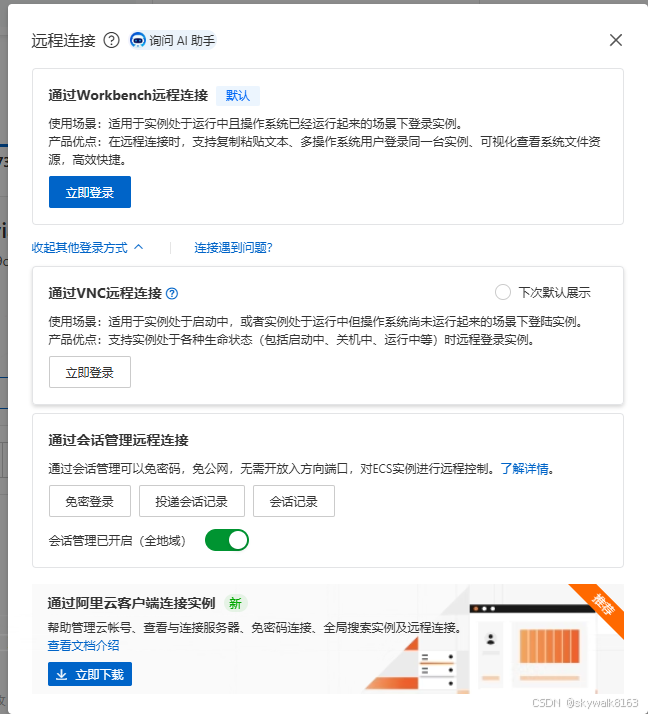
刚开始不理解vnc,于是就用了默认的第一个Workbench远程连接。
Workbench远程连接
结果第一次登录的时候报错,显示:
实例登录失败
1.当前无法通过临时SSH密钥进行远程连接,建议您选择其他认证方式,如密码等。
2.临时SSH密钥认证方式依托云助手,请检查当前实例内云助手的版本是否支持以及状态是否正常。前往云助手
3.您可以选择通过VNC方式连接实例。
登录名称:root@172.17.117.60:22
实例ID / 实例名称:i-2zebruhgtyia1373x9c8 / iZ2zebruhgtyia1373x9c8Z
简直麻爪了,赶紧重置实例密码试试
重置实例密码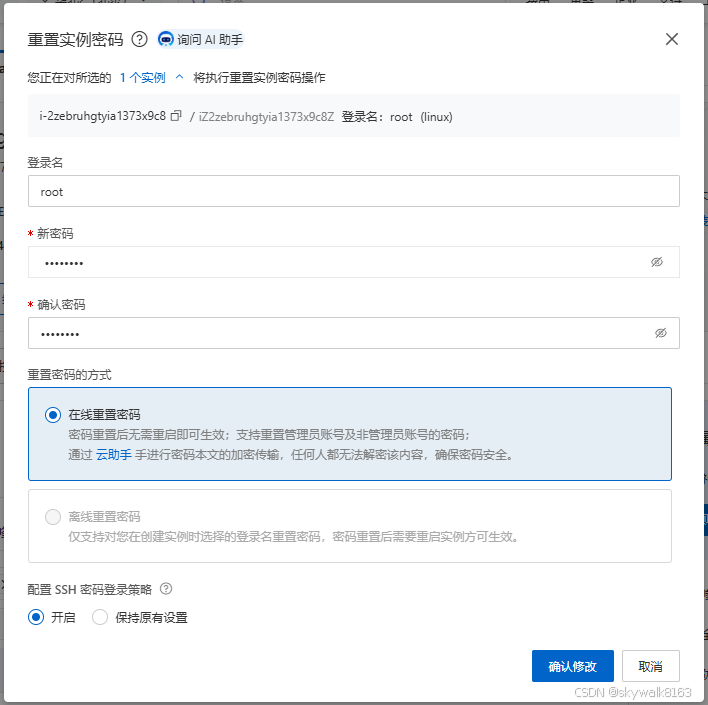
再次登录
先试试免密登录
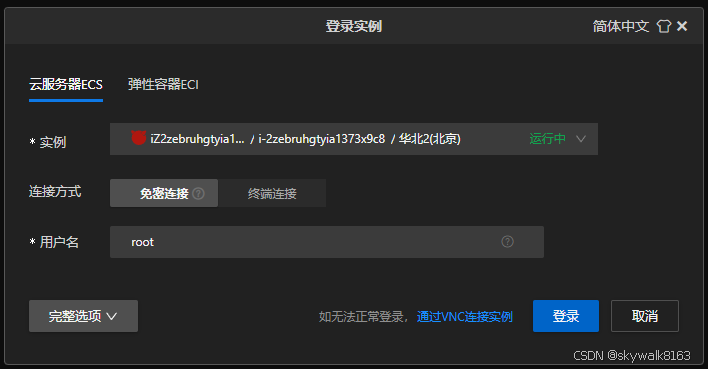
终于登进去了
添加用户和权限
添加一个常用用户
adduser注意给这个账户添加wheel组,也就是可以su - 提权到root
给这个用户加入sudo权限
安装sudo软件包
pkg install sudo给用户添加sudo权限,我习惯直接修改配置文件,注意,FreeBSD下的配置文件在/usr/local/etc/sudoers ,而不像linux是/etc/sudoers
仿照root的这句:root ALL=(ALL:ALL) ALL
在它下面添加个人账户:
testuser ALL=(ALL:ALL) ALL这样testuser这个账户就有了sudo权限
准备升级系统
升级前先记录机器情况
ps信息
ps -aux
USER     PID  %CPU %MEM    VSZ   RSS TT  STAT STARTED     TIME COMMAND
root      11 200.0  0.0      0    32  -  RNL  14:19   55:46.23 [idle]
root       0   0.0  0.0      0   528  -  DLs  14:19    0:00.02 [kernel]
root       1   0.0  0.1  11700  1036  -  ILs  14:19    0:00.01 /sbin/init
root       2   0.0  0.0      0    32  -  WL   14:19    0:00.20 [clock]
root       3   0.0  0.0      0    48  -  DL   14:19    0:00.00 [crypto]
root       4   0.0  0.0      0    48  -  DL   14:19    0:00.21 [cam]
root       5   0.0  0.0      0    16  -  DL   14:19    0:00.00 [busdma]
root       6   0.0  0.0      0    16  -  DL   14:19    0:00.10 [rand_harvestq]
root       7   0.0  0.0      0    48  -  DL   14:19    0:00.13 [pagedaemon]
root       8   0.0  0.0      0    16  -  DL   14:19    0:00.00 [vmdaemon]
root       9   0.0  0.0      0    48  -  DL   14:19    0:00.03 [bufdaemon]
root      10   0.0  0.0      0    16  -  DL   14:19    0:00.00 [audit]
root      12   0.0  0.0      0   288  -  WL   14:19    0:00.29 [intr]
root      13   0.0  0.0      0    48  -  DL   14:19    0:00.00 [geom]
root      14   0.0  0.0      0    16  -  DL   14:19    0:00.00 [sequencer 00]
root      15   0.0  0.0      0    80  -  DL   14:19    0:00.02 [usb]
root      16   0.0  0.0      0    16  -  DL   14:19    0:00.01 [vnlru]
root      17   0.0  0.0      0    16  -  DL   14:19    0:00.02 [syncer]
root     113   0.0  0.0  12828   460  -  Is   14:19    0:00.00 daemon: /usr/local/share/aliyun-assist/2.3.3.857/aliyun-service[114] (daemon)
root     114   0.0  1.0 728936 20196  -  I    14:19    0:00.90 /usr/local/share/aliyun-assist/2.3.3.857/aliyun-service
root     150   0.0  0.0  12712   488  -  Is   14:19    0:00.00 adjkerntz -i
root     839   0.0  0.1  14396  1752  -  Ss   14:19    0:00.00 /sbin/devd
root    1188   0.0  0.0  13156   660  -  Is   14:19    0:00.00 dhclient: system.syslog (dhclient)
root    1191   0.0  0.0  13156   752  -  Is   14:19    0:00.00 dhclient: vtnet0 [priv] (dhclient)
_dhcp   1222   0.0  0.0  13160   820  -  ICs  14:19    0:00.00 dhclient: vtnet0 (dhclient)
root    1416   0.0  0.1  12876  2660  -  Ss   14:19    0:00.01 /usr/sbin/syslogd -s
root    1462   0.0  0.4  23424  7956  -  Ss   14:19    0:00.15 /usr/sbin/ntpd -p /var/db/ntp/ntpd.pid -c /etc/ntp.conf -g
root    1512   0.0  0.5  22836 10300  -  Ss   14:19    0:00.00 sshd: /usr/sbin/sshd [listener] 0 of 10-100 startups (sshd)
root    1516   0.0  0.1  12916  2592  -  Is   14:19    0:00.00 /usr/sbin/cron -s
root    1784   0.0  0.5  23024 10724  -  Ss   14:46    0:00.02 sshd: skywalk [priv] (sshd)
skywalk 1787   0.0  0.6  23024 10988  -  S    14:47    0:00.01 sshd: skywalk@pts/1 (sshd)
root    1634   0.0  0.2  13908  3820  0  Is   14:35    0:00.03 csh
root    1773   0.0  0.2  13344  2948  0  I    14:44    0:00.00 su - skywalk
skywalk 1774   0.0  0.2  13456  3252  0  I+   14:44    0:00.01 -su (sh)
skywalk 1788   0.0  0.2  13456  3284  1  Ss   14:47    0:00.01 -sh (sh)
skywalk 1791   0.0  0.2  13532  3048  1  R+   14:47    0:00.00 ps -aux
root    1588   0.0  0.1  12844  2260 u0  Is+  14:19    0:00.00 /usr/libexec/getty 3wire ttyu0
root    1580   0.0  0.1  12844  2268 v0  Is+  14:19    0:00.00 /usr/libexec/getty Pc ttyv0
root    1581   0.0  0.1  12844  2264 v1  Is+  14:19    0:00.00 /usr/libexec/getty Pc ttyv1
root    1582   0.0  0.1  12844  2264 v2  Is+  14:19    0:00.00 /usr/libexec/getty Pc ttyv2
root    1583   0.0  0.1  12844  2268 v3  Is+  14:19    0:00.00 /usr/libexec/getty Pc ttyv3
root    1584   0.0  0.1  12844  2272 v4  Is+  14:19    0:00.00 /usr/libexec/getty Pc ttyv4
root    1585   0.0  0.1  12844  2264 v5  Is+  14:19    0:00.00 /usr/libexec/getty Pc ttyv5
root    1586   0.0  0.1  12844  2268 v6  Is+  14:19    0:00.00 /usr/libexec/getty Pc ttyv6
root    1587   0.0  0.1  12844  2272 v7  Is+  14:19    0:00.00 /usr/libexec/getty Pc ttyv7
netstat -an信息
netstat -an
Active Internet connections (including servers)
Proto Recv-Q Send-Q Local Address          Foreign Address        (state)
tcp4       0     72 172.17.117.60.22       112.8.96.171.5079      ESTABLISHED
tcp4       0      0 172.17.117.60.30332    100.100.18.120.80      TIME_WAIT
tcp4       0      0 172.17.117.60.22461    100.100.18.120.443     ESTABLISHED
tcp4       0      0 172.17.117.60.60159    100.100.18.120.443     ESTABLISHED
tcp4       0      0 *.22                   *.*                    LISTEN
tcp6       0      0 *.22                   *.*                    LISTEN
udp4       0      0 127.0.0.1.123          *.*
udp6       0      0 fe80::1%lo0.123        *.*
udp6       0      0 ::1.123                *.*
udp4       0      0 172.17.117.60.123      *.*
udp6       0      0 fe80::216:3eff:f.123   *.*
udp4       0      0 *.123                  *.*
udp6       0      0 *.123                  *.*
udp4       0      0 *.514                  *.*
udp6       0      0 *.514                  *.*
可以看到现在只打开了22端口。
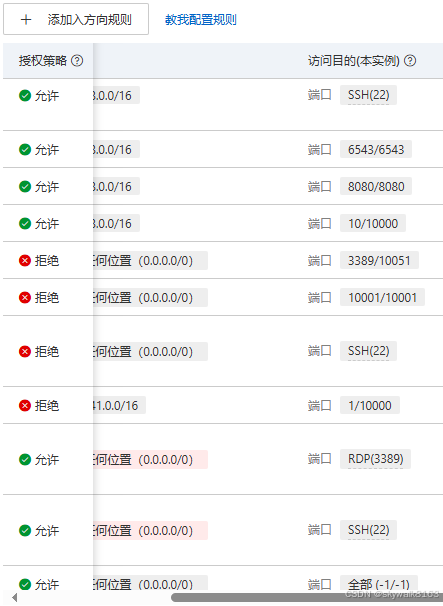
配置防火墙
添加一些特殊的ip可以ssh,然后把普通ip的ssh登入权限关闭
freebsd-update升级系统
用freebsd-update命令,先小升级
# 检查系统漏洞补丁
sudo freebsd-update fetch
sudo freebsd-update install
执行命令升级到14.3
sudo freebsd-update upgrade -r 14.3-RELEASE升级的卡住了,这里
80....5790....5800....5810....5820....5830....5840....5850....5860....5870....5880....5890....5900....5910....5920....5930....5940....5950....5960....5970....5980....5990....6000....6010....6020....6030....6040....6050....6060....6070....6080....6090....6100....6110....6120....6130....6140....6150....6160....6170....6180....6190....6200....6210....6220....6230....6240....6250 done. Applying patches... done. Fetching 5477 files... ....10....20....30....40....50....60
ping不通了
ping update2.freebsd.org
ping: UDP connect: No route to host
真难办啊,到60就卡,好不容易过去了,还终端断开了....
安装screen
pkg install screen在screen里进行升级
好吧,就是慢,也许8个小时应该可以搞定,那样也行啊
慢慢等待中
出现报错
Fetching 5477 files... ....10....20....30....40....50....60

.2000....2010....2020....2030....2040....2050....2060....2070....2080....2090....2100....2110....2120....2130....2140....2150....2160....2170....2180....2190....2200....2210....2220....2230....2240....2250....2260....2270....2280....2290....2300....2310....2320....2330....2340....2350....2360....2370....2380....2390....2400....2410....2420.... gunzip: (stdin): unexpected end of file
5a64dd42d8f28cbc040e77e5aebae9bfaf13611acfd9ff0a6c743cff34acf076 has incorrect hash.
再执行一次:
一晚上,终于下载完了,我估计用了10个小时,不过好消息是基本上几年只会升级一次:
3290....3300....3310....3320....3330....3340....3350....3360....3370....3380....3390....3400....3410....3420....3430....3440....3450....3460....3470....3480....3490....3500....3510....3520... done.
Attempting to automatically merge changes in files... done.

The following changes, which occurred between FreeBSD 14.1-RELEASE and
FreeBSD 14.3-RELEASE have been merged into /etc/login.conf:
--- current version
+++ new version
@@ -42,10 +42,11 @@
        :vmemoryuse=unlimited:\
        :swapuse=unlimited:\
        :pseudoterminals=unlimited:\
        :kqueues=unlimited:\
        :umtxp=unlimited:\
+       :pipebuf=unlimited:\
        :priority=0:\
        :ignoretime@:\
        :umask=022:\
        :charset=UTF-8:\
        :lang=C.UTF-8:
Does this look reasonable (y/n)? Does this look reasonable (y/n)? Does this look reasonable (y/n)? Does this look reasonable (y/n)? Does this look reasonable (y/n)? Does this look reasonable (y/n)? Does this look reasonable (y/n)? Does this look reasonable (y/n)? y

The following changes, which occurred between FreeBSD 14.1-RELEASE and
FreeBSD 14.3-RELEASE have been merged into /etc/pkg/FreeBSD.conf:
--- current version
+++ new version
@@ -11,5 +11,12 @@
   mirror_type: "none",
   signature_type: "fingerprints",
   fingerprints: "/usr/share/keys/pkg",
   enabled: yes
 }
+FreeBSD-kmods: {
+  url: "pkg+https://pkg.FreeBSD.org/${ABI}/kmods_quarterly_${VERSION_MINOR}",
+  mirror_type: "srv",
+  signature_type: "fingerprints",
+  fingerprints: "/usr/share/keys/pkg",
+  enabled: yes
+}
Does this look reasonable (y/n)? y

The following changes, which occurred between FreeBSD 14.1-RELEASE and
FreeBSD 14.3-RELEASE have been merged into /etc/ssh/sshd_config:
--- current version
+++ new version
@@ -103,11 +103,11 @@
 #PidFile /var/run/sshd.pid
 #MaxStartups 10:30:100
 #PermitTunnel no
 #ChrootDirectory none
 #UseBlacklist no
-#VersionAddendum FreeBSD-20240318
+#VersionAddendum FreeBSD-20250219

 # no default banner path
 #Banner none

 # override default of no subsystems
Does this look reasonable (y/n)?
删除了这部分
这部分删除了,果然删除了wifi网卡驱动iwlwifi
The following files are affected by updates. No changes have
been downloaded, however, because the files have been modified
locally:
/var/db/etcupdate/log
The following files will be removed as part of updating to
14.3-RELEASE-p5:
/boot/kernel/iwlwifi-3160-17.ucode.ko
/boot/kernel/iwlwifi-3168-29.ucode.ko
/boot/kernel/iwlwifi-7260-17.ucode.ko
/boot/kernel/iwlwifi-7265-17.ucode.ko
/boot/kernel/iwlwifi-7265D-29.ucode.ko
/boot/kernel/iwlwifi-8000C-36.ucode.ko
/boot/kernel/iwlwifi-8265-36.ucode.ko
/boot/kernel/iwlwifi-9000-pu-b0-jf-b0-46.ucode.ko
/boot/kernel/iwlwifi-9260-th-b0-jf-b0-46.ucode.ko
/boot/kernel/iwlwifi-Qu-b0-hr-b0-77.ucode.ko
/boot/kernel/iwlwifi-Qu-b0-jf-b0-77.ucode.ko
/boot/kernel/iwlwifi-Qu-c0-hr-b0-77.ucode.ko
/boot/kernel/iwlwifi-Qu-c0-jf-b0-77.ucode.ko
/boot/kernel/iwlwifi-QuZ-a0-hr-b0-77.ucode.ko
/boot/kernel/iwlwifi-QuZ-a0-jf-b0-77.ucode.ko
/boot/kernel/iwlwifi-cc-a0-77.ucode.ko
/boot/kernel/iwlwifi-gl-c0-fm-c0-83.ucode.ko
/boot/kernel/iwlwifi-gl-c0-fm-c0.pnvm.ko
/boot/kernel/iwlwifi-so-a0-gf-a0-83.ucode.ko
/boot/kernel/iwlwifi-so-a0-gf-a0.pnvm.ko
/boot/kernel/iwlwifi-so-a0-gf4-a0-83.ucode.ko
/boot/kernel/iwlwifi-so-a0-gf4-a0.pnvm.ko
/boot/kernel/iwlwifi-so-a0-hr-b0-81.ucode.ko
/boot/kernel/iwlwifi-so-a0-jf-b0-77.ucode.ko
/boot/kernel/iwlwifi-ty-a0-gf-a0-83.ucode.ko
/boot/kernel/iwlwifi-ty-a0-gf-a0.pnvm.ko
/etc/ssl/certs/08063a00.0
/etc/ssl/certs/18856ac4.0
/etc/ssl/certs/57bcb2da.0
/etc/ssl/certs/5e98733a.0
/etc/ssl/untrusted/03179a64.0
/etc/ssl/untrusted/080911ac.0
/etc/ssl/untrusted/157753a5.0
/etc/ssl/untrusted/2c543cd1.0
/etc/ssl/untrusted/2e5ac55d.0
/etc/ssl/untrusted/3e45d192.0
/etc/ssl/untrusted/4a6481c9.0
/etc/ssl/untrusted/5273a94c.0
/etc/ssl/untrusted/5c44d531.0
/etc/ssl/untrusted/76cb8f92.0
/etc/ssl/untrusted/861a399d.0
/etc/ssl/untrusted/9c2e7d30.0
/etc/ssl/untrusted/d853d49e.0
/etc/ssl/untrusted/f3377b1b.0
增加了这些
The following files will be added as part of updating to
14.3-RELEASE-p5:
/boot/kernel/bnxt_re.ko
/boot/kernel/gpioaei.ko
/boot/kernel/if_rtw89.ko
/boot/kernel/linuxkpi_video.ko
/boot/kernel/mac_do.ko
/boot/kernel/snd_dummy.ko
/boot/loader_ia32.efi
/etc/devd/autofs.conf
/etc/devd/rtlbtfw.conf
/etc/ssl/certs/616816f6.0
/etc/ssl/certs/6a9bdba3.0
/etc/ssl/certs/878d9bca.0
/etc/ssl/certs/a09a51ae.0
/etc/ssl/certs/b8d25de6.0
/etc/ssl/certs/ba8887ce.0
/etc/ssl/certs/ffdd40f9.0
/etc/ssl/untrusted/08063a00.0
/etc/ssl/untrusted/18856ac4.0
/etc/ssl/untrusted/57bcb2da.0
/etc/ssl/untrusted/5e98733a.0
/usr/bin/mdo
/usr/bin/mididump
/usr/include/c++/v1/__algorithm/pstl.h
执行freebsd-update install
freebsd-update install
src component not installed, skipped
Installing updates...
Kernel updates have been installed.  Please reboot and run
'freebsd-update [options] install' again to finish installing updates.
重启系统并重新运行freebsd-update install
2025-11-08 08:18:13 重新连接成功!
You have mail.
root@iZ2zebruhgtyia1373x9c8Z:~ # freebsd-update install
src component not installed, skipped
Installing updates...
Restarting sshd after upgrade
Performing sanity check on sshd configuration.
Stopping sshd.
Waiting for PIDS: 905.
Performing sanity check on sshd configuration.
Starting sshd.
 done.
搞定,看看版本号:
uname -a
FreeBSD iZ2zebruhgtyia1373x9c8Z 14.3-RELEASE-p5 FreeBSD 14.3-RELEASE-p5 GENERIC amd64
升级到FreeBSD 14.3-RELEASE-p 了!总共用时大约16个小时左右....如果是外网,估计可以快很多。
总共重启一次! 基本上这台机器未来3年都可以不重启了。只要FreeBSD 14.3-RELEASE-p这个版本够稳定就行。
升级完成后操作
ps信息
ps -aux
USER    PID  %CPU %MEM    VSZ   RSS TT  STAT STARTED     TIME COMMAND
root     11 200.0  0.0      0    32  -  RNL  08:16   41:43.13 [idle]
root      0   0.0  0.0      0   544  -  DLs  08:16    0:00.01 [kernel]
root      1   0.0  0.0  11700   784  -  ILs  08:16    0:00.00 /sbin/init
root      2   0.0  0.0      0    32  -  WL   08:16    0:00.15 [clock]
root      3   0.0  0.0      0    48  -  DL   08:16    0:00.00 [crypto]
root      4   0.0  0.0      0    48  -  DL   08:16    0:00.22 [cam]
root      5   0.0  0.0      0    16  -  DL   08:16    0:00.00 [busdma]
root      6   0.0  0.0      0    16  -  DL   08:16    0:00.10 [rand_harvestq]
root      7   0.0  0.0      0    48  -  DL   08:16    0:00.51 [pagedaemon]
root      8   0.0  0.0      0    16  -  DL   08:16    0:00.00 [vmdaemon]
root      9   0.0  0.0      0    48  -  DL   08:16    0:00.95 [bufdaemon]
root     10   0.0  0.0      0    16  -  DL   08:16    0:00.00 [audit]
root     12   0.0  0.0      0   272  -  WL   08:16    0:01.49 [intr]
root     13   0.0  0.0      0    48  -  DL   08:16    0:00.00 [geom]
root     14   0.0  0.0      0    16  -  DL   08:16    0:00.00 [sequencer 00]
root     15   0.0  0.0      0    80  -  DL   08:16    0:00.02 [usb]
root     16   0.0  0.0      0    16  -  DL   08:16    0:00.00 [vnlru]
root     17   0.0  0.0      0    16  -  DL   08:16    0:00.10 [syncer]
root    113   0.0  0.1  12828  1580  -  Is   08:16    0:00.00 daemon: /usr/local/share/aliyun-assist/2.3.4.965/aliyun-service[114] (daemon)
root    114   0.0  0.8 729504 15352  -  I    08:16    0:00.41 /usr/local/share/aliyun-assist/2.3.4.965/aliyun-service
root    150   0.0  0.1  12712  1560  -  Is   08:16    0:00.00 adjkerntz -i
root    476   0.0  0.1  13156  2012  -  Is   08:16    0:00.00 dhclient: system.syslog (dhclient)
root    479   0.0  0.1  13156  2124  -  Is   08:16    0:00.00 dhclient: vtnet0 [priv] (dhclient)
_dhcp   540   0.0  0.1  13160  2184  -  ICs  08:16    0:00.00 dhclient: vtnet0 (dhclient)
root    541   0.0  0.1  14396  2348  -  Is   08:16    0:00.00 /sbin/devd
root    806   0.0  0.1  12876  2116  -  Ss   08:16    0:00.00 /usr/sbin/syslogd -s
root    852   0.0  0.2  23424  4440  -  Ss   08:16    0:00.11 /usr/sbin/ntpd -p /var/db/ntp/ntpd.pid -c /etc/ntp.conf -g
root    909   0.0  0.1  12916  2012  -  Is   08:16    0:00.00 /usr/sbin/cron -s
root  29160   0.0  0.4  23508  8712  -  Is   08:20    0:00.00 sshd: /usr/sbin/sshd [listener] 0 of 10-100 startups (sshd)
root    950   0.0  0.2  13988  3216  0  Ss   08:18    0:00.01 csh
root  31671   0.0  0.1  14564  2608  0  R+   08:37    0:00.00 ps -aux
root    943   0.0  0.1  12844  1712 u0  Is+  08:16    0:00.00 /usr/libexec/getty 3wire ttyu0
root    935   0.0  0.1  12844  1712 v0  Is+  08:16    0:00.00 /usr/libexec/getty Pc ttyv0
root    936   0.0  0.1  12844  1716 v1  Is+  08:16    0:00.00 /usr/libexec/getty Pc ttyv1
root    937   0.0  0.1  12844  1720 v2  Is+  08:16    0:00.00 /usr/libexec/getty Pc ttyv2
root    938   0.0  0.1  12844  1716 v3  Is+  08:16    0:00.00 /usr/libexec/getty Pc ttyv3
root    939   0.0  0.1  12844  1720 v4  Is+  08:16    0:00.00 /usr/libexec/getty Pc ttyv4
root    940   0.0  0.1  12844  1716 v5  Is+  08:16    0:00.00 /usr/libexec/getty Pc ttyv5
root    941   0.0  0.1  12844  1724 v6  Is+  08:16    0:00.00 /usr/libexec/getty Pc ttyv6
root    942   0.0  0.1  12844  1720 v7  Is+  08:16    0:00.00 /usr/libexec/getty Pc ttyv7
netstat 信息
 netstat -an
Active Internet connections (including servers)
Proto Recv-Q Send-Q Local Address          Foreign Address        (state)
tcp4       0      0 172.17.117.60.40238    100.100.18.120.80      TIME_WAIT
tcp4       0      0 *.22                   *.*                    LISTEN
tcp6       0      0 *.22                   *.*                    LISTEN
tcp4       0      0 172.17.117.60.14119    100.100.18.120.443     ESTABLISHED
tcp4       0      0 172.17.117.60.25081    100.100.18.120.443     ESTABLISHED
udp4       0      0 127.0.0.1.123          *.*
udp6       0      0 fe80::1%lo0.123        *.*
udp6       0      0 ::1.123                *.*
udp4       0      0 172.17.117.60.123      *.*
udp6       0      0 fe80::216:3eff:f.123   *.*
udp4       0      0 *.123                  *.*
udp6       0      0 *.123                  *.*
udp4       0      0 *.514                  *.*
udp6       0      0 *.514                  *.*
pkg update
很快完成
安装cbsd
pkg install cbsd激活
/usr/local/cbsd/sudoexec/initenv /usr/local/cbsd/share/initenv.conf default_vs=1 workdir=/usr/jails启动
service cbsdd start发现新增了端口1873
tcp4       0      0 *.1873                 *.*                    LISTEN
tcp6       0      0 *.1873