1、简介
作为一个内核工程师, 会经常见到vmlinux ELF文件,如果没有对这个ELF文件熟悉,不能称之为合格的内核工程师。在分析中断向量表的定义和内存布局时,发现自己没有写过一个和内核vmlinux ELF布局的文章。下面开始详细介绍vmlinux ELF是如何生成的以及段布局。
2、ELF布局
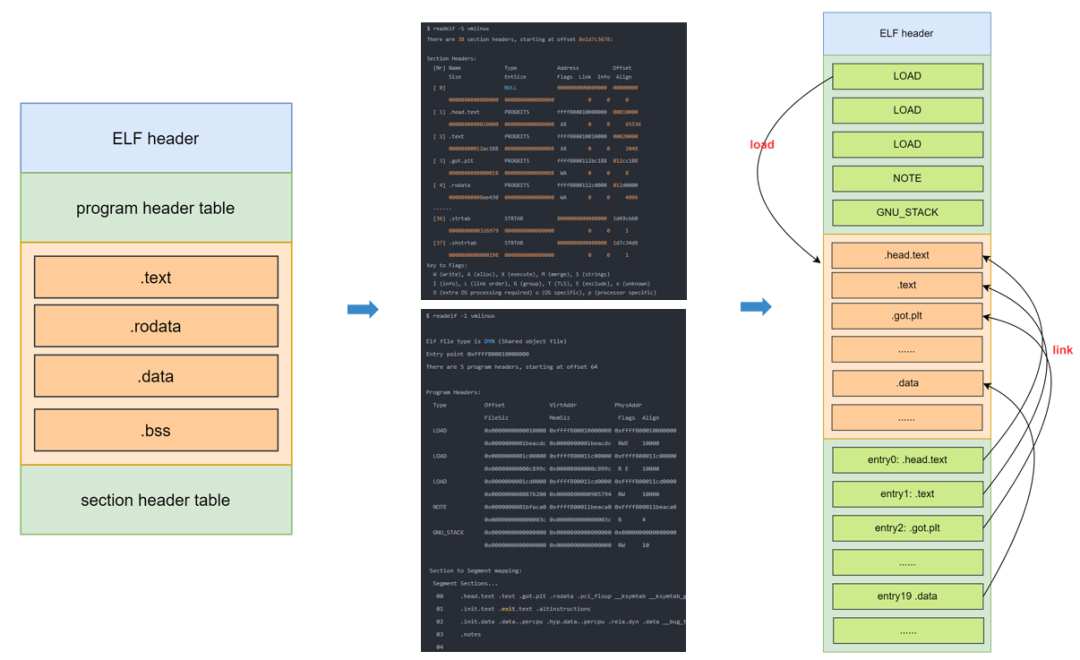
vmlinux 属于 ELF 文件,要想了解如何启动 vmlinux,首先需要知道 ELF 的格式。
- text段
代码段,通常是指用来存放程序执行代码的一块内存区域。这部分区域的大小在程序运行前就已经确定。
- data段
数据段,通常是指用来存放程序中已初始化的全局变量的一块内存区域。数据段属于静态内存分配。
- bss段
通常是指用来存放程序中未初始化的全局变量和静态变量的一块内存区域。BSS段属于静态内存分配。
- init段
linux定义的一种初始化过程中才会用到的段,一旦初始化完成,那么这些段所占用的内存会被释放掉,后续会继续说明。
3、vmlinux 入口:第一行运行的代码
Linux启动,会启动内核编译后的文件 vmlinux,vmlinux 是一个 ELF 文件,按照 ./arch/arm64/kernel/vmlinux.lds 设定的规则进行链接,vmlinux.lds 是 vmlinux.lds.S 编译之后生成的。所以为了确定 vmlinux 内核的起始地址, 首先通过 vmlinux.lds.S 链接脚本进行分析。如下所示:
$ readelf -h vmlinux
ELF Header:
  Magic:   7f 45 4c 46 02 01 01 00 00 00 00 00 00 00 00 00
  Class:                             ELF64
  Data:                              2's complement, little endian
  Version:                           1 (current)
  OS/ABI:                            UNIX - System V
  ABI Version:                       0
  Type:                              DYN (Shared object file)
  Machine:                           AArch64
  Version:                           0x1
  Entry point address:               0xffff800010000000
  Start of program headers:          64 (bytes into file)
  Start of section headers:          494679672 (bytes into file)
  Flags:                             0x0
  Size of this header:               64 (bytes)
  Size of program headers:           56 (bytes)
  Number of program headers:         5
  Size of section headers:           64 (bytes)
  Number of section headers:         38
  Section header string table index: 37

$ readelf -l vmlinux

Elf file type is DYN (Shared object file)
Entry point 0xffff800010000000
There are 5 program headers, starting at offset 64

Program Headers:
  Type           Offset             VirtAddr           PhysAddr
                 FileSiz            MemSiz              Flags  Align
  LOAD           0x0000000000010000 0xffff800010000000 0xffff800010000000
                 0x0000000001beacdc 0x0000000001beacdc  RWE    10000
  LOAD           0x0000000001c00000 0xffff800011c00000 0xffff800011c00000
                 0x00000000000c899c 0x00000000000c899c  R E    10000
  LOAD           0x0000000001cd0000 0xffff800011cd0000 0xffff800011cd0000
                 0x0000000000876200 0x0000000000905794  RW     10000
  NOTE           0x0000000001bfaca0 0xffff800011beaca0 0xffff800011beaca0
                 0x000000000000003c 0x000000000000003c  R      4
  GNU_STACK      0x0000000000000000 0x0000000000000000 0x0000000000000000
                 0x0000000000000000 0x0000000000000000  RW     10

 Section to Segment mapping:
  Segment Sections...
   00     .head.text .text .got.plt .rodata .pci_fixup __ksymtab __ksymtab_gpl __ksymtab_strings __param __modver __ex_table .notes
   01     .init.text .exit.text .altinstructions
   02     .init.data .data..percpu .hyp.data..percpu .rela.dyn .data __bug_table .mmuoff.data.write .mmuoff.data.read .pecoff_edata_padding .bss
   03     .notes
   04
通过上面的查询可知,此 vmlinux 为一个 aarch64 架构平台的 ELF 可执行文件,其程序入口的地址为 0xffff800010000000,此段对应的 section 为.head.text .text .got.plt......,所以 vmlinux 的入口在 .head.text 文本段。
详细查看各个段:readelf -S vmlinux
There are 38 section headers, starting at offset 0xd7dc238:

Section Headers:
  [Nr] Name              Type             Address           Offset
       Size              EntSize          Flags  Link  Info  Align
  [ 0]                   NULL             0000000000000000  00000000
       0000000000000000  0000000000000000           0     0     0
  [ 1] .head.text        PROGBITS         ffffffc010080000  00010000
       0000000000001000  0000000000000000  AX       0     0     4096
  [ 2] .text             PROGBITS         ffffffc010081000  00011000
       00000000008dcfd8  0000000000000008  AX       0     0     2048
  [ 3] .rodata           PROGBITS         ffffffc010960000  008f0000
       00000000003032b8  0000000000000000  WA       0     0     65536
  [ 4] .modinfo          PROGBITS         ffffffc010c632b8  00bf32b8
       00000000000115d2  0000000000000000   A       0     0     1
  [ 5] .init.eh_frame    PROGBITS         ffffffc010c74890  00c04890
       0000000000001bb0  0000000000000000   A       0     0     8
  [ 6] .pci_fixup        PROGBITS         ffffffc010c76440  00c06440
       00000000000022b0  0000000000000000   A       0     0     16
  [ 7] __ksymtab         PROGBITS         ffffffc010c786f0  00c086f0
       000000000000d500  0000000000000000   A       0     0     4
  [ 8] __ksymtab_gpl     PROGBITS         ffffffc010c85bf0  00c15bf0
       000000000000da04  0000000000000000   A       0     0     4
  [ 9] __ksymtab_strings PROGBITS         ffffffc010c935f4  00c235f4
       000000000002c292  0000000000000000   A       0     0     1
  [10] __param           PROGBITS         ffffffc010cbf888  00c4f888
       0000000000002710  0000000000000000   A       0     0     8
  [11] __modver          PROGBITS         ffffffc010cc1f98  00c51f98
       00000000000000c0  0000000000000000   A       0     0     8
  [12] __ex_table        PROGBITS         ffffffc010cc3000  00c53000
       0000000000001f10  0000000000000000   A       0     0     8
  [13] .notes            NOTE             ffffffc010cc4f10  00c54f10
       000000000000003c  0000000000000000   A       0     0     4
  [14] .init.text        PROGBITS         ffffffc010cd0000  00c60000
       0000000000049180  0000000000000000  AX       0     0     16
  [15] .exit.text        PROGBITS         ffffffc010d19180  00ca9180
       0000000000002e1c  0000000000000000  AX       0     0     4
  [16] .altinstructions  PROGBITS         ffffffc010d1bf9c  00cabf9c
       0000000000024bc4  0000000000000000   A       0     0     1
  [17] .init.data        PROGBITS         ffffffc010d41000  00cd1000
       00000000000169b0  0000000000000000  WA       0     0     256
  [18] .data..percpu     PROGBITS         ffffffc010d58000  00ce8000
       000000000000c258  0000000000000000  WA       0     0     64
  [19] .rela.dyn         RELA             ffffffc010d64258  00cf4258
       0000000000100050  0000000000000018   A       0     0     8
  [20] .data             PROGBITS         ffffffc010e70000  00e00000
       000000000008f640  0000000000000000  WA       0     0     4096
  [21] .got.plt          PROGBITS         ffffffc010eff640  00e8f640
       0000000000000018  0000000000000008  WA       0     0     8
  [22] __bug_table       PROGBITS         ffffffc010eff658  00e8f658
       0000000000010824  0000000000000000  WA       0     0     4
  [23] .mmuoff.data[...] PROGBITS         ffffffc010f10000  00ea0000
       0000000000000018  0000000000000000  WA       0     0     2048
  [24] .mmuoff.data.read PROGBITS         ffffffc010f10800  00ea0800
       0000000000000008  0000000000000000  WA       0     0     8
  [25] .pecoff_edat[...] PROGBITS         ffffffc010f10808  00ea0808
       00000000000001f8  0000000000000000  WA       0     0     1
  [26] .bss              NOBITS           ffffffc010f11000  00ea0a00
       0000000000060628  0000000000000000  WA       0     0     4096
  [27] .comment          PROGBITS         0000000000000000  00ea0a00
       000000000000005a  0000000000000001  MS       0     0     1
  [28] .debug_line       PROGBITS         0000000000000000  00ea0a5a
       00000000011db9fa  0000000000000000           0     0     1
  [29] .debug_info       PROGBITS         0000000000000000  0207c454
       0000000009285ce2  0000000000000000           0     0     1
  [30] .debug_abbrev     PROGBITS         0000000000000000  0b302136
       000000000048bc4e  0000000000000000           0     0     1
  [31] .debug_aranges    PROGBITS         0000000000000000  0b78dd90
       0000000000021cc0  0000000000000000           0     0     16
  [32] .debug_str        PROGBITS         0000000000000000  0b7afa50
       0000000000291d0d  0000000000000001  MS       0     0     1
  [33] .debug_ranges     PROGBITS         0000000000000000  0ba41760
       0000000000ca18c0  0000000000000000           0     0     16
  [34] .debug_loc        PROGBITS         0000000000000000  0c6e3020
       0000000000d6e817  0000000000000000           0     0     1
  [35] .symtab           SYMTAB           0000000000000000  0d451838
       0000000000230d90  0000000000000018          36   76147     8
  [36] .strtab           STRTAB           0000000000000000  0d6825c8
       0000000000159acb  0000000000000000           0     0     1
  [37] .shstrtab         STRTAB           0000000000000000  0d7dc093
       000000000000019f  0000000000000000           0     0     1
Key to Flags:
  W (write), A (alloc), X (execute), M (merge), S (strings), I (info),
  L (link order), O (extra OS processing required), G (group), T (TLS),
  C (compressed), x (unknown), o (OS specific), E (exclude),
  p (processor specific)
注意一个点: .head.text 的大小 0x1000, 一个页的大小。后面紧接着就是 exceptions.
3.1 .head.text 文本段
通过 vmlinux.lds.S 找到 vmlinux 的入口函数。具体分析如下:
/* SPDX-License-Identifier: GPL-2.0 */
/*
 * ld script to make ARM Linux kernel
 * taken from the i386 version by Russell King
 * Written by Martin Mares <mj@atrey.karlin.mff.cuni.cz>
 */

#define RO_EXCEPTION_TABLE_ALIGN        8
#define RUNTIME_DISCARD_EXIT

#include <asm-generic/vmlinux.lds.h>
#include <asm/cache.h>
#include <asm/hyp_image.h>
#include <asm/kernel-pgtable.h>
#include <asm/memory.h>
#include <asm/page.h>

#include "image.h"

OUTPUT_ARCH(aarch64)
ENTRY(_text)
根据链接脚本语法,可以知道 OUTPUT_ARCH 关键字指定了链接之后的输出文件的体系结构是 aarch64。ENTRY 关键字指定了输出文件 vmlinux 的入口 地址是 _text, 因此只需找到 _text 的定义就可以知道 vmlinux 的入口函数。接下来的代码是:
SECTIONS
{
        /*
         * XXX: The linker does not define how output sections are
         * assigned to input sections when there are multiple statements
         * matching the same input section name.  There is no documented
         * order of matching.
         */
        /DISCARD/ : {
                ARM_EXIT_DISCARD(EXIT_TEXT)
                ARM_EXIT_DISCARD(EXIT_DATA)
                EXIT_CALL
                *(.discard)
                *(.discard.*)
                *(.interp .dynamic)
                *(.dynsym .dynstr .hash .gnu.hash)
                *(.eh_frame)
        }

        . = KIMAGE_VADDR + TEXT_OFFSET; //这个当前段开始的位置

        .head.text : {
                _text = .;           //将上面的段的开始位置赋值给_text
                HEAD_TEXT
        }
        .text : {                       /* Real text segment            */
                _stext = .;             /* Text and read-only data      */
                        __exception_text_start = .;
                        *(.exception.text)
                        __exception_text_end = .;
                        IRQENTRY_TEXT
                        SOFTIRQENTRY_TEXT
                        ENTRY_TEXT
                        TEXT_TEXT
                        SCHED_TEXT
                        CPUIDLE_TEXT
                        LOCK_TEXT
                        KPROBES_TEXT
                        HYPERVISOR_TEXT
                        IDMAP_TEXT
                        HIBERNATE_TEXT
                        TRAMP_TEXT
                        *(.fixup)
                        *(.gnu.warning)
                . = ALIGN(16);
                *(.got)                 /* Global offset table          */
        }

        . = ALIGN(SEGMENT_ALIGN);
        _etext = .;                     /* End of text section */

        RO_DATA(PAGE_SIZE)              /* everything from this point to     */
        EXCEPTION_TABLE(8)              /* __init_begin will be marked RO NX */
        NOTES

        . = ALIGN(PAGE_SIZE);
        idmap_pg_dir = .;
        . += IDMAP_DIR_SIZE;
        idmap_pg_end = .;

#ifdef CONFIG_UNMAP_KERNEL_AT_EL0
        tramp_pg_dir = .;
        . += PAGE_SIZE;
#endif

        reserved_pg_dir = .;
        . += PAGE_SIZE;
        swapper_pg_dir = .;
        . += PAGE_SIZE;

        . = ALIGN(SEGMENT_ALIGN);
        __init_begin = .;
        __inittext_begin = .;

        INIT_TEXT_SECTION(8)

        __exittext_begin = .;
        .exit.text : {
                ARM_EXIT_KEEP(EXIT_TEXT)
        }
        __exittext_end = .;

        . = ALIGN(4);
        .altinstructions : {
                __alt_instructions = .;
                *(.altinstructions)
                __alt_instructions_end = .;
        }

        . = ALIGN(PAGE_SIZE);
        __inittext_end = .;
        __initdata_begin = .;

        .init.data : {
                INIT_DATA
                INIT_SETUP(16)
                INIT_CALLS
                CON_INITCALL
                INIT_RAM_FS
                *(.init.rodata.* .init.bss)     /* from the EFI stub */
        }
        .exit.data : {
                ARM_EXIT_KEEP(EXIT_DATA)
        }

        PERCPU_SECTION(L1_CACHE_BYTES)

        .rela.dyn : ALIGN(8) {
                *(.rela .rela*)
        }

        __rela_offset   = ABSOLUTE(ADDR(.rela.dyn) - KIMAGE_VADDR);
        __rela_size     = SIZEOF(.rela.dyn);

#ifdef CONFIG_RELR
        .relr.dyn : ALIGN(8) {
                *(.relr.dyn)
        }

        __relr_offset   = ABSOLUTE(ADDR(.relr.dyn) - KIMAGE_VADDR);
        __relr_size     = SIZEOF(.relr.dyn);
#endif

        . = ALIGN(SEGMENT_ALIGN);
        __initdata_end = .;
        __init_end = .;

        _data = .;
        _sdata = .;
        RW_DATA_SECTION(L1_CACHE_BYTES, PAGE_SIZE, THREAD_ALIGN)

        /*
         * Data written with the MMU off but read with the MMU on requires
         * cache lines to be invalidated, discarding up to a Cache Writeback
         * Granule (CWG) of data from the cache. Keep the section that
         * requires this type of maintenance to be in its own Cache Writeback
         * Granule (CWG) area so the cache maintenance operations don't
         * interfere with adjacent data.
         */
        .mmuoff.data.write : ALIGN(SZ_2K) {
                __mmuoff_data_start = .;
                *(.mmuoff.data.write)
        }

        . = ALIGN(SZ_2K);
        .mmuoff.data.read : {
                *(.mmuoff.data.read)
                __mmuoff_data_end = .;
        }

        PECOFF_EDATA_PADDING
        __pecoff_data_rawsize = ABSOLUTE(. - __initdata_begin);
        _edata = .;

        BSS_SECTION(0, 0, 0)

        . = ALIGN(PAGE_SIZE);
        init_pg_dir = .;
        . += INIT_DIR_SIZE;
        init_pg_end = .;

        __pecoff_data_size = ABSOLUTE(. - __initdata_begin);
        _end = .;

        STABS_DEBUG

        HEAD_SYMBOLS
}
对上面做个简化:
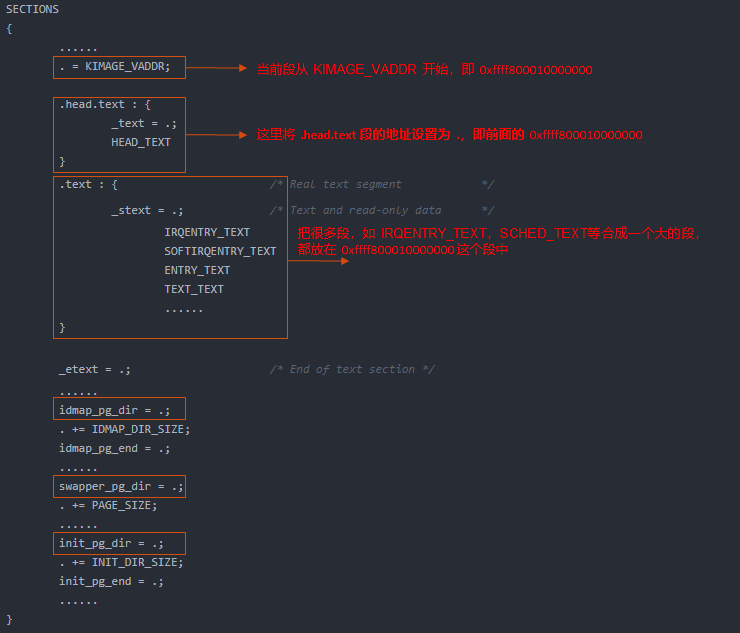
上面这个简化图和 readelf -S vmlinux 看到的各个段是一致的。
-
上图中的宏 HEAD_TEXT 定义在文件 include/asm-generic/vmlinux.lds.S 中,其定义为 .head.text 文本段。
-
上图中的 idmap_pg_dir,init_pg_dir 是页表映射,idmap_pg_dir 是 identity mapping 用到的页表,init_pg_dir 是 kernel_image_mapping 用到的页表。
/* include/asm-generic/vmlinux.lds.h文件 /
#define HEAD_TEXT KEEP((.head.text))/* include/linux/init.h 文件*/
#define __HEAD .section ".head.text","ax"
上面是 HEAD_TEXT 定义的宏,最终找到__HEAD;故转向 arch/arm64/kernel/head.S 中继续执行。
        __HEAD
_head:
        /*
         * DO NOT MODIFY. Image header expected by Linux boot-loaders.
         */
#ifdef CONFIG_EFI
        /*
         * This add instruction has no meaningful effect except that
         * its opcode forms the magic "MZ" signature required by UEFI.
         */
        add     x13, x18, #0x16
        b       primary_entry
#else
        b       primary_entry                   // branch to kernel start, magic
        .long   0                               // reserved
#endif
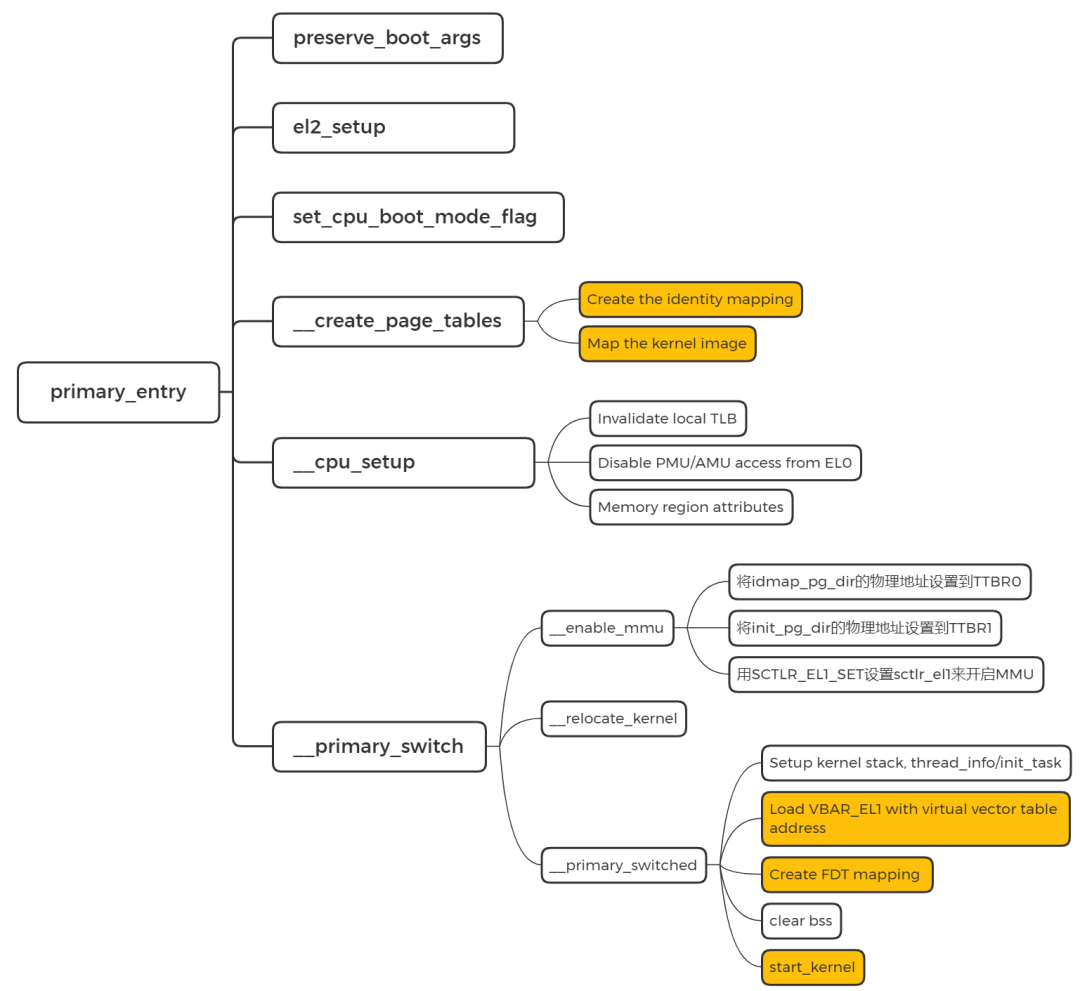
3.2 primary_entry
进入正式的初始化流程。
SYM_CODE_START(primary_entry)
        bl      preserve_boot_args
        bl      el2_setup                       // Drop to EL1, w0=cpu_boot_mode
        adrp    x23, __PHYS_OFFSET
        and     x23, x23, MIN_KIMG_ALIGN - 1    // KASLR offset, defaults to 0
        bl      set_cpu_boot_mode_flag
        bl      __create_page_tables
        /*
         * The following calls CPU setup code, see arch/arm64/mm/proc.S for
         * details.
         * On return, the CPU will be ready for the MMU to be turned on and
         * the TCR will have been set.
         */
        bl      __cpu_setup                     // initialise processor
        b       __primary_switch
SYM_CODE_END(primary_entry)
preserve_boot_args 是用来保存从 bootloader 传递的参数,使 dcache 失效。
el2_setup 设定 core 启动状态。
set_cpu_boot_mode_flag 设置 core 启动的 EL。
__create_page_tables 创建页表
我们知道 idmap_pg_dir 是 identity mapping 用到的页表,init_pg_dir 是 kernel_image_mapping 用到的页表。这里通过 __create_page_tables 来填充这两个页表。(具体如何实现的代码细节,请查看我写的内存管理文章)
SYM_FUNC_START_LOCAL(__create_page_tables)
 mov x28, lr
  ......
 /*
  * Create the identity mapping.
  */
 adrp x0, idmap_pg_dir
 adrp x3, __idmap_text_start  // __pa(__idmap_text_start)
  ......
  adrp x5, __idmap_text_end
  ......
 /*
  * Map the kernel image (starting with PHYS_OFFSET).
  */
 adrp x0, init_pg_dir
 mov_q x5, KIMAGE_VADDR  // compile time __va(_text)
 add x5, x5, x23   // add KASLR displacement
 mov x4, PTRS_PER_PGD
 adrp x6, _end   // runtime __pa(_end)
 adrp x3, _text   // runtime __pa(_text)
 sub x6, x6, x3   // _end - _text
 add x6, x6, x5   // runtime __va(_end)
  ......
SYM_FUNC_END(__create_page_tables)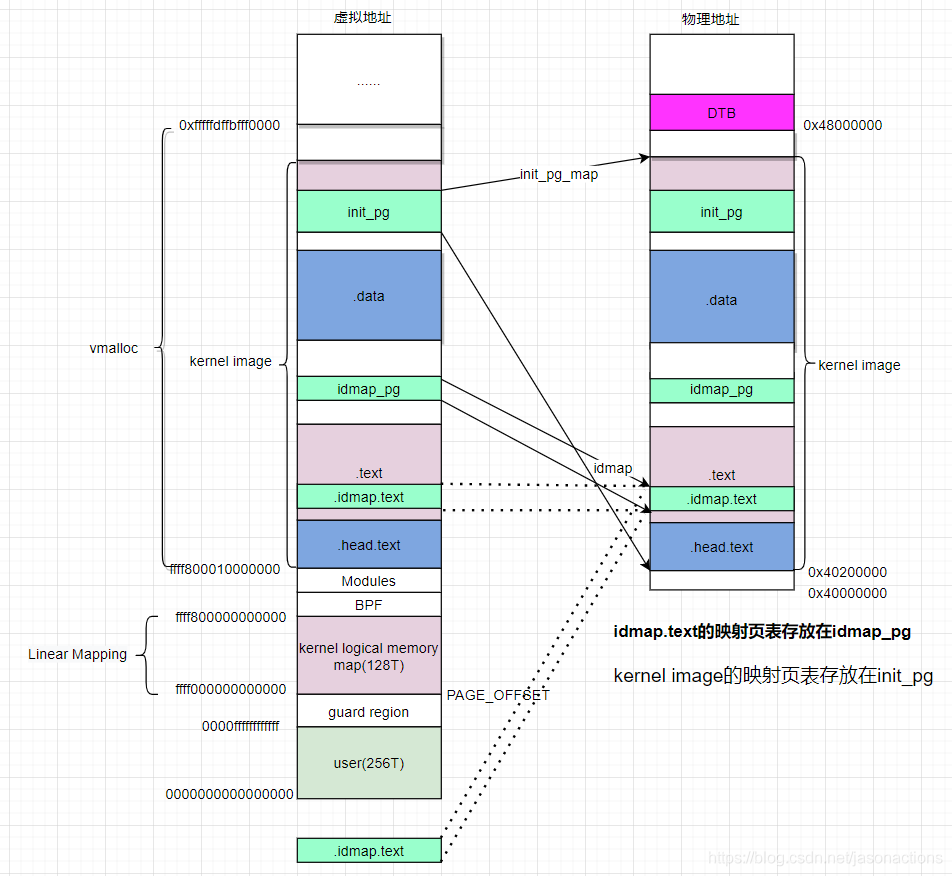
这里可以留一个 问题,让大家去查一下: idmap.text 恒等映射的原因是什么?
kernel 镜像的各个段分布, 就是由链接脚本组成的虚拟地址分布布局。至于物理地址, 是由bootloader 加载到内存的地址。然后CPU 访问虚拟地址,经过MMU,访问到物理内存上的二进制。
3.3 __cpu_setup 初始化 CPU
为开启 MMU 做一些 CPU 的初始化工作。前面都是关闭MMU。
SYM_FUNC_START(__cpu_setup)
 tlbi vmalle1    // Invalidate local TLB
 dsb nsh

 mov x1, #3 << 20
 msr cpacr_el1, x1   // Enable FP/ASIMD
 mov x1, #1 << 12   // Reset mdscr_el1 and disable
 msr mdscr_el1, x1   // access to the DCC from EL0
 isb     // Unmask debug exceptions now,
 enable_dbg    // since this is per-cpu
 reset_pmuserenr_el0 x1   // Disable PMU access from EL0
 reset_amuserenr_el0 x1   // Disable AMU access from EL0

 /*
  * Memory region attributes
  */
 mov_q x5, MAIR_EL1_SET
前面做 TLB/FP/ASIMD/DCC/PMU/AMU 的初始化,后面做 Memory region attributes。
3.4__primary_switch 开启MMU
切换到虚拟地址,并调用 __primary_switched。
3.5 __primary_switched
__primary_switched主要完成了如下的工作:
- 为init进程设置好堆栈地址和大小,保存当前进程描述符地址到sp_el0;
- 设置异常向量表基址寄存器;
- 保存FDT地址到__fdt_pointer变量;
- 将kimage的虚拟地址和物理地址的偏移保存到kimage_voffset
- clear bss
- 跳转到start_kernel
3.6 用一张图概括: