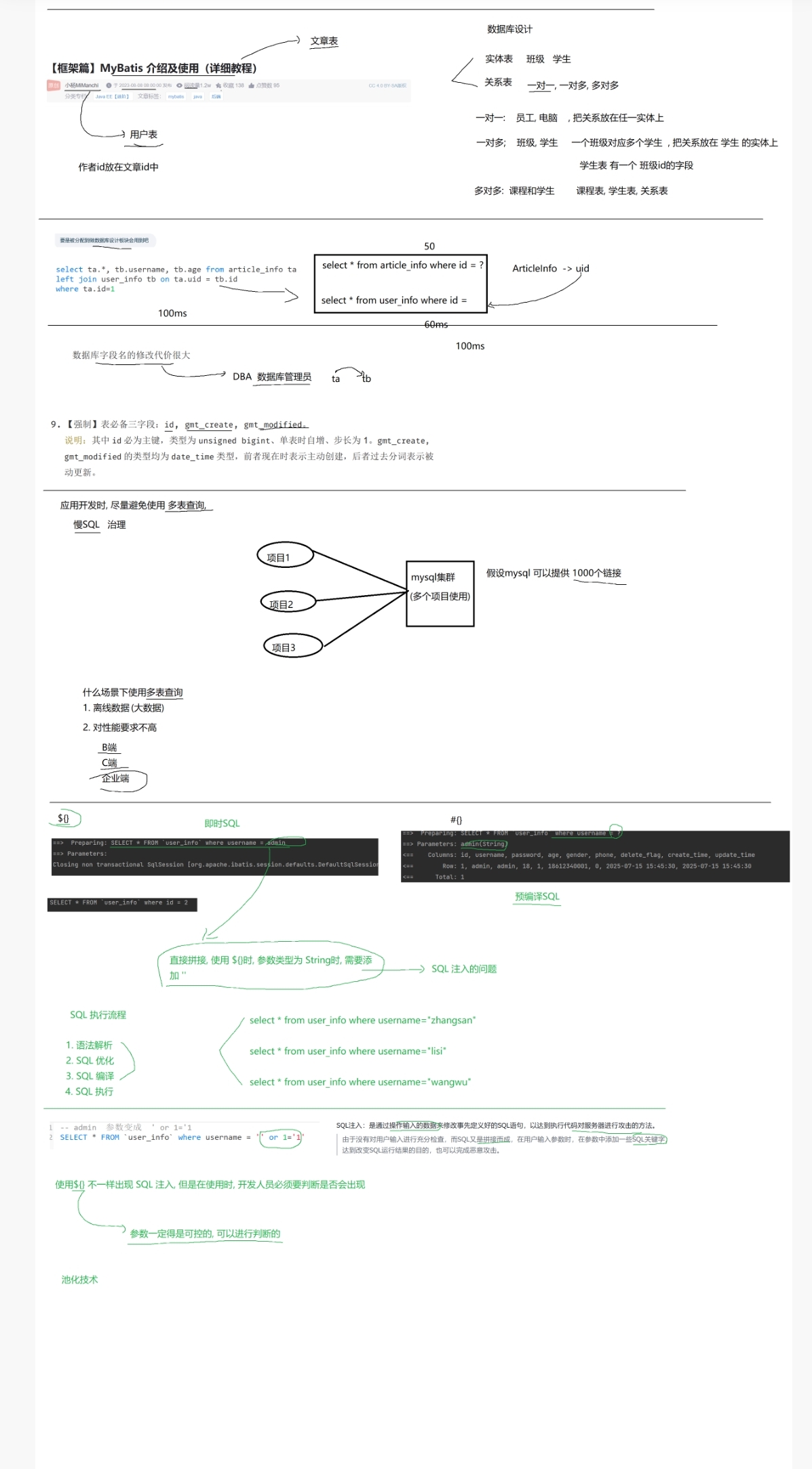
本章主要关于 MyBatis框架的核心使用教程,涵盖了XML映射文件语法、SQL注入防护、数据库设计规范、MyBatis配置与接口绑定等内容。以下是详细解释+代码片段:
一、MyBatis XML动态SQL语法(增删改查)
核心是MyBatis的 <trim> / <where> / <set> 等标签实现动态SQL,避免SQL语法错误。
1. 插入( insert )
- 用 <trim> 处理前缀/后缀,避免多余的逗号/括号
xml
<!-- 插入示例(带trim处理) -->
<insert id="insertUserInfo">
insert into user_info
<trim prefix="(" suffix=")" suffixOverrides=",">
username,
<if test="password!=null">password,</if>
<if test="age!=null">age,</if>
<if test="gender!=null">gender</if>
</trim>
values
<trim prefix="(" suffix=")" suffixOverrides=",">
#{username},
<if test="password!=null">#{password},</if>
<if test="age!=null">#{age},</if>
<if test="gender!=null">#{gender}</if>
</trim>
</insert>
2. 查询( select )
- 用 <where> 自动处理 and/or 前缀,避免 where 1=1 的冗余
xml
<!-- 查询示例(带where标签) -->
<select id="selectUserInfo" resultType="com.xxx.UserInfo">
select * from user_info
<where>
<if test="age!=null">age = #{age}</if>
<if test="gender!=null">and gender = #{gender}</if>
<if test="deleteFlag!=null">and delete_flag = #{deleteFlag}</if>
</where>
</select>
3. 更新( update )
- 用 <set> 自动处理逗号后缀,避免SQL语法错误
xml
<!-- 更新示例(带set标签) -->
<update id="updateUserInfo">
update user_info
<set>
<if test="gender!=null">gender = #{gender},</if>
<if test="deleteFlag!=null">delete_flag = #{deleteFlag}</if>
</set>
where id = #{id}
</update>
4. 逻辑删除(替代物理删除)
- 表加 delete_flag 字段(0=正常,1=删除),用 update 实现逻辑删除
sql
-- 表结构(含逻辑删除字段)
CREATE TABLE user_info (
id INT PRIMARY KEY AUTO_INCREMENT,
username VARCHAR(20) NOT NULL,
delete_flag TINYINT DEFAULT 0 COMMENT '0=正常,1=删除',
create_time DATETIME DEFAULT now()
);
二、SQL注入&数据库设计规范
1. SQL注入防护
-
**即时SQL(符号)**:直接拼接字符串,有注入风险(如`where username = '{name}' 被注入为 ' or 1=1 --`)
-
预编译SQL(#符号):参数占位符,自动转义,避免注入(推荐使用)
2. 数据库表关系设计
-
一对一:如 员工-电脑 ,关系字段放任意表
-
一对多:如 班级-学生 ,关系字段( class_id )放"多"的表(学生表)
-
多对多:如 课程-学生 ,需中间关系表(课程表+学生表+课程学生关系表)
3. 表必备字段
sql
-- 表必含字段(规范)
CREATE TABLE xxx (
id UNSIGNED BIGINT PRIMARY KEY AUTO_INCREMENT COMMENT '主键',
gmt_create DATETIME DEFAULT now() COMMENT '创建时间',
gmt_modified DATETIME DEFAULT now() ON UPDATE now() COMMENT '更新时间'
);
三、MyBatis环境配置&接口绑定
1. MyBatis核心配置( mybatis-config.xml )
xml
<!-- 数据源+映射器配置 -->
<configuration>
<environments default="dev">
<environment id="dev">
<transactionManager type="JDBC"/>
<dataSource type="POOLED">
<property name="driver" value="com.mysql.cj.jdbc.Driver"/>
<property name="url" value="jdbc:mysql://localhost:3306/test"/>
<property name="username" value="root"/>
<property name="password" value="root"/>
</dataSource>
</environment>
</environments>
<!-- 映射器(指定XML文件位置) -->
<mappers>
<mapper resource="mapper/UserInfoMapper.xml"/>
</mappers>
</configuration>
2. Mapper接口+XML绑定
- Mapper接口:
java
// 接口定义(方法名与XML的id一致)
public interface UserInfoMapper {
List<UserInfo> selectList();
}
- XML映射文件(UserInfoMapper.xml):
xml
<!-- namespace与接口全类名一致 -->
<mapper namespace="com.xxx.mapper.UserInfoMapper">
<!-- id与接口方法名一致,resultType指定返回类型 -->
<select id="selectList" resultType="com.xxx.entity.UserInfo">
select * from user_info
</select>
</mapper>
3. 结果映射( resultMap )
解决表字段与实体类属性名不一致的问题:
xml
<resultMap id="userMap" type="com.xxx.entity.UserInfo">
<result column="id" property="id"/>
<result column="username" property="userName"/> <!-- 字段username → 属性userName -->
<result column="delete_flag" property="deleteFlag"/> <!-- 下划线转驼峰(也可配置自动转换) -->
</resultMap>
三、 MyBatis常用XML标签+核心配置模板,覆盖增删改查、动态SQL、结果映射等高频场景:
一、MyBatis全局配置模板( mybatis-config.xml )
xml
<?xml version="1.0" encoding="UTF-8"?>
<!DOCTYPE configuration
PUBLIC "-//mybatis.org//DTD Config 3.0//EN"
"https://mybatis.org/dtd/mybatis-3-config.dtd">
<configuration>
<!-- 1. 环境配置(多环境切换) -->
<environments default="development">
<environment id="development">
<transactionManager type="JDBC"/> <!-- 事务管理(JDBC/MANAGED) -->
<dataSource type="POOLED"> <!-- 数据源(POOLED/UNPOOLED/JNDI) -->
<property name="driver" value="com.mysql.cj.jdbc.Driver"/>
<property name="url" value="jdbc:mysql://localhost:3306/your_db?useSSL=false&serverTimezone=UTC"/>
<property name="username" value="root"/>
<property name="password" value="your_pwd"/>
</dataSource>
</environment>
</environments>
<!-- 2. 映射器(指定Mapper XML位置) -->
<mappers>
<!-- 方式1:单个XML文件 -->
<mapper resource="mapper/UserMapper.xml"/>
<!-- 方式2:包扫描(接口与XML同包同名) -->
<!-- <package name="com.xxx.mapper"/> -->
</mappers>
</configuration>
二、Mapper XML标签模板(以 UserMapper.xml 为例)
xml
<?xml version="1.0" encoding="UTF-8"?>
<!DOCTYPE mapper
PUBLIC "-//mybatis.org//DTD Mapper 3.0//EN"
"https://mybatis.org/dtd/mybatis-3-mapper.dtd">
<!-- namespace必须与Mapper接口全类名一致 -->
<mapper namespace="com.xxx.mapper.UserMapper">
<!-- 1. 结果映射(解决字段名与实体类属性名不一致) -->
<resultMap id="UserResultMap" type="com.xxx.entity.User">
<id column="id" property="id"/> <!-- 主键映射 -->
<result column="user_name" property="userName"/> <!-- 字段:user_name → 属性:userName -->
<result column="delete_flag" property="deleteFlag"/>
<result column="gmt_create" property="gmtCreate"/>
</resultMap>
<!-- 2. 查询(select):带动态条件 -->
<select id="selectUserList" resultMap="UserResultMap">
select id, user_name, delete_flag, gmt_create
from user_info
<where>
<if test="userName != null and userName != ''">
and user_name like concat('%', #{userName}, '%')
</if>
<if test="deleteFlag != null">
and delete_flag = #{deleteFlag}
</if>
</where>
order by gmt_create desc
</select>
<!-- 3. 插入(insert):动态字段 -->
<insert id="insertUser" parameterType="com.xxx.entity.User">
insert into user_info
<trim prefix="(" suffix=")" suffixOverrides=",">
user_name,
<if test="password != null">password,</if>
gmt_create
</trim>
values
<trim prefix="(" suffix=")" suffixOverrides=",">
#{userName},
<if test="password != null">#{password},</if>
now()
</trim>
</insert>
<!-- 4. 更新(update):动态字段 -->
<update id="updateUser" parameterType="com.xxx.entity.User">
update user_info
<set>
<if test="userName != null">user_name = #{userName},</if>
<if test="password != null">password = #{password},</if>
gmt_modified = now()
</set>
where id = #{id}
</update>
<!-- 5. 逻辑删除(update实现) -->
<update id="deleteUserLogic">
update user_info
set delete_flag = 1,
gmt_modified = now()
where id = #{id}
</update>
<!-- 6. 批量操作(foreach):批量插入 -->
<insert id="batchInsertUser">
insert into user_info (user_name, password, gmt_create)
values
<foreach collection="list" item="user" separator=",">
(#{user.userName}, #{user.password}, now())
</foreach>
</insert>
</mapper>
三、配套Mapper接口模板( UserMapper.java )
java
package com.xxx.mapper;
import com.xxx.entity.User;
import org.apache.ibatis.annotations.Mapper;
import java.util.List;
@Mapper
public interface UserMapper {
// 对应XML中id="selectUserList"
List<User> selectUserList(User user);
// 对应XML中id="insertUser"
int insertUser(User user);
// 对应XML中id="updateUser"
int updateUser(User user);
// 对应XML中id="deleteUserLogic"
int deleteUserLogic(Long id);
// 对应XML中id="batchInsertUser"
int batchInsertUser(List<User> userList);
}