一、ndarray
1.ndrray的属性
数组属性反映了数组本身固有的信息。
| 属性名字 | 属性解释 |
|---|---|
| ndarray.shape | 数组维度的元组 |
| ndarray.ndim | 数组维数 |
| ndarray.size | 数组中的元素数量 |
| ndarray.itemsize | 一个数组元素的长度(字节) |
| ndarray.dtype | 数组元素的类型 |
2.ndrray的形状
python
# 创建不同形状的数组
>>> a = np.array([[1,2,3],[4,5,6]])
>>> b = np.array([1,2,3,4])
>>> c = np.array([[[1,2,3],[4,5,6]],[[1,2,3],[4,5,6]]])
分别打印出形状
python
>>> a.shape
>>> b.shape
>>> c.shape

(2, 3)  # 二维数组
(4,)	# 一维数组
(2, 2, 3) # 三维数组
3.ndrray的类型
dtype是numpy.dtype类型,先看看对于数组来说都有哪些类型
| 名称 | 描述 | 简写 |
|---|---|---|
| np.bool | 用一个字节存储的布尔类型(True或False) | 'b' |
| np.int8 | tinyint一个字节大小,-128 至 127 | 'i' |
| np.int16 | smallint整数,-32768 至 32767 | 'i2' |
| np.int32 | int整数,-2^31 至 2^32 -1 | 'i4' |
| np.int64 | bigint整数,-2^63 至 2^63 - 1 | 'i8' |
| np.uint8 | tinyint unsigned无符号整数,0 至 255 | 'u' |
| np.uint16 | smallint unsigned无符号整数,0 至 65535 | 'u2' |
| np.uint32 | 无符号整数,0 至 2^32 - 1 | 'u4' |
| np.uint64 | 无符号整数,0 至 2^64 - 1 | 'u8' |
| np.float16 | 半精度浮点数:16位,正负号1位,指数5位,精度10位 | 'f2' |
| np.float32 | float单精度浮点数:32位,正负号1位,指数8位,精度23位 | 'f4' |
| np.float64 | double双精度浮点数:64位,正负号1位,指数11位,精度52位 | 'f8' |
| np.complex64 | 复数,分别用两个32位浮点数表示实部和虚部 | 'c8' |
| np.complex128 | 复数,分别用两个64位浮点数表示实部和虚部 | 'c16' |
| np.object_ | python对象 | 'O' |
| np.string_ | 字符串 | 'S' |
| np.unicode_ | unicode类型(字符串) | 'U' |
常用的几个:
np.int32:32位整数,是最常用的整数类型,适用于大多数整数运算。
np.float64:64位浮点数,是默认的浮点数类型,广泛用于科学计算。
np.bool_:布尔类型,用于表示True或False,常用于条件判断和逻辑操作。
np.string_/np.unicode_:定长字符串类型,常用于二进制数据 或 多语言文本数据
np.object_:用于存储任意Python对象,特别是在处理混合类型数据或需要灵活性的时候。
np.string_只支持ASCII编码,不支持Unicode,而np.unicode_支持Unicode字符。
np.string_更适合处理旧有的二进制数据,而np.unicode_更适合处理现代文本数据。
创建数组的时候指定类型
python
>>> a = np.array([[1, 2, 3],[4, 5, 6]], dtype=np.float32)
>>> a.dtype
dtype('float32')

>>> arr = np.array(['python', 'tensorflow', 'scikit-learn', 'numpy'], dtype = np.string_)
>>> arr
array([b'python', b'tensorflow', b'scikit-learn', b'numpy'], dtype='|S12')- 注意:若不指定,整数默认int64,小数默认float64
4.总结
数组的基本属性
| 属性名字 | 属性解释 |
|---|---|
| ndarray.shape | 数组维度的元组 |
| ndarray.ndim | 数组维数 |
| ndarray.size | 数组中的元素数量 |
| ndarray.itemsize | 一个数组元素的长度(字节) |
| ndarray.dtype | 数组元素的类型 |
二、基本操作
1.生成数组的方法
1.1 生成0和1的数组
- np.ones(shape, dtype)
- np.ones_like(a, dtype) :用于创建一个与数组
a形状相同且所有元素都为1的数组的函数。 - np.zeros(shape, dtype)
- np.zeros_like(a, dtype) : :用于创建一个与数组
a形状相同且所有元素都为0的数组的函数。
python
ones = np.ones([4,8])
ones
返回结果:
python
array([[1., 1., 1., 1., 1., 1., 1., 1.],
       [1., 1., 1., 1., 1., 1., 1., 1.],
       [1., 1., 1., 1., 1., 1., 1., 1.],
       [1., 1., 1., 1., 1., 1., 1., 1.]])
python
np.zeros_like(ones)返回结果:
python
array([[0., 0., 0., 0., 0., 0., 0., 0.],
       [0., 0., 0., 0., 0., 0., 0., 0.],
       [0., 0., 0., 0., 0., 0., 0., 0.],
       [0., 0., 0., 0., 0., 0., 0., 0.]])
1.2 从现有数组生成
- np.array(object, dtype)
- np.asarray(a, dtype)
python
a = np.array([[1,2,3],[4,5,6]])
# 从现有的数组当中创建
a1 = np.array(a)
# 相当于索引的形式,并没有真正的创建一个新的
a2 = np.asarray(a)
1.3 生成固定范围的数组
range()
1.3.1 np.linspace (start, stop, num, endpoint)
- 创建等差数组 --- 指定数量
- 参数:
- start:序列的起始值
- stop:序列的终止值
- num:要生成的等间隔样例数量,默认为50
- endpoint:序列中是否包含stop值,默认为True
python
# 生成等间隔的数组
np.linspace(0, 100, 11)
返回结果:
python
array([ 0., 10., 20., 30., 40., 50., 60., 70., 80., 90., 100.])1.3.2 np.arange(start,stop, step, dtype)
- 创建等差数组 --- 指定步长
- 参数
- step:步长,默认值为1
python
np.arange(10, 50, 2)返回结果:
python
array([10, 12, 14, 16, 18, 20, 22, 24, 26, 28, 30, 32, 34, 36, 38, 40, 42,
       44, 46, 48])
1.3.3 np.logspace(start,stop, num)
-
创建等比数列
-
参数:
- num:要生成的等比数列数量,默认为50
python
# 生成10^x
np.logspace(0, 2, 3)
返回结果:
shell
array([ 1., 10., 100.])1.4 生成随机数组(绘图专用)
1.4.1 使用模块介绍
- np.random模块
python
import numpy as np

# 生成一个[0.0, 1.0)之间的均匀分布的随机浮点数
rand_num = np.random.rand()
print("均匀分布的随机浮点数:", rand_num)

# 生成一个形状为(3, 2)的均匀分布的随机浮点数组
rand_array = np.random.rand(3, 2)
print("均匀分布的随机数组:\n", rand_array)
python
import numpy as np

# 生成一个从0到9的随机整数
rand_int = np.random.randint(0, 10)
print("随机整数:", rand_int)

# 生成一个形状为(4, 3)的随机整数数组,范围在[1, 100)之间
rand_int_array = np.random.randint(1, 100, size=(4, 3))
print("随机整数数组:\n", rand_int_array)
2 数组的索引、切片
- 直接进行索引,切片
- 对象:, : -- 先行后列
基本索引:
python
import numpy as np

# 创建一个 2x3 的数组
arr = np.array([[1, 2, 3], [4, 5, 6]])

# 访问第1行第2列的元素(注意:索引从0开始)
element = arr[0, 1]
print("第1行第2列的元素:", element)  # 输出: 2

# 访问第2行第3列的元素
element = arr[1, 2]
print("第2行第3列的元素:", element)  # 输出: 6
切片操作
二维数组 :可以通过 [row, column] 进行索引和切片,提取特定的行、列或子矩阵。
三维数组 :可以通过 [depth, row, column] 进行索引和切片,提取特定的层、行、列或子阵列。
python
import numpy as np

# 创建一个 3x4 的数组
arr = np.array([[1, 2, 3, 4],
                [5, 6, 7, 8],
                [9, 10, 11, 12]])

# 提取第1行和第2行的所有列
sub_array = arr[0:2, :]
print("第1行和第2行的所有列:\n", sub_array)

# 提取第2列和第3列的所有行
sub_array = arr[:, 1:3]
print("第2列和第3列的所有行:\n", sub_array)

# 提取第1行第2列到第3列的元素
sub_array = arr[0, 1:3]
print("第1行第2列到第3列的元素:", sub_array)- 三维数组索引方式:
python
# 三维
a1 = np.array([[[1,2,3],[4,5,6]], [[12,3,34],[5,6,7]]])
# 返回结果
array([[[ 1,  2,  3],
        [ 4,  5,  6]],

       [[12,  3, 34],
        [ 5,  6,  7]]])
# 索引、切片
>>> a1[0, 0, 1]   # 输出: 2
3 形状修改
3.1 ndarray.reshape(shape, order)
- 返回一个具有相同数据域,但shape不一样的视图
- 行、列不进行互换
python
import numpy as np

# 创建一个 1x9 的数组
arr = np.array([1, 2, 3, 4, 5, 6, 7, 8, 9])

# 将其重新构造成 3x3 的数组
reshaped_arr = arr.reshape(3, 3)
print("原数组:\n", arr)
print("reshape后的数组:\n", reshaped_arr)

运行结果
原数组:
 [1 2 3 4 5 6 7 8 9]
reshape后的数组:
 [[1 2 3]
  [4 5 6]
  [7 8 9]]
3.2 ndarray.resize(new_shape)
- 修改数组本身的形状(需要保持元素个数前后相同)
- 行、列不进行互换
python
import numpy as np

# 创建一个 1x9 的数组
arr = np.array([1, 2, 3, 4, 5, 6, 7, 8, 9])

# 调整数组的大小为 2x5
resized_arr = np.resize(arr, (2, 5))
print("原数组:\n", arr)
print("resize后的数组:\n", resized_arr)

运行结果
原数组:
 [1 2 3 4 5 6 7 8 9]
resize后的数组:
 [[1 2 3 4 5]
  [6 7 8 9 1]]
3.3 ndarray.T
- 数组的转置
- 将数组的行、列进行互换
python
import numpy as np

# 创建一个 2x3 的二维数组
arr = np.array([[1, 2, 3],
                [4, 5, 6]])

# 对数组进行转置
transposed_arr = arr.T

print("原始数组:\n", arr)
print("转置后的数组:\n", transposed_arr)

运行结果
原始数组:
 [[1 2 3]
  [4 5 6]]
转置后的数组:
 [[1 4]
  [2 5]
  [3 6]]
4 类型修改
4.1 ndarray.astype(type)
- 返回修改了类型之后的数组
python
import numpy as np

# 创建一个浮点数类型的数组
arr = np.array([1.1, 2.2, 3.3, 4.4, 5.5])

# 使用 .astype(np.int32) 将数组的元素类型转换为 int32
arr_int32 = arr.astype(np.int32)

print("原始数组:", arr)
print("原始数组的类型:", arr.dtype)

print("转换后的数组:", arr_int32)
print("转换后的数组类型:", arr_int32.dtype)
4.2 ndarray.tobytes(order)
- 构造包含数组中原始数据字节的Python字节
python
arr = np.array([[[1, 2, 3], [4, 5, 6]], [[12, 3, 34], [5, 6, 7]]])
arr.tobytes()
为什么转二进制?方便网络传输
5 数组的去重
5.1 np.unique()
python
temp = np.array([[1, 2, 3, 4],[3, 4, 5, 6]])
np.unique(temp)
array([1, 2, 3, 4, 5, 6])
6.总结
-
创建数组
-
生成0和1的数组
- np.ones()
- np.ones_like()
-
从现有数组中生成
- np.array -- 深拷贝
- np.asarray -- 浅拷贝
-
生成固定范围数组
- np.linspace()
- nun -- 生成等间隔的多少个
- np.arange()
- step -- 每间隔多少生成数据
- np.logspace()
- 生成以10的N次幂的数据
- np.linspace()
-
生层随机数组
- 正态分布
- 里面需要关注的参数:均值:u, 标准差:σ
- u -- 决定了这个图形的左右位置
- σ -- 决定了这个图形是瘦高还是矮胖
- np.random.randn()
- np.random.normal(0, 1, 100)
- 里面需要关注的参数:均值:u, 标准差:σ
- 均匀
- np.random.rand()
- np.random.uniform(0, 1, 100)
- np.random.randint(0, 10, 10)
- 正态分布
-
-
数组索引
- 直接进行索引,切片
- 对象:, : -- 先行后列
-
数组形状改变
- 对象.reshape()
- 没有进行行列互换,新产生一个ndarray
- 对象.resize()
- 没有进行行列互换,修改原来的ndarray
- 对象.T
- 进行了行列互换
- 对象.reshape()
-
数组去重
- np.unique(对象)
三、ndarray运算
1 逻辑运算
python
# 生成10名同学,5门功课的数据
>>> score = np.random.randint(40, 100, (10, 5))

# 取出最后4名同学的成绩,用于逻辑判断
>>> test_score = score[6:, 0:5]

# 逻辑判断, 如果成绩大于60就标记为True 否则为False
>>> test_score > 60
array([[ True,  True,  True, False,  True],
       [ True,  True,  True, False,  True],
       [ True,  True, False, False,  True],
       [False,  True,  True,  True,  True]])

# BOOL赋值, 将满足条件的设置为指定的值-布尔索引
>>> test_score[test_score > 60] = 1
>>> test_score
array([[ 1,  1,  1, 52,  1],
       [ 1,  1,  1, 59,  1],
       [ 1,  1, 44, 44,  1],
       [59,  1,  1,  1,  1]])
2 通用判断函数
-
np.all()
当你需要检查数组中的所有元素是否都满足条件时使用,如果所有元素都满足条件,返回
True,否则返回False
python
# 判断前两名同学的成绩[0:2, :]是否全及格
>>> np.all(score[0:2, :] > 60)
False-
np.any()
当你需要检查数组中是否至少有一个元素满足条件时使用,如果有一个元素满足条件,返回
True,否则返回False
python
# 判断前两名同学的成绩[0:2, :]是否有大于90分的
>>> np.any(score[0:2, :] > 80)
True
3 np.where(三元运算符)
通过使用np.where能够进行更加复杂的运算
- np.where() => 类似Python中的if...else结构
python
# 判断前四名学生,前四门课程中,成绩中大于60的置为1,否则为0
temp = score[:4, :4]
np.where(temp > 60, 1, 0)- 复合逻辑需要结合np.logical_and和np.logical_or使用
python
# 判断前四名学生,前四门课程中,成绩中大于60且小于90的换为1,否则为0
np.where(np.logical_and(temp > 60, temp < 90), 1, 0)

# 判断前四名学生,前四门课程中,成绩中大于90或小于60的换为1,否则为0
np.where(np.logical_or(temp > 90, temp < 60), 1, 0)
4 统计运算
如果想要知道学生成绩最大的分数,或者做小分数应该怎么做?
4.1 统计指标
在数据挖掘/机器学习领域,统计指标的值也是我们分析问题的一种方式。常用的指标如下:
- min(a, axis)
- Return the minimum of an array or minimum along an axis.
- max(a, axis])
- Return the maximum of an array or maximum along an axis.
- median(a, axis)
- Compute the median along the specified axis.
- mean(a, axis, dtype)
- Compute the arithmetic mean along the specified axis.
- std(a, axis, dtype)
- Compute the standard deviation along the specified axis.
- var(a, axis, dtype)
- Compute the variance along the specified axis.
var方差是衡量数据点离平均值的平方偏差程度。方差的值总是非负的,方差越大,数据越分散。
std标准方差是衡量数据点离平均值的平均偏差程度。值越小,数据越集中;值越大,数据越分散。
5 小结
- 逻辑运算【知道】
- 直接进行大于,小于的判断
- 合适之后,可以直接进行赋值
- 通用判断函数【知道】
- np.all()
- np.any()
- 统计运算【掌握】
- np.max()
- np.min()
- np.median()
- np.mean()
- np.std()
- np.var()
- np.argmax(axis=) --- 最大元素对应的下标
- np.argmin(axis=) --- 最小元素对应的下标
四、数组间运算
2 数组与数组的运算
2.1 举例
python
arr1 = np.array([[1, 2, 3, 2, 1, 4], [5, 6, 1, 2, 3, 1]])   # 2 x 6
arr2 = np.array([[1, 2, 3, 4], [3, 4, 5, 6]])  # 2 x 4
结果不能运算
2.2 广播机制
数组在进行矢量化运算时,要求数组的形状是相等的。当形状不相等的数组执行算术运算的时候,就会出现广播机制,该机制会对数组进行扩展,使数组的shape属性值一样,这样,就可以进行矢量化运算了。下面通过一个例子进行说明:
python
arr1 = np.array([[0],[1],[2],[3]])  # 4 x 1
arr1.shape
# (4, 1)

arr2 = np.array([1,2,3])  # 1 x 3
arr2.shape
# (3,)

arr1+arr2
# 结果是:
array([[1, 2, 3],
       [2, 3, 4],
       [3, 4, 5],
       [4, 5, 6]])
上述代码中,数组arr1是4行1列,arr2是1行3列。这两个数组要进行相加,按照广播机制会对数组arr1和arr2都进行扩展,使得数组arr1和arr2都变成4行3列。
下面通过一张图来描述广播机制扩展数组的过程:
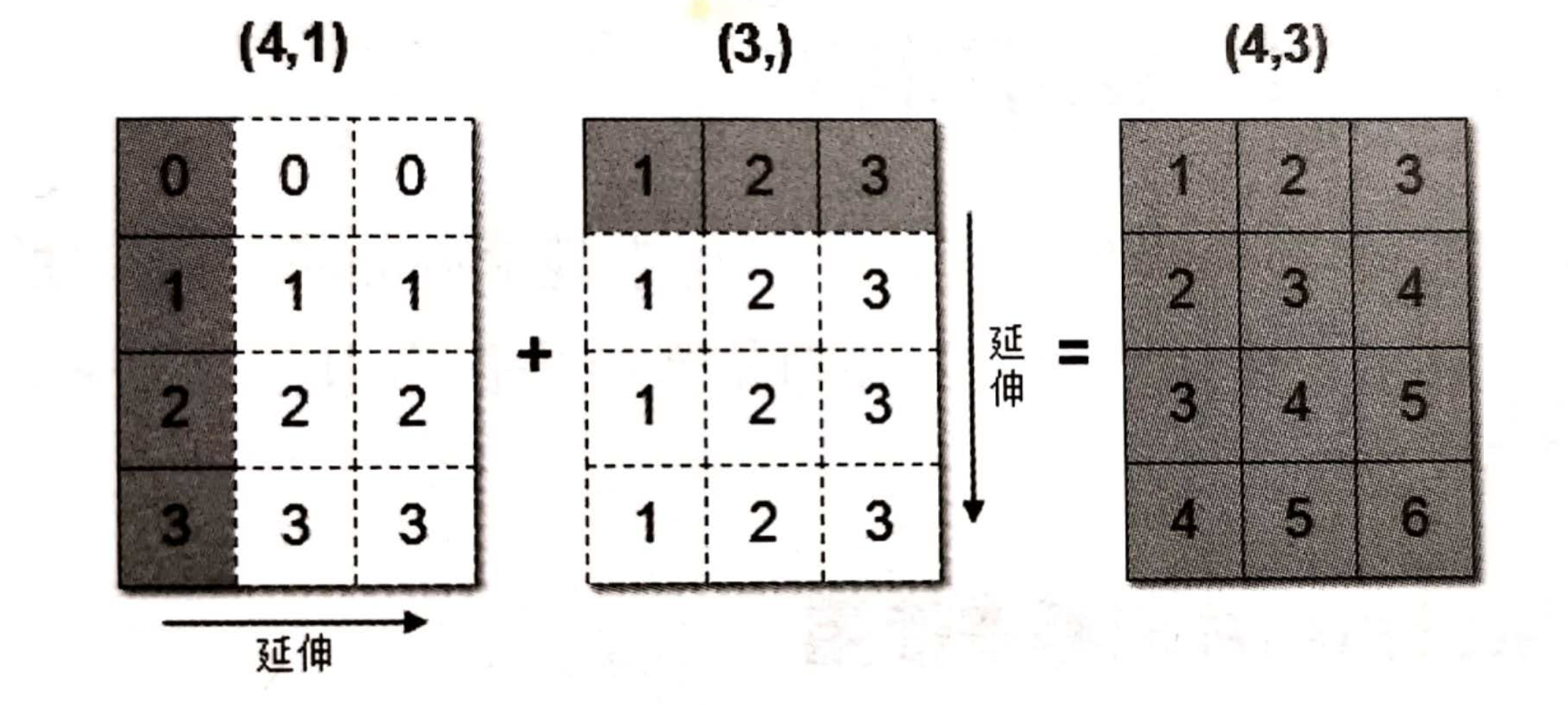
这句话乃是理解广播的核心。广播主要发生在两种情况,一种是两个数组的维数不相等,但是它们的后缘维度的轴长相符,另外一种是有一方的长度为1。
广播机制:数组与数组之间结构不同的情况
规则 1:如果数组的维度数不同,那么将维度数较少的数组在前面补充 1,使其维度数与维度数较多的数组一致。
规则 2:从最后一个维度开始比较,如果两个数组在该维度上的长度相同,或其中一个数组在该维度的长度为 1,那么它们在该维度上是兼容的,可以进行运算。
规则 3:如果在任何一个维度上,两个数组的长度既不同又都不为 1,则它们无法进行广播运算。
3 小结
- 数组运算(+,-,*(区别于点成@)),满足广播机制
- 1.维度相等
- 2.shape(其中对应的地方为1,也是可以的)