欢迎 👍点赞 ➕关注 ❤️收藏 💬评论
🌞<if>标签:非必填字段的灵活判断
定义
<if>标签:动态SQL中最基础的条件判断标签,用于实现"字段非必填时的动态拼接"。通过test属性指定判断条件,当true时,拼接其内部的SQL片段
语法
XML
<if test="判断条件(表达式)">
        <!-- 要拼接的SQL片段-->
</if>
使用
UserMappper.xml
XML
 <insert id="insertUser">
        insert into user_info(
            username,password
        <!--如果age不为空,添加age列-->
        <if test="age!=null and age!='' ">,age</if>
        ,gender,phone
        ) values(#{username},#{password}
        <if test="age!=null and age!='' ">,#{age}</if>,
        #{gender},#{phone})
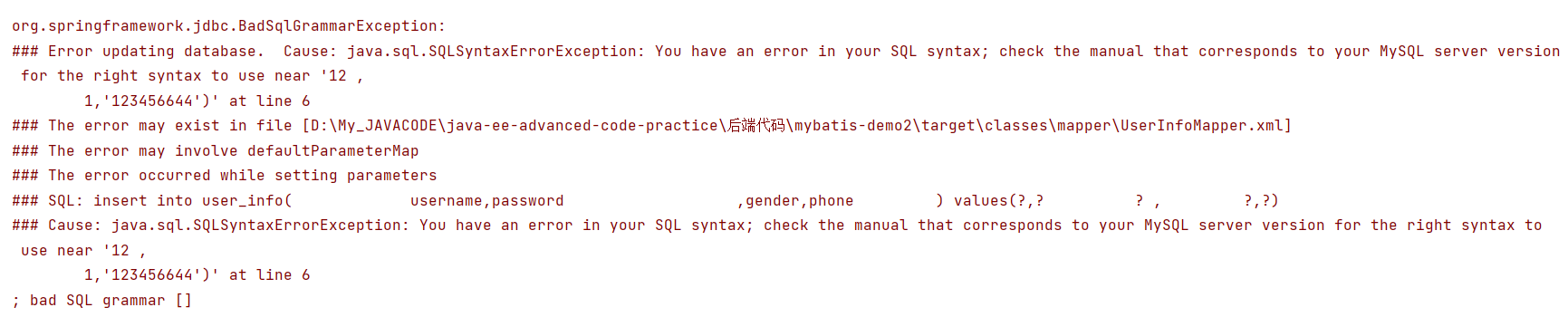
</insert>- 注意仍要添加逗号,但是也不要多添加逗号,否则会报错。
UserInfoXMLMapper
javascript
Integer insertUser(UserInfo userInfo);测试
javascript
  @Test
    void insertUser() {
        UserInfo userInfo=new UserInfo();
        userInfo.setUsername("zhanli");
        userInfo.setPassword("12442");
        userInfo.setAge(12);
        userInfo.setGender(1);
        userInfo.setPhone("123456644");
        userInfoXMLMapper.insertUser(userInfo);
    }
🌞<trim>标签:格式调整
定义
<trim>标签:通过自定义前缀,后缀以及多余的前缀/后缀,实现对SQL片段的精准控制,是动态SQL中最灵活的"格式调整器"。
语法
XML
<trim
            prefix="前缀字符串"
            suffix="后缀字符串"
            prefixOverrides="需要移除的前缀(多值用|分隔)"
            suffixOverrides="需要移除的后缀(多值用|分隔)">
            <!--待处理的SQL片段(通常包含<if>标签)-->
</trim>
使用
动态插入
像前面提醒的,我们可能经常多写了",",或者少写了",",那么语句就会报错,那么这个时候我们就可以使用<trim>
UserMappper.xml
javascript
 <insert id="insertUser2">
        insert into user_info
        <!--处理列名:添加前缀"("、后缀")",去除前面多余的逗号,去除最后多余的逗号-->
        <trim prefix="(" suffix=")" suffixOverrides="," prefixOverrides=",">
            username,password,
            <!--如果age不为空,添加age列-->
            <if test="age!=null and age!='' ">,age</if>
            ,gender,phone
            ) values(#{username},#{password},
            <if test="age!=null and age!='' ">,#{age}</if>,
            #{gender},#{phone})
        </trim>

</insert>- prefix、suffix、suffixOverrides、prefixOverrides这四个都是可选地,可选可不选;
- 图中可以发现我多写了逗号,但是我们来看一下结果,并没有报错,他帮我们除去了多余的逗号,以及添加了括号。当然我们也可以除去或者添加其他。

UserInfoXMLMapper
javascript
Integer insertUser2(UserInfo userInfo);测试
javascript
 @Test
    void insertUser2() {
        UserInfo userInfo=new UserInfo();
        userInfo.setUsername("zhanli");
        userInfo.setPassword("12442");
        userInfo.setAge(12);
        userInfo.setGender(1);
        userInfo.setPhone("123456644");
        userInfoXMLMapper.insertUser(userInfo);
    }
🌞<where>标签:where子句专用简化
定义
<where>标签:专为where条件句子设计的简化标签,自动处理条件前的and/or ,并在有效条件**(子元素有内容)时自动添加where关键字**。
语法
XML
<where>
            <!--带拼接的条件片段(通常包含<if>标签)-->
</where>
使用
UserMappper.xml
XML
    <select id="selectUser2" resultType="com.mybatis.demo.model.UserInfo">
        select * from user_Info
        <where>
            <if test="id">#{id}</if>
            <if test="username!=null">
                username=#{username}
            </if>
            <if test="password!=null">
                and password=#{password}
            </if>
            <if test="age">
                and age=#{age}
            </if>
            <if test="gender">
                and gender=#{gender}
            </if>
            <if test="phone">
                and phone=#{phone}
            </if>
        </where>
    </select>
UserInfoXMLMapper
javascript
List<UserInfo> selectUser2(UserInfo userInfo);测试1:都不传
sql
 @Test
    void selectUser2() {
        UserInfo userInfo=new UserInfo();
        userInfoXMLMapper.selectUser2(userInfo);
    }
结果:相当于
sql
select * from user_Info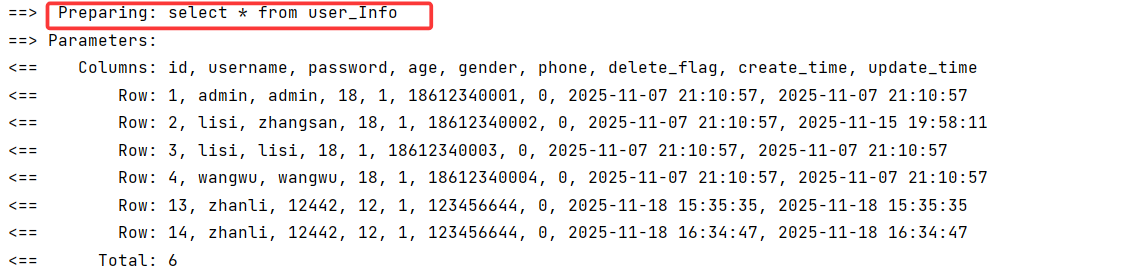
测试2:仅传一个参数
例:传入username
javascript
@Test
    void selectUser2() {
        UserInfo userInfo=new UserInfo();
        userInfo.setUsername("zhanli");
        userInfoXMLMapper.selectUser2(userInfo);
    }
结果:相当于
sql
select * from user_Info WHERE username= zhanli
测试3:传多个参数
例:传入username和gender
javascript
  @Test
    void selectUser2() {
        UserInfo userInfo=new UserInfo();
        userInfo.setUsername("zhanli");
        userInfo.setGender(1);
        userInfoXMLMapper.selectUser2(userInfo);
    }
结果相当于:
sql
select * from user_Info WHERE username=zhanli and gender=1
🌞<set>标签:set子句专用简化
定义
<set>标签:专门为update语句的set子句设计的简化标签,自动处理字段后的逗号,并在有有效字段时自动添加set关键字。
语法
XML
<set>
            <!--带拼接的更新片段(通常包含<if>标签)-->
</set>
使用
UserMappper.xml
XML
   <update id="updateUser2">
        update user_info
        <set>
        <if test="username!=null">
            username=#{username},
        </if>
        <if test="password!=null">
            password=#{password},
        </if>
        <if test="age">
            age=#{age},
        </if>
        <if test="gender">
            gender=#{gender},
        </if>
        <if test="phone">
            phone=#{phone},
        </if>
        </set>
        where id=#{id}
    </update>
UserInfoXMLMapper
javascript
Integer updateUser2(UserInfo userInfo);测试
javascript
   @Test
    void updateUser2() {
        UserInfo userInfo=new UserInfo();
        userInfo.setId(1);
        userInfo.setUsername("zhsi");
        userInfoXMLMapper.updateUser2(userInfo);
    }
结果

🌞<foreach>标签:集合遍历与批量操作
定义
用于遍历集合(List、数组等),将集合元素动态拼接为批量操作的SQL片段。
语法
XML
<foreach collection="集合名称"
                 item="元素别名"
                 index="索引元素"
                 open="片段前缀"
                 close="片段后缀"
                 separator="元素分隔符"
        >
            <!--单个元素的SQL片段-->
</foreach>- collection:必填,指定要遍历的集合/数组;
- item:必填,遍历过程中单个元素的别名(通过#{item}引用元素值);
- index:可选,遍历索引的别名(List为索引值,Map为键名);
- open:可选,整个遍历结果的前缀(例如"(");
- close:可选,整个遍历结果的后缀(例如")");
- separator:可选,元素之间的分隔符(例如",","、","or")。
使用
UserMappper.xml
XML
<select id="batchSelectByIds" resultType="com.mybatis.demo.model.UserInfo">
        select username from user_info
        where id in
        <foreach collection="idList" item="id" open="(" close=")" separator=",">
            #{id}
        </foreach>
    </select>
UserInfoXMLMapper
javascript
List<UserInfo> batchSelectByIds(@Param("idList") List<Integer> idList);测试
javascript
 @Test
    void batchSelectByIds() {
        List<Integer> idList= Arrays.asList(2,3);
        userInfoXMLMapper.batchSelectByIds(idList);
    }
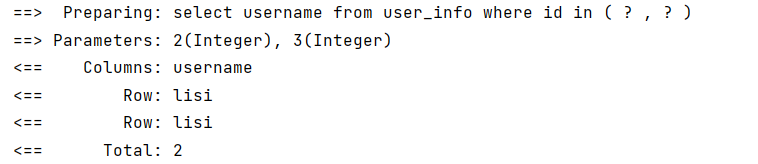
结果
🌞<include>:SQL片段复用
定义
<include>:用于引用提前定义的SQL片段,实现SQL代码复用,减少重复编写相同片段。
语法
XML
        <!--定义可复用的SQL片段-->
        <sql id="片段唯一id">
            <!--可用的SQL内容-->
        </sql>
        <!--引用片段-->
        <include refid="片段唯一id"></include>
使用
UserMappper.xml
XML
 <sql id="allColumn">
        id,username,age,gender,phone
    </sql>
    <select id="selectUser3" resultType="com.mybatis.demo.model.UserInfo">
        select
        <include refid="allColumn"></include>
        from user_info
    </select>
UserInfoXMLMapper
javascript
List<UserInfo> selectUser3(UserInfo userInfo);测试
javascript
 @Test
    void selectUser3() {
        UserInfo userInfo=new UserInfo();
        userInfoXMLMapper.selectUser3(userInfo);
    }
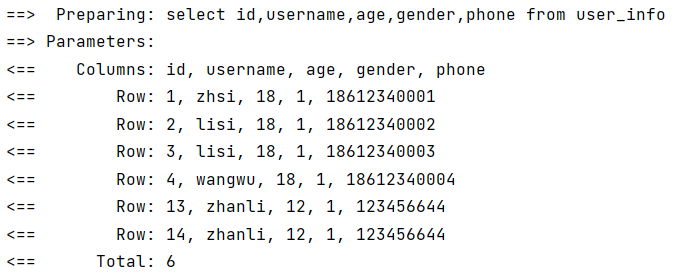
结果