Mybatis学习
一、Mybatis概述
- MyBatis是一款优秀的 持久层 框架,用于简化JDBC的开发
- MyBatis本是 Apache的一个开源项目iBatis, 2010年这个项目由apache迁移到了google code,并且改名为MyBatis 。2013年11月迁移到Github。
- 官网:https://mybatis.org/mybatis-3/zh/index.html
二、Mybatis入门
2.1 使用Mybatis查询所有用户数据
- 步骤:
- 准备工作(创建springboot工程,数据库表user,实体类User)
- 引入Mybatis相关依赖,配置Mybatis
- 编写SQL语句(注解/xml)
创建springboot工程和数据库表
-
springboot工程创建见前两期整理
-
连接数据库配置文件:
properties#驱动类名称 spring.datasource.driver-class-name=com.mysql.cj.jdbc.Driver #数据库连接的url spring.datasource.url=jdbc:mysql://localhost:3306/mybatis?useUnicode=true&characterEncoding=utf8&useSSL=false&serverTimezone=UTC #连接数据库的用户名 spring.datasource.username=root #连接数据库的密码 spring.datasource.password=123456
-
-
数据库创建
-
创建database,命名为mybatis
-
创建表单:
sqlcreate table user( id int unsigned primary key auto_increment comment 'ID', name varchar(100) comment '姓名', age tinyint unsigned comment '年龄', gender tinyint unsigned comment '性别, 1:男, 2:女', phone varchar(11) comment '手机号' ) comment '用户表'; insert into user(id, name, age, gender, phone) VALUES (null,'白眉鹰王',55,'1','18800000000'); insert into user(id, name, age, gender, phone) VALUES (null,'金毛狮王',45,'1','18800000001'); insert into user(id, name, age, gender, phone) VALUES (null,'青翼蝠王',38,'1','18800000002'); insert into user(id, name, age, gender, phone) VALUES (null,'紫衫龙王',42,'2','18800000003'); insert into user(id, name, age, gender, phone) VALUES (null,'光明左使',37,'1','18800000004'); insert into user(id, name, age, gender, phone) VALUES (null,'光明右使',48,'1','18800000005');
-
-
实体类创建:
javapackage com.itheima.pojo; public class User { private Integer id; private String name; private Short age; private Short gender; private String phone; public User() { } public User(Integer id, String name, Short age, Short gender, String phone) { this.id = id; this.name = name; this.age = age; this.gender = gender; this.phone = phone; } public Integer getId() { return id; } public void setId(Integer id) { this.id = id; } public String getName() { return name; } public void setName(String name) { this.name = name; } public Short getAge() { return age; } public void setAge(Short age) { this.age = age; } public Short getGender() { return gender; } public void setGender(Short gender) { this.gender = gender; } public String getPhone() { return phone; } public void setPhone(String phone) { this.phone = phone; } @Override public String toString() { return "User{" + "id=" + id + ", name='" + name + '\'' + ", age=" + age + ", gender=" + gender + ", phone='" + phone + '\'' + '}'; } } -
定义接口类
javapackage com.itheima.mapper; import java.util.List; import org.apache.ibatis.annotations.Mapper; import org.apache.ibatis.annotations.Select; import com.itheima.pojo.User; @Mapper // 在运行时,会自动生成该接口的实现类对象(),并且将该对象交给IOC容器管理 public interface UserMapper { // 查询全部的用户信息 @Select("SELECT * FROM user") public List<User> list(); } -
编写测试单元:
javapackage com.itheima; import java.util.List; import org.junit.jupiter.api.Test; import org.springframework.beans.factory.annotation.Autowired; import org.springframework.boot.test.context.SpringBootTest; import com.itheima.mapper.UserMapper; import com.itheima.pojo.User; @SpringBootTest // springboot整合单元测试的注解 class SpringbootMybatisQuickstartApplicationTests { @Autowired private UserMapper userMapper; @Test public void testListUser() { List<User> userList = userMapper.list(); userList.stream().forEach(user -> { System.out.println(user); }); } }
2.2 数据库连接池
-
概念:
- 数据库连接池是个容器,负责分配、管理数据库连接(Connection)
- 它允许应用程序重复使用一个现有的数据库连接,而不是再重新建立一个
- 释放空闲时间超过最大空闲时间的连接,来避免因为没有释放连接而引起的数据库连接遗漏
-
标准接口:DataSource
- 官方(sun)提供的数据库连接池接口,由第三方组织实现此接口。
- 功能:获取连接
-
Druid(德鲁伊)
- Druid连接池是阿里巴巴开源的数据库连接池项目
- 功能强大,性能优秀,是Java语言最好的数据库连接池之一
-
如何更换连接池:
xml<!-- pom.xml引入依赖 --> <dependency> <groupId>com.alibaba</groupId> <artifactId>druid-spring-boot-starter</artifactId> <version>1.2.8</version> </dependency> -
另一种配置方式:
propertiesspring.datasource.druid.driver-class-name=com.mysql.cj.jdbc.Driver spring.datasource.druid.url=jdbc:mysql://localhost:3306/mybatis?useUnicode=true&characterEncoding=utf8&useSSL=false&serverTimezone=UTC spring.datasource.druid.username=root spring.datasource.druid.password=123456
2.3 lombok 工具包
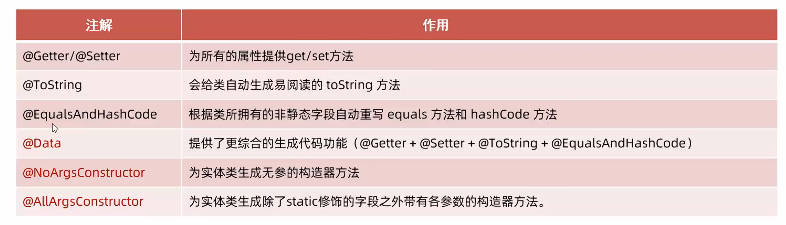
- Lombok是一个实用的Java类库,能通过注解的形式自动生成构造器、getter/setter、equals、hashcode、toString等方法,并可以自动化生成日志变量,简化java开发、提高效率。
-
加入lombok依赖
properties<dependency> <groupId>org.projectlombok</groupId> <artifactId>lombok</artifactId> </dependency> -
简化实体类:
javaimport lombok.*; @Data @NoArgsConstructor @AllArgsConstructor // 最常用的三个注解 public class User { private Integer id; private String name; private Short age; private Short gender; private String phone; }
三、Mybatis基础操作
3.1 工程创建准备
步骤:
-
创建数据库:
-
员工表:
mysql-- 员工管理 create table emp ( id int unsigned primary key auto_increment comment 'ID', username varchar(20) not null unique comment '用户名', password varchar(32) default '123456' comment '密码', name varchar(10) not null comment '姓名', gender tinyint unsigned not null comment '性别, 说明: 1 男, 2 女', image varchar(300) comment '图像', job tinyint unsigned comment '职位, 说明: 1 班主任,2 讲师, 3 学工主管, 4 教研主管, 5 咨询师', entrydate date comment '入职时间', dept_id int unsigned comment '部门ID', create_time datetime not null comment '创建时间', update_time datetime not null comment '修改时间' ) comment '员工表'; INSERT INTO emp(id, username, password, name, gender, image, job, entrydate,dept_id, create_time, update_time) VALUES (1,'jinyong','123456','金庸',1,'1.jpg',4,'2000-01-01',2,now(),now()), (2,'zhangwuji','123456','张无忌',1,'2.jpg',2,'2015-01-01',2,now(),now()), (3,'yangxiao','123456','杨逍',1,'3.jpg',2,'2008-05-01',2,now(),now()), (4,'weiyixiao','123456','韦一笑',1,'4.jpg',2,'2007-01-01',2,now(),now()), (5,'changyuchun','123456','常遇春',1,'5.jpg',2,'2012-12-05',2,now(),now()), (6,'xiaozhao','123456','小昭',2,'6.jpg',3,'2013-09-05',1,now(),now()), (7,'jixiaofu','123456','纪晓芙',2,'7.jpg',1,'2005-08-01',1,now(),now()), (8,'zhouzhiruo','123456','周芷若',2,'8.jpg',1,'2014-11-09',1,now(),now()), (9,'dingminjun','123456','丁敏君',2,'9.jpg',1,'2011-03-11',1,now(),now()), (10,'zhaomin','123456','赵敏',2,'10.jpg',1,'2013-09-05',1,now(),now()), (11,'luzhangke','123456','鹿杖客',1,'11.jpg',5,'2007-02-01',3,now(),now()), (12,'hebiweng','123456','鹤笔翁',1,'12.jpg',5,'2008-08-18',3,now(),now()), (13,'fangdongbai','123456','方东白',1,'13.jpg',5,'2012-11-01',3,now(),now()), (14,'zhangsanfeng','123456','张三丰',1,'14.jpg',2,'2002-08-01',2,now(),now()), (15,'yulianzhou','123456','俞莲舟',1,'15.jpg',2,'2011-05-01',2,now(),now()), (16,'songyuanqiao','123456','宋远桥',1,'16.jpg',2,'2010-01-01',2,now(),now()), (17,'chenyouliang','123456','陈友谅',1,'17.jpg',NULL,'2015-03-21',NULL,now(),now()); -
部门表:
mysql-- 部门管理 create table dept( id int unsigned primary key auto_increment comment '主键ID', name varchar(10) not null unique comment '部门名称', create_time datetime not null comment '创建时间', update_time datetime not null comment '修改时间' ) comment '部门表'; insert into dept (id, name, create_time, update_time) values(1,'学工部',now(),now()),(2,'教研部',now(),now()),(3,'咨询部',now(),now()), (4,'就业部',now(),now()),(5,'人事部',now(),now());
-
-
创建springboot工程,引入相关依赖:
- Lombok
- SQL driver
- Mybatis Framwork
-
配置文件中引入数据库连接信息
propertiesspring.datasource.driver-class-name=com.mysql.cj.jdbc.Driver spring.datasource.url=jdbc:mysql://localhost:3306/mybatis?useUnicode=true&characterEncoding=utf8&useSSL=false&serverTimezone=UTC spring.datasource.username=root spring.datasource.password=123456 -
创建对应的实体类Emp(实体类属性采用驼峰命名)
javapackage com.zcn.pojo; import java.time.LocalDate; import java.time.LocalDateTime; import lombok.AllArgsConstructor; import lombok.Data; import lombok.NoArgsConstructor; @Data @NoArgsConstructor @AllArgsConstructor public class emp { private Integer id; private String username; private String password; private String name; private Short gender; private String image; private Short job; private LocalDate entrydate; private Integer deptId; private LocalDateTime createTime; private LocalDateTime updateTime; } -
创建接口类
javapackage com.zcn.mapper; import org.apache.ibatis.annotations.Mapper; @Mapper public interface EmpMapper { }- 可以在接口类中,创建打印表单的sql语句用于测试
3.2 删除操作
-
sql中直接删除:
mysql-- 根据ID删除数据 delete from emp where id = 17; -
定义接口类方法
java@Delete("delete from emp where id=#{id}") // 占位符 被?替换,生成预编译的SQL public void delete(Integer id); -
进行删除测试
java@Test public void testDelete() { empMapper.delete(17); } // 如果方法返回int类型,则代表该语句影响的数据数
预编译SQL
- 优势:
- 性能更高
- 更安全(防止SQL注入)
3.3 插入操作
-
在SQL中直接操作
mysql-- 插入数据 insert into emp(username, name, gender, image, job, entrydate, dept_id, create_time, update_time) values ('songyuanqiao','宋远桥',1,'1.jpg',2,'2012-10-09',2,NOW(),NOW); -
定义接口类方法
java@Insert("insert into emp(username, name, gender, image, job, entrydate, dept_id, create_time, update_time) values(#{username}, #{name}, #{gender}, #{image}, #{job}, #{entrydate}, #{deptId}, #{createTime}, #{updateTime});") public void insert(Emp emp); -
进行插入测试
java@Test public void testInsert() { Emp emp = new Emp(); emp.setUsername("Tom"); emp.setName("汤姆"); emp.setImage("1.jpg"); emp.setGender((short) 1); emp.setJob((short) 1); emp.setEntrydate(LocalDate.of(2000, 1, 1)); emp.setCreateTime(LocalDateTime.now()); emp.setUpdateTime(LocalDateTime.now()); emp.setDeptId(1); empMapper.insert(emp); } -
主键返回
-
在数据添加成功后,需要获取插入数据库数据的主键。如:添加套餐数据时,还需要维护套餐菜品关系表数据。
-
实现:
java@Options(keyProperty = "id", useGeneratedKeys = true) // 主键返回 会自动将生成的主键值,赋值给emp对象的id属性 @Insert("insert into emp(username, name, gender, image, job, entrydate, dept_id, create_time, update_time) " + "values(#{username}, #{name}, #{gender}, #{image}, #{job}, #{entrydate}, #{deptId}, #{createTime}, #{updateTime})") public void insert(Emp emp);
-
3.4 更新操作
-
SQL语句
mysqlupdate emp set username = 'songdaxia', name = '宋大侠', gender = 1 , image = '1.jpg' , job = 2, entrydate = '2012-01-01', dept_id = 2, update_time = '2022-10-01 12:12:12' where id = 19; -
定义接口类方法
java@Update("update emp set username=#{username}, name=#{name}, gender=#{gender}, image=#{image}, job=#{job}, entrydate=#{entrydate}, dept_id=#{deptId}, update_time=#{updateTime} where id=#{id}") public void update(Emp emp); -
测试方法
java@Test public void testUpdate() { Emp emp = new Emp(); emp.setId(23); emp.setUsername("Tom6"); emp.setName("汤姆6"); emp.setImage("1.jpg"); emp.setGender((short) 1); emp.setJob((short) 1); emp.setEntrydate(LocalDate.of(2002, 2, 4)); emp.setUpdateTime(LocalDateTime.now()); emp.setDeptId(1); empMapper.update(emp); }
3.5 查询操作
根据ID查询
-
SQL语句
mysqlselect * from emp where id = 19; -
定义接口类方法
java@Select("select * from emp where id = #{id}") public Emp getById(Integer id); -
查询测试
java@Test public void testSelect() { Emp emp = empMapper.getById(23); System.out.println(emp); } -
输出
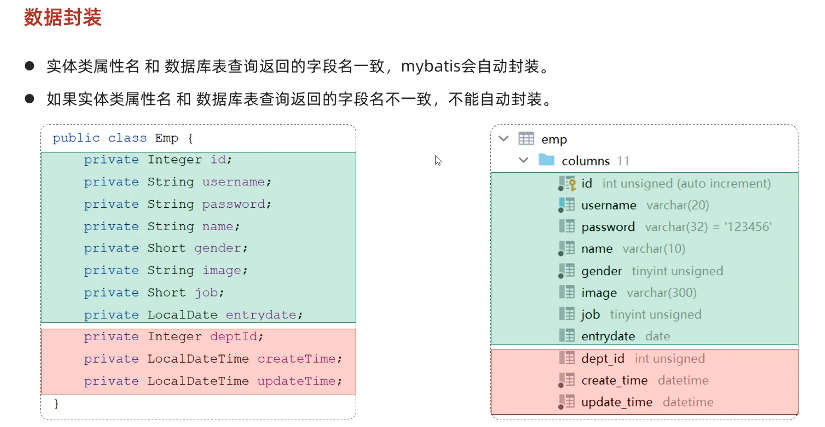
Emp(id=23, username=Tom6, password=123456, name=汤姆6, gender=1, image=1.jpg, job=1, entrydate=2002-02-04, deptId=null, createTime=null, updateTime=null)
-
解决方案一:给字段起别名,让别名与实体类属性一致
java@Select("select id, username, password, name, gender, image, job, entrydate, dept_id deptId, create_time createTime, update_time updateTime from emp where id = #{id} ") public Emp getById(Integer id); -
解决方案二:通过 @Results及@Result 进行手动结果映射
java@Select("select * from emp where id = #{id}") @Results({ @Result(column = "dept_id", property = "deptId"), @Result(column = "create_time", property = "createTime"), @Result(column = "update_time", property = "updateTime")}) public Emp getById(Integer id); -
解决方案三:开启驼峰命名,如果字段名与属性名符合驼峰命名规则,mybatis会自动通过驼峰命名规则映射
properties#开启驼峰命名自动映射,即从数据库字段名 a_column 映射到Java 属性名 aColumn。mybatis.configuration.map-underscore-to-camel-case=true
按条件查询
-
SQL语句
mysqlselect * from emp where name like '%张%' and gender = 1 and entrydate between '2010-01-01' and '2020-01-01 ' order by update_time desc; -
定义接口方法
java@Select("select * from emp where name like concat('%',#{name},'%') and gender = #{gender} and " + "entrydate between #{begin} and #{end} order by update_time desc ") public List<Emp> list(String name, Short gender, LocalDate begin , LocalDate end); -
测试查询
java@Test public void testList() { List<Emp> empList = empMapper.list("张", (short) 1, LocalDate.of(2010, 1, 1), LocalDate.of(2020, 1, 1)); System.out.println(empList); } -
注意:springboot1.x版本/单独使用mybatis时,需要加入一个插件,否则条件参数需要加@Param注解
properties<plugin> <groupId>org.apache.maven.plugins</groupId> <artifactId>maven-compiler-plugin</artifactId> <configuration> <compilerArgs> <arg>-parameters</arg> </compilerArgs> </configuration> </plugin>
四、XML映射文件
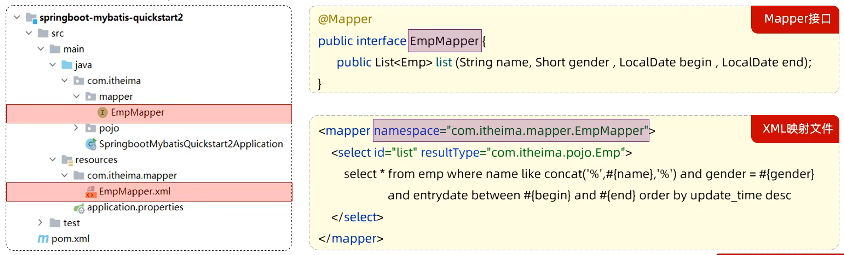
- 规范:
- XML映射文件的名称与Mapper接口名称一致,并且将XML映射文件和Mapper接口放置在相同包下(同包同名)。
- XML映射文件的namespace属性为Mapper接口全限定名一致。
- XML映射文件中sql语句的id与Mapper 接口中的方法名一致,并保持返回类型一致。
-
映射步骤
-
在resources中创建一个包 com.zcn.mapper
-
创建EmpMapper.xml文件
xml<?xml version="1.0" encoding="UTF-8" ?> <!DOCTYPE mapper PUBLIC "-//mybatis.org//DTD Mapper 3.0//EN" "http://mybatis.org/dtd/mybatis-3-mapper.dtd"> <mapper namespace="com.zcn.mapper.EmpMapper"> <sql id="commonSelect"> select id, username, password, name, gender, image, job, entrydate, dept_id, create_time, update_time from emp </sql> <!-- 动态更新员工--> <update id="update2"> update emp <set> <if test="username != null">username = #{username},</if> <if test="name != null">name = #{name},</if> <if test="gender != null">gender = #{gender},</if> <if test="image != null">image = #{image},</if> <if test="job != null">job = #{job},</if> <if test="entrydate != null">entrydate = #{entrydate},</if> <if test="deptId != null">dept_id = #{deptId},</if> <if test="updateTime != null">update_time = #{updateTime}</if> </set> where id = #{id} </update> <!--resultType: 单条记录封装的类型--> <select id="list" resultType="com.zcn.pojo.Emp"> <include refid="commonSelect"/> <where> <if test="name != null"> name like concat('%', #{name}, '%') </if> <if test="gender != null"> and gender = #{gender} </if> <if test="begin != null and end != null"> and entrydate between #{begin} and #{end} </if> </where> order by update_time desc </select> <!--批量删除员工 (18,19,20)--> <!-- collection: 遍历的集合 item: 遍历出来的元素 separator: 分隔符 open: 遍历开始前拼接的SQL片段 close: 遍历结束后拼接的SQL片段 --> <delete id="deleteByIds"> delete from emp where id in <foreach collection="ids" item="id" separator="," open="(" close=")"> #{id} </foreach> </delete> </mapper> -
定义接口的方法
javapublic List<Emp> list(String name, Short gender, LocalDate begin, LocalDate end);
-
五、Mybatis动态SQL
概念:随着用户的输入或外部条件的变化而变化的SQL语句,我们称为动态SQL。
动态查询
xml
<!-- if标签 -->
<!--resultType: 单条记录封装的类型-->
<select id="list" resultType="com.zcn.pojo.Emp">
    <include refid="commonSelect"/>
    <where>
        <if test="name != null">
            name like concat('%', #{name}, '%')
        </if>
        <if test="gender != null">
            and gender = #{gender}
        </if>
        <if test="begin != null and end != null">
            and entrydate between #{begin} and #{end}
        </if>
    </where>
    order by update_time desc
</select>
动态更新员工信息,防止出现每项信息都填写(不出现null),简化过程
java
    //动态更新员工 - 更新ID为18的员工 username 更新为 Tom111, name更新为 汤姆111, gender更新为2
    @Test
    public void testUpdate2(){
        //构造员工对象
        Emp emp = new Emp();
        emp.setId(19);
        emp.setUsername("Tom222333");
//        emp.setName("汤姆222");
//        emp.setGender((short)1);
//        emp.setUpdateTime(LocalDateTime.now());

        //执行更新员工操作
        empMapper.update2(emp);
}-
映射
xml<!-- 动态更新员工--> <update id="update2"> update emp <set> <if test="username != null">username = #{username},</if> <if test="name != null">name = #{name},</if> <if test="gender != null">gender = #{gender},</if> <if test="image != null">image = #{image},</if> <if test="job != null">job = #{job},</if> <if test="entrydate != null">entrydate = #{entrydate},</if> <if test="deptId != null">dept_id = #{deptId},</if> <if test="updateTime != null">update_time = #{updateTime}</if> </set> where id = #{id} </update> -
接口方法
java// 动态更新员工信息 public void update2(Emp emp);
批量删除 foreach
mysql
DELETE FROM emp WHERE id in(22,23)-
接口方法
java// 批量删除 public void deleteByIds(List<Integer> ids); -
映射
xml<!--批量删除员工 (18,19,20)--> <!-- collection: 遍历的集合 item: 遍历出来的元素 separator: 分隔符 open: 遍历开始前拼接的SQL片段 close: 遍历结束后拼接的SQL片段 --> <delete id="deleteByIds"> delete from emp where id in <foreach collection="ids" item="id" separator="," open="(" close=")"> #{id} </foreach> </delete> -
测试方法
java//批量删除员工 @Test public void testDeleteByIds(){ List<Integer> ids = Arrays.asList(22,23); empMapper.deleteByIds(ids); }
SQL&include
xml
<sql id="commonSelect">
    select id, username, password, name, gender, image, job, entrydate, dept_id, create_time, update_time
    from emp
</sql>


<include refid="commonSelect"/>

<!-- 二者配套使用 -->-
< sql >:定义可重用的 SQL 片段。
-
< include >:通过属性refid,指定包含的sql片段。