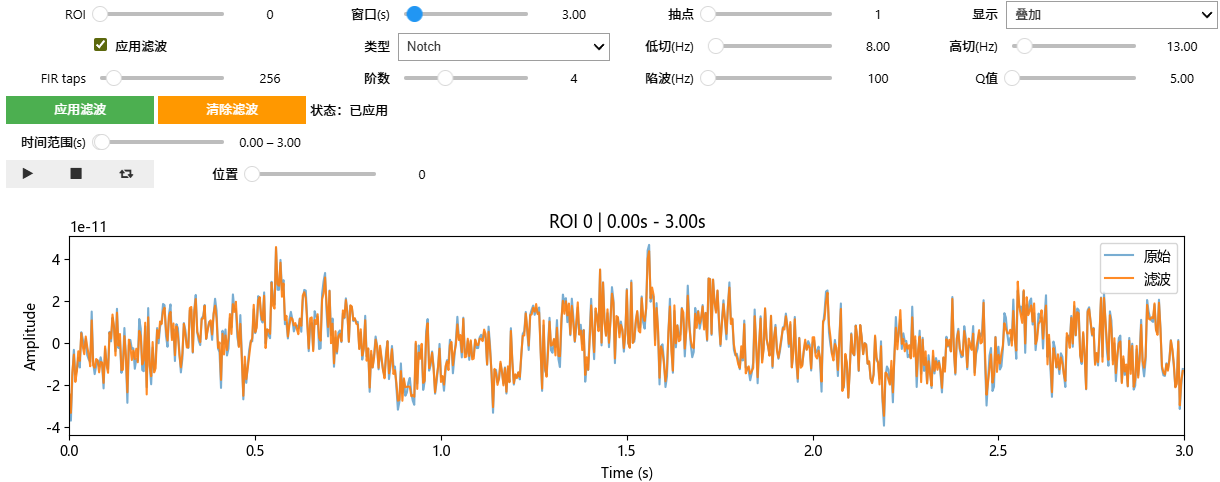
一个交互式查看通道信号,查看信号应用滤波的jupyter界面小工具。
没有提供数据和随机生成的部分。
python
import numpy as np
import pandas as pd
import matplotlib.pyplot as plt
from IPython.display import display
import ipywidgets as widgets
from ipywidgets import HBox, VBox, Play, jslink
from scipy import signal

plt.rcParams['font.sans-serif'] = ['Microsoft YaHei']
plt.rcParams['axes.unicode_minus'] = False

def apply_filter(y, fs, mode, low, high, taps, order, notch_freq, notch_q):
    if mode == 'None':
        return y
    if mode == 'FIR':
        if low is None or high is None or low <= 0 or high >= fs/2 or low >= high:
            return y
        b = signal.firwin(taps, [low, high], pass_zero=False, fs=fs)
        return signal.filtfilt(b, [1.0], y, method='pad')
    if mode == 'Butter':
        if low is None or high is None or low <= 0 or high >= fs/2 or low >= high:
            return y
        wn = [low/(fs/2), high/(fs/2)]
        b, a = signal.butter(order, wn, btype='band')
        return signal.filtfilt(b, a, y, axis=0)
    if mode == 'Notch':
        if notch_freq is None or notch_freq <= 0 or notch_freq >= fs/2:
            return y
        b, a = signal.iirnotch(notch_freq/(fs/2), notch_q)
        return signal.filtfilt(b, a, y, axis=0)
    return y

def interactive_timeline(dataseg1, fs=250, default_win_sec=3.0):
    arr = dataseg1.values if isinstance(dataseg1, pd.DataFrame) else np.asarray(dataseg1)
    arr = np.asarray(arr, dtype=np.float32)
    if arr.ndim == 1:
        arr = arr[None, :]
    n_roi, n_samples = arr.shape
    t = np.arange(n_samples) / fs

    roi_slider = widgets.IntSlider(min=0, max=n_roi-1, value=0, description='ROI')
    win_slider = widgets.FloatSlider(min=0.5, max=min(30.0, n_samples/fs), step=0.5, value=default_win_sec, description='窗口(s)')
    step_s = max(1/fs, default_win_sec/100.0)
    range_slider = widgets.FloatRangeSlider(min=0.0, max=n_samples/fs, step=step_s, value=(0.0, min(default_win_sec, n_samples/fs)), description='时间范围(s)', continuous_update=False)
    play = Play(interval=100, value=0, min=0, max=n_samples-1, step=max(1, int(fs*0.2)))
    pos_slider = widgets.IntSlider(min=0, max=n_samples-1, step=max(1, int(fs*0.2)), value=0, description='位置')
    jslink((play, 'value'), (pos_slider, 'value'))
    decim_slider = widgets.IntSlider(min=1, max=20, value=1, description='抽点')

    filter_enable = widgets.Checkbox(value=False, description='应用滤波')
    filter_mode = widgets.Dropdown(options=['None', 'FIR', 'Butter', 'Notch'], value='None', description='类型')
    lowcut = widgets.FloatSlider(min=0.5, max=120.0, step=0.5, value=8.0, description='低切(Hz)')
    highcut = widgets.FloatSlider(min=1.0, max=120.0, step=0.5, value=25.0, description='高切(Hz)')
    fir_taps = widgets.IntSlider(min=32, max=2048, step=32, value=256, description='FIR taps')
    butter_order = widgets.IntSlider(min=2, max=8, step=1, value=4, description='阶数')
    notch_f = widgets.FloatSlider(min=45.0, max=65.0, step=0.5, value=50.0, description='陷波(Hz)')
    notch_q = widgets.FloatSlider(min=5.0, max=50.0, step=1.0, value=30.0, description='Q值')
    show_mode = widgets.Dropdown(options=['滤波', '原始', '叠加'], value='滤波', description='显示')

    apply_btn = widgets.Button(description='应用滤波', button_style='success')
    clear_btn = widgets.Button(description='清除滤波', button_style='warning')
    status = widgets.HTML(value='状态:未应用')
    out = widgets.Output()

    confirmed = {'enabled': False, 'mode': 'None', 'low': None, 'high': None, 'taps': 256, 'order': 4, 'notch_f': None, 'notch_q': None}

    def current_params():
        return {
            'enabled': filter_enable.value,
            'mode': filter_mode.value,
            'low': lowcut.value if filter_mode.value in ('FIR', 'Butter') else None,
            'high': highcut.value if filter_mode.value in ('FIR', 'Butter') else None,
            'taps': fir_taps.value if filter_mode.value == 'FIR' else 256,
            'order': butter_order.value if filter_mode.value == 'Butter' else 4,
            'notch_f': notch_f.value if filter_mode.value == 'Notch' else None,
            'notch_q': notch_q.value if filter_mode.value == 'Notch' else None,
        }

    def render():
        with out:
            out.clear_output(wait=True)
            roi =xiu.value
            start_s, end_s = range_slider.value
            center_s = (start_s + end_s) / 2.0
            half = win_slider.value / 2.0
            start_s = max(0.0, center_s - half)
            end_s = min(n_samples/fs, center_s + half)
            start_idx = max(0, int(start_s * fs))
            end_idx = min(n_samples, int(end_s * fs))
            if end_idx <= start_idx:
                end_idx = start_idx + 1
            decim = max(1, decim_slider.value)

            y_raw = arr[roi, start_idx:end_idx]
            params = confirmed if confirmed['enabled'] else {'enabled': False, 'mode': 'None'}
            if params['enabled']:
                if params['mode'] in ('FIR', 'Butter'):
                    y_f = apply_filter(y_raw, fs, params['mode'], params['low'], params['high'], params.get('taps', 256), params.get('order', 4), None, None)
                elif params['mode'] == 'Notch':
                    y_f = apply_filter(y_raw, fs, 'Notch', None, None, None, None, params.get('notch_f', 50.0), params.get('notch_q', 30.0))
                else:
                    y_f = y_raw
            else:
                y_f = y_raw

            x_plot = t[start_idx:end_idx:decim]
            plt.figure(figsize=(12, 3))
            if show_mode.value == '原始':
                plt.plot(x_plot, y_raw[::decim], label='原始')
            elif show_mode.value == '滤波':
                plt.plot(x_plot, y_f[::decim], label='滤波')
            else:
                plt.plot(x_plot, y_raw[::decim], label='原始', alpha=0.6)
                plt.plot(x_plot, y_f[::decim], label='滤波', alpha=0.9)
            plt.xlim(start_s, end_s)
            plt.xlabel('Time (s)')
            plt.ylabel('Amplitude')
            plt.title(f'ROI {roi} | {start_s:.2f}s - {end_s:.2f}s')
            plt.legend(loc='upper right')
            plt.tight_layout()
            plt.show()

    def on_pos_change(change):
        center_s = change['new'] / fs
        half = win_slider.value / 2.0
        s0 = max(0.0, center_s - half)
        s1 = min(n_samples/fs, center_s + half)
        range_slider.value = (s0, s1)

    def on_apply_clicked(b):
        p = current_params()
        confirmed.update(p)
        status.value = '状态:已应用'
        render()

    def on_clear_clicked(b):
        confirmed.update({'enabled': False, 'mode': 'None', 'low': None, 'high': None, 'taps': 256, 'order': 4, 'notch_f': None, 'notch_q': None})
        status.value = '状态:未应用'
        render()

    pos_slider.observe(on_pos_change, 'value')
    for w in (roi_slider, range_slider, win_slider, decim_slider, show_mode):
        w.observe(lambda change: render(), 'value')
    apply_btn.on_click(on_apply_clicked)
    clear_btn.on_click(on_clear_clicked)

    render()
    ui_top = HBox([roi_slider, win_slider, decim_slider, show_mode])
    ui_filter_band = HBox([filter_enable, filter_mode, lowcut, highcut])
    ui_filter_params = HBox([fir_taps, butter_order, notch_f, notch_q])
    ui_action = HBox([apply_btn, clear_btn, status])
    ui_range = HBox([range_slider])
    ui_play = HBox([play, pos_slider])
    display(VBox([ui_top, ui_filter_band, ui_filter_params, ui_action, ui_range, ui_play]), out)

interactive_timeline(data['Value'], fs=250, default_win_sec=3.0)修改data'Value' 这个值(通道,timeseries)。就可以使用这个工具。
interactive_timeline(data'Value', fs=250, default_win_sec=3.0)
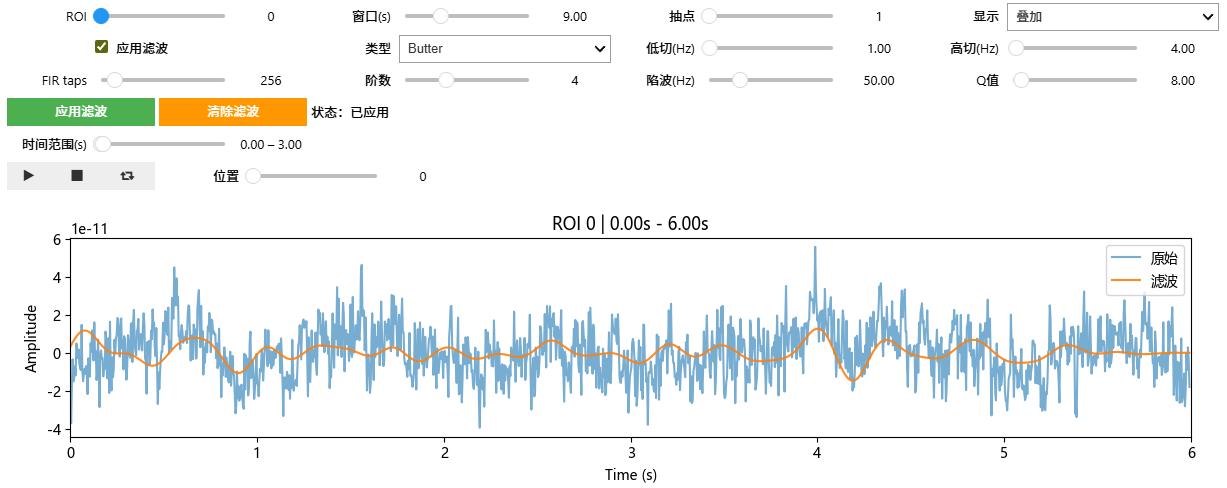
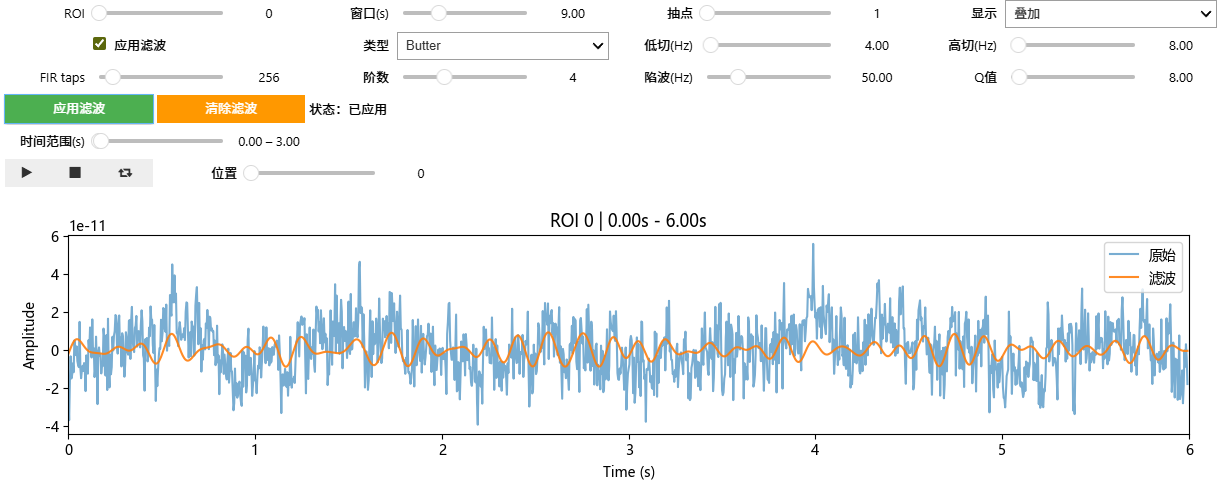
使用的四阶butter滤波器
Delta波(0.5Hz-4Hz)
Theta波(4Hz-8Hz)
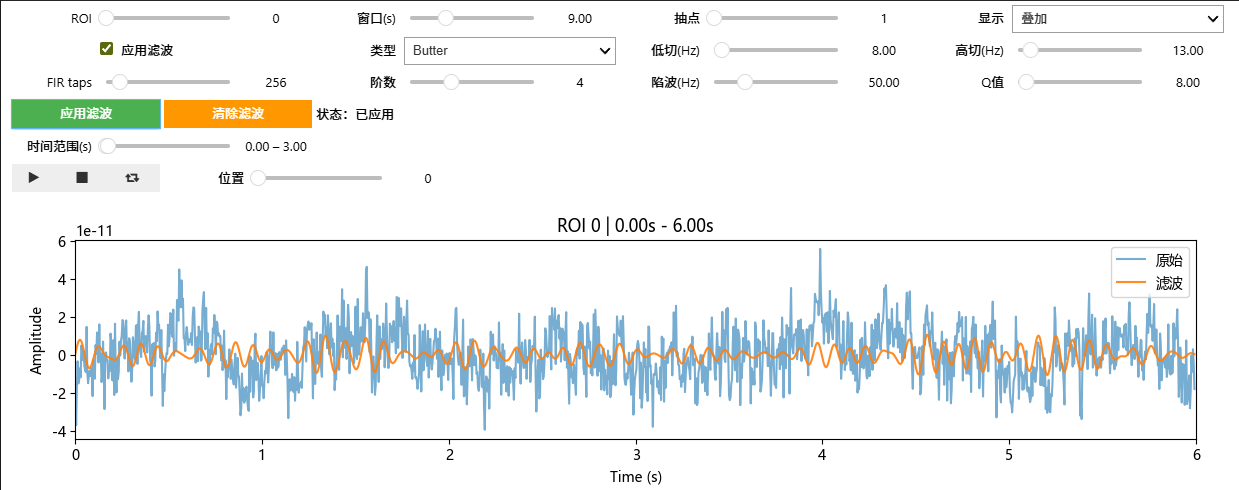
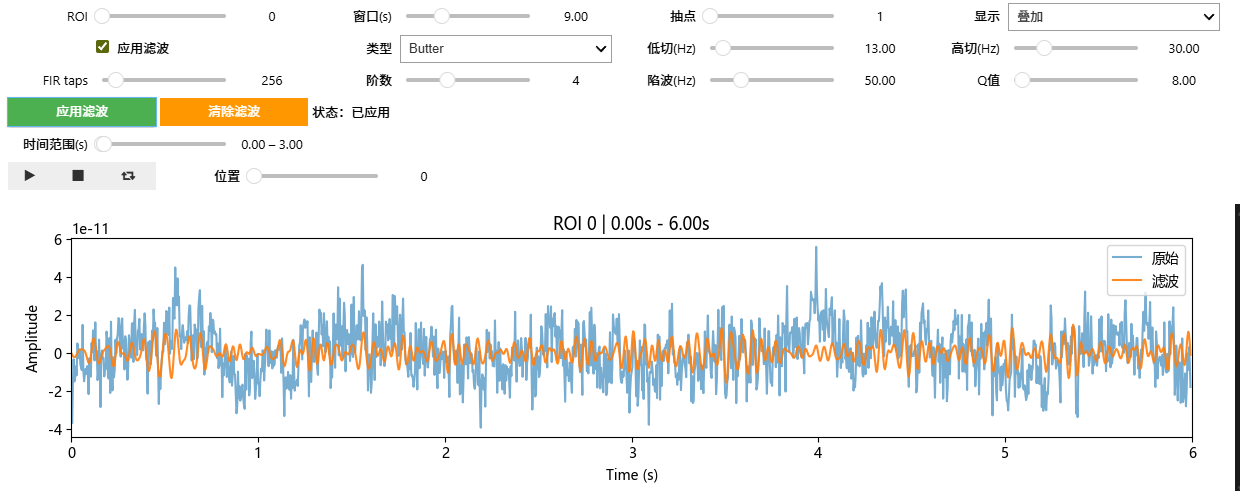
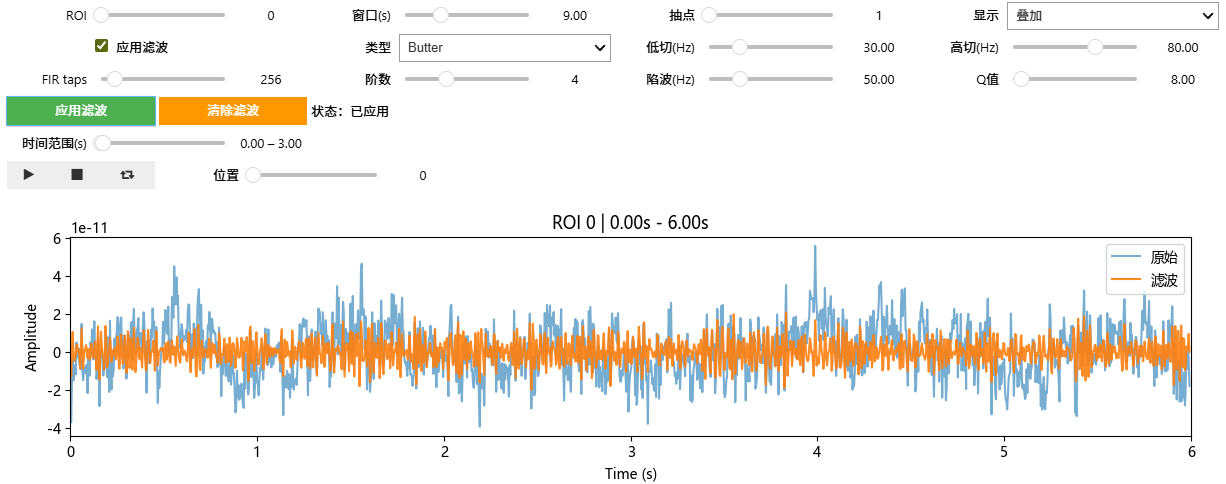
已经进行过陷波处理。Q值是和陷波相关的参数。
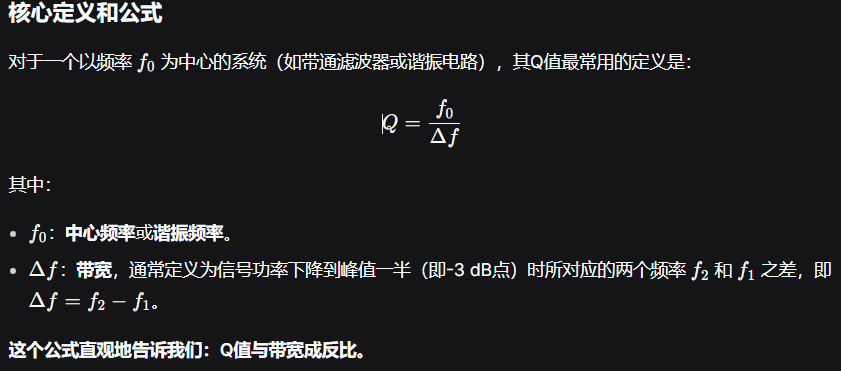
核心关系:Q值决定了陷波滤波器的"陡峭度"和"选择性"
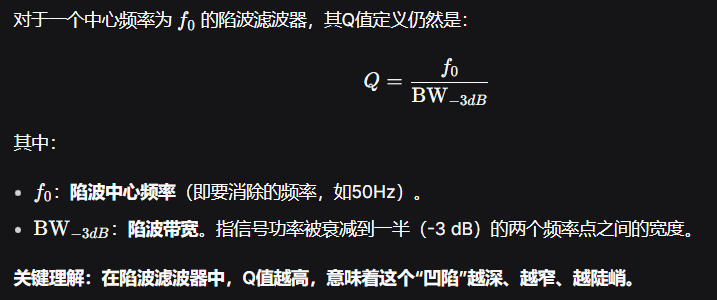
所以我们可以观察到100HZ的能量被滤去的差不多了。但是使用了较低的Q值,导致其他周围的频率,尖峰的高频成分,被去掉了一些。