全面掌握Dubbo七种配置方式,从XML到注解再到API,总有一款适合你!
文章目录
-
- 引言
- [一、Dubbo配置全景图 🗺️](#一、Dubbo配置全景图 🗺️)
-
- [1.1 配置方式演进历程](#1.1 配置方式演进历程)
- [1.2 七种配置方式概览](#1.2 七种配置方式概览)
- [二、XML配置:传统但稳定可靠 🏛️](#二、XML配置:传统但稳定可靠 🏛️)
-
- [2.1 XML配置基础结构](#2.1 XML配置基础结构)
- [2.2 消费者XML配置](#2.2 消费者XML配置)
- [2.3 XML配置的层次结构](#2.3 XML配置的层次结构)
- [三、注解配置:现代简洁的开发方式 ✨](#三、注解配置:现代简洁的开发方式 ✨)
-
- [3.1 服务提供者注解配置](#3.1 服务提供者注解配置)
- [3.2 服务消费者注解配置](#3.2 服务消费者注解配置)
- [3.3 注解配置的工作原理](#3.3 注解配置的工作原理)
- [四、属性配置:Spring Boot的最佳搭档 🎯](#四、属性配置:Spring Boot的最佳搭档 🎯)
-
- [4.1 基础属性配置](#4.1 基础属性配置)
- [4.2 多服务属性配置](#4.2 多服务属性配置)
- [4.3 多环境属性配置](#4.3 多环境属性配置)
- [五、API配置:灵活强大的编程方式 💪](#五、API配置:灵活强大的编程方式 💪)
-
- [5.1 服务提供者API配置](#5.1 服务提供者API配置)
- [5.2 服务消费者API配置](#5.2 服务消费者API配置)
- [5.3 API配置的适用场景](#5.3 API配置的适用场景)
- [六、配置中心:集中化动态管理 🎛️](#六、配置中心:集中化动态管理 🎛️)
-
- [6.1 配置中心集成](#6.1 配置中心集成)
- [6.2 动态配置示例](#6.2 动态配置示例)
- [6.3 配置监听与动态更新](#6.3 配置监听与动态更新)
- [七、环境变量与系统属性 🔧](#七、环境变量与系统属性 🔧)
-
- [7.1 环境变量配置](#7.1 环境变量配置)
- [7.2 系统属性配置](#7.2 系统属性配置)
- [7.3 配置优先级解析](#7.3 配置优先级解析)
- [八、配置最佳实践与技巧 🏆](#八、配置最佳实践与技巧 🏆)
-
- [8.1 多环境配置管理](#8.1 多环境配置管理)
- [8.2 配置验证与检查](#8.2 配置验证与检查)
- [8.3 配置模板与复用](#8.3 配置模板与复用)
- [九、总结 📚](#九、总结 📚)
-
- [9.1 配置方式对比总结](#9.1 配置方式对比总结)
- [9.2 配置选择指南](#9.2 配置选择指南)
- [9.3 最佳实践建议](#9.3 最佳实践建议)
- [参考资料 📖](#参考资料 📖)
引言
想象一下,你正在装修新家 🏠。你可以选择全包(XML配置)、半包(注解配置)、或者自己动手(API配置)...每种方式都有各自的优缺点。Dubbo的配置方式就像装修选择,提供了多种灵活的方案来满足不同场景的需求。
在微服务开发中,合理的配置方式能大大提高开发效率和维护性。今天,让我们一起探索Dubbo的七种配置方式,找到最适合你项目的配置方案!
一、Dubbo配置全景图 🗺️
1.1 配置方式演进历程
Dubbo的配置方式经历了从传统到现代、从复杂到简单的演进:
XML配置
传统稳定 注解配置
简洁优雅 属性配置
Spring Boot风格 API配置
灵活强大 配置中心
动态管理
1.2 七种配置方式概览
| 配置方式 | 适用场景 | 优点 | 缺点 |
|---|---|---|---|
| XML配置 | 传统项目、复杂配置 | 功能全面、结构清晰 | 配置繁琐、不够简洁 |
| 注解配置 | Spring项目、快速开发 | 代码即配置、开发快捷 | 配置分散、修改需重新编译 |
| 属性配置 | Spring Boot项目 | 简洁统一、云原生友好 | 功能相对受限 |
| API配置 | 动态场景、框架集成 | 灵活性强、运行时调整 | 代码侵入性高 |
| 配置中心 | 生产环境、多环境管理 | 动态更新、集中管理 | 架构复杂度增加 |
| 环境变量 | 容器化部署 | 环境无关、安全可靠 | 配置项有限 |
| 系统属性 | 临时调整、测试调试 | 优先级高、快速生效 | 不适合复杂配置 |
二、XML配置:传统但稳定可靠 🏛️
2.1 XML配置基础结构
XML配置是Dubbo最传统、最稳定的配置方式,适合复杂的配置场景:
xml
<!-- dubbo-provider.xml -->
<?xml version="1.0" encoding="UTF-8"?>
<beans xmlns="http://www.springframework.org/schema/beans"
       xmlns:xsi="http://www.w3.org/2001/XMLSchema-instance"
       xmlns:dubbo="http://dubbo.apache.org/schema/dubbo"
       xsi:schemaLocation="http://www.springframework.org/schema/beans
       http://www.springframework.org/schema/beans/spring-beans.xsd
       http://dubbo.apache.org/schema/dubbo
       http://dubbo.apache.org/schema/dubbo/dubbo.xsd">

    <!-- 应用配置 -->
    <dubbo:application name="demo-provider" owner="team-a">
        <dubbo:parameter key="qos.enable" value="true"/>
        <dubbo:parameter key="qos.port" value="22222"/>
    </dubbo:application>

    <!-- 注册中心配置 -->
    <dubbo:registry address="zookeeper://127.0.0.1:2181"
                    file="${user.home}/dubbo-cache/demo-provider.cache"/>

    <!-- 协议配置 -->
    <dubbo:protocol name="dubbo" port="20880"
                    threadpool="fixed" threads="200"/>

    <!-- 服务提供者配置 -->
    <dubbo:provider timeout="3000" retries="2" cluster="failover"/>

    <!-- 服务暴露 -->
    <dubbo:service interface="com.example.UserService"
                   ref="userService"
                   version="1.0.0"
                   group="production"
                   timeout="5000"
                   retries="0">
        <dubbo:method name="findUser" timeout="3000" retries="1"/>
    </dubbo:service>

    <!-- 服务实现 -->
    <bean id="userService" class="com.example.UserServiceImpl"/>
</beans>
2.2 消费者XML配置
xml
<!-- dubbo-consumer.xml -->
<?xml version="1.0" encoding="UTF-8"?>
<beans xmlns="http://www.springframework.org/schema/beans"
       xmlns:xsi="http://www.w3.org/2001/XMLSchema-instance"
       xmlns:dubbo="http://dubbo.apache.org/schema/dubbo"
       xsi:schemaLocation="http://www.springframework.org/schema/beans
       http://www.springframework.org/schema/beans/spring-beans.xsd
       http://dubbo.apache.org/schema/dubbo
       http://dubbo.apache.org/schema/dubbo/dubbo.xsd">

    <!-- 应用配置 -->
    <dubbo:application name="demo-consumer">
        <dubbo:parameter key="qos.enable" value="true"/>
    </dubbo:application>

    <!-- 注册中心配置 -->
    <dubbo:registry address="zookeeper://127.0.0.1:2181"/>

    <!-- 消费者默认配置 -->
    <dubbo:consumer check="false" timeout="5000" retries="2"/>

    <!-- 服务引用 -->
    <dubbo:reference id="userService"
                     interface="com.example.UserService"
                     version="1.0.0"
                     group="production"
                     timeout="3000"
                     loadbalance="random">
        <dubbo:method name="findUser" timeout="2000" retries="1"/>
    </dubbo:reference>
</beans>
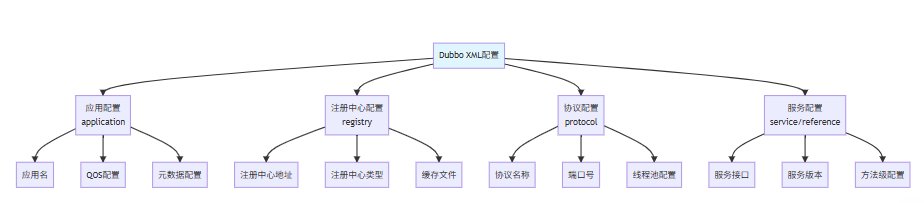
2.3 XML配置的层次结构
三、注解配置:现代简洁的开发方式 ✨
3.1 服务提供者注解配置
注解配置让Dubbo配置更加简洁,与代码紧密结合:
java
/**
 * 服务提供者配置类
 * 使用@Configuration和@EnableDubbo开启Dubbo注解支持
 */
@Configuration
@EnableDubbo(scanBasePackages = "com.example.service")
public class ProviderConfiguration {

    /**
     * 应用配置
     */
    @Bean
    public ApplicationConfig applicationConfig() {
        ApplicationConfig applicationConfig = new ApplicationConfig();
        applicationConfig.setName("demo-provider");
        applicationConfig.setQosEnable(true);
        applicationConfig.setQosPort(22222);
        return applicationConfig;
    }

    /**
     * 注册中心配置
     */
    @Bean
    public RegistryConfig registryConfig() {
        RegistryConfig registryConfig = new RegistryConfig();
        registryConfig.setAddress("zookeeper://127.0.0.1:2181");
        registryConfig.setProtocol("zookeeper");
        registryConfig.setTimeout(3000);
        return registryConfig;
    }

    /**
     * 协议配置
     */
    @Bean
    public ProtocolConfig protocolConfig() {
        ProtocolConfig protocolConfig = new ProtocolConfig();
        protocolConfig.setName("dubbo");
        protocolConfig.setPort(20880);
        protocolConfig.setThreadpool("fixed");
        protocolConfig.setThreads(200);
        return protocolConfig;
    }

    /**
     * 服务提供者默认配置
     */
    @Bean
    public ProviderConfig providerConfig() {
        ProviderConfig providerConfig = new ProviderConfig();
        providerConfig.setTimeout(3000);
        providerConfig.setRetries(2);
        providerConfig.setCluster("failover");
        return providerConfig;
    }
}

/**
 * 服务实现类
 * 使用@DubboService注解暴露服务
 */
@DubboService(
    version = "1.0.0",
    group = "production",
    timeout = 5000,
    retries = 0,
    methods = {
        @Method(name = "findUser", timeout = 3000, retries = 1)
    }
)
@Service
public class UserServiceImpl implements UserService {

    @Autowired
    private UserRepository userRepository;

    @Override
    public User findUser(Long id) {
        return userRepository.findById(id);
    }

    @Override
    public List<User> searchUsers(String keyword) {
        return userRepository.findByKeyword(keyword);
    }
}
3.2 服务消费者注解配置
java
/**
 * 服务消费者配置类
 */
@Configuration
@EnableDubbo(scanBasePackages = "com.example.consumer")
public class ConsumerConfiguration {

    @Bean
    public ApplicationConfig applicationConfig() {
        ApplicationConfig applicationConfig = new ApplicationConfig();
        applicationConfig.setName("demo-consumer");
        return applicationConfig;
    }

    @Bean
    public RegistryConfig registryConfig() {
        RegistryConfig registryConfig = new RegistryConfig();
        registryConfig.setAddress("zookeeper://127.0.0.1:2181");
        return registryConfig;
    }

    @Bean
    public ConsumerConfig consumerConfig() {
        ConsumerConfig consumerConfig = new ConsumerConfig();
        consumerConfig.setCheck(false);
        consumerConfig.setTimeout(5000);
        consumerConfig.setRetries(2);
        return consumerConfig;
    }
}

/**
 * 服务消费者使用示例
 */
@RestController
@RequestMapping("/api/users")
public class UserController {

    /**
     * 使用@DubboReference引用远程服务
     */
    @DubboReference(
        version = "1.0.0",
        group = "production",
        timeout = 3000,
        loadbalance = "random",
        check = false,
        methods = {
            @Method(name = "findUser", timeout = 2000, retries = 1)
        }
    )
    private UserService userService;

    @GetMapping("/{id}")
    public ResponseEntity<User> getUser(@PathVariable Long id) {
        try {
            User user = userService.findUser(id);
            return ResponseEntity.ok(user);
        } catch (Exception e) {
            return ResponseEntity.status(500).build();
        }
    }

    @GetMapping("/search")
    public ResponseEntity<List<User>> searchUsers(@RequestParam String keyword) {
        try {
            List<User> users = userService.searchUsers(keyword);
            return ResponseEntity.ok(users);
        } catch (Exception e) {
            return ResponseEntity.status(500).build();
        }
    }
}
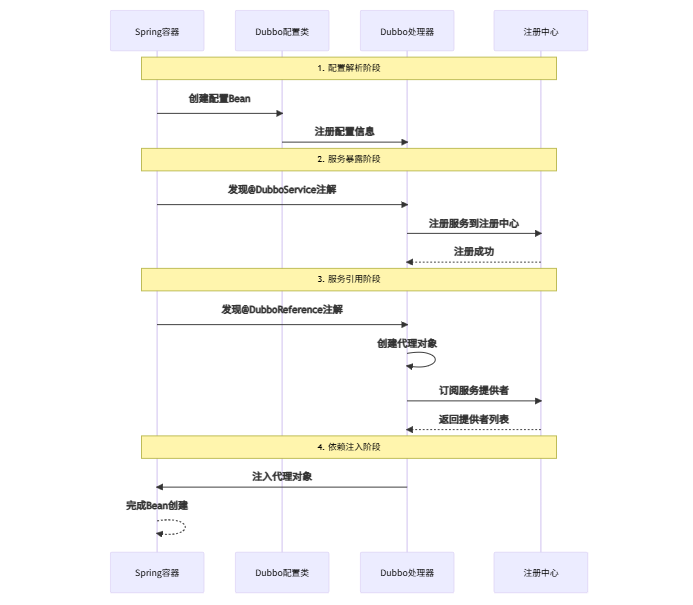
3.3 注解配置的工作原理
四、属性配置:Spring Boot的最佳搭档 🎯
4.1 基础属性配置
属性配置是Spring Boot项目中最为简洁的配置方式:
yaml
# application.yml
spring:
  application:
    name: dubbo-demo

dubbo:
  application:
    name: ${spring.application.name}
    qos-enable: true
    qos-port: 22222
    register-mode: instance
  registry:
    address: zookeeper://127.0.0.1:2181
    parameters:
      namespace: dev
      group: dubbo-demo
  protocol:
    name: dubbo
    port: 20880
    threadpool: fixed
    threads: 200
  provider:
    timeout: 3000
    retries: 2
  consumer:
    check: false
    timeout: 5000
    retries: 2
  scan:
    base-packages: com.example.service
4.2 多服务属性配置
yaml
# 多服务详细配置
dubbo:
  application:
    name: order-system
    metadata-type: remote
  registry:
    address: nacos://127.0.0.1:8848
    parameters:
      namespace: production
  protocol:
    name: dubbo
    port: -1  # 随机端口
  provider:
    filter: exception,accesslog
  consumer:
    filter: exception
  metrics:
    enable: true
    protocol: prometheus
    port: 9090
  metadata-report:
    address: nacos://127.0.0.1:8848

  # 服务级别配置
  service:
    userService:
      version: 1.0.0
      group: user-center
      timeout: 3000
      retries: 2
    orderService:
      version: 2.0.0
      group: order-center
      timeout: 5000
      retries: 0
      methods:
        createOrder:
          timeout: 10000
          retries: 0

  # 引用级别配置
  reference:
    userService:
      version: 1.0.0
      group: user-center
      timeout: 3000
    productService:
      version: 1.0.0
      group: product-center
      loadbalance: leastactive
4.3 多环境属性配置
yaml
# application-dev.yml - 开发环境
dubbo:
  registry:
    address: zookeeper://dev-zookeeper:2181
  protocol:
    port: 20880
  provider:
    timeout: 10000  # 开发环境超时时间较长
  consumer:
    check: true     # 开发环境检查服务可用性

---
# application-test.yml - 测试环境
dubbo:
  registry:
    address: zookeeper://test-zookeeper:2181
  protocol:
    port: 20880
  provider:
    timeout: 5000
  consumer:
    check: true

---
# application-prod.yml - 生产环境
dubbo:
  registry:
    address: zookeeper://prod-zookeeper:2181
    parameters:
      namespace: production
  protocol:
    port: 20880
  provider:
    timeout: 3000
    retries: 1
  consumer:
    check: false    # 生产环境不检查,避免启动依赖
    timeout: 3000
    retries: 1
五、API配置:灵活强大的编程方式 💪
5.1 服务提供者API配置
API配置提供了最大的灵活性,适合动态场景和框架集成:
java
/**
 * API方式配置服务提供者
 * 适用于非Spring环境或需要动态配置的场景
 */
public class ApiProviderConfiguration {

    public void exportService() {
        // 应用配置
        ApplicationConfig application = new ApplicationConfig();
        application.setName("api-provider");
        application.setQosEnable(true);
        application.setQosPort(22222);

        // 注册中心配置
        RegistryConfig registry = new RegistryConfig();
        registry.setAddress("zookeeper://127.0.0.1:2181");

        // 协议配置
        ProtocolConfig protocol = new ProtocolConfig();
        protocol.setName("dubbo");
        protocol.setPort(20880);
        protocol.setThreads(200);

        // 服务提供者配置
        ProviderConfig provider = new ProviderConfig();
        provider.setTimeout(3000);
        provider.setRetries(2);

        // 服务配置
        ServiceConfig<UserService> service = new ServiceConfig<>();
        service.setApplication(application);
        service.setRegistry(registry);
        service.setProtocol(protocol);
        service.setProvider(provider);
        service.setInterface(UserService.class);
        service.setRef(new UserServiceImpl());
        service.setVersion("1.0.0");
        service.setGroup("production");
        service.setTimeout(5000);

        // 方法级配置
        List<MethodConfig> methods = new ArrayList<>();
        MethodConfig methodConfig = new MethodConfig();
        methodConfig.setName("findUser");
        methodConfig.setTimeout(3000);
        methodConfig.setRetries(1);
        methods.add(methodConfig);
        service.setMethods(methods);

        // 导出服务
        service.export();

        System.out.println("服务导出成功: " + UserService.class.getName());
    }

    /**
     * 动态更新服务配置
     */
    public void updateServiceConfig(ServiceConfig<?> service, int newTimeout) {
        // 更新服务配置
        service.setTimeout(newTimeout);

        // 重新导出服务
        service.unexport();
        service.export();

        System.out.println("服务配置更新完成,新超时时间: " + newTimeout);
    }
}
5.2 服务消费者API配置
java
/**
 * API方式配置服务消费者
 */
public class ApiConsumerConfiguration {

    private ReferenceConfig<UserService> referenceConfig;

    public UserService buildReference() {
        // 应用配置
        ApplicationConfig application = new ApplicationConfig();
        application.setName("api-consumer");

        // 注册中心配置
        RegistryConfig registry = new RegistryConfig();
        registry.setAddress("zookeeper://127.0.0.1:2181");

        // 消费者配置
        ConsumerConfig consumer = new ConsumerConfig();
        consumer.setCheck(false);
        consumer.setTimeout(5000);
        consumer.setRetries(2);

        // 引用配置
        referenceConfig = new ReferenceConfig<>();
        referenceConfig.setApplication(application);
        referenceConfig.setRegistry(registry);
        referenceConfig.setConsumer(consumer);
        referenceConfig.setInterface(UserService.class);
        referenceConfig.setVersion("1.0.0");
        referenceConfig.setGroup("production");
        referenceConfig.setTimeout(3000);
        referenceConfig.setLoadbalance("random");

        // 方法级配置
        List<MethodConfig> methods = new ArrayList<>();
        MethodConfig methodConfig = new MethodConfig();
        methodConfig.setName("findUser");
        methodConfig.setTimeout(2000);
        methodConfig.setRetries(1);
        methods.add(methodConfig);
        referenceConfig.setMethods(methods);

        // 获取代理对象
        UserService userService = referenceConfig.get();
        System.out.println("服务引用成功: " + UserService.class.getName());

        return userService;
    }

    /**
     * 销毁引用,释放资源
     */
    public void destroy() {
        if (referenceConfig != null) {
            referenceConfig.destroy();
            System.out.println("服务引用已销毁");
        }
    }

    /**
     * 动态更新引用配置
     */
    public void updateReferenceConfig(int newTimeout) {
        if (referenceConfig != null) {
            // 创建新的ReferenceConfig
            ReferenceConfig<UserService> newReference = referenceConfig;
            newReference.setTimeout(newTimeout);

            // 重新获取代理对象
            referenceConfig.destroy();
            referenceConfig = newReference;
            referenceConfig.get();

            System.out.println("引用配置更新完成,新超时时间: " + newTimeout);
        }
    }
}
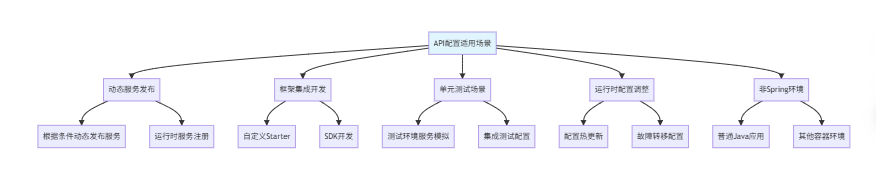
5.3 API配置的适用场景
六、配置中心:集中化动态管理 🎛️
6.1 配置中心集成
配置中心支持动态配置更新,适合生产环境:
java
/**
 * 配置中心使用示例
 */
@Configuration
public class ConfigCenterConfiguration {

    /**
     * Nacos配置中心
     */
    @Bean
    public ConfigCenterConfig nacosConfigCenter() {
        ConfigCenterConfig configCenter = new ConfigCenterConfig();
        configCenter.setAddress("nacos://127.0.0.1:8848");
        configCenter.setNamespace("dubbo-demo");
        configCenter.setGroup("DEFAULT_GROUP");
        configCenter.setCheck(true);
        configCenter.setTimeout(3000L);
        return configCenter;
    }

    /**
     * Apollo配置中心
     */
    @Bean
    public ConfigCenterConfig apolloConfigCenter() {
        ConfigCenterConfig configCenter = new ConfigCenterConfig();
        configCenter.setAddress("apollo://127.0.0.1:8080");
        configCenter.setNamespace("dubbo-config");
        configCenter.setCheck(false);
        return configCenter;
    }

    /**
     * Zookeeper配置中心
     */
    @Bean
    public ConfigCenterConfig zookeeperConfigCenter() {
        ConfigCenterConfig configCenter = new ConfigCenterConfig();
        configCenter.setAddress("zookeeper://127.0.0.1:2181");
        configCenter.setNamespace("dubbo/config");
        configCenter.setGroup("dubbo");
        return configCenter;
    }
}
6.2 动态配置示例
yaml
# 在配置中心存储的Dubbo配置
# nacos://127.0.0.1:8848/dubbo-demo/DEFAULT_GROUP/dubbo.properties

# 全局配置
dubbo.application.name=order-system
dubbo.registry.address=zookeeper://127.0.0.1:2181
dubbo.protocol.name=dubbo
dubbo.protocol.port=20880

# 动态配置 - 支持运行时修改
dubbo.provider.timeout=3000
dubbo.provider.retries=2
dubbo.consumer.timeout=5000
dubbo.consumer.retries=2

# 服务级配置
dubbo.service.com.example.UserService.timeout=5000
dubbo.service.com.example.UserService.retries=1
dubbo.reference.com.example.OrderService.timeout=10000
dubbo.reference.com.example.OrderService.retries=0
6.3 配置监听与动态更新
java
/**
 * 配置动态更新监听器
 */
@Component
public class ConfigUpdateListener {

    private static final Logger logger = LoggerFactory.getLogger(ConfigUpdateListener.class);

    /**
     * 监听配置变化事件
     */
    @EventListener
    public void onConfigChange(ConfigChangeEvent event) {
        Map<String, Object> changes = event.getChanges();

        for (Map.Entry<String, Object> entry : changes.entrySet()) {
            String key = entry.getKey();
            Object newValue = entry.getValue();

            logger.info("配置发生变化: {} = {}", key, newValue);

            // 根据配置键处理不同的配置更新
            handleConfigUpdate(key, newValue);
        }
    }

    private void handleConfigUpdate(String key, Object newValue) {
        if (key.startsWith("dubbo.provider.timeout")) {
            // 处理提供者超时配置更新
            updateProviderTimeout(Integer.parseInt(newValue.toString()));
        } else if (key.startsWith("dubbo.consumer.timeout")) {
            // 处理消费者超时配置更新
            updateConsumerTimeout(Integer.parseInt(newValue.toString()));
        } else if (key.startsWith("dubbo.service.")) {
            // 处理服务级配置更新
            updateServiceConfig(key, newValue);
        }
    }

    private void updateProviderTimeout(int newTimeout) {
        logger.info("更新提供者超时时间: {}ms", newTimeout);
        // 实现配置更新逻辑
    }

    private void updateConsumerTimeout(int newTimeout) {
        logger.info("更新消费者超时时间: {}ms", newTimeout);
        // 实现配置更新逻辑
    }

    private void updateServiceConfig(String key, Object newValue) {
        // 解析服务名和配置项
        String[] parts = key.split("\\.");
        if (parts.length >= 4) {
            String serviceName = parts[2];
            String configKey = parts[3];

            logger.info("更新服务配置: {}, {} = {}", serviceName, configKey, newValue);
            // 实现服务级配置更新逻辑
        }
    }
}
七、环境变量与系统属性 🔧
7.1 环境变量配置
环境变量配置适合容器化部署场景:
bash
# 通过环境变量配置Dubbo
export DUBBO_APPLICATION_NAME=user-service
export DUBBO_REGISTRY_ADDRESS=zookeeper://127.0.0.1:2181
export DUBBO_PROTOCOL_NAME=dubbo
export DUBBO_PROTOCOL_PORT=20880
export DUBBO_PROVIDER_TIMEOUT=3000
export DUBBO_CONSUMER_CHECK=false

# 启动应用
java -jar your-application.jar
7.2 系统属性配置
系统属性配置适合临时调整和测试场景:
java
/**
 * 系统属性配置示例
 */
public class SystemPropertyConfig {

    public static void setupSystemProperties() {
        // 设置Dubbo系统属性
        System.setProperty("dubbo.application.name", "user-service");
        System.setProperty("dubbo.registry.address", "zookeeper://127.0.0.1:2181");
        System.setProperty("dubbo.protocol.name", "dubbo");
        System.setProperty("dubbo.protocol.port", "20880");
        System.setProperty("dubbo.provider.timeout", "3000");
        System.setProperty("dubbo.consumer.check", "false");

        // 日志配置
        System.setProperty("dubbo.logger", "slf4j");
        System.setProperty("dubbo.log4j.file", "dubbo.log");

        // QOS配置
        System.setProperty("dubbo.application.qos.enable", "true");
        System.setProperty("dubbo.application.qos.port", "22222");
        System.setProperty("dubbo.application.qos.accept.foreign.ip", "false");
    }

    /**
     * 通过JVM参数设置
     */
    public static void startWithJvmArgs() {
        // 启动命令示例:
        // java -Ddubbo.application.name=user-service \
        //      -Ddubbo.registry.address=zookeeper://127.0.0.1:2181 \
        //      -Ddubbo.protocol.port=20880 \
        //      -jar your-application.jar
    }
}
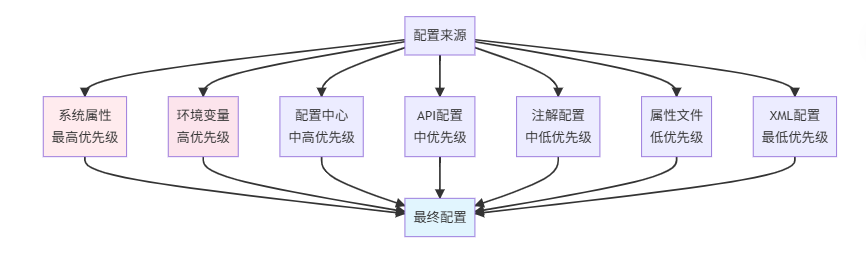
7.3 配置优先级解析
八、配置最佳实践与技巧 🏆
8.1 多环境配置管理
yaml
# config/application.yml - 基础配置
dubbo:
  application:
    name: ${APP_NAME:default-app}
    qos-enable: true
  scan:
    base-packages: com.example.service
  metadata-report:
    address: ${METADATA_ADDRESS:nacos://127.0.0.1:8848}

---
# config/application-dev.yml - 开发环境
spring:
  profiles: dev

dubbo:
  registry:
    address: zookeeper://dev-zookeeper:2181
  protocol:
    port: 20880
  provider:
    timeout: 10000
  consumer:
    check: true

---
# config/application-test.yml - 测试环境
spring:
  profiles: test

dubbo:
  registry:
    address: zookeeper://test-zookeeper:2181
  protocol:
    port: 20880
  provider:
    timeout: 5000
  consumer:
    check: true

---
# config/application-prod.yml - 生产环境
spring:
  profiles: prod

dubbo:
  registry:
    address: zookeeper://prod-zookeeper:2181
    parameters:
      namespace: production
  protocol:
    port: 20880
  provider:
    timeout: 3000
    retries: 1
  consumer:
    check: false
    timeout: 3000
    retries: 1
8.2 配置验证与检查
java
/**
 * 配置验证工具类
 */
@Component
public class DubboConfigValidator {

    private static final Logger logger = LoggerFactory.getLogger(DubboConfigValidator.class);

    /**
     * 验证Dubbo配置完整性
     */
    public void validateConfig(Environment environment) {
        logger.info("开始验证Dubbo配置...");

        // 检查必要配置
        checkRequiredConfig(environment, "dubbo.application.name", "应用名称");
        checkRequiredConfig(environment, "dubbo.registry.address", "注册中心地址");
        checkRequiredConfig(environment, "dubbo.protocol.name", "协议名称");

        // 检查配置合理性
        validateTimeoutConfig(environment);
        validateRetriesConfig(environment);
        validateThreadPoolConfig(environment);

        logger.info("Dubbo配置验证完成");
    }

    private void checkRequiredConfig(Environment environment, String key, String description) {
        String value = environment.getProperty(key);
        if (value == null || value.trim().isEmpty()) {
            throw new IllegalStateException("缺少必要Dubbo配置: " + description + "(" + key + ")");
        }
        logger.info("配置检查通过: {} = {}", description, value);
    }

    private void validateTimeoutConfig(Environment environment) {
        String timeoutStr = environment.getProperty("dubbo.provider.timeout");
        if (timeoutStr != null) {
            int timeout = Integer.parseInt(timeoutStr);
            if (timeout < 100) {
                logger.warn("超时时间设置过小: {}ms", timeout);
            } else if (timeout > 30000) {
                logger.warn("超时时间设置过大: {}ms", timeout);
            }
        }
    }

    private void validateRetriesConfig(Environment environment) {
        String retriesStr = environment.getProperty("dubbo.provider.retries");
        if (retriesStr != null) {
            int retries = Integer.parseInt(retriesStr);
            if (retries > 5) {
                logger.warn("重试次数设置过多: {}次", retries);
            }
        }
    }

    private void validateThreadPoolConfig(Environment environment) {
        String threadsStr = environment.getProperty("dubbo.protocol.threads");
        if (threadsStr != null) {
            int threads = Integer.parseInt(threadsStr);
            if (threads < 10) {
                logger.warn("线程数设置过少: {}", threads);
            } else if (threads > 1000) {
                logger.warn("线程数设置过多: {}", threads);
            }
        }
    }
}
8.3 配置模板与复用
yaml
# 通用配置模板
dubbo:
  application:
    qos-enable: true
    qos-port: 22222
    register-mode: instance
  metadata-report:
    address: nacos://127.0.0.1:8848
  metrics:
    enable: true
    protocol: prometheus

  # 开发环境模板
  dev-template: &dev-template
    registry:
      address: zookeeper://dev-zookeeper:2181
    provider:
      timeout: 10000
    consumer:
      check: true

  # 生产环境模板
  prod-template: &prod-template
    registry:
      address: zookeeper://prod-zookeeper:2181
    provider:
      timeout: 3000
      retries: 1
    consumer:
      check: false
      timeout: 3000
      retries: 1

---
# 具体服务配置
spring:
  profiles: user-service-dev

dubbo:
  application:
    name: user-service
  <<: *dev-template

---
spring:
  profiles: user-service-prod

dubbo:
  application:
    name: user-service
  <<: *prod-template
九、总结 📚
通过本文的全面学习,我们掌握了Dubbo七种配置方式的完整知识体系:
9.1 配置方式对比总结
| 配置方式 | 适用阶段 | 复杂度 | 灵活性 | 维护性 | 推荐场景 |
|---|---|---|---|---|---|
| XML配置 | 所有阶段 | 高 | 中 | 中 | 传统项目、复杂配置 |
| 注解配置 | 开发阶段 | 中 | 中 | 高 | Spring项目、快速开发 |
| 属性配置 | 所有阶段 | 低 | 中 | 高 | Spring Boot项目 |
| API配置 | 运行阶段 | 高 | 高 | 中 | 动态场景、框架集成 |
| 配置中心 | 生产阶段 | 中 | 高 | 高 | 多环境、动态配置 |
| 环境变量 | 部署阶段 | 低 | 低 | 高 | 容器化部署 |
| 系统属性 | 调试阶段 | 低 | 低 | 低 | 临时调整、测试 |
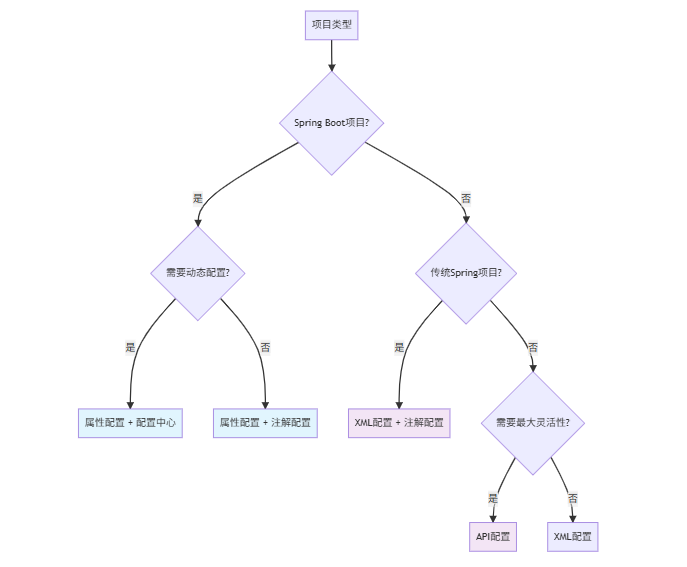
9.2 配置选择指南
根据项目特点选择合适的配置方式:
9.3 最佳实践建议
- 新项目推荐:Spring Boot + 属性配置 + 配置中心
- 老项目迁移:逐步从XML向注解和属性配置迁移
- 生产环境:务必使用配置中心,支持动态调整
- 开发环境:使用属性文件,方便快速调整
- 测试环境:结合系统属性,支持灵活覆盖
🎯 架构启示:配置管理是微服务治理的重要基础。选择合适的配置方式,建立规范的配置管理体系,能够显著提高开发效率和系统稳定性。
参考资料 📖
架构师建议:配置管理要遵循"约定优于配置"的原则,为团队制定统一的配置规范。同时建立配置审查和验证机制,确保配置的正确性和安全性。
标签 : Dubbo 配置管理 微服务 Spring Boot XML配置 `注解配置