一、系统架构设计
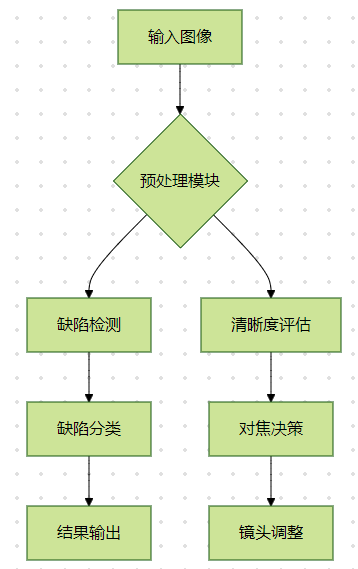
二、核心算法
1. 图像预处理
matlab
function preprocessed = preprocess(img)
    % 灰度化(心理学灰度公式)
    grayImg = rgb2gray(img);

    % 自适应去噪(非局部均值滤波)
    denoised = nlfilter(grayImg, [5 5], @(x) mean(x(:)));

    % 对比度增强(CLAHE算法)
    claheImg = adapthisteq(denoised, 'ClipLimit', 0.02);

    % 边缘增强(Sobel算子)
    edges = edge(claheImg, 'Sobel', 'Threshold', 0.15);

    preprocessed = edges;
end
2. 缺陷检测模块
matlab
function defects = detect_defects(img)
    % 多尺度形态学处理
    se1 = strel('disk',3);
    se2 = strel('disk',5);

    % 开运算去噪
    opened = imopen(img, se1);
    % 闭运算填充孔洞
    closed = imclose(opened, se2);

    % 差分运算提取缺陷
    diff = imabsdiff(closed, img);

    % 区域生长参数
    threshold = graythresh(diff)*255;
    markers = imbinarize(diff, threshold);

    % 连通区域分析
    L = bwlabel(markers);
    stats = regionprops(L, 'Area', 'Centroid', 'BoundingBox');

    % 缺陷过滤(面积阈值)
    defects = [];
    for i = 1:numel(stats)
        if stats(i).Area > 50 && stats(i).Area < 10000
            defects = [defects; stats(i)];
        end
    end
end
3. 清晰度评估模块
matlab
function sharpness = calculate_sharpness(img)
    % Tenengrad梯度法
    [Gx, Gy] = imgradientxy(img, 'sobel');
    tenengrad = sum(Gx(:).^2 + Gy(:).^2);

    % Laplacian梯度法
    laplacian = imlaplacian(img);
    lap_score = var(laplacian(:));

    % 频域分析(FFT)
    fft_img = fft2(img);
    freq_score = sum(abs(fft_img(10:20,10:20)));

    % 综合评分(加权平均)
    sharpness = 0.5*tenengrad + 0.3*lap_score + 0.2*freq_score;
end
4. 自动对焦模块
matlab
classdef AutoFocus
    properties
        step_size = 2;    % 对焦步长
        threshold = 50;   % 清晰度阈值
    end

    methods
        function focus_pos = find_focus(obj, img_seq)
            max_score = -inf;
            focus_pos = 0;

            % 爬山算法搜索最佳对焦点
            for delta = -obj.step_size:obj.step_size:obj.step_size
                shifted = circshift(img_seq, [0 delta]);
                score = calculate_sharpness(shifted);

                if score > max_score
                    max_score = score;
                    focus_pos = delta;
                end
            end

            % 二次精调
            if max_score < obj.threshold
                focus_pos = obj.refine_focus(img_seq);
            end
        end

        function pos = refine_focus(obj, img)
            % 傅里叶变换峰值检测
            F = fft2(img);
            [X,Y] = meshgrid(1:size(F,2),1:size(F,1));
            radius = sqrt((X-size(F,2)/2).^2 + (Y-size(F,1)/2).^2);
            peak_score = sum(F(radius < 10));

            [~, idx] = max(peak_score);
            pos = idx(1);
        end
    end
end
三、完整处理流程
matlab
% 读取图像序列
img_seq = imageDatastore('images/', 'IncludeSubfolders', true);
img_files = img_seq.Files;

% 预处理
preprocessed = cell(size(img_files));
for i = 1:numel(img_files)
    img = imread(img_files{i});
    preprocessed{i} = preprocess(img);
end

% 缺陷检测
all_defects = struct();
for i = 1:numel(img_files)
    defects = detect_defects(preprocessed{i});
    all_defects(i).count = numel(defects);
    all_defects(i).positions = [defects.Centroid];
end

% 清晰度评估
sharpness_scores = zeros(size(img_files));
for i = 1:numel(img_files)
    sharpness_scores(i) = calculate_sharpness(preprocessed{i});
end

% 自动对焦
af = AutoFocus();
[~, best_idx] = max(sharpness_scores);
focus_shift = af.find_focus(im2double(imread(img_files{best_idx})));

% 结果可视化
figure;
subplot(2,2,1); imshow(imread(img_files{best_idx})); title('最佳对焦图像');
subplot(2,2,2); imshow(preprocessed{best_idx}); title('预处理结果');
subplot(2,2,3); imshow(label2rgb(labelmatrix(all_defects))); title('缺陷分布');
subplot(2,2,4); plot(sharpness_scores); title('清晰度曲线');
四、性能优化策略
- 并行计算加速
matlab
parfor i = 1:numel(img_files)
    % 并行处理图像序列
end- GPU加速(需Parallel Computing Toolbox)
matlab
gpuImg = gpuArray(im2double(img));
laplacian = imlaplacian(gpuImg);- 多尺度处理
matlab
pyramid = imagePyramid(img, 'ScaleFactor', 0.5);
for i = 1:numel(pyramid)
    % 多尺度缺陷检测
end
参考代码 进行图像处理,检测图像缺陷,判断图像的清晰度 进行自动对焦 www.youwenfan.com/contentcsm/81560.html
五、扩展功能实现
- 三维缺陷重建
matlab
% 使用Kinect深度相机数据
depthImg = readKinectDepth('depth.png');
pointCloud = reconstruct3D(defects, depthImg);- 实时监控界面
matlab
% 使用App Designer创建GUI
app = uifigure;
videoPlayer = vision.VideoPlayer('Parent', app);
videoPlayer.Source = webcam;- 深度学习缺陷分类
matlab
layers = [
    imageInputLayer([256 256 3])
    convolution2dLayer(3, 16, 'Padding', 'same')
    reluLayer
    maxPooling2dLayer(2)
    classificationLayer];
六、部署方案
matlab
# Docker部署示例
FROM matlab/matlab:R2023a
COPY . /app
RUN matlab -nodisplay -nosplash -r "run('/app/deploy.m')"
CMD ["./app"]