1.Promtail配置文件
bash
vim /data/promtail/promtail-config.yaml

server:
  http_listen_port: 9080
  grpc_listen_port: 0
positions:
  filename: /tmp/positions.yaml
clients:
  - url: http://host.docker.internal:3100/loki/api/v1/push
scrape_configs:
  - job_name: crm-logs
    static_configs:
      - targets:
          - localhost
        labels:
          job: "crm"
          __path__: /logs/*.log
2.启动 Loki
bash
docker run -d --name loki -p 3100:3100 grafana/loki:latest3、启动Grafana
bash
docker run -d --name grafana -p 3000:3000 grafana/grafana:latest
bash
http://localhost:3000
默认账号密码:
admin / admin
4.启动 Promtail
bash
docker run -d --name promtail
 -v /data/promtail/promtail-config.yaml:/etc/promtail/config.yml
 -v /data/xxxxx/logs:/logs
 grafana/promtail:latest --config.file=/etc/promtail/config.yml
重要
验证 Promtail 状态:
bash
docker logs promtail如果看到:
tail routine: started
说明成功采集日志了
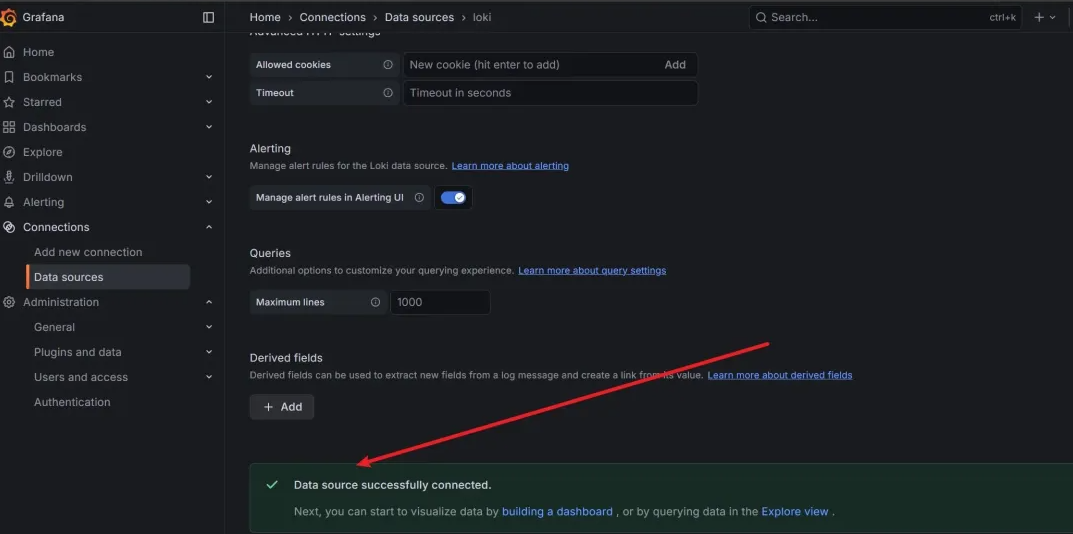
5.在 Grafana 接入 Loki
进入 Grafana:
导航:
Connections → Data sources → Add data source
选择:
Loki
URL 填:
bash
http://host.docker.internal:3100点击:
Save & test
6.日志查询语法(重点)
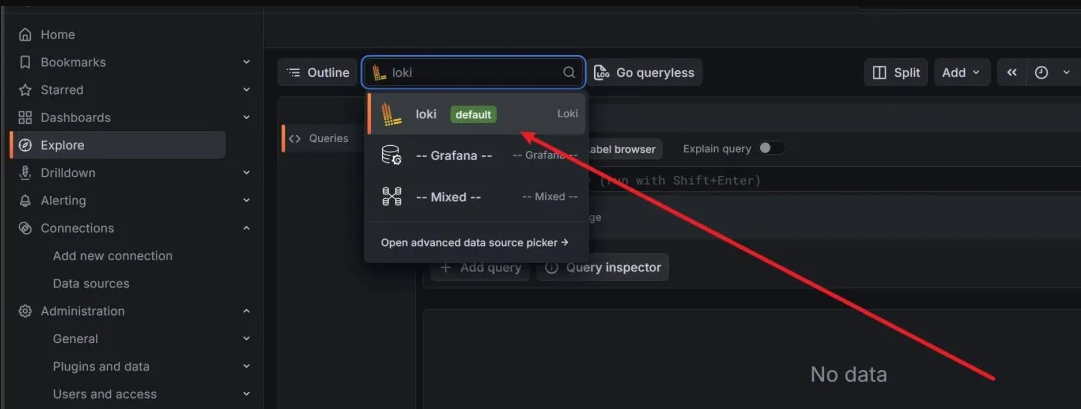
- Explore →Datasource 选择 Loki
2.基础查询:
bash
{job="crm"}
1)筛选错误日志
{job="crm"} |= "ERROR"
2)统计 ERROR 数量(支持图表)
sum(count_over_time({job="crm"} |= "ERROR" [1m]))
3)搜索关键字(如 cus)
{job="crm"} |= "cus"