一、谷歌生成式AI聊天
Google GenAI API 允许开发者通过 Gemini 开发者 API 或 Vertex AI,使用 Google 的 Gemini 模型构建生成式 AI 应用程序。Google GenAI API 支持多模态提示作为输入,并输出文本或代码。多模态模型能够处理来自多种模态的信息,包括图像、视频和文本。例如,您可以向模型发送一盘饼干的照片,并让它给出这些饼干的配方。
Gemini 是由 Google DeepMind 开发的一系列生成式 AI 模型,专为多模态应用场景设计。Gemini API 让您能够访问 Gemini 2.0 Flash、Gemini 2.0 Flash-Lite 以及所有 Gemini Pro 型号,包括最新的 Gemini 3 Pro。
本实现提供两种认证模式:
-
Gemini 开发者 API: 使用 API 密钥进行快速原型设计和开发。
-
Vertex AI: 使用 Google Cloud 凭据进行具有企业功能的生产部署。
二、先决条件
选择以下认证方法之一:
选项 1:Gemini 开发者 API(API 密钥)
-
从 Google AI Studio 获取 API 密钥。
-
将 API 密钥设置为环境变量或在应用程序属性中配置。
选项 2:Vertex AI(Google Cloud)
-
安装适用于您操作系统的 gcloud CLI。
-
运行以下命令进行身份验证。将 PROJECT_ID 替换为您的 Google Cloud 项目 ID,将 ACCOUNT 替换为您的 Google Cloud 用户名。
bash
gcloud config set project <PROJECT_ID> &&
gcloud auth application-default login <ACCOUNT>
三、自动配置
Spring AI 的自动配置和 starter 模块的工件名称发生了重大变化。更多信息请参考 升级说明。
Spring AI 为 Google GenAI 聊天客户端提供了 Spring Boot 自动配置。要启用它,请将以下依赖项添加到项目的 Maven pom.xml 或 Gradle build.gradle 构建文件中:
Maven
xml
<dependency>
    <groupId>org.springframework.ai</groupId>
    <artifactId>spring-ai-starter-model-google-genai</artifactId>
</dependency>
Gradle
groovy
dependencies {
    implementation 'org.springframework.ai:spring-ai-starter-model-google-genai'
}
请参阅 "依赖管理" 部分,将 Spring AI BOM 添加到您的构建文件中。
3.1、聊天属性
聊天自动配置的启用和禁用现在通过前缀为 spring.ai.model.chat 的顶级属性进行配置。
要启用:spring.ai.model.chat=google-genai(默认已启用)。
要禁用:spring.ai.model.chat=none(或任何不匹配 google-genai 的值)。
此项更改是为了支持配置多个模型。
3.1.1 连接属性
前缀 spring.ai.google.genai 用作属性前缀,允许您连接到 Google GenAI。
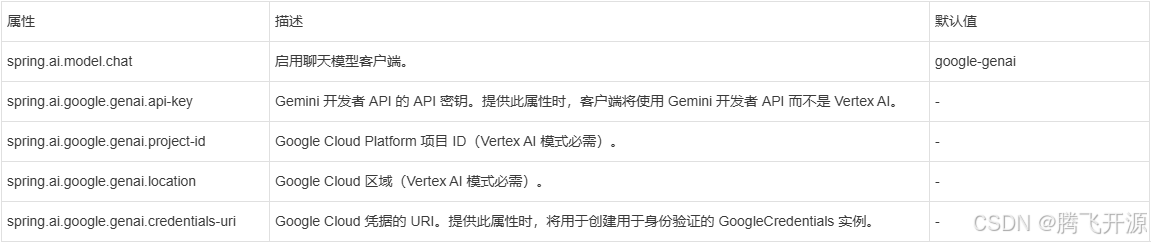
3.1.2 聊天模型属性
前缀 spring.ai.google.genai.chat 是用于配置 Google GenAI 聊天模型实现的属性前缀。
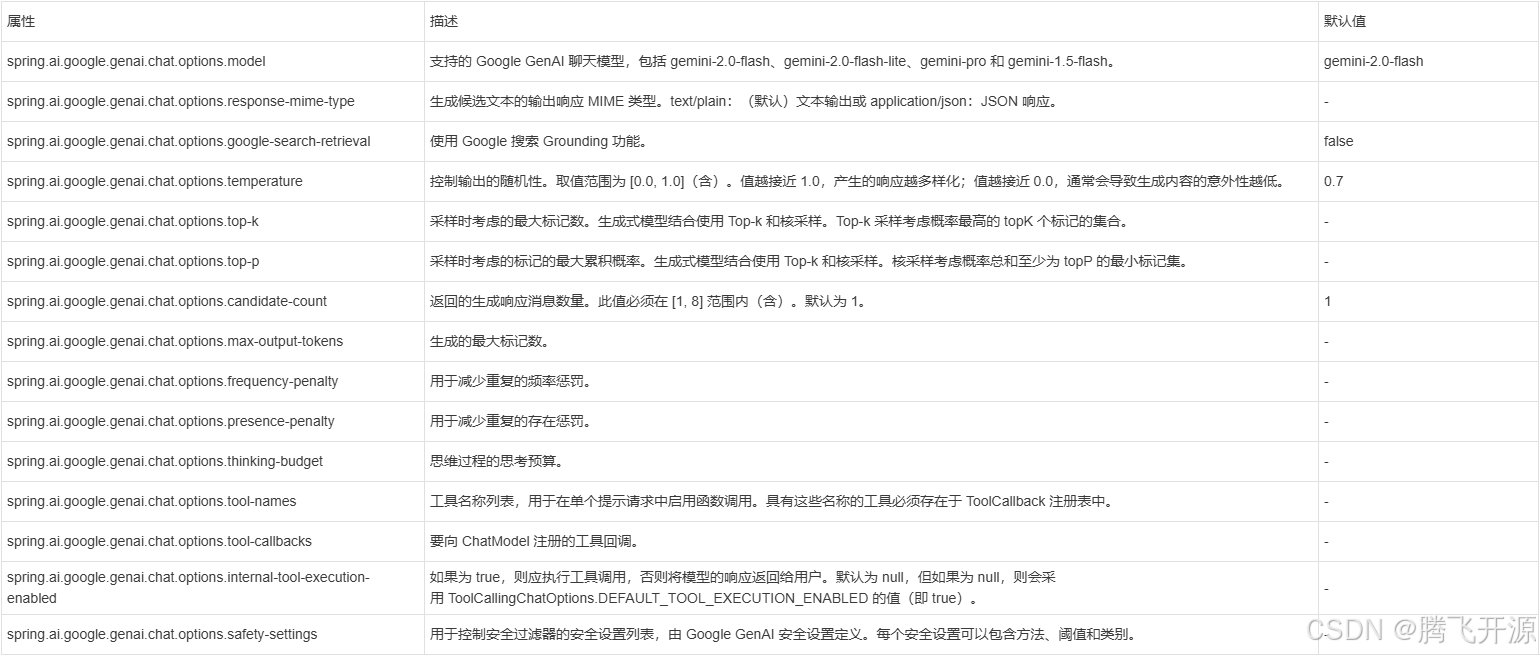
所有以 spring.ai.google.genai.chat.options 为前缀的属性都可以在运行时通过向 Prompt 调用添加请求特定的"运行时选项"来覆盖。
四、运行时选项
GoogleGenAiChatOptions.java 提供了模型配置,例如温度、topK 等。
在启动时,可以通过 GoogleGenAiChatModel(client, options) 构造函数或 spring.ai.google.genai.chat.options.* 属性来配置默认选项。
在运行时,您可以通过向 Prompt 调用添加新的、特定于请求的选项来覆盖默认选项。例如,为特定请求覆盖默认温度:
java
ChatResponse response = chatModel.call(
    new Prompt(
        "生成 5 个著名海盗的名字。",
        GoogleGenAiChatOptions.builder()
            .temperature(0.4)
        .build()
    ));
除了模型特定的 GoogleGenAiChatOptions,您还可以使用可移植的 ChatOptions 实例,该实例通过 ChatOptions#builder() 创建。
五、工具调用
Google GenAI 模型支持工具调用(函数调用)功能,允许模型在对话过程中使用工具。以下是如何定义和使用基于 @Tool 的工具的示例:
java
public class WeatherService {

    @Tool(description = "获取指定地点的天气")
    public String weatherByLocation(@ToolParam(description= "城市或州名") String location) {
        ...
    }
}

String response = ChatClient.create(this.chatModel)
        .prompt("波士顿的天气怎么样?")
        .tools(new WeatherService())
        .call()
        .content();
您也可以使用 java.util.function bean 作为工具:
java
@Bean
@Description("获取指定地点的天气。以 36°F 或 36°C 格式返回温度。")
public Function<Request, Response> weatherFunction() {
    return new MockWeatherService();
}

String response = ChatClient.create(this.chatModel)
        .prompt("波士顿的天气怎么样?")
        .toolNames("weatherFunction")
        .inputType(Request.class)
        .call()
        .content();
更多信息请参阅 工具文档。
六、思维配置
Gemini 模型支持"思考"能力,允许模型在生成响应之前进行更深层次的推理。这通过 ThinkingConfig 进行控制,其中包括三个相关选项:thinkingBudget、thinkingLevel 和 includeThoughts。
6.1 思维级别
thinkingLevel 选项控制模型生成的推理标记的深度。这适用于支持思考的模型(例如 Gemini 3 Pro Preview)。
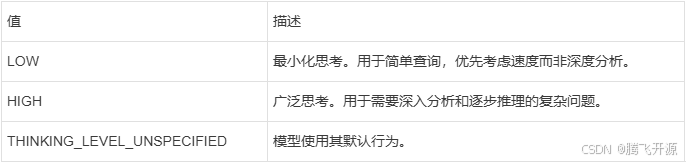
6.1.1 通过属性配置
yaml
spring.ai.google.genai.chat.options.model=gemini-3-pro-preview
spring.ai.google.genai.chat.options.thinking-level=HIGH
6.1.2 编程式配置
java
import org.springframework.ai.google.genai.common.GoogleGenAiThinkingLevel;

ChatResponse response = chatModel.call(
    new Prompt(
        "用简单的术语解释相对论。",
        GoogleGenAiChatOptions.builder()
            .model("gemini-3-pro-preview")
            .thinkingLevel(GoogleGenAiThinkingLevel.HIGH)
            .build()
    ));
6.2 思维预算
thinkingBudget 选项为思考过程设置标记预算:
-
正值: 思考的最大标记数(例如,8192)
-
零 (0): 完全禁用思考
-
未设置: 模型根据查询复杂度自动决定
java
ChatResponse response = chatModel.call(
    new Prompt(
        "逐步解决这个复杂的数学问题。",
        GoogleGenAiChatOptions.builder()
            .model("gemini-2.5-pro")
            .thinkingBudget(8192)
            .build()
    ));
6.3 选项兼容性
thinkingLevel 和 thinkingBudget 是互斥的。您不能在同一个请求中使用两者------这样做将导致 API 错误。
对于 Gemini 3 Pro 模型,使用 thinkingLevel(LOW、HIGH)
对于 Gemini 2.5 系列模型,使用 thinkingBudget(标记计数)
您可以将 includeThoughts 与 thinkingLevel 或 thinkingBudget 结合使用(但不能同时使用两者):
java
// 对于 Gemini 3 Pro:使用 thinkingLevel + includeThoughts
ChatResponse response = chatModel.call(
    new Prompt(
        "分析这个复杂场景。",
        GoogleGenAiChatOptions.builder()
            .model("gemini-3-pro-preview")
            .thinkingLevel(GoogleGenAiThinkingLevel.HIGH)
            .includeThoughts(true)
            .build()
    ));

// 对于 Gemini 2.5:使用 thinkingBudget + includeThoughts
ChatResponse response = chatModel.call(
    new Prompt(
        "分析这个复杂场景。",
        GoogleGenAiChatOptions.builder()
            .model("gemini-2.5-pro")
            .thinkingBudget(8192)
            .includeThoughts(true)
            .build()
    ));
6.4 模型支持
思维配置选项是模型特定的:
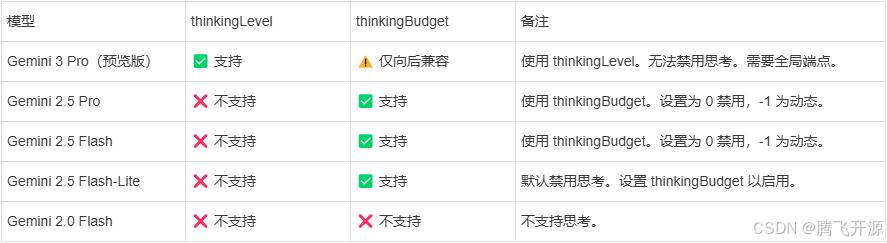
在不支持的模型(例如 Gemini 2.5 或更早版本)上使用 thinkingLevel 将导致 API 错误。
Gemini 3 Pro Preview 仅在全局端点上可用。设置 spring.ai.google.genai.location=global 或 GOOGLE_CLOUD_LOCATION=global。
有关最新的模型功能,请查阅 Google GenAI 思维文档。
启用思维功能会增加标记使用量和 API 成本。请根据查询的复杂性适当使用。
七、思维签名
Gemini 3 Pro 引入了思维签名,这是不透明的字节数组,用于在函数调用期间保留模型的推理上下文。当启用 includeThoughts 时,模型会返回思维签名,这些签名必须在同一轮次内在内部工具执行循环中传递回来。
7.1 思维签名的重要性
重要: 思维签名验证仅适用于 当前轮次------特别是在模型进行函数调用(包括并行和顺序)的内部工具执行循环期间。API 不会验证对话历史中先前轮次的思维签名。
根据 Google 的文档:
-
验证仅在当前轮次的函数调用中强制执行
-
不需要保留先前轮次的签名
-
当前轮次函数调用中缺少签名会导致 Gemini 3 Pro 出现 HTTP 400 错误
-
对于并行函数调用,只有第一个 functionCall 部分携带签名
对于 Gemini 2.5 Pro 及更早的模型,思维签名是可选的,API 较为宽松。
7.2 配置
使用配置属性启用思维签名:
yaml
spring.ai.google.genai.chat.options.model=gemini-3-pro-preview
spring.ai.google.genai.chat.options.include-thoughts=true
或者在运行时以编程方式启用:
java
ChatResponse response = chatModel.call(
    new Prompt(
        "您的问题在这里",
        GoogleGenAiChatOptions.builder()
            .model("gemini-3-pro-preview")
            .includeThoughts(true)
            .toolCallbacks(callbacks)
            .build()
    ));
7.3 自动处理
Spring AI 在内部工具执行循环期间自动处理思维签名。当 internalToolExecutionEnabled 为 true(默认)时,Spring AI 会:
-
从模型响应中提取思维签名
-
在发送回函数响应时将其附加到正确的 functionCall 部分
-
在单个轮次内的函数调用期间(包括并行和顺序)正确传播它们
您不需要手动管理思维签名------Spring AI 确保它们按照 API 规范的要求正确附加到 functionCall 部分。
7.4 函数调用示例
java
@Bean
@Description("获取指定地点的天气")
public Function<WeatherRequest, WeatherResponse> weatherFunction() {
    return new WeatherService();
}

// 为 Gemini 3 Pro 启用 includeThoughts 以进行函数调用
String response = ChatClient.create(this.chatModel)
        .prompt("波士顿的天气怎么样?")
        .options(GoogleGenAiChatOptions.builder()
            .model("gemini-3-pro-preview")
            .includeThoughts(true)
            .build())
        .toolNames("weatherFunction")
        .call()
        .content();
7.5 手动工具执行模式
如果您设置 internalToolExecutionEnabled=false 以手动控制工具执行循环,则在使用 Gemini 3 Pro 且 includeThoughts=true 时必须自行处理思维签名。
手动工具执行与思维签名的要求:
-
从响应元数据中提取思维签名:
javaAssistantMessage assistantMessage = response.getResult().getOutput(); Map<String, Object> metadata = assistantMessage.getMetadata(); List<byte[]> thoughtSignatures = (List<byte[]>) metadata.get("thoughtSignatures"); -
发送回函数响应时,在您的消息历史中包含原始的 AssistantMessage 及其完整的元数据。Spring AI 会自动将思维签名附加到正确的 functionCall 部分。
-
对于 Gemini 3 Pro,在当前轮次中未能保留思维签名将导致 API 返回 HTTP 400 错误。
只有当前轮次的函数调用需要思维签名。当开始新的对话轮次(完成函数调用轮次后),您不需要保留先前轮次的签名。
启用 includeThoughts 会增加标记使用量,因为响应中包含思考过程。这会影响 API 成本,但提供了更好的推理透明度。
八、多模态
多模态性是指模型能够同时理解和处理来自各种(输入)源的信息,包括文本、PDF、图像、音频和其他数据格式。
8.1 图像、音频、视频
Google 的 Gemini AI 模型通过理解和集成文本、代码、音频、图像和视频来支持此功能。更多详情,请参阅博客文章《Introducing Gemini》。
Spring AI 的 Message 接口通过引入 Media 类型来支持多模态 AI 模型。此类型包含消息中媒体附件的数据和信息,使用 Spring 的 org.springframework.util.MimeType 和用于原始媒体数据的 java.lang.Object。
以下是从 GoogleGenAiChatModelIT.java 中提取的简单代码示例,演示了用户文本与图像的结合。
java
byte[] data = new ClassPathResource("/vertex-test.png").getContentAsByteArray();

var userMessage = UserMessage.builder()
            .text("解释一下你在这张图片中看到了什么?")
            .media(List.of(new Media(MimeTypeUtils.IMAGE_PNG, data)))
            .build();

ChatResponse response = chatModel.call(new Prompt(List.of(this.userMessage)));
8.2 PDF格式
Google GenAI 支持 PDF 输入类型。使用 application/pdf 媒体类型将 PDF 文件附加到消息:
java
var pdfData = new ClassPathResource("/spring-ai-reference-overview.pdf");

var userMessage = UserMessage.builder()
            .text("你是一位非常专业的文档摘要专家。请总结给定的文档。")
            .media(List.of(new Media(new MimeType("application", "pdf"), pdfData)))
            .build();

var response = this.chatModel.call(new Prompt(List.of(userMessage)));
九、缓存内容
Google GenAI 的上下文缓存允许您缓存大量内容(例如长文档、代码仓库或媒体)并在多个请求中重复使用。这可以显著降低 API 成本,并提高对相同内容的重复查询的响应速度。
9.1 优势
-
降低成本:缓存标记的计费比常规输入标记低得多(通常便宜 75-90%)
-
提高性能:重用缓存内容减少了大型上下文的处理时间
-
一致性:相同的缓存上下文确保跨多个请求的响应一致性
9.2 缓存要求
-
最小缓存大小:32,768 个标记(约 25,000 词)
-
最大缓存持续时间:默认 1 小时(可通过 TTL 配置)
-
缓存内容必须包含系统指令或对话历史
9.3 使用缓存内容服务
Spring AI 提供了 GoogleGenAiCachedContentService 用于编程式缓存管理。使用 Spring Boot 自动配置时,该服务会自动配置。
9.3.1 创建缓存内容
java
@Autowired
private GoogleGenAiCachedContentService cachedContentService;

// 使用大型文档创建缓存内容
String largeDocument = "... 您的大型上下文(>32k 标记) ...";

CachedContentRequest request = CachedContentRequest.builder()
    .model("gemini-2.0-flash")
    .contents(List.of(
        Content.builder()
            .role("user")
            .parts(List.of(Part.fromText(largeDocument)))
            .build()
    ))
    .displayName("我的大型文档缓存")
    .ttl(Duration.ofHours(1))
    .build();

GoogleGenAiCachedContent cachedContent = cachedContentService.create(request);
String cacheName = cachedContent.getName(); // 保存此名称以供重用
9.3.2 在聊天请求中使用缓存内容
创建缓存内容后,在聊天请求中引用它:
java
ChatResponse response = chatModel.call(
    new Prompt(
        "总结文档的要点",
        GoogleGenAiChatOptions.builder()
            .useCachedContent(true)
            .cachedContentName(cacheName) // 使用缓存内容名称
            .build()
    ));
或通过配置属性:
yaml
spring.ai.google.genai.chat.options.use-cached-content=true
spring.ai.google.genai.chat.options.cached-content-name=cachedContent/your-cache-name
9.3.3 管理缓存内容
GoogleGenAiCachedContentService 提供全面的缓存管理:
java
// 检索缓存内容
GoogleGenAiCachedContent content = cachedContentService.get(cacheName);

// 更新缓存 TTL
CachedContentUpdateRequest updateRequest = CachedContentUpdateRequest.builder()
    .ttl(Duration.ofHours(2))
    .build();
GoogleGenAiCachedContent updated = cachedContentService.update(cacheName, updateRequest);

// 列出所有缓存内容
List<GoogleGenAiCachedContent> allCaches = cachedContentService.listAll();

// 删除缓存内容
boolean deleted = cachedContentService.delete(cacheName);

// 延长缓存 TTL
GoogleGenAiCachedContent extended = cachedContentService.extendTtl(cacheName, Duration.ofMinutes(30));

// 清理过期的缓存
int removedCount = cachedContentService.cleanupExpired();
9.3.4 异步操作
所有操作都有异步版本:
java
CompletableFuture<GoogleGenAiCachedContent> futureCache =
    cachedContentService.createAsync(request);

CompletableFuture<GoogleGenAiCachedContent> futureGet =
    cachedContentService.getAsync(cacheName);

CompletableFuture<Boolean> futureDelete =
    cachedContentService.deleteAsync(cacheName);
9.4 自动缓存
当提示超过指定的标记阈值时,Spring AI 可以自动缓存它们:
yaml
# 自动缓存超过 100,000 个标记的提示
spring.ai.google.genai.chat.options.auto-cache-threshold=100000
# 设置自动缓存 TTL 为 1 小时
spring.ai.google.genai.chat.options.auto-cache-ttl=PT1H
或以编程方式:
java
ChatResponse response = chatModel.call(
    new Prompt(
        largePrompt,
        GoogleGenAiChatOptions.builder()
            .autoCacheThreshold(100000)
            .autoCacheTtl(Duration.ofHours(1))
            .build()
    ));
自动缓存适用于一次性大型上下文。对于重复使用相同上下文的情况,手动创建和引用缓存内容更有效。
9.5 监控缓存使用情况
缓存内容包括可通过服务访问的使用情况元数据:
java
GoogleGenAiCachedContent content = cachedContentService.get(cacheName);

// 检查缓存是否过期
boolean expired = content.isExpired();

// 获取剩余 TTL
Duration remaining = content.getRemainingTtl();

// 获取使用情况元数据
CachedContentUsageMetadata metadata = content.getUsageMetadata();
if (metadata != null) {
    System.out.println("总标记数:" + metadata.totalTokenCount().orElse(0));
}
9.6 最佳实践
-
缓存生存期: 根据您的用例设置适当的 TTL。对于频繁更改的内容设置较短的 TTL,对于静态内容设置较长的 TTL。
-
缓存命名: 使用描述性的显示名称以便轻松识别缓存内容。
-
清理: 定期清理过期的缓存以保持组织性。
-
标记阈值: 仅缓存超过最小阈值(32,768 个标记)的内容。
-
**成本优化:**在多个请求中重用缓存内容以最大化成本节省。
9.7 配置示例
完整配置示例:
yaml
# 启用缓存内容服务(默认启用)
spring.ai.google.genai.chat.enable-cached-content=true

# 使用特定的缓存内容
spring.ai.google.genai.chat.options.use-cached-content=true
spring.ai.google.ai.chat.options.cached-content-name=cachedContent/my-cache-123

# 自动缓存配置
spring.ai.google.genai.chat.options.auto-cache-threshold=50000
spring.ai.google.genai.chat.options.auto-cache-ttl=PT30M
十、示例控制器
创建一个新的 Spring Boot 项目,并将 spring-ai-starter-model-google-genai 添加到您的 pom(或 gradle)依赖项中。
在 src/main/resources 目录下添加一个 application.properties 文件,以启用和配置 Google GenAI 聊天模型:
10.1 使用 Gemini 开发者 API(API 密钥)
yaml
spring.ai.google.genai.api-key=您的_API_密钥
spring.ai.google.genai.chat.options.model=gemini-2.0-flash
spring.ai.google.genai.chat.options.temperature=0.5
10.2 使用 Vertex AI**
yaml
spring.ai.google.genai.project-id=项目_ID
spring.ai.google.genai.location=区域
spring.ai.google.genai.chat.options.model=gemini-2.0-flash
spring.ai.google.genai.chat.options.temperature=0.5
请将 project-id 替换为您的 Google Cloud 项目 ID,location 是 Google Cloud 区域,例如 us-central1、europe-west1 等。
每个模型都有自己支持的区域列表,您可以在模型页面上找到支持的区域列表。
这将创建一个 GoogleGenAiChatModel 实现,您可以将其注入到您的类中。以下是一个简单的 @Controller 类示例,该类使用聊天模型进行文本生成。
java
@RestController
public class ChatController {

    private final GoogleGenAiChatModel chatModel;

    @Autowired
    public ChatController(GoogleGenAiChatModel chatModel) {
        this.chatModel = chatModel;
    }

    @GetMapping("/ai/generate")
    public Map generate(@RequestParam(value = "message", defaultValue = "给我讲个笑话") String message) {
        return Map.of("generation", this.chatModel.call(message));
    }

    @GetMapping("/ai/generateStream")
    public Flux<ChatResponse> generateStream(@RequestParam(value = "message", defaultValue = "给我讲个笑话") String message) {
        Prompt prompt = new Prompt(new UserMessage(message));
        return this.chatModel.stream(prompt);
    }
}
十一、手动配置
GoogleGenAiChatModel 实现了 ChatModel,并使用 com.google.genai.Client 连接到 Google GenAI 服务。
将 spring-ai-google-genai 依赖项添加到项目的 Maven pom.xml 文件中:
xml
<dependency>
    <groupId>org.springframework.ai</groupId>
    <artifactId>spring-ai-google-genai</artifactId>
</dependency>
或者添加到您的 Gradle build.gradle 构建文件中。
groovy
dependencies {
    implementation 'org.springframework.ai:spring-ai-google-genai'
}
请参阅 "依赖管理" 部分,将 Spring AI BOM 添加到您的构建文件中。
接下来,创建一个 GoogleGenAiChatModel 并将其用于文本生成:
11.1 使用 API 密钥
java
Client genAiClient = Client.builder()
    .apiKey(System.getenv("GOOGLE_API_KEY"))
    .build();

var chatModel = new GoogleGenAiChatModel(genAiClient,
    GoogleGenAiChatOptions.builder()
        .model(ChatModel.GEMINI_2_0_FLASH)
        .temperature(0.4)
    .build());

ChatResponse response = this.chatModel.call(
    new Prompt("生成 5 个著名海盗的名字。"));
11.2 使用 Vertex AI
java
Client genAiClient = Client.builder()
    .project(System.getenv("GOOGLE_CLOUD_PROJECT"))
    .location(System.getenv("GOOGLE_CLOUD_LOCATION"))
    .vertexAI(true)
    .build();

var chatModel = new GoogleGenAiChatModel(genAiClient,
    GoogleGenAiChatOptions.builder()
        .model(ChatModel.GEMINI_2_0_FLASH)
        .temperature(0.4)
    .build());

ChatResponse response = this.chatModel.call(
    new Prompt("生成 5 个著名海盗的名字。"));
GoogleGenAiChatOptions 为聊天请求提供配置信息。GoogleGenAiChatOptions.Builder 是一个流畅的选项构建器。
十二、从 Vertex AI Gemini 迁移
如果您当前正在使用 Vertex AI Gemini 实现 (spring-ai-vertex-ai-gemini),您可以以最小的更改迁移到 Google GenAI:
12.1 主要区别
-
SDK: Google GenAI 使用新的 com.google.genai.Client 而不是 com.google.cloud.vertexai.VertexAI。
-
身份验证: 支持 API 密钥和 Google Cloud 凭据。
-
包名: 类位于 org.springframework.ai.google.genai 而不是 org.springframework.ai.vertexai.gemini。
-
属性前缀: 使用 spring.ai.google.genai 而不是 spring.ai.vertex.ai.gemini。
12.2 何时使用 Google GenAI 与 Vertex AI Gemini
使用 Google GenAI 的情况:
-
您希望使用 API 密钥进行快速原型设计。
-
您需要来自开发者 API 的最新 Gemini 功能。
-
您希望在 API 密钥和 Vertex AI 模式之间灵活切换。
使用 Vertex AI Gemini 的情况:
-
您拥有现有的 Vertex AI 基础设施。
-
您需要特定的 Vertex AI 企业功能。
-
您的组织要求仅使用 Google Cloud 部署。
十三、低级 Java 客户端
Google GenAI 实现建立在新的 Google GenAI Java SDK 之上,该 SDK 提供了一个现代化、简化的 API 来访问 Gemini 模型。