一、核心概念解析
1、Active Directory(AD):微软推出的目录服务,用于集中管理企业网络中的用户账户、计算机、组、共享资源等对象,实现统一身份认证与权限控制。
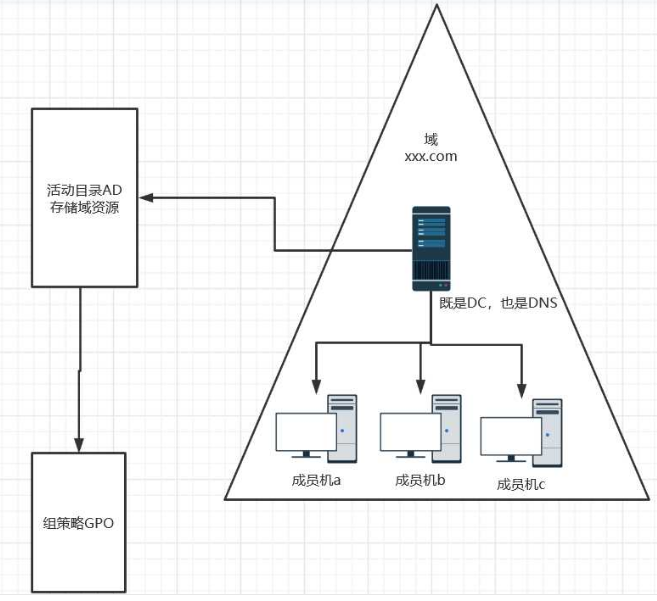
2、域(Domain):AD 的核心逻辑单元,是网络对象的集合(如用户、计算机),由一个或多个域控制器(Domain Controller,DC) 管理,域内对象遵循统一的策略与规则。
3、域控制器(DC):运行 AD 域服务的服务器,存储域的完整数据(用户信息、权限配置等),负责身份验证、策略下发等核心功能,支持多节点部署实现高可用。
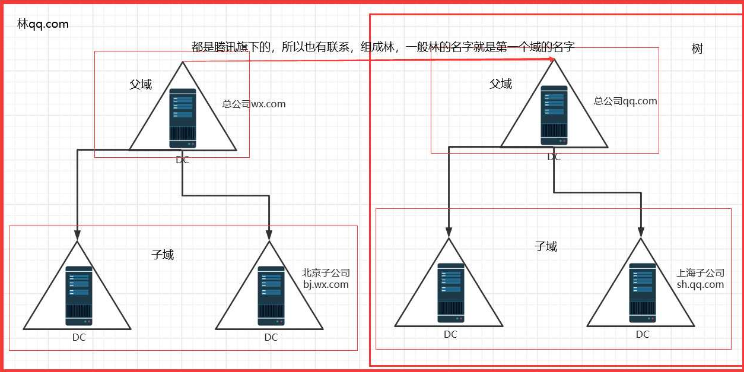
4、森林(Forest):由一个或多个信任关系的域组成,共享统一的全局目录(Global Catalog)和架构(Schema),是 AD 的最高逻辑结构。
5、组织单位(OU):域内的容器对象,用于按部门、功能或地理位置分类管理域对象(如 "IT 部门 OU""销售部门 OU"),可嵌套且支持单独应用组策略。
6、组策略(GPO):用于集中配置域内计算机和用户的设置(如软件部署、密码策略、桌面权限),通过链接到域、OU 或站点生效
二、相关使用命令
1 AD用户信息及状态报表
1.1 所有用户,包括根据用户所属单位的信息导出
1.查询域内所有用户信息
Get-ADUser -Filter *
默认包含如下属性
2.导出某部门公司OU下用户信息,包含如下属性
(姓名、显示名、部门、公司、UPN、职位、或者别属性)
(OU的表达式为DistinguishedName)
get-aduser -Filter {name -like "*"} -Properties * -SearchBase "OU=user, DC=domain,DC=com" |ft name, displayname,company,department, userprincipalname, Title
1.2 具有特定属性的用户
(特定属性包括部门、公司、职务、显示名、或者其他属性)
若要获取具有姓名属性的所有用户对象,请使用下列命令
Get-aduser -filter {name --like"*"}
若要获取具有电子邮件属性的所有用户对象,请使用下列命令:
Get-ADUser -Filter {EmailAddress -like "*"}
1.3 查询最近一段时间内(4为4周)非活动的用户
Dsquery user --inactive 4 | dsget user -- -desc
1.4 最近删除的用户
Get-ADObject -Filter {(ObjectClass -eq "user") -and (
isdeleted -eq $true) -and (objectclass -ne "computer") -and (lastknownparent -eq
"cn=users,dc=test,dc=com") -and (modified -gt "2015/1/25")} -properties * -incl
Udedeletedobjects |fl
查找2015.1.25之后删除的位于cn=users,dc=test,dc=com的用户
1.5 最近修改的用户
Get-ADObject -filter {(modified -gt "2015/1/25") -and
(objectclass -eq "user") -and (objectclass -ne "computer")} -Properties *
查找2015.1.25之后修改的用户
1.6 查看用户创建时间,SID,最后一次登录及最后一次密码设置时间(指定OU)
Get-ADuser -searchbase ' cn=User,DC=Domain,DC=COM ' -filter * -Properties * | Select-Object Name,SID, Created,PasswordLastSet,lastlogondate
1.7 最近一段时间没有登陆过的用户
get-aduser -SearchBase "cn=users,dc=test,dc=com" -fil
ter {lastlogondate -lt "2015/1/25"} -Properties *
查询2015.1.25之后没登录过的用户
1.8 禁用的用户
Get-ADUser -Filter {enabled -eq"false"} -Properties * -searchbase "ou=test,dc=test,dc=com"
|Select-Object name,enabled,userprincipalname,whenchanged
1.9 锁定的用户
Search-ADAccount -LockedOut | FT Name,ObjectClass -A
1.10密码过期及将要过期的用户
密码过期用户查询:
get-aduser -Filter {enabled -eq $true} -Properties *
| where-object{$_.passwordexpired}
密码将要过期的用户:
get-aduser -Filter {(enabled -eq $true) -and (passwor
dlastset -gt "2014/11/25")} -Properties *
1.11最后一次登陆时间统计
Get-ADuser -searchbase ' OU=IT服务部,OU=人力资源与行政部,OU=Js,OU=JinYu,DC=jres,DC=com ' -filter * -Properties * | Select-Object cws, @{n="lastLogonDate";e={datetime::FromFileTime($_.lastLogonTimestamp)}}
OU=生产部,OU=大工厂,OU=Jiers,OU=Ju,DC=jines,DC=com
2 AD组信息及状态报表
2.1 某个组的成员统计
Get-ADGroupMember --Identify "administrators"
2.2 组成员详细信息统计
Get-ADGroupmember -Identity "domain admins" |ft *
2.4 所有的组(以组织单位为过滤)
Get-adgroup --filter{name --like"*"} --searchbase "ou=users,dc=domain,dc=com"
2.5 最大的10个组
2.6 命名不规范的组统计
3 分发组报表
3.1 分发组成员信息统计
4 AD密码状态报表
4.1 最近一次登陆失败统计
Get-ADUser -Filter {(enabled -eq $true) -and (lastbad
passwordattempt -gt "2015/1/26")} -Properties *
4.2 不能修改密码的用户统计
Get-ADUser -Filter * -Properties * | where{$_.cannotchangepassword}
4.3 密码永不过期的用户统计
Get-ADUser -Filter {passwordneverexpires -eq"true"}
通过|select-object 可选属性
4.4 下次登陆修改密码的用户统计
Get-ADUser -Filter {passwordneverexpires -eq"false"}
4.5 密码已经过期的用户统计
将1.10
4.6 密码快过期的用户统计
密码快过期的用户统计需要知道的参数:
-
密码上次修改时间
-
组策略中的密码策略里定义的用户密码过期周期
-
密码快过期的"快"的时间周期
-
当前时间
计算方式:
密码上次修改时间+密码过期周期+自定义"快"的时间周期=当前时间
相应参数获得:
-
见4.7
-
密码过期周期在一个企业中一般固定不变,建议管理员手动输入
-
自定义定义
-
Get-date
4.7 密码上次修改时间统计
Get-aduser --searchbase "ou=users,dc=domain,dc=com" --filter * -properties * |select-objict name,passwordlastset
5 客户端信息及状态报表
5.1 所有客户端信息统计
get-adcomputer -Filter * -Properties *
如果查询某个OU内的所有客户端统计信息:
Get-adcomputer --fileter * -searchbase "ou=users,dc=domain,dc=com'
5.2 查询某个OU内客户端信息
Get-adcomputer --filter * -properties * -searchbase "ou=users,dc=domain,dc=com" |sesect-object name,operating,operatingsystem,systemservicespack,operatingsystemversion,lastlogondate Export-CSV-NoTypeInformation-EncodingUTF8--Path"d:\cmpinfo.csv"
5.3 不活动的客户端统计
Get-ADcomputer -Filter {(enabled -eq $true) -and (las
tlogondate -lt "2014/11/26")} -Properties * -SearchBase "cn=computers,dc=test,dc
=com"
2014.11.26之后没登录过的客户端统计
5.4 活动的客户端统计
Get-ADcomputer -Filter {(enabled -eq $true) -and (las
tlogondate -gt "2014/11/26")} -Properties * -SearchBase "cn=computers,dc=test,dc
=com"
2014.11.26之后登录过的客户端统计
5.5 禁用的客户端统计
get-adcomputer -filter {enabled -eq "false"}
5.6 域控制器信息统计
Get-addomaincontroller
6 文件共享平台权限状态及审计报表
6.1 文件共享平台某个文件夹的权限统计
Get-acl -Path \\10.0.6.137\公司 |fl
6.2 文件共享平台用户文档信息统计
- 查看某一OU下启用邮箱的用户:
Get-mailbox -ResultSize Unlimited --OrganizationalUnit "OU=temp,OU=temp,DC=weichai,DC=com"
- 查看某一组内启用邮箱的用户:
get-mailbox -filter {memberofgroup -eq 'cn=testgroup,ou=temp,dc=weichai,dc=com'}
备注:filter的功能十分强大,几乎可以根据用户的所有属性(例如城市、公司、传真等)进行筛选,因为大部分公司包括潍柴用户的属性信息都是不全的,筛选也会造成遗漏,所以不一一列举,详情请参见:http://msdn.microsoft.com/zh-cn/library/bb738155(v=exchg.150).aspx
7.2 未启用邮箱的用户统计
get-user -RecipientTypeDetails user
备注:
-
默认情况下禁用的用户不显示在结果中;
-
可以根据2.1的内容,通过filter参数进行筛选
7.3 不活动的邮箱统计
get-mailbox --OrganizationalUnit "ou=temp,ou=temp,dc=weichai,dc=com"|Get-MailboxStatistics |where{$_.lastlogontime -gt "2015/1/27"}
7.4 邮箱容量配置及容量占用统计
7.4.1邮箱容量配置统计
用户邮箱容量的大小主要取决于2个因素:用户邮箱所属的邮箱数据库上设置的邮箱配额和用户个人邮箱属性中设置的邮箱配额;
默认情况下,用户的邮箱大小取决于其邮箱所属的邮箱数据库上设置的邮箱配额(此时用户个人邮箱属性中邮箱配额是未配置的);
但是,如果用户个人邮箱属性中邮箱配额已设置,则用户邮箱大小取决于该配额的大小。
- 查看邮箱数据库的邮箱告警容量、禁止发送容量、禁止发送和接收容量,命令如下:
Get-MailboxDatabase |ft name,IssueWarningQuota,ProhibitSendQuota,ProhibitSendReceiveQuota
- 查看用户的邮箱的邮箱告警容量、禁止发送容量、禁止发送和接收容量,命令如下:
get-mailbox |ft name,IssueWarningQuota,ProhibitSendQuota,ProhibitSendReceiveQuota
- 查看用户是否配置了个人邮箱属性中邮箱配额的命令:
get-mailbox |ft name,UseDatabaseQuotaDefaults
- 查看用户邮箱所在的邮箱数据库:
get-mailbox test003 |ft name,database
所以,查看用户的邮箱容量正常的逻辑应该是:
查看用户是否配置了个人邮箱属性中邮箱配额:如果结果为真,则查看用户的邮箱的邮箱告警容量、禁止发送容量、禁止发送和接收容量。如果结果为假,首先判断用户邮箱所在的邮箱数据库是哪个,然后查看该邮箱数据库的邮箱告警容量、禁止发送容量、禁止发送和接收容量。
7.4.2邮箱容量占用统计
Get-MailboxStatistics -Identity test003 |ft displayname,TotalItemSize
备注:默认情况下输出的结果为KB,可以通过可以通过Add-Member命令来增加一些参数以优化输出结果,比如显示为MB,命令如下:
Get-Mailbox | Get-MailboxStatistics | Add-Member -MemberType ScriptProperty -Name TotalItemSizeinMB -Value {$this.totalitemsize.value.ToMB()} -PassThru | Format-Table DisplayName,TotalItem*
7.5 数据库实时状态统计
Get-mailboxdatabase |fl
8 邮箱违规使用审计报表
8.1 非本人登陆邮箱情况统计
邮箱审核日志记录可以记录邮箱所有者(owner)、管理员(admin)和委派用户(delegate)(包含具有完全邮箱访问权限的管理员)对邮箱的访问。
这里只针对delegate即委派的非邮箱所有者登录邮箱的统计。
8.1.1审计前提
默认情况下审计日志记录是禁用的,要对非本人登录邮箱情况进行统计,首先应针对该用户启用审计。
对用户启用日志记录审计:
Set-Mailbox -Identity test003 -AuditDelegate Update, SoftDelete, HardDelete, SendAs,FolderBind -AuditEnabled $true -AuditLogAgeLimit 10.00:00:00
其中:
Identity:用户账户
Auditdelegate: AuditDelegate 参数指定要记录的委派用户操作。有效值包括:
- None
- Update (对邮箱的更新)
- Move
- MoveToDeletedItems
- SoftDelete
- HardDelete
- FolderBind (访问文件夹)
- SendAs
- SendOnBehalf
默认情况下,会记录委派用户执行的 Update、SoftDelete、HardDelete 和 SendAs 操作。
AuditEnabled:启用审计日志记录
AuditLogAgeLimit:审计日志记录的保存天数,默认为90天
8.1.2审计内容
可以审计的内容取决于上面定义的auditdelegate的参数,如果只审计非本人登陆邮箱情况统计:
Search-MailboxAuditLog --identity test003 -LogonTypes delegate -showdetails -StartDate 12/16/2014 -EndDate 12/18/2014
其中:
Identity:用户账户
Logontype:用户登录类型(暂定只审计delegate)
8.1.3审计的目标用户统计
以上只是针对一个人或几个人的邮箱审计,如果是对一个组织单位内用户的审计:
- 启用该部门用户
get-user -OrganizationalUnit "ou=temp,ou=temp,dc=weichai,dc=com" |Set-Mailbox -AuditDelegate Update, SoftDelete, HardDelete, SendAs,FolderBind -AuditEnabled $true -AuditLogAgeLimit 10.00:00:00
- 审计该部门用户非本人登陆邮箱情况
get-user -OrganizationalUnit "ou=temp,ou=temp,dc=weichai,dc=com" |Search-MailboxAuditLog -LogonTypes delegate --showdetails -StartDate 12/16/2014 -EndDate 12/18/2014
8.2 邮箱超容量使用统计
结合7.4中的结果进行比对统计
8.3 邮件外发权限违规使用统计
get-aduser -Filter {name -like "*"} -Properties * -SearchBase "OU=山东院,DC=sdepci.com,DC=com" |ft name,distinguishedname,memberof