20251205给荣品RD-RK3588-MID开发板适配Rockchip原厂的Android13时让触摸屏FT8206的竖屏左转90度为横屏
2025/12/5 21:27
缘起:给荣品RD-RK3588-MID开发板跑Rockchip的原厂Android13!
在uboot的时候屏幕有显示,但是在kernel阶段就没有显示了!
通过HDMI接口输出可以看到 荣品RD-RK3588-MID开发板已经进Android系统了!
结论:在uboot下,GPIO口一般都没有配置。【也就是默认拉高,各路电路都为高!】
在在kernel/driver阶段,GPIO口开始被初始化为各种功能!也就是LCD屏的各路电源高高低低,那屏肯定就不亮了!【黑屏】
Rockchip的原厂Buildroot【linux-6.1】系统默认只有iperf2,还是比较喜欢iperf3。
iperf2的服务器端不会显示实时网速!^_
经过反复测试,终于把 荣品RD-RK3588开发板 自带的8寸屏的CTP触摸屏调试通了。
Android13的内核linux-5.10
Android13的内核linux-6.1。版本升级之后,
终于把全部的USB接口都点亮USB接口的鼠标了!
当你把荣品RD-RK3588开发板重新适配一把,就相当于从头做了一个项目:【荣品RD-RK3588开发板】。
当然,开发板的功能都是好的,你免除了调试的过程,也就没有解决相关硬件出错的经验/机会了!
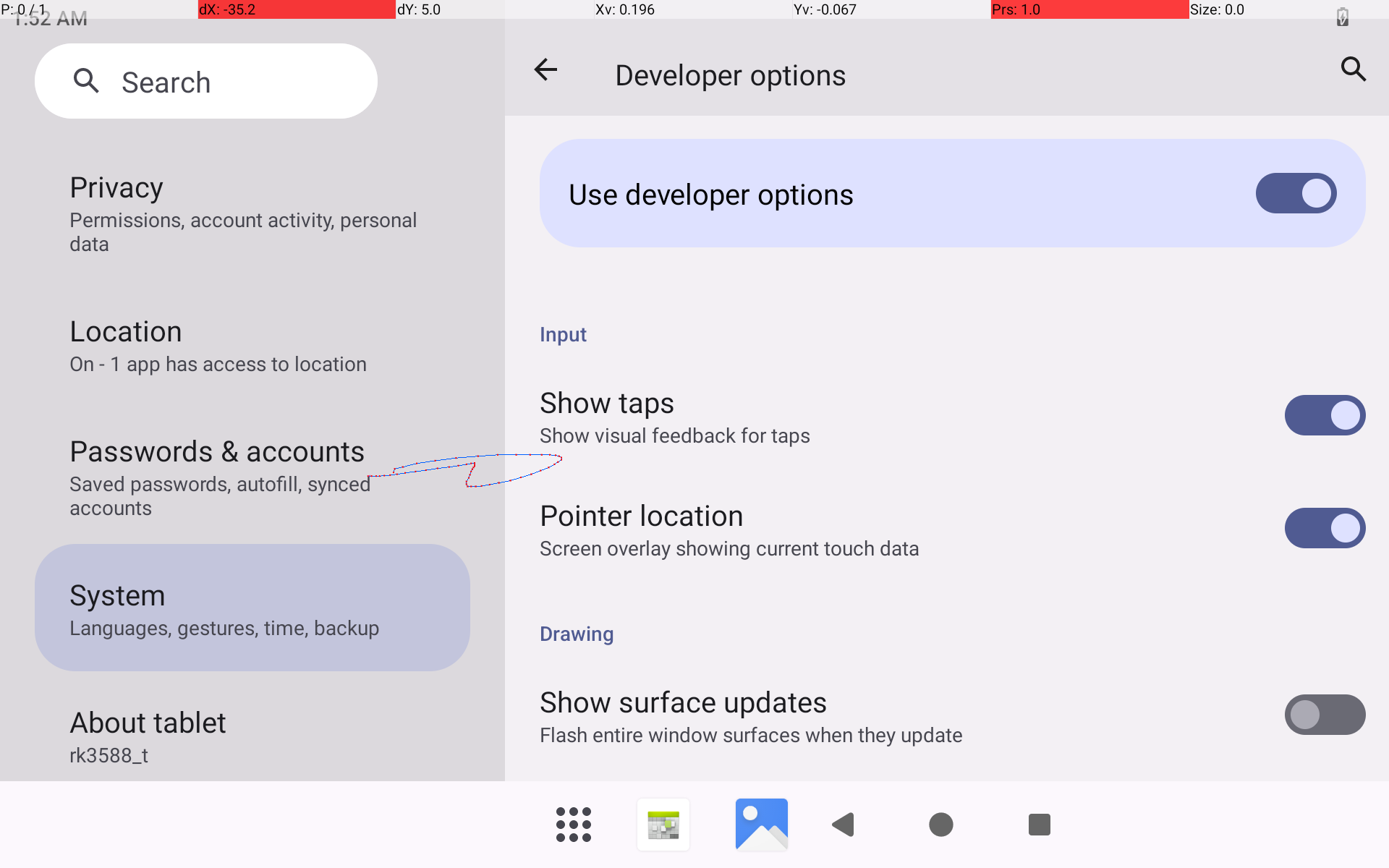
1、FT8206的LCD竖屏显示已经翻转/左转90度为横屏了!
但是CTP触摸屏还需要琢磨一下!
在驱动中input上报都已经改了!
现在只能求助DeepSeek了!
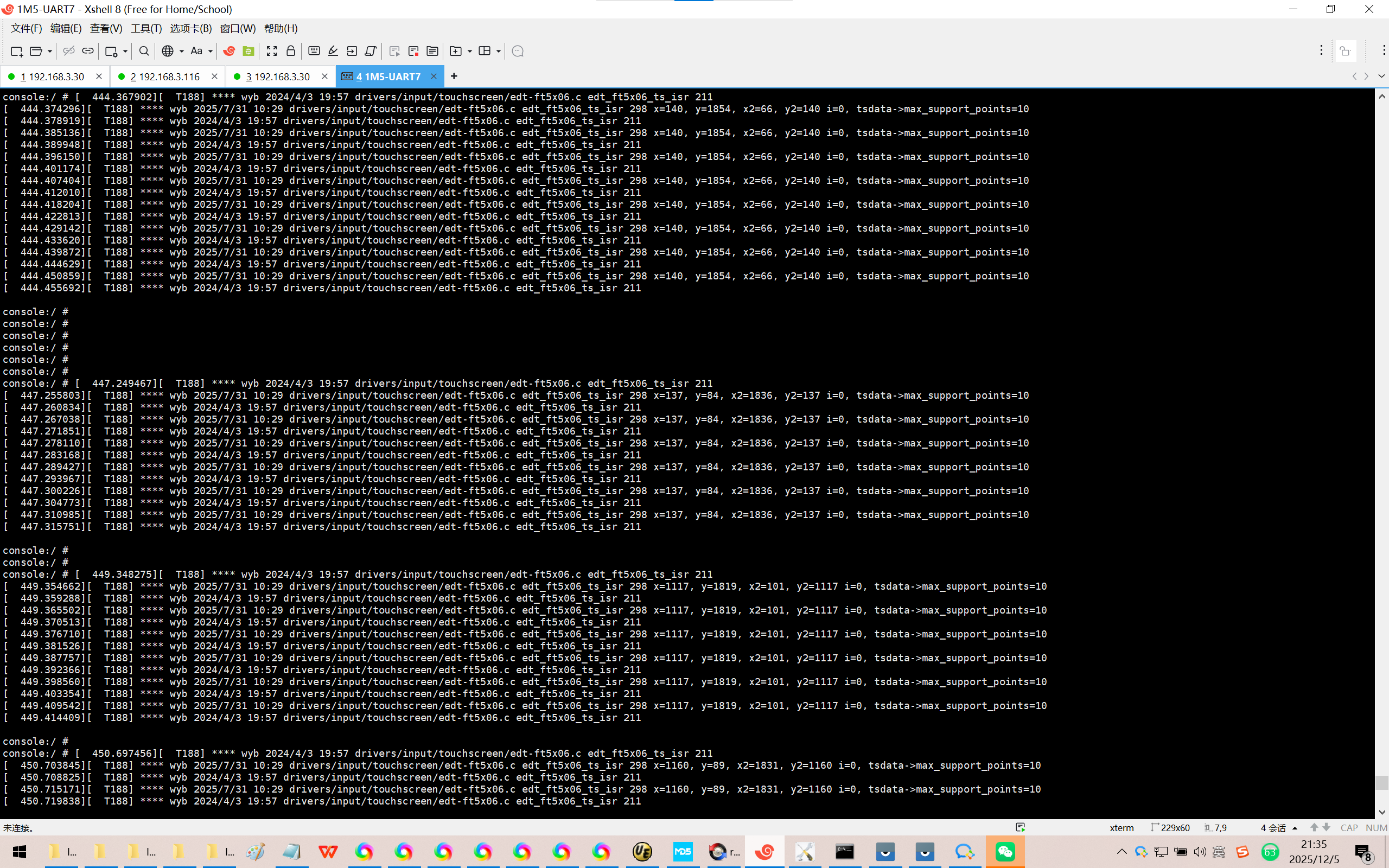
驱动中的报点LOG:
console:/ # 【左上】
console:/ # 444.367902 T188 **** wyb 2024/4/3 19:57 drivers/input/touchscreen/edt-ft5x06.c edt_ft5x06_ts_isr 211
444.374296 T188 **** wyb 2025/7/31 10:29 drivers/input/touchscreen/edt-ft5x06.c edt_ft5x06_ts_isr 298 x=140, y=1854, x2=66, y2=140 i=0, tsdata->max_support_points=10
444.378919 T188 **** wyb 2024/4/3 19:57 drivers/input/touchscreen/edt-ft5x06.c edt_ft5x06_ts_isr 211
444.385136 T188 **** wyb 2025/7/31 10:29 drivers/input/touchscreen/edt-ft5x06.c edt_ft5x06_ts_isr 298 x=140, y=1854, x2=66, y2=140 i=0, tsdata->max_support_points=10
444.389948 T188 **** wyb 2024/4/3 19:57 drivers/input/touchscreen/edt-ft5x06.c edt_ft5x06_ts_isr 211
444.396150 T188 **** wyb 2025/7/31 10:29 drivers/input/touchscreen/edt-ft5x06.c edt_ft5x06_ts_isr 298 x=140, y=1854, x2=66, y2=140 i=0, tsdata->max_support_points=10
444.401174 T188 **** wyb 2024/4/3 19:57 drivers/input/touchscreen/edt-ft5x06.c edt_ft5x06_ts_isr 211
444.407404 T188 **** wyb 2025/7/31 10:29 drivers/input/touchscreen/edt-ft5x06.c edt_ft5x06_ts_isr 298 x=140, y=1854, x2=66, y2=140 i=0, tsdata->max_support_points=10
444.412010 T188 **** wyb 2024/4/3 19:57 drivers/input/touchscreen/edt-ft5x06.c edt_ft5x06_ts_isr 211
444.418204 T188 **** wyb 2025/7/31 10:29 drivers/input/touchscreen/edt-ft5x06.c edt_ft5x06_ts_isr 298 x=140, y=1854, x2=66, y2=140 i=0, tsdata->max_support_points=10
444.422813 T188 **** wyb 2024/4/3 19:57 drivers/input/touchscreen/edt-ft5x06.c edt_ft5x06_ts_isr 211
444.429142 T188 **** wyb 2025/7/31 10:29 drivers/input/touchscreen/edt-ft5x06.c edt_ft5x06_ts_isr 298 x=140, y=1854, x2=66, y2=140 i=0, tsdata->max_support_points=10
444.433620 T188 **** wyb 2024/4/3 19:57 drivers/input/touchscreen/edt-ft5x06.c edt_ft5x06_ts_isr 211
444.439872 T188 **** wyb 2025/7/31 10:29 drivers/input/touchscreen/edt-ft5x06.c edt_ft5x06_ts_isr 298 x=140, y=1854, x2=66, y2=140 i=0, tsdata->max_support_points=10
444.444629 T188 **** wyb 2024/4/3 19:57 drivers/input/touchscreen/edt-ft5x06.c edt_ft5x06_ts_isr 211
444.450859 T188 **** wyb 2025/7/31 10:29 drivers/input/touchscreen/edt-ft5x06.c edt_ft5x06_ts_isr 298 x=140, y=1854, x2=66, y2=140 i=0, tsdata->max_support_points=10
444.455692 T188 **** wyb 2024/4/3 19:57 drivers/input/touchscreen/edt-ft5x06.c edt_ft5x06_ts_isr 211
console:/ #
console:/ #
console:/ #
console:/ #
console:/ #
console:/ # 【右上】
console:/ # 447.249467 T188 **** wyb 2024/4/3 19:57 drivers/input/touchscreen/edt-ft5x06.c edt_ft5x06_ts_isr 211
447.255803 T188 **** wyb 2025/7/31 10:29 drivers/input/touchscreen/edt-ft5x06.c edt_ft5x06_ts_isr 298 x=137, y=84, x2=1836, y2=137 i=0, tsdata->max_support_points=10
447.260834 T188 **** wyb 2024/4/3 19:57 drivers/input/touchscreen/edt-ft5x06.c edt_ft5x06_ts_isr 211
447.267038 T188 **** wyb 2025/7/31 10:29 drivers/input/touchscreen/edt-ft5x06.c edt_ft5x06_ts_isr 298 x=137, y=84, x2=1836, y2=137 i=0, tsdata->max_support_points=10
447.271851 T188 **** wyb 2024/4/3 19:57 drivers/input/touchscreen/edt-ft5x06.c edt_ft5x06_ts_isr 211
447.278110 T188 **** wyb 2025/7/31 10:29 drivers/input/touchscreen/edt-ft5x06.c edt_ft5x06_ts_isr 298 x=137, y=84, x2=1836, y2=137 i=0, tsdata->max_support_points=10
447.283168 T188 **** wyb 2024/4/3 19:57 drivers/input/touchscreen/edt-ft5x06.c edt_ft5x06_ts_isr 211
447.289427 T188 **** wyb 2025/7/31 10:29 drivers/input/touchscreen/edt-ft5x06.c edt_ft5x06_ts_isr 298 x=137, y=84, x2=1836, y2=137 i=0, tsdata->max_support_points=10
447.293967 T188 **** wyb 2024/4/3 19:57 drivers/input/touchscreen/edt-ft5x06.c edt_ft5x06_ts_isr 211
447.300226 T188 **** wyb 2025/7/31 10:29 drivers/input/touchscreen/edt-ft5x06.c edt_ft5x06_ts_isr 298 x=137, y=84, x2=1836, y2=137 i=0, tsdata->max_support_points=10
447.304773 T188 **** wyb 2024/4/3 19:57 drivers/input/touchscreen/edt-ft5x06.c edt_ft5x06_ts_isr 211
447.310985 T188 **** wyb 2025/7/31 10:29 drivers/input/touchscreen/edt-ft5x06.c edt_ft5x06_ts_isr 298 x=137, y=84, x2=1836, y2=137 i=0, tsdata->max_support_points=10
447.315751 T188 **** wyb 2024/4/3 19:57 drivers/input/touchscreen/edt-ft5x06.c edt_ft5x06_ts_isr 211
console:/ #
console:/ # 【左下】
console:/ # 449.348275 T188 **** wyb 2024/4/3 19:57 drivers/input/touchscreen/edt-ft5x06.c edt_ft5x06_ts_isr 211
449.354662 T188 **** wyb 2025/7/31 10:29 drivers/input/touchscreen/edt-ft5x06.c edt_ft5x06_ts_isr 298 x=1117, y=1819, x2=101, y2=1117 i=0, tsdata->max_support_points=10
449.359288 T188 **** wyb 2024/4/3 19:57 drivers/input/touchscreen/edt-ft5x06.c edt_ft5x06_ts_isr 211
449.365502 T188 **** wyb 2025/7/31 10:29 drivers/input/touchscreen/edt-ft5x06.c edt_ft5x06_ts_isr 298 x=1117, y=1819, x2=101, y2=1117 i=0, tsdata->max_support_points=10
449.370513 T188 **** wyb 2024/4/3 19:57 drivers/input/touchscreen/edt-ft5x06.c edt_ft5x06_ts_isr 211
449.376710 T188 **** wyb 2025/7/31 10:29 drivers/input/touchscreen/edt-ft5x06.c edt_ft5x06_ts_isr 298 x=1117, y=1819, x2=101, y2=1117 i=0, tsdata->max_support_points=10
449.381526 T188 **** wyb 2024/4/3 19:57 drivers/input/touchscreen/edt-ft5x06.c edt_ft5x06_ts_isr 211
449.387757 T188 **** wyb 2025/7/31 10:29 drivers/input/touchscreen/edt-ft5x06.c edt_ft5x06_ts_isr 298 x=1117, y=1819, x2=101, y2=1117 i=0, tsdata->max_support_points=10
449.392366 T188 **** wyb 2024/4/3 19:57 drivers/input/touchscreen/edt-ft5x06.c edt_ft5x06_ts_isr 211
449.398560 T188 **** wyb 2025/7/31 10:29 drivers/input/touchscreen/edt-ft5x06.c edt_ft5x06_ts_isr 298 x=1117, y=1819, x2=101, y2=1117 i=0, tsdata->max_support_points=10
449.403354 T188 **** wyb 2024/4/3 19:57 drivers/input/touchscreen/edt-ft5x06.c edt_ft5x06_ts_isr 211
449.409542 T188 **** wyb 2025/7/31 10:29 drivers/input/touchscreen/edt-ft5x06.c edt_ft5x06_ts_isr 298 x=1117, y=1819, x2=101, y2=1117 i=0, tsdata->max_support_points=10
449.414409 T188 **** wyb 2024/4/3 19:57 drivers/input/touchscreen/edt-ft5x06.c edt_ft5x06_ts_isr 211
console:/ # 【右下】
console:/ # 450.697456 T188 **** wyb 2024/4/3 19:57 drivers/input/touchscreen/edt-ft5x06.c edt_ft5x06_ts_isr 211
450.703845 T188 **** wyb 2025/7/31 10:29 drivers/input/touchscreen/edt-ft5x06.c edt_ft5x06_ts_isr 298 x=1160, y=89, x2=1831, y2=1160 i=0, tsdata->max_support_points=10
450.708825 T188 **** wyb 2024/4/3 19:57 drivers/input/touchscreen/edt-ft5x06.c edt_ft5x06_ts_isr 211
450.715171 T188 **** wyb 2025/7/31 10:29 drivers/input/touchscreen/edt-ft5x06.c edt_ft5x06_ts_isr 298 x=1160, y=89, x2=1831, y2=1160 i=0, tsdata->max_support_points=10
450.719838 T188 **** wyb 2024/4/3 19:57 drivers/input/touchscreen/edt-ft5x06.c edt_ft5x06_ts_isr 211
450.726069 T188 **** wyb 2025/7/31 10:29 drivers/input/touchscreen/edt-ft5x06.c edt_ft5x06_ts_isr 298 x=1160, y=89, x2=1831, y2=1160 i=0, tsdata->max_support_points=10
450.730858 T188 **** wyb 2024/4/3 19:57 drivers/input/touchscreen/edt-ft5x06.c edt_ft5x06_ts_isr 211
450.737078 T188 **** wyb 2025/7/31 10:29 drivers/input/touchscreen/edt-ft5x06.c edt_ft5x06_ts_isr 298 x=1160, y=89, x2=1831, y2=1160 i=0, tsdata->max_support_points=10
450.741862 T188 **** wyb 2024/4/3 19:57 drivers/input/touchscreen/edt-ft5x06.c edt_ft5x06_ts_isr 211
450.748077 T188 **** wyb 2025/7/31 10:29 drivers/input/touchscreen/edt-ft5x06.c edt_ft5x06_ts_isr 298 x=1160, y=89, x2=1831, y2=1160 i=0, tsdata->max_support_points=10
450.752666 T188 **** wyb 2024/4/3 19:57 drivers/input/touchscreen/edt-ft5x06.c edt_ft5x06_ts_isr 211
450.758857 T188 **** wyb 2025/7/31 10:29 drivers/input/touchscreen/edt-ft5x06.c edt_ft5x06_ts_isr 298 x=1160, y=89, x2=1831, y2=1160 i=0, tsdata->max_support_points=10
450.763430 T188 **** wyb 2024/4/3 19:57 drivers/input/touchscreen/edt-ft5x06.c edt_ft5x06_ts_isr 211
450.769682 T188 **** wyb 2025/7/31 10:29 drivers/input/touchscreen/edt-ft5x06.c edt_ft5x06_ts_isr 298 x=1160, y=89, x2=1831, y2=1160 i=0, tsdata->max_support_points=10
450.774306 T188 **** wyb 2024/4/3 19:57 drivers/input/touchscreen/edt-ft5x06.c edt_ft5x06_ts_isr 211
450.780605 T188 **** wyb 2025/7/31 10:29 drivers/input/touchscreen/edt-ft5x06.c edt_ft5x06_ts_isr 298 x=1160, y=89, x2=1831, y2=1160 i=0, tsdata->max_support_points=10
https://chat.deepseek.com/a/chat/s/de31db9a-7ca3-449f-93ea-a57bcb1a3f48
RK3588 Android触摸屏旋转校正方法
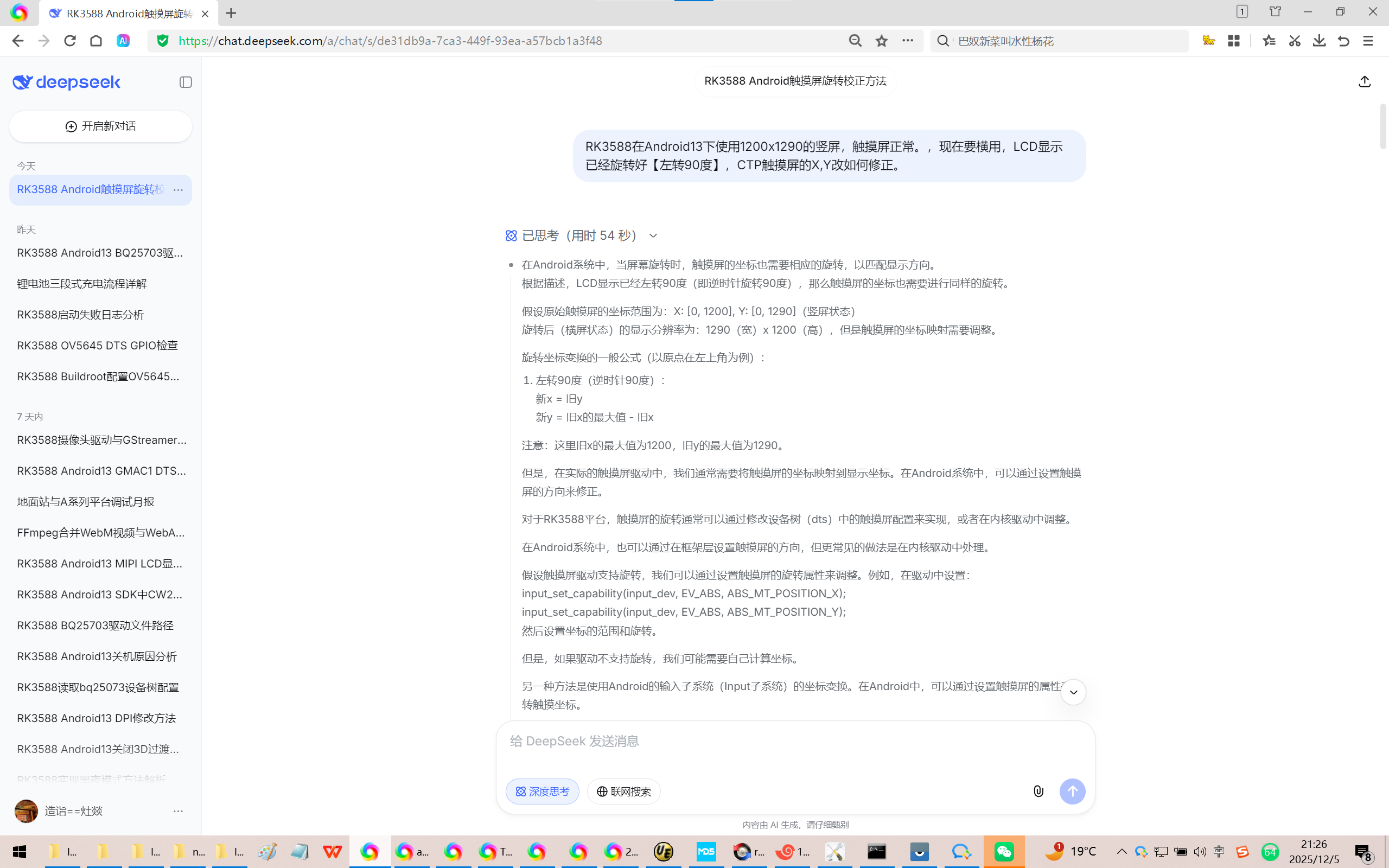
RK3588在Android13下使用1200x1920的竖屏,触摸屏正常。,现在要横用,LCD显示已经旋转好【左转90度】,CTP触摸屏的X,Y改如何修正。
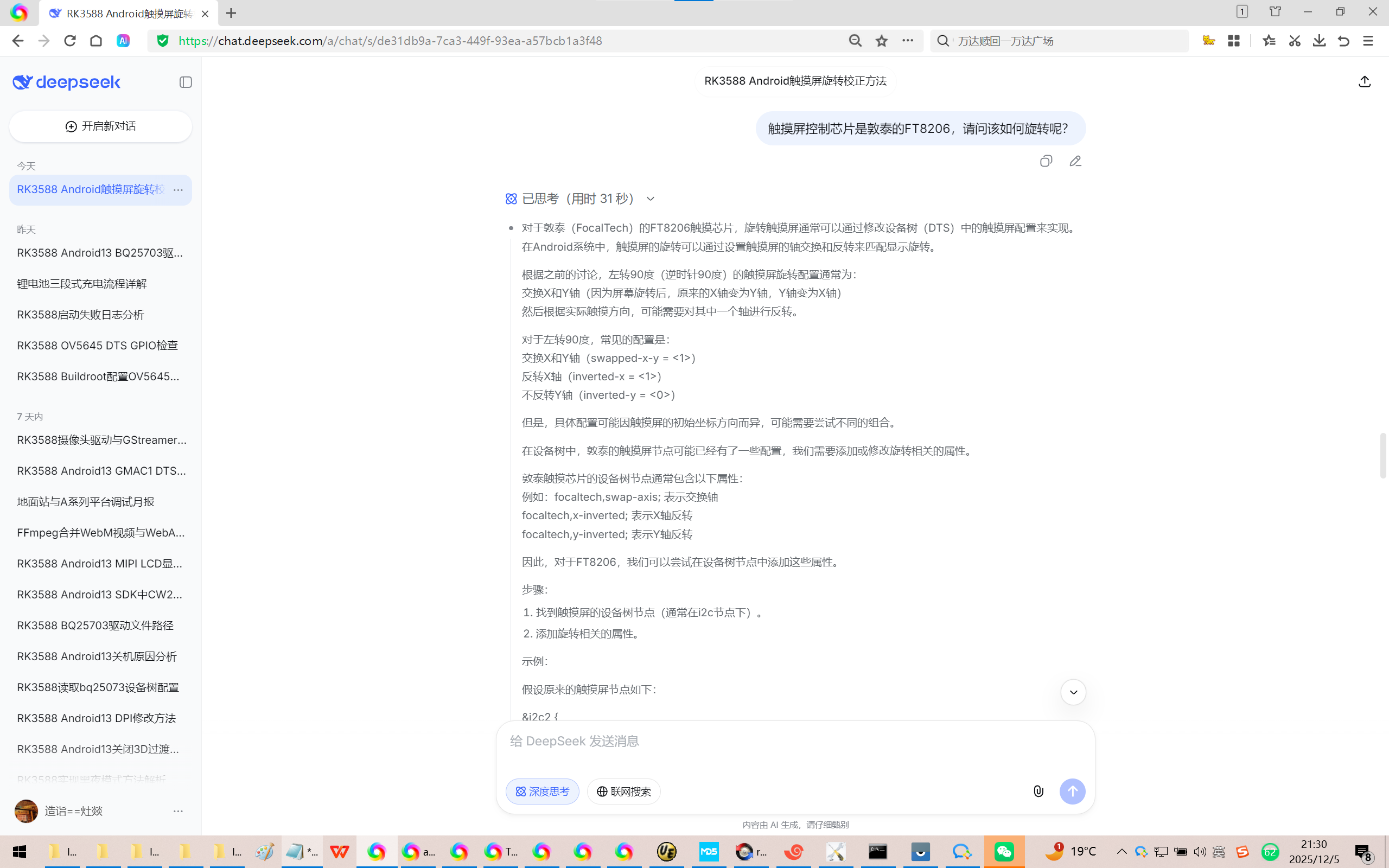
触摸屏控制芯片是敦泰的FT8206,请问该如何旋转呢?
- 设备树(DTS)配置方法
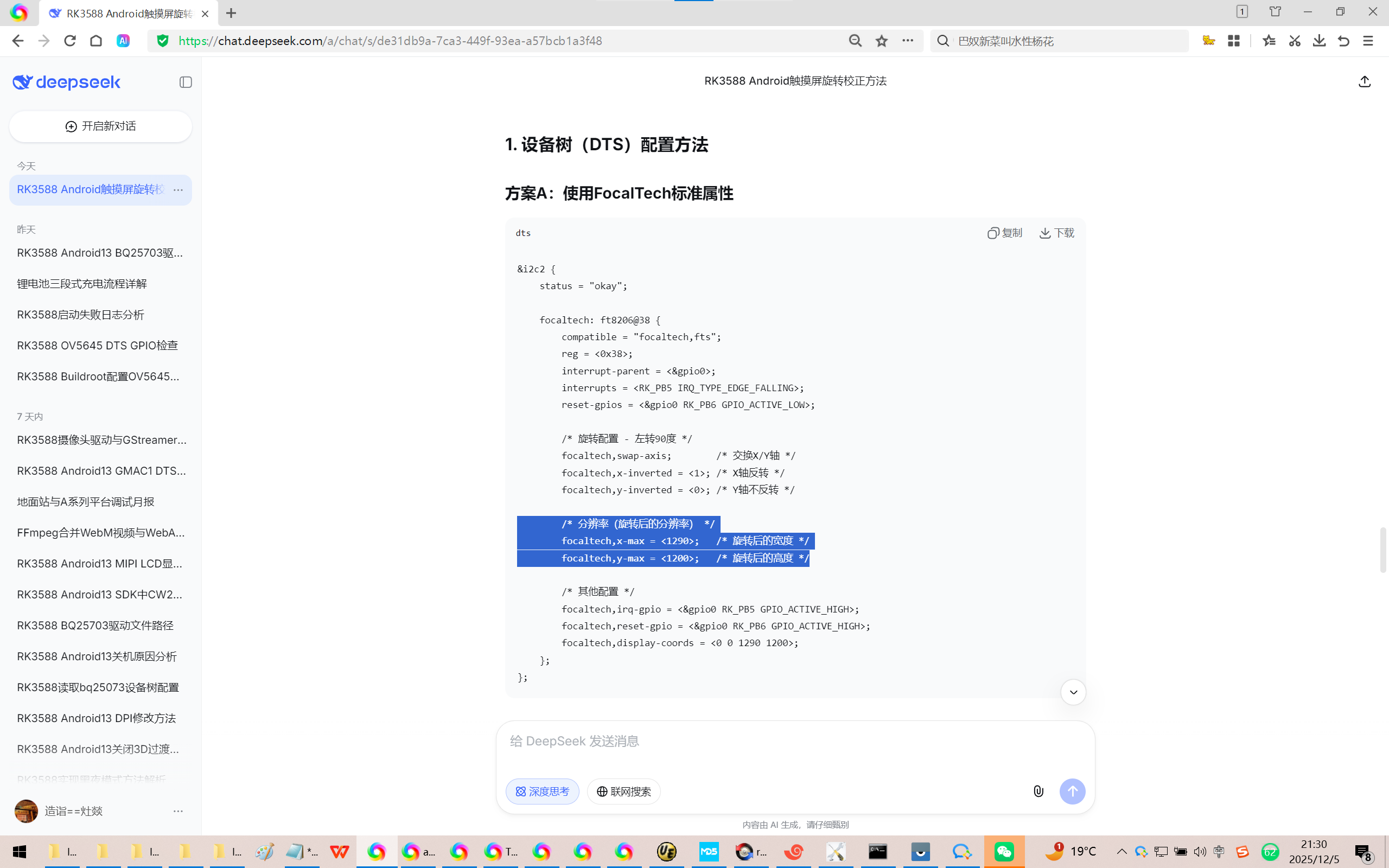
方案A:使用FocalTech标准属性
dts
&i2c2 {
status = "okay";
focaltech: ft8206@38 {
compatible = "focaltech,fts";
reg = <0x38>;
interrupt-parent = <&gpio0>;
interrupts = <RK_PB5 IRQ_TYPE_EDGE_FALLING>;
reset-gpios = <&gpio0 RK_PB6 GPIO_ACTIVE_LOW>;
/* 旋转配置 - 左转90度 */
focaltech,swap-axis; /* 交换X/Y轴 */
focaltech,x-inverted = <1>; /* X轴反转 */
focaltech,y-inverted = <0>; /* Y轴不反转 */
/* 分辨率(旋转后的分辨率) */
focaltech,x-max = <1920>; /* 旋转后的宽度 */
focaltech,y-max = <1200>; /* 旋转后的高度 */
/* 其他配置 */
focaltech,irq-gpio = <&gpio0 RK_PB5 GPIO_ACTIVE_HIGH>;
focaltech,reset-gpio = <&gpio0 RK_PB6 GPIO_ACTIVE_HIGH>;
focaltech,display-coords = <0 0 1290 1200>;
};
};
【改这里就OK了!】
Y:\EVB7_RD-RK3588t\kernel-5.10\arch\arm64\boot\dts\rockchip\rk3588-evb7-v11.dtsi
&i2c6 {
status = "okay";
pinctrl-names = "default";
pinctrl-0 = <&i2c6m0_xfer>;
goodix_ts:goodix_ts@5d {
status = "okay";
compatible = "goodix,gt9xx";
reg = <0x5d>;
};
ft5x06: ft5x06@38 { //dsi0 tp
compatible = "edt,edt-ft5406", "edt,edt-ft5x06";
reg = <0x38>;
pinctrl-names = "ft5x06_defaults";
pinctrl-0 = <&ft5x06_dsi1_gpio>;
// interrupt-parent = <&gpio0>;
// interrupts = <RK_PB5 IRQ_TYPE_EDGE_FALLING>;
//irq-gpio = <&gpio0 RK_PB5 GPIO_ACTIVE_HIGH>;
//irq-gpio = <&gpio0 RK_PB5 GPIO_ACTIVE_LOW>;
irq-gpio = <&gpio3 RK_PC7 GPIO_ACTIVE_LOW>;
//reset-gpio = <&gpio0 RK_PB6 GPIO_ACTIVE_HIGH>;
//reset-gpios = <&gpio0 RK_PB6 GPIO_ACTIVE_LOW>;
reset-gpios = <&gpio3 RK_PC6 GPIO_ACTIVE_LOW>;
touchscreen-size-x = <1200>;
touchscreen-size-y = <1920>;
//touchscreen-size-x = <1920>;
//touchscreen-size-y = <1200>;
status = "okay";
};
修改为:
&i2c6 {
status = "okay";
pinctrl-names = "default";
pinctrl-0 = <&i2c6m0_xfer>;
goodix_ts:goodix_ts@5d {
status = "okay";
compatible = "goodix,gt9xx";
reg = <0x5d>;
};
ft5x06: ft5x06@38 { //dsi0 tp
compatible = "edt,edt-ft5406", "edt,edt-ft5x06";
reg = <0x38>;
pinctrl-names = "ft5x06_defaults";
pinctrl-0 = <&ft5x06_dsi1_gpio>;
// interrupt-parent = <&gpio0>;
// interrupts = <RK_PB5 IRQ_TYPE_EDGE_FALLING>;
//irq-gpio = <&gpio0 RK_PB5 GPIO_ACTIVE_HIGH>;
//irq-gpio = <&gpio0 RK_PB5 GPIO_ACTIVE_LOW>;
irq-gpio = <&gpio3 RK_PC7 GPIO_ACTIVE_LOW>;
//reset-gpio = <&gpio0 RK_PB6 GPIO_ACTIVE_HIGH>;
//reset-gpios = <&gpio0 RK_PB6 GPIO_ACTIVE_LOW>;
reset-gpios = <&gpio3 RK_PC6 GPIO_ACTIVE_LOW>;
//touchscreen-size-x = <1200>;
//touchscreen-size-y = <1920>;
touchscreen-size-x = <1920>;
touchscreen-size-y = <1200>;
status = "okay";
};
在uboot的时候屏幕有显示,但是在kernel阶段就没有显示了!
通过HDMI接口输出可以看到 荣品RD-RK3588-MID开发板已经进Android系统了!
结论:在uboot下,GPIO口一般都没有配置。【也就是默认拉高,各路电路都为高!】
在在kernel/driver阶段,GPIO口开始被初始化为各种功能!也就是LCD屏的各路电源高高低低,那屏肯定就不亮了!【黑屏】
Rockchip的原厂Buildroot【linux-6.1】系统默认只有iperf2,还是比较喜欢iperf3。
iperf2的服务器端不会显示实时网速!^_
经过反复测试,终于把 荣品RD-RK3588开发板 自带的8寸屏的CTP触摸屏调试通了。
Android13的内核linux-5.10
Android13的内核linux-6.1。版本升级之后,
终于把全部的USB接口都点亮USB接口的鼠标了!
当你把荣品RD-RK3588开发板重新适配一把,就相当于从头做了一个项目:【荣品RD-RK3588开发板】。
当然,开发板的功能都是好的,你免除了调试的过程,也就没有解决相关硬件出错的经验/机会了!
console:/ #
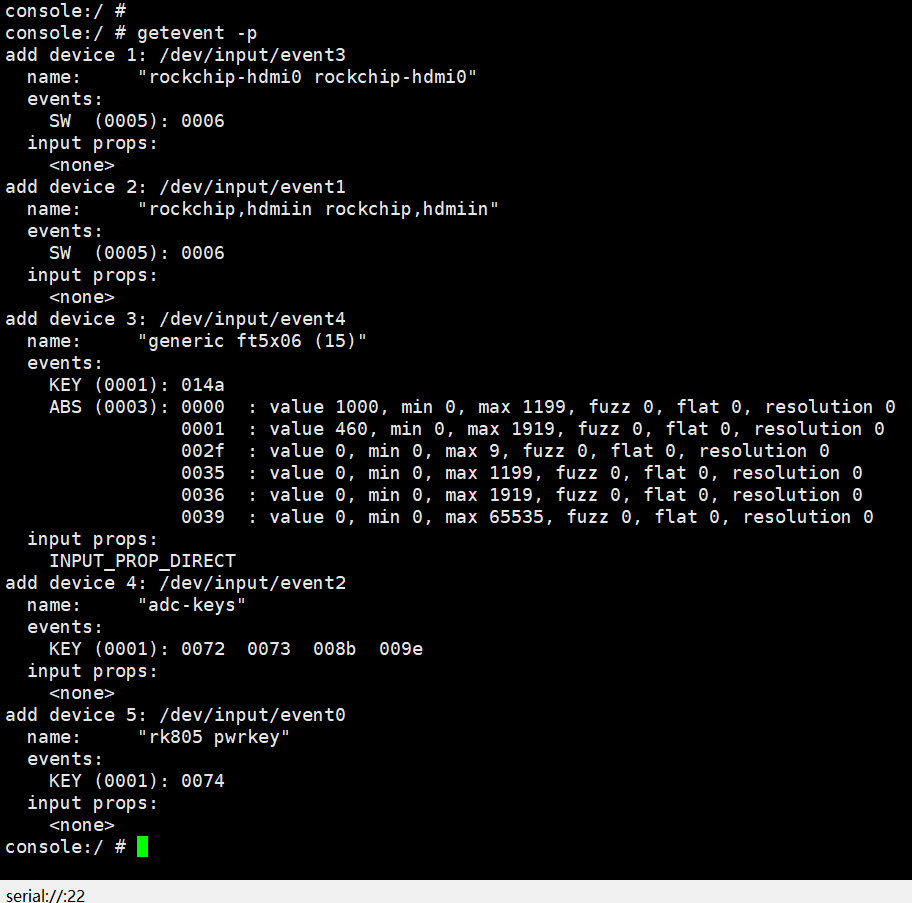
console:/ # getevent -p
add device 1: /dev/input/event3
name: "rockchip-hdmi0 rockchip-hdmi0"
events:
SW (0005): 0006
input props:
<none>
add device 2: /dev/input/event1
name: "rockchip,hdmiin rockchip,hdmiin"
events:
SW (0005): 0006
input props:
<none>
add device 3: /dev/input/event4
name: "generic ft5x06 (15)"
events:
KEY (0001): 014a
ABS (0003): 0000 : value 1000, min 0, max 1199, fuzz 0, flat 0, resolution 0
0001 : value 460, min 0, max 1919, fuzz 0, flat 0, resolution 0
002f : value 0, min 0, max 9, fuzz 0, flat 0, resolution 0
0035 : value 0, min 0, max 1199, fuzz 0, flat 0, resolution 0
0036 : value 0, min 0, max 1919, fuzz 0, flat 0, resolution 0
0039 : value 0, min 0, max 65535, fuzz 0, flat 0, resolution 0
input props:
INPUT_PROP_DIRECT
add device 4: /dev/input/event2
name: "adc-keys"
events:
KEY (0001): 0072 0073 008b 009e
input props:
<none>
add device 5: /dev/input/event0
name: "rk805 pwrkey"
events:
KEY (0001): 0074
input props:
<none>
console:/ #
console:/ #
console:/ #
console:/ # 189.821751 T399 healthd: battery l=50 v=3 t=2.6 h=2 st=3 c=-1600 fc=100 chg=au
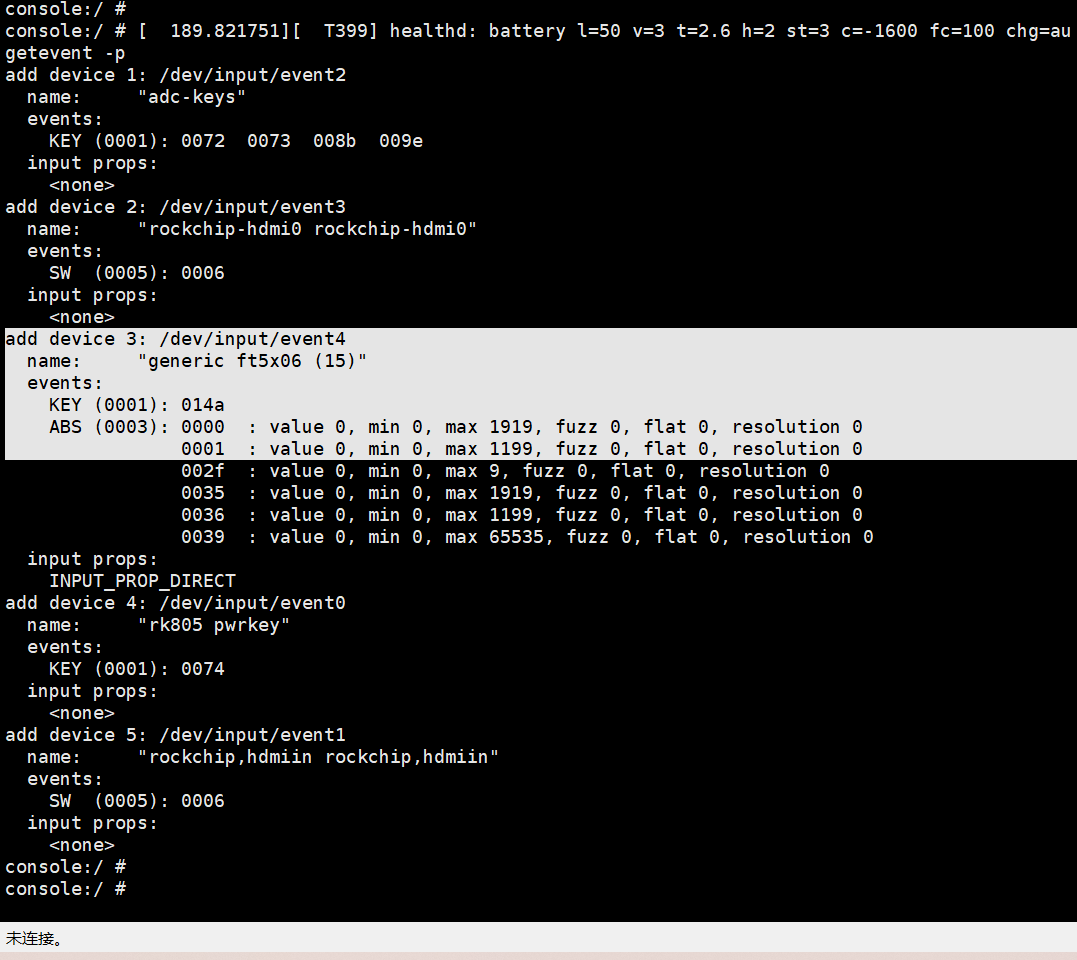
getevent -p
add device 1: /dev/input/event2
name: "adc-keys"
events:
KEY (0001): 0072 0073 008b 009e
input props:
<none>
add device 2: /dev/input/event3
name: "rockchip-hdmi0 rockchip-hdmi0"
events:
SW (0005): 0006
input props:
<none>
add device 3: /dev/input/event4
name: "generic ft5x06 (15)"
events:
KEY (0001): 014a
ABS (0003): 0000 : value 0, min 0, max 1919, fuzz 0, flat 0, resolution 0
0001 : value 0, min 0, max 1199, fuzz 0, flat 0, resolution 0
002f : value 0, min 0, max 9, fuzz 0, flat 0, resolution 0
0035 : value 0, min 0, max 1919, fuzz 0, flat 0, resolution 0
0036 : value 0, min 0, max 1199, fuzz 0, flat 0, resolution 0
0039 : value 0, min 0, max 65535, fuzz 0, flat 0, resolution 0
input props:
INPUT_PROP_DIRECT
add device 4: /dev/input/event0
name: "rk805 pwrkey"
events:
KEY (0001): 0074
input props:
<none>
add device 5: /dev/input/event1
name: "rockchip,hdmiin rockchip,hdmiin"
events:
SW (0005): 0006
input props:
<none>
console:/ #
console:/ #