本期是承接上一期系统IO相关的内容。
相关的内容已经上传到作者的个人gitee:楼田莉子/Linux学习喜欢请点个赞谢谢
目录
文件库
对于文件库,我们需要实现的有四个功能:打开(创建文件),写入文件,刷新文件,关闭文件
首先我们需要文件的结构体
cpp
#define OUTSIZE 1024//缓冲区范围

typedef struct Myfile
{
    int fd; //文件标识符
    int modes;//打开方式
    char outsize[OUTSIZE];//行缓冲区
    int fllush_mode;//刷新模式
    int pos;//缓冲区要写的位置
    int cap;//当前缓冲区的容量
}Myfile;
然后是相关函数的声明:
cpp
//打开文件
Myfile*myfopen(const char*pathname,const char*mode);
//r w a r+ w+...
//写入文件
int myfputs(const char*str,Myfile*fp);
//刷新文件(flag控制可选项)
static void myfflushCon(Myfile*fp,int flag);
//刷新文件函数的外层包装
void myfflush(Myfile*fp);
//关闭文件
void myclose(Myfile* fp);
打开文件
实现代码如下:
cpp
//open函数的权限。在写入函数myfputs中使用
#define mode1 0666
#define mode2 0644

Myfile*myfopen(const char*pathname,const char*mode)
//r w a r+ w+...
{
	int fd =-1;
    int flags=0;
    if(strcmp(mode,"r")==0)
    {
        flags=O_WRONLY;
       	fd=open(pathname,flags,mode1);

    }
    else if(strcmp(mode,"w")==0)
    {
        flags=O_WRONLY|O_TRUNC|O_CREAT;
       	fd=open(pathname,flags,mode1);


    }
    else if(strcmp(mode,"a")==0)
    {
        flags=O_WRONLY|O_TRUNC|O_APPEND;
       	fd=open(pathname,flags,mode1);

    }
    else if(strcmp(mode,"w+r")==0||strcmp(mode ,"r+w")==0)
    {
        flags=O_RDWR | O_CREAT | O_TRUNC;
        fd=open(pathname,
                  flags,  // 关键标志
                  mode2);
    }
	else if(strcmp(mode,"r+a")==0||strcmp(mode,"a+r")==0)
	{
        flags=O_RDWR | O_CREAT | O_APPEND;
	    fd=open(pathname,
                flags,  // 追加模式
                mode2);
	}

    if(fd<0)
        return NULL;
    Myfile*fp=(Myfile*)malloc(sizeof(Myfile));
    if(fp==NULL)
        return NULL;
    fp->fd=fd;
    fp->fllush_mode=LineFlush;
    fp->modes =flags;
    fp->cap=OUTSIZE;
    fp->pos=0;
    return fp;
}
刷新文件
对于文件刷新,我们需要在关闭文件的时候强制刷新缓冲区的内容到文件中,对于写入文件的内容。因此我们必须要准备可选项,来应对不同的情况
cpp
//刷新方式
#define NoneFlush 1//1
#define LineFlush 2//10
#define FullFlush 4//0100
//是否强制刷新
#define TRY_FFLUSH 0
#define FORCE_FFLUSH 1

//底层实现
static void myfflushCon(Myfile*fp,int flag)
{
    if(fp->pos==0)
        return ;
    if((fp->fllush_mode&LineFlush)||(flag&FORCE_FFLUSH))
    {
        if(fp->outsize[fp->pos-1]=='\n'||(flag&FORCE_FFLUSH))
        {
            write(fp->fd,fp->outsize,fp->pos);
            fp->pos=0;
        }
    }
    else if(fp->fllush_mode&NoneFlush)
    {

    }
    else if(fp->fllush_mode&FullFlush)
    {

    }
}
//外层包装------------强制刷新
void myfflush(Myfile*fp)
{
    myfflushCon(fp,FORCE_FFLUSH);
}
写入文件
向文件流写本质上就是将缓冲区内容拷贝到文件中
cpp
int myfputs(const char*str,Myfile*fp)
{
    if(strlen(str)==0)
    {
        return 0;
    }
    //向文件流写本质上就是将缓冲区内容拷贝到这里
    memcpy(fp->outsize+fp->pos,str,strlen(str));
    fp->pos+=strlen(str);
    //如果可以需要自己刷新
    myfflushCon(fp,TRY_FFLUSH);
    return strlen(str);
}
关闭文件
cpp
void myclose(Myfile* fp)
{
    //强制刷新
    myfflush(fp);
    close(fp->fd);
    free(fp);
}
测试代码:
cpp
#include"Mystdio.h"

int main()
{
    Myfile*fp=myfopen("log.txt","w");
    if(fp==NULL)
    {
        perror("打开文件失败");
        return 1;
    }
    const char*ss="go for a punch";
    int cnt=5;
    while(cnt--)
    {
        myfputs(ss,fp);
        sleep(1);
        printf("outbuffer:%s, pos=%d\n",fp->outsize,fp->pos);
    }
    myclose(fp);
    printf("写入成功");
    return 0;
}
结果为:

源代码
Mystdio.h
cpp
#pragma once
#include<stdio.h>
#include<stdlib.h>
#include<string.h>
#include<unistd.h>
#define OUTSIZE 1024//缓冲区范围
//刷新方式
#define NoneFlush 1//1
#define LineFlush 2//10
#define FullFlush 4//0100

//open函数的权限。在写入函数myfputs中使用
#define mode1 0666
#define mode2 0644


typedef struct Myfile
{
    int fd; //文件标识符
    int modes;//打开方式
    char outsize[OUTSIZE];//行缓冲区
    int fllush_mode;//刷新模式
    int pos;//缓冲区要写的位置
    int cap;//当前缓冲区的容量
}Myfile;
//打开文件
Myfile*myfopen(const char*pathname,const char*mode);
//r w a r+ w+...
//写入文件
int myfputs(const char*str,Myfile*fp);
//刷新文件(flag控制可选项)
static void myfflushCon(Myfile*fp,int flag);
//刷新文件函数的外层包装
void myfflush(Myfile*fp);
//关闭文件
void myclose(Myfile* fp);
Mystdio.c
cpp
#include"Mystdio.h"
#include<unistd.h>
#include <sys/types.h>
#include <sys/stat.h>
#include <fcntl.h>
#define TRY_FFLUSH 0
#define FORCE_FFLUSH 1

Myfile*myfopen(const char*pathname,const char*mode)
//r w a r+ w+...
{
	int fd =-1;
    int flags=0;
    if(strcmp(mode,"r")==0)
    {
        flags=O_WRONLY;
       	fd=open(pathname,flags,mode1);

    }
    else if(strcmp(mode,"w")==0)
    {
        flags=O_WRONLY|O_TRUNC|O_CREAT;
       	fd=open(pathname,flags,mode1);


    }
    else if(strcmp(mode,"a")==0)
    {
        flags=O_WRONLY|O_TRUNC|O_APPEND;
       	fd=open(pathname,flags,mode1);

    }
    else if(strcmp(mode,"w+r")==0||strcmp(mode ,"r+w")==0)
    {
        flags=O_RDWR | O_CREAT | O_TRUNC;
        fd=open(pathname,
                  flags,  // 关键标志
                  mode2);
    }
	else if(strcmp(mode,"r+a")==0||strcmp(mode,"a+r")==0)
	{
        flags=O_RDWR | O_CREAT | O_APPEND;
	    fd=open(pathname,
                flags,  // 追加模式
                mode2);
	}

    if(fd<0)
        return NULL;
    Myfile*fp=(Myfile*)malloc(sizeof(Myfile));
    if(fp==NULL)
        return NULL;
    fp->fd=fd;
    fp->fllush_mode=LineFlush;
    fp->modes =flags;
    fp->cap=OUTSIZE;
    fp->pos=0;
    return fp;
}
int myfputs(const char*str,Myfile*fp)
{
    if(strlen(str)==0)
    {
        return 0;
    }
    //向文件流写本质上就是将缓冲区内容拷贝到这里
    memcpy(fp->outsize+fp->pos,str,strlen(str));
    fp->pos+=strlen(str);
    //如果可以需要自己刷新
    myfflushCon(fp,TRY_FFLUSH);
    return strlen(str);
}
static void myfflushCon(Myfile*fp,int flag)
{
    if(fp->pos==0)
        return ;
    if((fp->fllush_mode&LineFlush)||(flag&FORCE_FFLUSH))
    {
        if(fp->outsize[fp->pos-1]=='\n'||(flag&FORCE_FFLUSH))
        {
            write(fp->fd,fp->outsize,fp->pos);
            fp->pos=0;
        }
    }
    else if(fp->fllush_mode&NoneFlush)
    {

    }
    else if(fp->fllush_mode&FullFlush)
    {

    }
}
void myfflush(Myfile*fp)
{
    myfflushCon(fp,FORCE_FFLUSH);
}
void myclose(Myfile* fp)
{
    //强制刷新
    myfflush(fp);
    close(fp->fd);
    free(fp);
}
main.c
cpp
#include"Mystdio.h"

int main()
{
    Myfile*fp=myfopen("log.txt","w");
    if(fp==NULL)
    {
        perror("打开文件失败");
        return 1;
    }
    const char*ss="go for a punch";
    int cnt=5;
    while(cnt--)
    {
        myfputs(ss,fp);
        sleep(1);
        printf("outbuffer:%s, pos=%d\n",fp->outsize,fp->pos);
    }
    myclose(fp);
    printf("写入成功");
    return 0;
}
标准输出和标准错误
前面我们已经学习了解过printf和perror是一个是标准输出一个是标准错误。但是当我们运行的时候它们看起来好像是一样的。但是事实真的如此吗?我们写一段代码验证一下:
cpp
#include<stdio.h>
#include<unistd.h>
#include<string.h>
int main()
{
    // 标准输出:1
    printf("这是一个正常消息\n");
    fprintf(stdout, "这也是一个正常的日志消息\n");
    const char *s1 = "这是一个正常消息, write\n";
    write(1, s1, strlen(s1));

    // 标准错误:2
    fprintf(stderr, "这是一个错误消息\n");
    const char *s2 = "这是一个错误消息, write\n";
    write(2, s2, strlen(s2));
    perror("perror, hello\n");
    return 0;
}
运行一下显示器里是全部打印出来了。
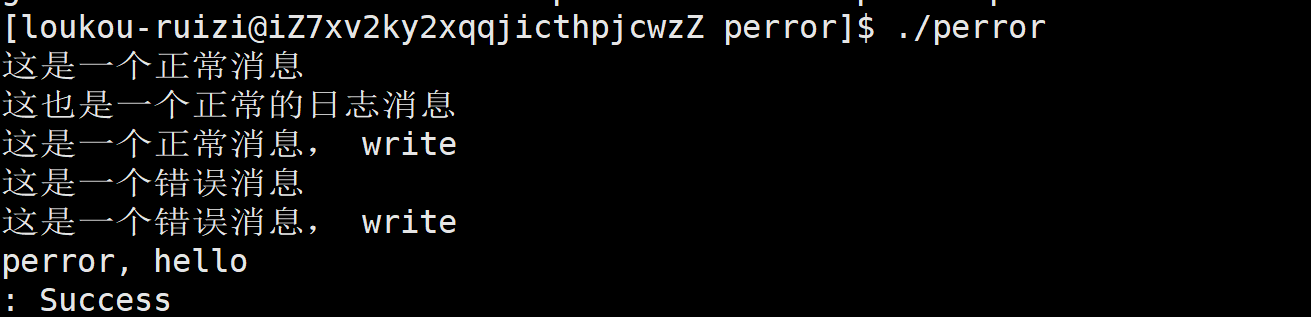
但是当我们选择重定向的时候就会发现问题了。显示器上并没有打印标准输出的内容

当我们打开文件会发现被输入到了这里。

不过我们可以通过这种方式强行在显示器上输出正常信息,将错误信息输入到文件中
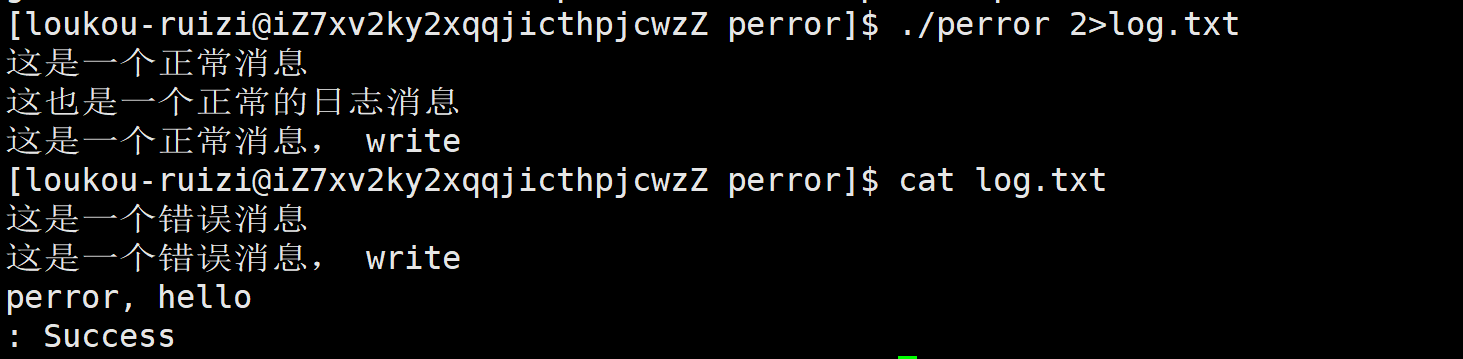
这样的话就可以分离正常信息和错误日志消息,方便调试。
本期内容就到这里了。喜欢请点个赞谢谢
封面图自取: