一、NVIDIA 聊天
NVIDIA LLM API 是一个代理 AI 推理引擎,提供来自各种供应商的广泛模型。
Spring AI 通过复用现有的 OpenAI 客户端与 NVIDIA LLM API 集成。为此,您需要将基础 URL 设置为 https://integrate.api.nvidia.com,选择 NVIDIA 提供的一个 LLM 模型,并获取其 API 密钥。
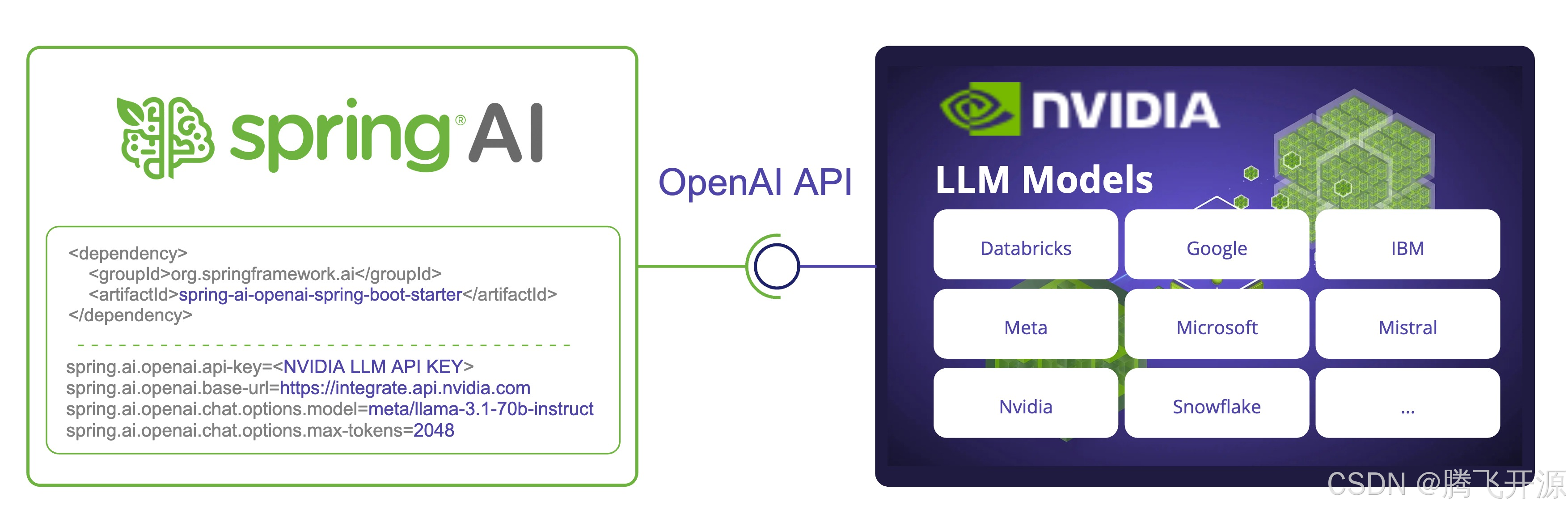
注意:NVIDIA LLM API 要求必须显式设置 max-tokens 参数,否则将抛出服务器错误。
有关使用 NVIDIA LLM API 与 Spring AI 的示例,请查阅 NvidiaWithOpenAiChatModelIT.java 测试。
二、先决条件
创建 NVIDIA 账户并确保有足够的额度。
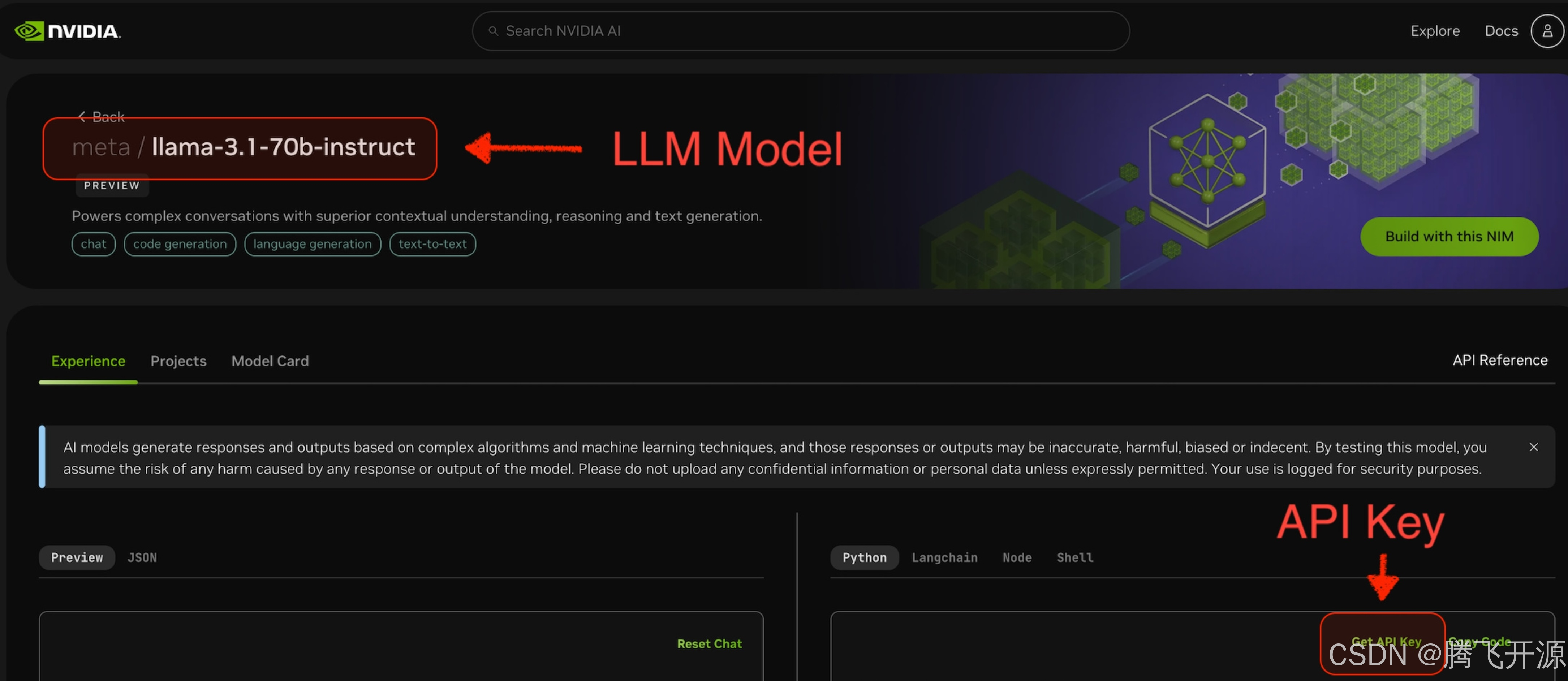
选择要使用的 LLM 模型。例如,下图中的 meta/llama-3.1-70b-instruct。
在所选模型的页面,您可以获取访问该模型的 API 密钥。
三、自动配置
Spring AI 的自动配置和 starter 模块的工件名称发生了重大变化。更多信息请参考升级说明。
Spring AI 为 OpenAI 聊天客户端提供了 Spring Boot 自动配置。要启用它,请将以下依赖项添加到项目的 Maven pom.xml 文件中:
xml
<dependency>
    <groupId>org.springframework.ai</groupId>
    <artifactId>spring-ai-starter-model-openai</artifactId>
</dependency>
或者添加到您的 Gradle build.gradle 构建文件中。
groovy
dependencies {
    implementation 'org.springframework.ai:spring-ai-starter-model-openai'
}
请参阅 "依赖管理" 部分,将 Spring AI BOM 添加到您的构建文件中。
3.1 聊天属性
3.1.1 重试属性
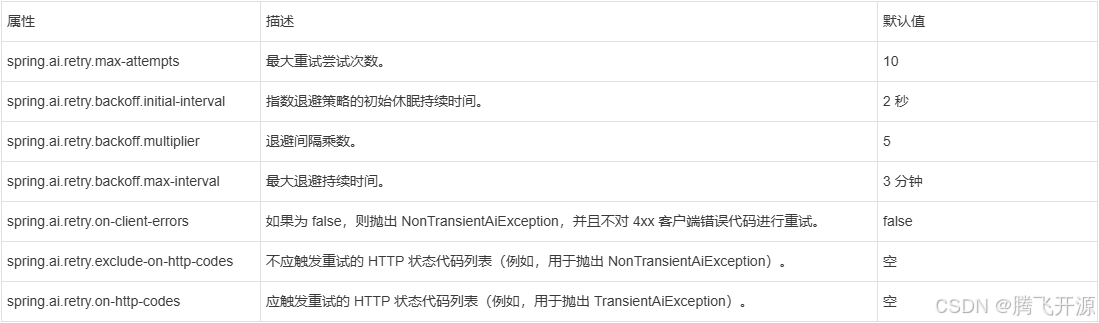
前缀 spring.ai.retry 用作属性前缀,允许您为 OpenAI 聊天模型配置重试机制。
3.1.2 连接属性
前缀 spring.ai.openai 用作属性前缀,允许您连接到 OpenAI。

3.1.3 配置属性
聊天自动配置的启用和禁用现在通过前缀为 spring.ai.model.chat 的顶级属性进行配置。
要启用:spring.ai.model.chat=openai(默认已启用)。
要禁用:spring.ai.model.chat=none(或任何不匹配 openai 的值)。
此项更改是为了支持配置多个模型。
前缀 spring.ai.openai.chat 是用于配置 OpenAI 聊天模型实现的属性前缀。
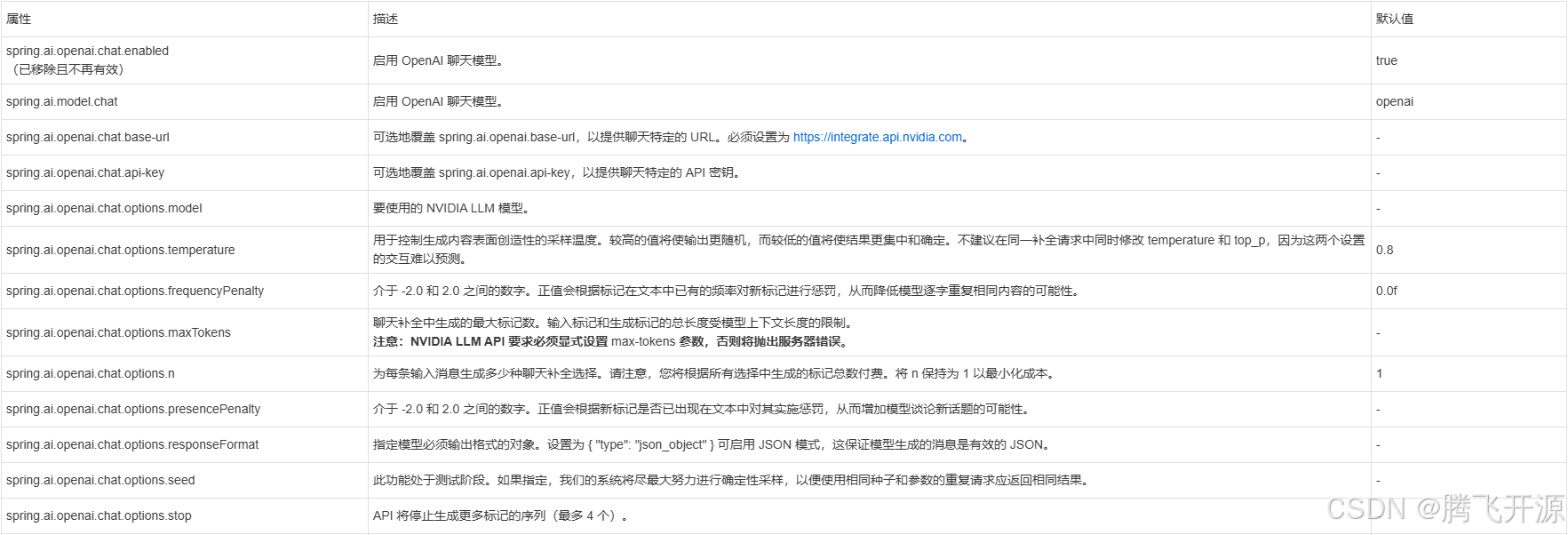
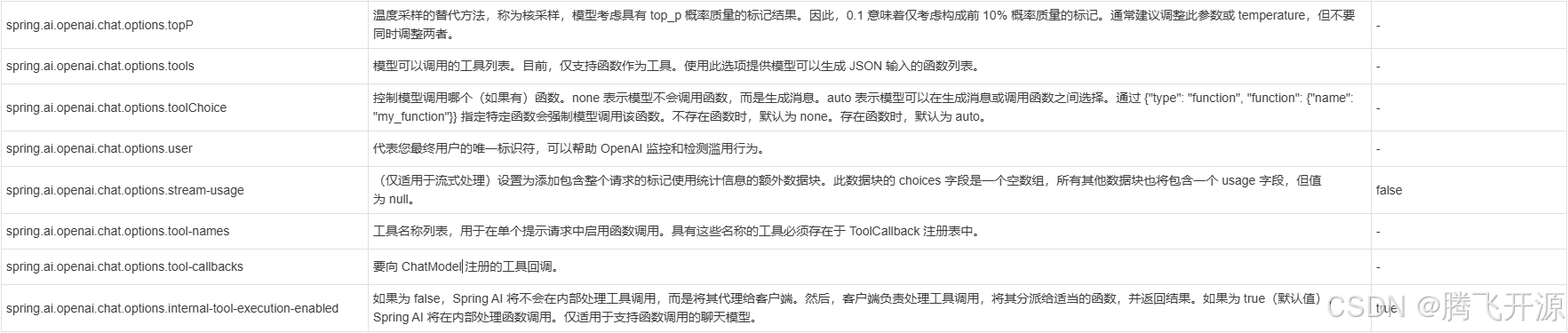
所有以 spring.ai.openai.chat.options 为前缀的属性都可以在运行时通过向 Prompt 调用添加请求特定的"运行时选项"来覆盖。
四、运行时选项
OpenAiChatOptions.java 提供了模型配置,例如要使用的模型、温度、频率惩罚等。
在启动时,可以通过 OpenAiChatModel(api, options) 构造函数或 spring.ai.openai.chat.options.* 属性来配置默认选项。
在运行时,您可以通过向 Prompt 调用添加新的、特定于请求的选项来覆盖默认选项。例如,为特定请求覆盖默认模型和温度:
java
ChatResponse response = chatModel.call(
    new Prompt(
        "生成 5 个著名海盗的名字。",
        OpenAiChatOptions.builder()
            .model("mixtral-8x7b-32768")
            .temperature(0.4)
        .build()
    ));
除了模型特定的 OpenAiChatOptions,您还可以使用可移植的 ChatOptions 实例,该实例通过 ChatOptions#builder() 创建。
五、函数调用
当选择支持此功能的模型时,NVIDIA LLM API 支持工具/函数调用。
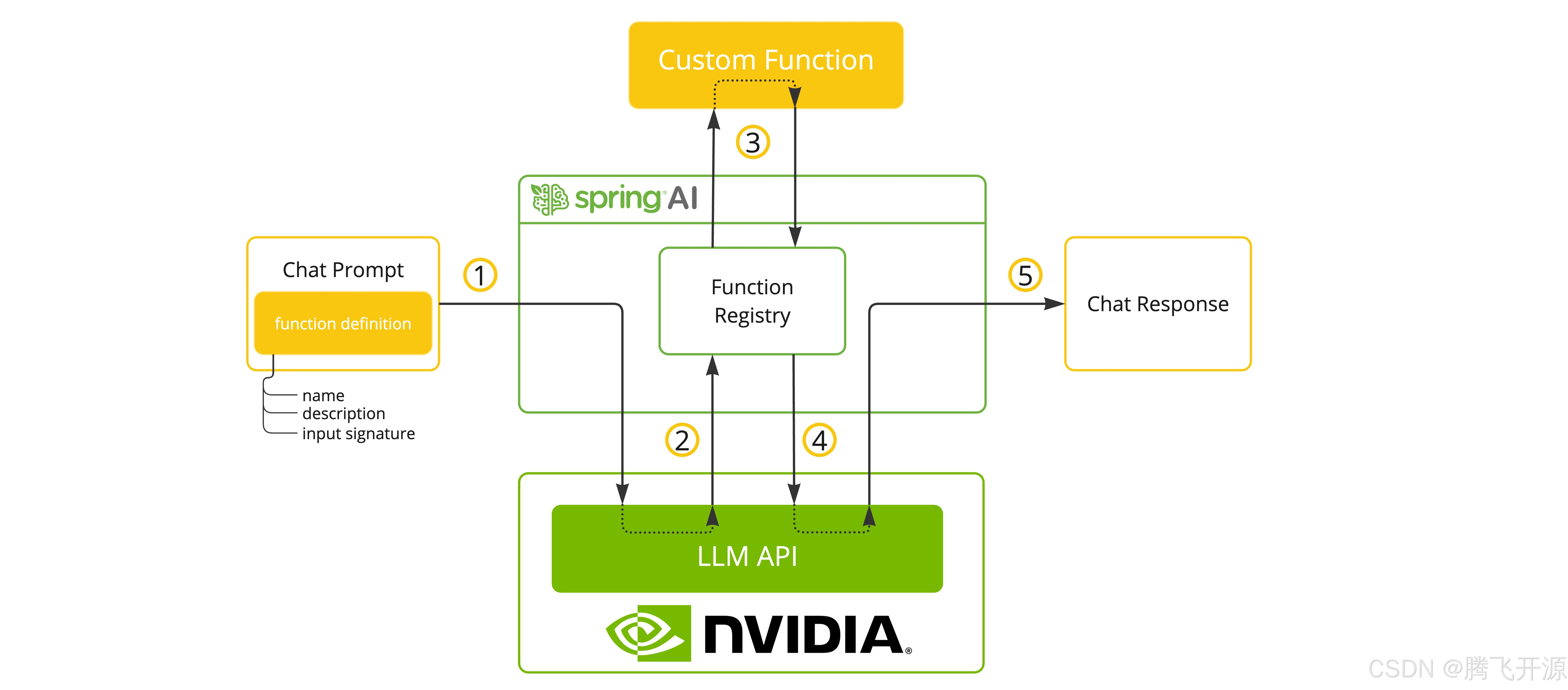
您可以将自定义 Java 函数注册到您的 ChatModel,并让提供的模型智能地选择输出包含调用一个或多个已注册函数参数的 JSON 对象。这是一种将 LLM 功能与外部工具和 API 连接的强大技术。
5.1 工具示例
以下是一个如何使用 NVIDIA LLM API 函数调用与 Spring AI 的简单示例:
yaml
spring.ai.openai.api-key=${NVIDIA_API_KEY}
spring.ai.openai.base-url=https://integrate.api.nvidia.com
spring.ai.openai.chat.options.model=meta/llama-3.1-70b-instruct
spring.ai.openai.chat.options.max-tokens=2048
java
@SpringBootApplication
public class NvidiaLlmApplication {

    public static void main(String[] args) {
        SpringApplication.run(NvidiaLlmApplication.class, args);
    }

    @Bean
    CommandLineRunner runner(ChatClient.Builder chatClientBuilder) {
        return args -> {
            var chatClient = chatClientBuilder.build();

            var response = chatClient.prompt()
                .user("阿姆斯特丹和巴黎的天气如何?")
                .functions("weatherFunction") // 通过 bean 名称引用。
                .call()
                .content();

            System.out.println(response);
        };
    }

    @Bean
    @Description("获取指定地点的天气")
    public Function<WeatherRequest, WeatherResponse> weatherFunction() {
        return new MockWeatherService();
    }

    public static class MockWeatherService implements Function<WeatherRequest, WeatherResponse> {

        public record WeatherRequest(String location, String unit) {}
        public record WeatherResponse(double temp, String unit) {}

        @Override
        public WeatherResponse apply(WeatherRequest request) {
            double temperature = request.location().contains("Amsterdam") ? 20 : 25;
            return new WeatherResponse(temperature, request.unit);
        }
    }
}
在此示例中,当模型需要天气信息时,它将自动调用 weatherFunction bean,然后该 bean 可以获取实时天气数据。预期的响应类似这样:"阿姆斯特丹目前的天气是 20 摄氏度,巴黎目前的天气是 25 摄氏度。"
阅读更多关于 OpenAI 函数调用的信息。
六、示例控制器
创建一个新的 Spring Boot 项目,并将 spring-ai-starter-model-openai 添加到您的 pom(或 gradle)依赖项中。
在 src/main/resources 目录下添加一个 application.properties 文件,以启用和配置 OpenAi 聊天模型:
yaml
spring.ai.openai.api-key=${NVIDIA_API_KEY}
spring.ai.openai.base-url=https://integrate.api.nvidia.com
spring.ai.openai.chat.options.model=meta/llama-3.1-70b-instruct

# NVIDIA LLM API 不支持嵌入,因此我们需要禁用它。
spring.ai.openai.embedding.enabled=false

# NVIDIA LLM API 要求必须显式设置此参数,否则将抛出服务器内部错误。
spring.ai.openai.chat.options.max-tokens=2048
请将 api-key 替换为您的 NVIDIA 凭据。
NVIDIA LLM API 要求必须显式设置 max-token 参数,否则将抛出服务器错误。
以下是一个简单的 @Controller 类示例,该类使用聊天模型进行文本生成。
java
@RestController
public class ChatController {

    private final OpenAiChatModel chatModel;

    @Autowired
    public ChatController(OpenAiChatModel chatModel) {
        this.chatModel = chatModel;
    }

    @GetMapping("/ai/generate")
    public Map generate(@RequestParam(value = "message", defaultValue = "给我讲个笑话") String message) {
        return Map.of("generation", this.chatModel.call(message));
    }

    @GetMapping("/ai/generateStream")
    public Flux<ChatResponse> generateStream(@RequestParam(value = "message", defaultValue = "给我讲个笑话") String message) {
        Prompt prompt = new Prompt(new UserMessage(message));
        return this.chatModel.stream(prompt);
    }
}