在项目中实用日志时非常常见的,同样在python项目中也可以使用日志,记录一些关键的日志信息,这里简单列举如何在python项目的各个文件中如何使用日志,这种把日志抽离出来作为一个通用模块,提供其它模块使用,避免了重复多写的缺点,因此比较有优点,推荐使用。
一,首先编写通用的日志模块,参见 pro_log_config.py 中 1 到 3 步,
python
# -*- coding: UTF-8 -*-
# ========================================
# @ProjectName: pythonws001
# @Filename: pro_log_config.py
# @Copyright www.637hulian.com
# @Author: shenzhennba(Administrator)
# @Version 1.0
# @Since 2025/12/6 15:02
# ========================================
# 公共的日志配置模块,提供打印日志的功能,
# 其它模块可以调用该模块的函数来完成日志配置
# ========================================

# 1,导入logging模块
import logging
import datetime

# 2,定义日志配置相关信息的函数
def setup_logging(log_level=None):
    """
    设置日志级别
    :param log_level: 日志级别,如DEBUG, INFO, WARNING, ERROR, CRITICAL
    :return:
    """
    if log_level is None:
        log_level = logging.INFO
    else:
        log_level = int(log_level)
    logDate = datetime.datetime.now().strftime('%Y.%m.%d')
    # 每天产生一个日志文件
    logFileName = f'pythonws001_' + logDate + '.log'
    logging.basicConfig(level=log_level
                        , format='%(asctime)s - %(name)s - %(levelname)s - %(message)s'
                        , datefmt='%Y-%m-%d %H:%M:%S'
                        , handlers=[
                            logging.StreamHandler(),
                            logging.FileHandler(rf"F:\appData\tempLog\{logFileName}",
                                                encoding='utf-8'),
                        ])
    # 3,每个模块将有自己的日志记录器,如下好处是可以通过模块名来区分日志消息的来源
    logger = logging.getLogger(__name__)
    logger.setLevel(log_level)
    return logger


if __name__ == '__main__':
    tipmsg = 'logging is configured'
    print('-' * 40, f'{tipmsg}', '-' * 40)
    logger = setup_logging()
logger.info(f'current logger.level={logger.getEffectiveLevel()}')二,在其它模块文件中使用日志模块,参见文件中的 1 到 4 步,项目结构参考如下:
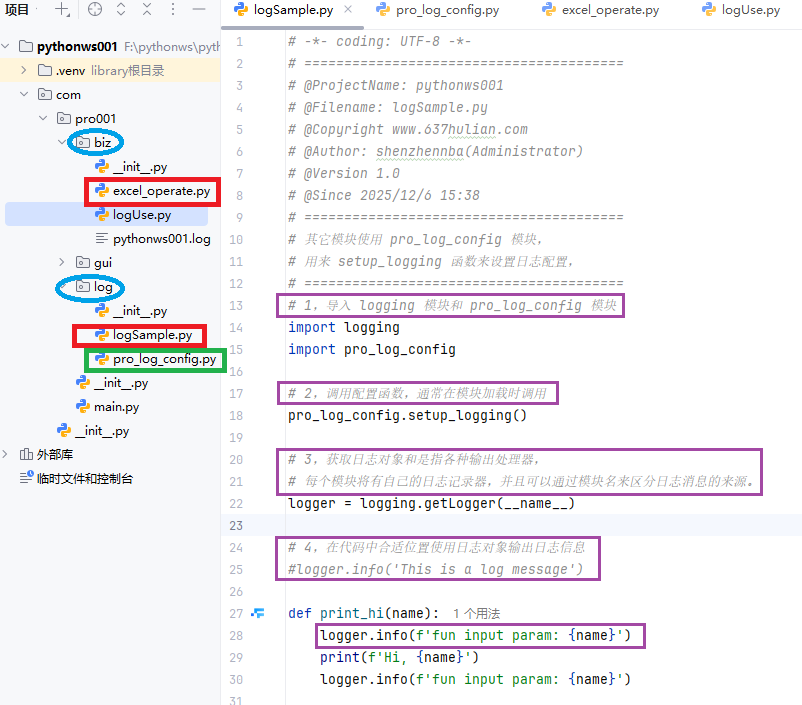
1,同一个包内其它模块使用日志模块,文件 logSample.py 如下:
python
# -*- coding: UTF-8 -*-
# ========================================
# @ProjectName: pythonws001
# @Filename: logSample.py
# @Copyright www.637hulian.com
# @Author: shenzhennba(Administrator)
# @Version 1.0
# @Since 2025/12/6 15:38
# ========================================
# 其它模块使用 pro_log_config 模块,
# 用来 setup_logging 函数来设置日志配置,
# ========================================
# 1,导入 logging 模块和 pro_log_config 模块
import logging
import pro_log_config

# 2,调用配置函数,通常在模块加载时调用
pro_log_config.setup_logging()

# 3,获取日志对象和是指各种输出处理器,
# 每个模块将有自己的日志记录器,并且可以通过模块名来区分日志消息的来源。
logger = logging.getLogger(__name__)

# 4,在代码中合适位置使用日志对象输出日志信息
#logger.info('This is a log message')

def print_hi(name):
    logger.info(f'fun input param: {name}')
    print(f'Hi, {name}')
    logger.info(f'fun input param: {name}')

if __name__ == '__main__':
print_hi('Python')2,不同包的其它模块使用日志模块,文件 excel_operate.py 如下:
python
# -*- coding: UTF-8 -*-
# ========================================
# @ProjectName: pythonws001
# @Filename: excel_operate.py
# @Copyright www.637hulian.com
# @Author: shenzhennba(Administrator)
# @Version 1.0
# @Since 2025/12/7 10:42
# ========================================
# 基于openpyxl库的Excel操作类
# ========================================
# 1,导入 logging 模块和 pro_log_config 模块
import logging
import com.pro001.log.pro_log_config as pro_log_config
from openpyxl import Workbook, load_workbook
import os
import datetime
import random

# 2,调用配置函数,通常在模块加载时调用
pro_log_config.setup_logging()

# 3,获取日志对象和是指各种输出处理器,
# 每个模块将有自己的日志记录器,并且可以通过模块名来区分日志消息的来源。
logger = logging.getLogger(__name__)

# 4,在代码中合适位置使用日志对象输出日志信息
#logger.info('This is a log message')


def create_sn(prefix, output_len=4):
    '''生成含有前缀带指定长度格式的序列号,
    格式:prefix_d0{output_len}1'''
    if output_len < 1:
        output_len = 1
    sn = 0
    while True:
        sn += 1
        if len(str(sn)) > output_len:
            # 当大于指定位数时直接加上位数
            yield f'{prefix}' + str(sn)
        else:
            yield f'{prefix}' + '{:0{}}'.format(sn, output_len)


def excel_create(file_path, file_name, *sheet_name):
    '''根据参数创建Excel文件并建立sheet'''
    try:
        if not os.path.exists(file_path):
            os.makedirs(file_path)
        if not file_name or not file_name.endswith('.xlsx'):
            file_name = datetime.datetime.now().strftime('%Y%m%d_%H%M%S') + '.xlsx'
        full_file_path = os.path.join(file_path, file_name)
        sn = create_sn('TB', 3)
        sheet_name_list = []
        if not sheet_name:
            sheet_name = next(sn)
        else:
            for item in sheet_name:
                sheet_name_list.append(item)
        # 创建 Workbook 对象,
        wb = Workbook()
        # 创建指定名称的工作表
        for sheet_name in sheet_name_list:
            wb.create_sheet(sheet_name)
        # 删除建立时生产的第一个默认sheet对象
        shnames = wb.sheetnames
        wb.remove(wb[shnames[0]])
        wb.save(full_file_path)

        # 获取wb对象所有的sheet名称
        shnames = wb.sheetnames
        # 关闭wb对象
        wb.close()
        logger.info(f'Excel文件:{full_file_path} 创建成功!')
        logger.info(f'工作表:' + ','.join(shnames))
        return full_file_path
    except Exception as e:
        logger.error(f'Excel文件:{full_file_path} 创建失败!info:\n{e}')


def main():
    '''主函数'''
    excel_create(r'F:\appData', '', 'TB01', 'TB02', 'TB03')


if __name__ == '__main__':
    print('-' * 60)
    main()