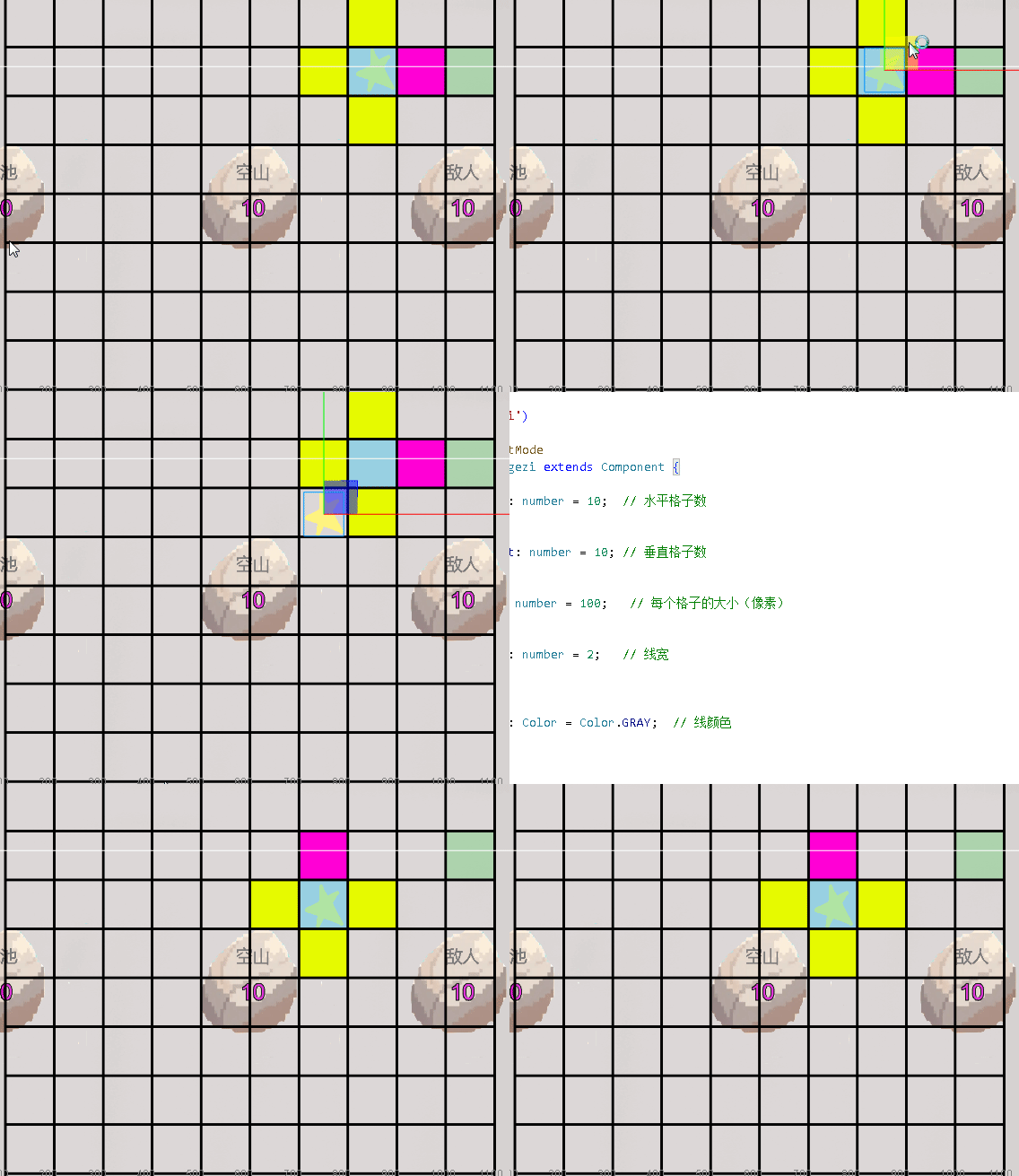
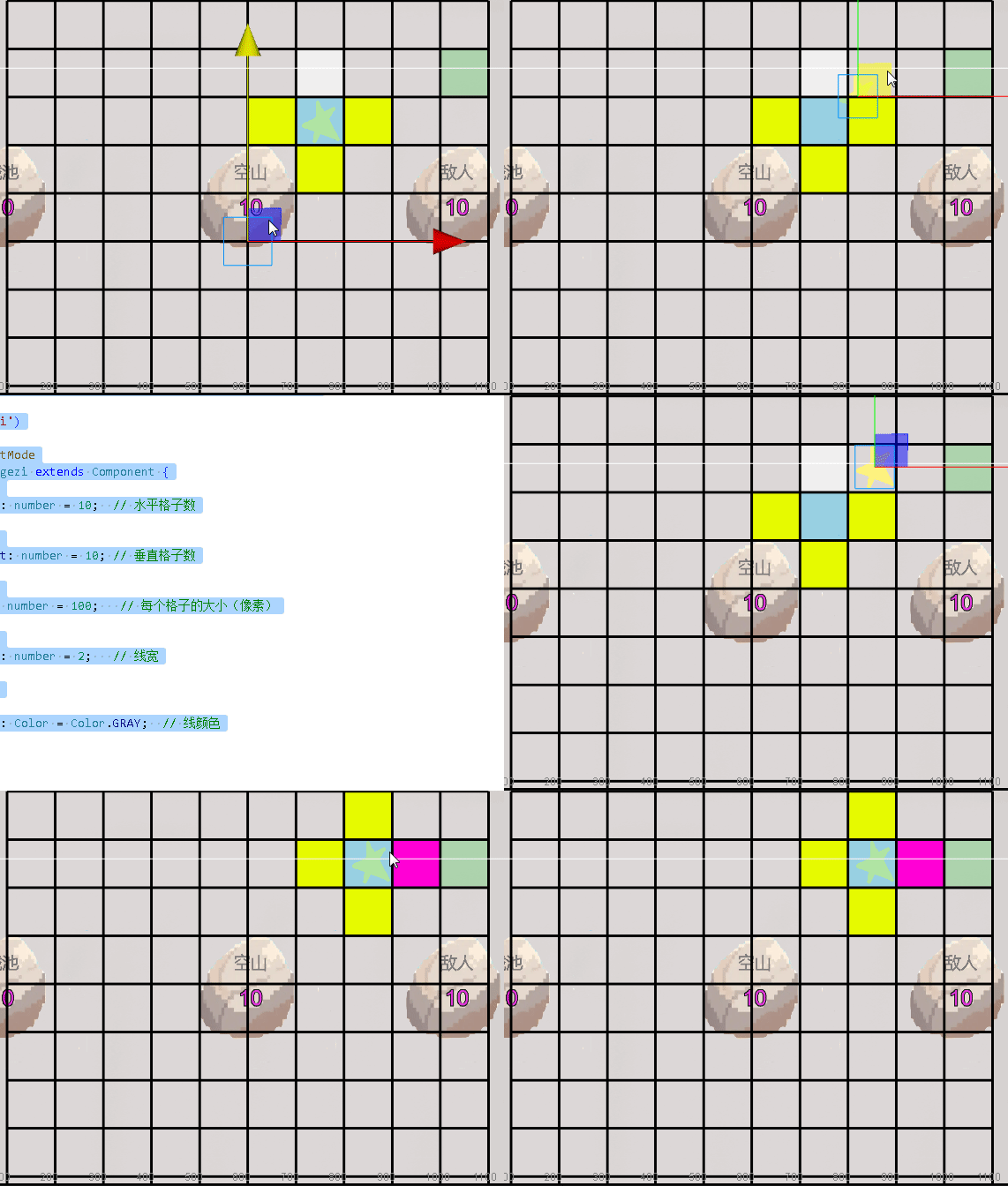
这里蓝色格子是角色起点 绿色是目的地 四周黄色是准备走的格子
红色是计算出最近的各自路线 是在上下左右格子的f中选择最小的
上次完成了将角色世界坐标转进地图数组
现在将地图数组中角色所在的格子从0换成7 (这其实是上片中没说到的没啥技术)
go
// 在gezi.ts中添加一个**可靠的**坐标转换方法
public worldPositionToGrid(worldPos: Vec3): { x: number, y: number } {
    const gridWorldPos = this.node.getWorldPosition();
    const offsetX = worldPos.x - gridWorldPos.x;
    const offsetY = worldPos.y - gridWorldPos.y;

    // DEBUG: 打印调试信息

    console.log("=== 坐标转换调试 ===");
    console.log("1. 网格中心:", gridWorldPos);

    console.log("2. 角色位置:", worldPos);
    console.log("3. 偏移量 offsetX=", offsetX, "offsetY=", offsetY);


    // 网格半宽/半高 (注意:这里有坐标轴方向问题)
    const halfWidth = (this.gridWidth * this.cellSize) / 2;
    const halfHeight = (this.gridHeight * this.cellSize) / 2;


    // Cocos Y轴向上为正,但数组通常是左下角为(0,0)
    // 所以需要调整Y轴方向
    const gridX = Math.floor((offsetX + halfWidth) / this.cellSize);
    const gridY = Math.floor((offsetY + halfHeight) / this.cellSize);

    // Y轴翻转(因为屏幕上方是正Y,但数组从上到下索引)
    const flippedY = (this.gridHeight - 1) - gridY;

    console.log(`4. 计算:gridX=${gridX} (${offsetX}+${halfWidth})/${this.cellSize}`);
    console.log(`5. 计算:gridY=${gridY} (${offsetY}+${halfHeight})/${this.cellSize}`);


    console.log(`6. 翻转后:gridX=${gridX}, flippedY=${flippedY}`);
    console.log(`7. 结果:[${this.gezi[flippedY][gridX]}]`);


    // 使用 flippedY 因为数组是从上到下存储
    return { x: gridX, y: flippedY };
}
onload调用角色世界坐标转数组
然后将gezi=\[0,0,0,0,0,0,0,0,0,0,
0,0,0,0,0,0,0,0,0,1,
0,0,0,0,0,0,0,0,0,0,
0,0,0,0,0,0,0,0,0,0,
0,0,0,0,0,0,0,0,0,0,
0,0,0,0,0,0,0,0,0,0,
0,0,0,0,0,0,0,0,0,0,
0,0,0,0,0,0,0,0,0,0,
0,0,0,0,0,0,0,0,0,0,
0,0,0,0,0,0,0,0,0,0,
];中的角色所在位置从0换成7
go
// 获取角色位置并标记
    const worldPos = this.xiaobing.getWorldPosition();
    const gridPos = this.worldPositionToGrid(worldPos);


    console.log("转换结果:", gridPos);

    // 关键修正:检查边界并更新数组
    if (this.isInGrid(gridPos.x, gridPos.y)) {
        // 注意:你的数组是 gezi[y][x] 结构!所以要 [gridPos.y][gridPos.x]
        this.gezi[gridPos.y][gridPos.x] = 7;
    } else {
        console.warn("角色在网格外!位置:", gridPos);
    }

    this.drawGrid();
    director.emit('gezi_ditu_xiaobing', this.gezi);

}
然后调用this.drawGrid();
go
// 绘制每个格子的填充背景
        for (let x = 0; x < this.gridWidth; x++) {
            for (let y = 0; y < this.gridHeight; y++) {
                let huoqugezi=this.gezi[y][x];
                // 然后反转Y坐标,让第一行显示在最上面
                const screenY = this.gridHeight - 1 - y;

                const posX = (x - this.gridWidth/2) * this.cellSize;
                //const posY = (y - this.gridWidth/2) * this.cellSize;
                const posY = (screenY - this.gridHeight/2) * this.cellSize;
                if(huoqugezi==1){
                    this.graphics.fillColor = this.zhangaiColor;
                    //this.graphics.rect(posX, posY, this.cellSize, this.cellSize);

                    console.log(huoqugezi+"shi");
                }else if(huoqugezi==7){
                    this.graphics.fillColor = this.jueseColor;
                    //this.graphics.rect(posX, posY, this.cellSize, this.cellSize);

                    console.log(huoqugezi+"shi");
                }else if(huoqugezi==4){
                    this.graphics.fillColor = this.xiaColor;
                }else if(huoqugezi==9){
                    this.graphics.fillColor = this.zuixiaoColor;
                }

                else{
                    this.graphics.fillColor = this.fillColor;
                }


                this.graphics.rect(posX, posY, this.cellSize, this.cellSize);
                    console.log(huoqugezi);
                    this.graphics.fill();
            }

        }
将格子中的0是空 1是目的地 7是角色所在起点
然后能做出来上篇中的
现在开始计算角色四周格子的f
首先将上面包含角色 目的地的地图数组传给角色脚本
director.emit('gezi_ditu_xiaobing', this.gezi);
go
onLoad() {
        director.on('xiaobing_sxzy_gezi', this.huasxzy, this);
        // 1. 创建并获取 Graphics 组件
        this.graphics = this.node.getComponent(Graphics);
        if (!this.graphics) {
            this.graphics = this.node.addComponent(Graphics);
        }

        // 2. 绘制网格

        director.on('xiaobing_position_gezi', this.xiaobingposition, this);
        // 获取角色位置并标记
    const worldPos = this.xiaobing.getWorldPosition();
    const gridPos = this.worldPositionToGrid(worldPos);


    console.log("转换结果:", gridPos);

    // 关键修正:检查边界并更新数组
    if (this.isInGrid(gridPos.x, gridPos.y)) {
        // 注意:你的数组是 gezi[y][x] 结构!所以要 [gridPos.y][gridPos.x]
        this.gezi[gridPos.y][gridPos.x] = 7;
    } else {
        console.warn("角色在网格外!位置:", gridPos);
    }

    this.drawGrid();
    director.emit('gezi_ditu_xiaobing', this.gezi);

}
角色脚本获取到数组后开始遍历地图获取角色 目的地数组坐标
go
director.on('gezi_ditu_xiaobing', this.huoquditu, this);
huoquditu(ditu:[][]){
       let len=ditu.length;
       console.log(len+"=");

       for(let y=0;y<len;y++){
        for(let x=0;x<ditu[y].length;x++){
            console.log(ditu[y][x]);
            if(ditu[y][x]==1){
                this.mubiaox=x;

                this.mubiaoy=y;

                console.log("/"+this.mubiaox,this.mubiaoy)
            }else if(ditu[y][x]==7){
                this.juesex=x;
                this.juesey=y;
                console.log("/"+this.juesex,this.juesey);
            }

        }

       }
       this.jisuanf();
    }
创建目标xy 角色xy记录 然后开始计算四周各自f
首先计算h 计算方式很简单 是上上片提到的如果起点是(0,0)目的地是(0,3)那h=|0-0|+|0-3|=3
g=0 因为角色在起点没动 那f=0+h
先创建上xy 左xy 右xy 下xy坐标 然后当前角色点x不动 y-1是上方格子坐标 用坐标系很清楚
左边是角色x-1 y不动
右边是x+1y不动
下方是x不动 y+1
上g 下g 左g 右g都是0
上f 左f 右f 下f能算出来了
go
const suoyouf=[this.shangf,this.zuof,this.youf,this.xiaf];
        let zuixiaof=suoyouf[0];
        let fangxiang=0; // 0/shang 1/zuo 2/you 3/xia
        for(let i=1;i<suoyouf.length;i++){
            if(suoyouf[i]<zuixiaof){
                zuixiaof=suoyouf[i];
                fangxiang=i;
            }
        }
然后将上f 左f 右f 下f存进数组遍历取出最小f跟是上下左右那个格子 0是上 1是左 2是右 3是下
go
let zuixiaofangxiangx=0;
        let zuixiaofangxiangy=0;
        if(fangxiang==0){
            zuixiaofangxiangx=this.shangx;
            zuixiaofangxiangy=this.shangy;
        }else if(fangxiang==1){
            zuixiaofangxiangx=this.zuox;
            zuixiaofangxiangy=this.zuoy;
        }else if(fangxiang==2){
            zuixiaofangxiangx=this.youx;
            zuixiaofangxiangy=this.youy;
        }else if(fangxiang==3){
            zuixiaofangxiangx=this.xiax;
            zuixiaofangxiangy=this.xiay;
        }
然后创建最小那个格子的xy坐标 存进
最后将
go
const directionData = {
            shangf: this.shangf,  // 上方向状态或坐标x
            xiaf: this.xiaf,      // 下
            zuof: this.zuof,      // 左
            youf: this.youf,      // 右
            shangx: this.shangx, // 上方向x坐标
            shangy: this.shangy, // 上方向y坐标
            zuox: this.zuox,     // 左方向x坐标
            zuoy: this.zuoy,     // 左方向y坐标
            youx: this.youx,     // 右方向x坐标
            youy: this.youy,     // 右方向y坐标(如果有)
            xiax: this.xiax,     // 下方向x坐标(如果有)
            xiay: this.xiay,     // 下方向y坐标(如果有)
            zuixiaof:zuixiaof,
            zuixiaofangxiangx:zuixiaofangxiangx,
            zuixiaofangxiangy:zuixiaofangxiangy
        };
        director.emit('xiaobing_sxzy_gezi', directionData);
发给格子脚本
各自脚本在onload 先接受这个 如果放在下面会收不到
go
onLoad() {
        director.on('xiaobing_sxzy_gezi', this.huasxzy, this);
收到上下左右格子xy坐标后 将地图数组中的坐标从0换4
go
huasxzy(data:any){
    console.log("....");
    console.log("/"+data.shangf+"z"+data.zuof+"y"+data.youf+"x"+data.xiaf);
    let xiaof=0;
    this.hua(data.shangx,data.shangy);
    this.hua(data.zuox,data.zuoy);
    this.hua(data.youx,data.youy);

    this.hua(data.xiax,data.xiay);
    this.huazuixiaof(data.zuixiaofangxiangx,data.zuixiaofangxiangy);
    this.drawGrid();

}

hua(x:number,y:number){


    this.gezi[y][x]=4;

}

huazuixiaof(x:number,y:number){
    this.gezi[y][x]=9;

}
然后将最小f那个格子的xy 在数组中从0换9
this.drawGrid();重新画地图
然后能呈现上方图片的能力
虾片开始将路线完整画出
go
huoqushangxiazuoyou(){

        this.shangx=this.juesex;
        this.shangy=this.juesey-1;
        this.zuox=this.juesex-1;
        this.zuoy=this.juesey;
        this.youx=this.juesex+1;
        this.youy=this.juesey;
        this.xiax=this.juesex;
        this.xiay=this.juesey+1;
        this.shangg=0;
        this.shangh=Math.abs(this.shangx-this.mubiaox)+Math.abs(this.shangy-this.mubiaoy);
        this.shangf=this.shangg+this.shangh;

        this.zuog=0;
        this.zuoh=Math.abs(this.zuox-this.mubiaox)+Math.abs(this.zuoy-this.mubiaoy);

        this.zuof=this.zuog+this.zuoh;
        this.youg=0;
        this.youh=Math.abs(this.youx-this.mubiaox)+Math.abs(this.youy-this.mubiaoy);
        this.youf=this.youg+this.youh;


        this.xiag=0;
        this.xiah=Math.abs(this.xiax-this.mubiaox)+Math.abs(this.xiay-this.mubiaoy);
        this.xiaf=this.xiag+this.xiah;

        const suoyouf=[this.shangf,this.zuof,this.youf,this.xiaf];
        let zuixiaof=suoyouf[0];
        let fangxiang=0; // 0/shang 1/zuo 2/you 3/xia
        for(let i=1;i<suoyouf.length;i++){
            if(suoyouf[i]<zuixiaof){
                zuixiaof=suoyouf[i];
                fangxiang=i;
            }
        }
        let zuixiaofangxiangx=0;
        let zuixiaofangxiangy=0;
        if(fangxiang==0){
            zuixiaofangxiangx=this.shangx;
            zuixiaofangxiangy=this.shangy;
        }else if(fangxiang==1){
            zuixiaofangxiangx=this.zuox;
            zuixiaofangxiangy=this.zuoy;
        }else if(fangxiang==2){
            zuixiaofangxiangx=this.youx;
            zuixiaofangxiangy=this.youy;
        }else if(fangxiang==3){
            zuixiaofangxiangx=this.xiax;
            zuixiaofangxiangy=this.xiay;
        }
        const directionData = {
            shangf: this.shangf,  // 上方向状态或坐标x
            xiaf: this.xiaf,      // 下
            zuof: this.zuof,      // 左
            youf: this.youf,      // 右
            shangx: this.shangx, // 上方向x坐标
            shangy: this.shangy, // 上方向y坐标
            zuox: this.zuox,     // 左方向x坐标
            zuoy: this.zuoy,     // 左方向y坐标
            youx: this.youx,     // 右方向x坐标
            youy: this.youy,     // 右方向y坐标(如果有)
            xiax: this.xiax,     // 下方向x坐标(如果有)
            xiay: this.xiay,     // 下方向y坐标(如果有)
            zuixiaof:zuixiaof,
            zuixiaofangxiangx:zuixiaofangxiangx,
            zuixiaofangxiangy:zuixiaofangxiangy
        };

        console.log("s"+this.shangf+"z"+this.zuof+"y"+this.youf+"x"+this.xiaf+"f"+zuixiaof+"fang"+fangxiang);
        director.emit('xiaobing_sxzy_gezi', directionData);
    }